

The DOCA Telemetry SDK, part of NVIDIA's DOCA framework, offers powerful telemetry, monitoring, and analytics capabilities for NVIDIA ConnectX-7 onwards, and DPUs (such as the BlueField series) in data centers. It enables developers to build, deploy, and manage network telemetry applications that enhance visibility, analyze network performance, optimize security, and monitor overall health.
By collecting and analyzing telemetry data from NVIDIA DPUs, NICs, and related components, the SDK provides comprehensive insights into network traffic, performance, and system integrity. It also offers APIs for monitoring performance metrics, tracking traffic statistics, logging events, and reporting errors. Additionally, it supports seamless integration with Windows-native monitoring tools or custom-built telemetry applications.
For further information, refer to DOCA Telemetry Diag.
To enable this feature:
-
Choose which diagnostic interface to use (DOCA Telemetry or Perfmon) using the registry key “DiagTelemetryMode”. By default, it is set to “Dynamic”.
-
In Dynamic mode, the default interface is Perfmon, but DOCA Telemetry can take control when Perfmon is active. To switch back to Perfmon, you must first close the DOCA Telemetry session.
-
The “DiagTelemetryMode” can also be explicitly set to “DOCA only” or “Perfmon only”, which prevents switching between interfaces.
For further information, refer to General Registry Keys.
-
-
Enable direct access to this from a VM using a Virtual Function (SR-IOV). Use the VFTrustCaps registry key to activate the DIAG_DATA_TRUST capability.
For further information, refer to SR-IOV Options.
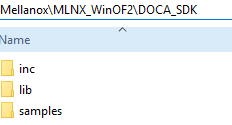
The DOCA Telemetry SDK is included in the package and is installed under the DOCA_SDK directory.
DOCA_SDK includes:
-
inc– DOCA Telemetry header files -
lib– DOCA Telemetry library files -
samples– DOCA Telemetry sample application source code
DOCA Telemetry DLLs:
-
libdoca_argp.dll -
libdoca_common.dll -
libdoca_telemetry.dll
DLL installation locations:
-
DLLs are installed under System32
Limitations
When utilizing DOCA Telemetry, the following counter sets are not accessible via Perfmon:
-
Mellanox WinOF-2 Device Diagnostics
-
Mellanox WinOF-2 PCI Device Diagnostics
-
Mellanox WinOF-2 Icmc Diag Counters Ext1
Perfmon should not be used to query counters from the above sets while a DOCA telemetry session is active. Additionally, VM VFs cannot access this feature unless they are configured with the appropriate VFTrustCaps.
DOCA Telemetry Counters Multi Domain
Multiple DOCA telemetry-diagnostics consumers can now run concurrently on a single NIC. Previously, the diagnostic-data interface supported only a single owner function, either one PF or one VF, per NIC.
Multi-domain support is disabled by default and is enabled per NIC. When enabled, a PF automatically activates multi-domain mode when the adapter starts, allowing the NIC and its VFs to support concurrent telemetry consumers.
Enabling Multi-Domain Support
To enable multi-domain support, set the following registry key on every PF of the NIC:
DocaTelemetryMultiDomainEnable=1
The setting is NIC-wide and must be applied consistently across all PFs of the NIC.
A change to this value takes effect after an adapter restart.
Requirements
This feature requires:
-
ConnectX-7 and later, or BlueField-3 and later
-
Firmware that supports DOCA Telemetry multi-domain mode
If the hardware or firmware does not support this capability, the NIC remains in single-domain mode.
Checking the Feature State
The current multi-domain state can be checked using:
Mlx5Cmd -Features
or:
Mlx5Cmd -Stat
Relevant fields include:
DiagDataMultiDomainDiagDataOwnershipStateDiagDataHeldDomains
When multi-domain is active, Mlx5Cmd -Features reports:
DOCA Telemetry Multi-Domain : Enabled
When the hardware supports the feature but the registry key is disabled, it reports:
DOCA Telemetry Multi-Domain : Supported+Disabled (Disabled by registry key DocaTelemetryMultiDomainEnable)
Virtual Function Access
To use DOCA Telemetry from a VM over a VF, enable the DIAG_DATA_TRUST capability on the host PF using the VFTrustCaps registry key.
A VF inherits the PF’s multi-domain state and does not have a VF-side configuration knob.
A VF picks up multi-domain mode on its first telemetry access. When multi-domain is enabled on the host PF, the feature becomes available as soon as the PF starts.
Identifying the Device PCI Address
The DOCA Telemetry example application’s -p parameter expects the device PCI address in hexadecimal segment:bus:device.function format. The address can be obtained from Mlx5Cmd -Stat.
Physical Port or InfiniBand SR-IOV VF
Convert the decimal bus value to hexadecimal. The lower byte is the bus, and the upper three bytes are the segment.
Example:
Bus 1783040, Device 2, Function 01783040 = 0x1B3500
Use:
-p 1b35:00:02.0
Hyper-V Ethernet VF
Ignore the large raw bus value. Use Bus Slot as the bus and Serial as the device, with segment 0000.
Example:
Bus Slot 2, Serial 2, Function 0
Use:
-p 0000:02:02.0
Limitations
-
The diagnostic interface is capability-driven. The active diagnostic interface is selected automatically based on device capability; there is no registry key to select it manually.
-
On capable hardware, legacy Device Diagnostic Counters are deprecated and reported as zero in Performance Monitor. For more information, see “Deprecated Device Diagnostic Counters.”
-
VFs cannot access DOCA Telemetry unless the host PF grants
DIAG_DATA_TRUSTusingVFTrustCaps. -
On hardware or firmware that does not support multi-domain mode, setting
DocaTelemetryMultiDomainEnablehas no effect. The NIC remains in single-domain mode, and no error is reported. Verify the active state usingMlx5Cmd -FeaturesorMlx5Cmd -Stat. -
Legacy single-domain mode and multi-domain mode are mutually exclusive per NIC. Enabling multi-domain is refused while a single-domain owner already holds the diagnostic interface and returns
STATUS_RESOURCE_IN_USE. -
A VF whose first telemetry access occurred before multi-domain became active on the NIC remains in single-domain mode and is rejected with
STATUS_INVALID_PARAMETERuntil the guest adapter is restarted. -
In single-domain mode, the consumer is responsible for cleanup, including ownership release. If the consumer does not properly release ownership, the driver does not release it automatically.
-
The number of concurrent domains is limited by firmware and shared NIC-wide across all PFs and VFs. There is no per-function reservation. When the limit is reached, additional requests return
STATUS_INSUFFICIENT_RESOURCES. -
On BlueField devices running in DPU mode, the driver is not the eSwitch owner and cannot change the VF trust level. The VF trust level must be configured from the BlueField host OS.
-
In mixed driver-version environments, behavior depends on the host PF driver version, VF guest driver version, and whether multi-domain is enabled.
Host PF / VF Guest Driver Compatibility
The following table assumes that the host PF grants VF diagnostic-data access using VFTrustCaps.
|
Host PF Driver |
Multi-Domain |
VF Guest Driver |
Behavior |
|---|---|---|---|
|
New |
Disabled |
New |
Single-domain mode. One telemetry consumer is supported at a time across the PF and its VFs. |
|
New |
Enabled |
New |
Multi-domain mode. Multiple consumers can run concurrently. The host PF enables multi-domain at adapter start, so a VF brought up afterward uses it on first access. A VF whose first telemetry access occurred before multi-domain became active remains single-domain until reinitialized. |
|
New |
Disabled |
Old |
Single-domain mode. |
|
Old |
N/A |
New |
The older host PF cannot enable multi-domain; single-domain mode is used. |
|
Old |
N/A |
Old |
Single-domain mode only. |
|
New |
Enabled |
Old |
The older VF guest cannot start DOCA Telemetry while multi-domain is enabled. Upgrade the guest driver or disable multi-domain on the host PF. |
Last updated: