

Preface
This guide outlines the list of messages and errors encountered from the power and thermal modules. Some of these messages are printed on the console and some in the RShim log.
Command Cheat Sheet
Sensors
Arm thermal sensor data can be accessed using the sensors command. All the Arm thermal sensors and DDR temperature are provided under acpitz-acpi section.
# sensors
mlx5-pci-0300
Adapter: PCI adapter
asic:         +45.0C  (crit = +91.0C, highest = +57.0C)

acpitz-acpi-0
Adapter: ACPI interface
temp1:        +41.4C  (crit = +115.0C)
temp2:        +41.2C  (crit = +115.0C)
temp3:        +39.4C  (crit = +115.0C)
temp4:        +41.9C  (crit = +115.0C)
temp5:        +42.0C  (crit = +115.0C)
temp6:        +42.4C  (crit = +115.0C)
temp7:        +42.4C  (crit = +115.0C)
temp8:        +42.1C  (crit = +115.0C)
temp9:        +44.4C  (crit = +115.0C)
temp10:       +80.0C  (crit = +105.0C)

nvme-pci-0600
Adapter: PCI adapter
Composite:    +40.9C  (low  = -40.1C, high = +114.8C)
                       (crit = +122.8C)
Sensor 1:     +38.9C  (low  = -273.1C, high = +65261.8C)
The sensor name corresponding to the tempX node can be known by reading this node: /sys/bus/acpi/devices/LNXTHERM:(X-1)/description.
For example, the temperature value displayed next to temp1 corresponds to:
# cat /sys/bus/acpi/devices/LNXTHERM\:00/description
center
Logging and Counters
RShim Error Messages
The following messages are seen in RShim log. To see the RShim log, run the following commands:
# echo "DISPLAY_LEVEL 2" > /dev/rshimX/misc
# cat /dev/rshimX/misc
|
Message |
Description |
|---|---|
|
|
VR0 is not responding. This indicates a hardware issue on the device. |
|
|
VR1 is not responding. This indicates a hardware issue on the device. |
|
|
VR is not responding. This indicates a hardware issue on the device. |
|
|
Access to VR is inconsistent. This indicates a hardware issue on the device, resulting in an unstable connection to the VR. |
|
|
Access to VR is inconsistent. This indicates a hardware issue on the device. resulting in an unstable connection to the VR. |
|
|
Access to VR is inconsistent. This indicates a hardware issue on the device, resulting in an unstable connection to the VR. |
|
|
Unable to set the requested v-out value. This indicates either the requested v-out is out of bounds or unstable connections to the VRs. |
|
|
VR is not responding. This indicates a hardware issue on the device. |
|
|
Power capping is disabled on the device because VRs are not detected and the OPN is not known. |
|
|
This error indicates that ATX power is not detected on the device, and the system has halted to prevent damage. To recover, connect the ATX power cable and restart. |
|
|
This indicates that the power capping is disabled on the device. |
Console Error Messages
Runtime messages related to power and thermal capping are logged to the console. These messages are in the following format:
PTM:<timestamp>:<event_type>:<throttle_action>:<event_details>
|
Element |
Description |
|---|---|
|
|
Current CPU cycle value since boot. This is counted at the speed of the RShim clock. |
|
|
1 – Thermal event 2 – Power event |
|
|
0 – No change 1 – Switched to P0 (100%) 2 – Switched to P1 (80%) 3 – Switched to P2 (50%) |
|
|
0 – None 1 – Device in LiveFish mode 3 – DDR reported error when reading temperature 4 – VR read error 6 – Power capping disabled 7 – Power capping enabled 8 – Thermal state is normal 9 – Thermal state is in Alarm-P1 state (temperature over threshold) 10 – Thermal state is in Alarm-P2 state (temperature consistently over threshold) 11 – DDR temperature over threshold |
Debug Info Packages
N/A
Scenarios
Abrupt System Halt in 150W BlueField-3 Platforms
On 150W BlueField platforms, system halt occurs in power capping code when the ATX cable is not connected or is removed during operation. In this case, the system is halted and the following message is printed on the RShim log and console:
CRITICAL ERROR: ATX power not detected! Halting system!!
To resume normal operation, connect the ATX cable and power cycle the device.
To connect the ATX cable, use the following harness for BlueField-3:
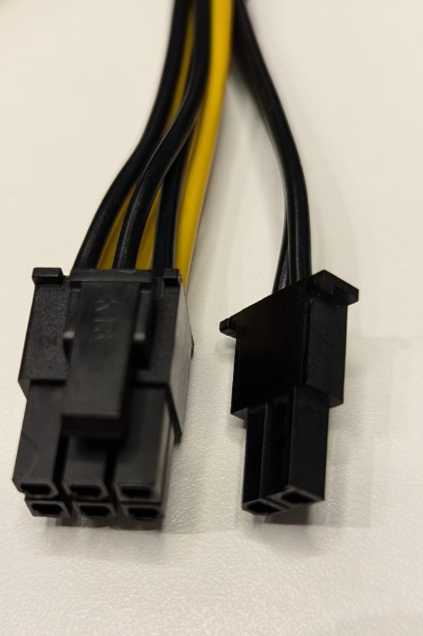
Good connectors for BlueField-3 are all black on the clipper side and should be easy to connect without using force.
Avoid common mistakes around matching the ATX harnesses to the BlueField-3!
-
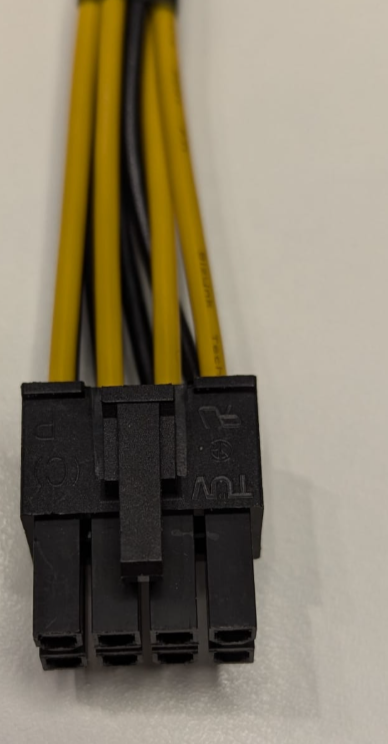
The following connector, although 8 pins, is an ATX harness for GPUs and does not fit BlueField-3:
-
It can be forced into the BlueField-3 ATX socket, but that should be avoided!
-
Note the all-yellow wires on the clipper side. The polarity is not right and will prevent the server from powering on.
Last updated: