

The following document provides an introduction to the various supported DOCA-Host profiles.
Introduction
NVIDIA DOCA™ can be installed on the host and used by a variety of customers who have different workloads and requirements. The DOCA-Host package includes drivers, libraries, and tools to support NVIDIA® BlueField® Networking Platform and NVIDIA® ConnectX® SmartNIC, Ethernet and InfiniBand, with both kernel and user-space components. Depending on their specific needs, customers may choose not to install the full DOCA-Host package on their host server but only the subset of components and tools relevant for their use case (whether to have a smaller installation size, lower integration/validation effort, etc).
To support the different use cases, DOCA includes DOCA-Host Installation Profiles, which are a subset of the full DOCA installation. DOCA-Host profiles are validated and tested installation packages. The following are the available DOCA profiles:
-
doca-all
-
doca-networking
-
doca-ofed
-
doca-roce
DOCA-Host supports the following NVIDIA devices:
-
BlueField-3
-
BlueField-2
-
ConnectX-7
-
ConnectX-6 DX
-
ConnectX-6 LX
-
ConnectX-6
-
ConnectX-5
-
ConnectX-4 LX
-
ConnectX-4
For hardware details on these devices, refer to the following pages:
DOCA functionality is limited by the specific device capabilities.
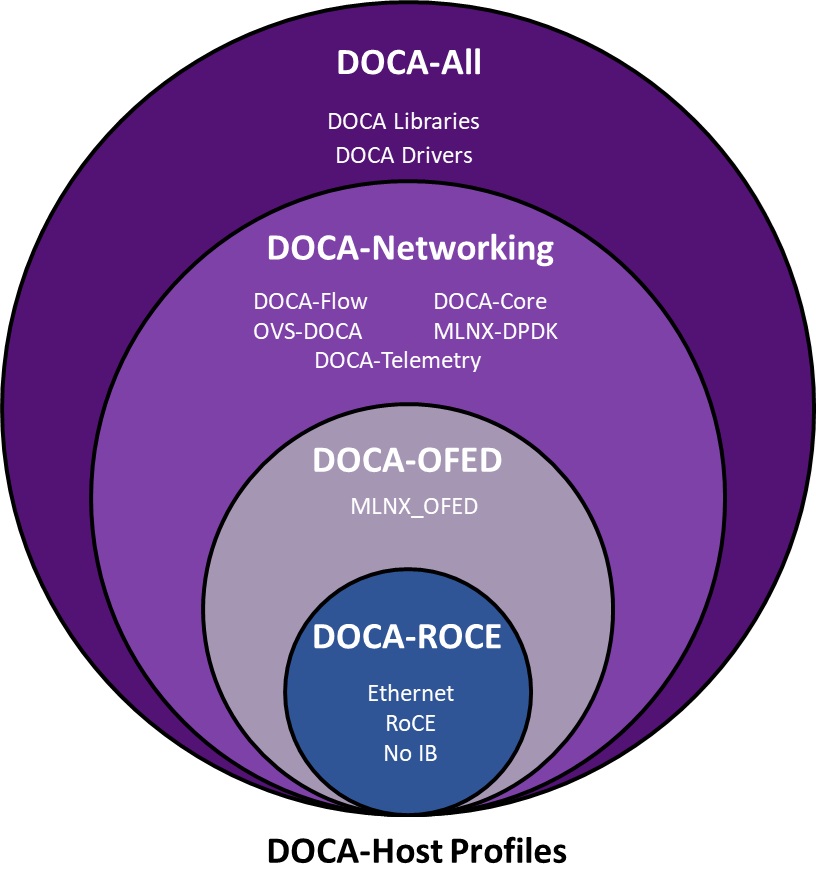
For information about DOCA Meta-Packages please refer to section "DOCA Meta-packages" in the NVIDIA DOCA Installation Guide for Linux.
doca-all
The full DOCA-Host installation is intended for users who wish to utilize the full extent of DOCA libs and drivers.
This profile is the super-set of components, which also includes the content of doca-ofed and doca-networking.
All DOCA libraries, drivers and tools are included in doca-all.
When installing doca-all on host, BlueField Platforms can utilize all DOCA libs and drivers whereas ConnectX devices can utilize only doca-ofed and doca-networking subset of functions from within the super-set of doca-all, depending on the device's capabilities.
doca-networking
The doca-networking profile is intended for users who wish to benefit only from the networking functionality of DOCA.
The content of the doca-networking package is the following:
-
MLNX_OFED
-
DOCA Core
-
MLNX-DPDK
-
OVS-DOCA
-
DOCA Flow
BlueField DPUs, BlueField SuperNICs, and ConnectX devices can utilize all included libs and drivers in the doca-networking profile, based on the device's capabilities.
doca-ofed
This profile is intended for users who wish to have the same user experience and content as MLNX_OFED but with DOCA package. doca-ofed installs the MLNX_OFED drivers and tools and does not include any other DOCA components.
The content of the doca-ofed package is:
-
MLNX_OFED drivers and tools
BlueField Platforms and ConnectX devices can utilize only the drivers in doca-ofed, based on the device's capabilities. No added DOCA libs are supported with any of the devices with doca-ofed profile installation.
doca-roce
The doca-roce (RDMA over Converged Ethernet) profile is intended for users who wish to benefit only from the Ethernet and RDMA functionality. doca-roce is a subset of doca-ofed.
The content for doca-roce package is:
-
rdma-core
-
ofed-scripts
-
mlnx-tools
-
mlnx-ofa_kernel
-
libibverbs
-
libibumad
-
librdmacm
-
perftest
BlueField platforms and ConnectX devices can utilize the drivers in doca-roce. No added DOCA libs are supported with any of the devices with doca-roce profile installation.
Which Profile to Install?
Selecting the right DOCA-Host installation profile is important to fully utilize the capabilities of your BlueField Platforms or ConnectX.
The functionality of DOCA-Host is limited by the device capabilities (e.g., ConnectX devices cannot utilize DOCA libs such as DPA, even if doca-all is installed on the host).
For BlueField devices:
-
It is recommended to use doca-all
-
If you require the smallest installation package for networking-only purposes, use doca-networking
-
For MLNX_OFED-like installation, use doca-ofed (no additional DOCA functionality)
-
For ROCE functionality only, install doca-roce
For ConnectX devices:
-
It is recommended to use doca-networking
-
For future-proof and mixed BlueField/ConnectX deployments, use doca-all
-
For MLNX_OFED-like installation use doca-ofed (no additional DOCA functionality)
-
For ROCE functionality only, install doca-roce
DOCA-Host Profile Installation
DOCA-Host can be installed on specific host OSs. Each of the Host Installation Profiles has specific OSs on which is can be installed as specified in section "DOCA Profiles | id (2.9.1)DOCAProfiles SupportedHostOSperDOCA HostInstallationProfile".
Follow the instructions under section "Installing Software on Host" in the NVIDIA DOCA Installation Guide for Linux.
Supported Host OS per DOCA-Host Installation Profile
Refer to the "General Support" page of the release notes for information.
Last updated: