

Introduction
DOCA Storage Zero Copy Initiator Comch application (initiator_comch) plays the following roles:
-
Demonstrates how to utilize the DOCA Comch API (client-server) to communicate configuration between the x86 host and BlueField
-
Demonstrates how to utilize the DOCA Comch API (producer-consumer) and hardware acceleration to offload the efficient transfer of messages between the x86 host and BlueField in the data path.
-
Provides a benchmark for the performance of such an application/use case.
System Design
DOCA Storage Zero Copy Initiator Comch application creates an area of local memory and a set of message buffers to instruct the doca_storage_zero_copy_comch_to_rdma (comch_to_rdma) application to perform read and write operations to and from the created local memory region. The initiator_comch application is responsible for providing the memory region details and access details to comch_to_rdma. The initiator_comch application has no knowledge of the specifics of the doca_storage_zero_copy_target_rdma (target_rdma) application and is not directly involved with the actions required to carry out the RDMA operations to affect the transfer of data to and from target_rdma.
Data path objects are created per thread and, to maintain simplicity, a single memory region is used and each each thread and its IO message will refer to a different segment of the single exported memory region. Ensuing each thread uses a separate region of the exported memory removes the complexity of multi-threaded access to the memory. If desired, users may choose to expand the application to support multiple unique memory regions so there is one per thread.
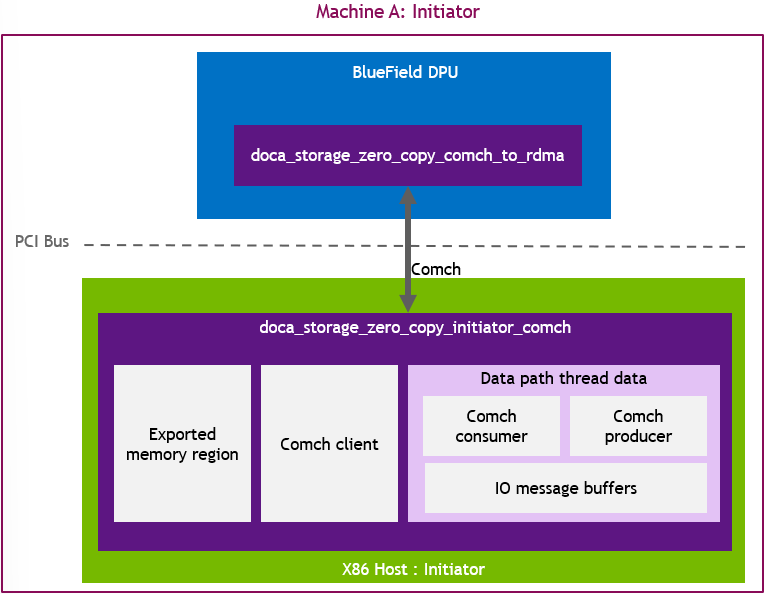
Application Architecture
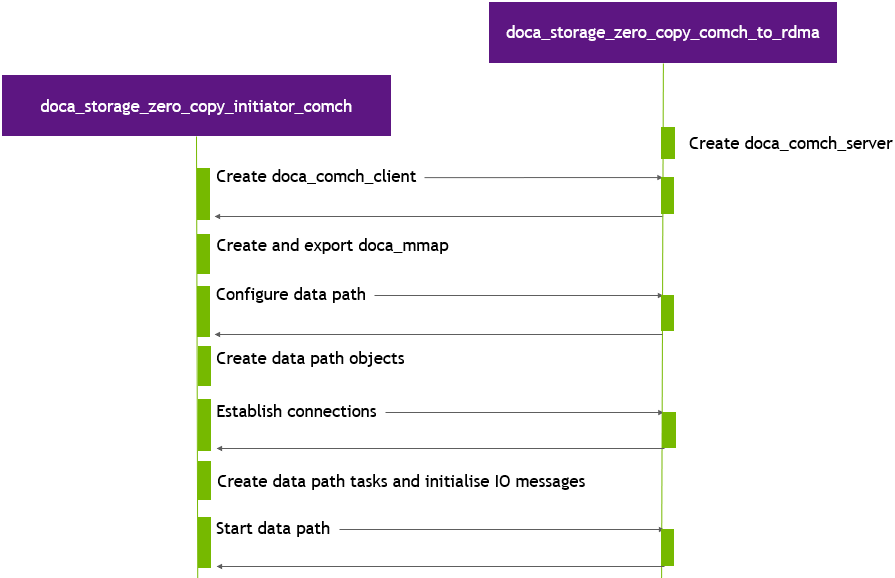
DOCA Storage Zero Copy Initiator Comch executes in three stages:
Preparation Stage
During this stage the application performs the following:
-
Allocates the required DOCA objects and memory for the control path.
-
Creates a DOCA Comch client and connects to comch_to_rdma.
-
Sends a "configure data path" control message (buffer count, buffer size, doca_mmap export details) to comch_to_rdma.
-
Waits for a configure data data path control message response from comch_to_rdma.
-
Creates data path objects.
-
Sends a "start data path connections" control message to comch_to_rdma.
-
Waits for a "start data path" control message response from comch_to_rdma.
-
Populates all IO messages with the necessary data.
-
Sends a "start storage" control message to comch_to_rdma.
-
Waits for a start storage control message response from comch_to_rdma.
Data Path Stage
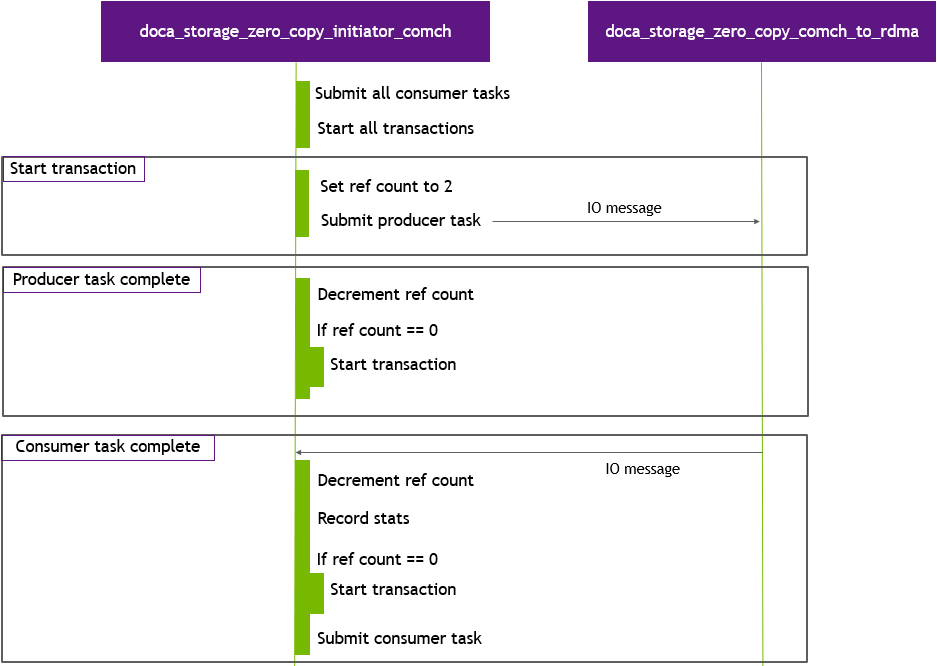
The data path state serves as both an example and a built-in benchmark and uses only data path objects. No control path objects or code are used during this stage.
The benchmark begins by submitting all tasks as quickly as possible to start all the transactions, then the progress engine (PE) is polled as quickly as possible. Each thread executes the same data path function. As each task completes, it decrements the transaction reference count. Once this value reaches 0, the transaction can start again. This is required as there are no temporal guarantees between DOCA Comch producer and consumer event callbacks. It is possible to be notified of the consumer completion before being notified of the producer send completion. Once a thread has completed its required number of transactions (the total transaction run limit as specified by: --run-limit-operation-count divided by the number of threads), that thread exits. Once all threads have joined, the application proceeds to send a stop IO message and moves onto the teardown phase.
Teardown Stage
To teardown, the application performs the following:
-
Displays execution statistics.
-
Sends a "destroy objects" control message to comch_to_rdma.
-
Waits for a destroy objects control message response from comch_to_rdma.
-
Destroys data path objects.
-
Destroys control path objects.
-
Destroys any other allocated memory/objects.
DOCA Libraries
This application leverages the following DOCA libraries:
Compiling the Application
This application is compiled as part of the set of storage zero copy applications. For compilation instructions, refer to NVIDIA DOCA Storage Zero Copy.
Running the Application
Application Execution
This application can only be run on the host.
DOCA Storage Zero Copy Initiator Comch is provided in source form. Therefore, a compilation is required before the application can be executed.
-
Application usage instructions:
Usage: doca_storage_zero_copy_initiator_comch [DOCA Flags] [Program Flags]

DOCA Flags:
  -h, --help                        Print a help synopsis
  -v, --version                     Print program version information
  -l, --log-level                   Set the (numeric) log level for the program <10=DISABLE, 20=CRITICAL, 30=ERROR, 40=WARNING, 50=INFO, 60=DEBUG, 70=TRACE>
  --sdk-log-level                   Set the SDK (numeric) log level for the program <10=DISABLE, 20=CRITICAL, 30=ERROR, 40=WARNING, 50=INFO, 60=DEBUG, 70=TRACE>
  -j, --json <path>                 Parse all command flags from an input json file

Program Flags:
  -d, --device                      Device identifier
  --operation                       Operation to perform. One of: read|write
  --run-limit-operation-count       Run N operations then stop
  --cpu                             CPU core to which the process affinity can be set
  --per-cpu-buffer-count            Number of memory buffers to create. Default: 64
  --buffer-size                     Size of each created buffer. Default: 4096
  --validate-writes                 Enable validation of writes operations by reading them back afterwards. Default: false
  --command-channel-name            Name of the channel used by the doca_comch_client. Default: storage_zero_copy_comch
  --control-timeout                 Time (in seconds) to wait while performing control operations. Default: 10
  --batch-size                      Batch size: Default: ${per-cpu-buffer-count} / 2
This usage printout can be printed to the command line using the
-h(or--help) options:./doca_storage_zero_copy_initiator_comch -hFor additional information, refer to section "DOCA Storage Zero Copy Initiator Comch Application Guide | id (2.9.3 LTS U1)DOCAStorageZeroCopyInitiatorComchApplicationGuide CommandLineFlags".
-
CLI example for running the application on the host:
./doca_storage_zero_copy_initiator_comch -d 3b:00.0 --operation read --run-limit-operation-count 10000000 --cpu 5
The DOCA device PCIe address,
3b:00.0, should match the address of the desired PCIe device.
-
The application also supports a JSON-based deployment mode, in which all command-line arguments are provided through a JSON file:
./doca_storage_zero_copy_initiator_comch --json [json_file]For example:
./doca_storage_zero_copy_initiator_comch --json doca_storage_reference_zero_copy_host_params.json
Before execution, ensure that the used JSON file contains the correct configuration parameters, and especially the PCIe addresses necessary for the deployment.
Command Line Flags
|
Flag Type |
Short Flag |
Long Flag/JSON Key |
Description |
JSON Content |
|---|---|---|---|---|
|
General flags |
|
|
Print a help synopsis |
N/A |
|
|
|
Print program version information |
N/A |
|
|
|
|
Set the log level for the application:
|
|
|
|
N/A |
|
Set the log level for the program:
|
|
|
|
|
|
Parse all command flags from an input JSON file |
N/A |
|
|
Program flags |
|
|
DOCA device identifier. One of:
This flag is mandatory.
|
|
|
N/A |
|
Operation to perform either This flag is mandatory.
|
|
|
|
N/A |
|
Run This flag is mandatory.
|
|
|
|
N/A |
|
Index of CPU to use. One data path thread is spawned per CPU. Index starts at 0. The user can specify this argument multiple times to create more threads.
This flag is mandatory.
|
|
|
|
N/A |
|
Number of buffers (all buffers execute in parallel) to use per CPU |
|
|
|
N/A |
|
Size of buffer to use for data transfers. Should be a value representative of a disk block size. |
|
|
|
N/A |
|
Run a functional test instead of a performance test. Only compatible with write operation mode. |
|
|
|
N/A |
|
Allows customizing the server name used for this application instance if multiple comch servers exist on the same device |
|
|
|
N/A |
|
Timeout (in seconds) for a control operation to complete. If any control operation exceeds this time, the application aborts. |
|
|
|
N/A |
|
Batch size to use when submitting tasks using the batched API |
|
Troubleshooting
Refer to the DOCA Troubleshooting for any issue encountered with the installation or execution of the DOCA applications.
Application Code Flow
Control Thread Flow
-
Parse application arguments:
C++auto const cfg = parse_cli_args(argc, argv);-
Prepare the parser (
doca_argp_init). -
Register parameters (
doca_argp_param_create). -
Parse the arguments (
doca_argp_start). -
Destroy the parser (
doca_argp_destroy).
-
-
Display the configuration:
C++print_config(cfg);
-
Create application instance
C++g_app.reset(storage::zero_copy::make_host_application(cfg));
-
Run the application:
C++g_app->run()-
Find and open the specified device:
C++m_dev = storage::common::open_device(m_cfg.device_id);
-
Create control path progress engine:
C++doca_pe_create(&m_ctrl_pe);
-
Create comch control objects:
C++create_comch_control();
-
Connect to comch server:
C++connect_comch_control();
-
Configure storage:
C++configure_storage();-
Allocate local memory region.
-
Create doca_mmap.
-
Send configure data path control message to comch_to_rdma.
-
Wait for a configure data path control message response from comch_to_rdma.
-
-
Prepare data path
C++prepare_data_path();-
Create per thread data context:
-
Create IO messages.
-
Create transaction objects.
-
Create progress engine.
-
Create mmap for IO message buffers.
-
Create Comch producer.
-
Create Comch consumer.
-
-
Send start data path connections control message to comch_to_rdma.
-
Wait for a start data path connections control message response from comch_to_rdma.
-
Poll progress engine until:
-
remote consumer ID values have been received.
-
All consumers are running.
-
All producers are running.
-
-
-
Create tasks:
C++m_thread_contexts[ii].create_tasks(m_raw_io_data + (ii * per_thread_task_count * m_cfg.buffer_size), m_cfg.buffer_size, m_remote_consumer_ids[ii], op_type, m_cfg.batch_size);
-
Create threads:
C++if (op_type == io_message_type::read) { m_thread_contexts[ii].thread = std::thread{&thread_hot_data::non_validated_test, std::addressof(m_thread_contexts[ii].hot_context)}; } else if (op_type == io_message_type::write) { if (m_cfg.validate_writes) { m_thread_contexts[ii].thread = std::thread{&thread_hot_data::validated_test, std::addressof(m_thread_contexts[ii].hot_context)}; } else { m_thread_contexts[ii].thread = std::thread{&thread_hot_data::non_validated_test, std::addressof(m_thread_contexts[ii].hot_context)}; } }
-
Start the data path:
C++wait_for_control_response(send_control_message(control_message_type::start_storage));
-
Record the start time.
-
Submit initial DOCA Comch consumer tasks.
-
Start data path threads.
-
Wait for all threads to complete.
-
Record the end time.
-
Stop storage.
-
Shutdown.
-
-
Display statistics:
C++printf("+================================================+\n"); printf("| Stats\n"); printf("+================================================+\n"); printf("| Duration (seconds): %2.06lf\n", duration_secs_float); printf("| Operation count: %u\n", stats.operation_count); printf("| Data rate: %.03lf GiB/s\n", GiBs / duration_secs_float); printf("| IO rate: %.03lf MIOP/s\n", miops); printf("| PE hit rate: %2.03lf%% (%lu:%lu)\n", pe_hit_rate_pct, stats.pe_hit_count, stats.pe_miss_count); printf("| Latency:\n"); printf("| \tMin: %uus\n", stats.latency_min); printf("| \tMax: %uus\n", stats.latency_max); printf("| \tMean: %uus\n", stats.latency_mean); printf("+================================================+\n");
Performance Data Path Thread Flow
-
Start transactions:
C++for (uint32_t ii = 0; ii != transactions_size; ++ii) start_transaction(transactions[ii], std::chrono::steady_clock::now());
-
Run until
Noperations have been completed:C++while (run_flag) { doca_pe_progress(data_pe) ? ++(pe_hit_count) : ++(pe_miss_count); }
Functional Data Path Thread Flow
-
Determine the number of iterations to execute (each iteration is up to
--per-cpu-buffer-counttransactions):C++uint32_t const iteration_count = (remaining_tx_ops / transactions_size) + ((remaining_tx_ops % transactions_size) == 0 ? 0 : 1);
-
For each iteration:
-
Set data in local memory region to a fixed pattern.
-
Set all transactions to write mode:
C++void thread_hot_data::set_operation(io_message_type operation) { for (uint32_t ii = 0; ii != transactions_size; ++ii) { auto *io_message = const_cast<char *>(storage::common::get_buffer_bytes( doca_comch_producer_task_send_get_buf(transactions[ii].request))); } }
-
Start all transactions.
-
Poll the PE until all transactions complete.
-
Set data in local memory region to an alternative fixed pattern.
-
Set all transactions to read mode.
-
Start all transactions.
-
Poll the PE until all transactions complete.
-
Validate that all data in local memory region has been modified and reflects the original data pattern and not the alternative pattern.
-
References
-
/opt/mellanox/doca/applications/storage/
Last updated: