

This guide explains how to use the NVIDIA DOCA™ Management Service (DMS) with the NVIDIA® BlueField® networking platform or NVIDIA® ConnectX® SmartNICs.
If you have used DMS before and are looking for the legacy OpenConfig-based tool, see Legacy OpenConfig-based DOCA Management Service.
Introduction
Configuring a BlueField DPU or ConnectX NIC requires a different tool for each task: mlxconfig for firmware parameters, devlink for E-switch settings, and mlnx_qos for traffic priorities. Each tool has its own syntax and behavior, which makes managing hundreds of devices this way difficult.
DOCA Management Service (DMS) is a centralized solution for configuring and operating BlueField and ConnectX devices.
DMS replaces these separate tools with a single command-line tool, dms-cli, that provides one interface and one syntax for every feature and every device.
Goals and Use Cases
DMS is built around two goals:
-
Unified interface: One tool and one syntax replace the separate tools, regardless of the feature or operation.
-
Works at scale: Every command returns structured JSON, so you can script and automate operations across a fleet of devices.
With DMS, you can do the following:
-
Install firmware or a BlueField Boot File (BFB) image: Update a ConnectX NIC or provision a BlueField DPU.
-
Configure network settings: Set port speed, enable or disable a port, and configure bonding.
-
Tune RoCE and QoS parameters: Congestion control, priorities, and adaptive routing.
-
Reset a device: Factory reset or reboot.
-
Automate at scale: Script consistent configuration across a fleet of devices.
Key Concepts
YANG - The Configuration Map
DMS describes everything a device can do using YANG model files.
YANG is a tree-based data modeling language (XML syntax). A YANG model works as a structured configuration map of your device: each feature is a branch, and each parameter is a leaf. Models use a human-readable format, so you can browse them to see what a device supports.
For example, the DPU mode configuration model looks like this:
container mode {
   leaf operating-mode {
     type enumeration {
       enum nic;   // Standard NIC, ARM cores disabled
       enum dpu;   // DPU mode, ARM cores enabled
    }
  }
}
Every parameter that DMS supports is defined this way. The YANG model is the single source of truth for what you can read, write, or trigger on a device.
XPath - Your Address in the Map
Each parameter in the YANG tree has a unique path, called an XPath. An XPath reflects the structure of the model: it starts from a feature area and navigates down to the specific parameter.
For example, the mode model in the preceding example translates to /nvidia/mode/operating-mode.
When a feature has multiple instances, such as several congestion control (CC) algorithm slots or multiple ports, the YANG model represents them as a list. The YANG model for that list defines the key name, such as id or name.
To select a specific entry, add a key in brackets:
/nvidia/cc/slot[id=0]/config/enabled    # slot 0
/nvidia/cc/slot[id=1]/config/enabled    # slot 1
To explore all the available paths on your device, run the following command:
/opt/mellanox/doca/services/dms/dms-cli --tree /nvidia
Target - Which Device You Are Talking To
Use -t or --target to specify the target device by its PCIe BDF (Bus:Device.Function) address. When you manage a virtual function (VF) or scalable function (SF), append the representor suffix:
/opt/mellanox/doca/services/dms/dms-cli -t pci/0000:03:00.0 /nvidia/mode/operating-mode        # target a specific device by BDF
/opt/mellanox/doca/services/dms/dms-cli -t pci/0000:03:00.0,pf0vf5 /nvidia/icm/quota           # target VF5 on PF0
/opt/mellanox/doca/services/dms/dms-cli -t pci/0000:03:00.0,pf0sf3 /nvidia/icm/quota           # target SF3 on PF0
The representor suffix format is pf<N>vf<M> for VFs and pf<N>sf<M> for SFs, where N is the physical function (PF) index and M is the VF or SF index.
|
Scope |
Target |
|---|---|
|
System-level |
Not required |
|
Device or port |
|
|
VF |
|
|
SF |
|
System Components
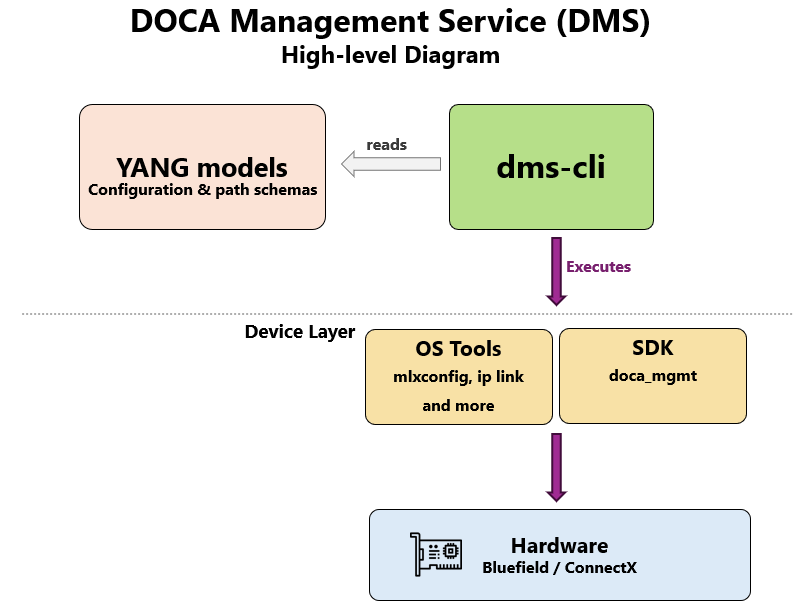
dms-cli
dms-cli is the single entry point for all DMS operations. You run it directly on the host or Arm side; no server or daemon is required.
When you run a command, dms-cli does the following:
-
Reads the YANG model to validate the command and determine the operation type.
-
Runs the appropriate operation on the device hardware.
Examples:
# Read the current DPU operating mode
/opt/mellanox/doca/services/dms/dms-cli -t pci/0000:03:00.0 /nvidia/mode/operating-mode

# Switch to DPU mode
/opt/mellanox/doca/services/dms/dms-cli -t pci/0000:03:00.0 /nvidia/mode/operating-mode dpu

# Reset the device to factory defaults
/opt/mellanox/doca/services/dms/dms-cli /nvidia/reset/factory-reset
Yang Models
YANG models are the configuration map that dms-cli reads to learn which paths exist, what types they accept, and which operations they support (Get, Set, or Action).
/opt/mellanox/doca/services/dms/dms-cli --tree /nvidia                  # browse all available paths
/opt/mellanox/doca/services/dms/dms-cli --describe /nvidia/mode         # explain a specific path
DMS uses NVIDIA-native YANG models. Paths follow the /nvidia/* structure rather than the OpenConfig conventions used in the Legacy OpenConfig-based DOCA Management Service.
For the full list of supported models and paths, see YANG Models.
OS Tools
DMS runs the operation that each command requests, either by invoking system tools such as mlxconfig, devlink, and dcb, or through the DOCA Management SDK for operations that require direct hardware access. For more information, see DOCA Management SDK.
YANG Models
Each YANG model covers one functional area under the flat /nvidia/ tree. All models are NVIDIA-native, not OpenConfig.
The YANG schema is the single source of truth for what you can read, write, or trigger. To explore it, use --tree and --describe:
/opt/mellanox/doca/services/dms/dms-cli --tree /nvidia                # browse all available paths
/opt/mellanox/doca/services/dms/dms-cli --describe /nvidia/cc         # explain a specific container
The following tables list all supported models, grouped by category.
Networking and Interfaces
|
Model |
Path |
Covers |
|---|---|---|
|
|
|
Root container and entry point for all paths |
|
|
|
Link admin/operational state, netdev MTU, physical port (PAOS), link type, keep-link-up policy, IPG, breakout |
|
|
|
LAG resource allocation strategy (HWLB prerequisite; not classic bonding configuration) |
|
|
|
E-switch mode (legacy/switchdev), flow-steering mode, multiport, flex parser profile |
|
|
|
Multi-plane / multipath: number of planes and load-balance mode |
|
|
|
QoS: trust-mode, PFC priorities, and ETS priority-to-TC mapping |
|
|
|
RoCE: adaptive routing, multipath DSCP, RTT, ToS, ACCL (slow-restart, tx-window, selective-repeat, etc.) |
|
|
|
Congestion control: user-programmable CC, shaper coalesce, algorithm slots and parameters, NP/RP global status, and NP CNP settings |
|
|
|
Enable or disable data-direct for VFs and SFs |
|
|
|
ICM (Initiator Connection Manager) quota settings |
Device and Platform
|
Model |
Path |
Covers |
|---|---|---|
|
|
|
Platform/C9x80V system-conf operations |
|
|
|
BlueField operational mode ( |
|
|
|
PCIe and SR-IOV: enable, max VFs, runtime VF count, BAR size, and PF count |
|
|
|
Bulk NVConfig apply (typed DMS intent and optional raw TLVs through |
|
|
|
Typed emulation-manager controls (for example, virtio-net and NVMe) for delegated PF targets |
|
|
|
Miscellaneous device settings (for example, flex parser profile) |
|
|
|
Low-level access: raw register access, HCA capabilities, and raw NVConfig query and modify |
Lifecycle and Operations
|
Model |
Path |
Covers |
|---|---|---|
|
|
|
Local artifact cache: stage, list, get-info, and delete (BFB, firmware, ISO, PLDM, and configuration files) |
|
|
|
Firmware, BFB, and image installation and version queries (ConnectX and BlueField) |
|
|
|
Profile-based NIC provisioning plans (for example, SPC-X or MRC): plan, install, verify, and cleanup |
|
|
|
Device reset: required and suggested status, capabilities, and the |
|
|
|
Async operation status lookup by operation ID |
|
|
|
Diagnostics data interface (multi-domain diagnostic ownership) |
Paths shown at runtime might be filtered by target and device capability. To see what applies to a specific device, use -t with --tree or --describe.
DMS-CLI Flags
dms-cli is path-centric: it deduces GET, SET, and ACTION operations from the path and arguments, so there are no --get, --set, or --action flags.
dmsc is an installed alias for dms-cli (same binary invocation).
The default installation path is /opt/mellanox/doca/services/dms/dms-cli, and dmsc is installed in the same directory.
Common Flags
|
Flag |
Short |
Description |
|---|---|---|
|
|
|
Device target. Grammar: |
|
|
|
Output GET/SET/ACTION results as JSON (ignored for introspection) |
|
|
|
Validate only; don't write or execute. |
|
|
|
Show debug information |
|
|
|
Show usage information. |
Introspection Flags
Introspection lets you explore what DMS supports without touching any device hardware.
All introspection operations read the installed YANG schema only. No device communication occurs, and --json has no effect.
For more information about introspection operations, see Introspection.
|
Flag |
Short |
Description |
|---|---|---|
|
|
|
Describe the node or leaf at |
|
|
|
With |
|
|
|
Print the schema subtree for |
For the legacy OpenConfig-based workflow and earlier tooling, see Legacy OpenConfig-Based DOCA Management Service.
Operations
dms-cli doesn't use get, set, or action sub-commands. It deduces the operation type from the path and arguments:
|
Operation |
Pattern |
|---|---|
|
GET |
Path ends at a container or leaf, with no |
|
SET |
Path or arguments contain |
|
ACTION |
Path points to a YANG |
Most device operations require -t or --target. To discover BDFs, use dms-cli list-targets.
DMS uses a flat /nvidia/* tree: writable leaves are config; read-only leaves use YANG config false (often named *-pending, oper-status, caps, etc.).
Some containers are still named config (for example, /nvidia/cc/config/); this is a feature name, not a config/state axis.
Default output is plain key: value text. For structured JSON output from GET, SET, and ACTION operations, add --json. Introspection ignores --json.
Get
Use the following syntax:
dms-cli -t pci/<BDF> <path>                  # container: all readable leaves
dms-cli -t pci/<BDF> <path> <leaf> [...]     # container + leaf filter
dms-cli -t pci/<BDF> <path>/<leaf>           # single leaf
Examples:
# Container
dms-cli -t pci/0000:03:00.0 /nvidia/mode
# operating-mode: dpu
# operating-mode-pending: dpu

# Single leaf
dms-cli -t pci/0000:03:00.0 /nvidia/mode/operating-mode
# operating-mode: dpu

# JSON
dms-cli --json -t pci/0000:03:00.0 /nvidia/mode/operating-mode
# { "operating-mode": "dpu" }
A subtree GET returns all readable leaves in that container. A leaf GET returns one value. The dms-cli response envelope has no separate timestamp field.
Set
Use the following syntax:
dms-cli -t pci/<BDF> <path>/<leaf>=<value>              # single leaf
dms-cli -t pci/<BDF> <path> <leaf>=<value> [<leaf>=…]   # multi-leaf under container
dms-cli -t pci/<BDF> ... --dry-run                      # validate only
Examples:
# MTU (netdev)
dms-cli -t pci/0000:03:00.0 /nvidia/link/netdev/mtu=9000

# QoS: trust-mode + PFC priorities
dms-cli -t pci/0000:03:00.0 /nvidia/qos trust-mode=dscp
dms-cli -t pci/0000:03:00.0 /nvidia/qos/pfc enabled-priorities=3,4,5

# Mode (BlueField)
dms-cli -t pci/0000:03:00.0 /nvidia/mode/operating-mode=dpu
# status: ok
Pending and Reset-required Leaves
Many NVConfig-backed leaves take effect only after a device reset or power cycle. After a SET operation, the running value might be unchanged while the companion *-pending leaf shows the next-boot value.
To check, run GET on both the base leaf and the *-pending leaf, and query /nvidia/reset/required when applicable. To see the available leaves for a path, use --describe.
For example, switching a BlueField device from NIC mode to DPU mode requires a power cycle to take effect. To read the current mode and the pending value:
dms-cli -t pci/0000:03:00.0 /nvidia/mode
# operating-mode: nic
# operating-mode-pending: dpu
Actions
Use the following syntax:
dms-cli -t pci/<BDF> <action-path> [<param>=<value> ...]
Actions are one-time operations with side effects, unlike leaf reads and writes.
Examples:
# Install an image/FW on a device (ConnectX FW / BlueField BFB / BlueField-4 flows - see model inputs)
dms-cli -t pci/0000:03:00.0 /nvidia/provisioning/install source=staged:<name>

# Version queries
dms-cli -t pci/0000:03:00.0 /nvidia/provisioning/fw/get-version
dms-cli -t pci/0000:03:00.0 /nvidia/provisioning/image/get-versions
Other common actions include /nvidia/blueprints/plan, /nvidia/blueprints/install, /nvidia/blueprints/verify, /nvidia/blueprints/cleanup, /nvidia/artifacts/list, /nvidia/artifacts/delete, and /nvidia/artifacts/get-info.
Batch Operations and Target Scoping
A single-container, multi-leaf operation passes several leaf=value arguments on one path, which results in one backend call.
A cross-container batch separates groups with ; (escape it as \; in the shell). All groups must be the same type: all GET or all SET. A batch that mixes GET and SET is rejected. All groups share one -t.
# Multi-container GET
dms-cli -t pci/0000:03:00.0 /nvidia/roce \; /nvidia/cc/np \; /nvidia/link

# Multi-container SET
dms-cli -t pci/0000:03:00.0 /nvidia/roce adaptive-routing=true \; /nvidia/cc/config user-programmable=true
There is no --request-file flag. A partial batch failure returns a partial-success result: status: partial, with the successes and failures.
Each invocation addresses one -t target. For multiple NICs or DPUs, run dms-cli once per target, or script over the list-targets output:
dms-cli list-targets
# pci/0000:03:00.0
# pci/0000:81:00.0

dms-cli -t pci/0000:03:00.0 /nvidia/mode/operating-mode
dms-cli -t pci/0000:81:00.0 /nvidia/mode/operating-mode
To address a representor, use -t pci/<BDF>,pf<N>vf<M> or pf<N>sf<M>. You can also add the optional ?port=N and ?scope=S query parameters. For more information, see Target - Which Device You Are Talking To.
Introspection
DMS lets you explore the YANG schema directly from the command line: discover which paths are available, understand what a specific parameter does, and see which values it accepts.
No hardware access is involved; introspection reads the schema only, and --json does not apply.
tree
--tree prints the YANG schema subtree rooted at PATH as an indented tree. Use it to browse which containers, lists, leaves, and actions are available in a feature area.
To limit how many levels deep the output goes, use --depth N with --tree. 0 means unlimited, which is the default.
--depth requires --tree.
# Full tree for path /nvidia/mode

> /opt/mellanox/doca/services/dms/dms-cli --tree /nvidia/mode
+--rw mode
   +--ro caps
      +--rw operating-mode   boolean
   +--rw operating-mode   device-mode
   +--ro operating-mode-pending   device-mode
describe
--describe describes a single node or leaf: its YANG type, enumerated values, whether it is read-only or writable, and any descriptive text from the model.
Use --describe when you know a path but want to understand which values are valid before you read or write it. You can also use it to see the input parameters of an action before you run it.
--tree and --describe are mutually exclusive.
# Leaf with enums + annotation (power-cycle required)

> /opt/mellanox/doca/services/dms/dms-cli --describe /nvidia/mode
+--rw mode
   +--ro caps
      +--rw operating-mode (boolean)?
   +--rw operating-mode (enumeration)? [reset] [cap-mode-operating-mode]
   |     Values: nic, dpu
   +--ro operating-mode-pending (enumeration)? [cap-mode-operating-mode]
   |     Values: nic, dpu
Use --tree to browse the structure of a path: the containers and leaves that exist in it.
Use --describe to understand a specific node: its type, accepted values, and any constraints, such as whether a reset is required after a change.
list-xpaths
list-xpaths prints every leaf XPath reachable under PATH. The default PATH is the full schema root.
Each line is a complete, directly addressable path to a readable or writable leaf. Use it to discover all readable and settable parameters in a feature area without reading the YANG model files.
# List all configurable paths under /nvidia/qos

> /opt/mellanox/doca/services/dms/dms-cli list-xpaths /nvidia/qos
/nvidia/qos/caps/both-trust-supported
/nvidia/qos/caps/dscp-trust-supported
/nvidia/qos/caps/pcp-trust-supported
/nvidia/qos/ets/prio-tc-map
/nvidia/qos/ets/tc-mapping/[<tc-index>]/tc-index
/nvidia/qos/ets/tc-mapping/[<tc-index>]/traffic-class
/nvidia/qos/pfc/enabled-priorities
/nvidia/qos/trust-mode
list-targets
list-targets lists the device targets present on the local host.
The target field in each record is the value to supply to -t or --target. For machine-readable output for scripting, use --json.
# List all available devices on the host

> /opt/mellanox/doca/services/dms/dms-cli list-targets

Device 1:
    chip_type=BF3
    func_type=PF
    iface_name=p0
    target=pci/0000:03:00.0
    ...
Device 2:
    chip_type=CX7
    func_type=PF
    iface_name=p1
    target=pci/0000:81:00.0
    ...
Provisioning and Reset
Deploying a device or updating an existing one also requires installing the right firmware or software image, verifying what is running, and resetting the device to apply changes.
DMS covers the full device lifecycle: staging and installing images, querying running and pending versions, checking whether a reset is needed, and running the reset. These operations are designed for deployment pipelines, fleet management scripts, and anyone bringing up or updating BlueField DPUs and ConnectX NICs at scale.
Unlike Get and Set, install and reset actions invoke external tools that can run for several minutes and might temporarily remove the device from the PCIe bus. The lifecycle API is divided into four areas:
|
Area |
Path |
Scope |
Behavior |
|---|---|---|---|
|
Artifact cache |
|
System |
Stages, lists, inspects, and deletes local files. These actions complete before returning. |
|
Provisioning |
|
Device |
Install ConnectX firmware, BlueField-3 BFBs, and BlueField-4 ISO or PLDM payloads. Installation is asynchronous. |
|
Operation status |
|
Device |
Reports the latest install or reset operation for the selected physical adapter. |
|
Reset |
|
Device |
Reports reset state and capabilities and starts an asynchronous device reset. |
The /nvidia/reset API performs a firmware or device reset through mlxfwreset. It does not restore factory-default configuration.
Lifecycle Workflow
To provision and reset a device, follow this lifecycle flow:
-
Discover the target PCI address with
list-targets. -
Stage each local payload in
/nvidia/artifacts. -
Start
/nvidia/provisioning/installon one target. -
Poll
/nvidia/operation/get-statuson the same target until the operation reachescompletedorfailed. -
Query
/nvidia/reset/required, and read/nvidia/reset/message. -
Run
/nvidia/reset/executewhen a device reset is appropriate. Follow/nvidia/reset/messagewhen it calls for an external host reboot or platform power cycle instead. -
Verify running versions after activation.
All examples use the installed client:
/opt/mellanox/doca/services/dms/dms-cli
Discover the available targets:
> /opt/mellanox/doca/services/dms/dms-cli list-targets

pci/0000:03:00.0
pci/0000:61:00.0
The following examples use pci/0000:03:00.0. Replace it with the target returned for your device.
For BlueField-4, a baseboard management controller (BMC) hostname does not identify the DMS target. BlueField-4 out-of-band operations still use -t pci/<BDF> for DMS operation tracking, while bmc-host identifies the BMC used by the backend. You must supply the BMC that belongs to the selected device.
To view the exact inputs that the installed version supports, use --describe:
/opt/mellanox/doca/services/dms/dms-cli --describe /nvidia/provisioning/install
/opt/mellanox/doca/services/dms/dms-cli --describe /nvidia/reset/execute
Supported Hardware Flows
|
Device or Mode |
Install Payload |
Install Path |
Version or Comparison Path |
Activation Notes |
|---|---|---|---|---|
|
ConnectX |
Firmware image ( |
Local, target-scoped firmware burn |
|
Query reset state after installation. |
|
BlueField-3 DPU mode |
BFB, with optional configuration file |
Local, in-band through the target's RSHIM device |
|
Query reset state after installation. |
|
BlueField-4 DPU mode |
ISO, PLDM, or both |
Out-of-band through the DPU BMC |
|
PLDM activation requires an external full card power cycle. |
|
BlueField-4 NIC mode |
PLDM |
Local, target-scoped update |
Backend-dependent |
The local device must be resolvable through MFT/MST. |
|
BlueField-2 |
None in this release's API |
- |
Image version and diff operations return |
Use a supported legacy workflow where required. For more information, see (3.5.0) Legacy OpenConfig-Based DOCA Management Service. |
Reset support is determined at runtime by mlxfwreset for the selected device.
Before you select reset parameters, query /nvidia/reset/capabilities.
Artifact Management
The /nvidia/artifacts actions manage the local cache used by provisioning. They are system-scoped, so they do not take -t.
The default cache directory is /var/lib/dms/artifacts, but you use artifact keys rather than this internal path. Artifact keys are names, not paths; they cannot contain path separators or traversal sequences.
A staged artifact is addressed by its key, staged:<name>. For example, an artifact staged as bf3.bfb is installed as source=staged:bf3.bfb.
An absolute input path refers to a file visible on the host where DMS runs, not a path on a remote client machine. Staging is recommended for repeatable operation and inspection.
DMS supports the following artifact types:
|
Type |
Purpose |
|---|---|
|
|
BlueField Boot File for BlueField-3 installation. |
|
|
BlueField-4 operating-system ISO or CIDATA seed ISO. |
|
|
ConnectX firmware image. |
|
|
Optional BlueField-3 BFB configuration file. |
|
|
BlueField-4 PLDM firmware package. |
|
|
Cached file without a provisioning-specific type. |
Stage an Artifact
/nvidia/artifacts/stage validates the request and copies a local file into the artifact cache. The copy is committed atomically, so a partially copied file is not exposed as a completed artifact.
|
Input |
Required |
Description |
|---|---|---|
|
|
Yes |
Absolute source path on the DMS execution host. |
|
|
No |
Artifact key. Defaults to the base name of |
|
|
No |
Explicit |
|
|
No |
Replace an existing artifact with the same key. Defaults to |
Stage a BlueField-3 BFB:
> /opt/mellanox/doca/services/dms/dms-cli /nvidia/artifacts/stage \
  input-file=/images/bf-bundle.bfb \
  staged-file=bf3.bfb \
  type=bfb

# output:
{
  "status": "completed",
  "type": "bfb",
  "error-message": ""
}
Stage a ConnectX firmware image:
/opt/mellanox/doca/services/dms/dms-cli /nvidia/artifacts/stage \
  input-file=/firmware/connectx.bin \
  staged-file=connectx.bin \
  type=fw
Stage BlueField-4 ISO and PLDM payloads:
/opt/mellanox/doca/services/dms/dms-cli /nvidia/artifacts/stage \
  input-file=/images/bf4-os.iso \
  staged-file=bf4.iso \
  type=iso

/opt/mellanox/doca/services/dms/dms-cli /nvidia/artifacts/stage \
  input-file=/firmware/bf4.fwpkg \
  staged-file=bf4.fwpkg \
  type=pldm
The stage action returns one of the following status values:
|
Status |
Meaning |
|---|---|
|
|
The file was validated as applicable and committed to the cache. |
|
|
The key already existed and |
|
|
Validation, copying, type detection, or cache registration failed. |
To replace an existing artifact:
/opt/mellanox/doca/services/dms/dms-cli /nvidia/artifacts/stage \
  input-file=/images/bf-bundle-new.bfb \
  staged-file=bf3.bfb \
  type=bfb \
  force=true
Before it copies installable BFB and ConnectX firmware images, DMS performs built-in, non-destructive validation:
|
Type |
Validation During Stage |
Validation Before Install |
|---|---|---|
|
|
|
Repeated before starting |
|
|
|
Repeated before starting the firmware burn. |
|
|
File, path, type, and cache checks |
The applicable backend tool performs payload-specific validation. |
Repeating BFB and firmware validation before installation protects against changes to a cached file after staging.
List Artifacts
/nvidia/artifacts/list returns the artifact key, recorded type, and size in bytes for every valid cached artifact.
/opt/mellanox/doca/services/dms/dms-cli --json /nvidia/artifacts/list
Example output:
{
  "files": [
    {
      "name": "bf3.bfb",
      "type": "bfb",
      "size": 1560281088
    },
    {
      "name": "connectx.bin",
      "type": "fw",
      "size": 4194304
    }
  ]
}
Get Artifact Information
/nvidia/artifacts/get-info inspects one cached artifact. name is the artifact key without the staged: prefix.
/opt/mellanox/doca/services/dms/dms-cli /nvidia/artifacts/get-info name=bf3.bfb
The information returned depends on the artifact type:
|
Type |
Information |
|---|---|
|
|
Size, BFB image versions, available firmware components, and raw |
|
|
Size, firmware version, PSID, component versions, and raw |
|
|
Type and size. Detailed ISO and PLDM validation remains part of the installation backend flow. |
The firmware-component entries use name, running-version, and pending-version. For a static artifact, running-version is the version reported by the inspection tool, and pending-version is normally N/A because the file itself has no running or pending state.
Delete an Artifact
/nvidia/artifacts/delete removes one cached artifact and its type metadata.
/opt/mellanox/doca/services/dms/dms-cli --json /nvidia/artifacts/delete name=bf3.bfb
Example response:
{
  "success": true,
  "error-message": ""
}
Deletion fails when the key is invalid or the artifact does not exist.
Provisioning Install
/nvidia/provisioning/install starts one installation on one target. It has two mutually exclusive modes:
-
Local mode uses
sourcefor ConnectX firmware, BlueField-3 BFB, or BlueField-4 NIC-mode PLDM. -
Out-of-band (OOB) mode uses BMC credentials together with an ISO, a PLDM package, or both for BlueField-4 DPU mode.
Install Inputs and Source Rules
|
Input |
Mode |
Description |
|---|---|---|
|
|
Local |
|
|
|
Local BlueField-3 BFB only |
Optional staged key or absolute path for a BFB configuration file. |
|
|
BlueField-4 OOB |
DPU BMC hostname or IP address. Required for OOB installation. |
|
|
BlueField-4 OOB |
BMC username. Defaults to |
|
|
BlueField-4 OOB |
BMC password. Required for OOB installation. |
|
|
BlueField-4 OOB |
Local or staged ISO. |
|
|
BlueField-4 OOB local ISO |
Optional local or staged cloud-init CIDATA ISO. |
|
|
BlueField-4 OOB |
HTTPS URL pulled directly by the BMC. |
|
|
BlueField-4 OOB |
Local or staged PLDM firmware package. Can be combined with an ISO. |
|
|
BlueField-4 OOB PLDM |
Requests backend ForceUpdate semantics when supported. Defaults to |
The following rules apply to install inputs:
-
sourcecannot be combined with BMC or OOB payload inputs. -
iso-sourceandiso-urlare mutually exclusive. -
iso-cidata-sourceis valid only withiso-source; it cannot be used withiso-url. -
OOB mode requires
bmc-host,bmc-password, and at least one ofiso-source,iso-url, orpldm-source. -
config-sourceis valid only with a BFBsource. -
Generic URLs and PXE are not valid
sourcevalues. Remote ISO is supported only through HTTPSiso-url. -
Absolute paths bypass the artifact cache and must be visible on the DMS execution host. Staging is recommended for repeatable operation and inspection.
bmc-password is a plaintext input passed to the backend tool. Use an account with minimum required permissions. Avoid retaining commands containing the password in shell history, logs, or automation output.
Asynchronous Start Behavior
A successful install request starts the backend and returns immediately:
{
  "status": "in-progress",
  "log-ref": "/var/lib/dms/operations/logs/install-pci_0000_03_00.0-<timestamp>-<pid>.log",
  "message": ""
}
in-progress means that DMS accepted the request and created the backend process. It does not mean that installation succeeded. The final result is available through /nvidia/operation/get-status.
If validation fails before a process is created, the install action returns status: failed, an empty log-ref, a non-empty message, and a nonzero command exit code.
Only one install or reset can run on a physical adapter at a time.
Install ConnectX Firmware
ConnectX firmware installation uses a firmware artifact and a target-scoped flint burn.
Stage and inspect the image:
/opt/mellanox/doca/services/dms/dms-cli /nvidia/artifacts/stage \
  input-file=/firmware/connectx.bin \
  staged-file=connectx.bin \
  type=fw

/opt/mellanox/doca/services/dms/dms-cli /nvidia/artifacts/get-info \
  name=connectx.bin
Start the installation:
/opt/mellanox/doca/services/dms/dms-cli -t pci/0000:03:00.0 /nvidia/provisioning/install source=staged:connectx.bin
DMS verifies the firmware image again immediately before starting the target-scoped firmware burn. After completion, query the running firmware version and reset state.
Install a BFB on BlueField-3
BlueField-3 BFB installation is a local, in-band operation. DMS maps the selected PCI target to its RSHIM device and starts doca-installer with the staged BFB.
Stage the BFB:
/opt/mellanox/doca/services/dms/dms-cli
  /nvidia/artifacts/stage \
  input-file=/images/bf-bundle.bfb \
  staged-file=bf3.bfb \
  type=bfb
Start the installation:
/opt/mellanox/doca/services/dms/dms-cli -t pci/0000:03:00.0 --json /nvidia/provisioning/install \
  source=staged:bf3.bfb
To include an optional configuration file, stage it and provide config-source in the same action:
/opt/mellanox/doca/services/dms/dms-cli /nvidia/artifacts/stage \
  input-file=/configs/bf.cfg \
  staged-file=bf3.cfg \
  type=cfg

/opt/mellanox/doca/services/dms/dms-cli -t pci/0000:03:00.0 /nvidia/provisioning/install \
  source=staged:bf3.bfb \
  config-source=staged:bf3.cfg
The BFB integrity check runs during stage and again before doca-installer is started. A missing or invalid RSHIM mapping rejects the request before installation begins.
Install on BlueField-4
BlueField-4 supports several installation flows, depending on the device mode and payload type. To see the exact inputs for your installed version, use --describe /nvidia/provisioning/install.
DPU Mode - Local ISO
BlueField-4 DPU-mode OS installation is out-of-band. The controller running DMS communicates with the BMC, and the BMC performs the platform operation.
Before you start, verify the following:
-
The selected BMC belongs to the PCI target used with
-t. -
The DMS host can reach the BMC management interface.
-
The BMC can reach the DMS host for a locally supplied ISO.
-
The BMC firmware and ISO meet the requirements of the installed
doca-installerrelease. -
The BMC credentials are valid.
# Stage the ISO:

/opt/mellanox/doca/services/dms/dms-cli /nvidia/artifacts/stage \
  input-file=/images/bf4-os.iso \
  staged-file=bf4.iso \
  type=iso

# Start the OOB installation:

/opt/mellanox/doca/services/dms/dms-cli -t pci/0000:03:00.0 /nvidia/provisioning/install \
  iso-source=staged:bf4.iso \
  bmc-host=bf4-bmc.example.com \
  bmc-user=admin \
  bmc-password='<BMC_PASSWORD>'
The backend flow is as follows:
-
DMS resolves the staged key to the local cached file.
-
doca-installerstarts a temporary HTTP service for the ISO. -
The BMC downloads the ISO from the DMS host and mounts it as virtual media.
-
The BMC boots the installation media and reports progress through Redfish.
-
doca-installerfollows progress, ejects the media when appropriate, and stops the temporary service. -
DMS records the final backend result for
/nvidia/operation/get-status.
The BMC must have a network route to the address and port selected on the DMS host.
DPU Mode - With cloud-init Seed (CIDATA)
Stage the CIDATA ISO alongside the OS ISO, and add iso-cidata-source:
# To provide a cloud-init seed, stage the CIDATA ISO and include it with the local OS ISO:

/opt/mellanox/doca/services/dms/dms-cli /nvidia/artifacts/stage \
  input-file=/images/cidata.iso \
  staged-file=cidata.iso \
  type=iso

/opt/mellanox/doca/services/dms/dms-cli -t pci/0000:03:00.0 /nvidia/provisioning/install \
  iso-source=staged:bf4.iso \
  iso-cidata-source=staged:cidata.iso \
  bmc-host=bf4-bmc.example.com \
  bmc-user=admin \
  bmc-password='<BMC_PASSWORD>'
The seed image must satisfy the CIDATA format and volume-label requirements of the installed provisioning tool.
DPU Mode - ISO From HTTPS
When the ISO is already hosted at an HTTPS URL that the BMC can reach, staging is not required.
The BMC downloads the ISO directly; DMS does not download, stage, or serve it.
# ISO from HTTPS (BMC downloads directly, no staging needed):

/opt/mellanox/doca/services/dms/dms-cli -t pci/0000:03:00.0 /nvidia/provisioning/install \
  iso-url=https://images.example.com/releases/bf4-os.iso \
  bmc-host=bf4-bmc.example.com \
  bmc-user=admin \
  bmc-password='<BMC_PASSWORD>'
The URL must use HTTPS. The BMC must be able to resolve and reach the URL host.
DPU Mode - PLDM Out-of-band
In BlueField-4 DPU mode, PLDM firmware is staged through the BMC.
/opt/mellanox/doca/services/dms/dms-cli -t pci/0000:03:00.0 /nvidia/provisioning/install \
  pldm-source=staged:bf4.fwpkg \
  bmc-host=bf4-bmc.example.com \
  bmc-user=admin \
  bmc-password='<BMC_PASSWORD>'
To request ForceUpdate behavior from the backend, add pldm-force=true.
DPU Mode - ISO + PLDM Combined
An OOB PLDM package can be combined with a local ISO in one action. The backend stages PLDM first and then installs the OS.
/opt/mellanox/doca/services/dms/dms-cli -t pci/0000:03:00.0 /nvidia/provisioning/install \
  pldm-source=staged:bf4.fwpkg \
  iso-source=staged:bf4.iso \
  bmc-host=bf4-bmc.example.com \
  bmc-user=admin \
  bmc-password='<BMC_PASSWORD>'
The ISO flow can reset the Arm subsystem but does not activate the staged PLDM firmware. A full card power cycle is required after the combined operation completes. The running BMC must already satisfy the ISO installation requirements.
NIC Mode - PLDM Local
In BlueField-4 NIC mode, the DPU BMC is not used. DMS resolves the PCI target to its local MST device and invokes the target-scoped in-band backend.
/opt/mellanox/doca/services/dms/dms-cli /nvidia/artifacts/stage \
  input-file=/firmware/bf4.fwpkg \
  staged-file=bf4.fwpkg \
  type=pldm

/opt/mellanox/doca/services/dms/dms-cli -t pci/0000:03:00.0 /nvidia/provisioning/install \
  source=staged:bf4.fwpkg
This flow requires the target to be available through the local MFT/MST device inventory.
bmc-password is a plaintext action input and is passed to the backend tool. Treat it as sensitive:
-
Use an account with the minimum permissions required by the provisioning operation.
-
Avoid retaining commands containing the password in shell history, logs, or automation output.
-
Restrict access to DMS logs and process information on the execution host.
Version Queries
Each version query answers a different question:
|
Operation |
Question Answered |
|---|---|
|
|
What versions or metadata are present in this cached file? |
|
|
What firmware is running on this ConnectX target? |
|
|
What image or firmware components are running on this BlueField target? |
|
|
How does a staged BlueField-3 BFB differ from the running BlueField-3 image? |
These operations cover device firmware and image versions only, not host software packages such as MFT or the Linux kernel.
Get the Running ConnectX Firmware Version
/opt/mellanox/doca/services/dms/dms-cli -t pci/0000:03:00.0 /nvidia/provisioning/fw/get-version
The response includes the following fields:
-
psid: device Parameter Set ID. -
fw-version: running firmware version. -
firmware-component: extensible component list. -
raw-output: complete backendflintoutput for diagnostics. -
error-message: empty on success.
Get BlueField-3 Image Versions
/opt/mellanox/doca/services/dms/dms-cli -t pci/0000:03:00.0 /nvidia/provisioning/image/get-versions
The response includes the classic bsp, doca, uefi, and atf fields, an extensible firmware-component list, raw-output, and error-message.
A value can be unknown or N/A when the backend does not report that component. To distinguish unavailable metadata from an operation failure, use error-message and the command exit code.
Get BlueField-4 OOB Inventory
BlueField-4 inventory is read through its BMC:
/opt/mellanox/doca/services/dms/dms-cli -t pci/0000:03:00.0 /nvidia/provisioning/image/get-versions \
  bmc-host=bf4-bmc.example.com \
  bmc-user=admin \
  bmc-password='<BMC_PASSWORD>'
For BlueField-4, use the firmware-component list as the primary inventory. The fixed bsp, doca, uefi, and atf fields exist for BlueField-3 compatibility and might be unknown when the OOB backend does not provide them.
Each component contains its running version and, when the BMC reports one, a pending version; otherwise, pending-version is N/A.
DMS does not verify that bmc-host belongs to the selected PCI target.
Compare a BlueField-3 BFB With the Running Image
/nvidia/provisioning/image/diff is a synchronous BlueField-3-only comparison. The BFB must already be staged, and image-name is the artifact key without staged:.
/opt/mellanox/doca/services/dms/dms-cli --json \
  /nvidia/artifacts/stage \
  input-file=/images/bf-bundle-new.bfb \
  staged-file=bf3-new.bfb \
  type=bfb

/opt/mellanox/doca/services/dms/dms-cli \
  -t pci/0000:03:00.0 --json \
  /nvidia/provisioning/image/diff \
  image-name=bf3-new.bfb
The response includes the following fields:
-
has-changes: whether a difference was found. -
diff-text: human-readable backend comparison output. -
component-diff: parsed current and staged component versions when available. -
error-message: backend or validation failure detail.
has-changes: true is a successful comparison result, not an action failure.
Reset
The /nvidia/reset API performs a firmware or device reset through mlxfwreset. It does not restore factory-default configuration.
After an installation reaches completed, follow this order:
-
Check
requiredto find out whether a reset is needed. -
Read
messageto see which action the device recommends. -
Read
suggested-resetto find out whether a normalized DMS reset is available. -
Check
capabilitiesto see which levels and types the device supports. -
Run
executeonly when a device reset is the appropriate action.
Check Whether Reset Is Required
> /opt/mellanox/doca/services/dms/dms-cli -t pci/0000:03:00.0 --json /nvidia/reset/required

{
  "required": true
}
|
Value |
Meaning |
|---|---|
|
|
The backend reports that a reset, reboot, power cycle, or other activation action is required. |
|
|
The backend explicitly reports that no action is required. |
|
|
Status timed out, is unavailable, or cannot be parsed reliably. Read |
Read the Reset Message
> /opt/mellanox/doca/services/dms/dms-cli -t pci/0000:03:00.0 --json /nvidia/reset/message

{
  "message": "Driver restart and PCI reset (Level 3). Pending NVCONFIG parameter change"
}
message contains free-form reasons and platform guidance. This is where DMS reports instructions that cannot be represented as a normalized device reset, including external host reboot or platform power-cycle requirements.
Get the Suggested Reset
> /opt/mellanox/doca/services/dms/dms-cli -t pci/0000:03:00.0 --json /nvidia/reset/suggested-reset
Stops the NIC driver, resets the device over PCIe, and restarts the driver. The device temporarily disappears from the bus during the sequence.
suggested-reset is filled in only when DMS can derive a concrete reset command from the device status. There are two cases:
Case 1: A normalized DMS reset is available.
{
  "level": "driver-reset",
  "type": "full",
  "sync": "driver",
  "method": "link-disable"
}
In this case, verify the returned values against /nvidia/reset/capabilities, then use them with /nvidia/reset/execute.
Case 2: A reset is required, but no normalized DMS reset is available.
suggested-reset returns an empty object, {}. This means that the required action is not a normalized DMS device reset; for example, the platform might require an external host reboot or a platform power cycle. Follow /nvidia/reset/message instead. Do not invent reset parameters from an empty suggestion.
Get Reset Capabilities
> /opt/mellanox/doca/services/dms/dms-cli -t pci/0000:03:00.0 --json /nvidia/reset/capabilities

{
  "default-level": "driver-reset",
  "default-type": "full",
  "supported-levels": ["driver-reset"],
  "supported-types": ["full", "phy-less", "arm-only", "arm-os-shutdown"]
}
Capabilities are best-effort and target-specific. DMS exposes device reset levels supported by its public model. Host warm reboot is intentionally outside this API and is reported as text guidance when applicable.
Execute a Reset
Prefer the values returned by /nvidia/reset/suggested-reset, and verify them against /nvidia/reset/capabilities.
|
Input |
Values |
Description |
|---|---|---|
|
|
|
Public reset level. |
|
|
|
Reset scope. BlueField-only types are exposed only where applicable. |
|
|
|
Component responsible for reset synchronization. |
|
|
|
PCIe reset method. |
|
|
|
Reserved for future DMS pre-check bypass. It does not bypass operation locks or backend validation. |
Run the normalized suggestion from the earlier example:
> /opt/mellanox/doca/services/dms/dms-cli -t pci/0000:03:00.0 --json /nvidia/reset/execute \
  level=driver-reset \
  type=full \
  sync=driver \
  method=link-disable

{
  "status": "in-progress",
  "log-ref": "/var/lib/dms/operations/logs/reset-pci_0000_03_00.0-<timestamp>-<pid>.log",
  "message": ""
}
If level is omitted, DMS chooses a safe type-specific backend level:
-
arm-onlyandarm-os-shutdownuse the internal immediate level chosen by the backend. -
Other types use
driver-reset.
Reset can temporarily remove the target from the PCI bus. Continue polling /nvidia/operation/get-status with the same target. Operation status remains available from persisted DMS state even while the hardware is absent.
After the reset reaches a terminal state, query the reset-required state and running versions again:
/opt/mellanox/doca/services/dms/dms-cli -t pci/0000:03:00.0 --json /nvidia/operation/get-status

/opt/mellanox/doca/services/dms/dms-cli -t pci/0000:03:00.0 --json  /nvidia/reset/required
Monitor Operations
Both /nvidia/provisioning/install and /nvidia/reset/execute are asynchronous. The selected target is the operation handle. There is no separate operation ID.
Poll the same target used to start the action:
/opt/mellanox/doca/services/dms/dms-cli -t pci/0000:03:00.0 --json /nvidia/operation/get-status
Example output:
# While an install is running:
{
  "status": "in-progress",
  "op-type": "install",
  "message": "",
  "log-ref": "/var/lib/dms/operations/logs/install-pci_0000_03_00.0-<timestamp>-<pid>.log"
}

# Completed reset
{
  "status": "completed",
  "op-type": "reset",
  "message": "",
  "log-ref": "/var/lib/dms/operations/logs/reset-pci_0000_03_00.0-<timestamp>-<pid>.log"
}
|
Status |
|
Meaning |
|---|---|---|
|
|
|
No operation has been recorded for this target. |
|
|
|
The backend process is still running. |
|
|
|
The backend finished successfully. |
|
|
|
The backend failed, exited unexpectedly, or is no longer running. Read |
The log is stored on the DMS execution host. Use the exact log-ref returned by the action or status response:
tail -f /var/lib/dms/operations/logs/<operation-log>.log
For automation, evaluate the returned status field. /nvidia/operation/get-status is a successful query even when it reports status: failed, so the command itself can return exit code 0. By contrast, an install or reset request that is rejected before asynchronous work starts returns a nonzero command exit code.
Troubleshooting
|
Result |
Meaning and Next Check |
|---|---|
|
Artifact stage returns |
The existing key was retained. Use |
|
Install returns |
DMS rejected the request before starting a backend. Correct the source, type, target, or required inputs. |
|
Install or reset returns |
The operation only started. Poll |
|
Operation status remains |
Inspect |
|
Operation status returns |
Read |
|
|
Another install or reset owns the physical adapter's operation slot. Wait for its terminal status. |
|
|
Confirm the artifact key with |
|
Source type mismatch |
Use the input that matches the artifact type, such as |
|
BlueField-3 install cannot resolve RSHIM |
Verify RSHIM availability and its PCI mapping on the DMS host. |
|
Local PLDM or image query cannot resolve MST |
Verify MFT/MST installation and that the target appears with a usable MST device. |
|
BlueField-4 OOB operation cannot reach an image |
Verify controller-to-BMC connectivity and, for local ISO, BMC-to-controller connectivity. For |
|
Reset |
Read |
|
Reset is required, but the suggestion is |
The required action is not a normalized DMS device reset. Follow |
Path Reference
|
Path |
Operation |
Scope |
Purpose |
|---|---|---|---|
|
|
Action |
System |
Validate as applicable and cache a local artifact. |
|
|
Action |
System |
List artifact keys, types, and sizes. |
|
|
Action |
System |
Inspect one artifact's metadata and available versions. |
|
|
Action |
System |
Delete one artifact. |
|
|
Action, asynchronous |
Device |
Start ConnectX, BlueField-3, or BlueField-4 provisioning. |
|
|
Action |
ConnectX device |
Query running ConnectX firmware. |
|
|
Action |
BlueField device |
Query BlueField-3 local or BlueField-4 OOB image and firmware inventory. |
|
|
Action |
BlueField-3 device |
Compare a staged BFB with the running image. |
|
|
Action |
Device |
Query the latest asynchronous install or reset state for the adapter. |
|
|
Get |
Device |
Return |
|
|
Get |
Device |
Return reset reasons and platform guidance. |
|
|
Get |
Device |
Return a normalized reset command when available. |
|
|
Get |
Device |
Return supported and default reset levels and types. |
|
|
Action, asynchronous |
Device |
Start a target-scoped device reset. |
Prerequisites and Dependencies
DMS requires a Linux-based environment with DOCA for Host installed, using either the doca-networking or doca-all profile. For setup instructions, see the DOCA Installation Guide for Linux.
The following packages must be present on the host. dms-cli itself has no runtime dependencies; the OS Tools layer invokes these packages when it runs specific operations.
|
Category |
Packages or Tools |
Purpose |
Availability |
|---|---|---|---|
|
DOCA SDK |
|
DOCA core runtime, including memory and platform abstractions, plus the DOCA Management API for dispatching Get, Set, and Action operations. |
Required |
|
MFT (Mellanox Firmware Tools) |
|
NIC firmware parameter get/set, direct register access, firmware version queries and ConnectX firmware flashing, and device enumeration for provisioning. |
Required for relevant operations. |
|
Network Tools (iproute2) |
|
E-switch mode, flow steering, NIC device parameters, and QoS trust-mode get/set. |
Required for relevant operations |
|
MLNX_OFED |
|
DCB trust-mode fallback when |
|
|
Provisioning (BlueField only) |
|
BFB and PLDM DPU provisioning, local BlueField-3 BFB installations, and BFB repackaging when injecting a configuration file. |
Required for relevant operations |
|
Runtime Libraries |
|
YAML parsing for YANG-to-tool mapping files and PAM authentication for agent-based mode. |
|
|
Optional |
|
JSON pretty-printing in reset tools. |
Optional. Operations degrade gracefully if absent. |
Last updated: