

This page provides an overview of NVIDIA® DOCA™ Platform Framework (DPF), which uses Kubernetes APIs to provision supported NVIDIA® BlueField® DPUs and orchestrate DPU services at fleet scale.
Introduction
NVIDIA® DOCA™ Platform Framework (DPF) provisions supported NVIDIA® BlueField® DPUs and orchestrates DPU services at fleet scale through Kubernetes APIs. Use DPF to manage DPU software and firmware lifecycles, deploy infrastructure services, and monitor operational health across a fleet.
DPF supports Host Trusted and Zero Trust deployment models. Hardware, software, and service compatibility varies by DPF release. Before deployment or upgrade, verify the qualified configuration in the current DPF documentation and review its Platform Support and Release Notes.
Key Capabilities
DPF provides the following capabilities:
-
Declarative DPU and service management through Kubernetes APIs and custom resource definitions (CRDs)
-
Fleet-wide DPU provisioning, configuration, upgrades, and health management
-
One or more DPU clusters for running infrastructure services separately from host workloads
-
Coordinated rollout of DPUs and services through
DPUDeployment -
Lifecycle management for NVIDIA DOCA, upstream, and compatible third-party DPU services
-
Service function chaining for steering traffic through ordered network services
-
Integration with higher-level infrastructure platforms
Architecture
DPF uses two cooperating Kubernetes cluster roles: a DPF management cluster, which the standalone DPF documentation also calls the host cluster, and one or more DPU clusters.
-
The DPF management cluster runs the DPF Operator and controllers that provision BlueField DPUs, deploy
DPUServiceresources, and manage service chains. In the default architecture, it also hosts the Kubernetes control-plane components for the DPU clusters. -
Each DPU cluster groups BlueField DPUs as Kubernetes nodes and provides the environment in which DPF-managed system components and DPU services operate.
Platform administrators can use the DPF management cluster's Kubernetes API directly. A higher-level infrastructure platform can also translate infrastructure intent into DPF resources and consume their reported status.
The following diagram shows how infrastructure orchestration declares desired state to the DPF control plane, which provisions DPUs, deploys and chains services, and operates the BlueField DPU fleet.
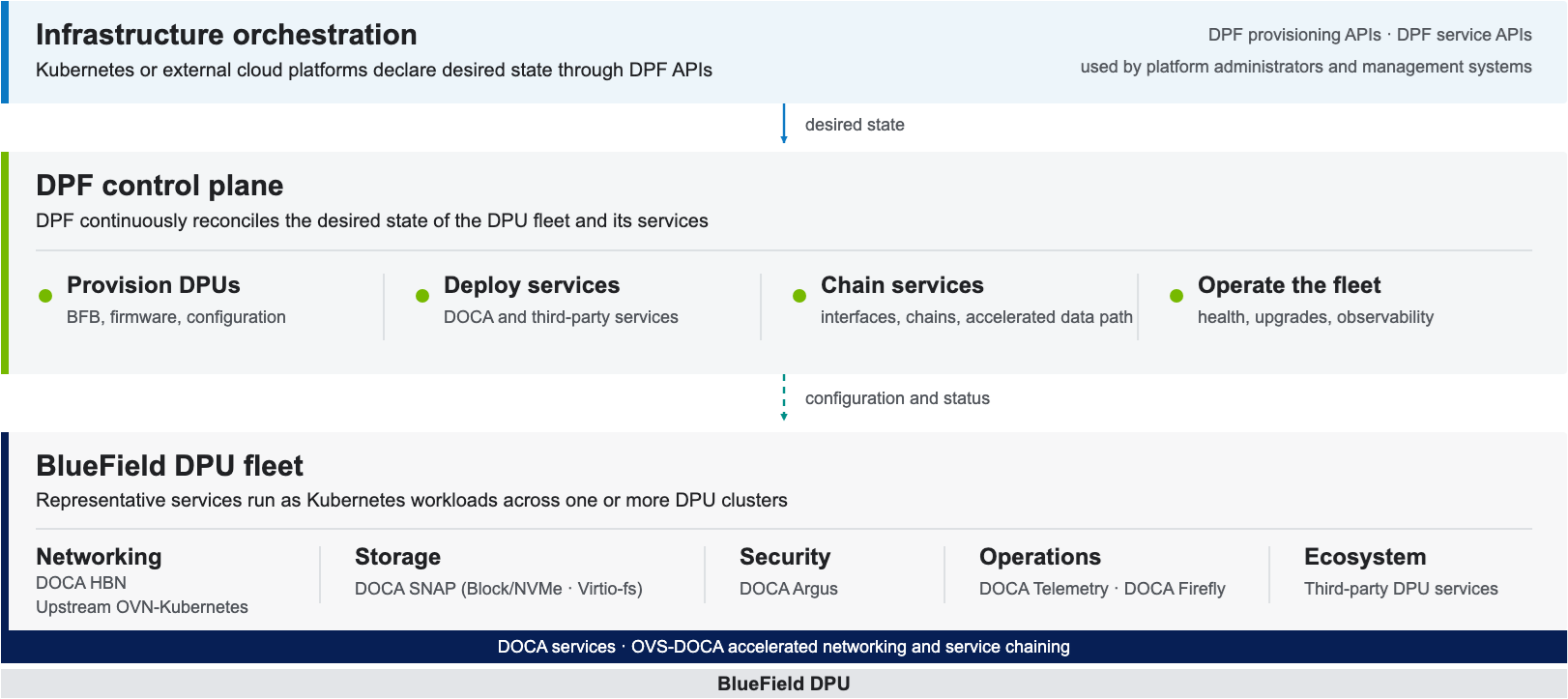
For component-level architecture and implementation details, see the current DPF documentation.
Where DPF Fits
|
Layer |
Responsibility |
|---|---|
|
Higher-Level Infrastructure Platform |
Owns applicable site, rack, host, tenant, cluster, and workload lifecycles and can declare desired DPU and service state through DPF APIs. |
|
DPF |
Provisions and manages BlueField DPUs and DPU clusters, deploys DPU services, and configures service-chain connectivity. |
|
DOCA and Compatible Third-Party Services |
Provide networking, storage, security, telemetry, and other runtime functions on BlueField. |
NVIDIA Platform Integrations
NVIDIA AI Enterprise documentation includes DPF in its Kubernetes orchestration stack for DPU operators. In an applicable NVIDIA DSX OS Zero Trust deployment, NVIDIA Infra Controller (NICo) can use DPF as the DPU provisioning strategy for selected hosts. NICo declares the required DPU and service state through DPF Kubernetes APIs. For deployment details, see DPF Setup for NICo Integration.
Deployment Models
DPF provides two deployment models. Both use Kubernetes-based DPF APIs, but they differ in the host trust boundary and the DPU management path.
|
Deployment Model |
Trust and Management Model |
DPU Management Path |
|---|---|---|
|
Host Trusted |
The host is trusted within the data center network and participates as a worker node in the infrastructure Kubernetes cluster. |
DPF provisions and manages the DPU in-band through the host. |
|
Zero Trust |
The host is untrusted relative to the data center network and remains outside the DPF management plane. The DPU acts as a security barrier between the host and the network infrastructure. |
DPF manages the DPU through its baseboard management controller (BMC) by using Redfish over a dedicated out-of-band network. DPF operates services through the DPU cluster's Kubernetes control plane. |
The following diagram compares control-plane placement and DPU management paths in Host Trusted and Zero Trust deployments.
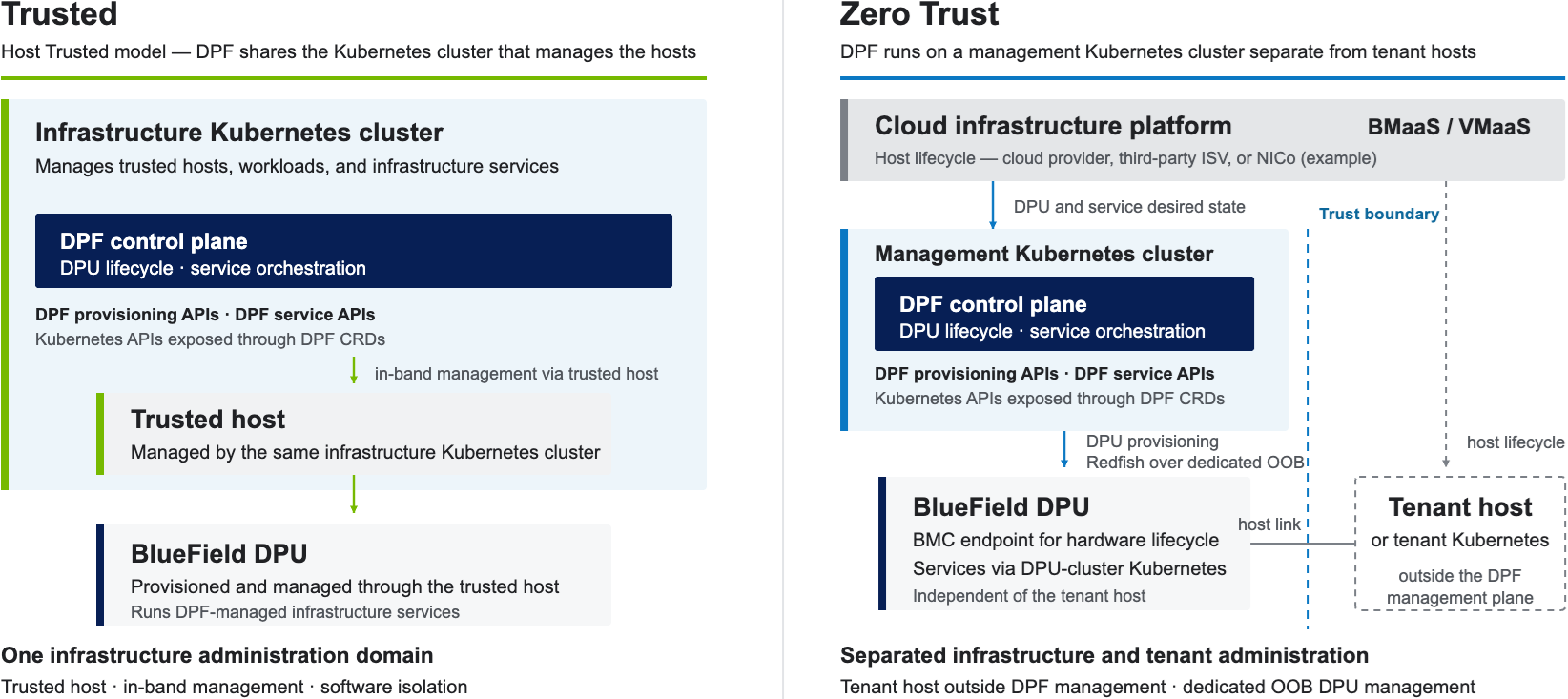
For deployment prerequisites, procedures, and security considerations, open the current DPF documentation and select Getting Started.
DPU Services
DPF deploys, configures, updates, monitors, and removes DPU services. Representative services include DOCA HBN and OVN-Kubernetes for networking, DOCA SNAP for storage, DOCA Argus for security, and DOCA Telemetry Service, DOCA BlueMan, and DOCA Firefly for operations. Service availability and compatibility vary by release. For release-specific information, see the standalone DPF documentation.
To be managed by DPF, compatible third-party applications are packaged as DPUService resources. A DPUService typically includes one or more arm64 container images, a Helm chart, and deployment configuration. A compatible third-party network service can participate in a service chain when it exposes the required DPUServiceInterface endpoints.
Service Function Chaining
Service function chaining steers traffic through an ordered set of network services on BlueField. DPUServiceInterface declares physical, host-facing, OVS patch, or service interfaces. DPUServiceChain selects the interfaces and defines their connections. DPF controllers reconcile the configuration and program the required OVS ports and flows.
The following diagram shows a conceptual egress packet path from a host workload through OVN-Kubernetes, an optional third-party packet-inspection service, and DOCA HBN to the data center fabric.
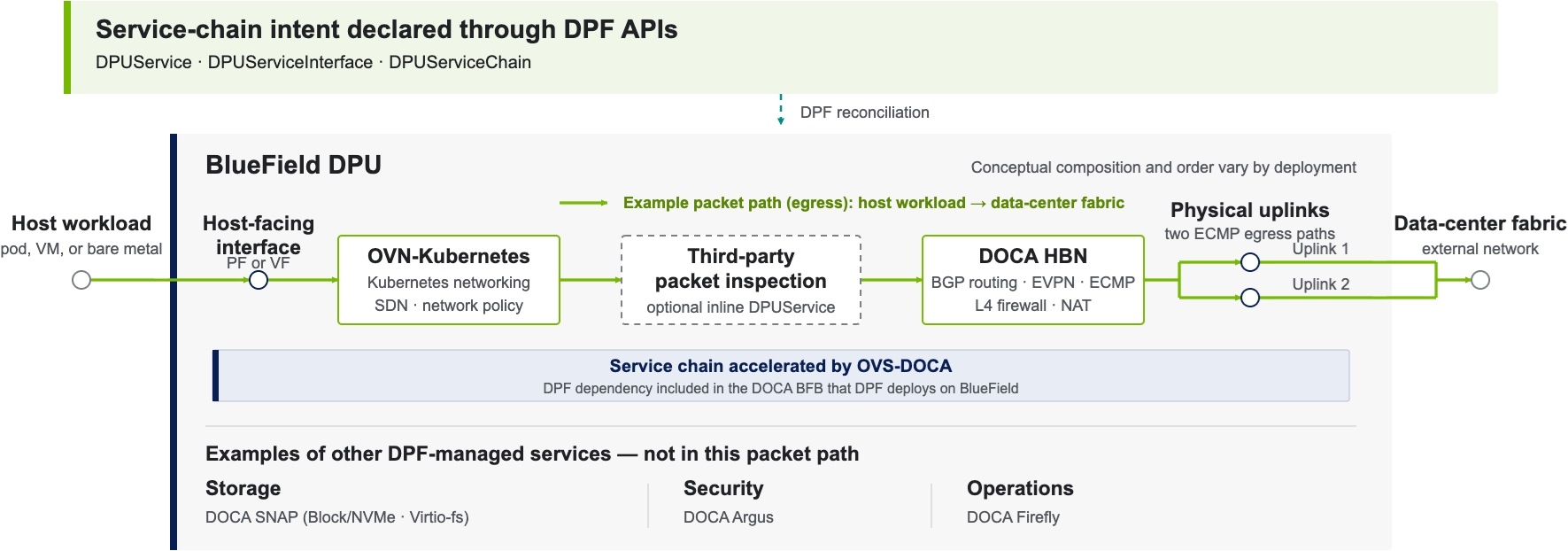
For API and implementation details, open the current DPF documentation and select DPUServiceChain.
Compatibility and Support
Current Hardware Boundary
The current DPF release supports only qualified dual-port BlueField-3 DPUs. Socket Direct configurations are not supported.
Compatibility is release-specific. In the current DPF documentation, use Platform Support to verify supported adapters, BlueField boot file (BFB) versions, firmware, NVIDIA Firmware Tools (MFT), operating systems, Kubernetes versions, Helm versions, and container runtimes. Review Release Notes for service availability, limitations, and known issues.
Validated Reference Deployments
NVIDIA Networking Solutions publishes point-in-time Reference Deployment Guides (RDGs) for validated DPF configurations. Representative scenarios include HBN networking, OVN-Kubernetes offload, SNAP storage, Argus security, Firefly time synchronization, multi-DPU deployments, and centralized DPU monitoring. Each guide defines its own bill of materials, software versions, prerequisites, and deployment procedure. See DPF Reference Deployment Guides for the current catalog.
Next Steps
|
Goal |
Resource |
|---|---|
|
Install DPF |
Current DPF Documentation — select Getting Started. |
|
Check Compatibility and Limitations |
Current DPF Documentation — select Platform Support and Release Notes. |
|
Follow a Validated Deployment |
|
|
Develop a DPU Service |
Current DPF Documentation — select DPUService Development Guide. See also the NVIDIA DPF GitHub Repository. |
|
Integrate Zero Trust DPF with NICo |
Last updated: