

dpfctl is a command-line tool designed to visualize, debug, and troubleshoot DPU resources in Kubernetes.
It simplifies debugging by extracting and presenting resource conditions in a structured, human-readable format.
It helps during provisioning and debugging of DPF by providing real-time visibility into resource states, conditions, and relationships.
For example, during DPU provisioning you can quickly identify which resources are ready, which are failing, and understand the dependency chain between components.
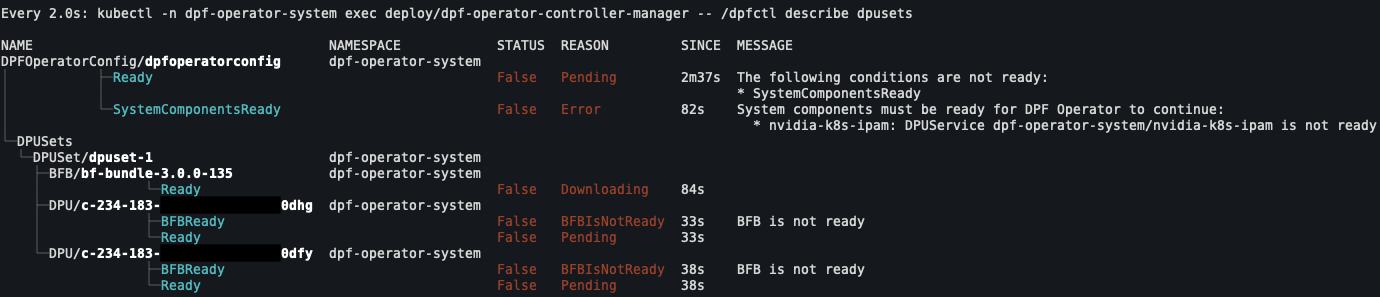
How to Run
There are 2 ways to run dpfctl:
-
Install: You can download & run
dpfctllocally on your machine -
Execute Inside Kubernetes Pod: With this way you can ensure that you are using the correct version of
dpfctlthat is compatible with the DPF Operator
Available Commands
Install
To download the latest version of dpfctl, you can find the latest version on NGC doca/dpfctl.
There are 3 different versions available for different architectures:
-
dpfctl-linux-amd64 -
dpfctl-linux-arm64 -
dpfctl-darwin-arm64
You can also download it directly from the command line (in this example we are using dpfctl-linux-amd64 with version v26.4.0):
curl -L -o /usr/local/bin/dpfctl https://api.ngc.nvidia.com/v2/resources/nvidia/doca/dpfctl/versions/v26.4.0/files/dpfctl-linux-amd64
chmod +x /usr/local/bin/dpfctl
Execute Inside Kubernetes Pod
To execute dpfctl from the running container:
kubectl -n dpf-operator-system exec deploy/dpf-operator-controller-manager -- /dpfctl describe all
Creating a Shell Alias
For convenience, you can create a shell alias to simplify your commands:
alias dpfctl="kubectl -n dpf-operator-system exec deploy/dpf-operator-controller-manager -- /dpfctl "
If you want to use watch according to man watch:
If the last character of the alias value is a blank, then the next command word following the alias is also checked for alias expansion.
To use watch with custom arguments (like -n1 for interval), add both aliases to your shell's configuration file (e.g., .bashrc, .zshrc, or .profile):
# Add to your shell's configuration file
alias dpfctl="kubectl -n dpf-operator-system exec deploy/dpf-operator-controller-manager -- /dpfctl "
alias watch="watch -c "
Kubeconfig
By default, dpfctl uses the kubeconfig file at ~/.kube/config. To use a different kubeconfig file, specify it with --kubeconfig, which is part of the global flags:
dpfctl describe all --kubeconfig /path/to/kubeconfig
Alternatively, set the KUBECONFIG environment variable:
export KUBECONFIG=/path/to/kubeconfig
dpfctl describe all
or
KUBECONFIG=/path/to/kubeconfig dpfctl describe all
Shell Completion
dpfctl supports shell completion for commands, flags, and flag values (e.g. resource kinds for --show-resources, --show-conditions, and --expand-resources).
Bash
Bash completion requires the bash-completion package (v2+) and Bash 4.1+.
# Add to ~/.bashrc
command -v dpfctl >/dev/null && source <(dpfctl completion bash)
Zsh
Zsh completion requires compinit to be enabled. If it is not already, add the following to your ~/.zshrc before the completion source line:
autoload -Uz compinit && compinit
Then add:
# Add to ~/.zshrc
command -v dpfctl >/dev/null && source <(dpfctl completion zsh)
Fish
dpfctl completion fish > ~/.config/fish/completions/dpfctl.fish
PowerShell
# Add to your PowerShell profile
dpfctl completion powershell | Out-String | Invoke-Expression
Last updated: