

Grand Master System Diagram
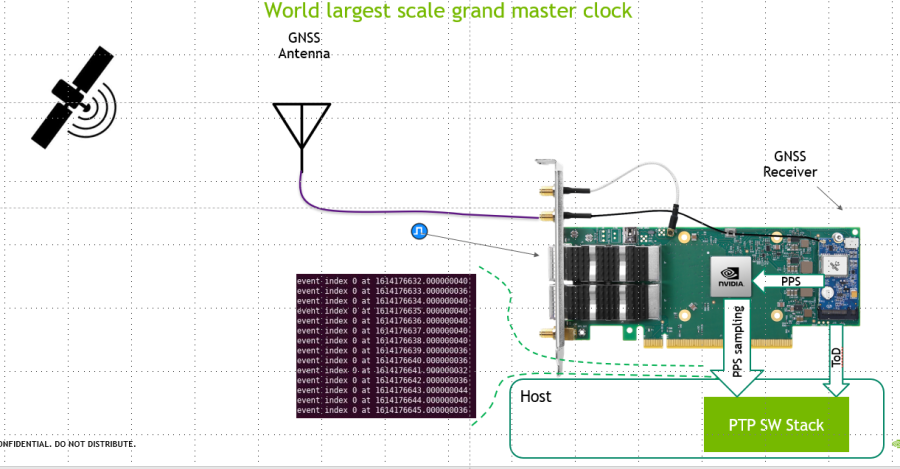
Supported cards are listed here: https://docs.nvidia.com/networking/display/ConnectX6DxEN/Introduction
If the boards are GNSS-enabled, connect the ConnectX PPS input to the GNSS module's PPS output.
-
Use the following script to identify the serial console for the GNSS receiver.
#!/bin/bash

for d in $(find /sys/bus/usb/devices/usb*/ -name dev); do
    (
        sysp="${d%/dev}"
        devname="$(udevadm info -q name -p $sysp | grep -vE '^bus')"
        [[ -z "$devname" ]] && continue
        eval "$(udevadm info -q property --export -p $sysp)"
        [[ -z "$(echo $ID_SERIAL | grep 'u-blox')" ]] && continue
        echo "$DEVNAME is a serial console for $ID_SERIAL"
    )
done
Example output:
/dev/ttyACM0 is a serial console for u-blox_AG_-_www.u-blox.com_u-blox_GNSS_receiver -
Find out the PHC device in Linux:
<find which /dev/ptpX> -
Synchronize the PHC on the card to the GNSS receiver:
ts2phc -c /dev/ptpX -s nmea --ts2phc.nmea_serialport /dev/ttyACM0 --ts2phc.pin_index 0 -l 7 -m
Leap Seconds File
ts2phc attempts to obtain the leap seconds information from the operating system. If it fails to retrieve it, the following will appear in the log:
ts2phc[52122.156]: nmea: unable to find utc time in leap second table
Thankfully, one can supply the leap seconds file to ts2phc manually. First, download the leap seconds file from International Earth Rotation and Reference Systems Service:
wget https://hpiers.obspm.fr/iers/bul/bulc/ntp/leap-seconds.list
Secondly, provide it as an argument to ts2phc:
ts2phc -c /dev/ptpX -s nmea --ts2phc.nmea_serialport /dev/ttyACM0 --ts2phc.pin_index 0 -l 7 -m --leapfile ./leap-seconds.list
Last updated: