

Interface isolation provides the ability to group interfaces in sets where traffic from each port is isolated from other interfaces in the group. The isolated interfaces in the group, however, are able to communicate with the interface marked as privileged.
Configuring Isolated Interfaces
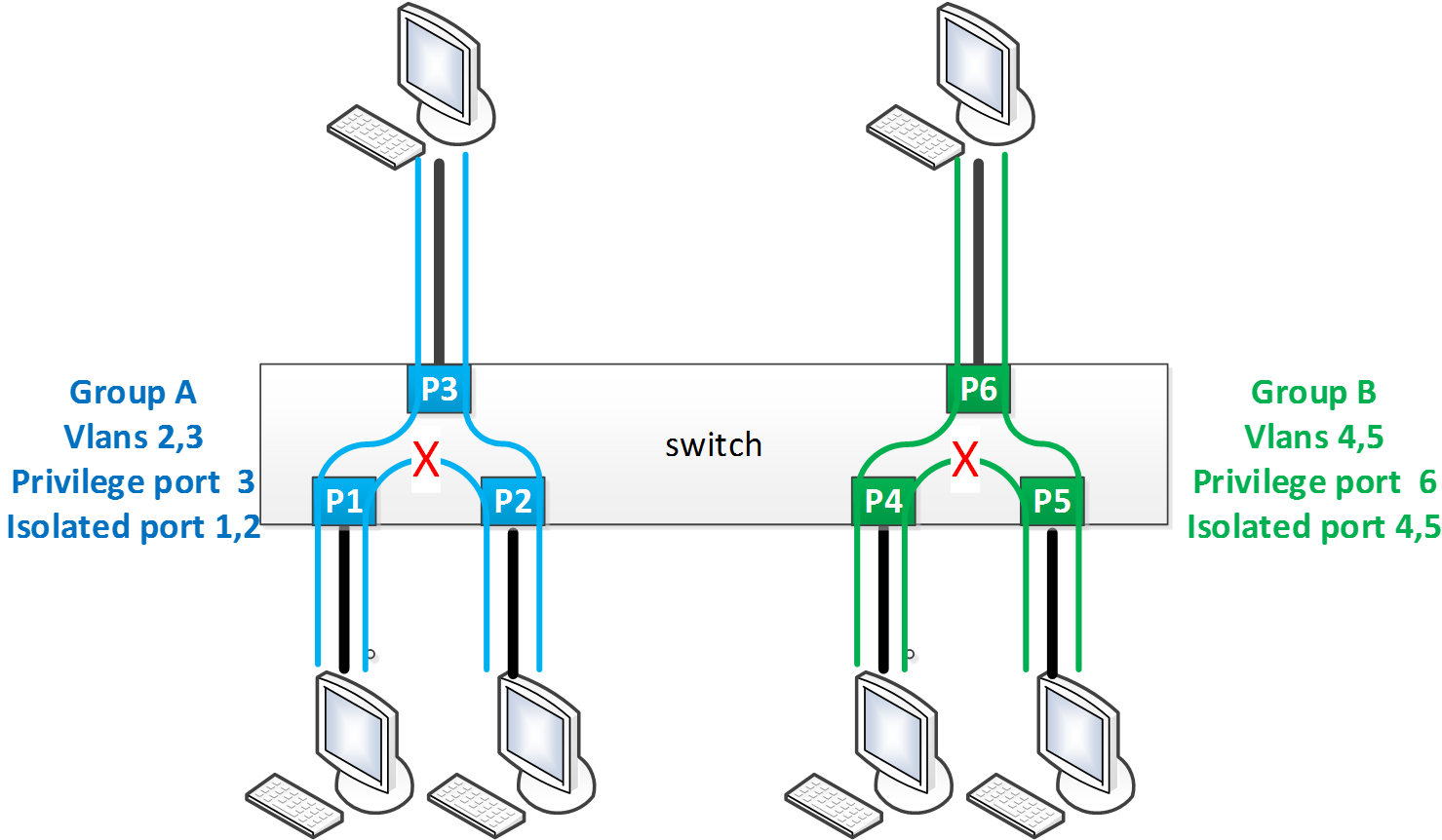
-
Create the VLANs to be used.
switch (config) # vlan 2-5
switch (config vlan 2-5) # exit
-
Unlock isolation interface protocol.
switch (config) # protocol isolation-group
-
Create isolation Group A.
switch (config) # isolation-group GroupA
-
Assign VLANs 2 and 3 to isolation Group A.
switch (config isolation-group GroupA) # vlan 2-3
switch (config isolation-group GroupA) # exit
-
Create isolation Group B.
switch (config) # isolation-group GroupB
-
Assign VLANs 4 and 5 to isolation Group B.
switch (config isolation-group GroupB) # vlan 4-5
switch (config isolation-group GroupB) # exit
-
Set Ethernet interfaces 1-3 to access for VLAN 3.
switch (config) # interface ethernet 1/1 switchport access vlan 3
switch (config) # interface ethernet 1/2 switchport access vlan 3
switch (config) # interface ethernet 1/3 switchport access vlan 3
-
Isolate Ethernet interfaces 1 and 2 and set Ethernet interfaces 3 as privileged.
switch (config) # interface ethernet 1/1-1/2 isolation-group GroupA mode isolated
switch (config) # interface ethernet 1/3 isolation-group GroupA mode privileged
-
Enable isolation Group A.
(config) # isolation-group GroupA no shutdown
-
Set Ethernet interfaces 4-6 to trunk.
switch (config) # interface ethernet 1/4 switchport mode trunk
switch (config) # interface ethernet 1/5 switchport mode trunk
switch (config) # interface ethernet 1/6 switchport mode trunk
-
Isolate Ethernet interfaces 4 and 5 and set Ethernet interfaces 6 as privileged.
switch (config) # interface ethernet 1/4-1/5 isolation-group GroupA mode isolated
switch (config) # interface ethernet 1/6 isolation-group GroupA mode privileged
-
Enable isolation Group B.
switch (config) # isolation-group GroupB no shutdown
-
Verify configuration.
switch (config) # show isolation-group
Isolation group: GroupA
State:           Enabled
VLANs:           2, 3
Privileged port: Eth1/3
Isolated ports:  Eth1/1, Eth1/2

Isolation group: GroupB
State:           Enabled
VLANs:           4, 5
Privileged port: Eth1/6
Isolated ports:  Eth1/4, Eth1/5
Interface Isolation Commands
protocol isolation-group
|
|
protocol isolation-group
Enables interface isolation and unlocks further isolation-group commands.
|
|
|
Syntax Description |
N/A |
|
|
Default |
Disabled |
|
|
Configuration Mode |
config |
|
|
History |
3.6.1002 |
|
|
Example |
switch (config) # protocol isolation-group |
|
|
Related Commands |
show isolation-group |
|
|
Notes |
|
|
isolation-group
|
|
isolation-group <name>
Creates isolation group.
|
|
|
Syntax Description |
N/A |
|
|
Default |
N/A |
|
|
Configuration Mode |
config |
|
|
History |
3.6.1002 |
|
|
Example |
switch (config) # isolation-group mygroupswitch (config isolation-group mygroup) # |
|
|
Related Commands |
protocol isolation-group
|
|
|
Notes |
|
|
shutdown
|
|
shutdown
Disables isolation group.
|
|
|
Syntax Description |
N/A |
|
|
Default |
Disabled |
|
|
Configuration Mode |
config isolation group |
|
|
History |
3.6.1002 |
|
|
Example |
switch (config isolation-group mygroup) # no shutdown |
|
|
Related Commands |
protocol isolation-group
|
|
|
Notes |
Enabling isolation groups fails if there are VLANs with ports both inside and outside the group |
|
vlan
|
|
vlan <vid>
Adds a VLAN to isolation group.
|
|
|
Syntax Description |
N/A |
|
|
Default |
N/A |
|
|
Configuration Mode |
config isolation group |
|
|
History |
3.6.1002 |
|
|
Example |
switch (config isolation-group mygroup) # vlan 10 |
|
|
Related Commands |
protocol isolation-group
|
|
|
Notes |
|
|
isolation-group mode
|
|
isolation-group <name> mode {isolated | privileged}
Adds a VLAN to isolation group.
|
|
|
Syntax Description |
name |
The isolation group name |
|
isolated |
Configures this interface as isolated |
|
|
privileged |
Configures this interface as privileged |
|
|
Default |
N/A |
|
|
Configuration Mode |
config interface ethernet
|
|
|
History |
3.6.1002 |
|
|
Example |
switch (config interface ethernet 1/2) # isolation-group mygroup mode privileged |
|
|
Related Commands |
protocol isolation-group
|
|
|
Notes |
|
|
show isolation-group
|
|
show isolation-group <name> Displays isolation group information. |
|
|
Syntax Description |
N/A |
|
|
Default |
N/A |
|
|
Configuration Mode |
Any command mode |
|
|
History |
3.6.1002 |
|
|
3.6.5000 |
Updated Example |
|
|
Example |
switch (config) # show isolation-group mygroupIsolation group 1: State: Disabled VLANs: N/A Privileged port: N/A Isolated ports: N/A |
|
|
Related Commands |
|
|
|
Notes |
|
|
Last updated: