

Overview
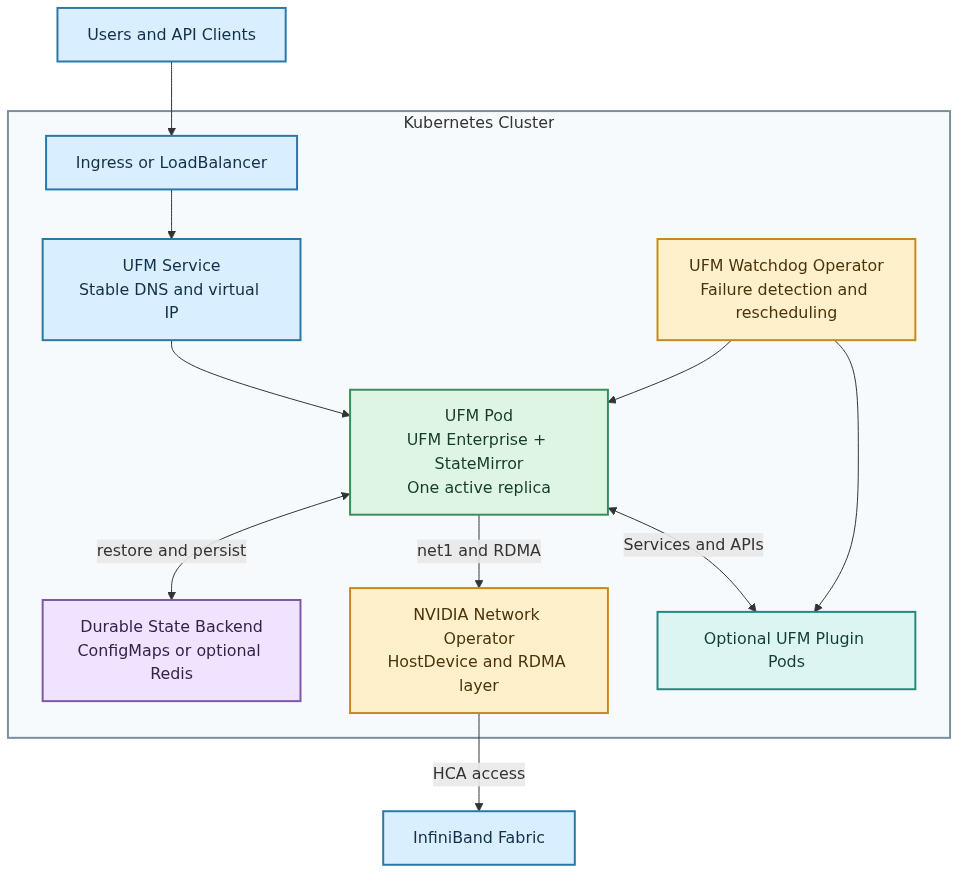
NVIDIA UFM Enterprise can run as a Kubernetes workload installed and managed with Helm. Kubernetes provides scheduling, service discovery, health probes, and pod recovery while UFM retains a single-active-instance model.
The UFM Enterprise Helm chart deploys:
-
One UFM Deployment with one active UFM pod.
-
A
ClusterIPService by default and an optional Ingress. -
A
HostDeviceNetworkattachment that gives the UFM pod an InfiniBandnet1interface through Multus and the NVIDIA Network Operator. -
An RDMA shared-device allocation that grants access to
/dev/infiniband/*. -
StateMirrorrestore and runtime sidecar containers, which support durable UFM state without a shared PVC. -
The UFM Watchdog Operator, enabled by default, for node-level failure detection and pod migration.
-
ConfigMaps, license and TLS Secret references, and least-privilege StateMirror RBAC.
UFM plugins are deployed separately with the UFM Plugins Helm chart. Each plugin runs in its own Kubernetes Deployment and communicates with UFM through a Kubernetes Service and the plugins.yaml ConfigMap.
Deployment characteristics
-
UFM always runs as one active pod. Active-active UFM replicas are not supported.
-
The UFM Deployment uses the
Recreatestrategy. -
The supported storage mode is StateMirror with a pod-local
emptyDir; no PVC or StorageClass is required. -
The Watchdog Operator can move UFM away from an unhealthy node.
-
The UFM Service retains a stable DNS name and virtual IP across pod replacements. During failover, service is temporarily unavailable until the replacement UFM pod becomes ready.
-
Automatic failover has service downtime while Kubernetes schedules the replacement pod, StateMirror restores state, and UFM initializes.
UFM Kubernetes Architecture
Deployment Models and High Availability
Single-node deployment
A single-node deployment is suitable for development or environments that do not require worker-node failure recovery.
-
UFM replicas:
1. -
Set
watchdog.replicas=1. -
StateMirror protects classified UFM state from normal pod recreation, but UFM is unavailable when the only worker node is unavailable.
-
A single-node Kubernetes control plane and ConfigMap backend do not constitute an HA platform.
Multi-node deployment with automatic recovery
For automatic UFM recovery after a worker-node failure:
-
Provide at least two schedulable UFM-capable worker nodes.
-
Every UFM-capable node must have a supported HCA connection, host drivers, Multus and host-device CNI,
nvidia.com/hostdev, andrdma/hca_shared. -
Make the UFM and StateMirror images available on every UFM-capable node.
-
Run two Watchdog replicas on different Kubernetes nodes.
-
Ensure node selectors, taints, tolerations, and affinity rules leave at least two eligible UFM nodes.
-
Use a highly available Kubernetes control plane.
-
Use customer-managed Redis/Valkey with Sentinel when the StateMirror data exceeds the ConfigMap backend limits or requires independent backend HA.
UFM itself remains a single replica. Do not scale the UFM Deployment above one.
Automatic failover sequence
-
UFM reports a critical failover condition, or repeated process restarts reach the configured Watchdog threshold.
-
The active Watchdog replica labels the current node
ufm.nvidia.com/unhealthy=true. -
The Watchdog deletes the failing UFM pod.
-
The Deployment creates a replacement pod. UFM node affinity excludes the labeled node.
-
The installer seeds the replacement pod's
emptyDir. -
StateMirror restores classified UFM state from ConfigMaps or Redis/Valkey.
-
The StateMirror sidecar completes its initial scan and becomes ready.
-
UFM starts, and the Kubernetes Service routes traffic to the replacement pod.
This is restart-and-restore recovery, not zero-downtime active-active UFM.
Supported Environments
Kubernetes Version
UFM on Kubernetes requires Kubernetes 1.28 or later. The Helm chart enforces Kubernetes >=1.28.0 because StateMirror uses native sidecar containers. This deployment flow was validated with NVIDIA Network Operator v25.7.0.
Node Operating Systems
UFM on Kubernetes supports the same operating systems as UFM Enterprise. See the Installation Notes for the complete list of supported operating systems.
Hardware Requirements
UFM on Kubernetes has the same hardware requirements as UFM Enterprise. See the Installation Notes for detailed specifications.
Kubernetes Node Requirements
Every node eligible to run the UFM pod must:
-
Meet the UFM Enterprise CPU, memory, and disk requirements for the managed fabric.
-
Have a supported NVIDIA/Mellanox HCA connected to the target InfiniBand fabric.
-
Have the supported host OFED/DOCA driver stack, unless the Network Operator is configured to deploy the driver.
-
Expose
nvidia.com/hostdevandrdma/hca_shared. -
Have enough Linux inotify capacity for StateMirror.
-
Have access to the UFM and StateMirror images.
-
Not run a host OpenSM or host UFM process that manages the same HCA port.
For automatic node recovery, at least two nodes must satisfy all these requirements.
Note - Linux inotify (StateMirror):
StateMirror uses inotify to watch classified UFM paths. If instance or watch capacity is too low, the StateMirror sidecar stays unready and UFM does not start.
On every UFM-capable node, check:
sysctl fs.inotify.max_user_instances
sysctl fs.inotify.max_user_watches
sysctl fs.inotify.max_queued_events
Sizing guidance:
-
fs.inotify.max_user_instances: size for all pods and host processes that use inotify on the node. -
fs.inotify.max_user_watches: size for classified parent directories, all subdirectories under recursive classifier entries, expected growth, and operational headroom. -
fs.inotify.max_queued_events: size for the expected peak filesystem-event burst across classified paths during the longest anticipated StateMirror processing or backend delay, plus operational headroom.
Configure these host-level settings on every node where UFM can be scheduled, and persist them across reboot using the site OS configuration method.
Prerequisites
Before deploying UFM Enterprise on Kubernetes, ensure the following requirements are met:
Kubernetes Cluster
-
Supported Kubernetes cluster version: Kubernetes 1.28 or later.
-
kubectlconfigured with cluster access -
Cluster admin permissions for installation
Helm
Helm 3.x installed on the management workstation:
helm version
# Expected: version.BuildInfo{Version:"v3.14.0", GitCommit:"3fc9f4b2638e76f26739cd77c7017139be81d0ea", GitTreeState:"clean", GoVersion:"go1.21.5"}
Release Artifacts and Container Images
Obtain mutually compatible artifacts from the same UFM release:
-
UFM Enterprise Helm package.
-
UFM Enterprise container image.
-
UFM Watchdog Operator container image.
-
UFM StateMirror container image.
-
Optional UFM Plugins Helm package.
-
Optional plugin container images.
Do not assume that the StateMirror version equals the UFM version. Set stateMirror.image.repository and stateMirror.image.tag to the exact image delivered for the release unless the packaged chart already contains that mapping. The Watchdog image tag normally matches the UFM chart appVersion.
For registry-based installations:
-
Configure the exact image repositories and tags in the values file.
-
Set the required pull policy.
-
Create registry credentials in the UFM namespace when authentication is required.
For air-gapped installations or pullPolicy: Never:
-
Load the UFM and StateMirror images on every UFM-capable node.
-
Load the Watchdog image on every node where a Watchdog replica can run.
-
Load each plugin image on every node where that plugin can run.
-
Verify that each imported image repository and tag exactly match the Helm values.
For air-gapped clusters or pullPolicy: Never, import every required image on every eligible node before installing the chart. Image repository and tag values in ufm-values.yaml must match the imported names exactly.
Containerd example (ctr 1.x; adjust for your runtime):
# UFM Enterprise
gunzip -c ufm_<version>.ubuntu24.x86_64-docker.img.gz \
  | sudo ctr -n k8s.io images import -

# StateMirror
gunzip -c ufm-state-mirror_<version>.x86_64-docker.img.gz \
  | sudo ctr -n k8s.io images import -

# Watchdog Operator
gunzip -c ufm-watchdog_<version>.x86_64-docker.img.gz \
  | sudo ctr -n k8s.io images import -
Docker runtime example:
gunzip -c ufm_<version>.ubuntu24.x86_64-docker.img.gz | sudo docker load
gunzip -c ufm-state-mirror_<version>.x86_64-docker.img.gz | sudo docker load
gunzip -c ufm-watchdog_<version>.x86_64-docker.img.gz | sudo docker load
Verify imported tags before Helm install:
sudo ctr -n k8s.io images ls | grep -E 'ufm|state-mirror|watchdog'
# or: sudo docker images | grep -E 'ufm|state-mirror|watchdog'
Do not assume that the StateMirror image tag equals the UFM image tag. Set stateMirror.image.repository and stateMirror.image.tag to the exact release artifact names.
Storage
-
The default deployment uses
storage.mode=statemirrorand does not require a PVC or StorageClass./opt/ufm/filesuses a pod-localemptyDir, while the StateMirror containers persist selected runtime state to a durable ConfigMap or Redis backend.
The UFM StateMirror image must be available to the cluster. -
A ReadWriteMany StorageClass is required only for the legacy, unsupported storage.mode=pvc fallback.
-
stateMirror.backend=configmap is the default and needs no external storage service.
-
stateMirror.backend=redis requires customer-supplied Redis.
-
The ConfigMap backend has the Kubernetes object-size limitation; larger state should use Redis.
NVIDIA Network Operator (Required)
UFM cannot function without access to InfiniBand devices. The NVIDIA Network Operator must be installed and configured before installing the UFM Helm chart.
-
Install Network Operator:
helm repo add nvidia https://helm.ngc.nvidia.com/nvidia
helm repo update

helm install network-operator nvidia/network-operator \
  --namespace nvidia-network-operator \
  --create-namespace \
  --version 25.7.0 \
  --set nfd.enabled=true \
  --set ofedDriver.deploy=false \
  --set sriovDevicePlugin.deploy=true \
  --set secondaryNetwork.deploy=true \
  --set secondaryNetwork.multus.deploy=true \
  --wait --timeout 5m
Note: Set ofedDriver.deploy=false if OFED/DOCA drivers are already installed on the host.
-
Create NicClusterPolicy:
The sriovDevicePlugin must be enabled so the nodes expose nvidia.com/hostdev. The rdmaSharedDevicePlugin must be enabled to expose rdma/hca_shared, which is required for OpenSM to access InfiniBand character devices.
kubectl apply -f - <<EOF
apiVersion: mellanox.com/v1alpha1
kind: NicClusterPolicy
metadata:
  name: nic-cluster-policy
spec:
  secondaryNetwork:
    multus:
      image: multus-cni
      repository: ghcr.io/k8snetworkplumbingwg
      version: v4.1.0
    cniPlugins:
      image: plugins
      repository: nvcr.io/nvidia/mellanox
      version: network-operator-v25.7.0
  sriovDevicePlugin:
    image: sriov-network-device-plugin
    repository: nvcr.io/nvidia/mellanox
    version: network-operator-v25.7.0
    config: |
      {
        "resourceList": [
          {
            "resourcePrefix": "nvidia.com",
            "resourceName": "hostdev",
            "selectors": {
              "vendors": ["15b3"],
              "devices": [],
              "drivers": [],
              "pfNames": [],
              "pciAddresses": [],
              "rootDevices": [],
              "linkTypes": ["infiniband"],
              "isRdma": true
            }
          }
        ]
      }
  rdmaSharedDevicePlugin:
    image: k8s-rdma-shared-dev-plugin
    repository: nvcr.io/nvidia/mellanox
    version: network-operator-v25.7.0
    config: |
      {
        "configList": [
          {
            "resourceName": "hca_shared",
            "rdmaHcaMax": 1000,
            "devices": ["all"]
          }
        ]
      }
EOF
The linkTypes selector is case-sensitive. Use infiniband in lowercase. An empty selector can expose both InfiniBand and Ethernet ports on mixed-mode hosts, which may cause UFM to receive a non-InfiniBand net1 interface.
On hosts with multiple HCAs, restrict the device-plugin selectors to the adapters intended for UFM by setting pfNames, rootDevices, or pciAddresses. Avoid exposing every NVIDIA/Mellanox adapter on mixed-purpose hosts.
Wait for the policy to be ready:
kubectl get nicclusterpolicy -o jsonpath='{.items[0].status.state}'
# Expected: ready
-
Verify resources are available:
kubectl get nodes -o custom-columns=NAME:.metadata.name,HOSTDEV:.status.allocatable.nvidia\.com/hostdev,RDMA:.status.allocatable.rdma/hca_shared
# Expected: both nvidia.com/hostdev and rdma/hca_shared should appear on the target nodes
Note: 15b3 is the NVIDIA/Mellanox PCI vendor ID.
UFM License
-
Valid UFM Enterprise license file
Installation
Step 1: Select the Storage Mode
UFM uses storage.mode as the single selector between the available storage implementations:
-
statemirror— supported default; usesemptyDirwith StateMirror and does not require a PVC. -
pvc— legacy, unsupported fallback requiring a ReadWriteMany claim.
When storage.mode=statemirror, stateMirror.backend selects the durable StateMirror backend:
-
configmap— default; no external storage service. -
redis— customer-supplied Redis.
storage:
  mode: statemirror

stateMirror:
  backend: configmap
Optional: Shared PVC Mode
Use shared PVC mode only when:
-
The installed UFM release supports PVC deployment.
-
UFM or an installed plugin requires live shared filesystem access.
-
The cluster provides a
ReadWriteManyvolume accessible from every node where UFM or the plugin can run.
In PVC mode:
-
/opt/ufm/filesis mounted from the shared PVC. -
The StateMirror restore container and runtime sidecar are not deployed.
-
Data retention depends on the PersistentVolume and StorageClass reclaim policies.
-
Any plugin that needs the shared UFM filesystem must also use
ufmFiles.mode=pvcand mount the same claim.
Use an existing PVC
The claim must already exist in the UFM namespace and support ReadWriteMany.
Add the following to ufm-values.yaml:
storage:
  mode: pvc
  existingClaim: <shared-rwx-claim>
If plugins require the same filesystem, add the following to plugin-values.yaml:
ufmFiles:
  mode: pvc
  existingClaim: <shared-rwx-claim>
After completing Step 2, verify the claim before installing UFM:
kubectl get pvc <shared-rwx-claim> -n "$NS"
kubectl describe pvc <shared-rwx-claim> -n "$NS"
The claim must report Bound and include the ReadWriteMany access mode.
Create a PVC through the UFM chart
To let the chart request a new PVC, leave existingClaim empty and configure an RWX-capable StorageClass:
storage:
  mode: pvc
  existingClaim: ""
  className: <rwx-storage-class>
  size: 10Gi
  accessMode: ReadWriteMany
The chart creates <ufmFullname>-files in the UFM namespace. Verify it after installation and after discovering $UFM_DEPLOYMENT:
kubectl get pvc -n "$NS"
kubectl describe pvc "${UFM_DEPLOYMENT}-files" -n "$NS"
Do not switch an existing deployment between PVC and StateMirror by changing only Helm values. The chart does not migrate data between a PVC and the StateMirror backend.
storage.mode is the single storage-mode selector. stateMirror.backend is a subordinate StateMirror setting, not a second storage-mode selector.
Step 2: Create Namespace and Provide the UFM License
Create the namespace before installing UFM. The chart value namespace.name must match the namespace passed to Helm with --namespace.
export NS=ufm-enterprise

# Create the namespace
kubectl create namespace "$NS"
If the namespace already exists, do not recreate it.
Choose one of the following license methods. Do not configure both methods for the same installation.
Option A: License ConfigMap
Create a ConfigMap containing the UFM license file:
# Create the license ConfigMap
kubectl create configmap ufm-license \
  --from-file=<license-filename>.lic=/path/to/your/<license-filename>.lic \
  -n "$NS"
Reference it in the UFM values file:
license:
  existingConfigMap: ufm-license
Verify that the ConfigMap exists:
kubectl get configmap ufm-license -n "$NS"
Option B: License Secret
When organizational policy requires the license to be stored as a Secret, create a generic Secret instead:
kubectl create secret generic ufm-license \
  --from-file=<license-filename>.lic=/path/to/your/<license-filename>.lic \
  -n "$NS"
Reference it in the UFM values file:
license:
  existingSecret: ufm-license
Verify that the Secret exists without displaying its contents:
kubectl get secret ufm-license -n "$NS"
The license object and the UFM release must be in the same namespace.
Step 3: Install UFM with Helm
The Helm artifact contains the chart's default values.yaml. Do not modify or repackage the artifact. First inspect its chart metadata and default values:
export UFM_CHART=<ufm-enterprise-chart.tgz>

helm show chart "$UFM_CHART"
helm show values "$UFM_CHART" > ufm-default-values.yaml
Use ufm-default-values.yaml as a read-only reference. Create a separate ufm-values.yaml containing the required and environment-specific overrides. Helm merges this file over the defaults packaged in the chart.
The following is an override-file example. Replace all placeholders with the exact image repositories and tags delivered for the release:
namespace:
  name: ufm-enterprise

image:
  repository: <registry>/ufm-enterprise
  tag: <ufm-image-tag>
  pullPolicy: IfNotPresent

storage:
  mode: statemirror

stateMirror:
  backend: configmap
  image:
    repository: <registry>/ufm-state-mirror
    tag: <state-mirror-image-tag>
    pullPolicy: IfNotPresent

watchdog:
  enabled: true
  image:
    repository: <registry>/ufm-enterprise-watchdog
    tag: <watchdog-image-tag>
  replicas: 2

license:
  existingSecret: ufm-license

resources:
  requests:
    cpu: "2"
    memory: 4Gi
This example uses the license Secret from Step 2. If a license ConfigMap was created instead, replace the license block with:
license:
  existingConfigMap: ufm-license
StateMirror Configuration Examples
The following fragments are examples for ufm-values.yaml. Merge one backend configuration into the main override file; do not pass these as replacements for the complete file.
Example A: ConfigMap backend (default)
The ConfigMap backend requires no external storage service:
storage:
  mode: statemirror

stateMirror:
  backend: configmap
  image:
    repository: <registry>/ufm-state-mirror
    tag: <state-mirror-image-tag>
    pullPolicy: IfNotPresent
The chart creates the required StateMirror ServiceAccount and namespace-scoped ConfigMap RBAC.
Example B: Direct Redis/Valkey endpoint
Use a direct endpoint only when Redis backend failover is not required:
storage:
  mode: statemirror

stateMirror:
  backend: redis

redis:
  external:
    host: <redis-host>
    port: 6379
    existingSecret: ufm-redis-auth
    existingSecretPasswordKey: redis-password
Create the referenced Secret before installing UFM:
kubectl create secret generic ufm-redis-auth \
  --from-literal=redis-password='<redis-password>' \
  -n "$NS"
Avoid placing Redis passwords directly in ufm-values.yaml.
Example C: Redis Sentinel with TLS
For a production HA backend, use a writable primary, at least one replica, and three Sentinel instances distributed across failure domains:
storage:
  mode: statemirror

stateMirror:
  backend: redis

redis:
  external:
    sentinelHosts:
      - redis-sentinel-0.redis.svc:26379
      - redis-sentinel-1.redis.svc:26379
      - redis-sentinel-2.redis.svc:26379
    masterName: ufmmaster
    existingSecret: ufm-redis-auth
    existingSecretPasswordKey: redis-password
    existingSentinelSecret: ufm-redis-sentinel-auth
    existingSentinelSecretPasswordKey: redis-password
  tls:
    enabled: true
    existingSecret: ufm-redis-tls
The referenced Secrets must already exist in the UFM namespace:
-
ufm-redis-auth: Redis data-tier password. -
ufm-redis-sentinel-auth: Sentinel password, when Sentinel authentication is enabled. -
ufm-redis-tls: TLS material containing at leastca.crt.
The UFM chart does not deploy or operate Redis/Valkey. The customer is responsible for its capacity, availability, authentication, TLS, persistence, backup, and disaster recovery.
Example D: Enable StateMirror monitoring
When the Prometheus Operator CRDs are installed, add:
stateMirror:
  metrics:
    serviceMonitor:
      enabled: true
    prometheusRule:
      enabled: true
prometheusRule.enabled=true requires serviceMonitor.enabled=true.
For a single-node cluster, change the Watchdog replica value in ufm-values.yaml to:
watchdog:
  replicas: 1
Install the chart:
export NS=ufm-enterprise
export UFM_RELEASE=ufm-enterprise

helm upgrade --install "$UFM_RELEASE" "$UFM_CHART" \
  --namespace "$NS" \
  -f ufm-values.yaml \
  --wait \
  --timeout 15m
The UFM image version must be equal to or newer than the chart appVersion. Keep versionCheckEnabled=true unless NVIDIA Support directs otherwise.
Note: The chart-delivered gv.cfg defaults Server.fabric_interface to net1, matching the interface provided by HostDeviceNetwork. To change this or another gv.cfg setting, supply a complete gv.cfg through configFiles during Helm installation or upgrade.
Step 4: Discover UFM resource names
The generated UFM resource fullname depends on the Helm release name:
-
Release
ufm-enterprisenormally produces fullnameufm-enterprise. -
Release
ufmnormally produces fullnameufm-ufm-enterprise.
Discover the Deployment instead of hard-coding it:
export UFM_SELECTOR="app.kubernetes.io/name=ufm-enterprise,app.kubernetes.io/instance=${UFM_RELEASE}"
export UFM_DEPLOYMENT="$(
  kubectl get deployment -n "$NS" -l "$UFM_SELECTOR" \
    -o jsonpath='{.items[0].metadata.name}'
)"
test -n "$UFM_DEPLOYMENT"
echo "$UFM_DEPLOYMENT"
Use $UFM_DEPLOYMENT as the ufmFullname value for the UFM Plugins Helm chart.
Step 5: Verify Installation
Watch the UFM and Watchdog pods:
kubectl get pods -n "$NS" -o wide -w
During startup, the UFM pod runs:
-
ufm-installer. -
state-mirror-restore. -
The native
state-mirrorsidecar. -
The
ufm-enterprisecontainer.
Intermediate init-container and readiness counts can vary. The final StateMirror-enabled UFM pod normally reports 2/2 Running.
Verify the UFM Deployment and StateMirror:
kubectl rollout status deployment/"$UFM_DEPLOYMENT" \
  -n "$NS" --timeout=15m

export UFM_POD="$(
  kubectl get pod -n "$NS" -l "$UFM_SELECTOR" \
    -o jsonpath='{.items[0].metadata.name}'
)"

kubectl logs -n "$NS" "$UFM_POD" -c ufm-installer
kubectl logs -n "$NS" "$UFM_POD" -c state-mirror-restore
kubectl logs -n "$NS" "$UFM_POD" -c state-mirror --tail=100
Verify the secondary network:
kubectl get hostdevicenetwork ufm-hostdevice
kubectl get network-attachment-definition -n "$NS" ufm-hostdevice
kubectl exec -n "$NS" "$UFM_POD" -c ufm-enterprise -- \
  ip -d link show net1
net1 must report link/infiniband.
Configuration Reference
Chart configuration is supplied through Helm values, values files, and --set-file.
UFM application settings contained in gv.cfg are managed by supplying the complete file through configFiles; they are not exposed as individual Helm values.
Namespace Configuration
|
Parameter |
Description |
Default |
|---|---|---|
|
|
Create the namespace |
|
|
|
Namespace name |
|
Image Configuration
|
Parameter |
Description |
Default |
|---|---|---|
|
|
Image repository |
|
|
|
Image tag |
|
|
|
Image pull policy (REQUIRED) |
— |
|
|
Image pull secrets for private registries |
|
|
|
Check that UFM image version >= Helm chart appVersion at startup. Fails the init container with a clear error if the image is older than the chart. |
|
Note: image.pullPolicy must be set to one of: Never, IfNotPresent, or Always.
UFM Configuration
|
Parameter |
Description |
Default |
|---|---|---|
|
|
Apache HTTP port |
|
|
|
Apache HTTPS port |
|
HostDevice Network Configuration
UFM requires a valid InfiniBand fabric interface inside the pod. The interface is provided by the NVIDIA Network Operator HostDeviceNetwork. The pod gets a net1 interface which is a link/infiniband interface (no IP address). UFM uses fabric_interface = net1.
|
Parameter |
Description |
Default |
|---|---|---|
|
|
Create the HostDeviceNetwork resource as part of chart install |
|
|
|
Name of the HostDeviceNetwork resource |
|
|
|
Resource name referenced by the HostDeviceNetwork |
|
|
|
Device-plugin resource requested by the pod |
|
|
|
Number of host-device resources per container |
|
Set hostDevice.createNetwork=false if you want to reference a pre-created HostDeviceNetwork instead of letting the chart create it.
RDMA Configuration
The RDMA shared device plugin grants cgroup-level access to /dev/infiniband/* character devices. This is required for OpenSM to function. The HostDevice resource alone makes device files visible but does not grant the necessary cgroup permissions.
|
Parameter |
Description |
Default |
|---|---|---|
|
|
RDMA device plugin resource name |
|
|
|
Number of RDMA resources to request per container |
|
Storage Configuration
The storage.mode value is the single storage selector. Set it to statemirror for the supported no-PVC deployment or pvc for the legacy fallback. The stateMirror.* settings are used only when storage.mode=statemirror, while the PVC-specific storage settings are used only when storage.mode=pvc.
|
Parameter |
Description |
Default |
|---|---|---|
|
|
statemirror or legacy pvc fallback |
|
|
|
Existing PVC used only with |
|
|
|
StorageClass used only by PVC mode when no existing claim is supplied |
— |
|
|
Requested PVC size in PVC mode |
|
|
|
PVC access mode |
|
|
|
Durable backend: configmap or redis |
|
|
|
StateMirror image repository |
|
|
|
Empty means chart appVersion |
|
|
|
StateMirror image pull policy |
|
|
|
Size limit for /opt/ufm/files |
|
|
|
Optional classifier override |
|
|
|
Classifier mount directory |
|
|
|
Runtime sidecar UID |
|
|
|
Maximum pending-delete queue size |
|
|
|
Delay before StateMirror |
|
|
|
Interval between StateMirror |
|
|
|
Timeout for each StateMirror |
|
|
|
Failures allowed before restarting the sidecar. Startup budget = |
|
|
|
Delay before StateMirror |
|
|
|
Interval between StateMirror |
|
|
|
Timeout for each StateMirror |
|
|
|
Failures before restarting the runtime sidecar |
|
Note: stateMirror.startupProbe.* controls the StateMirror native sidecar, not the main UFM container probes documented under Startup Probe Configuration. /ready becomes successful only after the initial full scan completes (hash every classified file and snapshot every SQLite database). On large fabrics, increase stateMirror.startupProbe.periodSeconds and/or stateMirror.startupProbe.failureThreshold so the sidecar is not restarted mid-scan. UFM application containers do not start until this probe succeeds.
Warning: A regular Helm upgrade from a PVC-based release to the new default does not import data from the old PVC. The pod starts with a new emptyDir and restores only from the configured StateMirror backend.
Before upgrading, select one of these approaches:
-
-
Continue temporarily with the existing PVC:
Bash--set storage.mode=pvc \ --set storage.existingClaim=<existing-claim> -
Migrate to StateMirror by populating the selected StateMirror backend from the existing PVC before changing to
storage.mode=statemirror.
-
Do not treat an empty StateMirror backend as a migration of the old PVC.
This migration guidance applies only to PVC-based releases for which an in-place Kubernetes upgrade is supported. Upgrade from UFM 6.24.2 remains unsupported and requires a fresh installation.
StateMirror Architecture and Limitations
StateMirror enables UFM to run without a shared ReadWriteMany PVC. In storage.mode=statemirror, /opt/ufm/files is backed by a pod-local emptyDir.
Startup flow:
-
ufm-installerinstalls the image defaults and Helm-managed configuration, includinggv.cfg. -
state-mirror-restorerestores classified runtime state from the configured backend. -
The
state-mirrornative sidecar monitors classified files and persists changes to the backend. -
UFM starts after the StateMirror sidecar completes its initial scan and becomes ready.
Backend comparison:
|
Backend |
Advantages |
Limitations |
|---|---|---|
|
|
Default; no external service; chart creates the required RBAC. |
Each mirrored object has approximately 700 KiB of usable raw capacity after encoding and Kubernetes object overhead. |
|
|
Supports larger files and databases; Redis Sentinel HA is supported. |
Redis must be supplied and operated by the customer. |
StateMirror Classifier
The StateMirror classifier defines which UFM runtime paths are durable and how each path is copied to and restored from the selected backend.
The StateMirror image is consumer-agnostic and does not contain the UFM classifier. The UFM Helm chart supplies the release-specific classifier as a ConfigMap whose state_mirror.yaml key is mounted into the StateMirror restore and runtime containers.
The chart-delivered classifier in k8s/helm/ufm-enterprise/files/state_mirror.yaml is the authoritative default file list for the UFM release. The example classifier in the public SDK repository documents the format but is not the authoritative UFM file list.
Classifier Handler Types
|
Handler |
Use |
Required storage field |
Change detection |
|---|---|---|---|
|
|
A single file written directly, such as a JSON, CSV, or configuration file. |
|
Filesystem events, with periodic reconciliation |
|
|
A single file written by creating a temporary file and renaming it over the destination. |
|
Rename/move events, with periodic reconciliation |
|
|
A directory whose child files are stored as separate backend objects. |
|
Filesystem events; set |
|
|
A live SQLite database requiring a consistent online-backup snapshot. |
|
Periodic change polling using |
The logical field names redis_key and redis_key_prefix are used with both StateMirror backends. The selected backend is global for the deployment; backend selection is not configured per classifier entry.
Common classifier fields
|
Field |
Description |
|---|---|
|
|
Absolute path under the UFM files tree. |
|
|
One of |
|
|
Unique logical backend key for non-directory handlers. |
|
|
Unique logical backend prefix for the |
|
|
Include nested directories for a directory entry. |
|
|
First-install behavior when no backend object exists: |
|
|
Image-baseline source path; valid only with |
|
|
Minimum event-processing interval for rapidly changing files. |
|
|
Polling interval for SQLite change detection. |
|
|
SQLite snapshot method; UFM entries use |
The UFM classifier normally uses baseline: skip because the UFM installer seeds release defaults before StateMirror restore runs. On a new backend, the runtime sidecar's first successful scan then creates the durable backend objects.
Example single-file entry:
entries:
  - path: /opt/ufm/files/conf/example.json
    handler: blob
    redis_key: ufm:state:example
    baseline: skip
Example recursive-directory entry:
entries:
  - path: /opt/ufm/files/conf/example-directory
    handler: directory
    redis_key_prefix: "ufm:state:example-directory:"
    recursive: true
    baseline: skip
Example SQLite entry:
entries:
  - path: /opt/ufm/files/sqlite/example.db
    handler: sqlite
    redis_key: ufm:sqlite:example.db
    baseline: skip
    snapshot_method: online_backup
    poll_interval_ms: 5000
For the complete classifier schema and engine behavior, see the public StateMirror repository and its classifier example.
Add or remove classifier entries
Classifier customization is an advanced operation. Back up the StateMirror backend and test the change in a non-production environment before applying it to a production deployment.
Removing an entry stops future restore and mirroring for that path. After the UFM pod is replaced, the path can return to its image baseline and previously modified runtime state can be lost. Removing an entry does not guarantee that its old backend object is deleted.
Adding an entry makes only that path durable. Select the handler that matches the application's write behavior, use a unique key or key prefix, and confirm that the object fits the selected backend. Recursive directories consume additional Linux inotify watches. Large files and SQLite databases can exceed the ConfigMap backend limit and require Redis/Valkey.
Use a versioned custom ConfigMap instead of editing the Helm-managed default ConfigMap or updating an existing custom ConfigMap in place. StateMirror loads the classifier at process startup; changing the ConfigMap contents alone does not reload the running sidecar.
-
Discover and export the currently mounted classifier:
Bashexport CLASSIFIER_CM="$( kubectl get deployment "$UFM_DEPLOYMENT" -n "$NS" \ -o jsonpath='{.spec.template.spec.volumes[?(@.name=="state-mirror-classifier")].configMap.name}' )" test -n "$CLASSIFIER_CM" echo "Current classifier ConfigMap: $CLASSIFIER_CM" kubectl get configmap "$CLASSIFIER_CM" -n "$NS" \ -o jsonpath='{.data.state_mirror\.yaml}' \ > state_mirror.yaml -
Save an unchanged backup and edit a working copy:
 cp state_mirror.yaml state_mirror.backup.yaml
 cp state_mirror.yaml state_mirror.custom.yaml
Add or remove entries only in
state_mirror.custom.yaml. Keep the top-levelentries:list and verify that paths, keys, and key prefixes are unique. -
Create a new versioned ConfigMap. The key must be named
state_mirror.yaml:Bashkubectl create configmap ufm-state-mirror-classifier-v2 \ --from-file=state_mirror.yaml=./state_mirror.custom.yaml \ -n "$NS" kubectl get configmap ufm-state-mirror-classifier-v2 -n "$NS" \ -o jsonpath='{.data.state_mirror\.yaml}' | headDo not edit the Helm-managed default classifier ConfigMap in place. Always create a new versioned ConfigMap and point Helm at it.
-
Reference the new ConfigMap in
ufm-values.yaml:stateMirror: classifier: existingConfigMap: ufm-state-mirror-classifier-v2 -
Apply the change through Helm:
helm upgrade "$UFM_RELEASE" "$UFM_CHART" \ --namespace "$NS" \ -f ufm-values.yaml \ --wait \ --timeout 15m -
Verify that the new pod loads the expected classifier and becomes ready:
Bashkubectl rollout status deployment/"$UFM_DEPLOYMENT" \ -n "$NS" --timeout=15m export UFM_POD="$( kubectl get pod -n "$NS" -l "$UFM_SELECTOR" \ -o jsonpath='{.items[0].metadata.name}' )" kubectl logs -n "$NS" "$UFM_POD" -c state-mirror-restore kubectl logs -n "$NS" "$UFM_POD" -c state-mirror --tail=100
The classifier is validated when StateMirror starts. Invalid YAML, duplicate paths, missing handler-specific keys, or colliding keys cause startup to fail closed instead of starting UFM with an incomplete persistence definition.
To roll back, restore the previous stateMirror.classifier.existingConfigMap value in ufm-values.yaml and run the Helm upgrade again. Do not delete the previous classifier ConfigMap or backend data until the new classifier has been validated.
Back Up the ConfigMap Backend
Back up only ConfigMaps owned by StateMirror:
kubectl get configmap -n "$NS" \
  -l app.kubernetes.io/managed-by=state-mirror \
  -o yaml > "ufm-statemirror-configmaps-$(date +%Y%m%d-%H%M%S).yaml"
Protect this backup as customer data.
Controlled Stop Requirements
Before stopping or restarting UFM, verify that:
-
The StateMirror backend is reachable.
-
No StateMirror write-stall alert is active.
-
No StateMirror queue-backlog alert is active.
Do not recreate or move the UFM pod while the backend is unavailable. Changes that have not reached the backend can be lost.
Limitations:
-
Only paths listed in the StateMirror classifier are persisted. StateMirror is not a backup of the complete
/opt/ufm/filestree. -
gv.cfgis intentionally excluded because Helm owns its desired content. -
Kubernetes 1.28 or later is required.
-
SQLite databases are persisted as full consistent snapshots; individual WAL records are not shipped.
-
During a backend outage, new changes are not durable until connectivity is restored. Recreating the UFM pod during the outage may lose the unmirrored delta.
-
emptyDiris node-local and ephemeral. Durability is limited to the latest successfully mirrored state. -
Large fabrics may require a longer initial-scan startup budget. Configure
stateMirror.startupProbe.*when necessary. -
Migration from an existing PVC is not automatic.
Resource Requests (REQUIRED) and Limits (OPTIONAL)
|
Parameter |
Description |
Default |
|---|---|---|
|
|
Memory request (REQUIRED) |
— |
|
|
CPU request (REQUIRED) |
— |
|
|
Memory limit (optional) |
— (no cap) |
|
|
CPU limit (optional) |
— (no cap) |
License Configuration
|
Parameter |
Description |
Default |
|---|---|---|
|
|
ConfigMap containing license file(s) |
|
|
|
Secret containing license file(s) |
|
SSL Certificate Configuration
|
Parameter |
Description |
Default |
|---|---|---|
|
|
Enable custom SSL certificates |
|
|
|
TLS Secret name (required when ssl.enabled=true) |
|
Create the TLS Secret before enabling custom certificates:
kubectl create secret tls ufm-tls \
  --cert=/path/to/tls.crt \
  --key=/path/to/tls.key \
  -n "$NS"
Reference it in ufm-values.yaml:
ssl:
  enabled: true
  existingSecret: ufm-tls
The Secret must exist in the same namespace as the UFM release.
Startup Probe Configuration
The startup probe waits for UFM to fully initialize before the liveness probe starts.
|
Parameter |
Description |
Default |
|---|---|---|
|
|
Enable startup probe |
|
|
|
Initial delay before probe |
|
|
|
Probe interval |
|
|
|
Probe timeout |
|
|
|
Failures before giving up (10s × 30 = 5 min max) |
|
Liveness Probe Configuration
The liveness probe checks if UFM is still running after startup completes.
|
Parameter |
Description |
Default |
|---|---|---|
|
|
Enable liveness probe |
|
|
|
Initial delay before probe |
|
|
|
Probe interval |
|
|
|
Probe timeout |
|
|
|
Failures before restart |
|
Service Configuration
|
Parameter |
Description |
Default |
|---|---|---|
|
|
Enable Kubernetes Service |
|
|
|
Service type: ClusterIP, NodePort, LoadBalancer |
|
|
|
NodePort number (30000-32767), auto-assign if empty |
|
Ingress Configuration
|
Parameter |
Description |
Default |
|---|---|---|
|
|
Enable Ingress for external access |
|
|
|
Ingress class name (e.g., nginx, traefik) |
|
|
|
Hostname for the Ingress |
|
|
|
Ingress annotations (controller-specific) |
|
|
|
TLS secret name for HTTPS |
|
Scheduling Configuration
|
Parameter |
Description |
Default |
|---|---|---|
|
|
Node labels for pod scheduling |
|
|
|
Tolerations for pod scheduling |
|
|
|
Affinity rules for pod scheduling |
|
Note: When the watchdog is enabled, the chart automatically adds a nodeAffinity rule to exclude nodes labeled unhealthy. If you also provide affinity.nodeAffinity, the watchdog expression is injected into each of your nodeSelectorTerms, preserving OR semantics between terms while ANDing the watchdog rule within each.
Deployment Configuration
|
Parameter |
Description |
Default |
|---|---|---|
|
|
Enable the UFM deployment |
|
|
|
Time to wait for graceful shutdown |
|
Config File Overrides
|
Parameter |
Description |
Default |
|---|---|---|
|
|
Map of file path to content; override with |
|
Override chart-bundled config files without extracting the chart. Escape dots in filenames with a backslash (\.). For nested paths, use path segments as keys (e.g., configFiles.opensm.opensm\.conf for opensm/opensm.conf).
User Scripts Configuration
|
Parameter |
Description |
Default |
|---|---|---|
|
|
Map of script filename to content; inject via |
|
Mount custom scripts as executable files inside the UFM pod. Scripts are mounted at /opt/ufm/scripts/user-scripts/ with mode 0755. Inject via --set-file (escape dots in filenames with \.). When no userScripts are provided, no ConfigMap or volume mount is created.
Watchdog Operator Configuration
The Watchdog Operator is deployed by the UFM Enterprise Helm chart. It does not use a separate Helm chart or Watchdog custom resource.
When watchdog.enabled=true, the UFM chart creates:
-
A Watchdog Deployment.
-
Two replicas by default.
-
Leader election so that only one replica acts at a time.
-
Hard pod anti-affinity between Watchdog replicas.
-
Namespace-scoped permissions for pods, Events, and leader-election Leases.
-
Cluster-scoped permissions to inspect and label Nodes.
-
A metrics Service on port
8080.
The Watchdog image is delivered separately from the UFM image. It must be available on every node where a Watchdog pod can run. The Watchdog image inherits the main UFM image.pullPolicy; there is no separate watchdog.image.pullPolicy value.
The watchdog operator monitors UFM pods for crash loops and automatically labels problematic nodes to enable rescheduling to healthy nodes. It is enabled by default.
The operator handles two types of failures:
-
Failover signal: UFM's health detects a critical failure and creates a failover flag. The operator detects this and triggers immediate node labeling and pod migration — no threshold, no waiting.
-
Process crash: A UFM process dies. The operator counts restarts within a sliding window and migrates only if the threshold is reached.
|
Parameter |
Description |
Default |
|---|---|---|
|
|
Enable watchdog operator |
|
|
|
Watchdog image tag |
|
|
|
Restarts before action (process crashes only) |
|
|
|
Time window for counting restarts (seconds) |
|
|
|
Max nodes to label unhealthy (0 = auto) |
|
|
|
Operator replicas for HA |
|
|
|
Label key applied to unhealthy nodes |
|
Multi-node configuration
Use two Watchdog replicas on a multi-node cluster:
watchdog:
  enabled: true
  image:
    repository: <registry>/ufm-enterprise-watchdog
    tag: <watchdog-image-tag>
  replicas: 2
  restartThreshold: 3
  timeWindowSeconds: 120
  maxLabeledNodes: 1
Single-node configuration
Use one Watchdog replica on a single-node cluster:
watchdog:
  enabled: true
  replicas: 1
If two replicas are configured on a single-node cluster, the second Watchdog pod remains Pending because the chart requires replicas to run on different nodes.
maxLabeledNodes=0 calculates the automatic limit from all non-cordoned Kubernetes nodes. It does not count only UFM-capable nodes.
In a heterogeneous cluster, set an explicit value no greater than:
number of UFM-capable nodes - 1
For example, use maxLabeledNodes: 1 when two nodes are capable of running UFM. This preserves at least one eligible failover target.
Plugin Watchdog:
The watchdog also monitors plugin pods (deployed by the UFM Plugins Helm chart) for crash loops. Plugins are identified by the ufm.nvidia.com/watchdog-scope=plugin label. Each plugin gets its own per-plugin unhealthy label (e.g., ufm.nvidia.com/fast_api-unhealthy), so one crashing plugin does not affect other plugins or UFM scheduling.
Plugin pods can override chart-level thresholds via annotations:
-
ufm.nvidia.com/watchdog-restart-threshold -
ufm.nvidia.com/watchdog-time-window-seconds
|
Parameter |
Description |
Default |
|---|---|---|
|
|
Enable plugin monitoring |
|
|
|
Label selector for plugin pods |
|
|
|
Restarts before action |
|
|
|
Time window for counting restarts |
|
|
|
Label key template |
|
|
|
Max nodes to label per plugin (0=auto) |
|
Observability: The operator reports status through Kubernetes Events (e.g., NodeLabeledUnhealthy, MaxUnhealthyNodesReached) and Prometheus metrics exposed on port watchdog.metricsPort (default 8080).
Recovering a node: Remove the unhealthy label after the issue is resolved: kubectl label node <node-name> ufm.nvidia.com/unhealthy-
Verify the Watchdog Operator
export WATCHDOG_DEPLOYMENT="${UFM_DEPLOYMENT}-watchdog"

kubectl rollout status deployment/"$WATCHDOG_DEPLOYMENT" \
  -n "$NS" --timeout=5m
kubectl get pods -n "$NS" -l "app=${WATCHDOG_DEPLOYMENT}" -o wide
kubectl get lease -n "$NS" ufm-watchdog-operator
kubectl logs -n "$NS" deployment/"$WATCHDOG_DEPLOYMENT" --tail=100
kubectl get service -n "$NS" "${UFM_DEPLOYMENT}-watchdog-metrics"
Inspect Watchdog events and UFM node labels:
kubectl get events -n "$NS" --sort-by='.lastTimestamp' | \
  grep -E 'NodeLabeledUnhealthy|MaxUnhealthyNodesReached|failover'

kubectl get nodes \
  -o custom-columns='NAME:.metadata.name,UFM_UNHEALTHY:.metadata.labels.ufm\.nvidia\.com/unhealthy'
After correcting the underlying node problem, use the existing recovery command to remove the unhealthy label. The Watchdog does not remove unhealthy labels automatically.
Plugin Deployment
UFM plugins are installed with the separate UFM Plugins Helm chart. Install UFM Enterprise before installing plugins.
Prerequisites
-
UFM Enterprise must already be installed in the target namespace. The chart-created ConfigMap
<ufmFullname>-configmust exist and contain theUFM_VERSIONkey, which plugin init containers use during startup. -
The plugin chart is compatible with the installed UFM release.
-
ufmFullnameis set to the generated UFM Deployment fullname. -
Plugin images are available on all nodes where plugins can run.
-
The RDMA device plugin is available when a plugin requests
rdma/hca_shared.
Plugin no-PVC mode
The default plugin value is:
ufmFiles:
  mode: configmap
In this mode:
-
Plugin pods do not mount the UFM
/opt/ufm/filesvolume. -
/config,/log, and/dataare pod-localemptyDirvolumes. -
These directories are lost when the plugin pod is replaced.
-
The plugin chart does not deploy StateMirror containers.
-
StateMirror in the UFM pod does not provide durable plugin pod state.
-
UFM and plugins do not share a live filesystem.
The word configmap in ufmFiles.mode identifies the current no-PVC integration mode. It does not mean that plugin /config, /log, or /data are persisted in ConfigMaps.
Plugins that require durable state must use a plugin-supported external store or an explicitly configured volume. Do not assume that UFM StateMirror protects plugin state.
Plugins that require a shared UFM filesystem
Some plugins require live access to files shared between the UFM pod and the plugin pod. These plugins are not compatible with the default no-PVC mode. If a plugin's initialization or runtime depends on the shared UFM filesystem, configure both UFM and the plugin chart to mount the same RWX PVC. Otherwise, the plugin can fail to initialize or start because its required shared files are unavailable.
Configure UFM:
storage:
  mode: pvc
  existingClaim: <shared-rwx-claim>
Configure the plugin chart:
ufmFiles:
  mode: pvc
  existingClaim: <shared-rwx-claim>
The claim must exist in the UFM namespace and support ReadWriteMany. Use this mode only when PVC deployment is supported for the installed UFM release and the plugin documentation explicitly requires shared filesystem access.
Create plugin values
The plugin Helm artifact also contains default values. Do not modify the packaged chart. Review its defaults and create a separate plugin-values.yaml override:
export PLUGIN_CHART=<ufm-plugins-chart.tgz>

helm show chart "$PLUGIN_CHART"
helm show values "$PLUGIN_CHART" > plugin-default-values.yaml
Use plugin-default-values.yaml as a reference. Create plugin-values.yaml with the deployment-specific plugin definitions:
ufmFullname: <value-of-UFM_DEPLOYMENT>
namespace: ufm-enterprise

ufmFiles:
  mode: configmap

plugins:
  entries:
    my_plugin:
      image: <registry>/my-ufm-plugin
      tag: <plugin-tag>
      port: 8401
      healthEndpoint: /health
      healthPort: 8401
Install plugins
export PLUGIN_RELEASE=ufm-plugins

helm upgrade --install "$PLUGIN_RELEASE" "$PLUGIN_CHART" \
  --namespace "$NS" \
  --set "ufmFullname=${UFM_DEPLOYMENT}" \
  -f plugin-values.yaml \
  --wait \
  --timeout 10m
When default names are used, the plugin chart creates ${UFM_DEPLOYMENT}-plugins, which matches the optional ConfigMap mounted by the UFM chart. Set plugins.configMapName in the UFM chart only when the plugin chart uses a non-default ConfigMap name.
Verify plugins
kubectl get deployment,pod,service -n "$NS" \
  -l "app.kubernetes.io/instance=${PLUGIN_RELEASE}"
kubectl get configmap -n "$NS" "${UFM_DEPLOYMENT}-plugins"
kubectl get pods -n "$NS" \
  -l ufm.nvidia.com/watchdog-scope=plugin --show-labels
For plugins that expose a REST API through UFM:
curl -k -u <user>:<password> \
  "https://<ufm-host>/ufmRest/plugin/<plugin-name>/<api-path>"
Plugin lifecycle
All plugin lifecycle operations are performed with Helm. Plugin Manager is read-only in Kubernetes.
Upgrade one plugin while preserving other plugin values:
helm upgrade "$PLUGIN_RELEASE" "$PLUGIN_CHART" \
  --namespace "$NS" \
  --reuse-values \
  -f one-plugin-upgrade.yaml
Disable one plugin:
helm upgrade "$PLUGIN_RELEASE" "$PLUGIN_CHART" \
  --namespace "$NS" \
  --reuse-values \
  --set plugins.entries.<plugin-name>.enabled=false
When upgrading the plugin chart itself, use a reviewed complete values set with --reset-values so that new chart defaults are applied.
Plugin Watchdog integration
The plugin chart does not deploy the Watchdog Operator. When plugin Watchdog integration is enabled, it adds:
-
ufm.nvidia.com/watchdog-scope=plugin. -
Per-plugin restart-threshold annotations.
-
Node affinity that excludes nodes labeled unhealthy for that plugin.
The actual operator is the Watchdog Deployment installed by the UFM Enterprise chart.
Plugin Chart Values Reference
General values
|
Value |
Description |
Required |
Default |
|---|---|---|---|
|
|
Generated UFM resource fullname, such as |
Yes |
— |
|
|
Namespace where plugin resources are created. When empty and discovery finds no match, the chart uses |
No |
|
|
|
Namespaces searched for |
No |
|
|
|
UFM filesystem integration mode: |
No |
|
|
|
Shared UFM PVC claim used only when |
No |
|
|
|
Deprecated compatibility alias for |
No |
|
|
|
ConfigMap containing |
No |
|
|
|
RDMA device-plugin resource requested by RDMA-capable plugins. |
No |
|
|
|
Number of RDMA resources requested by default for each plugin. Set to |
No |
|
|
|
Adds plugin Watchdog discovery labels, annotations, and node-exclusion affinity. |
No |
|
|
|
Default restart count that triggers plugin node labeling. |
No |
|
|
|
Default restart-counting window in seconds. |
No |
|
|
|
Default CPU and memory requests or limits for plugins without per-plugin resources. |
No |
|
|
|
Map of plugin definitions keyed by canonical plugin name. |
Yes |
|
|
|
Optional pod-level security context applied to plugin pods. |
No |
|
|
|
Node selector applied to plugin Deployments in this Helm release. |
No |
|
|
|
Tolerations applied to plugin Deployments in this Helm release. |
No |
|
|
|
Affinity rules applied to plugin Deployments in this Helm release. |
No |
|
|
|
Registry credentials used by plugin pods. |
No |
|
Plugin entry values
Each entry is configured under plugins.entries.<plugin-name>.
|
Value |
Description |
Required |
Default |
|---|---|---|---|
|
|
Deploy this plugin. Setting it to |
No |
|
|
|
Plugin image repository without the tag. |
Yes |
— |
|
|
Plugin image tag. |
Yes |
— |
|
|
Plugin image pull policy. |
No |
|
|
|
Primary TCP port. It is written to |
No |
— |
|
|
Additional TCP container ports. |
No |
|
|
|
HTTP path used by the default HTTP liveness probe. |
No |
— |
|
|
Port used by the default HTTP liveness probe. |
No |
|
|
|
Host written to |
No |
In-cluster plugin Service DNS |
|
|
Per-plugin |
No |
General |
|
|
Per-plugin CPU and memory requests or limits. |
No |
|
|
|
Complete Kubernetes startup probe definition. |
No |
— |
|
|
Complete Kubernetes liveness probe definition, overriding the chart-generated probe. |
No |
Chart-generated probe |
|
|
Disable the liveness probe. |
No |
|
|
|
Complete Kubernetes readiness probe definition. |
No |
— |
|
|
Mount the chart health-check script at |
No |
|
|
|
Additional Linux capabilities for the plugin container. |
No |
|
|
|
Additional environment variables for the init and plugin containers. |
No |
|
|
|
Additional pod volumes. |
No |
|
|
|
Additional volume mounts for the plugin container. |
No |
|
|
|
Run the plugin image's |
No |
|
|
|
Kubernetes Deployment strategy: |
No |
|
|
|
Per-plugin |
No |
General |
What the Plugin Chart Generates
-
ClusterIP Service per plugin (when
portand/orportsis set): enables in-cluster DNS so UFM and other services can reach the plugin -
Deployment per plugin: one Deployment per enabled entry, using
Recreatestrategy by default. Each enabled plugin receives its configured storage implementation. In the default mode. PVC mounts are rendered only when legacy PVC mode is selected. Optional RDMA resources are included when configured. -
ConfigMap
plugins.yaml: consumed by UFM with plugin name, host, port, tag for each enabled plugin -
Watchdog labels and annotations: when watchdog is enabled, each plugin pod gets discovery labels and threshold annotations
Incremental Plugin Upgrades
The map-based plugins.entries model lets you upgrade a single plugin without restating every other plugin.
|
Action |
Helm Flag |
Effect |
|---|---|---|
|
Upgrade one plugin's image/config |
|
Keeps all other plugins as-is |
|
Add a new plugin to an existing release |
|
Merges the new entry into existing |
|
Disable a single plugin |
|
Only changes that plugin's |
|
Upgrade the chart version itself |
|
Ensures new chart defaults apply cleanly |
|
Full reconcile of all plugins |
|
Sets the authoritative desired state |
Plugin Manager Behavior on Kubernetes
The Plugin Manager in Kubernetes mode is read-only:
-
The Plugin Manager UI displays current plugin state but all modification operations are blocked
-
Plugin Manager REST API and shell operations only allow
GET/read actions — write operations are blocked -
All plugin lifecycle management (deploy, upgrade, disable) must be done via the Helm chart
Custom Configuration Files
The Helm chart includes default UFM configuration files that can be customized.
Customizing Config Files
Use --set-file (configFiles)
Override chart-bundled files. Escape dots in filenames with a backslash (\.). For nested paths, use path segments as keys.
# Override a top-level file
helm install ufm-enterprise ./ufm-enterprise \
  --set-file 'configFiles.gv\.cfg=/path/to/my-gv.cfg' \
  --set image.repository=<registry>/ufm-enterprise \
  --set image.tag=<ufm-tag> \
  --set image.pullPolicy=IfNotPresent

# Override a file in a subdirectory
helm install ufm-enterprise ./ufm-enterprise \
  --set-file 'configFiles.opensm.opensm\.conf=/path/to/opensm.conf' \
  --set image.repository=<registry>/ufm-enterprise \
  --set image.tag=<ufm-tag> \
  --set image.pullPolicy=IfNotPresent
Helm-Managed gv.cfg
In Kubernetes (
K8S_MODE=true),gv.cfgis Helm-managed and read-only at runtime. UFM configuration-save APIs reject writes to it, andupdate_gv_cfg.shis disabled.This restriction applies specifically to
gv.cfg; it does not make every UFM configuration file read-only.
gv.cfgis intentionally excluded from StateMirror because Helm owns its desired content.
Use this command as the supported update method:
helm upgrade ufm-enterprise <chart> \
  --reuse-values \
  --set-file 'configFiles.gv\.cfg=/path/to/my-gv.cfg'
Use --reuse-values when changing only gv.cfg so unrelated existing Helm settings are retained.
Do not edit
/opt/ufm/files/conf/gv.cfginside a running pod. Such changes bypass Helm and may be replaced on a later chart-driven restart or upgrade.
Configuration Priority
Configuration is applied in this order (later wins):
-
UFM defaults installed or upgraded from the image.
-
Configuration files bundled in the Helm chart.
-
configFiles content supplied through values or --set-file.
-
Runtime writes to gv.cfg are blocked in Kubernetes, so runtime configuration cannot override the Helm-managed file.
Important Notes
-
Config files are applied by the init container after the base UFM files are installed or upgraded and before the UFM application starts.
-
File ownership and permissions are preserved for existing files
-
New files are created with
ufmapp:ufmappownership -
helm upgradewith modified config files orconfigFilesoverrides triggers a pod restart automatically -
Pod restarts skip config application if nothing changed (checksum-based)
Upgrade
Before upgrading:
-
Read the release-specific upgrade support statement.
-
Back up the StateMirror backend.
-
Export UFM logs and audit records.
-
Record the deployed values:
helm get values "$UFM_RELEASE" -n "$NS" --all \ > ufm-values-before-upgrade.yaml -
Inspect the new artifact's metadata and defaults without modifying it:
Bashexport NEW_UFM_CHART=<new-ufm-enterprise-chart.tgz> helm show chart "$NEW_UFM_CHART" helm show values "$NEW_UFM_CHART" > ufm-new-default-values.yaml -
Compare
ufm-new-default-values.yamlwith the previous release and updatethe version-controlled
ufm-values.yamloverride as required. -
Make the new UFM, StateMirror, and Watchdog images available on every
eligible node.
-
Verify that the UFM image version is not older than the chart
appVersion. -
Explicitly review the StateMirror and Watchdog image tags.
Use the version-controlled, reviewed override file. Do not modify the new chart artifact:
helm upgrade "$UFM_RELEASE" "$NEW_UFM_CHART" \
  --namespace "$NS" \
  -f ufm-values.yaml \
  --wait \
  --timeout 15m
Do not rely on --reuse-values without reviewing the new defaults. --reuse-values can retain obsolete values and prevent new defaults from taking effect.
After upgrading, verify:
-
UFM reaches
2/2 Running. -
StateMirror restore and runtime logs contain no errors.
-
The Watchdog leader and standby are ready.
-
net1is an InfiniBand interface. -
UFM UI and REST access work.
-
Plugin Services and proxy routes work.
-
No StateMirror or Watchdog alerts are active.
Upgrade from the old UFM 6.24.2 Kubernetes deployment is not supported; perform a fresh installation.
Operations
Start, Stop, and Restart UFM
Set the namespace and release, then discover the UFM Deployment:
export NS=ufm-enterprise
export UFM_RELEASE=ufm-enterprise
export UFM_SELECTOR="app.kubernetes.io/name=ufm-enterprise,app.kubernetes.io/instance=${UFM_RELEASE}"
export UFM_DEPLOYMENT="$(
  kubectl get deployment -n "$NS" -l "$UFM_SELECTOR" \
    -o jsonpath='{.items[0].metadata.name}'
)"
test -n "$UFM_DEPLOYMENT"
Stop only UFM
Before stopping, verify that the StateMirror backend is healthy and that no write-stall or queue-backlog alert is active.
kubectl scale deployment/"$UFM_DEPLOYMENT" \
  -n "$NS" --replicas=0

kubectl wait --for=delete pod \
  -n "$NS" -l "$UFM_SELECTOR" --timeout=5m
The Watchdog and plugin pods remain running. An intentional scale-to-zero operation is not treated as a failure.
Start UFM
kubectl scale deployment/"$UFM_DEPLOYMENT" \
  -n "$NS" --replicas=1

kubectl rollout status deployment/"$UFM_DEPLOYMENT" \
  -n "$NS" --timeout=15m
kubectl get pods -n "$NS" -l "$UFM_SELECTOR" -w
In StateMirror mode, the UFM pod normally reports 2/2 Running. In PVC mode, where the StateMirror sidecar is not present, it normally reports 1/1 Running.
Never set the UFM replica count above one.
Verify UFM is running
Wait for the Deployment to become available:
kubectl wait --for=condition=Available \
  deployment/"$UFM_DEPLOYMENT" \
  -n "$NS" \
  --timeout=15m
Verify that the Deployment has one ready and available replica and inspect the pod status:
kubectl get deployment/"$UFM_DEPLOYMENT" -n "$NS" \
  -o custom-columns='NAME:.metadata.name,DESIRED:.spec.replicas,READY:.status.readyReplicas,AVAILABLE:.status.availableReplicas'

kubectl get pods -n "$NS" -l "$UFM_SELECTOR" -o wide
Expected Deployment values are DESIRED=1, READY=1, and AVAILABLE=1.
Finally, verify the UFM application through its REST API:
curl -k -u <user>:<password> \
  "https://<ufm-host>/ufmRest/app/ufm_version"
The request must return the installed UFM version. If UFM is exposed only through the default ClusterIP Service, start a port-forward in another terminal:
kubectl port-forward -n "$NS" \
  service/"$UFM_DEPLOYMENT" 8443:443
Then verify locally:
curl -k -u <user>:<password> \
  "https://localhost:8443/ufmRest/app/ufm_version"
Restart UFM
kubectl rollout restart deployment/"$UFM_DEPLOYMENT" -n "$NS"
kubectl rollout status deployment/"$UFM_DEPLOYMENT" \
  -n "$NS" --timeout=15m
After a restart, repeat the Verify UFM is running checks.
Stop the complete UFM solution
Stop plugins first, then UFM:
export PLUGIN_RELEASE=ufm-plugins

kubectl scale deployment -n "$NS" \
  -l "app.kubernetes.io/instance=${PLUGIN_RELEASE}" --replicas=0
kubectl scale deployment/"$UFM_DEPLOYMENT" \
  -n "$NS" --replicas=0
Start the complete UFM solution
Start UFM first and wait until it is ready, then start plugins:
kubectl scale deployment/"$UFM_DEPLOYMENT" \
  -n "$NS" --replicas=1
kubectl rollout status deployment/"$UFM_DEPLOYMENT" \
  -n "$NS" --timeout=15m

kubectl scale deployment -n "$NS" \
  -l "app.kubernetes.io/instance=${PLUGIN_RELEASE}" --replicas=1
View Logs
Set the namespace and workload variables
Set these variables once, then reuse them in all log commands:
export NS=ufm-enterprise
export UFM_RELEASE=ufm-enterprise
export PLUGIN_RELEASE=ufm-plugins

export UFM_SELECTOR="app.kubernetes.io/name=ufm-enterprise,app.kubernetes.io/instance=${UFM_RELEASE}"

export UFM_DEPLOYMENT="$(
  kubectl get deployment -n "$NS" -l "$UFM_SELECTOR" \
    -o jsonpath='{.items[0].metadata.name}'
)"

export UFM_POD="$(
  kubectl get pod -n "$NS" -l "$UFM_SELECTOR" \
    -o jsonpath='{.items[0].metadata.name}'
)"

export WATCHDOG_DEPLOYMENT="${UFM_DEPLOYMENT}-watchdog"

test -n "$UFM_DEPLOYMENT"
test -n "$UFM_POD"

echo "Namespace: $NS"
echo "UFM Deployment: $UFM_DEPLOYMENT"
echo "UFM Pod: $UFM_POD"
The UFM pod must be running for pod and application-log commands.
UFM container logs
Follow the current UFM container log:
kubectl logs -n "$NS" "$UFM_POD" \
  -c ufm-enterprise -f
View the previous UFM container log after a restart or crash:state
kubectl logs -n "$NS" "$UFM_POD" \
  -c ufm-enterprise --previous
View recent output from all containers in the UFM pod:
kubectl logs -n "$NS" "$UFM_POD" \
  --all-containers --prefix --tail=200
UFM installer logs
kubectl logs -n "$NS" "$UFM_POD" \
  -c ufm-installer
StateMirror logs
These containers exist only when storage.mode=statemirror.
View the restore init-container log:
kubectl logs -n "$NS" "$UFM_POD" \
  -c state-mirror-restore
Follow the StateMirror runtime sidecar:
kubectl logs -n "$NS" "$UFM_POD" \
  -c state-mirror -f
UFM application log files
List UFM application logs:
kubectl exec -n "$NS" "$UFM_POD" \
  -c ufm-enterprise -- \
  ls -la /opt/ufm/files/log/
View the UFM console log:
kubectl exec -n "$NS" "$UFM_POD" \
  -c ufm-enterprise -- \
  cat /opt/ufm/files/log/console.log
View the latest UFM Health log entries:
kubectl exec -n "$NS" "$UFM_POD" \
  -c ufm-enterprise -- \
  tail -100 /opt/ufm/files/log/ufmhealth.log
Watchdog Operator logs
View recent logs from both Watchdog replicas:
kubectl logs -n "$NS" \
  -l "app=${WATCHDOG_DEPLOYMENT}" \
  --all-containers --prefix --tail=100
Follow Watchdog logs:
kubectl logs -n "$NS" \
  -l "app=${WATCHDOG_DEPLOYMENT}" \
  --all-containers --prefix -f
Plugin logs
View recent logs from all plugins in the plugin Helm release:
kubectl logs -n "$NS" \
  -l "app.kubernetes.io/instance=${PLUGIN_RELEASE}" \
  --all-containers --prefix --tail=100
Follow one plugin:
export PLUGIN_NAME=<plugin-name>

kubectl logs -n "$NS" \
  -l "plugin-name=${PLUGIN_NAME}" \
  --all-containers --prefix -f
In StateMirror mode, UFM application logs under /opt/ufm/files/log are stored in the pod's emptyDir and are not mirrored. Export them to an external logging system before the pod is replaced. Container stdout and stderr retention depend on the cluster's logging and container-runtime configuration.
Access UFM UI and REST API
The default UFM Service is ClusterIP, and Ingress is disabled. A default installation is not externally reachable.
There are two TLS connections when Ingress is used:
-
Client to Ingress.
-
Ingress to UFM Apache over HTTPS.
Configure the Ingress controller to use HTTPS for the backend. For production, use trusted certificates with the required DNS names. Do not disable backend certificate verification unless the security implications are understood and accepted.
Use the generated UFM Service name for port forwarding:
kubectl port-forward -n "$NS" \
  service/"$UFM_DEPLOYMENT" 8443:443
Then open:
https://localhost:8443/ufm_web/
The Ingress URL applies only when Ingress has been enabled and configured.
https://<ingress-host>/ufm_web/
REST API
# Get UFM version
curl -k -u <user>:<password> https://<host>/ufmRest/app/ufm_version

# List resources
curl -k -u <user>:<password> https://<host>/ufmRest/resources/systems
Expose UFM externally (Ingress example)
The default Service is ClusterIP and Ingress is disabled. For production access, enable Ingress and configure the controller to talk to UFM Apache over HTTPS.
-
Create the Ingress TLS secret:
kubectl create secret tls ufm-ingress-tls \ --cert=/path/to/tls.crt \ --key=/path/to/tls.key \ -n "$NS" -
Add the following to
ufm-values.yaml(merge with the existing override file):service: enabled: true type: ClusterIP ingress: enabled: true className: nginx host: ufm.example.com annotations: nginx.ingress.kubernetes.io/backend-protocol: "HTTPS" tls: secretName: ufm-ingress-tls -
Apply with Helm upgrade/install, then open:
https://ufm.example.com/ufm_web/
There are two TLS hops when Ingress is used: client → Ingress, and Ingress → UFM Apache. Do not disable backend certificate verification unless the security implications are understood and accepted.
Alternative without Ingress:
service:
  type: NodePort
  # optional: nodePort: 30443
Then access https://<node-ip>:<nodePort>/ufm_web/.
Uninstallation
Before uninstalling:
-
Back up the StateMirror backend.
-
Export UFM logs and audit records.
-
Save Helm values and release history if needed for support.
-
Record any unhealthy node labels that require cleanup.
Remove plugins first:
helm uninstall ufm-plugins -n "$NS"
Remove UFM:
helm uninstall "$UFM_RELEASE" -n "$NS"
Helm uninstall removes Helm-managed UFM resources. Dynamically created ConfigMap-backend StateMirror objects can remain in the namespace until they are explicitly deleted or the namespace is removed.
Do not delete the namespace until required data has been exported or backed up. Deleting the namespace removes:
-
ConfigMap-backed StateMirror state.
-
License and TLS Secrets or ConfigMaps.
-
Plugin configuration ConfigMaps.
-
Kubernetes Events and other namespace-scoped diagnostic data.
Redis/Valkey data is external to the namespace. Retain its backup, credentials, certificates, and connection configuration together.
After correcting any underlying node issue, remove remaining labels:
kubectl label node <node-name> ufm.nvidia.com/unhealthy-
kubectl label node <node-name> ufm.nvidia.com/<plugin-name>-unhealthy-
Warning: helm uninstall removes Helm-managed UFM resources. In StateMirror mode, durable state is held in the configured ConfigMap or Redis backend. In legacy PVC mode, data retention depends on the PVC/PV lifecycle and the StorageClass reclaim policy. Back up or migrate state before uninstalling.
Resource Cleanup
Remove all resources (entire namespace):
kubectl delete namespace ufm-enterprise
Remove specific resources only:
# Legacy storage.mode=pvc installations only
kubectl delete pvc -n ufm-enterprise -l app.kubernetes.io/name=ufm-enterprise
kubectl delete configmap -n ufm-enterprise ufm-license
kubectl delete secret -n ufm-enterprise ufm-tls
Deleting the namespace also deletes StateMirror ConfigMaps stored in that namespace and any license ConfigMap or Secret in the namespace. Back up or migrate required durable state and license material before uninstalling UFM or deleting the namespace.
Monitoring
Kubernetes Probes
UFM uses two probes:
|
Startup |
Wait for UFM initialization |
REST API returns HTTP 200 |
|
Liveness |
Detect failures |
UfmHealthRunner running, no failover flag |
StateMirror Monitoring
The StateMirror sidecar exposes /metrics, /ready, and /healthz on the configured stateMirror.metrics.port, which defaults to 9180.
stateMirror:
  metrics:
    serviceMonitor:
      enabled: true
    prometheusRule:
      enabled: true
-
ServiceMonitor and PrometheusRule require the Prometheus Operator CRDs.
-
prometheusRule.enabledrequiresserviceMonitor.enabled. -
StateMirror monitoring detects backend unavailability, mirror lag, excessive queue depth, prolonged not-ready state, and a missing scrape target.
-
During a backend outage, investigate and restore the backend before recreating the UFM pod.
Watchdog Operator Monitoring
The Watchdog Operator provides automatic failover capabilities. When UFM encounters a critical failure or crash loop, the operator:
-
Labels the current node as unhealthy
-
Kubernetes reschedules the UFM pod to a healthy node
-
The same process applies to plugin pods (with per-plugin labels)
Monitoring Commands
Verify Probe Status
UFM_POD=$(kubectl get pods -n ufm-enterprise \
  -l app=ufm-enterprise \
  -o jsonpath='{.items[0].metadata.name}')

kubectl describe pod -n ufm-enterprise "$UFM_POD" | grep -A 5 -E "Liveness:|Startup:"
Verify UFM Processes:
UFM_POD=$(kubectl get pods -n ufm-enterprise \
  -l app=ufm-enterprise \
  -o jsonpath='{.items[0].metadata.name}')

kubectl exec -n ufm-enterprise "$UFM_POD" -c ufm-enterprise -- ps aux
Check UFM Health Log:
UFM_POD=$(kubectl get pods -n ufm-enterprise \
  -l app=ufm-enterprise \
  -o jsonpath='{.items[0].metadata.name}')

kubectl exec -n ufm-enterprise "$UFM_POD" -c ufm-enterprise -- cat /opt/ufm/files/log/ufmhealth.log
Diagnostic Collection
Kubernetes sysdump collection is not supported. Before recreating a failing pod, collect:
-
Kubernetes and Helm versions.
-
helm get valuesandhelm history. -
All namespace resources.
-
Pod descriptions and Events.
-
Current and previous logs for all containers.
-
StateMirror restore and runtime logs.
-
Watchdog logs, Events, Leases, and node labels.
-
NicClusterPolicy, HostDeviceNetwork, NetworkAttachmentDefinition, and node allocatable resources.
-
UFM application logs while the pod still exists.
-
Plugin Deployments, Services, ConfigMaps, and logs.
Minimum commands:
kubectl get all -n "$NS" -o wide
kubectl describe pods -n "$NS"
kubectl get events -n "$NS" --sort-by='.lastTimestamp'
helm get values "$UFM_RELEASE" -n "$NS" --all
helm history "$UFM_RELEASE" -n "$NS"
kubectl get nicclusterpolicy -o yaml
kubectl get hostdevicenetwork -o yaml
kubectl get network-attachment-definition -n "$NS" -o yaml
kubectl get nodes --show-labels
Collect both current and previous logs for every container before deleting a crash-looping pod.
Known Limitations
|
Limitation |
Description |
Workaround |
|---|---|---|
|
Single Pod |
Only one UFM replica supported |
No horizontal scaling |
|
sysdump Unavailable |
sysdump collector does not work in Kubernetes |
Use manual log collection |
|
Recreate Strategy |
Rolling updates not supported |
Downtime during upgrades |
|
Plugin UI |
Plugins with web UI are not supported in Kubernetes |
— |
|
Plugin Manager Read-Only |
Plugin manager UI and REST API are read-only; write operations are blocked |
Use Helm chart for plugin lifecycle management |
|
Plugin Port Configuration |
User must manually specify plugin ports |
Refer to plugin documentation for port values |
|
Filesystem-Based Plugin Communication |
In the default no-PVC mode, UFM and plugin pods do not share a live filesystem. A plugin whose initialization or runtime requires shared UFM files can fail to start or operate correctly. |
Prefer supported network or API communication. When supported by the installed release and required by the plugin, configure UFM with |
|
Watchdog Label Cleanup |
Watchdog does not automatically remove unhealthy labels from nodes after recovery |
Resolve the underlying problem, then remove the label manually with |
|
No Upgrade from 6.24.2 |
This version is not compatible with the previous Kubernetes deployment |
Fresh install required |
|
XDR HCA Port Sharing |
UFM and an XDR/UTM plugin cannot use the same HCA port in separate Kubernetes pods. |
Assign separate supported HCA resources or ports and consult the release-specific NVIDIA Network Operator support matrix. |
|
UTM Plugin Requires a Shared UFM Filesystem |
The UFM Telemetry Manager (UTM) plugin, in its normal UFM-integrated telemetry-management mode, requires live shared access to UFM's |
Run UTM as a standalone Deployment that does not depend on the shared UFM filesystem. See Deploy UTM via the UFM Plugins Helm Chart (No Shared PVC) below. |
|
Watchdog Replica Placement |
The default two Watchdog replicas use hard pod anti-affinity and cannot run on the same Kubernetes node. On a single-node cluster, one replica remains |
Set |
|
Watchdog Scheduling Controls |
The current chart does not expose Watchdog-specific |
Ensure at least two untainted, generally schedulable nodes are available for the default two replicas. |
|
Watchdog Private Registry Authentication |
The current chart does not attach |
Make the Watchdog image anonymously pullable, configure node-level registry credentials, or preload the image on every eligible Watchdog node. |
|
Watchdog Automatic Label Limit |
|
Set |
|
Plugin No-PVC Persistence |
The default plugin |
Use plugin-supported external persistence, explicitly configured volumes, or supported shared-PVC mode when required. |
|
StateMirror Scope |
StateMirror persists only paths included in the UFM classifier. It is not a backup of the complete |
Back up the configured backend and use supported external persistence for data outside the classifier. |
|
StateMirror ConfigMap Object Size |
Each object stored by the ConfigMap backend is limited by the Kubernetes object-size limit; the practical raw capacity is approximately 700 KiB after encoding and metadata overhead. |
Use the Redis/Valkey backend before a classified object exceeds the limit. |
|
StateMirror Backend Outage |
Changes made while the backend is unavailable are not durable until mirroring recovers. Replacing the UFM pod during the outage can lose the unmirrored delta. |
Restore backend connectivity before deleting, restarting, or moving the UFM pod. |
|
Log and Audit Retention |
UFM application logs, container logs, and audit records are not persisted by StateMirror. |
Export logs and audit records to an external logging and retention system. |
Deploy UTM via the UFM Plugins Helm Chart (No Shared PVC)
This guide deploys the UFM Telemetry Manager (UTM) using the UFM plugins Helm chart, without a shared UFM files PVC. It is intended for UFM on Kubernetes with storage.mode=statemirror (ConfigMap backend), where UFM and plugin pods do not share /opt/ufm/files.
Prerequisites
-
UFM Enterprise already installed in namespace
ufm-enterprise -
ConfigMap
{ufmFullname}-configpresent. -
NVIDIA Network Operator providing
rdma/hca_sharedon the target node -
UTM image available on the target node (
imagePullPolicy: NeverorIfNotPresentfor lab installs) -
Plugins Helm chart tarball.
-
kubectlconfigured for the cluster.
Known limitations
|
Limitation |
Description |
Workaround |
|---|---|---|
|
OpenSM ibdiag snapshot |
Files are a point-in-time copy, not live-synced from UFM |
Refresh ConfigMap and restart the UTM pod if mkey/neighbor state changes |
|
Chart does not create the ConfigMap |
You must create |
Keep the copy step in your install procedure |
|
Fabric segment is optional and static |
Default flow discovers the full fabric. A fixed segment requires mounting a filtered |
See Restrict collection to a fabric segment. Refresh ConfigMaps and restart the pod after topology changes |
|
External |
When using a ConfigMap override of |
Rebase the override from a fresh pod after upgrading the UTM image |
|
Plugin HTTP proxies may be disabled |
Supervisord may show `http_proxy_*` FATAL; UTM mgmt API can still work |
Ignore unless you need HTTP proxy features |
Steps
Set common variables:
NS=ufm-enterprise
CHART=<path_to_plugins_helm_chart_tarball>
UFM_FULLNAME=ufm-ufm-enterprise
UTM_IMAGE=mellanox/ufm-plugin-utm
UTM_TAG=1.26.1-2
# Optional: pin to the same node as UFM / IB HCA
NODE=<HCA_HOSTNAME>
-
Copy OpenSM ibdiag files from UFM
BashUFM_POD=$(kubectl get pod -n "$NS" -l app.kubernetes.io/name=ufm-enterprise \ -o jsonpath='{.items[0].metadata.name}') mkdir -p opensm-files for f in ibdiag.conf guid2mkey neighbors; do kubectl exec -n "$NS" "$UFM_POD" -c ufm-enterprise -- \ cat "/opt/ufm/files/conf/opensm/$f" > "opensm-files/$f" echo "got $f ($(wc -c < opensm-files/$f) bytes)" done -
Create ConfigMap
utm-ibdiagkubectl create configmap utm-ibdiag -n "$NS" --from-file=opensm-files/ \ --dry-run=client -o yaml | kubectl apply -f - kubectl get cm utm-ibdiag -n "$NS" -o yaml | headExpected keys: `ibdiag.conf`, `guid2mkey`, `neighbors`.
-
Create Helm values file
Save asutm-plugin-values.yaml:ufmFullname: "ufm-ufm-enterprise" namespace: "ufm-enterprise" namespaceSearchList: ["ufm-enterprise"] # Default no-PVC / StateMirror path (do not mount UFM files PVC) ufmFiles: mode: configmap rdma: resourceName: "rdma/hca_shared" resourceCount: "1" # Optional but recommended when IB HCAs are on a specific node nodeSelector: kubernetes.io/hostname: <HCA_HOSTNAME> watchdog: enabled: true plugins: entries: utm: image: mellanox/ufm-plugin-utm tag: "1.26.1-2" imagePullPolicy: Never # use IfNotPresent if the node can pull the image port: 8888 ports: [10100] healthEndpoint: /help healthPort: 8888 rdma: resourceName: "rdma/hca_shared" resourceCount: "1" # Mount OpenSM snapshot where TI create expects it volumes: - name: opensm-snapshot configMap: name: utm-ibdiag volumeMounts: - name: opensm-snapshot mountPath: /opt/ufm/files/conf/opensm # Plugin mode serves HTTP on 8888 (not HTTPS) startupProbe: httpGet: path: /help port: 8888 scheme: HTTP periodSeconds: 10 failureThreshold: 30 readinessProbe: httpGet: path: /status port: 8888 scheme: HTTP periodSeconds: 10 timeoutSeconds: 10 livenessProbe: httpGet: path: /help port: 8888 scheme: HTTP periodSeconds: 30Adjust
nodeSelector,image tag, andimagePullPolicyfor your environment.
If you also want a fabric segment, do not install yet — continue with Restrict collection to a fabric segment and merge those volumes/mounts into this file before
helm install.
-
Install the plugins chart
helm install ufm-plugins "$CHART" -n "$NS" -f utm-plugin-values.yaml --timeout 5m kubectl rollout status deployment/${UFM_FULLNAME}-plugin-utm -n "$NS" --timeout=180s kubectl get pods,svc,cm -n "$NS" -l 'plugin-name=utm' # Also useful: kubectl get pods -n "$NS" -l app.kubernetes.io/instance=ufm-plugins kubectl get cm ${UFM_FULLNAME}-plugins -n "$NS" -o yaml -
Confirm OpenSM files are mounted
POD=$(kubectl get pod -n "$NS" -l plugin-name=utm -o jsonpath='{.items[0].metadata.name}')

kubectl exec -n "$NS" "$POD" -c utm -- ls -la /opt/ufm/files/conf/opensm/
kubectl exec -n "$NS" "$POD" -c utm -- cat /opt/ufm/files/conf/opensm/ibdiag.conf
You should see `ibdiag.conf`, `guid2mkey`, and `neighbors`.
-
Create a telemetry instance (TI):
Plugin-mode UTM management API is HTTP on port8888.POD=$(kubectl get pod -n "$NS" -l plugin-name=utm -o jsonpath='{.items[0].metadata.name}') kubectl exec -n "$NS" "$POD" -c utm -- curl -sS -X POST \ 'http://127.0.0.1:8888/host/create_sessions?group=default&count=1&sample_rate=5&port_start=10100'Expected: `"result": true` and a session with `"port": 10100`.
Alternative (explicit HCA / port):kubectl exec -n "$NS" "$POD" -c utm -- curl -sS -X POST \ 'http://127.0.0.1:8888/host/create_telemetry?hca=mlx5_0&http_port=8200&sample_rate=10&group=default' -
Verify
Wait a few sample intervals, then check control plane and data plane.
BashPOD=$(kubectl get pod -n "$NS" -l plugin-name=utm -o jsonpath='{.items[0].metadata.name}') # Sessions map kubectl exec -n "$NS" "$POD" -c utm -- curl -sS http://127.0.0.1:8888/host/get_sessions # Control-plane status kubectl exec -n "$NS" "$POD" -c utm -- curl -sS http://127.0.0.1:8888/status # Managed GUIDs / ports kubectl exec -n "$NS" "$POD" -c utm -- curl -sS http://127.0.0.1:8888/guids
-
Healthy signs in
/status:-
A status message like
Sampled N/N ports in recent ... seconds -
TI
status: Running -
Collected portsequalsConfigured ports -
total_ports_missing: 0 -
fabric_sourceisibnetdiscoverfor full fabric, or/segment/segment_ibnetdiscover.txtif you enabled a segment
Data plane (TI HTTP port;
10100if you usedcreate_sessionsas above):Bashkubectl exec -n "$NS" "$POD" -c utm -- curl -sS http://127.0.0.1:10100/csv/metrics | head sleep 6 kubectl exec -n "$NS" "$POD" -c utm -- curl -sS http://127.0.0.1:10100/csv/metrics | headConfirm
/csv/metricsreturns a header row plus data rows, and that the first CSV column (timestamp) advances between samples.Off-pod access:
Bashkubectl port-forward -n "$NS" svc/${UFM_FULLNAME}-plugin-utm 8888:8888 10100:10100 & curl http://127.0.0.1:8888/status curl http://127.0.0.1:10100/csv/metrics | head -
Restrict collection to a fabric segment (optional)
By default UTM discovers and collects the full local fabric (fabric_source: ibnetdiscover). To scope collection to a subset of the fabric, you must:
-
Provide a filtered
ibnetdiscoverfile via ConfigMap -
Override
utm_config.inisoibnetdiscover_filepoints at that file andenable_ib_trap = 0
Mounting the segment file alone is not enough — UTM ignores it unless config references it. This is done with ConfigMaps and Helm values; no chart code change is required.
a. Build the filtered topology
NS=ufm-enterprise
UFM_POD=$(kubectl get pod -n "$NS" -l app.kubernetes.io/name=ufm-enterprise \
            -o jsonpath='{.items[0].metadata.name}')

# Capture the full fabric topology from the UFM pod
kubectl exec -n "$NS" "$UFM_POD" -c ufm-enterprise -- ibnetdiscover > full_ibnetdiscover.txt

# Edit / filter into segment_ibnetdiscover.txt:
# - Keep only the switch stanza ports that connect to in-scope HCAs
# - Keep only the corresponding CA stanzas
# Including a full switch stanza can pull ALL neighbor HCAs into scope

kubectl create configmap utm-segment -n "$NS" \
  --from-file=segment_ibnetdiscover.txt=segment_ibnetdiscover.txt \
  --dry-run=client -o yaml | kubectl apply -f -
b. Build a patched utm_config.ini
You need a full valid utm_config.ini (not just the changed lines). Easiest path: install UTM once without a segment (steps 1–5), copy the generated config, then upgrade with the override.
POD=$(kubectl get pod -n "$NS" -l plugin-name=utm -o jsonpath='{.items[0].metadata.name}')
kubectl exec -n "$NS" "$POD" -c utm -- cat /config/utm_config.ini > utm_config.ini
Edit utm_config.ini and set (match the image’s key = value spacing):
force_as_plugin = 1
enable_ib_trap = 0
ibnetdiscover_file = /segment/segment_ibnetdiscover.txt
kubectl create configmap utm-config-override -n "$NS" \
  --from-file=utm_config.ini=utm_config.ini \
  --dry-run=client -o yaml | kubectl apply -f -
c. Mount segment + config override in Helm values
Extend the utm plugin entry in utm-plugin-values.yaml:
      volumes:
        - name: opensm-snapshot
          configMap:
            name: utm-ibdiag
        - name: segment
          configMap:
            name: utm-segment
        - name: utm-config-override
          configMap:
            name: utm-config-override
      volumeMounts:
        - name: opensm-snapshot
          mountPath: /opt/ufm/files/conf/opensm
        - name: segment
          mountPath: /segment
        - name: utm-config-override
          mountPath: /config/utm_config.ini
          subPath: utm_config.ini
Apply and recreate the pod so the override is picked up:
helm upgrade ufm-plugins "$CHART" -n "$NS" -f utm-plugin-values.yaml --timeout 5m
kubectl delete pod -n "$NS" -l plugin-name=utm --wait=false
kubectl rollout status deployment/${UFM_FULLNAME}-plugin-utm -n "$NS" --timeout=180s
d. Verify the segment is applied
POD=$(kubectl get pod -n "$NS" -l plugin-name=utm -o jsonpath='{.items[0].metadata.name}')

kubectl exec -n "$NS" "$POD" -c utm -- \
  grep -E 'force_as_plugin|enable_ib_trap|ibnetdiscover_file' /config/utm_config.ini

kubectl exec -n "$NS" "$POD" -c utm -- curl -sS http://127.0.0.1:8888/status
Expected before creating a TI:
-
Config shows
ibnetdiscover_file = /segment/segment_ibnetdiscover.txtandenable_ib_trap = 0 -
/statusshowsfabric_source=/segment/segment_ibnetdiscover.txt(not plainibnetdiscover)
Then create a TI (step 6) and re-check step 7:
-
Port count matches the segment (smaller than full fabric)
-
/guidslists only in-scope switch ports and HCAs
Segment notes
-
The segment file is read once at startup; later topology changes are not reflected until you refresh the ConfigMap and restart the pod
-
enable_ib_trap = 0is required; with traps enabled, in-service HCAs outside the segment can be auto-added -
Keep
force_as_plugin = 1for plugins-chart / UFM registration
Refresh the OpenSM snapshot
If OpenSM mkeys/neighbors change (or TI create starts failing after fabric/security changes):
UFM_POD=$(kubectl get pod -n "$NS" -l app.kubernetes.io/name=ufm-enterprise \
            -o jsonpath='{.items[0].metadata.name}')

mkdir -p opensm-files
for f in ibdiag.conf guid2mkey neighbors; do
  kubectl exec -n "$NS" "$UFM_POD" -c ufm-enterprise -- \
    cat "/opt/ufm/files/conf/opensm/$f" > "opensm-files/$f"
done

kubectl create configmap utm-ibdiag -n "$NS" --from-file=opensm-files/ \
  --dry-run=client -o yaml | kubectl apply -f -

kubectl rollout restart deployment/${UFM_FULLNAME}-plugin-utm -n "$NS"
kubectl rollout status deployment/${UFM_FULLNAME}-plugin-utm -n "$NS"
Upgrade / change values
helm upgrade ufm-plugins "$CHART" -n "$NS" -f utm-plugin-values.yaml --timeout 5m
Teardown
helm uninstall ufm-plugins -n "$NS"
kubectl delete configmap utm-ibdiag -n "$NS"
kubectl delete configmap utm-segment utm-config-override -n "$NS" --ignore-not-found
Troubleshooting
|
Symptom |
Likely cause |
What to check |
|---|---|---|
|
TI create: |
ConfigMap not mounted |
Pod mounts include |
|
Pod pending / insufficient |
RDMA device plugin / NicClusterPolicy |
Node allocatable |
|
Startup probe connection refused then Ready |
Normal brief warm-up |
Wait for rollout; probes use HTTP |
|
Probe failures with HTTPS scheme |
Wrong scheme for plugin mode |
Use |
|
|
No Active IB port in pod |
IB devices in pod; |
|
Sampling full fabric despite segment file mounted |
|
Confirm config override mount and |
|
Segment still too large |
Switch stanza not pruned |
Keep only switch ports connected to in-scope HCAs |
|
Sampling 0 ports |
Fabric / HCA / discovery issue |
|
Version Changes Since UFM 6.24.2
|
Area |
UFM 6.24.2 |
Current release |
|---|---|---|
|
Network |
|
HostDevice via NVIDIA Network Operator (no host network) |
|
Security |
Privileged container required |
Non-privileged container |
|
UFM Storage |
Shared ReadWriteMany PVC required |
|
|
StateMirror |
N/A |
A restore init container and native runtime sidecar restore and persist classified UFM state. |
|
|
Runtime components could save configuration changes |
The file remains mutable, but Helm manages its desired configuration. Apply supported persistent changes through |
|
Interface Configuration |
|
Supply the complete |
|
Plugins deployment |
Deployed via UFM Helm chart ( |
Separate Helm chart in UFM SDK repo ( |
|
Plugin discovery |
Plugin definitions managed as part of the UFM deployment |
The plugin chart creates |
|
Plugin Storage |
Shared UFM PVC |
The default |
|
Plugin Filesystem Communication |
Plugins could depend on shared filesystem paths |
The default no-PVC mode has no live shared filesystem between UFM and plugin pods. Use supported Service/API communication, or supported shared-PVC mode for plugins that explicitly require shared files. |
|
Plugin Manager |
Full lifecycle operations available |
Plugin Manager is read-only. Deploy, upgrade, disable, and uninstall plugins with Helm. |
|
UFM Watchdog |
N/A |
The UFM chart deploys a leader-elected Watchdog Operator that labels unhealthy nodes and moves the single UFM pod to another eligible node. |
|
Plugin Watchdog |
N/A |
Plugin pods can opt into Watchdog monitoring with per-plugin unhealthy labels and restart thresholds. |
|
Config Overrides |
Edit chart files before install only |
Also supports |
|
Resource Limits |
Both requests and limits required |
Requests required, limits optional |
|
Service |
Disabled by default |
Enabled (ClusterIP) by default |
|
User Scripts |
N/A |
ConfigMap mount at |
|
SSL Certificates |
N/A |
Custom SSL cert support via TLS Secret |
|
Version Check |
N/A |
Init container verifies image version >= chart appVersion |
|
Upgrade from 6.24.2 |
— |
Not supported — fresh install required |
Last updated: