

-
Before starting the UFM software, copy your license file(s) downloaded from NVIDIA Licensing and Download Portal (volt-ufm-<serial-number>.lic) to the master server under the /opt/ufm/files/licenses directory. We recommend that you back up the license file(s).
In High Availability mode, the license files are replicated to the standby machine automatically. Your software is now activated.
-
Run the UFM software as described in the following sections.
When a UFM license is not provided for activation upon the first UFM installation, the UFM runs on an auto-generated evaluation license which expires after 30 days from the first start-up of the UFM.
Kubernetes: License the Node by HCA GUID
In Kubernetes, a pod’s Ethernet address changes each time the pod is recreated, so it cannot serve as a stable license identity. For Kubernetes deployments, enter an HCA GUID in the license MAC address field instead. UFM accepts this value for Subscription and Permanent licenses, provided the GUID belongs to a physical HCA on the node where the pod is running.
Collect one GUID from every node on which UFM is permitted to run. Do this on the host, before installing UFM. A single physical HCA per node is sufficient; any physical HCA on that node satisfies the license.
Read the GUID
On each eligible node, run:
ibstat | grep -E "^CA |Node GUID|Port GUID"
Use only a physical HCA. Skip virtual functions, which are identified by the presence of device/physfn. The following loop lists each device and flags virtual functions:
for dev in /sys/class/infiniband/*; do
  name=$(basename "$dev")
  if [ -e "$dev/device/physfn" ]; then
    echo "$name  virtual function, do not use"
  else
    echo "$name  Node GUID $(cat "$dev/node_guid")"
  fi
done
Note: Do not use the System Image GUID reported by
ibstat. On a host with multiple HCAs, all devices share the same value.
Convert the GUID to a license MAC address
The license field requires the 8-byte GUID formatted as eight colon-separated byte pairs, for example:
94:6d:ae:03:00:7f:03:ca
ibstat reports the same 8 bytes with a 0x prefix:
Node GUID: 0x946dae03007f03ca
To convert:
-
Remove the
0xprefix. The remaining 16 hex digits (946dae03007f03ca) represent the 8 bytes. -
Convert all letters to lowercase.
-
Insert a colon after every two digits.
0x946dae03007f03ca
        ↓
94:6d:ae:03:00:7f:03:ca
Sysfs reports the same bytes in groups of four (946d:ae03:007f:03ca). Remove those colons first, then insert a colon after every two digits. The result is identical.
The following command prints the license value for every physical HCA:
for dev in /sys/class/infiniband/*; do
  [ -e "$dev/device/physfn" ] && continue
  printf '%s  %s\n' "$(basename "$dev")" \
    "$(cat "$dev/node_guid" | tr -d ':' | tr 'A-F' 'a-f' | sed 's/../&:/g;s/:$//')"
done
Deriving the GUID from an InfiniBand interface address
The GUID is also the last eight octets of an InfiniBand interface address. For example, from the address 00:00:10:69:fe:80:00:00:00:00:00:00:94:6d:ae:03:00:7f:03:ca, the license value is 94:6d:ae:03:00:7f:03:ca. The leading prefix (00:00:10:69:fe:80) is not part of the GUID and must not be submitted.
Apply the license
-
Enter the converted value in the MAC address field of the license portal. For a two-node deployment, enter the second node’s GUID in the HA MAC address field.
-
Install the resulting
.licfile using the Kubernetes license ConfigMap or Secret.
Licensing
-
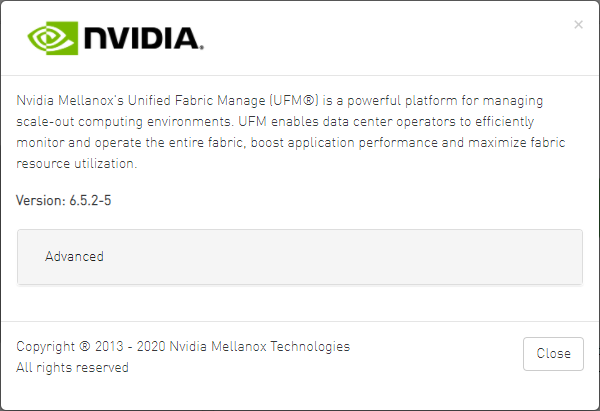
After installing and activating your software, you can view your licenses in the Web UI by clicking the About icon (

-
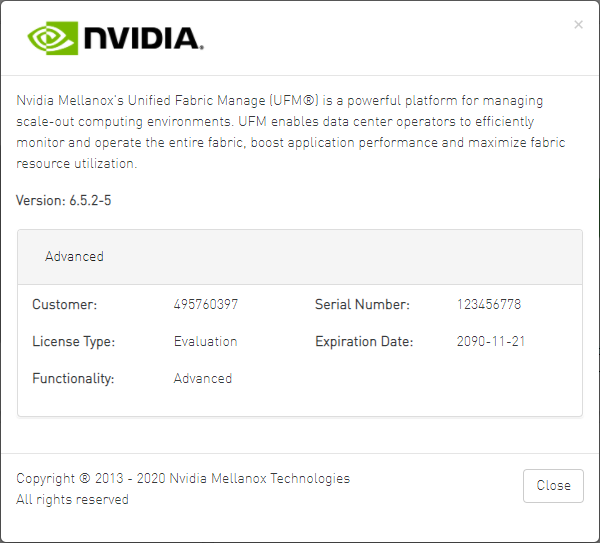
To view the advanced license information, click the Advanced button. The advanced license details will be displayed below.
-
Product Functionality is updated only after startup. If you replace the UFM license, UFM continues to work in the previous mode until the UFM server is restarted.

Run CLI Command "ufmlicense" to display information about all installed licenses on the UFM server under /opt/ufm/files/licenses. This includes invalid and expired license information.
UFM license could support up to 3 different MAC addresses in case there are more than one standby machines (one master and two standbys).
In below example there are two UFM HA licenses where each license includes 2 different MACs: one for the primary machine and one for the standby machine.
In a given time, for each license, only one MACs is detected to be "Valid" (exists on the local machine) where the other MAC is detected as "Invalid" (exist on the standby machine).
See below output example when running the CLI command ufmlicense in SA and HA Modes.
HA Mode Output Example:
|
|
SA Mode Output Example:
root@ufm-production:~# ufmlicense
|--------------------------------------------------------------------------------------------------------------------------------|
|   Customer ID   |     SN     |   swName      |        Type         |   MAC Address   |   Exp. Date   |Limit| Functionality | Status |
|--------------------------------------------------------------------------------------------------------------------------------|
|495760397        |123456778   |UFM Enterprise |Evaluation           |NA               |2090-11-21     |1024 |Advanced       |Valid   |
|--------------------------------------------------------------------------------------------------------------------------------|
Delete the license file from /opt/ufm/files/licenses.
Last updated: