

The GNMI NVOS Events plugin is a standalone Docker container managed by UFM. Its main role is to collect GNMI events from NVOS switches and relay them to UFM as external events. This capability improves the user experience by delivering more detailed information about switches within the InfiniBand fabric through UFM events and alarms.
Deployment
There are two potential deployment options for the GNMI NVOS Events plugin:
-
On UFM Appliance
-
On UFM Software
For detailed instructions on how to deploy the GNMI NVOS Events plugin, refer to this page.
Usage
By default, upon initialization, the GNMI NVOS Events plugin captures events from all managed NVOS switches within the fabric.
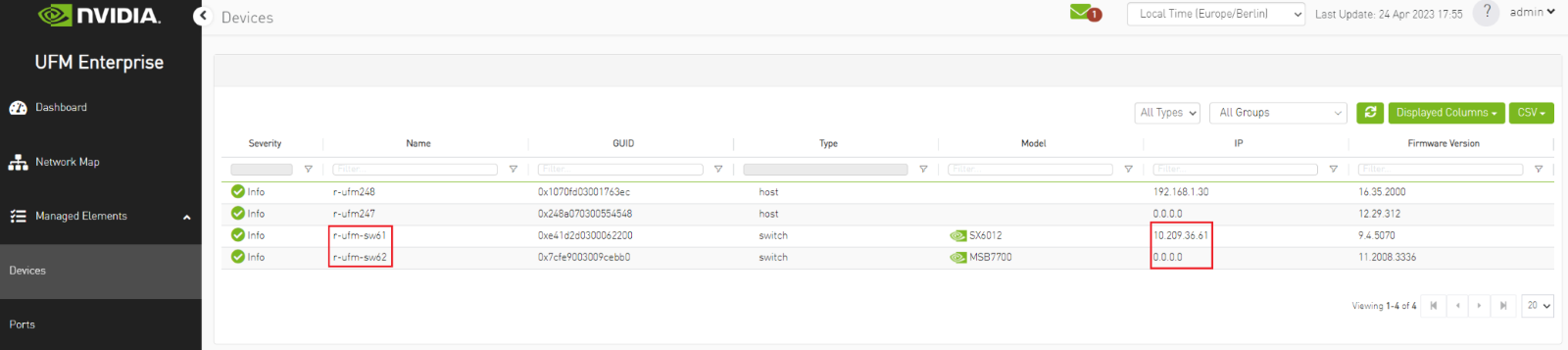
It is important to ensure that the switch is visible to UFM and has a valid IP address. As illustrated in the following example, switch events will only be received from "r-ufm-sw61".
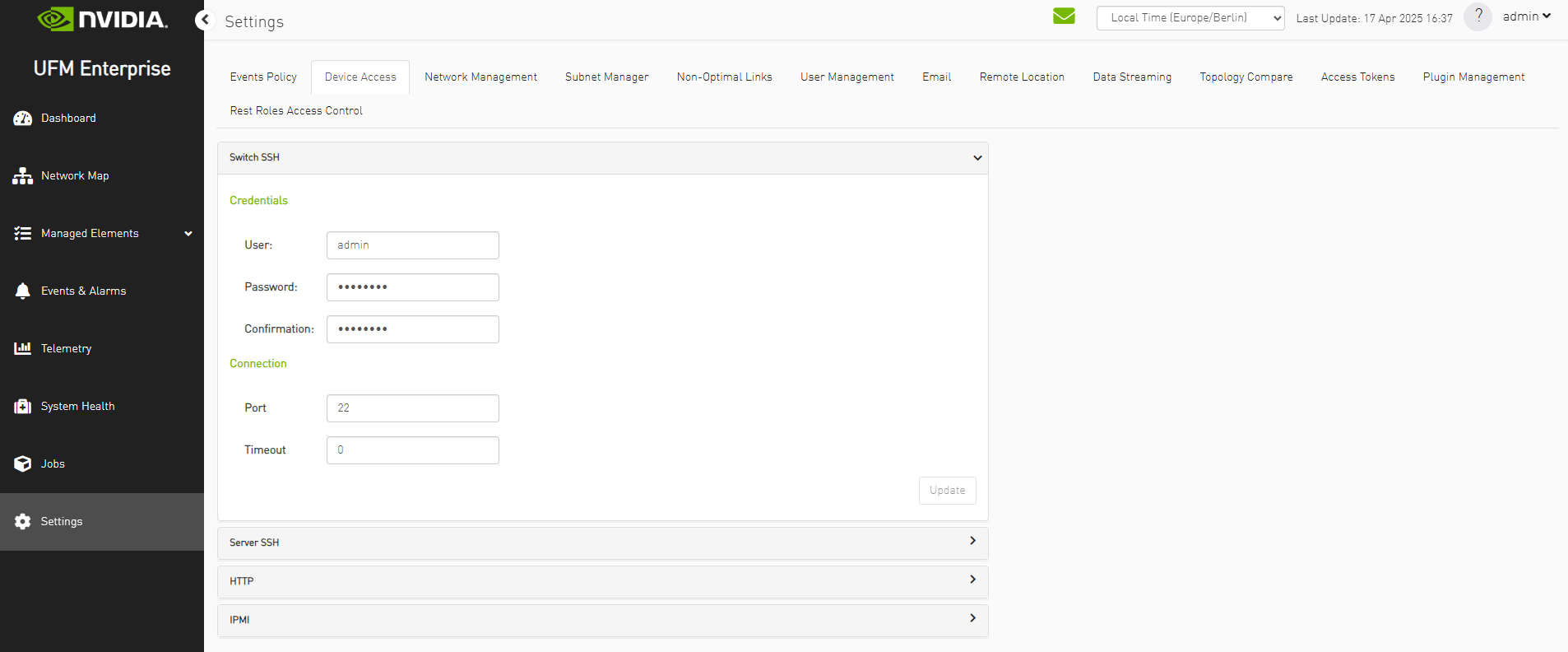
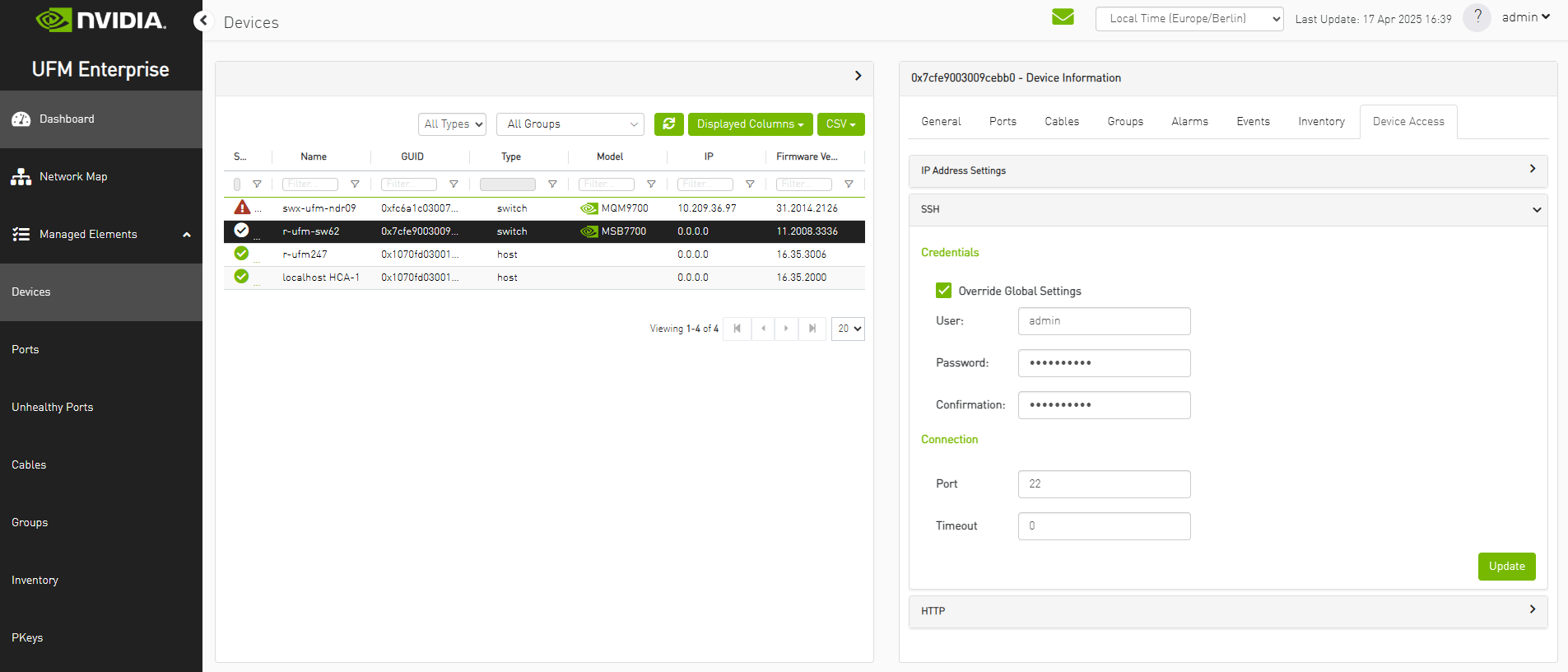
An additional requirement is to have the correct credentials to the switch. The credentials could be set globally for the whole fabric or locally for each switch.
Globally:
Locally:
The following is an example of events received by the GNMI NVOS Events plugin and displayed as UFM events:
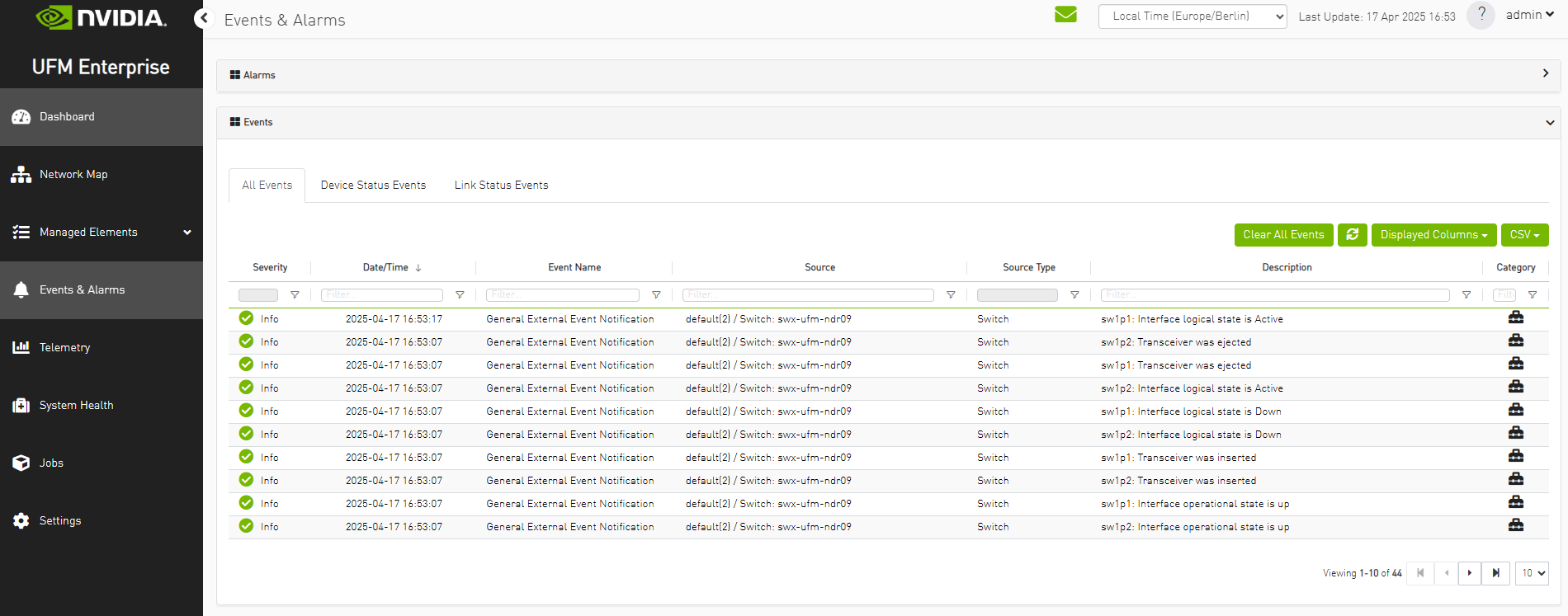
Additionally, there is an option to verify events/alarms for a particular switch:
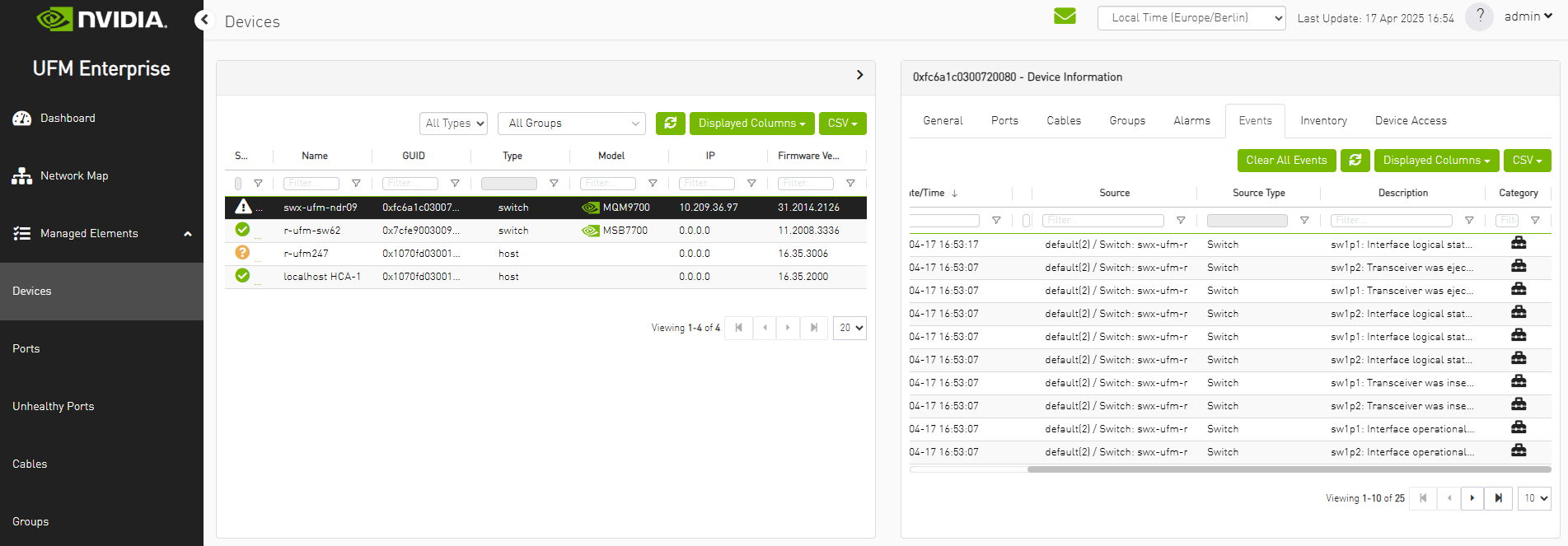
The GNMI NVOS Events plugin performs a periodic check of the fabric every 600 seconds, allowing for prompt receipt of events from new switches or updated IP addresses of existing switches in under 600 seconds. This interval may be adjusted via the "ufm_switches_update_interval" option. The initial update will be performed in 180 seconds after the plugin startup. This grace period gives UFM time to initialize the fabric and also gives user to set up switches credentials. This interval may be adjusted via the "ufm_first_update_interval" option.
Here is the list of available events:
    Event ID  Severity       Component  Description                          Timestamp
    --------  -------------  ---------  -----------------------------------  -------------------
    313       INFORMATIONAL  sw1p1      Interface logical state is Active    2025-04-17 14:53:09
    312       INFORMATIONAL  sw1p2      Interface logical state is Active    2025-04-17 14:53:06
    311       INFORMATIONAL  sw1p2      Interface operational state is up    2025-04-17 14:53:04
    310       INFORMATIONAL  sw1p1      Interface operational state is up    2025-04-17 14:53:04
    309       INFORMATIONAL  sw1p1      Transceiver was inserted             2025-04-17 14:53:02
    308       INFORMATIONAL  sw1p2      Transceiver was inserted             2025-04-17 14:53:02
    307       INFORMATIONAL  sw1p2      Interface logical state is Down      2025-04-17 14:52:58
    306       INFORMATIONAL  sw1p1      Interface logical state is Down      2025-04-17 14:52:58
    305       INFORMATIONAL  sw1p1      Transceiver was ejected              2025-04-17 14:52:57
    304       INFORMATIONAL  sw1p2      Transceiver was ejected              2025-04-17 14:52:57
    303       INFORMATIONAL  sw1p2      Interface operational state is down  2025-04-17 14:52:57
    302       INFORMATIONAL  sw1p1      Interface operational state is down  2025-04-17 14:52:57
    301       INFORMATIONAL  System     Health status is ok                  2025-04-17 10:46:07
    300       INFORMATIONAL  System     Cleared: Health status is not ok     2025-04-17 10:46:07
    299       INFORMATIONAL  PSU2/FAN   HW component goes back to normal     2025-04-17 10:46:07
    298       INFORMATIONAL  PSU2/FAN   Cleared: PSU2/FAN is not working     2025-04-17 10:46:07
    297       WARNING        System     Health status is not ok              2025-04-17 10:46:01
    296       WARNING        PSU2/FAN   PSU2/FAN is not working              2025-04-17 10:46:01
    295       INFORMATIONAL  System     Health status is ok                  2025-04-17 10:45:58
    294       INFORMATIONAL  System     Cleared: Health status is not ok     2025-04-17 10:45:58
    293       INFORMATIONAL  PSU2/FAN   HW component goes back to normal     2025-04-17 10:45:58
    292       INFORMATIONAL  PSU2/FAN   Cleared: PSU2/FAN is not working     2025-04-17 10:45:58
    291       WARNING        System     Health status is not ok              2025-04-17 10:45:34
    290       WARNING        PSU2/FAN   PSU2/FAN is not working              2025-04-17 10:45:34
    289       INFORMATIONAL  System     Health status is ok                  2025-04-17 10:45:31
    288       INFORMATIONAL  System     Cleared: Health status is not ok     2025-04-17 10:45:31
    287       INFORMATIONAL  PSU2/FAN   HW component goes back to normal     2025-04-17 10:45:31
    286       INFORMATIONAL  PSU2/FAN   Cleared: PSU2/FAN is not working     2025-04-17 10:45:31
    285       WARNING        System     Health status is not ok              2025-04-17 10:45:13
    284       WARNING        PSU2/FAN   PSU2/FAN is not working              2025-04-17 10:45:13
    283       INFORMATIONAL  System     Health status is ok                  2025-04-17 10:44:58
    282       INFORMATIONAL  System     Cleared: Health status is not ok     2025-04-17 10:44:58
    281       INFORMATIONAL  PSU2/FAN   HW component goes back to normal     2025-04-17 10:44:58
    280       INFORMATIONAL  PSU2/FAN   Cleared: PSU2/FAN is not working     2025-04-17 10:44:58
    279       WARNING        PSU2/FAN   PSU2/FAN is not working              2025-04-17 10:44:52
    278       WARNING        PSU2/FAN   PSU2/FAN speed is out of range       2025-04-17 10:44:16
    277       WARNING        System     Health status is not ok              2025-04-17 10:43:46
    276       WARNING        PSU2/FAN   PSU2/FAN is not working              2025-04-17 10:43:46
    275       INFORMATIONAL  System     Health status is ok                  2025-04-17 10:43:43
    274       INFORMATIONAL  System     Cleared: Health status is not ok     2025-04-17 10:43:43
    273       INFORMATIONAL  PSU2/FAN   HW component goes back to normal     2025-04-17 10:43:43
    272       INFORMATIONAL  PSU2/FAN   Cleared: PSU2/FAN is not working     2025-04-17 10:43:43
    271       WARNING        System     Health status is not ok              2025-04-17 10:42:46
    270       WARNING        PSU2/FAN   PSU2/FAN is not working              2025-04-17 10:42:46
    269       INFORMATIONAL  System     Health status is ok                  2025-04-17 10:42:34
    268       INFORMATIONAL  System     Cleared: Health status is not ok     2025-04-17 10:42:34
    267       INFORMATIONAL  PSU2/FAN   HW component goes back to normal     2025-04-17 10:42:34
    266       INFORMATIONAL  PSU2/FAN   Cleared: PSU2/FAN is not working     2025-04-17 10:42:34
    265       WARNING        System     Health status is not ok              2025-04-17 10:42:16
    264       WARNING        PSU2/FAN   PSU2/FAN is not working              2025-04-17 10:42:16
To ensure the uninterrupted reception of traps from switches within a large fabric, changes must be made to the UFM configuration in the [/opt/ufm/conf/gv.cfg] file's [Events] section. Specifically, the "max_events" option should be raised from 100 to 1000, while "medium_rate_threshold" and "high_rate_threshold" should both be set to 500. To implement configuration adjustments, disable and then enable the plugin.
In case of an event storm, it is necessary to adjust the Event Policy settings such that General Events are non-alarmable and the TTL is set to zero, as illustrated in the following screenshot:

Other
Additional configurations are located in "/opt/ufm/conf/plugins/gnmi_nvos_events_plugin/gnmi_nvos_events.conf". To implement configuration adjustments, disable and then enable the plugin. For instructions on modifying the appliance, please refer to the UFM-SDN Appliance Command Reference Guide .
Logs for the SNMP plugin are stored in "/opt/ufm/logs/gnmi_nvos_events.log". For guidance on accessing logs on the appliance, please refer to the UFM-SDN Appliance Command Reference Guide .
Last updated: