

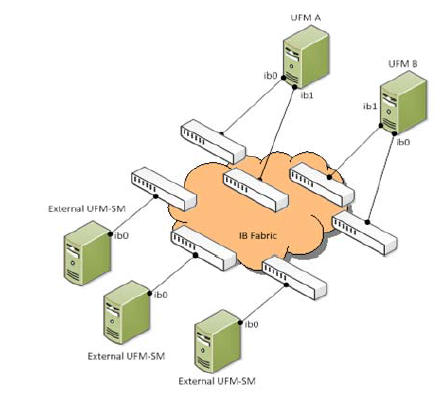
The main UFM®-SDN Appliance should be set to Standalone with external Sms or with High Availability external SMs (see “High Availability” on page 27). External UFM SM requires additional UFM-SDN Appliance configured in sm-only mode.
Adding External SMs provides additional Subnet Managers for failover. Moreover, it enables UFM®-SDN Appliance upgrade without fabric downtime (In-service upgrade).
While the main UFM-SDN Appliance is running, it synchronizes the SMs configuration files on all the external SMs. If the main UFM-SDN Appliance fails (or stops for maintenance operations) an External SM takes mastership and manages the fabric until the main UFM-SDN Appliance resumes operation.
UFM HA with Additional External SMs
Configuring External UFM Subnet Manager

-
Set the External SM machines mode to “sm-only”.
ufm-appliance [ mgmt-sa ] (config) # ufm mode sm-only ufm-appliance [ sm-only ] (config) # -
Set the Active machine mode to “mgmt-allow-sm” to enable External SM machines registration.
ufm-appliance [ mgmt-sa ] (config) # ufm mode mgmt-allow-sm ufm-appliance [ mgmt-allow-sm-sa ] (config) # -
Register the External SM machines.
ufm-appliance [ mgmt-allow-sm-sa ] (config) # ufm external-sm register <UFM-SM IP address> ufm-appliance [ mgmt-allow-sm-sa ] (config) # -
Verify the registration succeeded.
ufm-appliance [ mgmt-allow-sm-sa ] (config) # show ufm external-sm 10.30.30.101 ufm-appliance [ mgmt-allow-sm-sa ] (config) # -
Create a trust relationship between the Standby and the External SM machines in the HA configuration.
This step is performed on the Standby machine.ufm-appliance [ ha-standby ] (config) # ufm external-sm trust <UFM-SM IP address> ufm-appliance [ ha-standby ] (config) # -
Start UFM on both UFM and UFM-SM machines.
-
Verify the SM configuration is synchronized in the External SM machines.
ufm-appliance [ mgmt-allow-sm-sa ] (config) # show ufm external-sm status
10.30.30.19 0 ok Synchronized on: Sun Mar 10 11:26:22 GMT-2 2013
10.30.30.20 0 ok Synchronized on: Sun Mar 10 11:26:23 GMT-2 2013
ufm-appliance [ mgmt-allow-sm-sa ] (config) #
This step is performed on the Active machine and the synchronization might take up to a few minutes.
Last updated: