

The DOCA Telemetry SDK, part of NVIDIA's DOCA framework, offers powerful telemetry, monitoring, and analytics capabilities for NVIDIA ConnectX-7 onwards, and DPUs (such as the BlueField series) in data centers. It enables developers to build, deploy, and manage network telemetry applications that enhance visibility, analyze network performance, optimize security, and monitor overall health.
By collecting and analyzing telemetry data from NVIDIA DPUs, NICs, and related components, the SDK provides comprehensive insights into network traffic, performance, and system integrity. It also offers APIs for monitoring performance metrics, tracking traffic statistics, logging events, and reporting errors. Additionally, it supports seamless integration with Windows-native monitoring tools or custom-built telemetry applications.
For further information, refer to DOCA Telemetry Diag.
To enable this feature:
-
Choose which diagnostic interface to use (DOCA Telemetry or Perfmon) using the registry key “DiagTelemetryMode”. By default, it is set to “Dynamic”.
-
In Dynamic mode, the default interface is Perfmon, but DOCA Telemetry can take control when Perfmon is active. To switch back to Perfmon, you must first close the DOCA Telemetry session.
-
The “DiagTelemetryMode” can also be explicitly set to “DOCA only” or “Perfmon only”, which prevents switching between interfaces.
For further information, refer to General Registry Keys.
-
-
Enable direct access to this from a VM using a Virtual Function (SR-IOV). Use the VFTrustCaps registry key to activate the DIAG_DATA_TRUST capability.
For further information, refer to SR-IOV Options.
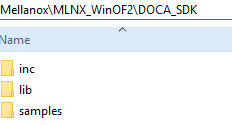
The DOCA Telemetry SDK is included in the package and is installed under the DOCA_SDK directory.
DOCA_SDK includes:
-
inc– DOCA Telemetry header files -
lib– DOCA Telemetry library files -
samples– DOCA Telemetry sample application source code
DOCA Telemetry DLLs:
-
libdoca_argp.dll -
libdoca_common.dll -
libdoca_telemetry.dll
DLL installation locations:
-
DLLs are installed under System32
Limitations
When utilizing DOCA Telemetry, the following counter sets are not accessible via Perfmon:
-
Mellanox WinOF-2 Device Diagnostics
-
Mellanox WinOF-2 PCI Device Diagnostics
-
Mellanox WinOF-2 Icmc Diag Counters Ext1
Perfmon should not be used to query counters from the above sets while a DOCA telemetry session is active. Additionally, VM VFs cannot access this feature unless they are configured with the appropriate VFTrustCaps.
Last updated: