

As of v5.25, WinOF supports NDIS PacketDirect Provider Interface. PacketDirect extends NDIS with an accelerated I/O model, which can increase the number of packets processed per second by an order of magnitude and significantly decrease jitter when compared to the traditional NDIS I/O path.
PacketDirect is supported only on Ethernet ports.
System Requirements
-
Hypervisor OS: Windows Server 2016
-
Virtual Machine (VM) OS: Windows Server 2012 and above
-
Mellanox ConnectX-3 Pro Adapter Card family
-
Mellanox WinOF 5.25 or higher
-
Firmware version: 2.36.5150 or higher
Using PacketDirect for VM
To allow a VM to send/receive traffic in PacketDirect mode:
-
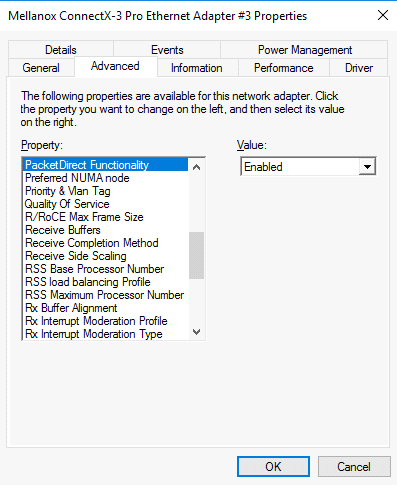
Enable PacketDirect:
• On the Ethernet adapter.PS $ Enable-NetAdapterPacketDirect -Name <EthInterfaceName>• In the Device Manager:
-
Create a vSwitch with PacketDirect enabled.
PS $ New-VMSwitch <vSwitchName> -NetAdapterName <EthInterfaceName> -EnablePacketDirect $true -AllowManagementOS $true -
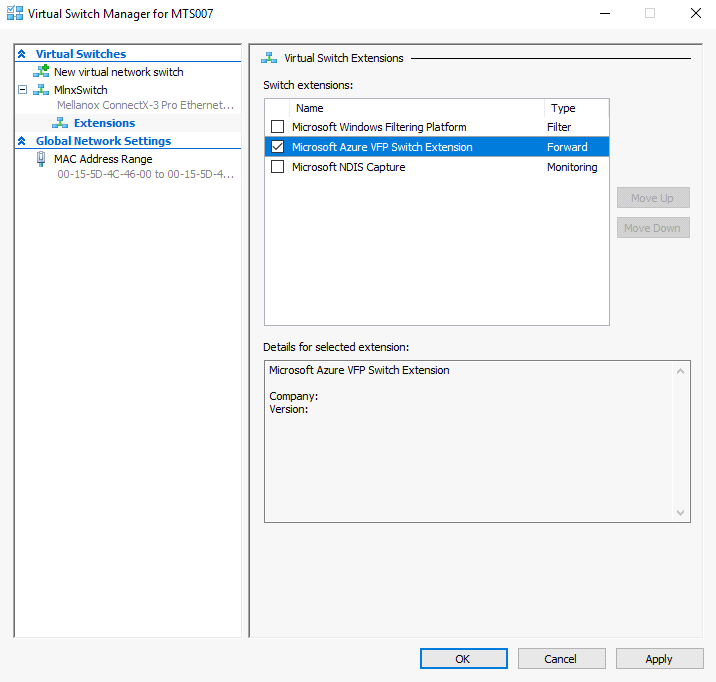
Enable VFP extension:
• On the vSwitch.PS $ Enable-VMSwitchExtension -VmSwitchName <vSwitchName> -Name "Windows Azure VFP Switch Extension"
• In the Hyper-V Manager: Action->Virtual Switch Manager...
-
Shut down the VM.
PS $ Stop-VM -Name <VMName> -Force -Confirm -
Add a virtual network adapter for the VM.
PS $ Add-VMNetworkAdapter -VMName <VMName> -SwitchName <vSwitchName> -StaticMacAddress <StaticMAC Address> -
Start the VM.
PS $ Start-VM -Name <VMName>Since VFP is enabled, without any forwarding rules, it will block all traffic going through the VM.
Follow the following steps to unblock the traffic:
• Find the port name for the VM.CMD > vfpctrl /list-vmswitch-port …... Port name : E431C413-D31F-40EB-AD96-0B2D45FE34AA Port Friendly name : Switch name : 8B288106-9DB6-4720-B144-6CC32D53E0EC Switch Friendly name : MlnxSwitch PortId : 3 VMQ Usage : 0 SR-IOV Usage : 0 Port type : Synthetic Port is Initialized. MAC Learning is Disabled. NIC name : bd65960d-4215-4a4f-bddc-962a5d0e2fa0--e7199a49-6cca-4d3c-a4cd-22907592527e NIC Friendly name : testnic MTU : 1500 MAC address : 00-15-5D-4C-46-00 VM name : vm ...... Command list-vmswitch-port succeeded! -
Disable the port to allow traffic.
CMD > vfpctrl /disable-port /port <PortName>
Command disable-port succeeded!
The port should be disabled after each reboot of the VM to allow traffic.
Last updated: