

This document provides an Ethernet L2 Forwarding implementation on top of the NVIDIA® BlueField® DPU.
Introduction
The Ethernet L2 Forwarding application is a DOCA Ethernet based application that forwards traffic from a single RX port to a single TX port and vice versa, leveraging DOCA's task/event batching feature for enhanced performance.
The application can run both on the host and the BlueField, and has two main modes:
-
Two-sided forwarding – device 1 → device 2 and device 2 → device 1
-
One-sided forwarding – device 1 → device 2 or device 2 → device 1
The one-sided mode offers better performance, enlarging the packets forwarding rate.
System Design
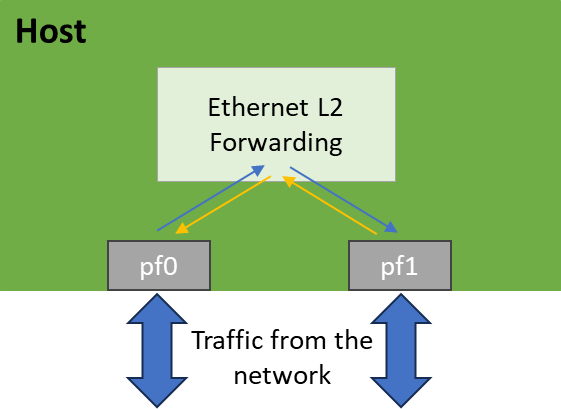
The following diagram shows the application running on the host:
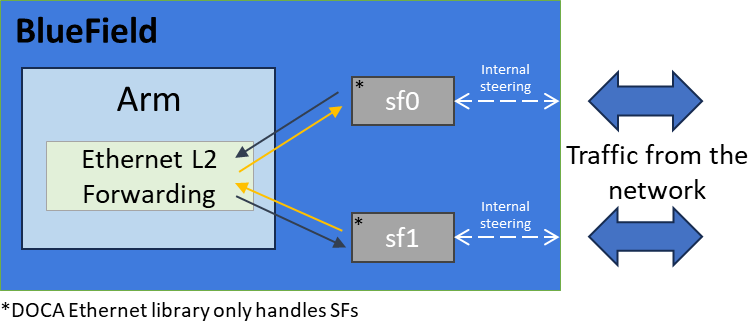
The Ethernet L2 Forwarding application runs on the host or the BlueField.
The following diagram shows the application running on the BlueField:
Application Architecture
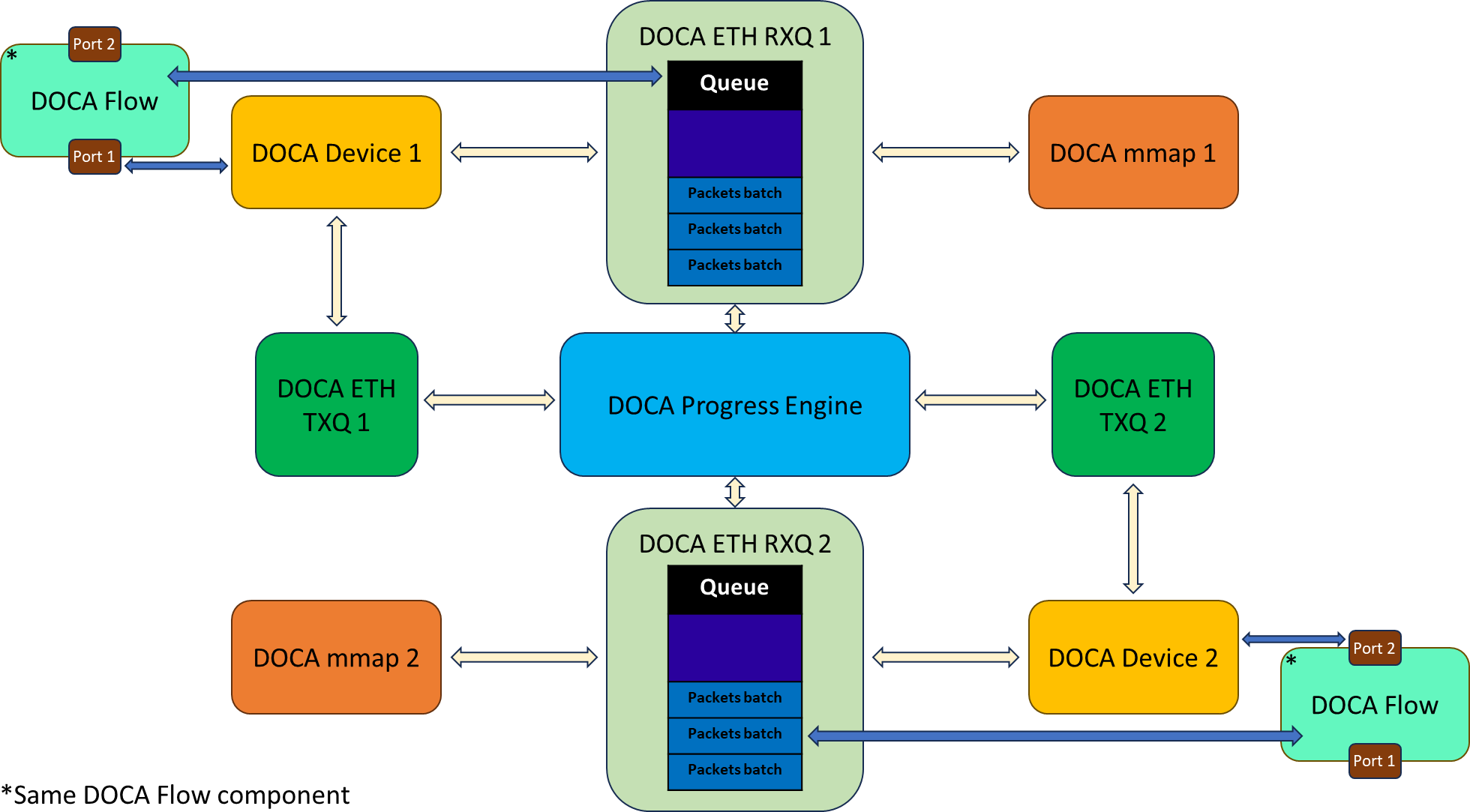
The Ethernet L2 Forwarding application runs on top of the DOCA Ethernet API to form an (two/one-sided) L2 forwarding between two ports.
-
Two DOCA devices are opened.
-
Two DOCA mmaps are created.
-
Two DOCA Flow ports are configured and started, each with a different opened DOCA device.
-
Two DOCA Ethernet TXQ and RXQ contexts are initialized, each TXQ-RXQ pair with a different opened DOCA device such that traffic is steered from the device to the corresponding RXQ, and from the corresponding TXQ to the device.
-
Forwarding - Packets received by device x are steered to RXQ x, then allocated to TXQ y and sent by device y (and vice versa).
DOCA Libraries
This application leverages the following DOCA libraries:
For additional information about the used DOCA libraries, please refer to the respective programming guides.
Compiling the Application
Installation
Please refer to the NVIDIA DOCA Installation Guide for Linux for details on how to install BlueField-related software.
Overview
The installation of DOCA's reference applications contains the sources of the applications, alongside the matching compilation instructions. This allows for both compilation of the applications "as-is", as well as provides the ability to modify the sources and then compile the new version of the application. For more information about the applications, as well as development and compilation tips, please refer to the DOCA Reference Applications main guide.
The sources of the application can be found under the application's directory: /opt/mellanox/doca/applications/eth_l2_fwd/.
Compiling All Applications
The applications are all defined under a single meson project, meaning that the default compilation will compile all the DOCA applications.
To build all the applications together, run:
cd /opt/mellanox/doca/applications/
meson /tmp/build
ninja -C /tmp/build
doca_eth_l2_fwd will be created under /tmp/build/eth_l2_fwd/.
Compiling Only the Current Application
-
To directly build only the Ethernet L2 Forwarding application:
cd /opt/mellanox/doca/applications/
meson /tmp/build -Denable_all_applications=false -Denable_eth_l2_fwd=true
ninja -C /tmp/build
doca_eth_l2_fwdwill be created under/tmp/build/eth_l2_fwd/.
-
Alternatively, one can set the desired flags in the
meson_options.txtfile instead of providing them in the compilation command line:-
Edit the following flags in
/opt/mellanox/doca/applications/meson_options.txt:-
Set
enable_all_applicationstofalse -
Set
enable_eth_l2_fwdtotrue
-
-
The same compilation commands should be used, as were shown in the previous section:
cd /opt/mellanox/doca/applications/
meson /tmp/build
ninja -C /tmp/build
doca_eth_l2_fwdwill be created under/tmp/build/eth_l2_fwd/.
-
Troubleshooting
Please refer to the NVIDIA DOCA Troubleshooting for any issue you may encounter with the compilation of the DOCA applications.
Running the Application
Application Execution
The Ethernet L2 Forwarding application is provided in source form, hence a compilation is required before the application can be executed.
-
Application usage instructions:
Usage: doca_eth_l2_fwd [DOCA Flags] [Program Flags]

DOCA Flags:
  -h, --help                        Print a help synopsis
  -v, --version                     Print program version information
  -l, --log-level                   Set the (numeric) log level for the program <10=DISABLE, 20=CRITICAL, 30=ERROR, 40=WARNING, 50=INFO, 60=DEBUG, 70=TRACE>
  --sdk-log-level                   Set the SDK (numeric) log level for the program <10=DISABLE, 20=CRITICAL, 30=ERROR, 40=WARNING, 50=INFO, 60=DEBUG, 70=TRACE>
  -j, --json <path>                 Parse all command flags from an input json file

Program Flags:
  -d, --devs-names <name1,name2>    Set two IB devices names separated by a comma, without spaces.
  -r, --rate <rate>                 Set packets receive rate (in [MB/s]), default is 12500.
  -ps, --pkt-size <size>            Set max packet size (in [B]), default is 1600.
  -t, --time <time>                 Set packet max process time (in [μs]), default is 1.
  -nt, --num-tasks <num>            Set number of tasks per batch, default is 128.
  -nb, --num-batches <num>          Set number of task batches, default is 32.
  -o, --one-sided-forwarding <num>  Set one-sided forwarding: 0 - two-sided forwarding, 1 - device 1 -> device 2, 2 - device 2 -> device 1. default is 0.
  -f, --max-forwardings <num>       Set max forwardings after which the application run will end, default is 0, meaning no limit.
For additional information, please refer to the Command Line Flags section below.
The above usage printout can be printed to the command line using the
-h(or--help) options:./doca_eth_l2_fwd -h
-
CLI example for running the application either on the BlueField or on the host:
./doca_eth_l2_fwd -d mlx5_0,mlx5_1
Both IB devices identifiers (
mlx5_0, mlx5_1) should match the identifiers of the desired IB devices.
-
The application also supports a JSON-based deployment mode, in which all command-line arguments are provided through a JSON file:
./doca_eth_l2_fwd --json [json_file]For example:
./doca_eth_l2_fwd --json ./eth_l2_fwd_params.json
Before execution, please ensure that the used JSON file contains the correct configuration parameters, and especially the desired IB devices names needed for the deployment.
Command Line Flags
|
Flag Type |
Short Flag |
Long Flag/JSON Key |
Description |
JSON Content |
|---|---|---|---|---|
|
General flags |
|
|
Prints a help synopsis |
N/A |
|
|
|
Prints program version information |
N/A |
|
|
|
|
Set the log level for the application:
|
|
|
|
N/A |
|
Sets the log level for the program:
|
N/A |
|
|
|
|
Parse all command flags from an input json file |
N/A |
|
|
Program flags |
|
|
Two IB devices names, separated by a comma, without spaces. This is a mandatory flag.
|
|
|
|
|
The rate (in [MB/s]) in which the RX port is expected to receive traffic. |
|
|
|
|
|
The maximum size (in [B]) of a received packet. |
|
|
|
|
|
The maximum time taking to process a single packet. |
|
|
|
|
|
The number of tasks to set per a single task batch. |
|
|
|
|
|
The number of task batches to set for the TX side. |
|
|
|
|
|
Flag to set one of 3 options:
1 - One-sided forwarding from device 1 to device 2. 2 - One-sided forwarding from device 2 to device 1. |
|
|
|
|
|
|
The maximum number of forwarding |
|
Refer to DOCA Arg Parser for more information regarding the supported flags and execution modes.
Troubleshooting
Please refer to the NVIDIA DOCA Troubleshooting for any issue you may encounter with the installation or execution of the DOCA applications.
Application Code Flow
-
Parse application argument.
-
Initialize Arg parser resources and register DOCA general parameters.
doca_argp_init();
-
Register Ethernet L2 Forwarding application parameters.
register_eth_l2_forwarding_params();
-
Parse the arguments.
doca_argp_start();-
Parse DOCA flags.
-
Parse application parameters.
-
-
-
Execute Ethernet L2 Forwarding application main logic.
eth_l2_fwd_execute();-
Open the two chosen DOCA devices.
-
Initialize necessary DOCA Core objects.
-
Initialize ETH RXQ/TXQ contexts for the devices.
-
Forward packets.
-
-
Clean up application resources.
eth_l2_fwd_cleanup();-
Stop all contexts and drain tasks.
-
Free all application resources.
-
-
Arg parser destroy.
doca_argp_destroy()
References
-
/opt/mellanox/doca/applications/eth_l2_fwd/ -
/opt/mellanox/doca/applications/eth_l2_fwd/eth_l2_fwd_params.json
Last updated: