

This guide provides instructions on building and developing applications that require emulation of a PCIe device at the PCI Transaction Layer Packet level.
Introduction
DOCA DevEmu PCI TLP is part of the DOCA Device Emulation subsystem. It provides low-level software APIs that allow emulation of a custom PCIe device at the PCI Transaction Layer Packet (TLP) level using the emulation capability of NVIDIA® BlueField®.
PCIe transactions from the host that target the application's emulated devices are forwarded to the application running on the DPU, which processes the TLPs in accordance with the PCI specification, allowing full management of the configuration space of the PCIe device (endpoint or bridge), and construction of a custom PCIe topology consisting of endpoints and switches.
Prerequisites
This library follows the architecture of a DOCA Core Context. It is recommended read the following sections beforehand:
TLP device emulation is part of DOCA PCIe device emulation. It is recommended to read the following guides beforehand:
Environment
DOCA DevEmu PCI TLP Emulation is supported only on the BlueField target. The BlueField must meet the following requirements:
-
DOCA version 3.4.0 or higher
-
BlueField-3 firmware 32.49.0288 or higher
Please refer to the DOCA Compatibility Policy.
Library must be run with root privileges.
Perform the following:
-
Configure the BlueField to work in DPU mode as described in BlueField Modes of Operation.
-
Set the required device configurations by running the following commands on the host or BlueField:
-
Enable the PCIe switch emulation capability:
Bashhost/bf> sudo mlxconfig -d /dev/mst/mt41692_pciconf0 s PCI_SWITCH_EMULATION_ENABLE=1 -
Enable TLP emulation:
Bashhost/bf> sudo mlxconfig -d /dev/mst/mt41692_pciconf0 s TLP_EMULATION_ENABLE=1 -
Set at least 1 NVIDIA emulation switch port for TLP emulation:
Bashhost/bf> sudo mlxconfig -d /dev/mst/mt41692_pciconf0 s PCI_SWITCH_EMULATION_NUM_TLP_PORT=1 -
Set at least (
PCI_SWITCH_EMULATION_NUM_TLP_PORT+ 1) NVIDIA emulation switch ports:Bashhost/bf> sudo mlxconfig -d /dev/mst/mt41692_pciconf0 s PCI_SWITCH_EMULATION_NUM_PORT=2 -
Set at least 1 PF for TLP emulation:
Bashhost/bf> sudo mlxconfig -d /dev/mst/mt41692_pciconf0 s TLP_EMULATION_NUM_PF=1
-
-
Perform a BlueField system-level reset for the
mlxconfigsettings to take effect.
To support the hot-plug feature please follow the instructions described at DOCA DevEmu PCI.
Architecture
DOCA DevEmu PCI TLP allows the creation of a PCI TLP type which essentially serves the same purpose of a generic PCI type as described at DOCA DevEmu PCI Generic, only it places the responsibility of processing and responding to PCIe traffic (Transaction layer packets) on the user application, and some other exceptions, e.g., a PCI TLP type has its own capabilities, and APIs only partially overlap (some apply to both, while others are type-specific).
Transaction Layer Packets
The transaction layer packet (TLP) is the fundamental unit of information exchange in a PCIe fabric, carrying requests and responses between the host and the PCIe device.
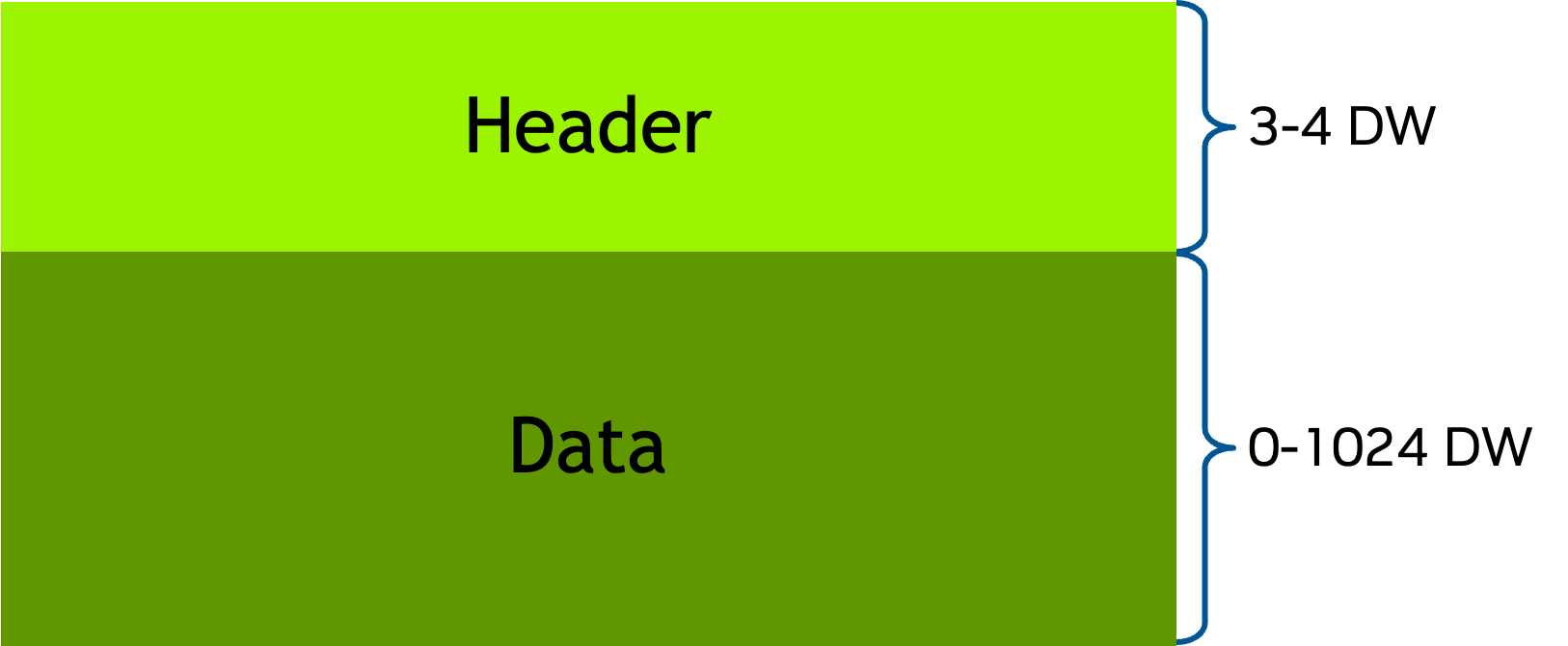
Each TLP starts with a 3 or 4 DW (Double Word) header and ends with up to 1024 DW of data:
DOCA DevEmu PCI TLP supports 3 types of TLPs:
-
Configuration read/write - access a PCIe device configuration space.
-
MMIO (or memory) read/write - access memory within the BARs address range.
-
Completion - response from a PCIe device back to the requester.
All TLP requests in this scope require a response with a completion TLP except MMIO write TLPs.
For a detailed breakdown of the Transaction Layer Packet, please refer to the PCI Express Base Specification.
DOCA DevEmu PCI TLP provides APIs that allow the application to fully handle and respond to incoming TLP requests from the host.
PCIe Configuration Space
Unlike generic emulation where the configuration space is maintained internally, with TLP emulation the application is responsible for the following:
-
Keeping track of the configuration space of each device (Type 0 for an endpoint, Type 1 for a bridge) explicitly (for example, by preserving a dedicated data structure of its fields).
-
Handling all configuration read and write TLP requests.
-
Constructing the appropriate completion responses.
This enables the application to dynamically create robust, custom PCIe topologies consisting of switches and endpoints.
For a detailed breakdown of the PCIe device Configuration Space and its types, please refer to the PCI Express Base Specification.
Base Address Register (BAR)
DOCA DevEmu PCI TLP utilizes most of the generic emulation BAR and BAR regions functionality, for example, configure I/O and memory mapped BAR layouts, and BAR regions like Doorbell and MSI-X. The only exception is the Stateful BAR Region, which is not supported by TLP emulation.
TLP Control Path (Transaction BAR Region)
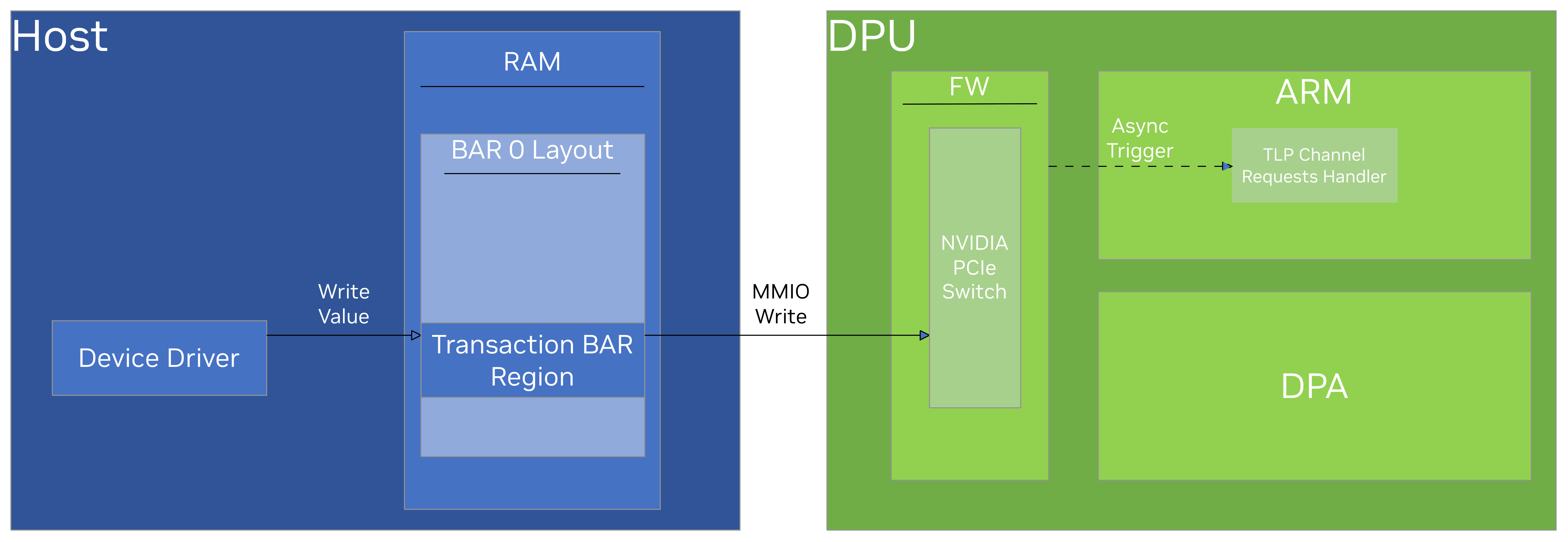
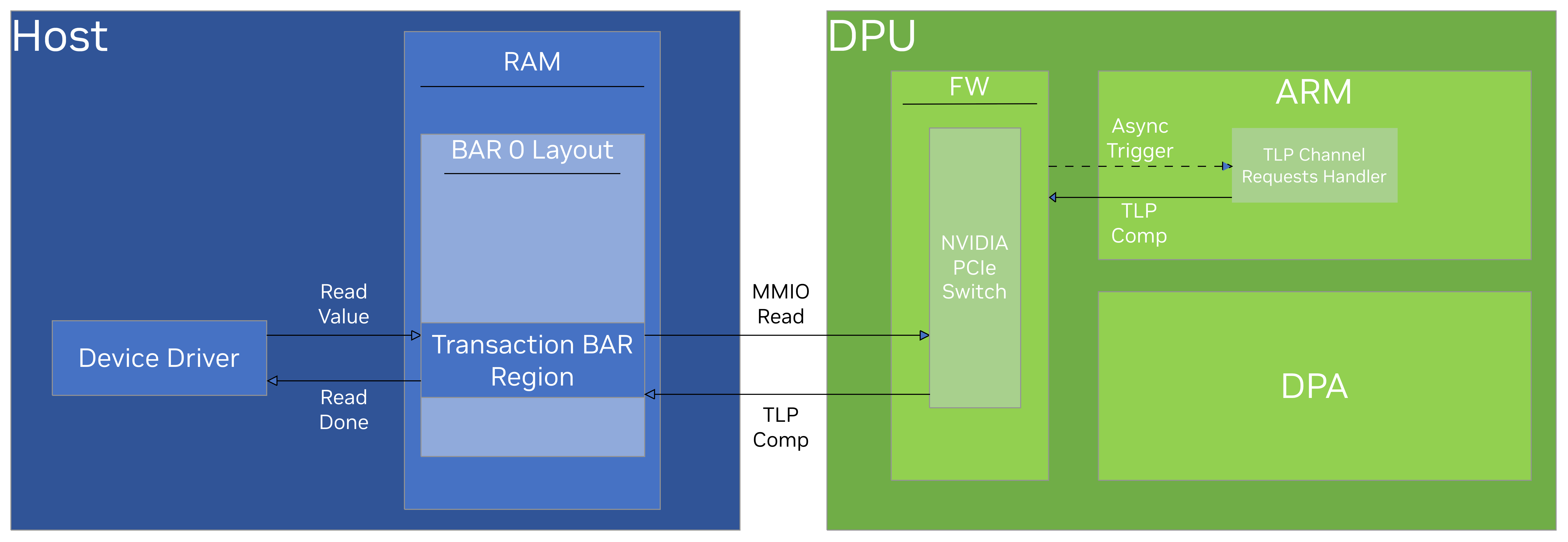
The Transaction region is a general-purpose BAR region for host driver ↔ device communication, typically during the configuration phase (e.g., exposing capabilities, initialization, etc.). Any read or write to an address within this region by the host driver is passed to the application running on the DPU in the form of a memory read or memory write (respectively) TLP request, and therefore it is the application's responsibility to maintain and update the Transaction region state consistently.
The application has full control over the Transaction region and can define any desired behavior for any transaction from the host driver that targets the region's memory range.
Although maintained by the application, to expose a Transaction region the application must configure it explicitly using doca_devemu_pci_tlp_type_set_bar_transaction_region_conf
The following diagram depicts how MMIO Write and Read operations targeting the Transaction BAR Region are executed:
TLP Data Path (Doorbell BAR Region)
DOCA DevEmu PCI TLP shares the same Doorbell BAR region logic as DOCA DevEmu PCI Generic (see DOCA DevEmu PCI Generic Doorbell BAR Region).
MSI-X Capability (MSI-X BAR Region)
DOCA DevEmu PCI TLP shares the same MSI-X BAR region logic as DOCA DevEmu PCI Generic (see DOCA DevEmu PCI Generic MSI-X BAR Region).
DMA Memory
DOCA DevEmu PCI TLP shares the same I/O memory access logic as DOCA DevEmu PCI Generic (see DOCA DevEmu PCI Generic DMA Memory).
TLP Channel
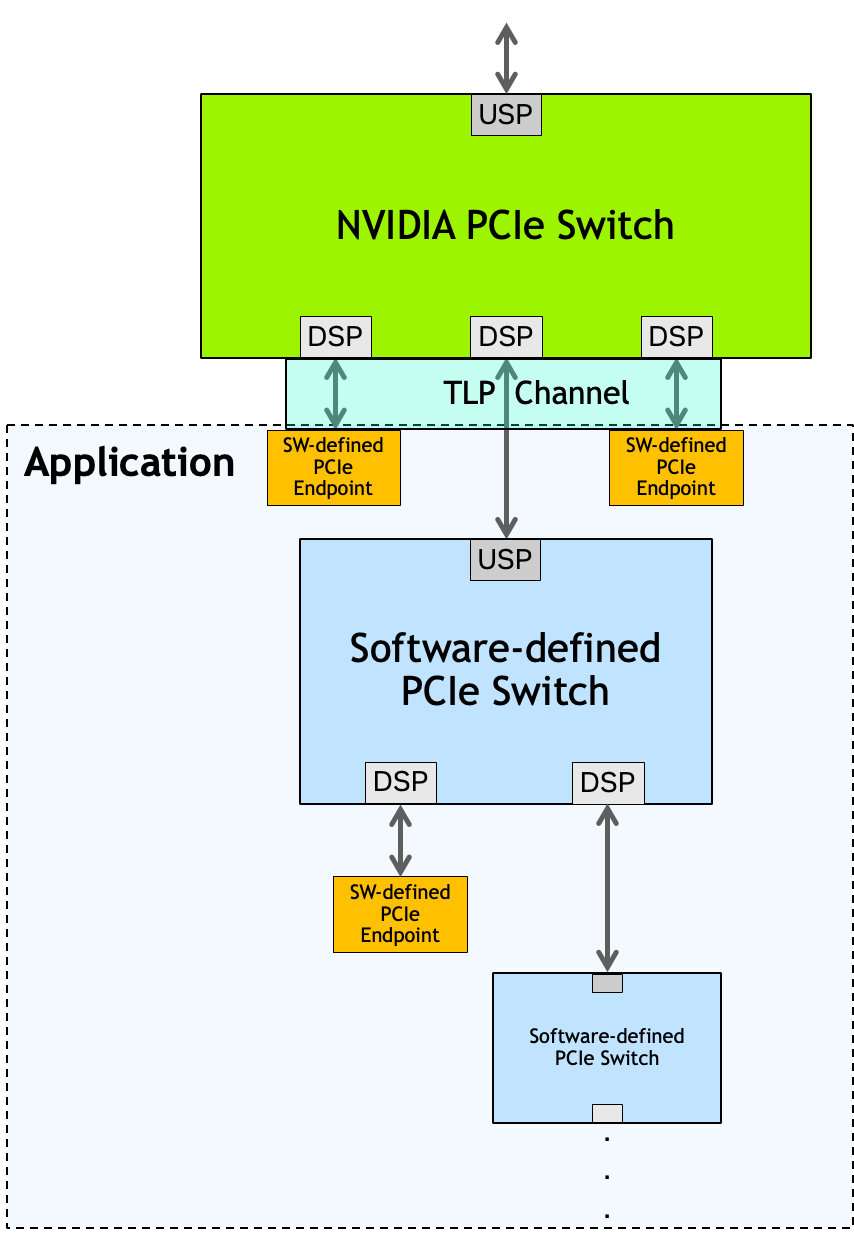
DOCA DevEmu PCI TLP introduces a bidirectional channel for receiving requests and sending responses (completing requests). A single channel can deliver transactions from one or more NVIDIA emulation switch downstream ports, and the application has the flexibility to define the PCIe entity connected to each port (either an endpoint or a switch). The number of downstream ports associated with a given channel can be retrieved using doca_devemu_pci_tlp_channel_get_num_dsp. See TLP Channel Request Downstream Port Identifier for more details on how an application can identify the downstream port associated with any given transaction.
The application has to follow the PCIe specification to handle incoming TLP requests properly.
The following diagram shows an example of a TLP channel and a software PCIe topology built underneath:
In addition to TLP requests, the TLP channel also supports the following:
-
Asynchronous Credit Grant (ACG) requests - allows the application to transmit PCI-compliant MMIO write TLP to the host, e.g., use MSI to notify the host on a device hot-plug. For more information, see Asynchronous Credit Grant Requests.
-
PCI Event requests - notify the application on state changes that may require specific actions, e.g., PERST# assertion and de-assertion. For more information, see PCI Event Requests.
A TLP channel can also enforce a response timeout for non-posted TLP requests (MMIO Read and Configuration Read/Write), all of which require a completion. If the application does not complete such a request within the configured time window, the device autonomously returns error completions to the host for all outstanding non-posted requests, as mandated by the PCIe specification, and transitions the channel to a fatal state. A channel in a fatal state can no longer serve traffic, and it must be recreated together with its associated devices. See TLP Channel Non-Posted Response Timeout for the configuration and recovery flow.
SR-IOV
Before reading this section, please refer to the SR-IOV section of the DOCA DevEmu PCI guide.
With TLP emulation, the responsibility for the SR-IOV capability rests with the application. When exposing an SR-IOV PF over TLP emulation, the application must implement the SR-IOV Extended Capability for each SR-IOV PF, and maintain the configuration space and BARs of the associated VFs – all in accordance with the PCI specification.
Whether SR-IOV is supported for a PCI TLP type can be queried using doca_devemu_pci_tlp_cap_type_is_dynamic_sriov_supported.
Using SR-IOV over TLP emulation has some limitations:
-
The following APIs are not supported when provided with a DOCA DevEmu PCI EP that represents a TLP PF device:
-
doca_devemu_pci_ep_get_num_free_dynamic_vf_msix(will be supported in the future) -
doca_devemu_pci_ep_get_num_free_dynamic_vf_db(will be supported in the future) -
doca_devemu_pci_ep_reset_msix_resources(will be supported in the future) -
doca_devemu_pci_ep_reset_db_resources(will be supported in the future) -
doca_devemu_pci_ep_get_num_vfs(should be read from the SR-IOV capability at the PF’s configuration space)
-
-
When configuring 1 or more Doorbells to a TLP PF’s VFs using
doca_devemu_pci_rep_init_attr_set_vf_num_db, the TLP PF must be set with same number of Doorbells usingdoca_devemu_pci_ep_set_num_dbordoca_devemu_pci_type_set_num_db. This limitation will be removed in a future release.
Device Support
DOCA PCI TLP Device emulation requires a device to operate. For information on picking a device, see DOCA DevEmu PCI Device Support.
Some devices can allow different capabilities. For example:
-
The maximum number of different PCI TLP types
-
The maximum number of different TLP emulation physical functions (endpoints)
-
The maximum number of Asynchronous Credit Grants
-
The maximum number of BARs
-
The maximum number of BAR regions
-
The maximum BAR size
-
The maximum number of doorbells
-
The maximum number of MSI-X vectors
-
The maximum configurable non-posted response timeout for a TLP channel
As the list of capabilities can be long, it is recommended to use the DOCA Capabilities Print Tool to get an overview of all the available capabilities.
Run the tool as root user as follows:
$ sudo /opt/mellanox/doca/tools/doca_caps -p <pci-address> -b devemu_pci
Example output:
PCI: 0000:03:00.0
    devemu_pci_tlp
        max_tlp_types                                 8
        max_pf_devices                                5
        max_payload_size_per_tlp_channel_comp         32
        max_acg                                       1
        min_log_exp_bar_size                          12
        max_log_exp_bar_size                          24
        type_max_bars                                 2
        bar_max_bar_regions                           15
        type_max_bar_regions                          15
        type_log_min_bar_size                         12
        type_log_max_bar_size                         30
        type_max_num_msix                             256
        type_max_num_db                               256
        bar_db_region_block_size                      4096
        bar_db_region_max_num_region_blocks           16
        type_max_bar_db_regions                       2
        bar_max_bar_db_regions                        2
        bar_db_region_start_addr_alignment            4096
        bar_msix_table_region_block_size              4096
        bar_msix_table_region_max_num_region_blocks   1
        type_max_bar_msix_table_regions               1
        bar_max_bar_msix_table_regions                1
        bar_msix_table_region_start_addr_alignment    4096
        bar_msix_pba_region_block_size                4096
        bar_msix_pba_region_max_num_region_blocks     1
        type_max_bar_msix_pba_regions                 1
        bar_max_bar_msix_pba_regions                  1
        bar_msix_pba_region_start_addr_alignment      4096
        bar_transaction_region_block_size             64
        bar_transaction_region_max_num_region_blocks  1024
        type_max_bar_transaction_regions              4
        bar_max_bar_transaction_regions               4
        bar_transaction_region_start_addr_alignment   64
        bar_is_32_bit_supported                       unsupported
        bar_is_1_mb_supported                         unsupported
        bar_is_64_bit_supported                       supported
        tlp_type_supported                            supported
        ingress_mmio_read_fmt                         valid
        ingress_mmio_write_fmt                        valid
        ingress_mmio_read_type                        valid
        ingress_mmio_write_type                       valid
        ingress_mmio_read_t9                          invalid
        ingress_mmio_write_t9                         invalid
        ingress_mmio_read_tc                          invalid
        ingress_mmio_write_tc                         invalid
        ingress_mmio_read_t8                          invalid
        ingress_mmio_write_t8                         invalid
        ingress_mmio_read_attr_2                      invalid
        ingress_mmio_write_attr_2                     invalid
        ingress_mmio_read_ln                          invalid
        ingress_mmio_write_ln                         invalid
        ingress_mmio_read_th                          invalid
        ingress_mmio_write_th                         invalid
        ingress_mmio_read_td                          valid
        ingress_mmio_write_td                         valid
        ingress_mmio_read_ep                          valid
        ingress_mmio_write_ep                         valid
        ingress_mmio_read_attr_1_0                    invalid
        ingress_mmio_write_attr_1_0                   invalid
        ingress_mmio_read_at                          invalid
        ingress_mmio_write_at                         invalid
        ingress_mmio_read_length                      valid
        ingress_mmio_write_length                     valid
        ingress_mmio_read_req_id                      valid
        ingress_mmio_write_req_id                     valid
        ingress_mmio_read_tag                         invalid
        ingress_mmio_write_tag                        invalid
        ingress_mmio_read_last_dw_be                  valid
        ingress_mmio_write_last_dw_be                 valid
        ingress_mmio_read_first_dw_be                 valid
        ingress_mmio_write_first_dw_be                valid
        ingress_mmio_read_address_31_2                valid
        ingress_mmio_write_address_31_2               valid
        ingress_mmio_read_address_63_32               valid
        ingress_mmio_write_address_63_32              valid
        ingress_mmio_read_tlp_ph                      invalid
        ingress_mmio_write_tlp_ph                     invalid
PCI TLP Type
Configurations
This section describes the configurations of the DOCA DevEmu PCI TLP Type object, that can be provided before start.
To find if a configuration is supported or what its min/max value is, refer to Device Support.
Mandatory Configurations
The following are mandatory configurations that must be provided before starting the PCI TLP type:
-
A DOCA device that supports PCI TLP type. See Device Support.
-
At least one BAR (either memory mapped or I/O mapped).
Optional Configurations
The following configurations are optional:
-
One or more PCI capabilities
-
One or more PCI extended capabilities
-
The number of MSI-X vectors for MSI-X capability
-
The number of Doorbells
-
One or more memory mapped BARs (in addition to the mandatory one)
-
One or more I/O mapped BARs (in addition to the mandatory one)
-
One or more Doorbell regions
-
An MSI-X table and PBA regions
-
One or more Transaction regions
If these configurations are not set, then a default value is used.
PCI TLP Device
The following sections from DOCA DevEmu PCI Generic apply for a TLP device as well:
Configurations
This section describes the configurations of the DOCA DevEmu PCI TLP Device object, that can be provided before start.
To find if a configuration is supported or what its min/max value is, refer to Device Support.
Mandatory Configurations
All mandatory configurations are provided during the creation of the PCI TLP device as follows:
-
A DOCA DevEmu PCI TLP type object
-
A DOCA Device Representor, representing an emulated function with the same type as the provided PCI TLP object type.
Optional Configurations
The following configurations are optional:
-
The number of MSI-X vectors for MSI-X capability. By default, it is derived from the PCIe type.
-
The number of Doorbells. By default, it is derived from the PCIe type.
-
Set data path on DPA.
PCI TLP Channel
Configurations
This section describes the configurations of the DOCA DevEmu PCI TLP Channel object, that can be provided before start.
To start using the TLP Channel, users must first go through a configuration phase as described in DOCA Core Context Configuration Phase.
To find if a configuration is supported or what its min/max value is, refer to Device Support.
Mandatory Configurations
The following are mandatory configurations and must be provided before starting the TLP channel:
-
A DOCA Device - provided at the TLP channel creation.
-
A TLP channel requests handler (callback).
Optional Configurations
The following configurations are optional:
-
Channel request user data size.
-
Enable/Disable Asynchronous Credit Grant requests.
-
A non-posted response timeout for non-posted TLP requests (see TLP Channel Non-Posted Response Timeout).
-
A shared memory directory path (see TLP Channel Live Upgrade).
-
Channel role, primary or secondary (see TLP Channel Live Upgrade).
Execution Phase
TLP Channel Events
When the TLP channel requests handler triggers (invoked by a preceding call to doca_pe_progress), ownership of the request is transferred to the application.
Each request provides an operation code for classification:
/**
 * @brief DOCA devemu PCI TLP channel request opcodes.
 */
enum doca_devemu_pci_tlp_channel_req_opcode {
	/**< Incoming TLP request opcode. */
	DOCA_DEVEMU_PCI_TLP_CHANNEL_REQ_OPCODE_TLP = 0x00,
	/**< Asynchronous Credit Grant (ACG) request opcode. */
	DOCA_DEVEMU_PCI_TLP_CHANNEL_REQ_OPCODE_ACG = 0x01,
	/**< PCI event request opcode. */
	DOCA_DEVEMU_PCI_TLP_CHANNEL_REQ_OPCODE_PCI_EVENT = 0x02,
	/**< INVALID request opcode. */
	DOCA_DEVEMU_PCI_TLP_CHANNEL_REQ_OPCODE_INVALID = 0x10000,
};
The application can retrieve the opcode using doca_devemu_pci_tlp_channel_req_get_opcode.
TLP Channel Request Downstream Port Identifier
The application can retrieve the downstream port identifier associated with a given request using doca_devemu_pci_tlp_channel_req_get_dsp_id. Since there are cases where there is no explicit ID associated with the request (e.g., when the request is associated with all the channel's downstream ports), this API may return one of the following special values:
/**
 * @brief The specific downstream port is implicitly determined from the request data.
 */
#define DOCA_DEVEMU_PCI_TLP_CHANNEL_REQ_DSP_ID_IMPLICIT 0xFD
/**
 * @brief The request is not associated with any specific downstream port.
 */
#define DOCA_DEVEMU_PCI_TLP_CHANNEL_REQ_DSP_ID_NONE 0xFE
/**
 * @brief The request is associated with all downstream ports associated with the corresponding TLP channel.
 */
#define DOCA_DEVEMU_PCI_TLP_CHANNEL_REQ_DSP_ID_ALL 0xFF
When supported by the device, the application can also obtain the host-visible BDF of the downstream port associated with a request using doca_devemu_pci_tlp_channel_req_get_dsp_bdf(). Whether the downstream port BDF is provided in TLP channel requests is queried using doca_devemu_pci_tlp_cap_is_channel_req_dsp_bdf_supported(). The BDF is only meaningful for requests whose downstream port identifier is a concrete (non-special) value as returned by doca_devemu_pci_tlp_channel_req_get_dsp_id(); it is returned in the standard PCI format, encoding bus[15:8], device[7:3], and function[2:0]. For example, it can be used to complete requests with an Unsupported Request (UR) status on behalf of the associated downstream port, when the application has not implemented any PCI entity beyond that port.
Handling and completing TLP Channel requests
Transaction Layer Packet requests (DOCA_DEVEMU_PCI_TLP_CHANNEL_REQ_OPCODE_TLP)
Processing
To parse an incoming TLP request, the application should use doca_devemu_pci_tlp_channel_req_get_tlp_header and read the relevant TLP header fields according to the PCIe specification.
For write transactions, the payload can be retrieved using doca_devemu_pci_tlp_channel_req_get_tlp_data.
Completion
For non-posted requests (i.e. require a completion), the application retrieves a TLP completion header and data buffers using doca_devemu_pci_tlp_channel_req_get_tlp_cpl_header and doca_devemu_pci_tlp_channel_req_get_tlp_cpl_data and populate them according to the PCIe specification.
The completion header buffer size is always 3 DW (12 Bytes) to conform with the PCIe specification. Combined with the completion data, the total size cannot exceed max_payload_size_per_tlp_channel_comp.
Populating more than the maximum size may result in an undefined behavior
Returning ownership of the request back to the channel is done by using doca_devemu_pci_tlp_channel_req_complete_tlp.
Completion of configuration space transactions in particular can be optimized by using doca_devemu_pci_tlp_channel_req_complete_config_read and doca_devemu_pci_tlp_channel_req_complete_config_write.
Asynchronous Credit Grant requests (DOCA_DEVEMU_PCI_TLP_CHANNEL_REQ_OPCODE_ACG)
When the application enables ACG requests using doca_devemu_pci_tlp_channel_set_acg_enabled, the TLP channel will forward all the ACG requests to the application right after the channel is started.
Typically, the application stores the ACG requests and only completes them at a later time, utilizing them for one of the functionalities introduced by the ACG completion operation mode:
/**
 * @brief DOCA devemu PCI TLP Asynchronous Credit Grant (ACG) completion operation modes.
 */
enum doca_devemu_pci_tlp_channel_req_acg_comp_opmode {
	/**< Flush ACG completion. */
	DOCA_DEVEMU_PCI_TLP_CHANNEL_REQ_ACG_COMP_OPMODE_FLUSH = 0x00,
	/**< MMIO WRITE ACG completion. */
	DOCA_DEVEMU_PCI_TLP_CHANNEL_REQ_ACG_COMP_OPMODE_MMIO_WRITE = 0x01,
};
Completion
Returning ownership of the request back to the channel is done by using doca_devemu_pci_tlp_channel_req_complete_acg.
When completing an ACG request while the channel is still running, the channel returns the request back to the application for reuse.
Flush (DOCA_DEVEMU_PCI_TLP_CHANNEL_REQ_ACG_COMP_OPMODE_FLUSH)
Flushing the ACG request simply returns ownership back to the channel without any effect.
This is used during a TLP Channel Handover for passing ACGs from one process to another (see TLP Channel handover Switchover stage).
Memory Write request (DOCA_DEVEMU_PCI_TLP_CHANNEL_REQ_ACG_COMP_OPMODE_MMIO_WRITE)
To send a memory write TLP request to the host, the application retrieves the ACG buffer using doca_devemu_pci_tlp_channel_req_get_acg_buf and populates it with a memory write request (both header and data) according to the PCIe specification.
PCI Event requests (DOCA_DEVEMU_PCI_TLP_CHANNEL_REQ_OPCODE_PCI_EVENT)
Processing
Each PCI Event request provides an operation mode for classification:
/**
 * @brief DOCA devemu PCI TLP PCI_EVENT request operation modes.
 */
enum doca_devemu_pci_tlp_channel_req_pci_event_opmode {
	/**< PERST# is asserted (enters reset). */
	DOCA_DEVEMU_PCI_TLP_CHANNEL_REQ_PCI_EVENT_OPMODE_PERST_ASSERT = 0x00,
	/**< PERST# is deasserted (released from reset). */
	DOCA_DEVEMU_PCI_TLP_CHANNEL_REQ_PCI_EVENT_OPMODE_PERST_DEASSERT = 0x01,
	/**< INVALID PCI_EVENT request operation mode. */
	DOCA_DEVEMU_PCI_TLP_CHANNEL_REQ_PCI_EVENT_OPMODE_INVALID = 0x10000,
};
The application can retrieve the opmode using doca_devemu_pci_tlp_channel_req_get_pci_event_opmode, and act accordingly (e.g., if opmode is DOCA_DEVEMU_PCI_TLP_CHANNEL_REQ_PCI_EVENT_OPMODE_PERST_ASSERT, put the relevant PCIe entities (endpoints/switches) into reset as defined by the PCIe specification).
Completion
Returning ownership of the request back to the channel is done by using doca_devemu_pci_tlp_channel_req_complete_pci_event.
TLP Channel Non-Posted Response Timeout
A TLP channel can be configured to bound the time the application is allowed to take when responding to a non-posted TLP request — that is, an MMIO Read or a Configuration Read/Write, all of which require a completion. Whether the device supports this mechanism, and the maximum value that may be configured, is queried using doca_devemu_pci_tlp_cap_get_max_np_rsp_timeout(). A returned maximum of 0 milliseconds indicates that the mechanism is not supported by the device.
When supported, the timeout is configured per channel, in milliseconds, using doca_devemu_pci_tlp_channel_set_np_rsp_timeout(), and read back using doca_devemu_pci_tlp_channel_get_np_rsp_timeout(). The configured value must not exceed the maximum reported by doca_devemu_pci_tlp_cap_get_max_np_rsp_timeout(), and a value of 0 disables the timeout. The timeout must be set while the channel is idle; once the channel has been started with doca_ctx_start(), the configuration is fixed for the remainder of the channel’s lifetime. This configuration is not available for a channel created with doca_devemu_pci_tlp_channel_create_from_export().
If the application fails to complete a non-posted request within the configured window, the device autonomously transitions the channel to a fatal state and, in accordance with the PCIe specification, returns error completions to the host for all outstanding non-posted TLP requests.
Detecting the fatal state
The application can detect the transition in one of two ways:
-
Register a handler using
doca_devemu_pci_tlp_channel_event_fatal_state_register()while the channel is idle. The registereddoca_devemu_pci_tlp_channel_event_fatal_state_handler_cb_tcallback is then invoked, during a call todoca_pe_progress, when the channel enters the fatal state. -
Poll
doca_devemu_pci_tlp_channel_get_is_fatal_state(), which reports whether a started channel is currently in a fatal state. If no handler is registered, the fatal state is not signaled and must be detected by polling.
Recovery
A channel in a fatal state cannot be reused. Before it can be recreated, the application must perform the following steps, in order:
-
Stop and destroy all DOCA DevEmu PCI TLP devices associated with the channel (the devices whose TLP requests were received and processed through it).
-
Destroy the representor devices that were used to create those TLP devices, using
doca_devemu_pci_type_destroy_rep(). -
Stop and destroy the channel, following the destruction flow described for
doca_devemu_pci_tlp_channel_create().
Once these steps are complete, the channel, its representor devices, and its TLP devices can be recreated.
TLP Channel Live Upgrade
This section describes the process of a TLP channel handover between a running (source) application and a new upgraded (destination) application.
In a channel handover, the source and destination applications use dedicated APIs and an inter-process communication channel to export and import a running TLP Channel.
This process is fully transparent to the host driver, which can keep initiating transactions towards the NVIDIA switch ports associated with the channel.
Requirements
Channel
For a non-imported source channel:
-
Must be set with a valid shared memory directory path.
-
Must be started.
For an imported source channel:
-
Must be started.
Application
The source and destination applications are required to share an inter-process communication channel for passing resources and for synchronization.
Exporting the DOCA device associated with the channel includes passing a file descriptor, which requires a special treatment (e.g., using dup(), SCM_RIGHTS, etc.).
TLP Channel Handover Stages
The following diagram shows all the TLP Channel Handover stages in high level:
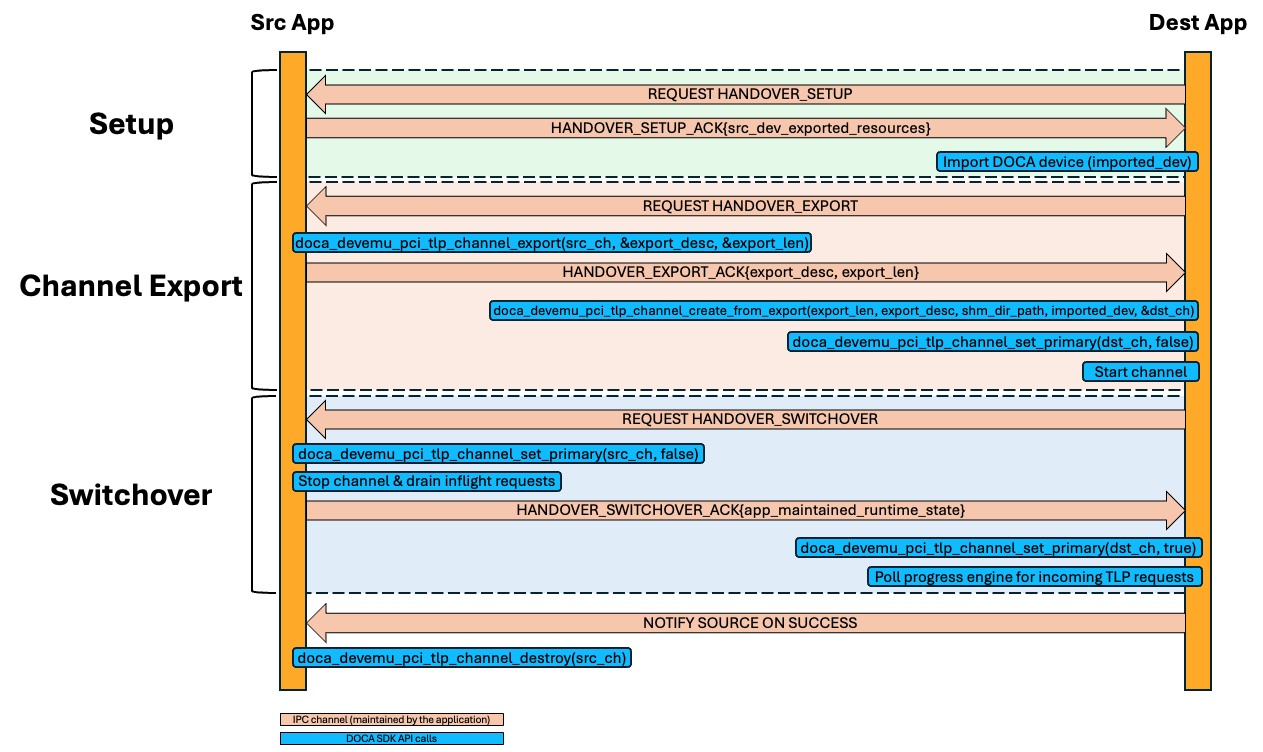
Setup
The source application retrieves the ibv_pd associated with the DOCA device that used for the TLP channel creation using doca_rdma_bridge_get_dev_pd, and sends the associated resources to the destination application.
The destination application imports the ibv_pd and creates the DOCA device using doca_rdma_bridge_open_dev_from_pd.
For a detailed breakdown of the export and import process of an ibv_pd, please refer to the relevant Linux Manual Pages.
Channel Export
The source application creates a channel export descriptor using doca_devemu_pci_tlp_channel_export, and sends it to the destination application.
The destination application imports the channel using doca_devemu_pci_tlp_channel_create_from_export, sets the channel as secondary using doca_devemu_pci_tlp_channel_set_primary, sets other configurations (e.g., request user data size), and starts the channel using doca_ctx_start.
Setting the destination channel as secondary ensures only the source channel can forward requests to the (source) application, avoiding race conditions and undefined behavior. Later in the process, the source and destination channels switch roles.
Some configurations are not supported when the channel is created from export, e.g., setting a shared memory directory path.
Switchover
The source application sets the channel as secondary using doca_devemu_pci_tlp_channel_set_primary, stops the channel using doca_ctx_stop and drains all inflight requests.
The destination application sets the channel as primary using doca_devemu_pci_tlp_channel_set_primary, and can start receiving incoming TLP Channel Requests using doca_pe_progress.
Inflight ACG requests flushed during the draining stage can be retrieved by the destination application once it polls the channel for incoming requests.
If the destination application faces any failures at this stage, the source application can rollback by re-starting the (stopped) source channel.
It is the source application responsibility to pass all the necessary maintained PCIe-related resources to the destination application at this stage (e.g., a data structure with the latest configuration space state of a PCIe device).
DOCA DevEmu PCI TLP Samples
This section describes DOCA DevEmu PCI TLP samples.
The samples illustrate how to use the DOCA DevEmu PCI TLP API to do the following:
-
Create a single PCIe endpoint and handle raw Transaction Layer Packets at the BlueField DPU level
-
Carry out a TLP Channel Handover (Live Upgrade)
-
Emulate a complete PCIe switch topology with multiple bridges and endpoints using (handling) raw Transaction Layer Packets.
-
Hot-plug and hot-unplug TLP devices.
Structure
All the samples utilize the same TLP type configurations, which can be found at /opt/mellanox/doca/samples/doca_devemu/devemu_pci_type_config.h
The structure for some samples is as follows:
-
/opt/mellanox/doca/samples/doca_devemu/<sample directory>-
dpu -
host
-
Samples following this structure will have two binaries: dpu (1) and host (2), the former should be run on the BlueField and represents the controller of the emulated TLP devices, while the latter should be run on the host and represents the host driver.
For simplicity, the host (2) side is based on the VFIO driver, allowing development of a driver in user-space.
Running the Samples
-
Refer to the following documents:
-
DOCA Installation Guide for Linux for details on how to install BlueField-related software.
-
DOCA Troubleshooting for any issue you may encounter with the installation, compilation, or execution of DOCA samples.
-
-
To build a given sample, run the following command. If you downloaded the sample from GitHub, update the path in the first line to reflect the location of the sample file
The binary
doca_<sample_name>[_dpu or _host]is created under/tmp/build/.Bashcd /opt/mellanox/doca/samples/doca_devemu/<sample_name>[/dpu or /host] meson /tmp/build ninja -C /tmp/build -
Sample usage example (
devemu_pci_device_tlp_handler):-
BlueField side (
devemu_pci_device_tlp_handler_dpu):BashUsage: doca_devemu_pci_device_tlp_handler_dpu [DOCA Flags] [Program Flags] DOCA Flags: -h, --help Print a help synopsis -v, --version Print program version information -l, --log-level Set the (numeric) log level for the program <10=DISABLE, 20=CRITICAL, 30=ERROR, 40=WARNING, 50=INFO, 60=DEBUG, 70=TRACE> --sdk-log-level Set the SDK (numeric) log level for the program <10=DISABLE, 20=CRITICAL, 30=ERROR, 40=WARNING, 50=INFO, 60=DEBUG, 70=TRACE> --log-filter Filter logs from specific modules, separated by comma -j, --json <path> Parse command line flags from an input json file Program Flags: -p, --pci-addr The DOCA device PCI address. Format: XXXX:XX:XX.X or XX:XX.X -d, --handover-destination Run as a TLP channel handover destination: connect to a source app and take over the TLP channel -s, --shm-dir-path Absolute directory path for TLP channel shared memory. When provided, enables live-upgrade handover (source: exports channel; destination: imports from this path). When omitted, the sample runs in standalone mode without handover support. -
Host side (
devemu_pci_device_tlp_handler_host):BashUsage: devemu_pci_device_tlp_handler_host [DOCA Flags] [Program Flags] DOCA Flags: -h, --help Print a help synopsis -v, --version Print program version information -l, --log-level Set the (numeric) log level for the program <10=DISABLE, 20=CRITICAL, 30=ERROR, 40=WARNING, 50=INFO, 60=DEBUG, 70=TRACE> --sdk-log-level Set the SDK (numeric) log level for the program <10=DISABLE, 20=CRITICAL, 30=ERROR, 40=WARNING, 50=INFO, 60=DEBUG, 70=TRACE> --log-filter Filter logs from specific modules, separated by comma -j, --json <path> Parse all command flags from an input json file Program Flags: -p, --pci-addr PCI address of the emulated device. Format: XXXX:XX:XX.X -g, --vfio-group VFIO group ID of the device. Integer -r, --region-index The index of the transaction region as defined in devemu_pci_type_config.h. Integer -w, --write-data Data to write to the transaction region, if not provided then the sample will do a read instead. ASCII string
-
-
For additional information per sample, use the
-hoption:
/tmp/build/<sample_name> -h
Additional sample setup:
-
The host samples require the emulated device to be discovered by the host side and the device is bound to the VFIO driver:
-
The samples expect 2 parameters
-p(--pci-addr) and-g(--vfio-group) of the emulated device as seen by the host. -
The host can use the script
/opt/mellanox/doca/samples/doca_devemu/devemu_pci_vfio_bind.pyto bind the VFIO driver.Bash$ sudo python3 /opt/mellanox/doca/samples/doca_devemu/devemu_pci_vfio_bind.py <pcie-address-of-emulated-dev>-
The script is a python3 script which expects the PCIe address of the emulated device as a positional argument (e.g.,
0000:3e:00.0) -
The script outputs the VFIO group ID
-
The script should be used only once after the device is discovered at the host for the first time
-
-
-
To unbind the VFIO driver, use the script located at
/opt/mellanox/doca/samples/doca_devemu/devemu_pci_vfio_bind.pyfrom the host as follows:Bash$ sudo python3 /opt/mellanox/doca/samples/doca_devemu/devemu_pci_vfio_bind.py <pcie-address-of-emulated-dev> --unbind
-
This python3 script expects the PCIe address of the emulated device as a positional argument (e.g.,
0000:3e:00.0) along with the--unbindargument
-
Samples
These samples are also available on GitHub.
PCI Device TLP Handler
This sample illustrates how to handle raw Transaction Layer Packets (TLPs) at the BlueField DPU level, providing low-level PCIe protocol processing capabilities for custom device emulation.
It also demonstrates how the host driver can interact with transaction regions for testing TLP processing functionality.
In addition, the sample supports TLP channel handover (live upgrade): a running source instance can transfer its active TLP channel to a newly started destination instance with zero host-visible disruption, enabling seamless in-service software upgrades.
The sample can also optionally expose an SR-IOV capability on the PF and serve the configuration and memory TLPs of each VF over the same endpoint.
This sample implements a single PCIe endpoint and is limited to a single TLP channel downstream port.
When the device supports querying the downstream port BDF for TLP channel requests, the sample uses it to serve TLPs that are associated with unused downstream ports: such requests are completed with an Unsupported Request (UR) status, using the downstream port’s BDF as the completer ID. This lets the single-endpoint sample run even when more than one TLP downstream port is configured; otherwise, the number of TLP ports must be set to 1 via mlxconfig before running the sample.
The BlueField sample logic includes:
-
Initializing a custom PCI TLP type with specific device and vendor IDs.
-
Creating and configuring a TLP channel to receive and process raw PCIe transactions.
-
Setting up PCI configuration space structure with proper headers, BARs, and device capabilities.
-
Registering a TLP request handler callback function to process incoming transactions.
-
Creating a device representor to enable host-side device enumeration.
-
Initializing a TLP device context for transaction processing.
-
Optionally enabling SR-IOV: exposing an SR-IOV capability on the PF, bringing up the requested VFs, and routing each function’s configuration and memory TLPs.
-
Processing various types of TLP requests including:
-
Configuration space read/write operations (Type 0)
-
Memory read/write operations
-
Completion handling with appropriate status codes
-
-
Handling PCIe protocol-specific fields such as:
-
Transaction tags and request IDs
-
Bus/Device/Function (BDF) addressing
-
Byte enable masks and data alignment
-
Completion status codes (Success, Unsupported Request, etc.)
-
-
Parsing TLP headers to extract transaction information and routing details.
-
Generating appropriate TLP completion responses for posted and non-posted transactions.
-
Managing device state and configuration space updates.
-
Supporting TLP channel handover for live upgrade between two instances of the sample (running on 2 different processes).
-
The sample polls indefinitely for TLP requests until the user presses `[Ctrl+c]` to close the sample.
The Host sample logic includes:
-
Initializing the VFIO device with a matching PCIe address and VFIO group.
-
Mapping the transaction memory region from the BAR to the process address space.
-
Writing the values provided as input to the beginning of the transaction region, or reading existing values if no input is provided.
-
The sample demonstrates interaction with transaction regions that can be processed by the TLP handler on the BlueField DPU.
References:
-
/opt/mellanox/doca/samples/doca_devemu/-
devemu_pci_device_tlp_handler/dpu/-
devemu_pci_device_tlp_handler_dpu_sample.c -
devemu_pci_device_tlp_handler_dpu_main.c -
meson.build
-
-
devemu_pci_device_tlp_handler/host/-
devemu_pci_device_tlp_handler_host_sample.c -
devemu_pci_device_tlp_handler_host_main.c -
meson.build
-
-
devemu_pci_common.h -
devemu_pci_common.c -
devemu_pci_host_common.h -
devemu_pci_host_common.c -
devemu_pci_type_config.h
-
PCI Device TLP Bridge Handler
This sample illustrates how to emulate a complete PCIe switch topology with multiple bridges and endpoints using raw Transaction Layer Packets (TLPs). It demonstrates advanced PCIe fabric emulation capabilities by implementing a hierarchical bus architecture with upstream/downstream ports and multiple endpoint devices, in either a static mode or a hot-plug mode.
The sample logic includes:
-
Initializing a custom PCI TLP type for bridge and multi-endpoint topology.
-
Creating and configuring a TLP channel to receive and process PCIe transactions across the entire topology.
-
Initializing a complex PCIe device topology with one sub-topology per TLP channel DSP, each consisting of:
-
1 Upstream Switch Port (USP)
-
N Downstream Switch Ports (DSPs) connected to the USP, where N is the number of endpoints assigned to this channel DSP
-
N Single-PF endpoint devices, each connected to a DSP
-
-
Setting up PCI configuration space structures for both Type 0 (endpoint) and Type 1 (bridge) headers.
-
Implementing PCIe switch routing logic:
-
Type 0 configuration requests routing to USPs
-
Type 1 configuration requests routing to DSPs and endpoints
-
Bus number management and secondary bus assignment
-
Device number mapping across the switch fabric
-
-
Creating device representors for all endpoint devices to enable host enumeration, or delaying creation in case of hot-plug mode.
-
Initializing TLP device contexts for hardware-accelerated endpoint processing.
-
Allocating independent transaction memory regions for each endpoint device.
-
Processing various types of TLP requests with topology-aware routing:
-
Configuration space read/write operations (Type 0 and Type 1)
-
Memory read/write operations with BDF-based device lookup
-
Bridge-specific configuration (bus numbers, memory windows)
-
Endpoint-specific configuration (BARs, capabilities)
-
-
Handling PCIe capabilities for endpoints:
-
PCIe Express capability
-
MSI-X capability
-
VPD (Vital Product Data) capability
-
Power Management capability
-
-
Managing bridge and endpoint device states independently.
-
The sample polls indefinitely for TLP requests until the user presses `[Ctrl+c]` to close the sample.
-
In hot-plug mode, the user can hot-plug and hot-unplug on any available downstream port, via the terminal that runs the sample.
References:
-
/opt/mellanox/doca/samples/doca_devemu/-
devemu_pci_device_tlp_bridge_handler/-
devemu_pci_device_tlp_bridge_handler_config.h -
devemu_pci_device_tlp_bridge_handler_sample.c -
devemu_pci_device_tlp_bridge_handler_main.c -
meson.build
-
-
devemu_pci_common.h -
devemu_pci_common.c -
devemu_pci_type_config.h
-
Last updated: