

This guide describes how to deploy the DOCA Flow library, the philosophy of the DOCA Flow API, and how to use it. The guide is intended for developers writing network function applications that focus on packet processing (such as gateways). It assumes familiarity with the network stack and DPDK.
Introduction
The quality status of DOCA libraries is listed here.
DOCA Flow is the most fundamental API for building generic packet processing pipes in hardware. The DOCA Flow library provides an API for building a set of pipes, where each pipe consists of match criteria, monitoring, and a set of actions. Pipes can be chained so that after a pipe-defined action is executed, the packet may proceed to another pipe.
A DOCA Flow-based application can run on either the host machine or an NVIDIA® BlueField® DPU target.
Using DOCA Flow API, it is easy to develop hardware-accelerated applications that have a match on up to two layers of packets (tunneled).
-
MAC/VLAN/ETHERTYPE
-
IPv4/IPv6
-
TCP/UDP/ICMP
-
GRE/VXLAN/GTP-U/ESP/PSP
-
Metadata
-
SRv6 (
segments_leftfield) -
Application-defined packet bytes, through a packet window
The execution pipe can include packet modification actions such as the following:
-
Modify MAC address
-
Modify IP address
-
Modify L4 (ports)
-
Strip tunnel
-
Add tunnel
-
Set metadata
-
SRv6 actions
-
Insert SRv6 Segment Routing Header (SRH)
-
Decrement SRv6 segments left
-
Copy active SID to IPv6 destination based on segments left field
-
-
Modify application-defined packet bytes, through a packet window
The execution pipe can also have monitoring actions such as the following:
-
Count
-
Policers
The pipe also has a forwarding target which can be any of the following:
-
Software (RSS to subset of queues)
-
Port
-
Another pipe
-
Drop packets
Architecture
The following diagram shows how the DOCA Flow library defines a pipe template, receives a packet for processing, creates the pipe entry, and offloads the flow rule in NIC hardware.
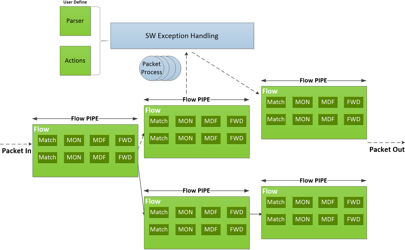
Features of DOCA Flow:
-
User-defined set of matches parser and actions
-
DOCA Flow pipes can be created or destroyed dynamically
-
Packet processing is fully accelerated by hardware with a specific entry in a flow pipe
-
Packets that do not match any of the pipe entries in hardware can be sent to Arm cores for exception handling and then reinjected back to hardware
The DOCA Flow pipe consists of the following components:
-
Monitor (MON in the diagram) - counts, meters
-
Modify (MDF in the diagram) - modifies a field
-
Forward (FWD in the diagram) - forwards to the next stage in packet processing
Steering Domains
DOCA Flow organizes pipes into high-level containers named domains to address the specific needs of the underlying architecture.
A key element in defining a domain is the packet direction and a set of allowed actions.
-
A domain is a pipe attribute (also relates to shared objects)
-
A domain restricts the set of allowed actions
-
Transition between domains is well-defined (packets cannot cross domains arbitrarily)
-
A domain may restrict the sharing of objects between packet directions
-
Packet direction can restrict the move between domains
List of Steering Domains
DOCA Flow provides the following set of predefined steering domains:
|
Domain |
Description |
|---|---|
|
|
|
|
|
|
|
|
|
|
|
|
Domains in VNF Mode
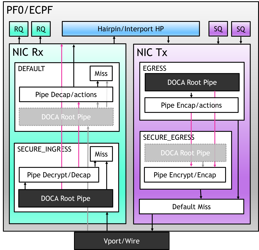
Domains in Switch Mode
In switch mode, forwarding from a pipe with the default domain to the egress domain root pipe is permitted, while forwarding from the egress domain back to the default domain is prohibited.
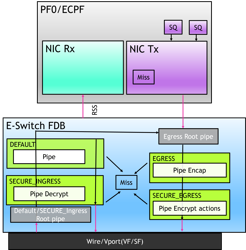
Traffic originating from Software Transmit (SW Tx) automatically forwards to the egress root pipe.
A pipe with RSS forwarding strictly follows these cross-domain rules.
Domain Details
|
Domain |
Direction |
Traffic Entry |
Allowed Actions |
Prohibited Actions |
Root Pipe Slot |
|---|---|---|---|---|---|
|
|
Ingress |
Packet arrives at E-Switch from wire or vport. |
match, modify, decap, encap, monitor, forward |
crypto (encrypt/decrypt) |
Ingress slot (shared with |
|
|
Ingress |
Forwarded from |
match, decrypt, monitor |
encap, encrypt |
Ingress slot (shared with |
|
|
Egress |
|
match, modify, encap, monitor |
crypto (encrypt/decrypt) |
Egress slot (shared with |
|
|
Egress |
Forwarded from |
match, encrypt, monitor |
decap |
Egress slot (shared with |
Only one root pipe is allowed per direction slot. DEFAULT and SECURE_INGRESS are mutually exclusive as ingress root; EGRESS and SECURE_EGRESS are mutually exclusive as egress root.
Cross-Domain Forwarding Rules
|
↓ Source \ Target → |
DEFAULT |
SECURE_INGRESS |
EGRESS |
SECURE_EGRESS |
|---|---|---|---|---|
|
|
Yes |
Yes |
Yes (root only) |
Yes (root only) |
|
|
Yes |
Yes |
Yes (root only) |
No |
|
|
No |
No |
Yes |
Yes |
|
|
No |
No |
Yes |
Yes |
-
(root only): When forwarding from an ingress domain to an egress domain, the target must be a root pipe.
-
Forwarding from egress domains back to ingress domains is not allowed.
-
Cross-direction forwarding (ingress → egress) requires
hairpinq_numto be configured.
Traffic Models & Domain Mapping
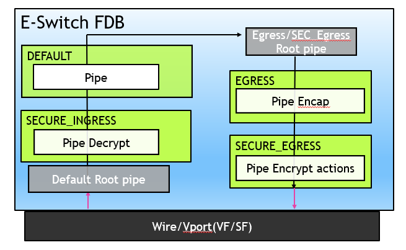
The following models illustrate common traffic paths utilized in switch mode. Square brackets [...] indicate optional stages (e.g., cryptographic operations) that can be appended based on specific application requirements.
Fast Path (Full Hardware Forwarding, No Software Involvement)
|
# |
Path |
Domain Chain |
Description |
|
FP1 |
VF → Wire |
|
Egress direction: The |
|
FP2 |
Wire → VF |
|
Ingress direction: The |
Slow Path (Miss to Software, Software Processes, Re-enters e-Switch)
|
# |
Path |
Domain Chain |
Description |
|
SP1 |
* → RSS → SW → Tx → Wire |
|
Egress slow path: Unmatched packets miss to RSS for Software (SW) processing. The SW then transmits the packet (with |
|
SP2 |
* → RSS → SW → Tx → VF |
|
Ingress slow path: Unmatched packets miss to RSS for SW processing. The SW then transmits the packet (with |
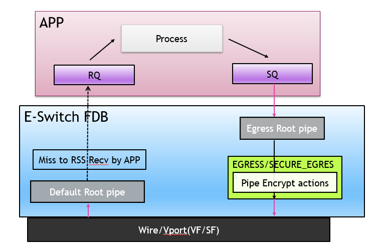
Architectural Design Patterns
-
The
DEFAULTroot serves as the primary traffic entry point. -
The
EGRESSroot acts as the unified re-entry point for software-transmitted (SW Tx) traffic. -
The Fast Path completely bypasses RSS/Software, relying entirely on full hardware processing.
-
The second half of the Slow Path (post-SW Tx) directly reuses the Fast Path's
EGRESS→ output chain. -
SECURE_INGRESSandSECURE_EGRESSare optional cryptographic processing layers added strictly on demand.
Reference Applications & Samples
|
Use Case |
Paths |
Reference |
|
Simple L2/L3 switch |
FP1 + FP2 |
|
|
Bidirectional wire ↔︎ VF |
FP1 + FP2 |
|
|
IPsec/PSP Security Gateway (full offload) |
FP1[SEC_EGR] + FP2[SEC_ING → EGRESS] |
|
|
IPsec/PSP Security Gateway (partial offload) |
SP1[SEC_EGR] + SP2 |
|
|
PSP GW on-demand tunnel setup |
SP1 |
|
Important Routing Constraints
-
Mutually exclusive root pipes:
DEFAULTandSECURE_INGRESSshare a single ingress root slot.EGRESSandSECURE_EGRESSshare a single egress root slot. -
Cross-domain forwarding: Forwarding traffic from an ingress domain to an egress domain requires the target to be an egress root pipe.
-
Miss cascade: If a pipe lacks a defined
fwd_misshandler, unmatched traffic automatically falls through to the port default miss (which defaults to the kernel). -
Software Tx auto-entry: Packets transmitted via
rte_eth_tx_burst()automatically enter the egress root pipe. -
One-way transitions: Egress domains are prohibited from forwarding back to ingress domains. Similarly,
SECURE_INGRESScannot forward directly toSECURE_EGRESS.
API
DOCA API is available through the DOCA API Reference.
The pkg-config (*.pc file) for the DOCA Flow library is doca-flow.
CTSD Struct Initialization Macros
DOCA Flow versions its structs with compile-time struct dispatching (CTSD). The DOCA SDK Compatibility Policy describes the rules shared by every CTSD library: how DOCA_CTSD_COMPAT_VERSION selects a version, how a struct initializer macro maps its arguments, and how to move an application to a newer compatibility version. This section covers the DOCA Flow initializers.
Define DOCA_CTSD_COMPAT_VERSION before including doca_flow.h. It selects LIB_FLOW_VERSION, and DOCA_FLOW_STRUCT_<NAME>_INIT(...) resolves to DOCA_FLOW_STRUCT_<NAME>_INIT_V<LIB_FLOW_VERSION>, the initializer of the selected struct version. When DOCA_CTSD_COMPAT_VERSION is left unset, the latest version is selected.
These initializers take a new argument in version 2 or 3:
-
DOCA_FLOW_STRUCT_META_INITtakesaccess_indexafterpkt_meta, starting in version 2. -
DOCA_FLOW_STRUCT_MONITOR_INITtakesevent_rss_typeafter the meter type, the counter type, and the aging time, starting in version 2. -
DOCA_FLOW_STRUCT_PARSER_META_INITtakestcp_window_validation_syndromeas its last argument, starting in version 3.
A call written for the older argument list fails to compile under the newer version, even when the application leaves the new field unset. An application that leaves DOCA_CTSD_COMPAT_VERSION unset follows the latest version, so a DOCA release that adds a version can break such a call.
For example, DOCA_FLOW_STRUCT_META_INIT in version 1 takes pkt_meta and fills the scratch array u32[DOCA_FLOW_META_SCRATCH_PAD_MAX] with zero:
struct doca_flow_meta meta = DOCA_FLOW_STRUCT_META_INIT(pkt_meta);
Under LIB_FLOW_VERSION 2 or later, pass a value for access_index. Pass 0 to leave the field clear:
struct doca_flow_meta meta = DOCA_FLOW_STRUCT_META_INIT(pkt_meta, 0);
Other changes in these versions keep the argument lists:
-
The anonymous union stored next to
event_rss_typeindoca_flow_monitoradds no argument. -
DOCA_FLOW_STRUCT_MATCH_INITkeeps the arguments(META, PARSER_META, OUTER, TUN, INNER)in versions 1, 2, and 3. The new arguments belong to the nestedDOCA_FLOW_STRUCT_META_INITandDOCA_FLOW_STRUCT_PARSER_META_INITcalls that produceMETAandPARSER_META.
A struct initialized with = {} does not use these macros. It keeps compiling, and the new fields are zero.
To keep a call written for an older argument list compiling, either keep DOCA_CTSD_COMPAT_VERSION on the version the call was written for, or pass a value for each new argument. The DOCA SDK Compatibility Policy describes both options.
Flow Life Cycle
Initialization Flow
Create the configuration and any definitions before calling doca_flow_init(). Initialize the library before starting ports or creating pipes.
Definitions
Application-Defined Match and Actions Layouts
Use application-defined mode when an application needs compact match and actions buffers with its own member names. The registered fields define the complete layouts, so no standard structure needs to precede them. Select the mode before creating the definitions object, register the members before initialization, and pass each buffer through the typed pipe and entry APIs with an explicit cast. The default library-defined mode keeps the standard layouts.
The required storage for each type is the greatest registered field end. The library has no allocation-size argument and cannot detect a registration that exceeds the actual application buffer; every supplied buffer must provide at least that storage. Protocol selectors are unsupported and cause initialization to fail. Connection tracking is unsupported: doca_flow_init() returns DOCA_ERROR_NOT_SUPPORTED when CT queues are configured together with application-defined definitions. A type with no registered fields has size zero: pass NULL for that type. See doca_flow_definitions_cfg_set_mode() for the full contract and flow_definition_mode for a runnable example.
Array Fields
Control pipes support array fields with DOCA_FLOW_DEFINITIONS_MODE_APP_DEFINED. Declare and register each array with a capacity no larger than its corresponding standard field in doca_flow_actions, on whole-element boundaries. For example, this crypto data buffer uses the maximum capacity, DOCA_FLOW_CRYPTO_HEADER_LEN_MAX:
struct flat_control_crypto_actions {
    uint8_t encap_data[DOCA_FLOW_CRYPTO_HEADER_LEN_MAX];
    uint16_t data_size;
};
Register both the array and its associated size field with doca_flow_definitions_add_field(), passing each field's sizeof as its registered byte capacity or width. Each control entry must supply a concrete size that fits the registered array capacity; for this byte array, data_size must not exceed DOCA_FLOW_CRYPTO_HEADER_LEN_MAX. The all-ones changeable marker is not a valid size. Keep the size field zero in action masks.
The constant defines the buffer capacity; different entries may use different valid sizes. The application is responsible for keeping each entry's size within that capacity. Control entries provide their action data when added, so their array sizes cannot be validated at pipe creation. The existing array bounds checks reject sizes beyond the registered capacity during entry addition. These checks use the registered capacity; the application must ensure its buffer actually provides that storage.
Programmable Structs
Definitions also carry application-defined layouts of bytes DOCA Flow does not parse, either in the packet or in a message. Such a layout is built with doca_flow_definitions_programmable_struct_create() and doca_flow_definitions_programmable_struct_add_field(), and registered with doca_flow_definitions_add_programmable_struct() under one of the programmable prefixes. See the Packet Window section for the packet-byte layouts and their use in match and actions, and Defining a Message Format for message layouts.
Pipe Mode
The pipe mode (set via mode_args) defines the fundamental traffic topology and default "miss" behavior for a DOCA port. When a port is initialized, this mode creates the initial miss rules.
This mode (mode_args) defines the basic traffic in DOCA. It creates some miss rules when a DOCA port initializes. Currently, DOCA supports 2 modes:
-
vnfA packet arriving from one of the device's ports is processed, and can be sent to another port. By default, missed packets go to RSS.
The following diagram shows the basic traffic flow in
vnfmode. Packet1 firstly misses and is forwarded to host RSS. The app captures this packet and decides how to process it and then creates a pipe entry. Packet2 will hit this pipe entry and do the action, for example, for VXLAN, will do decap, modify, and encap, then is sent out from P1.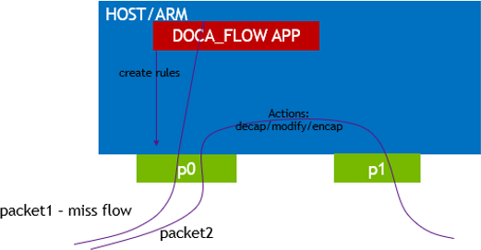
To forward packets between ports, use
doca_flow_port_pairto establish a port pair. Port pairing is unidirectional, meaning that pairing port X with port Y allows forwarding from X to Y, but not the reverse. To enable forwarding from Y to X, you must pair Y with X usingdoca_flow_port_pairagain. After pairing ports, packets can be forwarded to either the paired port directly or the paired port's egress root pipe, which sends packets through the egress routine.Forwarding from an ingress pipe to an egress pipe is only allowed to the
egress_rootpipe. -
switchUsed for internal switching, only representor ports are allowed, for example, uplink representors and SF/VF representors. Packet is forwarded from one port to another. If a packet arrives from an uplink and does not hit the rules defined by the user's pipe, then the packet is received on all RSS queues of the representor of the uplink.
The following diagram shows the basic flow of traffic in
switchmode. Packet1 firstly misses to host RSS queues. The app captures this packet and decides to which representor the packet goes, and then sets the rule. Packets hit this rule and go to representor0.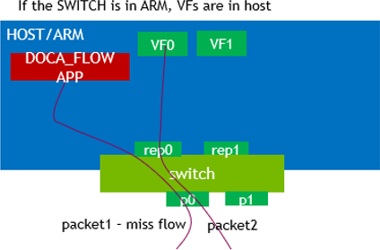
doca_devfield is mandatory indoca_flow_port_cfg(usingdoca_flow_port_cfg_set_dev()).The application must avoid initialization of the VF/SF representor ports in DPDK API (i.e., the following functions
rte_eth_dev_configure(),rte_eth_rx_queue_setup(),rte_eth_dev_start()must not be called for VF/SF representor ports).DOCA Flow switch mode unifies all the ports to the switch manager port for traffic management. This means that all the traffic is handled by switch manager port. Users only must create an RSS pipe on the switch manager port to get the missed traffic, and they should only manage the pipes on the switch manager port.
To obtain the switch manager port, call
doca_flow_port_switch_get():/* Pass any started port to get its eswitch's manager port */ struct doca_flow_port *sw_port = doca_flow_port_switch_get(ports[0]); /* Or pass NULL when there is only one eswitch */ struct doca_flow_port *sw_port = doca_flow_port_switch_get(NULL);All pipe creation, entry addition, and
doca_flow_entries_process()calls must use this switch manager port, not the individual ports returned bydoca_flow_port_start().Switch mode can work with two different
mode_argsconfigurations: With or withoutexpert. The way to retrieve the miss traffic source'sport_iddepends on this configuration:-
If
expertis not set, the traffic misses to software would be tagged withport_idinformation in the mbuf CQE field to allow users to deduce the sourceport_id. Meanwhile, users can set the destinationport_idto mbuf meta and the packet is sent out directly to the destination port based on the meta information.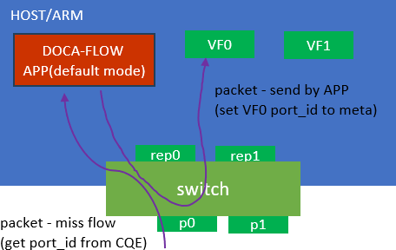
-
If
expertis set, theport_idis not added to the packet. Users can configure the pipes freely to implement their own solution.Traffic cloned from the VF to the RSS pipe misses its
port_idinformation due to firmware limitation.
-
Port Capabilities
DOCA Flow provides a port capabilities API (doca_flow_port_capabilities_create(), doca_flow_port_capabilities_destroy()) to query hardware-supported features before pipeline configuration. The whole cycle of querying port capabilities (create -> query -> destroy) should happen after doca_flow_init() and before port start. The device passed to create must remain open until destroy.
Currently supported queries include CT IPv6 steering. For hardware requirements, API usage, and an example, see Querying CT IPv6 Support in the DOCA Flow Connection Tracking guide.
Start Point
DOCA Flow API serves as an abstraction layer API for network acceleration. The packet processing in-network function is described from ingress to egress and, therefore, a pipe must be attached to the origin port. Once a packet arrives to the ingress port, it starts the hardware execution as defined by the DOCA API.
Port identifiers
doca_flow_port is an opaque object, as the DOCA Flow API is designed to be independent of any specific packet I/O framework (e.g., DPDK). To begin using a DOCA Flow port, the user must call doca_flow_port_start(). This function associates the application's underlying port with a DOCA Flow port.
DOCA Flow performs all steering in hardware, operating on the port's doca_dev independently of the packet I/O framework. When the port is managed through DPDK, the application must probe the device with the dv_flow_en=2 device argument, which puts the DPDK PMD into hardware steering mode (see the "Running the Sample" section). Paths that do not use DPDK do not require this argument.
During this setup, the user must assign a logical port ID using the doca_flow_port_cfg_set_port_id() API. This port_id is later referenced in:
-
doca_flow_parser_meta.port_id- when matching packets received on a specific port. In switch mode, the special valueUINT16_MAX(0xffff) can be used to match software-originated traffic — i.e., packets sent by the application viarte_eth_tx_burst(). This is particularly useful in EGRESS root pipes to distinguish SW-injected packets from hardware-forwarded traffic. -
doca_flow_fwd.port_id- when forwarding packets to a specific port
For DPDK-based applications, the DPDK port_id can be used directly as the logical port identifier.
DOCA Device
A DOCA device must be specified during doca_flow_port_start() to provide the necessary hardware context for the port.
-
For physical, virtual, or subfunction devices (PF, VF, or SF), use the
doca_flow_port_cfg_set_dev()API to associate adoca_devobject with the port. -
For representor ports, use the
doca_flow_port_cfg_set_dev_rep()API to associate adoca_dev_repobject instead.
Providing a doca_dev_rep is what explicitly indicates that the port is a representor.
Actions Memory
The use of DOCA Flow actions mandates that sufficient memory will be allocated for them, in advance, per port. This is done using the doca_flow_port_cfg_set_actions_mem_size() API function. The recommended way of getting precise information about the expected actions memory consumption is the following:
-
During development, allocate a fixed high amount of actions memory, regardless of your actual pipeline.
-
Once the steering pipeline is ready, examine the program's actual consumption using the DOCA Flow Tune tool.
-
Using DOCA Flow Tune for calibration, update the parameter passed to the setter function.
Please note that in the hot upgrade use case, the total actions memory size set for all instances should not exceed the maximum resource limit of this hardware port.
Port devargs
Set specific configurations per port type using doca_flow_port_cfg_set_devargs().
-
no_wire_to_wire– Acts as a hint telling DOCA Flow that no wire-to-wire traffic path exists on the port. Enable this when the environment exclusively processes Wire-to-VF or VF-to-Wire traffic. This reduces latency for these specific forwarding paths and significantly improves port startup times. In VNF mode, a pipe in theDEFAULTdomain on such a port cannot forward to a port: the forward is rejected when the pipe is created, or when the entry sets the port if the forward is changeable.
Port Operation State
DOCA Flow ports can be initialized multiple times from different instances. Each instance prepares its pipeline, but only one actively receives port traffic at a time. The instance actively handling the port traffic depends on the operation state set by the doca_flow_port_cfg_set_operation_state() function:
-
DOCA_FLOW_PORT_OPERATION_STATE_ACTIVE– The instance actively handles incoming and outgoing traffic -
DOCA_FLOW_PORT_OPERATION_STATE_ACTIVE_READY_TO_SWAP– The instance handles traffic actively when no other active instance is available -
DOCA_FLOW_PORT_OPERATION_STATE_STANDBY– The instance handles traffic only when no active oractive_ready_to_swapinstance is available -
DOCA_FLOW_PORT_OPERATION_STATE_UNCONNECTED– The instance does not handle traffic, regardless of the state of other instances
If the doca_flow_port_cfg_set_operation_state() function is not called, the default state DOCA_FLOW_PORT_OPERATION_STATE_ACTIVE is applied.
When a port is configured with a state that expects to handle traffic, it takes effect only after root pipes are created for this port.
When the active port is closed, either gracefully or due to a crash, the standby instance automatically becomes active without any action required.
The port operation state can be modified after the port is started using the doca_flow_port_operation_state_modify() function.
Use Case Examples
Hot Upgrade
This operation state mechanism allows upgrading the DOCA Flow program without losing any traffic.
To upgrade an existing DOCA Flow program with ports started in DOCA_FLOW_PORT_OPERATION_STATE_ACTIVE state (Instance A):
-
Open a new Instance B and start its ports in
DOCA_FLOW_PORT_OPERATION_STATE_STANDBYstate. -
Modify Instance A's ports from
DOCA_FLOW_PORT_OPERATION_STATE_ACTIVEtoDOCA_FLOW_PORT_OPERATION_STATE_UNCONNECTEDstate. At this point, Instance B starts receiving traffic. -
Close Instance A.
-
Open a new Instance C with
DOCA_FLOW_PORT_OPERATION_STATE_UNCONNECTEDstate. Instance C is the upgraded version of Instance A. -
Create the entire pipeline for Instance C.
-
Change Instance C's state from
DOCA_FLOW_PORT_OPERATION_STATE_UNCONNECTEDtoDOCA_FLOW_PORT_OPERATION_STATE_ACTIVE. At this point, Instance B stops receiving traffic and Instance C starts. -
Instance B can either be closed or kept as a backup should Instance C crash.
Swap Existing Instances
This mechanism also facilitates swapping two different DOCA Flow programs without losing any traffic.
To swap between two existing DOCA Flow programs with ports started in DOCA_FLOW_PORT_OPERATION_STATE_ACTIVE and DOCA_FLOW_PORT_OPERATION_STATE_STANDBY states (Instance A and Instance B, respectively):
-
Modify Instance A's ports from
DOCA_FLOW_PORT_OPERATION_STATE_ACTIVEtoDOCA_FLOW_PORT_OPERATION_STATE_ACTIVE_READY_TO_SWAP. -
Modify Instance B's ports from
DOCA_FLOW_PORT_OPERATION_STATE_STANDBYtoDOCA_FLOW_PORT_OPERATION_STATE_ACTIVE. At this point, Instance B starts receiving traffic. -
Modify Instance A's ports from
DOCA_FLOW_PORT_OPERATION_STATE_ACTIVE_READY_TO_SWAPtoDOCA_FLOW_PORT_OPERATION_STATE_STANDBY.
Limitations
-
Supported only in switch mode – the
mode_argsstring must include"switch". -
Only the switch port supports states; its representors are affected by its state. Starting a representor port or calling the modify function with a non-active operation state should fail.
-
Two instances cannot be in the same operation state simultaneously, except for
DOCA_FLOW_PORT_OPERATION_STATE_UNCONNECTED. If a new instance initializes a port while another instance with the same operation state exists, aDOCA_ERROR_ALREADY_EXISTerror is returned either during port startup or root pipe creation.
Create Pipe and Pipe Entry
Pipe is a template that defines packet processing without adding any specific hardware rule. A pipe consists of a template that includes the following elements:
-
Match
-
Monitor
-
Actions
-
Forward
The following diagram illustrates a pipe structure.
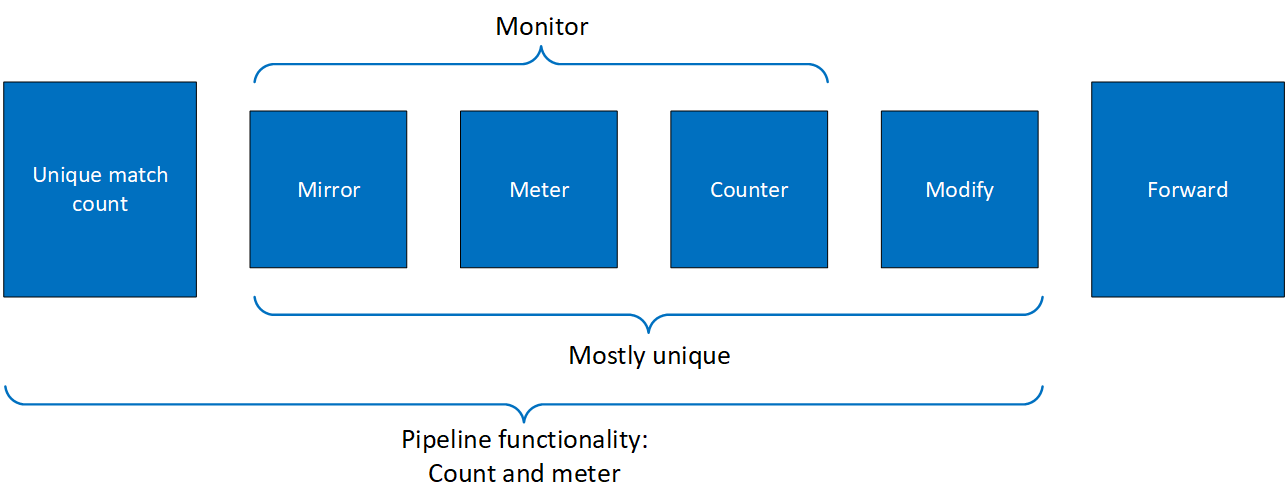
The creation phase allows the hardware to efficiently build the execution pipe. After the pipe is created, specific entries can be added. A subset of the pipe template may be used (e.g., skipping the monitor completely, or using only some of its features, such as a counter without aging). Unless the entry API for that pipe type explicitly supports it - for example, a control pipe entry, which carries its own monitor - an entry cannot introduce a field or resource that was not set on the pipe configuration at pipe creation; doing so is undefined behavior.
Pipe Matching or Action Applying
DOCA Flow allows defining criteria for matching on a packet or for taking actions on a matched packet by modifying it. The information defining these criteria is provided through the following pointers:
-
Match or action pointer – given at pipe or entry creation
-
Mask pointer – optionally given at pipe creation
Defining criteria for matching or actions on a packet can be done at the pipe level, where it applies to all packets of a pipe, or specified on a per entry basis, where each entry defines the operation on either the match, actions, or both.
In DOCA Flow terminology, when a field is identified as CHANGEABLE at pipe creation, this means that the actual criterion of the field is deferred to entry creation. Different entries can provide different criteria for a CHANGEABLE field.
A match or action field can be categorized, during pipe creation, as one of the following:
-
IGNORED – Ignored in either the match or action taking process
-
CHANGEABLE – When the actual behavior is deferred to the entry creation stage
-
SPECIFIC – Value is used as is in either match or action process
A mask field can either be provided, in which case it is called explicit matching, or action applying. If the mask pointer is NULL, we call it implicit matching or action applying. The following subsections provide the logic governing matching and action applying.
When a field value is specified as 0xffff it means that all the field's bits are set (e.g., for TTL it means 0xff and for IPv4 address it means 0xffffffff).
Creating multiple entries with the same match criteria is not supported. Instead, use the update entry API to modify the existing entry.
Matching
Matching is the process of selecting packets based on their fields' values and steering them for further processing. Processing can either be further matching or actions applying.
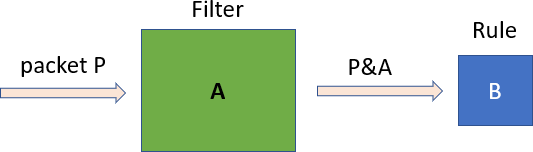
The packet enters the green filter which modifies it by masking it with the value A. The output value, P&A, is then compared to the value B, and if they are equal, then that is a match.
The values of A and B are evaluated according to the values of the pipe configuration and entry configuration fields, according to the tables in sections "Implicit Matching" and "Explicit Matching".
Implicit Matching
|
Match Type |
Pipe Match Value (V) |
Pipe Match Mask (M) |
Entry Match Value (E) |
Filter (A) |
Rule (B) |
|
Ignore |
0 |
NULL |
N/A |
0 |
0 |
|
Constant |
0<V<0xffff |
NULL |
N/A |
0xffff |
V |
|
Changeable (per entry) |
0xffff |
NULL |
0≤E≤0xffff |
0xffff |
E |
Explicit Matching
|
Match Type |
Pipe Match Value (V) |
Pipe Match Mask (M) |
Entry Match Value (E) |
Filter (A) |
Rule (B) |
|
Constant |
V!=0xffff |
0<M≤0xffff |
0≤E≤0xffff |
M |
M&V |
|
Changeable |
V==0xffff |
0<M≤0xffff |
0≤E≤0xffff |
M |
M&E |
|
Ignored |
0≤V<0xffff |
M==0 |
0≤E≤0xffff |
0 |
0 |
Action Applying
Implicit Action Applying
|
Action Type |
Pipe Action Value (V) |
Pipe Action Mask (M) |
Entry Action Value (E) |
Action on the Field |
|
Ignore |
0 |
NULL |
N/A |
None |
|
Constant |
0 < V < 0xffff |
NULL |
N/A |
Set to V |
|
Changeable |
0xffff |
NULL |
E |
Set to E |
Implicit action applying example:
-
Destination IPv4 address is 255.255.255.255
-
No mask provided
-
Entry value is 192.168.0.1
-
Result – The action field is changeable. Therefore, the value is provided by the entry. If a match on the packet occurs, the packet destination IPv4 address is changed to 192.168.0.1.
Meta only supports changeable action.
Explicit Action Applying
Assume P is packet's field value.
|
Action Type |
Pipe Action Value (V) |
Pipe Action Mask (M) |
Entry Action Value (E) |
Action on the Field |
|---|---|---|---|---|
|
constant |
V!=0xffff |
0≤M≤0xffff |
0≤E≤0xffff |
set to (~M & P) | (M & V) In words: modify only bits that are set on the mask to the values in V |
|
Changeable |
V==0xffff |
0<M≤0xffff |
0≤E≤0xffff |
set to (~M & P) | (M & E) |
|
Ignored |
0≤V<0xffff |
M==0 |
0≤E≤0xffff |
none |
Explicit action applying example:
-
Destination IPv4 address is 192.168.10.1
-
Mask is provided and equals 255.255.0.0
-
Entry value is ignored
-
Result – If a match on the packet occurs, the packet destination IPv4 value changes to 192.168.0.0
Setting Pipe Match or Action
Match is a mandatory parameter when creating a pipe. Using the doca_flow_match struct, users must define the packet fields to be matched by the pipe.
For each doca_flow_match field, users select whether the field type is:
-
Ignore (match any) – the value of the field is ignored in a packet. In other words, match on any value of the field.
-
Constant (specific) – all entries in the pipe have the same value for this field. Users should not put a value for each entry.
-
Changeable – the value of the field is defined per entry. Users must provide it upon adding an entry.
L4 type, L3 type, and tunnel type cannot be changeable.
gtp_next_ext_hdr_typesupports onlypsctype (0x85).
The match field type can be defined either implicitly or explicitly using the doca_flow_pipe_cfg_set_match(struct doca_flow_pipe_cfg *cfg, const doca_flow_match *match, const doca_flow_match *match_mask) function. If match_mask == NULL, then it is done implicitly. Otherwise, it is explicit.
In the tables in the following subsections, an example is used of a 16-bit field (such as layer-4 destination port) where:
The same concept would apply to any other field (such as an IP address occupying 32 bits).
-
P stands for the packet field value
-
V stands for the pipe match field value
-
M stands for the pipe mask field value
-
E stands for the match entry field value
Implicit Match
|
Match Type |
Pipe Match Value (V) |
Pipe Match Mask (M) |
Entry Match Value (E) |
Filter (A) |
Rule (B) |
|
Ignore |
0 |
NULL |
N/A |
0 |
0 |
|
Constant |
0<V<0xffff |
NULL |
N/A |
0xffff |
V |
|
Changeable (per entry) |
0xffff |
NULL |
0≤E≤0xffff |
0xffff |
E |
To match implicitly, the following considerations should be taken into account.
-
Ignored fields:
-
Field is zeroed
-
Pipeline has no comparison on the field
-
-
Constant fields – These are fields that have a constant value among all entries. For example, as shown in the following, the tunnel type is VXLAN:
match.tun.type = DOCA_FLOW_TUN_VXLAN;These fields must only be configured once at pipe build stage, not once per new pipeline entry.
-
Changeable fields – These are fields whose value may change per entry. For example, the following shows match on a destination IPv4 address of variable per-entry value (outer 5-tuple):
match.outer.ip4.dst_ip = 0xffffffff; -
The following is an example of a match, where:
-
Outer 5-tuple
-
L3 type is IPv4 – constant among entries by design
-
L4 type is UDP – constant among entries by design
-
Tunnel type is
DOCA_FLOW_TUN_VXLAN– constant among entries by design -
IPv4 destination address varies per entry
-
UDP destination port is always
DOCA_FLOW_VXLAN_DEFAULT_PORT -
VXLAN tunnel ID varies per entry
-
The rest of the packet fields are ignored
-
-
Inner 5-tuple
-
L3 type is IPv4 – constant among entries by design
-
L4 type is TCP – constant among entries by design
-
IPv4 source and destination addresses vary per entry
-
TCP source and destination ports vary per entry
-
The rest of the packet fields are ignored
-
-
// filter creation
static void build_underlay_overlay_match(struct doca_flow_match *match)
{
    //outer
    match->outer.l3_type = DOCA_FLOW_L3_TYPE_IP4;
    match->outer.l4_type_ext = DOCA_FLOW_L4_TYPE_EXT_UDP;
    match->tun.type = DOCA_FLOW_TUN_VXLAN;
    match->outer.ip4.dst_ip = 0xffffffff;
    match->outer.udp.l4_port.dst_port = DOCA_FLOW_VXLAN_DEFAULT_PORT;
    match->tun.vxlan_tun_id = 0xffffffff;

    //inner
    match->inner.l3_type = DOCA_FLOW_L3_TYPE_IP4;
    match->inner.l4_type_ext = DOCA_FLOW_L4_TYPE_EXT_TCP;
    match->inner.ip4.dst_ip = 0xffffffff;
    match->inner.ip4.src_ip = 0xffffffff;
    match->inner.tcp.l4_port.src_port = 0xffff;
    match->inner.tcp.l4_port.dst_port = 0xffff;
}

// create entry specifying specific values to match upon
doca_error_t add_entry(struct doca_flow_pipe *pipe, struct doca_flow_port *port,
                       struct doca_flow_pipe_entry **entry)
{
    struct doca_flow_match match = {};
    struct doca_flow_actions actions = {};
    struct entries_status status = {};
    doca_error_t result;

    match.outer.ip4.dst_ip = BE_IPV4_ADDR(7, 7, 7, 1);
    match.tun.vxlan_tun_id = RTE_BE32(9876);
    match.inner.ip4.src_ip = BE_IPV4_ADDR(8, 8, 8, 1);
    match.inner.ip4.dst_ip = BE_IPV4_ADDR(9, 9, 9, 1);
    match.inner.tcp.l4_port.src_port = rte_cpu_to_be_16(5678);
    match.inner.tcp.l4_port.dst_port = rte_cpu_to_be_16(1234);
    result = doca_flow_pipe_basic_add_entry(0, pipe, &match, 0, &actions, NULL, NULL, 0, &status, entry);
}
The fields of the doca_flow_meta struct inside the match are not subject to implicit match rules and must be paired with explicit mask values.
Explicit Match
|
Match Type |
Pipe Match Value (V) |
Pipe Match Mask (M) |
Entry Match Value (E) |
Filter (A) |
Rule (B) |
|
Constant |
V!=0xffff |
0<M≤0xffff |
0≤E≤0xffff |
M |
M&V |
|
Changeable |
V==0xffff |
0<M≤0xffff |
0≤E≤0xffff |
M |
M&E |
|
Ignored |
0≤V<0xffff |
M==0 |
0≤E≤0xffff |
0 |
0 |
In this case, there are two doca_flow_match items, the following considerations should be considered:
-
Ignored fields
-
M equals zero. This can be seen from the table where the rule equals 0. Since mask is also 0, the resulting packet after the filter is0. Thus, the comparison always succeeds.
match_mask.inner.ip4.dst_ip = 0; -
-
Constant fields
These are fields that have a constant value. For example, as shown in the following, the inner 5-tuple match on IPv4 destination addresses belonging to the
0.0.0.0/24subnet, and this match is constant among all entries:// BE_IPV4_ADDR converts 4 numbers A,B,C,D to a big endian representation of IP address A.B.C.D match.inner.ip4.dst_ip = 0; match_mask.inner.ip4.dst_ip = BE_IPV4_ADDR(255, 255, 255, 0);For example, as shown in the following, the inner 5-tuple match on IPv4 destination addresses belonging to the
1.2.0.0/16subnet, and this match is constant among all entries. The last two octets of thematch.inner.ip4.dst_ipare ignored because thematch_maskof255.255.0.0is applied:// BE_IPV4_ADDR converts 4 numbers A,B,C,D to a big endian representation of IP address A.B.C.D match.inner.ip4.dst_ip = BE_IPV4_ADDR(1, 2, 3, 4); match_mask.inner.ip4.dst_ip = BE_IPV4_ADDR(255, 255, 0, 0);Once a field is defined as constant, the field's value cannot be changed per entry.
Users should set constant fields to zero when adding entries for better code readability.
A more complex example of constant matches may be achieved as follows:
match_mask.outer.tcp.l4_port.dst_port = rte_cpu_to_be_16(0xf0f0);
match.outer.tcp.l4_port.dst_port = rte_cpu_to_be_16(0x5020)
The following ports would be matched:
-
0x5020 - 0x502f
-
0x5120 - 0x512f
-
...
-
0x5f20 - 0x5f2f
-
Changeable fields
The following example matches on either FTP or TELNET well known port numbers and forwards packets to a server after modifying the destination IP address and destination port numbers. In the example, either FTP or TELNET are forwarded to the same server. FTP is forwarded to port 8000 and TELNET is forwarded to port 9000.
// at Pipe creation
doca_flow_pipe_cfg_set_name(pipe_cfg, "PORT_MAPPER");
doca_flow_pipe_cfg_set_type(pipe_cfg, DOCA_FLOW_PIPE_BASIC);
match.outer.tcp.l4_port.dst_port = rte_cpu_to_be_16(0xffff); // v
match_mask.outer.tcp.l4_port.dst_port = rte_cpu_to_be_16(0xffff); // M
doca_flow_pipe_cfg_set_match(pipe_cfg, &match, &match_mask);
actions_arr[0] = &actions;
doca_flow_pipe_cfg_set_actions(pipe_cfg, actions_arr, NULL, NULL, 1);
doca_flow_pipe_cfg_set_is_root(pipe_cfg, true);

// Adding entries
// FTP
match.outer.tcp.l4_port.dst_port = rte_cpu_to_be_16(20); // E
actions.outer.ip4.src_ip = server_addr;
actions.outer.tcp.l4_port.dst_port = rte_cpu_to_be_16(8000);
result = doca_flow_pipe_basic_add_entry(0, pipe, &match, 0, &actions, NULL, NULL, 0, &status, entry);

// TELNET
match.outer.tcp.l4_port.dst_port = rte_cpu_to_be_16(23); // E
actions.outer.ip4.src_ip = server_addr;
actions.outer.tcp.l4_port.dst_port = rte_cpu_to_be_16(9000);
result = doca_flow_pipe_basic_add_entry(0, pipe, &match, 0, &actions, NULL, NULL, 0, &status, entry);
TCP Window-Validation Syndrome Matching
For TCP window-validation syndrome matching, see "Matching the Packet Syndrome" in the DOCA Flow Connection Tracking guide.
Relaxed Match
Relaxed matching mode grants users full control on matching fields and guarantees that no fields are implicitly added by DOCA Flow.
Relaxed Matching and Pipeline Design Considerations
Relaxed matching mode provides full control to the DOCA application developer over the match design, without adding implicit match logic by the DOCA Flow library. This approach increases user responsibility to prevent unintended side effects caused by packet layout similarities (e.g., between UDP and TCP source/destination ports) or by skipping header type validation before matching on header fields. For instance, matching solely on a UDP destination port does not verify the presence of an L4 header or confirm that the L4 header is of UDP type.
To ensure effective design, early-stage pipes should classify packet types to filter out undesired packets. As the pipeline progresses, later stages can focus on more specific packet types based on prior matches. Examples include:
-
Match on VXLAN VNI:
-
For Early-stage pipes, ensure the packet contains a VXLAN header (this can be achieved in a single pipe):
-
The first pipe verifies the packet has a UDP header by matching the L4 packet type to UDP or the L3
next_protofield to UDP -
The second pipe matches the UDP destination port to the commonly used VXLAN value (4789)
-
-
For later-stage pipes, match on the VXLAN VNI field
-
-
Match on UDP destination port:
-
For early-stage pipes, verify the packet contains a UDP header by matching the L4 packet type to UDP or the L3
next_protofield to UDP -
For later-stage pipes, match on the UDP destination port field
-
Relaxed Matching Memory Footprint and Performance Impact
Consider the following strict matching mode example. There are three pipes:
-
Basic pipe
Awithmatch.outer.l4_type_ext = DOCA_FLOW_L4_TYPE_EXT_TCPandmatch.outer.tcp.flags = 1 -
Basic pipe
Bwithmatch.outer.l4_type_ext = DOCA_FLOW_L4_TYPE_EXT_UDPandmatch.outer.udp.l4_port.src_port = 8080 -
Control pipe
Cwith two entries to direct TCP traffic to pipeAand UDP traffic to pipeB. The first entry hasmatch.outer.l4_type_ext = DOCA_FLOW_L4_TYPE_EXT_TCPwhile the second hasmatch.outer.l4_type_ext = DOCA_FLOW_L4_TYPE_EXT_UDP.
As a result, the hardware matches on the L4 header type twice:
-
When the packet enters the filter in control pipe
Cto decide the next pipe -
When the packet enters the filter of pipe
AorBto match on the L4 header fields
With particularly large pipelines, such double matches decrease performance and increase the memory footprint in hardware. Relaxed matching mode gives the user greater control of the match logic to eliminate the implicitly added matches, consequently reducing hardware memory footprint and improving performance as well.
Parser Meta Usage with Relaxed Match
Parser meta matching is particularly useful when it comes to matching on a specific packet type. In relaxed mode, type selectors in the outer, inner, and tun parts of the doca_flow_match structs are used only for the type cast of the underlying unions. Header-type (packet type) matches are available using the parser_meta API.
For example, the scenario from the previous section may be overwritten by changing the match of control pipe C (with the same A and B pipes):
-
Basic pipe
Awithmatch.outer.l4_type_ext = DOCA_FLOW_L4_TYPE_EXT_TCPandmatch.outer.tcp.flags = 1 -
Basic pipe
Bwithmatch.outer.l4_type_ext = DOCA_FLOW_L4_TYPE_EXT_UDPandmatch.outer.udp.l4_port.src_port = 8080 -
Control pipe
Cwith two entries to direct TCP traffic to pipeAand UDP traffic to pipeB. The first entry hasmatch.parser_meta.outer_l4_type = DOCA_FLOW_L4_META_TCPwhile the second hasmatch.parser_meta.outer_l4_type = DOCA_FLOW_L4_META_UDP.
As a result, the hardware performs the L4 header-type match only once, when the packet enters the filter of control pipe. Basic pipes' match.outer.l4_type_ext are used only for the selection of the match.outer.tcp or match.outer.udp structures during the inspection of match struct.
Examples
The following code snippets are used to demonstrate the redesign of a pipeline with relaxed matching for non-tunnel match cases.
The following is the code before the redesign:
static void pipe_match_build(struct doca_flow_match *match)
{
    match->outer.l3_type = DOCA_FLOW_L3_TYPE_IP4;
    match->outer.ip4.dst_ip = 0xffffffff;
    match->outer.l4_type_ext = DOCA_FLOW_L4_TYPE_EXT_UDP;
    match->outer.udp.l4_port.src_port = 22;
}
Without relaxed matching, the following hardware matches were performed for the code snippet above:
-
L3 header type is IPv4 – constant among entries by design
-
L4 header type is UDP – constant among entries by design
-
IPv4 destination address varies per entry
-
UDP source port is constant among entries
-
The rest of the packet fields are ignored
With relaxed matching the following pipeline stages, where pipe1 forwards packets to pipe2, should be considered to achieve a similar match as above:
static void pipe1_match_build(struct doca_flow_match *match)
{
    // Classifier logic. Only IPv4, UDP packets are to be forwarded to pipe2
    match.parser_meta.outer_l3_type = DOCA_FLOW_L3_META_IPV4;
    match.parser_meta.outer_l4_type = DOCA_FLOW_L4_META_UDP;
}

static void pipe2_match_build(struct doca_flow_match *match)
{
    // Main logic. Match on the specific packet fields
    match->outer.l3_type = DOCA_FLOW_L3_TYPE_IP4;
    match->outer.ip4.dst_ip = 0xffffffff;
    match->outer.l4_type_ext = DOCA_FLOW_L4_TYPE_EXT_UDP;
    match->outer.udp.l4_port.src_port = 22;
}
The following code snippet demonstrates the redesign of a pipeline with relaxed matching for tunnel match cases:
static void pipe1_match_build(struct doca_flow_match *match)
{
    match->outer.l3_type = DOCA_FLOW_L3_TYPE_IP4;
    match->outer.l4_type_ext = DOCA_FLOW_L4_TYPE_EXT_UDP;
    match->tun.type = DOCA_FLOW_TUN_VXLAN;
    match->outer.ip4.dst_ip = 0xffffffff;
    match->outer.udp.l4_port.src_port = 0x22;
    match->tun.vxlan_tun_id = 0xffffffff;
}
Without relaxed matching, the following hardware matches were performed for the code snippet above:
-
L3 type is IPv4 – constant among entries by design
-
L4 type is UDP – constant among entries by design
-
Tunnel type is
DOCA_FLOW_TUN_VXLAN– constant among entries by design -
IPv4 destination address varies per entry
-
UDP source port is always 22
-
VXLAN tunnel ID varies per entry
-
The rest of the packet fields are ignored
With relaxed matching, the following pipeline stages, where pipe1 forwards packets to pipe2, should be considered to achieve a similar match as above:
static void pipe1_match_build(struct doca_flow_match *match)
{
    // Classifier logic. Only IPv4, UDP packets are to be forwarded to pipe2
    match.parser_meta.outer_l3_type = DOCA_FLOW_L3_META_IPV4;
    match.parser_meta.outer_l4_type = DOCA_FLOW_L4_META_UDP;
}

static void pipe2_match_build(struct doca_flow_match *match)
{
    // Main logic. Match on the specific packet fields
    match->outer.l4_type_ext = DOCA_FLOW_L4_TYPE_EXT_UDP;
    match->outer.udp.l4_port.src_port = 22;
    match->outer.udp.l4_port.dst_port = DOCA_FLOW_VXLAN_DEFAULT_PORT;
    match->outer.l3_type = DOCA_FLOW_L3_TYPE_IP4;
    match->outer.ip4.dst_ip = 0xffffffff;
    match->tun.type = DOCA_FLOW_TUN_VXLAN;
    match->tun.vxlan_tun_id = 0xffffffff;
}
Relaxed Matching Considerations
With relaxed matching, header type fields within outer, inner, or tun structs no longer indicate a match on the specific protocol. They are used solely as a selector for the relevant header fields. For example, to match on outer.ip4.dst_ip, users must set outer.l3_type = DOCA_FLOW_L3_TYPE_IP4. With this match, the L3 header is checked for the IPv4 destination address, however there is no check that the L3 header is of IPv4 type. It is user responsibility to make sure that packets arriving to such a filter indeed have an L3 header of type IPv4.
To match on a specific protocol/tunnel type, consider the following:
-
To match on an inner/outer L3/L4 protocol type, users can use relevant
doca_flow_parser_metafields as explained above. For example, for outer protocols,parser_meta.outer_l[3,4]_typefields can be used. -
To match on a specific tunnel type, users should match on a tunnel according to its specification. For example, for a VXLAN tunnel, a match on UDP destination port 4789 can be used. Another option is to use the L3 next protocol field. For example, for IPv4 with next header GRE, one can match on the IPv4 headers' next protocol field value to match GRE IP protocol number 47.
More relaxed matching design best practices can be found in the samples Flow Drop, Flow VXLAN Encap, and LPM with Exact Match Logic.
With relaxed matching, to achieve a match-all functionality, either one of the following methods can be used during pipe creation:
-
Set the
match_maskstructure to NULL and set the match structure to all zeroes -
Set the
match_maskstructure to all zeroes while the match structure have any setting
With relaxed matching, if any of the selectors is used without setting a relevant field, the pipe/entry creation would fail with the following error message:
failed building active opcode - active opcode <opcode number> is protocol only
Setting Pipe Actions
Pipe Actions Execution Order
When setting actions, they are executed in the following order:
-
Crypto (decryption)
-
Decapsulation
-
Pop
-
Push
-
Field modify (
meta,outer,tun) -
Action descriptors (
desc_arrayinstruct doca_flow_action_descs), by order of the array -
Encapsulation
-
Crypto (encryption)
A "next protocol" field selects the protocol of the header that follows it. For example:
-
an EtherType (
eth.type) — selects the L3 protocol (IPv4, IPv6, …); -
an IPv4 protocol (
ipv4.next_proto) or IPv6 next-header (ipv6.next_proto) — selects the L4 protocol (TCP, UDP, …); -
a tunnel next-protocol (
vxlan_gpe.next_proto,geneve.next_proto) — selects the protocol carried inside the tunnel.
Such a field can be set in several ways:
-
directly, by a modify action on the field;
-
indirectly, by pushing a header (e.g. a VLAN, whose EtherType selects what follows);
-
indirectly, by encapsulating a header.
If a next-protocol field is set to an unsupported value, the following header can no longer be identified. No error is raised and the entry still reports success, but for that header and any after it:
-
matching is not supported — matches will not hit;
-
actions are unpredictable — they may be silently skipped, applied to the wrong location, or happen to work by chance.
Auto-modification
Similarly to setting pipe match, actions also have a template definition.
Similarly to doca_flow_match in the creation phase, only the subset of actions that should be executed per packet are defined. This is done in a similar way to match, namely by classifying a field of doca_flow_actions to one of the following:
-
Ignored field – field is zeroed, modify is not used.
-
Constant fields – when a field must be modified per packet, but the value is the same for all packets, a one-time value on action definitions can be used
-
Changeable fields – fields that may have more than one possible value, and the exact values are set by the user per entry
actions.outer.ip4.dst_ip = 0xffffffffThe
action_maskshould be set as0xffffffffand action as 0 if the user wants to configure 0 to this field.Changeable shared encap/decap actions must use shared resources that have been configured in advance.
A single pipe cannot be created with both a changeable shared encap/decap action and a changeable FWD action at the same time. This configuration is not supported and will fail.
To use both a changeable shared encap/decap action and a changeable FWD action, implement them in sequential pipes. Use one pipe for the encap/decap action, and then use a subsequent pipe for the FWD action.
Explicit Modification Type
It is possible to force constant modification or per-entry modification with action mask. For example:
static void
create_constant_modify_actions(struct doca_flow_actions *actions,
                               struct doca_flow_actions *actions_mask,
                               struct doca_flow_action_desc *desc)
{
        actions->outer.l4_type_ext = DOCA_FLOW_L4_TYPE_EXT_UDP;
        actions->outer.udp.src_port = 0x1234;
        actions_mask->outer.udp.src_port = 0xffff;
}
Copy Field
The action descriptor can be used to copy between the packet field and metadata. For example:
#define META_U32_BIT_OFFSET(idx) (offsetof(struct doca_flow_meta, u32[(idx)]) << 3)

static void
create_copy_packet_to_meta_actions(struct doca_flow_match *match,
                                   struct doca_flow_action_desc *desc)
{
        desc->type = DOCA_FLOW_ACTION_COPY;
        desc->field_op.src.field_string = "outer.ipv4.src_ip";
        desc->field_op.src.bit_offset = 0;
        desc->field_op.dst.field_string = "meta.data";
        desc->field_op.dst.bit_offset = META_U32_BIT_OFFSET(1); /* Bit offset of meta.u32[1] */;
}
Multiple Actions List
Creating a pipe is possible using a list of multiple actions. For example:
static void
create_multi_actions_for_pipe_cfg()
{
    struct doca_flow_actions *actions_arr[2];
    struct doca_flow_actions actions_0 = {0}, actions_1 = {0};
    struct doca_flow_pipe_cfg *pipe_cfg;

    /* input configurations for actions_0 and actions_1 */

    actions_arr[0] = &actions_0;
    actions_arr[1] = &actions_1;
    doca_flow_pipe_cfg_set_actions(pipe_cfg, actions_arr, NULL, NULL, 2);
}
Summary of Action Types
|
Pipe Creation |
Entry Creation |
Behavior
|
|||
|---|---|---|---|---|---|
|
action_desc |
Pipe Actions |
Pipe Actions Mask |
Entry Actions |
||
|
doca_flow_action_type |
Configuration |
||||
|
|
No specific config |
|
|
N/A |
Field ignored, no modification |
|
|
|
N/A |
Apply |
||
|
|
|
N/A |
Apply |
||
|
|
|
N/A |
Apply |
||
|
|
|
Define |
Apply entry's |
||
|
Add field value or from |
Define only the |
|
N/A |
N/A |
Add to dst this |
|
|
N/A |
Define |
Add to dst entry's |
||
|
Define the |
Define the source and destination fields.
|
N/A |
N/A |
Add data from |
|
|
Copy field to another field |
N/A |
Define the source and destination fields.
|
N/A |
N/A |
Copy data between fields for all entries |
Queue Balancing for Non-shared Actions
For non-shared actions, each action resource handle is implicitly bound to a specific entry. To enable faster, lock-free access during entry creation, these action resource handles are cached on a per-queue basis, mirroring how entries are added.
Therefore, applications should distribute entry additions evenly across all available queues. This practice prevents cache fragmentation and ensures efficient use of action resources.
If entries are distributed unevenly, it can lead to a worst-case scenario where the number of successfully attached action handles is slightly lower than the total number of defined resources, even if those resources are technically available system-wide.
Setting Pipe Monitoring
If a meter policer should be used, then it is possible to have the same configuration for all policers on the pipe or to have a specific configuration per entry. The meter policer is determined by the FWD action. If an entry has NULL FWD action, the policer FWD action is taken from the pipe.
The monitor also includes the aging configuration, if the aging time is set, this entry ages out if timeout passes without any matching on the entry.
For example:
static void build_entry_monitor(struct doca_flow_monitor *monitor, void *user_ctx)
{
    monitor->aging_sec = 10;
}
Refer to Pipe Entry Aged Query for more information.
Setting Pipe Forwarding
The FWD (forwarding) action is the last action in a pipe, and it directs where the packet goes next. Users may configure one of the following destinations:
-
Send to software (representor)
-
Send to wire
-
Jump to next pipe
-
Drop packets
The FORWARDING action may be set for pipe create, but it can also be unique per entry.
Pipe forwarding can be set either at creation time or be deferred to entry addition:
-
If the
fwd.typetype is notDOCA_FLOW_FWD_CHANGEABLE, any match on the pipe, on any entry, is forwarded to the specified target -
If the
fwd.typetype isDOCA_FLOW_FWD_CHANGEABLE, the target would match on whatever is defined in thefwd.typefield of the specific entry
Putting this logic in a table look like this:
|
Pipe Fwd.type |
Entry Fwd.type |
Actual Forward |
Comment |
|---|---|---|---|
|
Equals |
X |
X |
X must not equal |
|
X != |
Does not care |
X |
|
When a pipe includes meter monitor <cir, cbs>, it must have fwd defined as well as the policer.
The following is an RSS forwarding example:
fwd.type = DOCA_FLOW_FWD_RSS;
fwd.rss_type = DOCA_FLOW_RESOURCE_TYPE_NON_SHARED;
fwd.rss.queues_array = queues;
fwd.rss.outer_flags = DOCA_FLOW_RSS_IPV4 | DOCA_FLOW_RSS_UDP;
fwd.rss.nr_queues = 4;
Queues point to the uint16_t array that contains the queue numbers. When a port is started, the number of queues is defined, starting from zero up to the number of queues minus 1. RSS queue numbers may contain any subset of those predefined queue numbers. For a specific match, a packet may be directed to a single queue by having RSS forwarding with a single queue.
Changeable RSS forwarding is supported. When creating the pipe, the num_of_queues must be set to 0xffffffff, then different forwarding RSS information can be set when adding each entry.
fwd->num_of_queues = 0xffffffff;
The packet is directed to the port. In many instances the complete pipe is executed in the hardware, including the forwarding of the packet back to the wire. The packet never arrives to the software.
Example code for forwarding to port:
struct doca_flow_fwd *fwd = malloc(sizeof(struct doca_flow_fwd));
memset(fwd, 0, sizeof(struct doca_flow_fwd));
fwd->type = DOCA_FLOW_FWD_PORT;
fwd->port_id = port_id; // this should be the same port_id as set in doca_flow_port_cfg_set_port_id()
The type of forwarding is DOCA_FLOW_FWD_PORT and the only data required is port_id, the id of the destination port, as set with doca_flow_port_cfg_set_port_id().
The destination port for any FWD action (identified by fwd->port_id) must be started in advance by calling doca_flow_port_start().
A single pipe cannot be created with both a changeable shared encap/decap action and a changeable FWD action simultaneously. This configuration is not supported.
Changeable port forwarding is also supported. When creating the pipe, the port_id must be set to 0xffff, then different forwarding port_id values can be set when adding each entry.
fwd->port_id = 0xffff;
Shared Resources
DOCA Flow supports several types of resources that can be shared. The supported types of resources can be:
-
Meters
-
Counters
-
RSS queues
-
PSPs
-
Encap
-
Decap
-
IPsec SA
-
Trim
Shared resources can be used by several pipes and can save device and memory resources while promoting better performance.
To create and configure shared resource, the user should go through the steps detailed in the following subsections.
The per-port resource-sizing and shared-resource APIs used throughout this section (doca_flow_port_cfg_set_nr_resources(), doca_flow_port_shared_resource_set_cfg(), doca_flow_port_shared_resource_get(), doca_flow_port_shared_resource_put(), and doca_flow_port_shared_resources_query()) are currently experimental and may change until they are promoted to stable. The deprecated system-wide sizing and binding APIs they replace are stable, so callers migrating now should account for the experimental status of the replacements.
Creating Shared Resource Configuration Object
Create a DOCA Flow port configuration object by calling doca_flow_port_cfg_create(&port_cfg).
Global DOCA Flow initialization via doca_flow_cfg_create() and doca_flow_init() is still required before starting ports. Shared-resource sizing and binding are configured per port via struct doca_flow_port_cfg and struct doca_flow_port.
Before using the per-port shared-resource APIs in this section, enable per-port resource mode by calling doca_flow_cfg_set_resource_mode(flow_cfg, DOCA_FLOW_RESOURCE_MODE_PORT) on the global configuration object before doca_flow_init(). DOCA Flow defaults to system resource mode; enabling port mode is a required precondition for these APIs, so call them only after port mode is enabled. Do not select DOCA_FLOW_RESOURCE_MODE_SYSTEM.
doca_flow_cfg_set_resource_mode() is experimental and planned for deprecation once per-port is the only supported model.
Setting Number of Port Resources per Resource Type
Set the number of resources for each type on the port configuration object by calling doca_flow_port_cfg_set_nr_resources() with the matching enum doca_flow_resource value (for example, DOCA_FLOW_RESOURCE_COUNTER or DOCA_FLOW_RESOURCE_METER). This function sizes both ID-based shared-resource pools and entry-bound per-port resource pools. Refer to the API documentation for details on the configuration process.
For configuration and lifecycle of the entry-bound DOCA_FLOW_RESOURCE_TCP_WINDOW_VALIDATION pool, see "Connection Tracking Offload" in the DOCA Flow Connection Tracking guide.
Start the port by calling doca_flow_port_start() with the configured struct doca_flow_port_cfg.
The legacy system-wide sizing APIs doca_flow_cfg_set_nr_shared_resource(), doca_flow_cfg_set_nr_counters(), and doca_flow_cfg_set_nr_meters() are deprecated. Use doca_flow_port_cfg_set_nr_resources() instead.
Getting a Shared Resource ID
Obtain a shared-resource ID on the port by calling doca_flow_port_shared_resource_get(). These per-port APIs require per-port resource mode to be enabled first (see the prerequisite above); they are not supported in the default system mode. Each call returns the next available ID for that resource type on the port, and returns DOCA_ERROR_EMPTY once the port's configured resources of that type are exhausted. When the ID is no longer needed, return it with doca_flow_port_shared_resource_put().
Each resource type has its own ID space. The first IDs handed out for a type start at 0 and increase incrementally, so getting two shared counters and three meters yields identifiers 0..1 and 0..2 respectively. IDs released with doca_flow_port_shared_resource_put() are recycled, so a later doca_flow_port_shared_resource_get() may return a previously released ID — do not assume IDs are monotonic or never reused.
The legacy global binding API doca_flow_shared_resources_bind() is deprecated. Use doca_flow_port_shared_resource_get() and doca_flow_port_shared_resource_put() instead.
Configuring a Shared Resource
Configure a shared resource on the port by calling doca_flow_port_shared_resource_set_cfg(), passing an ID previously obtained from doca_flow_port_shared_resource_get().
The legacy global configuration API doca_flow_shared_resource_set_cfg() is deprecated. Use doca_flow_port_shared_resource_set_cfg() instead.
Using Shared Resources
After a resource has been configured, it can be used by referring to its ID.
In the case of meters and counters, they are referenced through struct doca_flow_monitor: the shared ID (shared_meter_id / shared_counter_id) is set at pipe creation, or set to 0xffffffff there and supplied per entry.
Querying Shared Resource
Querying shared resources can be done by calling doca_flow_port_shared_resources_query(). The function accepts the port, resource type, and an array of resource numbers and returns an array of struct doca_flow_resource_query with the results.
The legacy global query API doca_flow_shared_resources_query() is deprecated. Use doca_flow_port_shared_resources_query() instead.
Shared Meter Resource
A shared meter can be used in multiple pipe entries (hardware steering mode support only).
The shared meter action marks a packet with one of three colors: Green, Yellow, and Red. The packet color can then be matched in the next pipe, and an appropriate action may be taken. For example, packets marked in red are usually dropped. So, the next pipe to meter action may have an entry which matches on red and has fwd type DOCA_FLOW_FWD_DROP.
DOCA Flow supports three marking algorithms based on RFCs: 2697, 2698, and 4115.
RFC 2697 – Single-rate Three Color Marker (srTCM)
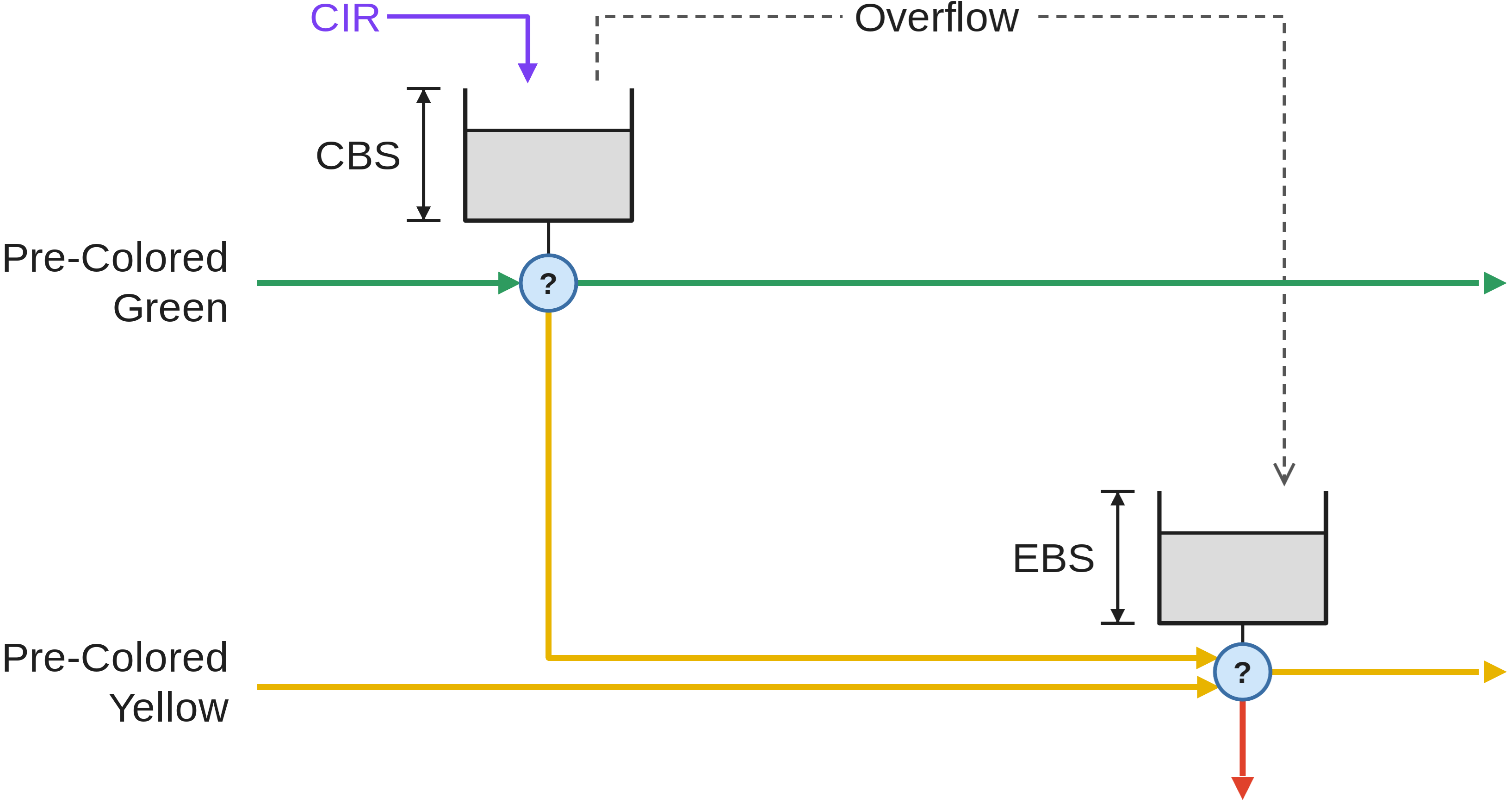
CBS (committed burst size) is the bucket size which is granted credentials at a CIR (committed information rate). If CBS overflow occurs, credentials are passed to the EBS (excess burst size) bucket. Packets passing through the meter consume credentials. A packet is marked green if it does not exceed the CBS, yellow if it exceeds the CBS but not the EBS, and red otherwise. A packet can have an initial color upon entering the meter. A pre-colored yellow packet will start consuming credentials from the EBS.
RFC 2698 – Two-rate Three Color Marker (trTCM)
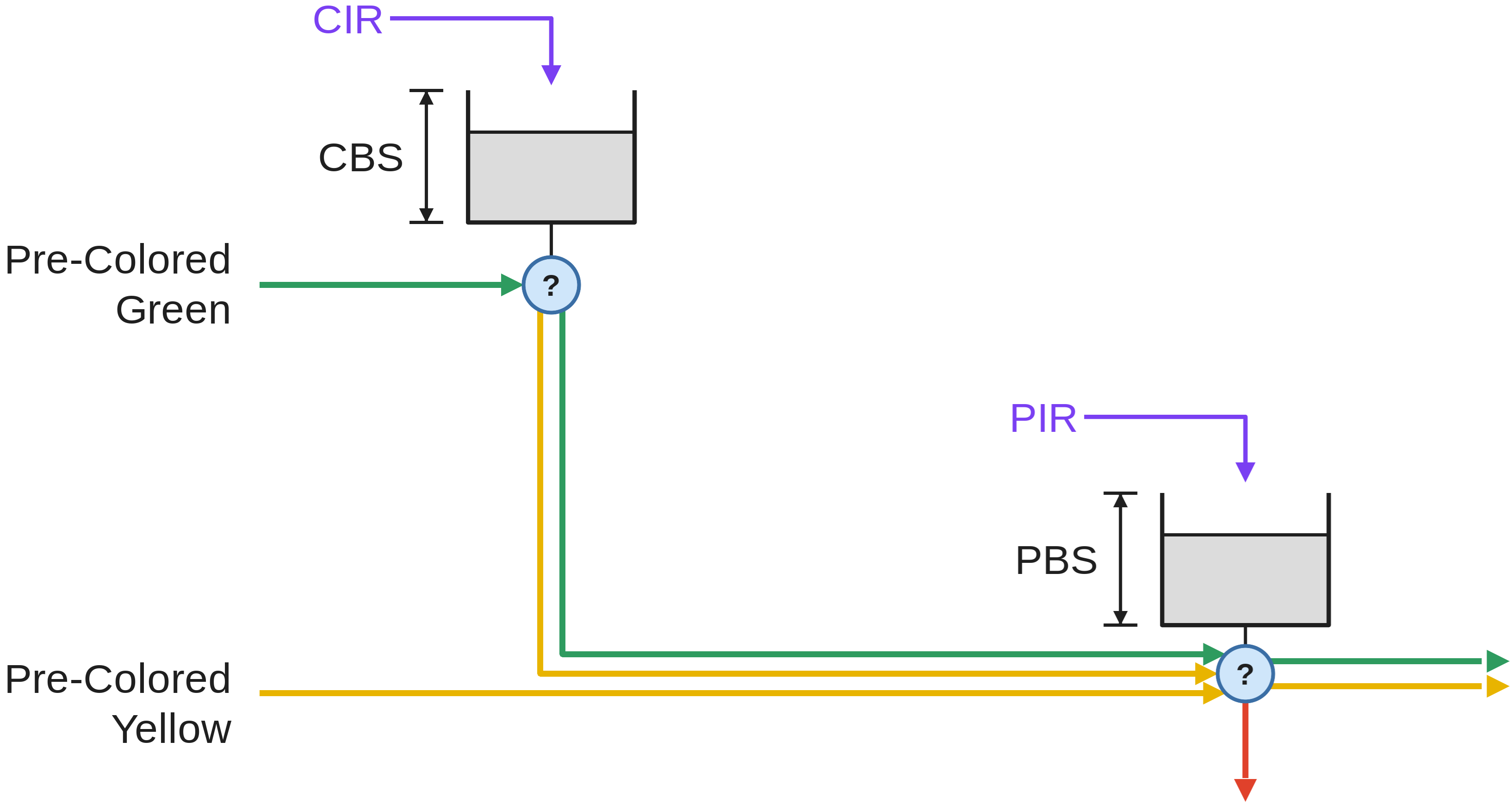
CBS and CIR are defined as in RFC 2697. PBS (peak burst size) is a second bucket which is granted credentials at a PIR (peak information rate). There is no overflow of credentials from the CBS bucket to the PBS bucket. The PIR must be equal to or greater than the CIR. Packets consuming CBS credentials consume PBS credentials as well. A packet is marked red if it exceeds the PIR. Otherwise, it is marked either yellow or green depending on whether it exceeds the CIR or not. A packet can have an initial color upon entering the meter. A pre-colored yellow packet starts consuming credentials from the PBS.
RFC 4115 – trTCM without Peak-rate Dependency
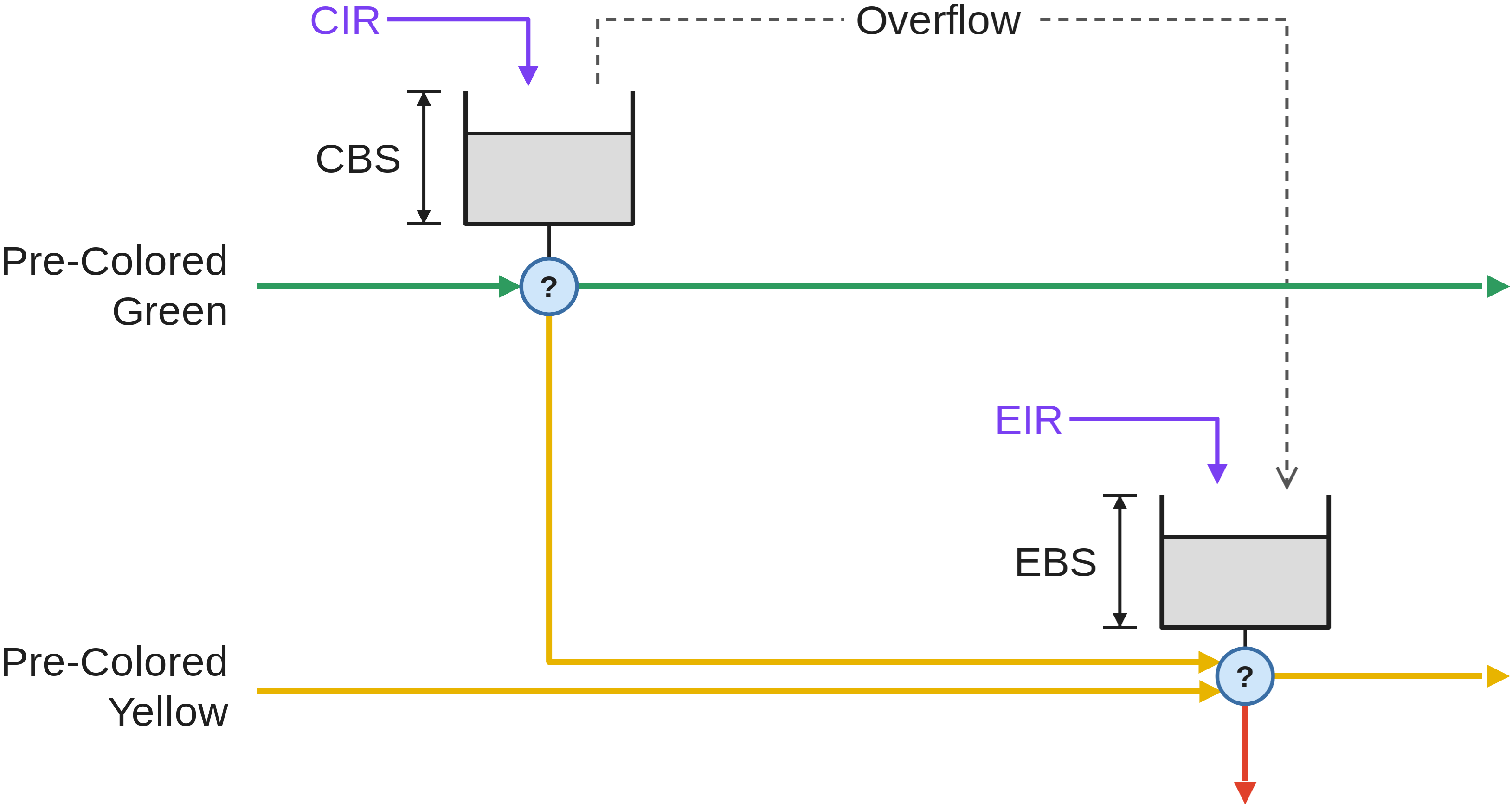
EBS is a second bucket which is granted credentials at a EIR (excess information rate) and gets overflowed credentials from the CBS. For the packet marking algorithm, refer to RFC 4115.
All information rates (i.e., CIR, PIR, EIR) are measured in one of two units:
-
Per bytes (
DOCA_FLOW_METER_LIMIT_TYPE_BYTES); or -
Per packets (
DOCA_FLOW_METER_LIMIT_TYPE_PACKETS)
The following sections present the steps for configuring and using shared meters to mark packets.
Bandwidth Measurement
When testing a DOCA Flow meter, it is important to understand that the rate-limiting parameters (CIR, PIR, EIR) apply to the information rate, not the full L2 Ethernet frame. The information rate typically refers to the inner IP layer of the packet.
Because of this, to accurately measure the metered bandwidth and verify that it matches your settings, you must perform a mathematical adaptation to exclude the non-IP layer overhead from your byte count.
Measurement Method
The recommended method is to take two measurements, 1 second apart, after the traffic stream has been stable for at least 5 seconds.
Terminology:
-
pckts1andbytes1: The total number of packets and bytes measured at timeX(whereX≥ 5 seconds). -
pckts2andbytes2: The total number of packets and bytes measured at timeX+1second.
The true metered bandwidth (in bytes per second) is the adapted byte count, which is calculated by subtracting the total overhead from the total bytes measured during that one-second interval:
Adapted Byte Count = (bytes2 - bytes1) - (overhead_bytes * (pckts2 - pckts1))
Here, overhead_bytes is the size of all non-IP-layer headers for your specific packet type.
Overhead Examples
The overhead_bytes value depends on the packet's structure. Common examples include:
-
Simple IP packets:
18 bytes-
(14-byte MAC header + 4-byte FCS)
-
-
VLAN packets:
22 bytes-
(14-byte MAC header + 4-byte VLAN tag + 4-byte FCS)
-
-
MPLS tunnel packets:
50 bytes-
(14-byte MAC header + 4-byte MPLS + 20-byte Tunnel IP + 8-byte Tunnel UDP + 4-byte FCS)
-
Verifying the Rate
You can then compare the calculated bandwidth against your meter's settings:
-
For byte-based limits (
DOCA_FLOW_METER_LIMIT_TYPE_BYTES): The expected bandwidth is the Adapted Byte Count calculated above. -
For packet-based limits (
DOCA_FLOW_METER_LIMIT_TYPE_PACKETS): The expected bandwidth is the packet delta:(pckts2 - pckts1).
Shared IPsec SA Resource
The Shared IPsec Security Association (SA) resource is used to manage the IPsec ESP protocol for both encryption and decryption. This resource is referenced from the doca_flow_actions struct via the crypto field.
Default Hardware Offload Behavior
By default, the resource manages the sequence number (SN) state in hardware (i.e., sn_offload is enabled). This includes:
-
Encryption: Automatically incrementing the sequence number (SN) for each packet.
-
Decryption: Performing anti-replay protection. The anti-replay status (syndrome) is stored in
meta.u32[0].
Manual Software SN Control
To manage the sequence number in software, the sn_offload feature must be disabled in the port configuration passed to doca_flow_port_start (see the DOCA API References for details).
When sn_offload is disabled, the following hardware offload fields in the resource configuration are ignored:
-
sn_offload_type -
win_size -
sn_initial -
lifetime_threshold
Querying the Resource
When sn_offload is enabled, you can query the shared IPsec SA resource to retrieve its current state:
-
For an encryption resource: The query returns the current sequence number (SN).
-
For a decryption resource: The query returns the lower bound of the anti-replay window.
Querying the resource is not supported when sn_offload is disabled.
State Maintenance
To ensure a valid resource state during operation, the doca_flow_crypto_ipsec_resource_handle function should be called periodically.
Shared Encap Resource
The shared encap resource defines a specific, reusable encapsulation configuration. Each unique configuration, primarily defined by its reformat type (is_l2) and size, is represented by a shared encap ID.
This ID allows the same encapsulation to be applied across multiple pipes and entries.
Key characteristics:
-
This feature is supported only in hardware steering mode.
-
Once a shared encap resource is configured and assigned an ID, its settings (like type and size) cannot be modified.
-
The "shared encap action" in a pipe uses this resource ID to encapsulate a packet with the pre-configured tunnel information.
Shared Decap Resource
The shared decap resource defines a specific, reusable decapsulation configuration. Each unique configuration, primarily defined by its reformat type (is_l2) and size, is represented by a shared decap ID.
This ID allows the same decapsulation to be applied across multiple pipes and entries.
Key characteristics:
-
This feature is supported only in hardware steering mode.
-
Once a shared decap resource is configured and assigned an ID, its settings (like type and size) cannot be modified.
-
If the
is_l2flag is set to false (indicating a non-L2 decap), Ethernet information must be provided in the configuration. -
The "shared decap action" in a pipe uses this resource ID to decapsulate the packet according to the pre-configured rules.
Shared PSP Resource
The PSP shared resource is used for PSP encryption. The resource should be pointed to from the doca_flow_crypto_action struct in doca_flow_actions.
The resource should be configured with a key to encrypt the packets. See DOCA API References for PSP key generation for a reference about key handling on decrypt side.
Shared Trim Resource
The trim shared resource lets a pipe entry trim its matched packet to a fixed length and continue processing the trimmed copy at a user-chosen target pipe.
Configure the resource with struct doca_flow_resource_trim_cfg:
-
size— number of bytes to keep on the trimmed copy (counted from the start of the packet), must be at least 14 bytes. -
target—struct doca_flow_fwddescribing where the trimmed packet continues. The target must be a pipe (DOCA_FLOW_FWD_PIPE) on a port that itself owns at least one trim shared resource. Thetarget.next_pipefield must be non-NULL.
Reference the configured resource from a pipe by setting the entry's forward to DOCA_FLOW_FWD_TRIM and filling fwd.trim.trim_id with the resource id allocated at configure time. Both fixed and DOCA_FLOW_FWD_CHANGEABLE forwarding are supported, so the same pipe can route different entries to different trim resources.
Key characteristics:
-
Supported in hardware steering mode, in both VNF mode and Switch mode.
-
Multiple trim shared resources may coexist on the same port.
-
Once a trim shared resource is configured and assigned an id, its
sizeandtargetcannot be modified, must destroy and recreate the resource to change it.
Limitations:
-
In VNF mode, the trim resource's
targetpipe must be created on the egress domain (DOCA_FLOW_PIPE_DOMAIN_EGRESS). -
After trimming, none of the metadata fields are preserved. All metadata scratch area is set to 0 and must not be matched or read post-trim.
-
Packet ordering is not preserved in the following cases: between packets sent to different trim resources; between trimmed and non-trimmed packets.
-
Padding: a trimmed packet will be padded with zeros until its size reaches
max(size, 60)bytes, and will impact counters/meters/etc accordingly.
Packet Length Field
pkt_length is a 16-bit parser meta field carrying the length in bytes of the received packet, counted from the start of the packet. It pairs naturally with the trim shared resource: an entry can match the length of the incoming packet, or steer by it, for example to trim only packets longer than the trim size.
The field is read-only: it may be matched, and used as the source of a copy or add action descriptor.
Match on pkt_length is accessible through the DOCA Flow Definitions API, it must be registered before calling doca_flow_init() by extending the match structure:
struct trim_match {
    struct doca_flow_match base;
    doca_be16_t pkt_length;
};

/* Register match field */
doca_flow_definitions_add_field(definitions,
                                "match.packet.parser_meta.pkt_length.value",
                                offsetof(struct trim_match, pkt_length),
                                sizeof(((struct trim_match *)0)->pkt_length));
The field is available to action descriptors as the field string parser_meta.pkt_length.value with a width of 16 bits, for example to copy the packet length into metadata:
desc.type = DOCA_FLOW_ACTION_COPY;
desc.field_op.src.field_string = "parser_meta.pkt_length.value";
desc.field_op.src.bit_offset = 0;
desc.field_op.dst.field_string = "meta.data";
desc.field_op.dst.bit_offset = 0;
desc.field_op.width = 16;
The base member must be the first field in the extended structure.
Creating a Pipe
Once all pipe parameters are defined, call doca_flow_pipe_create to create the pipe.
Refer to the DOCA API documentation to see which fields are optional and may be skipped. It is typically recommended to set optional fields to 0 when not in use. See Miss Pipe and Control Pipe for more information.
On success, this function returns a handle to the pipe, which is required when adding new entries. If creation fails, the function returns NULL. An error struct, if provided by the user, will be populated with the error details.
A pipe acts as a container for its entries. When a pipe is destroyed, all entries bound to it are automatically removed. For more details, see the Pipe Entry section.
DOCA Flow Connection Tracking Pipe
CT pipes use additional doca_flow_pipe_cfg parameters beyond standard pipe creation. For configuration details (session pools, zone limits, duplication filter, etc), see CT Pipe Configuration in the DOCA Flow Connection Tracking guide.
Implementing Priority
DOCA Flow does not have an explicit priority field for pipes or entries. Priority is managed through the order of operation and rule insertion.
-
Chaining (Recommended) – The most explicit way to implement priority is to create a chain. Create a "miss" rule in a high-priority pipe that forwards traffic to the next, lower-priority pipe (e.g., match
PIPE1, and on miss, jump toPIPE2). -
Insertion Order (Overlapping Entries) – Priority can also be determined by the order in which entries are added to pipes.
-
If two pipes have overlapping match criteria, the pipe whose entries were added last has the higher priority.
-
For example, to make
PIPE1(high-priority) take precedence overPIPE2(low-priority), you must add all entries forPIPE2first, followed by the overlapping entries forPIPE1.
-
Pipe Sizing and Caching
When you define the number of entries for a pipe, this number must account for both active entries and entries held in internal caches.
This means the actual number of entries your application can add will be less than the total defined size. The total number of cached entries is limited to (1K * number of queues), and this cache size cannot exceed 2% of the total pipe size.
Pipe Entry (doca_flow_pipe_basic_add_entry)
An entry is a specific instance inside of a pipe. When defining a pipe, users define match criteria (subset of fields to be matched), the type of actions to be done on matched packets, monitor, and, optionally, the FWD action.
When a user calls doca_flow_pipe_basic_add_entry() to add an entry, they must define the values for the match criteria and action parameters. If a Forward (FWD) action was not defined as constant for the entire pipe, it is mandatory to specify the FWD action for each entry.
Concurrency and Queue Affinity
DOCA Flow is designed to support millions of new entries per second. To achieve this, its architecture requires that entry-addition operations be parallelized.
This is managed by assigning a dedicated pipe_queue ID to each CPU core that will be adding entries. Having a unique queue ID per core prevents the need for data-structure locking and enables efficient, parallel interaction with the hardware.
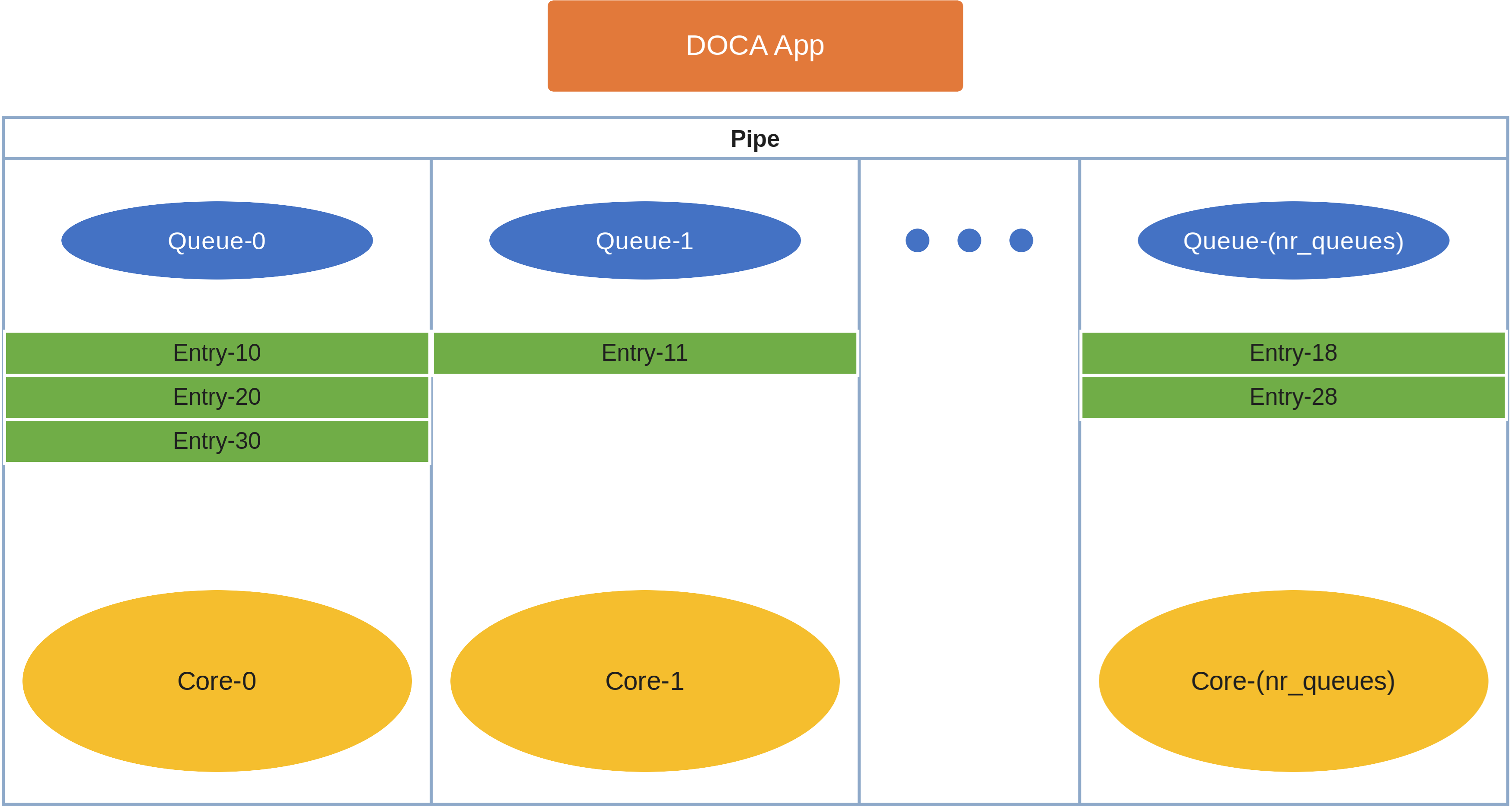
Each core must use its own dedicated pipe_queue ID when calling doca_flow_pipe_basic_add_entry. Using the same pipe_queue ID from different cores simultaneously will cause a race condition and lead to undefined behavior.
Usage Notes
-
Applications must not add, remove, or update pipe entries from within a
doca_flow_entry_process_cbcallback. -
Applications should distribute entry additions evenly across all queues. This prevents cache fragmentation and ensures efficient resource use. In a worst-case scenario where entries are not balanced, the number of successfully inserted entries may be slightly lower than the total number defined during pipe creation.
Pushing Entries to Hardware
When calling doca_flow_pipe_basic_add_entry(), the flags parameter controls when the entry is pushed to hardware:
-
DOCA_FLOW_ENTRY_FLAGS_WAIT_FOR_BATCH– the entry waits to be pushed to hardware together with subsequent entries. Batching entries reduces the number of pushes and increases the insertion rate. -
DOCA_FLOW_ENTRY_FLAGS_NO_WAIT– the entry is pushed to hardware immediately.
Entry Processing and Completion
doca_flow_entries_process() processes all the pending entries on a given queue. This covers add, update, and remove operations. Once an operation has been handled and its status is known, the completion callback (set via doca_flow_cfg) is invoked with the resulting status, the operation type (add/update/remove), and the entry's usr_ctx. The usr_ctx is the pointer supplied when the entry was added (the add APIs take a usr_ctx parameter; update and remove reuse the context associated with the entry).
If no callback is set in doca_flow_cfg, the application must still call doca_flow_entries_process() on the queue to progress operations, and can read an entry's status with doca_flow_pipe_entry_get_status() (which only reports the currently known status) to check whether it has completed offloading. This applies only to live entries — doca_flow_pipe_remove_entry() only schedules an asynchronous removal, and the entry is destroyed while its remove completion is processed; once removal has been requested the entry handle becomes invalid and must not be used or queried.
doca_flow_pipe_queue_drain() complements doca_flow_entries_process() as a control-step API: it pushes any pending entry operations on the given queue to hardware and then waits for all in-progress operations on that queue to complete, optionally reporting the number of operations drained. The wait is bounded by an internal timeout: the call returns DOCA_ERROR_DRIVER if the queue does not empty in time or the underlying flush/poll fails. Use doca_flow_entries_process() for periodic processing (bounded by a number of operations or a timeout) and for triggering pipe resize relocation; use doca_flow_pipe_queue_drain() when the application needs to complete all outstanding operations on a queue in a single control step. As with doca_flow_entries_process(), per-entry results are still delivered through the status callback (or doca_flow_pipe_entry_get_status()) — a successful drain reports that the queue was emptied, not that every entry succeeded. Connection tracking (CT) queues are not supported by this API; use doca_flow_entries_process() for those.
Failure Path
Entry insertion can fail in two places: the pipe add-entry call (doca_flow_pipe_basic_add_entry() and its per-type variants), and the subsequent entry-process callback (doca_flow_entry_process_cb), which reports the add completion with an error status.
-
When the add-entry call fails, no cleanup is required.
-
When the add-entry call succeeds, a handle is returned to the user. If the entry-process callback reports failure, the user is responsible for releasing the handle through
doca_flow_pipe_remove_entry(). That remove call is expected to returnDOCA_SUCCESSand to invoke the entry-process callback configured indoca_flow_cfgwith a successful status.
Pipe Entry Counting
By default, no counter is added. A counter is added only if it is defined in the pipe's monitor at pipe creation: a non-shared counter is unique per entry, while a shared counter is common to all entries that use it. A control pipe entry is an exception — it defines its own monitor when the entry is added.
Having a counter per entry affects performance and should be avoided if it is not required by the application.
The retrieved statistics are stored in struct doca_flow_resource_query. Connection tracking (CT) entries are not supported by doca_flow_resource_query_entry(); use doca_flow_ct_query_entry() for those.
Counters have a granularity of 1 second.
Per-Port Counter Capacity
Counter capacity is a property of the port's whole counter allocation: the per-entry and shared counters sized for the port — doca_flow_port_cfg_set_nr_resources() with DOCA_FLOW_RESOURCE_COUNTER, or the deprecated doca_flow_cfg_set_nr_counters() / doca_flow_cfg_set_nr_shared_resource() — together with the required CT counters reserved through DOCA_FLOW_RESOURCE_COUNTER_CT. When CT aging plugin callbacks are configured through doca_flow_port_cfg_set_ct_aging_plugin_ops(), CT counters beyond the minimum reservation are allocated on a best-effort basis.
The device-reported standard per-port counter capacity on current devices is approximately 16 million counters. A required allocation within that capacity succeeds; a required allocation above it fails doca_flow_port_start() instead of reducing the required count.
Pipe Entry Aged Query
When a user calls doca_flow_aging_handle(), this query is used to get the aged-out entries by the time quota in microseconds. The user callback is invoked by this API with the aged entries.
Since the number of flows can be very large, the query of aged flows is limited by a quota in microseconds. This means that it may return without all flows and requires the user to call it again. When the query has gone over all flows, a full cycle is done.
Pipe Entry (doca_flow_pipe_basic_update_entry)
Updating an entry requires available space in the pipe. If the pipe is full, the function returns DOCA_ERROR_AGAIN. To proceed with the update, you may need to release an existing entry to free up space.
Pipes with Multiple Actions
DOCA Flow allows you to define a pipe with an array of multiple, distinct actions. This feature is useful for creating multiple flow entries that share the same match criteria but require different actions.
When adding or updating an entry (e.g., with doca_flow_pipe_basic_add_entry), you select which action to execute by providing its index in the action_idx argument.
Even if a pipe has multiple actions defined, only one action will be executed for any given packet that matches an entry.
Consider a case where two flows are needed with identical match criteria but different actions:
-
Pipe creation: A pipe is created with two actions defined in its
actionsarray:-
Index 0: An action to
modify_mac. -
Index 1: An action to
modify_ip.
-
-
Entry addition:
-
Entry A is added (e.g.,
match L4_PORT=80) with itsaction_idxset to0. Packets matching this entry will have their MAC modified. -
Entry B is added (e.g.,
match L4_PORT=80) with itsaction_idxset to1. Packets matching this entry will have their IP modified.
-
Pipe Chaining, Priority, and Miss Handling
This section describes how to chain pipes together to implement priority, how to use Control Pipes to resolve complex matching conflicts, and how the Port Default Miss handler works.
Implementing Priority with fwd_miss (Miss-Pipe Chaining)
DOCA Flow implements priority by chaining pipes together. A pipe's fwd_miss handler defines what to do with a packet if it does not match any entry within that pipe, allowing you to create a "miss-pipe" chain:
-
A packet is looked up in
Pipe 1(the highest priority table). -
If it matches an entry, the action is taken.
-
If it does not match, the
fwd_misshandler forwards the packet toPipe 2. -
The lookup process repeats in
Pipe 2.
This behavior is configured in the struct doca_flow_fwd of a pipe. When creating a pipe, the fwd_miss struct's next_pipe field specifies where to send non-matching packets.
The fwd_miss handler supports three forwarding types:
-
DOCA_FLOW_FWD_PIPE: Forwards the packet to another pipe for further processing. -
DOCA_FLOW_FWD_DROP: Drops the packet. -
DOCA_FLOW_FWD_TARGET: Forwards to a target such as the kernel (seedoca_flow_get_target()).
Other forwarding types, such as forwarding to a port (DOCA_FLOW_FWD_PORT) or an RSS queue (DOCA_FLOW_FWD_RSS), are not supported in a fwd_miss handler.
Root Pipes vs. Chained Pipes
A pipe's operational role within the DOCA Flow architecture is defined by the is_root flag within its struct doca_flow_pipe_cfg:
|
Pipe Type |
|
Execution Trigger |
Characteristics & Constraints |
|---|---|---|---|
|
Root Pipe |
|
Executed immediately upon packet arrival. |
|
|
Chained Pipe (Non-Root) |
|
Executed strictly when targeted by a forwarding action. |
|
Control Pipes and Prioritized Entries
Internally, DOCA Flow implements the fwd_miss handler as a flow entry with the lowest possible priority. This can create conflicts.
For example, consider a pipe that:
-
Matches specific VXLAN flows and sends them to RSS.
-
Has a
fwd_misshandler to hairpin all other (non-matching) packets.
If a new VXLAN packet arrives for an IP that does not have a specific flow entry, it will not match (1) and will incorrectly fall through to (2), where it is hairpinned instead of being sent to RSS.
The solution is to use a Control Pipe. A Control Pipe allows you to add entries with explicit priorities, giving you fine-grained control to resolve these conflicts.
-
You add prioritized entries to a Control Pipe by calling
doca_flow_pipe_control_add_entry(). -
This function includes a
priorityfield (where 0 is the highest and 7 is the lowest), which overrides the default insertion-order priority.
Example for Resolving Conflicts with Control Entries
Using the scenario above, you can fix the conflict with a Control Pipe:
-
Configure
fwd_miss: Set the pipe'sfwd_misshandler to hairpin packets. This creates an internal "hairpin" rule at the lowest priority (e.g., priority 7). -
Add a control entry: Call
doca_flow_pipe_control_add_entry()to add a new, higher-priority rule:-
Priority:
6(higher than thefwd_missrule's priority of 7). -
Match: Match all VXLAN packets (not just specific IPs).
-
Forward: Forward to the RSS pipe.
-
As a result, the new VXLAN packet no longer matches a specific IP, but it will match the new "all VXLAN" control entry at priority 6. It is correctly forwarded to RSS and never falls through to the lowest-priority (7) fwd_miss rule.
Updating fwd_miss at Runtime
A pipe's fwd_miss handler can be updated dynamically after creation using doca_flow_pipe_update_miss(), without needing to recreate the pipe:
doca_error_t doca_flow_pipe_update_miss(struct doca_flow_pipe *pipe, const struct doca_flow_fwd *fwd_miss);
The same forwarding type restrictions apply as during pipe creation (DOCA_FLOW_FWD_PIPE, DOCA_FLOW_FWD_DROP, or DOCA_FLOW_FWD_TARGET).
Example:
struct doca_flow_fwd new_fwd_miss = {.type = DOCA_FLOW_FWD_PIPE, .next_pipe = new_target_pipe};
doca_flow_pipe_update_miss(pipe, &new_fwd_miss);
Port Default Miss
This is the final fallback action for the port, used when a pipe's fwd_miss is not set (i.e., NULL).
By default, this forwards all non-matched traffic to the kernel and is active as soon as the port is started. The target of this default miss can be controlled using the following API:
enum doca_flow_port_default_miss_type {
    DOCA_FLOW_PORT_DEFAULT_MISS_KERNEL = 0,
    DOCA_FLOW_PORT_DEFAULT_MISS_RSS,
    DOCA_FLOW_PORT_DEFAULT_MISS_DROP,
};

doca_error_t doca_flow_port_update_default_miss(
    struct doca_flow_port *port,
    enum doca_flow_port_default_miss_type default_miss,
    bool counter_en
);

doca_error_t doca_flow_port_query_default_miss(
    struct doca_flow_port *port,
    struct doca_flow_resource_query *data
);
-
The target of the default miss (
KERNEL,RSS, orDROP) can be updated at any time. -
The counter (
counter_en) can only be enabled before the first use of or update to the default miss, and it cannot be disabled once set. -
The
DOCA_FLOW_PORT_DEFAULT_MISS_RSSoption distributes packets over all existing RSS queues, hashing each packet using its L3/L4 information. Packets without a hashable L3/L4 header will receive a constant hash value. -
Message- and built-in-message-isolated pipes are exempt: an unset
fwd_misson those pipes defaults to drop rather than to the port default miss (see Message Queue).
LPM Pipe (DOCA_FLOW_PIPE_LPM)
The DOCA_FLOW_PIPE_LPM pipe performs Longest Prefix Match (LPM) matching.
LPM Logic
LPM matching is performed on a single field specified at pipe creation, such as the outer destination IP. Each entry consists of a value and a mask (e.g., 10.0.0.0/8, 10.10.0.0/16). The LPM match is defined as the entry with the maximum number of matching bits.
For example, given two entries, 10.0.0.0/8 and 10.7.0.0/16:
-
An incoming IP of
10.1.9.2matches10.0.0.0/8. -
An incoming IP of
10.7.9.2matches10.7.0.0/16, as its 16-bit prefix is the longest match.
Exact Match (EM) Logic
In addition to the prefix match, the pipe can simultaneously apply Exact Match (EM) logic on a set of additional fields. This allows multiple entries to share the same prefix while matching different values on those fields. For example, an application can have multiple entries for the same IP prefix 1.1.1.1/32 that match different meta values, such as 42, 555, and 1020.
The EM values of an entry are part of its match, alongside its prefix, and are provided when the entry is added. A lookup selects the entry with the longest prefix whose EM values also match the packet. A packet whose EM values differ from those of the longest matching prefix can still match a shorter prefix, and is considered a pipe miss only if no combination of prefix and EM values matches.
EM logic is supported on any doca_flow_match field whose own bits are all masked in the pipe's match_mask, for example:
-
meta.pkt_metaandmeta.u32[i]other thanmeta.u32[0] -
inner.eth.dst_mac -
tun.vxlan_tun_id,tun.nvgre_vs_id,tun.nvgre_flow_id -
inner.udp.l4_port.src_port
Support for the metadata scratch area allows for EM on any field, as its value can be copied to one of these metadata fields in a preceding pipe.
Enabling EM logic is a two-step process:
-
At pipe creation:
-
Specify the LPM field using the
matchparameter. -
Enable the EM fields by masking every bit they own in the
match_maskparameter (e.g., setmatch_mask.meta.u32[1]to all0xFFs, and/orinner.eth.dst_mac, and/ortun.vxlan_tun_id). -
A field narrower than the member holding it is masked over its own bits, and the spare bits of the member may be left clear or set. The field's own bits are not always at the bottom of the member, so take the mask from the field's placement rather than from another field's example:
tun.vxlan_tun_idholds its 24-bit VNI in the low bits, so bothDOCA_HTOBE32(0x00FFFFFF)andDOCA_HTOBE32(0xFFFFFFFF)enable it, whiletun.geneve.vniholds its 24-bit VNI in the high bits and takesDOCA_HTOBE32(0xFFFFFF00).outer.ip6.flow_labelholds a 20-bit label in the low bits, so bothDOCA_HTOBE32(0x000FFFFF)andDOCA_HTOBE32(0xFFFFFFFF)enable it. A field matched together with its neighbours as one unit, such astun.psp.s_d_ver_v, takes the whole member instead of its own bits. Masks are in network order. -
Type selector fields, such as
outer.l3_type,outer.l4_type_ext,tun.type, andtun.gre_type, and fields which are also selectors, such astun.key_present, are set to their specific value rather than being fully masked. They select the type of the union they describe and the parsing of the EM fields, and are not EM fields themselves. For example, if usingtun.vxlan_tun_id,match_mask.tun.typemust be set toDOCA_FLOW_TUN_VXLAN.
-
-
At entry addition:
-
Provide the LPM value and its corresponding prefix mask (e.g.,
1.1.1.1and/32) in thematchandmatch_maskstructures, respectively. -
Provide the EM values (e.g.,
meta.u32[1] = 42) in thematchstructure. Thematch_maskis only for the LPM field's prefix mask.
-
The following restrictions apply to EM logic, and pipe creation fails if any of them is violated:
-
A field (e.g., inner destination MAC) cannot be used for both LPM and EM at the same time -
DOCA_ERROR_INVALID_VALUE. -
meta.u32[0]cannot be used for EM logic, as it is used internally by the LPM pipe -DOCA_ERROR_INVALID_VALUE. -
A field taking part in EM logic must be masked over all of its own bits. Masking only some of them, or setting only bits which fall outside the field, is rejected -
DOCA_ERROR_NOT_SUPPORTED. This applies to every field in the pipematch_maskother than a type selector, includingparser_metafields. -
A field which the device cannot match on is rejected rather than left out of the key -
DOCA_ERROR_NOT_SUPPORTED. -
tun.geneve_optionscannot take part in EM logic, even when a GENEVE option parser has been created -DOCA_ERROR_NOT_SUPPORTED. -
A protocol field which qualifies the parsing of an EM field, such as
inner.eth.typeorinner.ip4.next_proto, is needed only when the type selectors do not already reach the EM field. When it is needed it is an EM field as well: fully mask it, and provide its value in every entry, as the pipematchholds the LPM field alone and cannot carry it. When a type selector already selects the parsing, such astun.gre_typefor NVGRE, omit the protocol field instead of adding it to the key.
General Behavior and Limitations
-
Actions and forwarding: The
actionsandfwdconfigurations for an LPM pipe work the same as for a basic DOCA Flow pipe. The pipe must be created with a forward, either a specific target orDOCA_FLOW_FWD_CHANGEABLE, in which case every entry provides its own forward. A changeable forward cannot be combined with a non-shared meter; pipe creation fails withDOCA_ERROR_NOT_SUPPORTED. -
Root pipe: An LPM pipe can be a root pipe.
-
Domain: An LPM pipe can be created in any of the steering domains (see the "Steering Domains" section).
-
LPM field support: LPM matching can only be performed on a single field per pipe, which can be the outer/inner source or destination MAC address, or the outer/inner source or destination IPv4/IPv6 address.
-
Entry addition:
doca_flow_pipe_lpm_add_entryrequires thematch,match_mask, andfwdparameters. The prefix mask must be a contiguous mask (e.g.,255.255.0.0). Adding an entry whose match is identical to that of an existing entry fails. Only the bits of a field which take part in the Exact Match logic are compared, so two entries whosematchdiffers only in bits of a member outside the masked field are the same entry and the second one fails. A field matched together with its neighbours as one unit is compared on its whole member, so the spare bits of that member do tell two entries apart. The pipe accepts at most the number of entries set withdoca_flow_pipe_cfg_set_nr_entries. -
Default entry: An entry whose prefix mask is zero is the default entry of the pipe, and only one is allowed. It does not take part in EM logic: it applies to every packet that reaches the pipe and matches no other entry, whatever its EM values, and EM values provided with it are ignored.
-
Entry update:
doca_flow_pipe_lpm_update_entryupdates the actions, monitor, and forward of an existing entry. The match of the entry cannot be changed. If the pipe was created withDOCA_FLOW_FWD_CHANGEABLE, the update must provide a forward. -
Monitoring: The monitor (
doca_flow_monitor) for an LPM pipe supports non-shared counters and non-shared meters only. Shared counters, shared meters, and aging are not supported, and pipe creation fails if aging is set. -
Insertion latency: Entry insertion for an LPM pipe can, in some cases, take milliseconds.
-
Best practice: Entries should be added from a control path rather than a fast data path.
-
Performance: To get the best insertion performance, add entries in large batches.
-
ACL Pipe (DOCA_FLOW_PIPE_ACL)
An ACL pipe uses access-control list (ACL) matching. ACL matching is five tuple of the doca_flow_match. Each entry consists of a value and a mask (e.g., 10.0.0.0/8, 10.10.0.0/16, etc.) for IP address fields, port range, or specific port in the port fields, protocol, and priority of the entry.
ACL entry port configuration:
-
Mask port is 0 ==> Any port
-
Mask port is equal to match port ==> Exact port. Port with mask 0xffff.
-
Mask port > match port ==> Match port is used as port from and mask port is used as port to
Monitor actions are not supported in ACL. FWD of the DOCA Flow ACL pipe works the same as the basic DOCA Flow pipe.
ACL supports the following types of FWD:
-
DOCA_FLOW_FWD_PORT -
DOCA_FLOW_FWD_PIPE -
DOCA_FLOW_FWD_DROP
ACL pipe insertion max latency can be measured in milliseconds in some cases and, therefore, it is better to insert it from the control path. To get the best insertion performance, entries should be added in large batches.
An ACL pipe is not currently supported for IPv6.
An ACL pipe can be a root pipe.
An ACL pipe can be in ingress and egress domain.
The monitor (doca_flow_monitor) for an ACL pipe only supports non-shared counters. Other monitoring capabilities are not supported.
Ordered List Pipe (DOCA_FLOW_PIPE_ORDERED_LIST)
An ordered-list pipe runs a fixed sequence of actions per entry, so the user can control ordering and reuse the same kind of step multiple times (for example, meter and encap/decap ordering).
An ordered list pipe is defined by an array of actions (i.e., sequences of actions). Each entry can be an instance of one of these sequences.
The pipe is built from one or more list templates (doca_flow_pipe_cfg_set_ordered_lists). Each template is an ordered array of typed elements (enum doca_flow_ordered_list_element_type):
-
DOCA_FLOW_ORDERED_LIST_ELEMENT_ACTIONS– astruct doca_flow_actionswith optional action descriptors and mask. -
DOCA_FLOW_ORDERED_LIST_ELEMENT_MONITOR– astruct doca_flow_monitor -
DOCA_FLOW_ORDERED_LIST_ELEMENT_NAT64– astruct doca_flow_nat64_action -
DOCA_FLOW_ORDERED_LIST_ELEMENT_CRYPTO– astruct doca_flow_crypto -
DOCA_FLOW_ORDERED_LIST_ELEMENT_EXTERNAL_ACTIONS– an external action handle. At pipe creation, theexternal_actionsfield points to the pipe-level action handle. At entry creation, it points to the per-entry data structure (e.g. SRH content for SRv6 PUSH). -
DOCA_FLOW_ORDERED_LIST_ELEMENT_FILTER– astruct doca_flow_filter, described below.
Filter Element
A filter element evaluates the packet and decides whether the rest of the list runs. A filter may sit at any position after the first. A packet the filter accepts continues to the next element, or takes the pipe forward when the filter is the last element of the list; a packet it does not accept takes the pipe miss forward.
The type field of struct doca_flow_filter selects what the element evaluates:
-
DOCA_FLOW_FILTER_MATCHcompares packet fields against the values inmatch_op.match, optionally restricted to the bits set inmatch_op.match_mask. -
DOCA_FLOW_FILTER_CONDITIONcompares two packet fields, or a packet field against the immediate value incondition_op.immediate, as described bycondition_op.condition.
match_op.inverse_match and fwd_miss are not supported yet: a filter that sets inverse_match, or a non-NULL fwd_miss, is rejected with DOCA_ERROR_NOT_SUPPORTED by doca_flow_pipe_cfg_set_ordered_lists() and at entry add, so a packet the filter does not accept always takes the pipe miss forward.
A DOCA_FLOW_FILTER_CONDITION filter compares whole 32-bit words: condition_op.condition->field_op.width has to be 32, and every field the condition names has to be a 32-bit word at a word-aligned offset. A narrower field, such as an L4 port, cannot be compared directly; copy it into a meta.u32[] word with an earlier DOCA_FLOW_ORDERED_LIST_ELEMENT_ACTIONS element of the same list, and compare that word instead. The one exception is parser_meta.random, which is compared with a width of 16 and only against an immediate value. A condition outside these limits is rejected at pipe create with DOCA_ERROR_NOT_SUPPORTED.
At entry add, every element of the entry's list is translated again, so the entry's list repeats the template's DOCA_FLOW_ORDERED_LIST_ELEMENT_FILTER element with the same mandatory pointers: match_op.match for a match filter, and condition_op.condition, plus condition_op.immediate for a compare against a value, for a condition filter. An entry element missing one of them is refused with DOCA_ERROR_INVALID_VALUE. A DOCA_FLOW_FILTER_MATCH filter takes the values of its changeable fields from the entry's match_op.match, as described in Matching. A DOCA_FLOW_FILTER_CONDITION filter is fixed at pipe create, and the entry's copy of the condition is not read.
A filter as the first element of a list is rejected at pipe create with DOCA_ERROR_NOT_SUPPORTED, and so is a DOCA_FLOW_FILTER_CONDITION filter as the last element of a list when the pipe forward is DOCA_FLOW_FWD_CHANGEABLE.
Hash Pipe (DOCA_FLOW_PIPE_HASH)
A hash pipe matches entries by an index, which is typically the result of a hash calculation on the packet.
Key characteristics of a hash pipe:
-
A
doca_flow_matchstructure is provided only at pipe creation. -
This
doca_flow_matchmask defines which packet fields are included in the hash calculation. -
Other features (e.g.,
monitor,actions,fwd) behave identically to a basic DOCA Flow pipe. -
The number of entries set via
doca_flow_pipe_cfg_set_nr_entries()must be a power of 2.
Hash Map Algorithms
The hash pipe's behavior is defined by its map algorithm, which can be set using doca_flow_pipe_cfg_set_hash_map_algorithm().
If no algorithm is specified, the default DOCA_FLOW_PIPE_HASH_MAP_ALGORITHM_HASH is used.
The available algorithms are:
-
DOCA_FLOW_PIPE_HASH_MAP_ALGORITHM_HASH– The default algorithm. Uses a standard hash function on the masked fields to calculate the index. -
DOCA_FLOW_PIPE_HASH_MAP_ALGORITHM_RANDOM– Directs packets to entries randomly. No match mask is required. -
DOCA_FLOW_PIPE_HASH_MAP_ALGORITHM_IDENTITY– Uses an identity function for mapping. This creates a one-to-one relationship between the hash value and the index. -
DOCA_FLOW_PIPE_HASH_MAP_ALGORITHM_FLOODING– Duplicates the packet to match the number of entries, causing the packet to hit all entries in the pipe.-
Best practices for this design are shown in the "Flow Hash Flooding Pipe" sample.
-
The pipe is limited to a maximum of 254 entries.
-
This algorithm is not supported in the VNF egress direction.
-
Packet order is only guaranteed for the destination of the first entry.
-
SECURE_EGRESSlimitation (pre-ConnectX-8) – If a hash pipe is in theSECURE_EGRESSdomain, its flooding destination pipe cannot be aSECURE_EGRESSorSECURE_INGRESSpipe.
-
-
DOCA_FLOW_PIPE_HASH_MAP_ALGORITHM_SELECT_ENABLED– Consistently directs packets to the same, single index within the pipe.
Dynamic Algorithm Selection
It is possible to specify the hash algorithm dynamically when forwarding a packet from another pipe.
When DOCA_FLOW_FWD_HASH_PIPE is used as a forwarding action, the application can specify which algorithm to apply. This allows a single hash pipe to be used in multiple ways, processing packets with different logic as needed.
Pipe Resize
The move to HWS improves performance because rule insertion is implemented in hardware rather than software. However, this move imposes additional limitations, such as the need to commit in advance on the size of the pipes (the number of rule entries). For applications that require pipe sizes to grow over time, a static size can be challenging: Committing to a pipe size too small can cause the application to fail once the number of rule entries exceeds the committed number, and pre-committing to an excessively high number of rules can result in memory over-allocation.
This is where pipe resizing comes in handy. This feature allows the pipe size to increase during runtime with support for all entries in a new resized pipe.
Pipe resizing is supported in a basic pipe and a control pipe.
Increasing Pipe Size
It is possible to set a congestion level by percentage (CONGESTION_PERCENTAGE). Once the number of entries in the pipe exceeds this value, a callback is invoked. For example, for a pipe with 1000 entries and a CONGESTION_PERCENTAGE of 80%, the CONGESTION_REACHED callback is invoked after the 800th entry is added.
Following the CONGESTION_REACHED callback, the application should call the pipe resize API (resize()). The following are optional callbacks during the resize callback:
-
A callback on the new number of entries allocated to the pipe
-
A callback on each entry that existed in the smaller pipe and is now allocated to the resized pipe
The pipe pointer remains the same for the application to use even after being resized.
Upon completion of the internal transfer of all entries from the small pipe to the resized pipe, a RESIZED callback is invoked.
A CONGESTION_REACHED callback is received exactly once before the RESIZED callback. Receiving another CONGESTION_REACHED only happens after calling resize() and receiving its completion with a RESIZED callback.
List of Callbacks
-
CONGESTION_REACHED– on the updated number of entries in the pipe (if pipe is resizable)Receiving a
CONGESTION_REACHEDcallback can occur after adding a small number of entries and for moving entries from a small to resized pipe. The application must always call pipe resize after receiving theCONGESTION_REACHEDcallback to handle such cases. -
RESIZED– upon completion of the resize operationCalling pipe resize returns immediately. It starts an internal process that ends later with the
RESIZEDcallback. -
NR_ENTRIES_CHANGED(optional) – on the new max number of entries in the pipe -
ENTRY_RELOCATE(optional) – on each entry moved from the small pipe to the resized pipe
Order of Operations for Pipe Resizing
-
Set a process callback on flow configuration:
struct doca_flow_cfg *flow_cfg;
doca_flow_cfg_create(&flow_cfg);
doca_flow_cfg_set_cb_pipe_process(flow_cfg, <pipe-process-callback>);
This informs on
OP_CONGESTION_REACHEDandOP_RESIZEDoperations when applicable. -
Set the following pipe attribute configurations:
struct doca_flow_pipe_cfg *pipe_cfg; doca_flow_pipe_cfg_create(&pipe_cfg, port); doca_flow_pipe_cfg_set_nr_entries(pipe_cfg, <initial-number-of-entries>); doca_flow_pipe_cfg_set_is_resizable(pipe_cfg, true); doca_flow_pipe_cfg_set_congestion_level_threshold(pipe_cfg, <CONGESTION_PERCENTAGE>); doca_flow_pipe_cfg_set_user_ctx(pipe_cfg, <pipe-user-context>); # Optional for each pipe queue number to be excluded from entries process: doca_flow_pipe_cfg_set_excluded_queue(pipe_cfg, pipe_queue); -
Start adding entries:
/* Basic pipe */ doca_flow_pipe_basic_add_entry() /* Control pipe */ doca_flow_pipe_control_add_entry() -
Once the number of entries in the pipe crosses the congestion threshold, an
OP_CONGESTION_REACHEDoperation callback is received. -
Mark the pipe's congestion threshold event and, upon return, call
doca_flow_pipe_resize(). For this call, add the following parameters:-
The new threshold percentage for calculating the new size.
-
A callback on the new pipe size (optional):
doca_flow_pipe_resize_nr_entries_changed_cb nr_entries_changed_cb -
A callback on the entries to be transferred to the resized pipe:
doca_flow_pipe_resize_entry_relocate_cb entry_relocation_cb
-
-
Call
doca_flow_entries_process()per queue in a loop to trigger the transfer of entries (per queue). It is relevant for both a basic pipe and a control pipe. -
At this phase, adding new entries to the pipe is permitted. The entries are added directly to the resized pipe and therefore do not need to be transferred.
-
Once all entries are transferred on all queues, an
OP_RESIZEDoperation callback is received (in the context of the last thread calling entries process. Also, at this point a newOP_CONGESTION_REACHEDoperation callback can be received again.
At this point calling doca_flow_entries_process() can be stopped for a control pipe. For a basic pipe an additional call is required to complete the call to doca_flow_pipe_basic_add_entry().
doca_flow_entries_process() has the following roles:
-
Triggering entry transfer from the smaller to the bigger pipe (until an
OP_RESIZEDcallback is received) -
Follow up API on previous
add_entriesAPI (basic pipe relevance only) -
If a specific queue is excluded on the resized pipe - calling entries process on that queue is not a must in order to receive the
OP_RESIZEDoperation callback. -
The
OP_RESIZEDcallback can only be received on a pipe non-excluded queue.
Excluded Queues
There are cases where an application uses a subset of queues for rules operations such as add/remove/update. On the other hand, resizing a pipe requires calling doca_flow_entries_process() on all queues to get anOP_RESIZED operation callback. This is where the excluded queues feature becomes handy: it enables excluding the pipe's queues where rule operations do not take part of.
-
When calling pipe resize it is sufficient to process entries only on the non-excluded queues to get an
OP_RESIZEDoperation callback for that pipe. Still - it is allowed to process entries of any queue (for any other pipe with this queue included). -
Before and during pipe destroy it is allowed to process entries (in parallel) on all pipe's excluded queues.
However, there are limitations when configuring a pipe's excluded queues:
-
It is not allowed to add/remove/update entries on a pipe's excluded queues. There is no validity check or enforcement on this and it is up to the application to maintain this restriction. It is allowed to process entries of all queues at all times since
doca_flow_entries_process()API is not per pipe.
Excluded queue syntax
struct doca_flow_pipe_cfg *pipe_cfg;

doca_flow_pipe_cfg_create(&pipe_cfg, port);
...
/* The next configuration should be repeated for each excluded queue number individually */
doca_error_t doca_flow_pipe_cfg_set_excluded_queue(struct doca_flow_pipe_cfg *pipe_cfg, uint16_t pipe_queue);

# pipe_cfg - pointer to DOCA Flow pipe configuration struct.
# pipe_queue - the pipe queue number to exclude.
# Return code:
# - DOCA_SUCCESS - in case of success.
# - DOCA_ERROR_INVALID_VALUE - in case of invalid input.
-
An excluded queue number must be between 0 to (max queues - 1).
-
It is not allowed to exclude all queues of a pipe. At least one of the pipe's queues must remain non-excluded.
Hairpin Configuration
In switch mode, if dev is set in struct doca_flow_port_cfg (using doca_flow_port_cfg_set_dev()), then an internal hairpin is created for direct wire-to-wire fwd. Users may specify the hairpin configuration using mode_args. The supported options as follows:
-
hairpinq_num=[n]– the hairpin queue number -
use_huge_mem– places the hairpin Tx queue buffer in host memory allocated by the library instead of the device's internal buffer -
lock_rx_mem– locks Rx queue memory
Teardown
Pipe Entry Teardown
When an entry is terminated by the user application or ages-out, the user should call the entry destroy function, doca_flow_pipe_remove_entry(). This frees the pipe entry and cancels hardware offload.
Pipe Teardown
When a pipe is terminated by the user application, the user should call the pipe destroy function, doca_flow_pipe_destroy(). This destroys the pipe and the pipe entries that match it.
When all pipes of a port are terminated by the user application, the user should call the pipe flush function, doca_flow_port_pipes_flush(). This destroys all pipes and all pipe entries belonging to this port.
During doca_flow_pipe_destroy() execution, the application must avoid adding/removing entries or checking for aged entries of any other pipes.
Port Teardown
When the port is not used anymore, the user should call the port stop function, doca_flow_port_stop(). This stops the DOCA port, disables the traffic, destroys the port and frees all resources of the port.
Flow Teardown
When the DOCA Flow is not used anymore, the user should call the flow destroy function, doca_flow_destroy(). This releases all the resources used by DOCA Flow.
Metadata
In DOCA Flow, a scratch area of size up to DOCA_FLOW_META_MAX bytes is available throughout the pipeline. This area functions like transient memory, allowing applications to store, modify, and match metadata values across multiple pipes.
You can set metadata values manually or copy them from packet fields. These values can then be matched in later pipes, with support for bit masking in both matching and modification operations.
Metadata Actions
Metadata can be modified using the following action types depending on their masks or descriptors:
-
SET– Sets a metadata value from a pipe action or a specific entry action. The width of the value is defined by the action descriptor. -
COPY– Copies a value from a packet field, which can include other metadata fields. The width is also specified by the descriptor.
Refer to DOCA API References for details on struct doca_flow_meta.
Behavior and Usage Considerations
Metadata fields behave similarly to variables in programming languages but have specific characteristics within DOCA Flow:
-
Some fields may be internally used by DOCA Flow actions and can be overwritten with opaque values
-
Most fields do not retain their values when the packet crosses between NIC and FDB domains (i.e., if there is a transfer between two pipes belonging to the NIC and FDB domains the field data might be lost)
-
Some fields support software datapath integration, allowing promotion to or from the software Rx/Tx paths.
Metadata Field Breakdown
|
Field |
Description |
|---|---|
|
|
Intended exclusively for application use. Preserves its content across NIC/FDB domain boundaries. Available in the software Rx datapath. Values set in Tx can be observed in Rx. |
|
|
Always available for application use. Content may not be preserved across NIC/FDB domain boundaries. May be used internally by DOCA Flow for certain pipe types or actions. |
|
|
Always available for application use |
|
|
Optionally available, depending on the hardware model, firmware configuration, and DOCA Flow operation mode |
|
|
32-bit big-endian field ( |
ConnectX-9 limitation: On ConnectX-9, even though access_index is a single 32-bit field, enabling it consumes either u32[8] and/or u32[9], so access_index and u32[8],u32[9] cannot be used simultaneously.
Pipe Design Consideration
Some pipe types or actions use specific bytes in the scratch area for internal operations. So, if:
-
PIPE-1 sets metadata
-
PIPE-A (intermediate) modifies the same bytes internally
-
PIPE-2 reads those bytes
Then the values may be overwritten by PIPE-A, leading to incorrect results in PIPE-2.
When designing a pipe tree, ensure metadata fields used across multiple pipes are not also internally consumed by intermediate pipes.
Some DOCA pipe types (or actions) use several bytes in the scratch area for internal usage. So, if the user has set these bytes in PIPE-1 and read them in PIPE-2, and between PIPE-1 and PIPE-2 there is PIPE-A which also uses these bytes for internal purposes, then these bytes are overwritten by the PIPE-A. This must be considered when designing the pipe tree.
Scratch Area Usage by Pipe Type
The following table shows which scratch area bytes (metadata fields) are used internally by different DOCA Flow pipe types.
If the application writes to any of these fields before or after they are used internally by a pipe, the values may be overwritten.
|
Pipe Type/Action |
Elements Used in Scratch |
|---|---|
|
Hash Pipe |
|
|
LPM Pipe |
|
|
ACL |
|
|
IPsec Anti-Replay |
|
|
METER COLOR |
|
|
NAT64 |
|
When designing the pipeline, avoid reading or writing to metadata fields that are used internally by intermediate pipes.
Supported Metadata Fields per Hardware and Mode
The number of available user metadata fields (starting from u32[5]) depends on the hardware generation and operating mode. The following table details which fields are available for application use.
Attempting to use an unavailable metadata field during pipe creation will cause the operation to fail.
|
Hardware Type and Mode |
Available Fields |
|---|---|
|
Before ConnectX-7, VNF mode, over PF (switchdev mode) |
|
|
Before ConnectX-7, VNF mode, over VF / PF (non-switchdev) |
|
|
Before ConnectX-7, SWITCH mode |
None |
|
ConnectX-7 and above, VNF mode, over PF (switchdev mode) |
|
|
ConnectX-7 and above, VNF mode, over VF / PF (non-switchdev) |
|
|
ConnectX-7 and above, SWITCH mode |
|
The number of available fields listed above is the maximum. This number can be reduced by specific host configurations, firmware settings, or other enabled features.
Always verify hardware capabilities and operating mode when designing pipelines that rely on these extended metadata fields. An API to query these capabilities will be provided in a future release.
Custom Header
Network protocols evolve rapidly, often outpacing hardware support. To address the need for flexible packet processing, DOCA Flow provides support for custom headers. This allows applications to define and parse proprietary or new network protocols (such as GENEVE or eCPRI) directly in hardware without waiting for native firmware support.
Network Header Properties
A network header can vary in format, field composition, and length. The Custom Header feature categorizes these properties into the following groups:
-
Header length: Indicates the size of the header. It can be a fixed value or dynamic (determined by a specific field within the header). For example, the IPv4 header uses a 4-bit IHL field to indicate its length.
-
Next protocol: Defines how the parser identifies the subsequent header. This can be a fixed protocol type or determined dynamically by a dedicated field. For instance, the
Protocolfield in an IPv4 header dictates whether the next header is TCP, UDP, etc. -
Data fields: Specific segments of the header exposed for application logic. Applications can match on or modify these fields.
-
TLV options: Describes variable-length options (Type-Length-Value), including overall option length, starting offset, option type, and individual length fields.
-
Preceding protocols: Specifies valid preceding headers. For example, a GENEVE header typically follows a UDP header; an eCPRI header may follow either UDP or L2 headers.
-
Following protocols: Specifies valid subsequent headers. For example, a tunnel header might be followed by an inner L2 or L3 header.
-
Special attributes: Defines protocol characteristics, such as whether the protocol acts as a tunnel (a split point between outer and inner layers).
IPv4 Header Definition Example
The following table illustrates the structure of an IPv4 header. This layout serves as a reference for defining similar protocols using the Custom Header API.
|
Byte |
0 |
1 |
2 |
3 |
||||||||||||||||||||||||||||
|---|---|---|---|---|---|---|---|---|---|---|---|---|---|---|---|---|---|---|---|---|---|---|---|---|---|---|---|---|---|---|---|---|
|
Offset |
0 |
1 |
2 |
3 |
4 |
5 |
6 |
7 |
8 |
9 |
10 |
11 |
12 |
13 |
14 |
15 |
16 |
17 |
18 |
19 |
20 |
21 |
22 |
23 |
24 |
25 |
26 |
27 |
28 |
29 |
30 |
31 |
|
IP v4 |
Version |
Header Length |
TOS |
Total length MSB |
Total length LSB |
|||||||||||||||||||||||||||
|
Offset |
32 |
33 |
34 |
35 |
36 |
37 |
38 |
39 |
40 |
41 |
42 |
43 |
44 |
45 |
46 |
47 |
48 |
49 |
50 |
51 |
52 |
53 |
54 |
55 |
56 |
57 |
58 |
59 |
60 |
61 |
62 |
63 |
|
IP v4 |
Identification |
- |
DF |
MF |
Offset |
|||||||||||||||||||||||||||
|
Offset |
64 |
65 |
66 |
67 |
68 |
69 |
70 |
71 |
72 |
73 |
74 |
75 |
76 |
77 |
78 |
79 |
80 |
81 |
82 |
83 |
84 |
85 |
86 |
87 |
88 |
89 |
90 |
91 |
92 |
93 |
94 |
95 |
|
IP v4 |
Time to live |
Next Protocol |
Header checksum |
|||||||||||||||||||||||||||||
|
Offset |
96 |
97-126 |
127 |
|||||||||||||||||||||||||||||
|
IP v4 |
Source IP address |
|||||||||||||||||||||||||||||||
|
Offset |
128 |
129-258 |
159 |
|||||||||||||||||||||||||||||
|
IP v4 |
Destination IP address |
|||||||||||||||||||||||||||||||
-
Header Length: This is a dynamic length determined by the 4-bit
IHLfield (bits 4-7). The value in this field is multiplied by 32 to calculate the total length in bits. -
Next Protocol: This is determined by the 8-bit
Protocolfield (bits 72-79). This value tells the parser which protocol header follows IPv4 (e.g., TCP, UDP). -
Data Fields: The application may define fields of interest for matching or modification, such as
Source IP(32 bits at offset 96) andDestination IP(32 bits at offset 128).
GENEVE Header Definition Example
The following table illustrates the structure of a GENEVE header, emphasizing variable-length options.
|
Byte |
0 |
1 |
2 |
3 |
||||||||||||||||||||||||||||
|
Offset |
0 |
1 |
2 |
3 |
4 |
5 |
6 |
7 |
8 |
9 |
10 |
11 |
12 |
13 |
14 |
15 |
16 |
17 |
18 |
19 |
20 |
21 |
22 |
23 |
24 |
25 |
26 |
27 |
28 |
29 |
30 |
31 |
|
Geneve |
Version |
Options length |
O |
C |
Reserved |
Next protocol |
||||||||||||||||||||||||||
|
Offset |
32 |
33 |
34 |
35 |
36 |
37 |
38 |
39 |
40 |
41 |
42 |
43 |
44 |
45 |
46 |
47 |
48 |
49 |
50 |
51 |
52 |
53 |
54 |
55 |
56 |
57 |
58 |
59 |
60 |
61 |
62 |
63 |
|
Geneve |
Virtual Network Identifier (VNI) |
Reserved |
||||||||||||||||||||||||||||||
-
Option Length: The 6-bit
Opt Lenfield (bits 2-7) specifies the length of the options following the base header. The total length is calculated as(Opt Len * 32) + 64bits. -
Type: Hardware can match on the
Typefield (bits 72-79) to identify specific options, which is necessary because GENEVE options do not have a fixed order. -
Sample Fields: Applications can match or modify specific option data, such as
Option ClassandOption Value.
GENEVE Option Definition Example
The following list describes the properties of a GENEVE header, specifically focusing on how the hardware handles variable-length options.
|
Byte |
0 |
1 |
2 |
3 |
||||||||||||||||||||||||||||
|---|---|---|---|---|---|---|---|---|---|---|---|---|---|---|---|---|---|---|---|---|---|---|---|---|---|---|---|---|---|---|---|---|
|
Offset |
0 |
1 |
2 |
3 |
4 |
5 |
6 |
7 |
8 |
9 |
10 |
11 |
12 |
13 |
14 |
15 |
16 |
17 |
18 |
19 |
20 |
21 |
22 |
23 |
24 |
25 |
26 |
27 |
28 |
29 |
30 |
31 |
|
Option |
Option Class |
Type |
Rsvd |
Length |
||||||||||||||||||||||||||||
|
Offset |
32 |
33 |
34 |
35 |
36 |
37 |
38 |
39 |
40 |
41 |
42 |
43 |
44 |
45 |
46 |
47 |
48 |
49 |
50 |
51 |
52 |
53 |
54 |
55 |
56 |
57 |
58 |
59 |
60 |
61 |
62 |
63 |
|
Option |
Option value |
|||||||||||||||||||||||||||||||
-
Option Length: This is a 5-bit field located at an offset of 27 bits. It specifies the length of the subsequent option data in 32-bit words. The hardware calculates the total header length by multiplying this value by 32 and adding the fixed header size (64 bits).
-
Type: Located at an offset of 16 bits with a length of 8 bits. The hardware uses this value to identify specific options and capture the correct data into the configured sampler. This identification is essential because the order of GENEVE options is not fixed by the protocol; the hardware must match the type to locate the data.
-
Sample Fields (
Option Class,Option Value): These are the specific data fields the application intends to match or modify. For example, an application might define a sampler for theOption Value, located at an offset of 32 bits with a length of 32 bits.
UDP Header Definition Example
The following table illustrates the structure of a UDP header.
|
Byte |
0 |
1 |
2 |
3 |
||||||||||||||||||||||||||||
|---|---|---|---|---|---|---|---|---|---|---|---|---|---|---|---|---|---|---|---|---|---|---|---|---|---|---|---|---|---|---|---|---|
|
Offset |
0 |
1 |
2 |
3 |
4 |
5 |
6 |
7 |
8 |
9 |
10 |
11 |
12 |
13 |
14 |
15 |
16 |
17 |
18 |
19 |
20 |
21 |
22 |
23 |
24 |
25 |
26 |
27 |
28 |
29 |
30 |
31 |
|
UDP |
Source Port |
Destination Port |
||||||||||||||||||||||||||||||
|
Offset |
32 |
33 |
34 |
35 |
36 |
37 |
38 |
39 |
40 |
41 |
42 |
43 |
44 |
45 |
46 |
47 |
48 |
49 |
50 |
51 |
52 |
53 |
54 |
55 |
56 |
57 |
58 |
59 |
60 |
61 |
62 |
63 |
|
UDP |
Header + Payload length |
Checksum |
||||||||||||||||||||||||||||||
-
Source/Destination Port: 16-bit fields typically used for matching or modification.
-
Header Length: Fixed at 64 bits (8 bytes).
-
Next Protocol: The UDP header does not contain an explicit "Next Protocol" field. The payload is treated as generic data unless a specific context (like a tunneling destination port, e.g., VXLAN on port 4789) implicitly defines the next layer.
Custom Header Lifecycle
The following workflow describes the standard operation for custom headers:
-
Define Structure: The application defines the header layout (fields and lengths) based on the protocol specification.
-
Create Parser Object: The application creates a
doca_flow_parserobject. This object represents the new protocol header and is available for use across the DOCA instance. One object is created per protocol. -
Create Samplers: The application creates "samplers" within the parser object. These identify specific data fields to be exposed for matching or modification.
-
Set Attributes: The application configures attributes such as header length calculation logic, next protocol identification, and tunnel behavior.
-
Create Parse Graph: The application creates one or more parse graphs. These graphs define the sequence of headers the hardware should expect.
-
Define Arcs: The application creates "arcs" to link native and custom headers within the graph, establishing valid transitions between protocols.
-
Configure Match/Actions: The application uses the
definitionstructure to map new header fields to DOCA match and action APIs. -
Initialize: The application initializes DOCA devices and binds the required parse graphs. Graphs can be bound to multiple devices; all ports on a device (VFs, SFs, representors) share the bound graphs.
-
Teardown: Upon exit, the application must destroy all custom header objects, parse graphs, and devices as part of the standard cleanup procedure.
-
application defines the header structures according to the protocol specification, or just the structure defining the necessary fields only
-
application creates the
custom headerobject, which is DOCA global visible and represents the new protocol header applications wish to support. Application can support multiple new protocols and create multiple custom header objects, one per protocol -
on top of the custom header object application creates the
samplers- the local objects representing the data field to match on or modify with actions. Sampler can be configured to handle TLV option with a matched type value -
application sets the custom header object attributes specifying how the header length should be calculated, whether there is a next protocol field, and whether the header is a tunnel header
-
application creates one or multiple
parse graphobjects, that is DOCA global visible object and represents the set of custom headers configured on one or more DOCA devices in hardware -
on top of large graph application creates an
arc, the local object to link the native or custom headers in the header parsing chain. It tells the relations between headers and the following order -
application configures definitions to represent the new header fields in DOCA match and actions structures. The required by
definitionsstrings are provided from the created samplers -
application initializes the
DOCA devicesand binds the required parse graphs. The parse graph can be bound to multiple devices, and multiple graphs can be bound to the same device. All network ports spawned on the top of the same device (VFs, SFs, representors) share the bound parse graphs -
On the DOCA Flow, the library implicitly configures the hardware according to the configuration of the bound parse graphs, some firmware/hardware imposed errors might occur on this stage
-
application uses the match and action structure extensions provided by definitions to build the pipes matching on and modifying the fields in the custom headers
-
on exit application stops the DOCA Flow, destroys the devices, parse graphs, and custom headers – the usual cleanup procedure
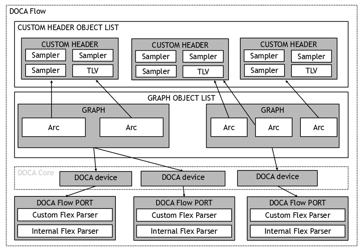
Match and Actions Fields
Custom header fields are presented to DOCA match and action APIs as byte arrays via the definition structure. If a field width is not byte-aligned, it is right-aligned within the array, occupying the lower bits.
The valid_bit field in the metadata indicates whether the custom header was successfully identified and parsed in the current packet. This ensures matches are only applied when the header is present.
Known Limitations
There are some known limitations:
-
Field alignment: Both the
next protocoland dynamicheader lengthfields must reside entirely within a single 32-bit word, aligned to the start of the header. They cannot cross a dword boundary due to hardware constraints. -
Header length field width: The supported width for a dynamic header length field is limited to 6 or 9 bits, depending on the hardware generation.
-
Sampling limit: The total amount of data sampled for matching and modification cannot exceed eight 32-bit words (32 bytes) per header.
-
Dummy fields: To maintain the correct header structure in software without exceeding the sampling limit, fields that are not required for matching can be defined as dummy fields in the configuration.
-
Multiplier restrictions: The hardware calculates header length in 32-bit words. Therefore, multipliers of 1 (bytes) or 2 (16-bit words) are not fully supported due to hardware alignment behaviors.
-
Parse graph vs. flow match: The input and output arcs defined in the parse graph configuration only instruct the hardware on when and how to capture sample fields from a recognized header. They do not enforce a match in the flow rules. It is the application's responsibility to ensure the flow rules explicitly match the required packet pattern (e.g., ensuring a specific header sequence exists) if strict adherence to the graph structure is required.
NIC Configuration for Custom Header Support
The Flex Parser is a specialized hardware feature on BlueField DPUs that enables programmable parsing of protocol headers. While the NIC contains fixed, built-in parsers for standard protocols defined at the time of hardware development, the Flex Parser allows DOCA to define and handle new or modified protocols and options.
BlueField-2 and BlueField-3 models support a maximum of 8 concurrent Flex Parser units. However, the actual number available to the application may be lower if the firmware reserves specific units for internal use (e.g., to support newer network protocols).
Two non-volatile parameters control the Flex Parser configuration, which can be modified using the mlxconfig utility
-
PROG_PARSE_GRAPH– Setting this value toTruemakes the Flex Parser feature available for host software usage. -
FLEX_PARSER_PROFILE_ENABLE– This setting configures how the firmware allocates internal Flex Parser units for specific protocols.
Configuration steps:
-
Check the current device settings:
mlxconfig -d /dev/mst/mt41686_pciconf0 query -
Enable the Flex Parser feature for the host:
mlxconfig -d /dev/mst/mt41686_pciconf0 set PROG_PARSE_GRAPH=1 -
Set the profile enable bit (e.g., to 4) to allocate resources for the custom header feature.
mlxconfig -d /dev/mst/mt41686_pciconf0 set FLEX_PARSER_PROFILE_ENABLE=4 -
A cold reboot of the NIC is required for these non-volatile configuration changes to take effect.
mlxfwreset -d /dev/mst/mt41686_pciconf0 –yes r
Segment Routing over IPv6 (SRv6)
DOCA Flow provides hardware-accelerated SRv6 support for IPv6 Segment Routing. SRv6 is implemented as an external action; that is, a plugin that extends the standard DOCA Flow action set.
This feature provides the following capabilities:
-
Insert an SRH (Segment Routing Header) after the IPv6 base header with a user-provided segment list.
-
Match on the
segments_leftfield of an existing SRH. -
Decrement the
segments_leftvalue to advance to the next segment. -
Copy the active SID (determined by the current
segments_leftvalue) to the IPv6 destination address.
SRv6 Prerequisites
SRv6 is supported in both vnf and switch modes. The SRv6 external action must be registered before calling doca_flow_init():
doca_flow_external_action_srv6_register();
/* Then proceed with doca_flow_init() */
Calling this function after doca_flow_init() results in undefined behavior.
SRv6 Actions Memory
SRv6 actions require additional actions memory beyond the standard per-entry allocation. Each distinct SRH configuration consumes DOCA_FLOW_SRV6_ACTION_MEM_SIZE (128) bytes. This must be added to the total actions memory size set via doca_flow_port_cfg_set_actions_mem_size().
For example, for a port with 1024 entries and up to 16 distinct SRH configurations:
uint32_t mem_size = ACTIONS_MEM_SIZE(1024) + SRV6_ACTIONS_MEM_SIZE(16);
doca_flow_port_cfg_set_actions_mem_size(port_cfg, mem_size);
SRv6 PUSH Operation
The PUSH operation inserts an SRH immediately after the IPv6 base header. Because this action encapsulates several operations, it is considered a "complex" action. The hardware will:
-
Insert a user-inputted SRH (header fields that are not set by HW must contain valid values).
-
Set the IPv6
next_headerfield to43. -
Set the SRH
next_headerfield to the original IPv6 packet'snext_headervalue.
To use SRv6 PUSH in a pipe, create a pipe action handle. The configuration specifies the operation type, the port ID, and the expected SRH size in bytes (base header + all segments):
#define NB_SIDS 2
struct doca_flow_external_action_srv6_pipe_action_cfg push_cfg = {0};
void *push_action = NULL;

push_cfg.op = DOCA_FLOW_EXT_ACT_SRV6_OP_PUSH;
push_cfg.port_id = port_id;
push_cfg.srh_size = sizeof(struct doca_flow_header_ipv6_srh_base) + NB_SIDS * sizeof(struct doca_flow_ipv6_addr);

result = doca_flow_external_action_srv6_pipe_action_create(&push_cfg, &push_action);
When the pipe action is no longer needed, destroy it:
doca_flow_external_action_srv6_pipe_action_destroy(push_action);
Creating/Destroying the Pipe Action
To utilize the SRv6 PUSH operation within a pipe, the application must first create a pipe action handle. The configuration specifies the operation type, the port ID, and the expected SRH size in bytes (which includes the base header plus all segments):
#define NB_SIDS 2
struct doca_flow_external_action_srv6_pipe_action_cfg push_cfg = {0};
void *push_action = NULL;

push_cfg.op = DOCA_FLOW_EXT_ACT_SRV6_OP_PUSH;
push_cfg.port_id = port_id;
push_cfg.srh_size = sizeof(struct doca_flow_header_ipv6_srh_base) + NB_SIDS * sizeof(struct doca_flow_ipv6_addr);

result = doca_flow_external_action_srv6_pipe_action_create(&push_cfg, &push_action);
-
srh_size: Defines the total SRH header size in bytes. All entries added to this pipe action must provide an SRH of this exact size.
This handle is subsequently passed to an ordered list pipe element of type DOCA_FLOW_ORDERED_LIST_ELEMENT_EXTERNAL_ACTIONS.
When the pipe action is no longer required, it must be destroyed:
doca_flow_external_action_srv6_pipe_action_destroy(push_action);
Ordered List Integration
SRv6 PUSH functions as an ordered list pipe external action element. The DOCA_FLOW_ORDERED_LIST_ELEMENT_EXTERNAL_ACTIONS element serves a dual role:
-
At pipe creation: The
external_actionsfield points to the pipe action handle returned bydoca_flow_external_action_srv6_pipe_action_create(). -
At entry creation: The
external_actionsfield points to astruct doca_flow_external_action_srv6_entrycontaining the per-entry SRH data.
The PUSH element can be seamlessly combined with other ordered list elements, such as actions (e.g., copying the SID to the IPv6 destination) and monitors (e.g., counters), within the same list.
Providing Per-Entry SRH Data
Each entry must supply its SRH content via struct doca_flow_external_action_srv6_entry. The SRH is defined by struct doca_flow_header_ipv6_srh, consisting of a fixed 8-byte base header followed by a flexible array of 128-bit segment addresses:
#define NB_SIDS 2
uint32_t entry_len = sizeof(struct doca_flow_external_action_srv6_entry) + NB_SIDS * sizeof(struct doca_flow_ipv6_addr);
struct doca_flow_external_action_srv6_entry *srv6_entry = calloc(1, entry_len);
struct doca_flow_header_ipv6_srh *srh = &srv6_entry->srh;

srh->base.hdr_ext_len = (NB_SIDS * sizeof(struct doca_flow_ipv6_addr)) / 8;
srh->base.routing_type = 4;
srh->base.segments_left = NB_SIDS - 1;
srh->base.last_entry = NB_SIDS - 1;

/* Segment 0 (active segment — copied to IPv6 DIP) */
SET_IPV6_ADDR(srh->segments[0].addr,
              DOCA_HTOBE32(0x20010db8), DOCA_HTOBE32(0x00000001),
              DOCA_HTOBE32(0x00000000), DOCA_HTOBE32(0x00000001));

/* Segment 1 */
SET_IPV6_ADDR(srh->segments[1].addr,
              DOCA_HTOBE32(0x20010db8), DOCA_HTOBE32(0x00000002),
              DOCA_HTOBE32(0x00000000), DOCA_HTOBE32(0x00000002));
-
hdr_ext_len: Must be non-zero (at least one segment is required) and must be an even number, as each segment occupies 16 bytes (2 units of 8). DOCA Flow does not validate this field; the application must ensure it correctly reflects the total SRH size. -
next_headerautomatic handling: When a PUSH operation executes, DOCA Flow automatically saves the original IPv6next_headervalue before overwriting it with43(IPv6 Routing Header). After the SRH is inserted and the packet is reparsed, the saved value is restored into the SRHnext_headerfield. Any manual application settings applied tosrh->base.next_headerare ignored.
Matching/Actions on SRv6 Fields
DOCA Flow supports matching and modifying the following SRv6 fields:
-
segments_left: The number of remaining route segments (8-bit). -
segments: The active segment identifier (128-bit IPv6 address).
These fields are accessed through the DOCA Flow Definitions API. Developers must register the SRv6 fields prior to calling doca_flow_init() by extending the match and actions structures:
struct srv6_match {
    struct doca_flow_match base;
    uint32_t segments_left;
};

struct srv6_actions {
    struct doca_flow_actions base;
    uint32_t segments_left;
};

/* Register match field */
doca_flow_definitions_add_field(definitions,
                                "match.packet.outer.srv6.segments_left",
                                offsetof(struct srv6_match, segments_left),
                                sizeof(((struct srv6_match *)0)->segments_left));

/* Register actions field */
doca_flow_definitions_add_field(definitions,
                                "actions.packet.outer.srv6.segments_left",
                                offsetof(struct srv6_actions, segments_left),
                                sizeof(((struct srv6_actions *)0)->segments_left));
The base member must be the first field in the extended structure.
SRv6 Field Strings
The following field strings are available for use in action descriptors:
|
String Field |
Supported Actions |
Description |
|
|
Set, Add, Copy (src/dst) |
Segments remaining count |
|
|
Copy (src) |
Active segment (128-bit SID) |
Examples:
-
Copying the active SID into the IPv6 destination address:
desc.type = DOCA_FLOW_ACTION_COPY; desc.field_op.src.field_string = "outer.srv6.segments"; desc.field_op.src.bit_offset = 0; desc.field_op.dst.field_string = "outer.ipv6.dst_ip"; desc.field_op.dst.bit_offset = 0; desc.field_op.width = 128; -
Decrementing
segments_left: Use theADDaction with a per-entry value ofUINT8_MAX(which is the equivalent of subtracting 1 in unsigned 8-bit arithmetic).desc.type = DOCA_FLOW_ACTION_ADD; desc.field_op.dst.field_string = "outer.srv6.segments_left"; desc.field_op.dst.bit_offset = 0; desc.field_op.width = 8; /* At entry creation: */ entry_actions.segments_left = UINT8_MAX; /* decrement by 1 */
SRv6 PUSH Limitations
-
Currently, only the PUSH operation is supported in hardware. SRH removal (POP) must be performed in software (future releases will introduce hardware POP support).
-
The total SRH size (base header + segment list) must not exceed the hardware's insert-header maximum. The API will return a descriptive error message in such cases.
-
doca_flow_external_action_srv6_register()MUST be called beforedoca_flow_init(). -
SRv6 PUSH strictly requires an internal scratch register on the port. If this register is unavailable (which is dependent on the specific hardware model and firmware configuration), the pipe creation will fail.
External Action Memory
The memory external action performs atomic operations on a pool of 64-bit memory slots (resource offsets) as part of packet processing. A packet metadata register (meta.u32[u32_index] / meta.u32[u32_index + 1]) serves as both input and output: it provides the input operand for memory-modifying operations and always receives the operation result. The pool can also be read or updated from the CPU.
Memory Prerequisites
The memory external action must be registered before calling doca_flow_init():
doca_flow_external_action_memory_register();
Memory Resource
A memory resource is a pool of 64-bit resource offsets created per port after the port is started. For example:
struct doca_flow_external_resource_memory_cfg mem_cfg = {0};
struct doca_flow_external_resource_memory *memory = NULL;

mem_cfg.num_resources = 1024;
mem_cfg.granularity = DOCA_FLOW_EXTERNAL_RESOURCE_GRANULARITY_64BIT;

doca_flow_external_resource_memory_create(port, &mem_cfg, &memory);
DOCA_FLOW_EXTERNAL_RESOURCE_GRANULARITY_64BIT is currently the only supported granularity.
Resource offset values can be written from the CPU using doca_flow_external_resource_memory_update() and read back using doca_flow_external_resource_memory_read().
When no longer needed:
doca_flow_external_resource_memory_destroy(memory);
Creating/Destroying the Memory Pipe Action
A pipe action handle binds a memory resource, an operation, a target resource offset, and the metadata register used as input/output. For example:
struct doca_flow_external_action_memory_pipe_action_cfg act_cfg = {0};
void *mem_action = NULL;

act_cfg.resource        = memory;
act_cfg.resource_offset = 0;       /* fixed offset; UINT32_MAX for per-entry */
act_cfg.operation       = DOCA_FLOW_EXTERNAL_ACTION_MEMORY_OP_LOAD;
act_cfg.u32_index       = 0;       /* input/output register: meta.u32[0] and meta.u32[1] */

doca_flow_external_action_memory_pipe_action_create(&act_cfg, &mem_action);
-
resource_offset: The target resource offset. Set toUINT32_MAXto make it selectable per flow entry viastruct doca_flow_external_action_memory_entryat add-entry time. Mutually exclusive withuse_access_index. -
use_access_index: When set, the per-packetaccess_indexmetadata field selects the resource offset to act on. Mutually exclusive withresource_offset. -
u32_index: Must be even. The 64-bit register spansmeta.u32[u32_index]andmeta.u32[u32_index + 1], and serves as both input (operand for write-to-memory operations) and output (result for read-from-memory operations).
When no longer needed:
doca_flow_external_action_memory_pipe_action_destroy(mem_action);
Memory Ordered List Integration
The memory external action is used as an element in an ordered list pipe (DOCA_FLOW_ORDERED_LIST_ELEMENT_EXTERNAL_ACTIONS):
-
At pipe creation:
external_actionspoints to the handle returned bydoca_flow_external_action_memory_pipe_action_create(). -
At entry creation:
external_actionsalways points to astruct doca_flow_external_action_memory_entry. Theresource_offsetfield within it is used only when the pipe action'sresource_offsetisUINT32_MAXanduse_access_indexis not set.
Supported Operations
The register (u32_index) is the input operand for write-to-memory operations and receives the result for all operations. For write-to-memory operations, the register is updated with the previous resource offset value (before the operation was applied).
|
Operation |
Memory effect |
Register after operation |
|---|---|---|
|
|
None |
Set to the resource offset value |
|
|
Set to the register value |
Set to the previous resource offset value |
|
|
Incremented by the register value |
Set to the previous resource offset value |
|
|
XOR'd with the register value |
Set to the previous resource offset value |
|
|
OR'd with the register value |
Set to the previous resource offset value |
|
|
AND'd with the register value |
Set to the previous resource offset value |
|
|
None |
Set to the bit offset of the most significant set bit |
|
|
None |
Set to a bitmap containing only the most significant set bit |
|
|
None |
Set to the bit offset of the least significant set bit |
|
|
None |
Set to a bitmap containing only the least significant set bit |
|
|
Most significant set bit cleared |
Set to the bit offset of the cleared bit |
|
|
Most significant set bit cleared |
Set to a bitmap containing only the cleared bit |
|
|
Least significant set bit cleared |
Set to the bit offset of the cleared bit |
|
|
Least significant set bit cleared |
Set to a bitmap containing only the cleared bit |
For the four "bit offset" operations above (..._FFS_ID_MSB, ..._FFS_ID_LSB, ..._FIND_FIRST_SET_AND_RESET_ID_MSB, ..._FIND_FIRST_SET_AND_RESET_ID_LSB), the register format is: u32[u32_index] bits [31:26] = offset (counted from LSB regardless of search direction), u32[u32_index + 1] bit 0 = set when no bit was found (all-zero slot).
Packet Window
A packet window is a 64-byte view of the packet, positioned at a byte base derived from a parsed header position and a signed byte offset from it. The application declares its own named fields inside that window and then uses them like any other DOCA Flow field: masked-equality match, and the SET, COPY, and ADD field-modify actions.
This makes bytes that DOCA Flow does not parse — a proprietary header carried in the payload, an application tag following the UDP header, an RDMA payload word — available to steering without adding protocol members to the library's match and actions structures. Every declared field must fit within the 64 bytes of the window.
Using the feature involves three steps:
-
Declare the window layout (a programmable struct) in the definitions object, before
doca_flow_init(). -
Configure the window location per pipe with
doca_flow_pipe_cfg_set_packet_window(), when the pipe needs a deterministic location. -
Match on, and modify, the declared fields through the match and actions buffers and through action descriptors.
doca_flow_pipe_cfg_set_packet_window() and the programmable-struct definitions APIs are experimental and may change until they are promoted to stable.
The flow_packet_window sample is a runnable end-to-end example: it registers a window layout, positions the window after the UDP header, matches a payload tag, sets another tag with SET, copies one payload byte to another with COPY, and adds an immediate to a third with ADD. The arguments of each API are described in the DOCA API Reference; this section covers the workflow, the supported configurations, and the limitations.
Declaring Packet Window Fields
A programmable struct describes one window layout: named fields at window-relative byte offsets. Create it with doca_flow_definitions_programmable_struct_create(), add its fields with doca_flow_definitions_programmable_struct_add_field(), and register it into the definitions object with doca_flow_definitions_add_programmable_struct() under the packet window match prefix, the actions prefix, or both.
Registration rules:
-
A layout is registered under the packet window match prefix,
match.packet.programmable.packet_window, or the actions prefix,actions.packet.programmable.packet_window. Each field becomes<prefix>.<field_name>, unique within its prefix; the same name may be used under both. The API reference gives the field-name syntax. -
A field's offset inside the programmable struct is its offset inside the packet window. The
field_offsetargument ofdoca_flow_definitions_add_programmable_struct()is the base of the layout inside the application's match or actions buffer, so the registered buffer offset isfield_offsetplus the field's offset in the programmable struct. -
doca_flow_definitions_programmable_struct_add_field()validates a field only against thestruct_sizepassed at create time. The 64-byte window bound is validated at initialization:doca_flow_init()returnsDOCA_ERROR_INVALID_VALUEif a field's window-relative end (offset plus length) exceeds 64. -
The programmable struct may be destroyed as soon as it is registered. The definitions object must stay alive until
doca_flow_init()returns. -
The same programmable struct may be registered several times, and different structs may be registered under the same prefix, as long as each registration uses its own base offset. All registered fields are active at the same time.
-
A window layout needs storage of its own: window fields are not checked against the built-in match and actions members whose bytes they may overlap, and overlapping a built-in member is not a supported way to alias it. In
DOCA_FLOW_DEFINITIONS_MODE_LIBRARY_DEFINEDmode, place the layout past the library structure — an extended structure whose first member isstruct doca_flow_matchorstruct doca_flow_actions, and anoffsetof()base. -
Registered offsets are absolute offsets in the match and actions buffers, so every pipe and entry on the port must pass a zero-initialized buffer that covers all registered offsets, even when the pipe activates only one region. In library-defined mode that buffer is the whole extended structure (
&carrier.base); smaller wrappers are unsafe. InDOCA_FLOW_DEFINITIONS_MODE_APP_DEFINEDmode the registered fields define the complete layout and no library structure precedes them — see Application-Defined Match and Actions Layouts. -
A programmable struct is bound to one prefix family: a struct registered under a packet window prefix cannot also be registered as a message format (
match.message.programmable/actions.message.programmable). Use two programmable structs in that case.
Positioning the Window
The window location is part of the pipe configuration: doca_flow_pipe_cfg_set_packet_window() takes a struct doca_flow_packet_window_cfg holding a parsed header position and a signed byte_offset from it.
-
positionis a parsed header reference — the start of an outer or inner header, such as the BTH used below; seeenum doca_flow_header_positionin the API reference for the full list.byte_offsetis a signed byte distance from that reference. -
The setter only validates and stores the configuration; the location itself is validated at pipe creation, against the anchors and offset range the device reports and against the pipe type and its configuration. An unsupported anchor, an out-of-range offset, or an unsupported pipe configuration returns
DOCA_ERROR_NOT_SUPPORTED. Nothing is silently degraded. -
On a device that cannot position a packet window, the window is fixed at the BTH payload. There,
DOCA_FLOW_HEADER_POSITION_BTH_STARTwithbyte_offset12 is accepted — it names the location the window already has — and every other location returnsDOCA_ERROR_NOT_SUPPORTED. -
The location is fixed per pipe: it is taken when the pipe is created, cannot be changed per entry or by updating an entry, and a later call on a reused
pipe_cfgaffects only subsequent pipe creations. -
A pipe that does not configure a location reads the window wherever it is currently positioned — the location set by a pipe the packet already traversed, or the device default. Configure the location on every pipe that needs a deterministic one.
Matching Packet Window Fields
Window fields are matched through the match buffer, like any other registered definitions field — there is no field string for match. The pipe's match and match-mask buffers select the window fields the pipe matches on, marking a changeable template field with all-ones in both, and each entry then supplies the concrete values.
Only masked equality is supported; ranges and other non-equality comparisons are not. Matching is available on Basic, Control, Hash, and Ordered List pipes, root and non-root alike, in both vnf and switch mode. A Hash pipe with a window key requires the plain DOCA_FLOW_PIPE_HASH_MAP_ALGORITHM_HASH algorithm; the identity, random, round-robin, flooding, and multi-algorithm variants return DOCA_ERROR_NOT_SUPPORTED.
Bytes outside the received packet are read as zero. Since the window is placed relative to a parsed header and its size is not validated against the packet, classify the packet — L3/L4 type, and length when needed — in an earlier pipe, or include enough of the window in the match to reject short packets.
Modifying Packet Window Fields
Window fields are modified with the regular action types:
-
SET — write the value into the actions buffer, and mark the field in the actions mask (implicit auto-modification), exactly as for a library-defined field.
-
COPY and ADD — use an action descriptor. A window field is addressed by the field string
programmable.packet_window.<field_name>in the descriptor's source or destination, together with abit_offsetand awidth. An immediate ADD has no source field: its operand is the destination field's value in the actions buffer.
Rules and semantics:
-
SET and COPY may span 4-byte words of the window.
-
An immediate ADD requires the destination's registered field — its full offset and length, not the slice selected by
bit_offset/width— to fit in a single 4-byte word of the window, that isfield_offset / 4 == (field_offset + field_length - 1) / 4. A 1–4-byte field may start at any byte. -
An ADD from a source field requires only the
bit_offset/widthrange selected from each window operand to fit in a single 4-byte word. A registered field that crosses a word boundary is usable, as long as every range an ADD selects from it stays inside one word. -
A violation of either rule returns
DOCA_ERROR_INVALID_VALUEwhen the template is created (for a Control pipe, when the entry is built). A registered field that crosses a word boundary but is not used by an ADD does not block anything. -
ADD is unsigned modular addition over the operation width and discards the overflow bit, as for other DOCA Flow fields.
-
COPY supports window-to-field, field-to-window, and window-to-window. An exact self-copy is a no-op; partially overlapping source and destination ranges return
DOCA_ERROR_INVALID_VALUE. -
Packet window fields and message-format fields (
programmable.message.*) cannot be mixed in the same action array. -
DOCA Flow does not recompute L3/L4 checksums, or the RoCE iCRC, for modified window bytes. Rewriting payload bytes covered by a checksum invalidates it unless the application handles it.
Packet Window Support Matrix
|
Pipe |
Window location ( |
Window match |
Window field modify |
|---|---|---|---|
|
Basic, Control, Hash, Ordered List |
Supported |
Masked equality |
Supported |
|
LPM, ACL |
Supported |
Not supported (MAC/IPv4/IPv6 and ACL keys only) |
Supported |
|
Connection Tracking |
Not supported |
Not supported |
Not supported |
Root and non-root pipes are equally supported: the root role restricts neither the window location nor the window match, in either pipe mode.
Packet Window Limitations
-
A device that cannot position a packet window keeps the window fixed at the BTH payload: only
DOCA_FLOW_HEADER_POSITION_BTH_STARTwithbyte_offset12 is accepted there, and any other location returnsDOCA_ERROR_NOT_SUPPORTED. -
A resizable pipe cannot use every window combination:
-
A resizable Control pipe cannot position the window at all, even without a window match, and returns
DOCA_ERROR_NOT_SUPPORTED. -
A resizable Basic, Hash, or Ordered List pipe cannot both position the window and match window fields; that combination returns
DOCA_ERROR_NOT_SUPPORTED, while either alone is supported. -
The fixed BTH-payload location on a device without positioning support repositions nothing, so it leaves every resizable pipe usable.
-
-
A message-isolated pipe cannot set the window location and returns
DOCA_ERROR_INVALID_VALUE. -
There is no automatic validation that the window lies inside the received packet, and no match on the number of valid window bytes.
-
Definitions are per system, not per pipe: the window layout registered before
doca_flow_init()is shared by every port and pipe, and cannot be changed afterwards. A pipe selects which registered fields it uses; it cannot redefine them.
Message Queue
The message queue lets an application inject software-originated messages into the DOCA Flow steering pipeline. A message is matched and modified the same way a packet is, through ordinary pipes, but it never mixes with real network traffic: message pipelines are kept isolated from the regular datapath by a dedicated isolation type that DOCA Flow enforces on every pipe and forward. This makes it possible to reuse the pipe match/action/forward model for software-driven, application-defined records.
A message pipeline reuses the same building blocks described elsewhere in this guide: pipes, entries, matches, actions, forwards, and counters. What is different is how a message enters the pipeline: through doca_flow_message_queue_send(), instead of real traffic arriving on the wire.
Message Queue Prerequisites
The message queue is supported on ConnectX-9 and newer.
On ConnectX-9, the feature also requires a specific Flex Parser profile enabled on the PF:
sudo mlxconfig -d <pci> set FLEX_PARSER_PROFILE_ENABLE=10
This is a non-volatile setting and requires a firmware reset or a host reboot to take effect — see NIC Configuration for Custom Header Support for the general mlxconfig / mlxfwreset workflow.
Defining a Message Format
A message's format is entirely application-defined: a fixed-size record whose fields are declared through the DOCA Flow Definitions API's programmable struct, then bound to an opaque struct doca_flow_message_type handle. Both steps must happen before doca_flow_init().
struct message_format {
    doca_be32_t key;
    doca_be32_t seq;
};

/* Match/actions structs extend the format past the library's own built-in fields. */
struct message_match {
    struct doca_flow_match base;
    struct message_format msg;
};

struct message_actions {
    struct doca_flow_actions base;
    struct message_format msg;
};

struct doca_flow_definitions_programmable_struct *fmt;
struct doca_flow_message_type *msg_type;

doca_flow_definitions_programmable_struct_create(sizeof(struct message_format), &fmt);
doca_flow_definitions_programmable_struct_add_field(fmt, "key",
                                                    offsetof(struct message_format, key),
                                                    sizeof(((struct message_format *)0)->key));
doca_flow_definitions_programmable_struct_add_field(fmt, "seq",
                                                    offsetof(struct message_format, seq),
                                                    sizeof(((struct message_format *)0)->seq));

/* The same programmable struct is registered under both message field families. */
doca_flow_definitions_add_programmable_struct(defs, "match.message.programmable",
                                              offsetof(struct message_match, msg), fmt);
doca_flow_definitions_add_programmable_struct(defs, "actions.message.programmable",
                                              offsetof(struct message_actions, msg), fmt);

doca_flow_definitions_add_message_type(defs, fmt, &msg_type);
Each field added to the programmable struct becomes two field strings, match.message.programmable.<name> and actions.message.programmable.<name>, at the offset passed to doca_flow_definitions_add_programmable_struct() plus the field's own offset inside the struct.
-
The programmable struct must be registered under both
match.message.programmableandactions.message.programmableon the same definitions object beforedoca_flow_definitions_add_message_type()is called, and must not be changed afterward — adding a field later invalidates both registrations. -
A programmable struct registered under a message prefix cannot also be registered under a
packet_windowprefix (and vice versa); use a separate programmable struct for each. -
The format's
struct_sizecannot exceed the message payload maximum (see Sending and Processing Messages), and the number of distinct message types that can be registered is bounded —doca_flow_definitions_add_message_type()returnsDOCA_ERROR_FULLonce that space is exhausted. -
msg_typestays valid untildoca_flow_destroy()— there is no separate per-type destroy call.
Message-Isolated Pipes
A pipe's isolation type restricts what it can match, modify, and forward to. It is set once at pipe creation with doca_flow_pipe_cfg_set_isolation_type():
enum doca_flow_pipe_isolation_type {
        DOCA_FLOW_PIPE_ISOLATION_TYPE_DEFAULT = 0,     /* regular datapath pipe; the default */
        DOCA_FLOW_PIPE_ISOLATION_TYPE_MESSAGE,         /* user message pipeline */
        DOCA_FLOW_PIPE_ISOLATION_TYPE_BUILTIN_MESSAGE, /* built-in message pipeline */
};

doca_flow_pipe_cfg_set_isolation_type(pipe_cfg, DOCA_FLOW_PIPE_ISOLATION_TYPE_MESSAGE);
Built-in messages are produced by the library rather than sent by an application. Configuring them is outside this section's scope; the rules below name both kinds because the isolation type constrains them the same way.
A CT pipe cannot be message- or built-in-message-isolated: it matches a 5-tuple supplied per entry rather than through the pipe's own match template, so this is rejected at pipe creation. A message-isolated pipe must also be created with DOCA_FLOW_PIPE_DOMAIN_EGRESS (see Steering Domains).
A pipe may only forward to another pipe of the same isolation type. A message or built-in-message pipe is further restricted: it may forward only to another pipe of its own isolation type, or to a drop — no other terminal forward (RSS, port, target, trim) is allowed. This is validated at pipe creation, at entry creation when the entry supplies the forward (a control-pipe entry or a changeable forward), and by doca_flow_pipe_update_miss().
A message or built-in-message pipe is also restricted in what it can match, modify, and monitor:
-
Matching and modifying is limited to the metadata fields (
pkt_meta, theu32[]scratchpad,access_index— the slot an admitted external action reads when itsuse_access_indexis set — andmeta.packet_generate_input, the window a packet generate action with dynamic bytes reads them from; see Metadata and theflow_packet_generatesample) and, on a message pipe only, the message-format fields registered undermatch.message.programmable.*/actions.message.programmable.*. Any other match field, action, or monitor resource is rejected at pipe (or control-pipe entry) creation. -
External actions are admitted per family: memory, mutex, timer and packet generate are allowed; SRv6, RIA, timestamp and programmable action are rejected at pipe creation, as is every other external action family. An admitted action's own field references follow the same allow-list as any match or action field: the packet generate prefill selector must name an allowed field when its resource holds more than one prefill, and the memory, mutex and timer actions read
access_indexwhenuse_access_indexis set. -
A regular (default-isolation) pipe rejects the message-format fields — they are only meaningful inside a message pipeline.
-
The monitor may only use a counter, a shared event RSS resource, or aging; a meter is rejected.
-
As with any other field, an action descriptor addressing a message field or a metadata field is written without the
match./actions.prefix used at registration — for examplemessage.programmable.key, ormeta.datafor a metadata field (see Copy Field).
Configuring Message Queues
A port that sends messages needs at least one message queue, sized and configured on the port configuration object before doca_flow_port_start():
doca_flow_port_cfg_set_nr_message_queues(port_cfg, 1);
doca_flow_port_cfg_set_message_queue_depth(port_cfg, 64);
doca_flow_port_cfg_set_cb_message_process(port_cfg, message_completion_cb);
-
doca_flow_port_cfg_set_nr_message_queues()sets the number of message queues on the port. Zero, the default, disables message queues on the port. -
doca_flow_port_cfg_set_message_queue_depth()sets how many in-flight messages each queue can hold. It is mandatory oncenr_message_queuesis non-zero — it has no default, anddoca_flow_port_start()fails without it. A non-power-of-two value is rounded up when the queue is created. -
doca_flow_port_cfg_set_cb_message_process()registers the completion callback described in Results and Completions for Messages. It may beNULLto disable callbacks.
A message queue's queue_index is a separate namespace from the pipe-entry queue used by doca_flow_pipe_basic_add_entry() / doca_flow_entries_process(). Sizing or indexing one has no effect on the other.
Attaching a Message Type to a Pipe
Before a message type can be sent, it must be bound to an origin pipe:
doca_flow_message_type_attach(port, msg_type, pipe);
-
A message type (from
doca_flow_definitions_add_message_type()) attaches only to aMESSAGE-isolated pipe, and requires the port to have at least one message queue configured. -
A message type can be attached to only one pipe at a time. Attaching is cumulative: calling it again for the same type re-points the type's routing to the new pipe, with no window where the type is unrouted — a send racing the re-point is delivered to either the previous or the new pipe, never dropped.
-
Several message types may share one origin pipe, but the pipe's match layout then applies to all of them.
-
There is no explicit detach call. A type stays bound for the lifetime of its origin pipe; destroying that pipe, or the port, auto-detaches every type bound to it. Re-pointing a type to a different pipe is done by attaching it again. A send racing auto-detach either fails with
DOCA_ERROR_NOT_CONNECTEDor, if it already passed the attachment check, is posted and may complete after the type's routing to the pipe is removed — in which case the message is dropped. -
Attach and re-point are control-plane calls; an application must not call them concurrently on the same port, whether for the same message type or different ones.
doca_flow_message_queue_send()may run concurrently with attach / re-point on the same port. -
If auto-detach (on pipe or port destroy) fails to remove a type's steering, that type is retired on the port: attaching it again returns
DOCA_ERROR_BAD_STATEuntil the port is stopped. -
doca_flow_message_type_attach()rejects an unset or mismatched isolation type (a user type on aBUILTIN_MESSAGEpipe, or a built-in type on aMESSAGEpipe), a resizable or compound-type pipe (LPM / ACL / ordered list / CT), and a pipe placed outside the port's egress domain. An unset or mismatched isolation type and a wrong domain returnDOCA_ERROR_INVALID_VALUE; a resizable or compound-type pipe returnsDOCA_ERROR_NOT_SUPPORTED; a port with no message queues, or a retired type (see above), returnsDOCA_ERROR_BAD_STATE; andDOCA_ERROR_IO_FAILEDis returned if the device rejects the steering rule. A failed attach leaves any previous attachment of the message type intact.
Sending and Processing Messages
Once a type is attached, send a message with doca_flow_message_queue_send():
doca_flow_message_queue_send(port, queue_index, msg_type, &message, DOCA_FLOW_QUEUE_FLAGS_NO_WAIT, user_ctx);
-
messageis the payload matchingmsg_type's registered format; its length is resolved from the type, and is at most 60 bytes. -
flagstakes exactly one ofDOCA_FLOW_QUEUE_FLAGS_NO_WAIT(submitted to the device immediately) orDOCA_FLOW_QUEUE_FLAGS_WAIT_FOR_BATCH(buffered — submitted by a laterNO_WAITsend, or bydoca_flow_message_queue_process(), on the same queue). -
user_ctxis echoed back to the completion callback for this specific send.
doca_flow_message_queue_send() returns DOCA_ERROR_AGAIN when the queue is full — process completions and retry. It returns DOCA_ERROR_NOT_CONNECTED if the type is not currently attached on this port, DOCA_ERROR_INVALID_VALUE if queue_index is outside the port's configured message queues (including when nr_message_queues is 0) or for other invalid input, and DOCA_ERROR_BAD_STATE if this queue has already hit an unrecoverable device error. Once a queue hits such an error it enters an error state and rejects every further send for the remainder of the port's lifetime.
doca_flow_message_queue_process() polls the queue's completions — submitting any batched (WAIT_FOR_BATCH) sends first — and invokes the completion callback, if one is registered, once per retired send:
doca_flow_message_queue_process(port, queue_index, 0 /* process all pending completions */);
Unlike doca_flow_entries_process(), there is no timeout parameter: max_messages == 0 processes every pending completion, and any n > 0 caps how many are processed in this call.
Query the queue's lifetime completion counters at any time with doca_flow_message_queue_query():
struct doca_flow_queue_completion_stats stats;
doca_flow_message_queue_query(port, queue_index, &stats);
/* stats.num_completed / stats.num_failed */
num_completed and num_failed remain valid, and readable, even after the queue has entered its error state.
Do not call doca_flow_message_queue_send() or doca_flow_message_queue_process() concurrently with doca_flow_port_stop() on the same queue.
Results and Completions for Messages
The completion callback and doca_flow_message_queue_query() report the same underlying event through two independent channels — one per send, one aggregated per queue — and both only confirm that the device accepted and injected the message. Neither reports what happened once the message reached the pipeline: that is what the pipeline's own entry counters are for. Comparing a queue's completion count against a downstream entry's counter is how an application tells "injected" apart from "matched."
Message and built-in-message pipelines must terminate in a drop forward. This is what the isolation rules validate (see Message-Isolated Pipes). The terminating entry's forward must be supplied by the application; an unspecified miss forward defaults to drop.
Message Queue Limitations
-
Requires ConnectX-9 or newer; the device capability is validated automatically at port and pipe creation.
-
A message payload is at most 60 bytes, and the number of distinct message types that can be registered is bounded — see Defining a Message Format.
-
Message pipelines must terminate in a drop; any other terminal forward is rejected (see Message-Isolated Pipes for when the forward is validated).
-
The message queue's completion path (the callback and
doca_flow_message_queue_query()) confirms only that the device injected a message, never what the pipeline did with it — use entry counters to observe pipeline results. -
A message type cannot be attached to a resizable or compound-type pipe (LPM, ACL, ordered list). A CT pipe is rejected at message-isolated pipe creation. A message pipe also cannot forward across isolation types.
-
Once a message queue hits an unrecoverable device error, it stops accepting sends for the remainder of the port's lifetime.
The flow_message_queue sample walks the whole feature end to end on a single port: it registers a two-field message format, creates a small message pipeline with a counted entry, attaches the type, sends both a hitting and a missing message, and reads the outcome from both the queue's completion stats and the pipeline's entry counters.
Packet Processing
In situations where there is a port without a pipe defined, or with a pipe defined but without any entry, the default behavior is that all packets arrive to a port in the software.
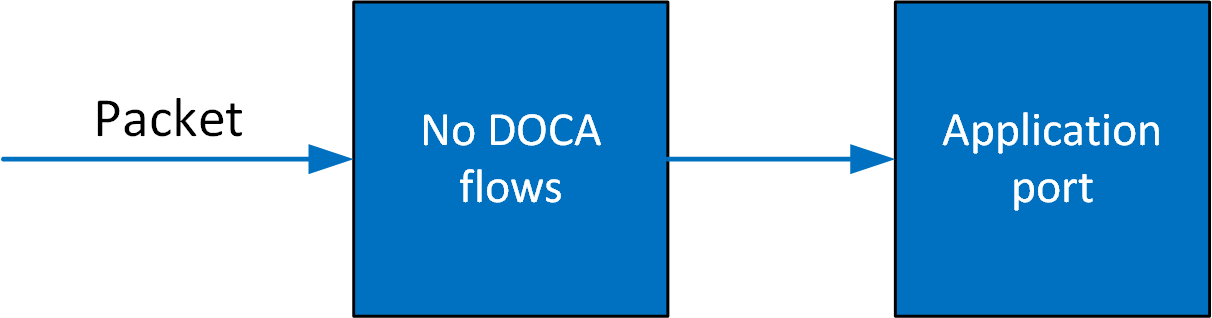
Once entries are added to the pipe, if a packet has no match then it continues to the port in the software. If it is matched, then the rules defined in the pipe are executed.
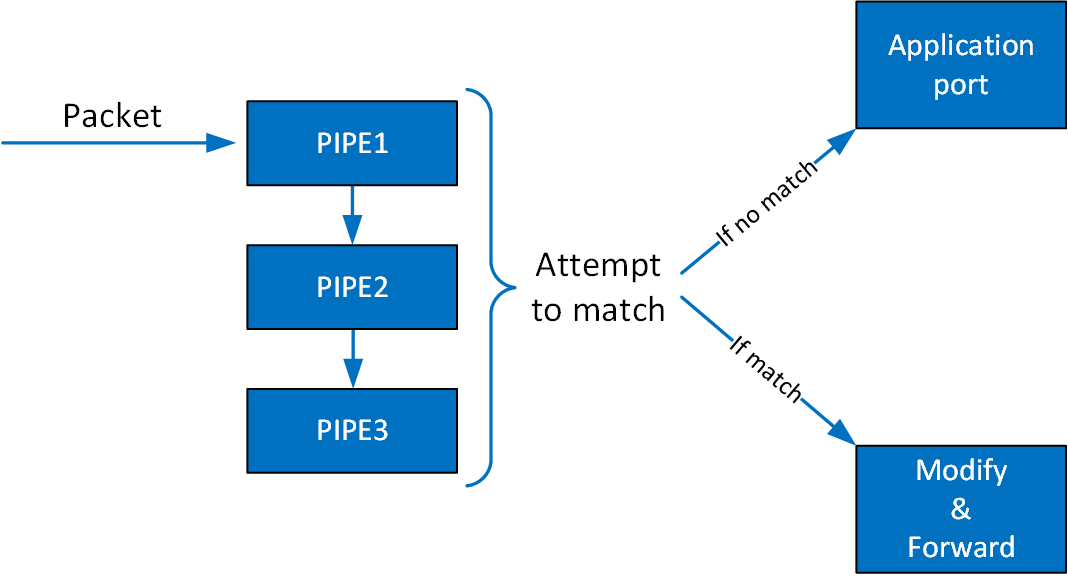
If the packet is forwarded in RSS, the packet is forwarded to software according to the RSS definition. If the packet is forwarded to a port, the packet is redirected back to the wire. If the packet is forwarded to the next pipe, then the software attempts to match it with the next pipe.
Note that the number of pipes impacts performance. The longer the number of matches and actions that the packet goes through, the longer it takes the hardware to process it. When there is a very large number of entries, the hardware must access the main memory to retrieve the entry context which increases latency.
Debug and Trace Features
DOCA Flow supports trace and debugging of DOCA Flow applications which enable collecting predefined internal key performance indicators (KPIs) and pipeline visualization.
Installation
The set of DOCA's SDK development packages include also a developer-oriented package that includes additional trace and debug features which are not included in the production libraries:
-
.debbased systems –libdoca-sdk-flow-trace -
.rpmbased systems –doca-sdk-flow-trace
These packages install the trace-version of the libraries under the following directories:
-
.debbased systems –/opt/mellanox/doca/lib/<arch>/trace -
.rpmbased systems –/opt/mellanox/doca/lib64/trace
Using Trace Libraries
Runtime Linking
The trace libraries are designed to allow a user to link their existing (production) program to the trace library without needing to recompile the program. To do so, one should simply update the matching environment variable so that the OS will prioritize loading libraries from the above trace directory.
The following is an example for such an update for the Ubuntu 22.04 BlueField image:
LD_LIBRARY_PATH=/opt/mellanox/doca/lib/aarch64-linux-gnu/trace:${LD_LIBRARY_PATH} doca_ipsec_security_gw <program parameters>
Compilation
The trace-level development packages in the previous section provide additional compilation definitions (doca-flow-trace.pc) to be used in addition to the regular compilation definitions for the DOCA Flow SDK library (doca-flow.pc). It is recommended to use these compilation definitions for the following scenarios:
-
Static linking of the trace-level DOCA Flow library into your program
-
Regular (dynamic) linking of the trace-level DOCA Flow library into your program during development and testing
Although the latter could also be determined at runtime as explained in the previous section, many developers find it handy to compile directly against the trace version during initial development phases.
Trace Features
DOCA Log – Trace Level
DOCA's trace logging level (DOCA_LOG_LEVEL_TRACE) is compiled as part of this trace version of the library. That is, any program compiled against the library can activate this additional logging level through DOCA's API or even through DOCA's built-in argument parsing (ARGP) library:
LD_LIBRARY_PATH=/opt/mellanox/doca/lib/aarch64-linux-gnu/trace:${LD_LIBRARY_PATH} doca_ipsec_security_gw <program parameters> --sdk-log-level 70
DOCA Flow – Additional Sanity Checks
When using the trace version of the library, additional input sanitation checks are added, at the cost of introducing minor performance implications. These checks are meant to assist developers in their early steps of using the library, as they provide early detection and improved logging for common coding mistakes.
DOCA Flow Samples
This section provides DOCA Flow sample implementation on top of the BlueField.
All the DOCA samples described in this section are governed under the BSD-3 software license agreement.
The samples illustrate common designs, not the full set of what is supported. A missing sample does not mean a missing capability — this guide and the API reference define the supported behavior.
Sample Prerequisites
A DOCA Flow-based program can either run on the host machine or on the BlueField.
Most samples use DPDK for packet acquisition, so huge pages must be available before running them; any huge-page setup that DPDK supports works. For example, to reserve 1024 pages of 2MB and mount hugetlbfs at /mnt/huge:
$ echo '1024' | sudo tee -a /sys/kernel/mm/hugepages/hugepages-2048kB/nr_hugepages
$ sudo mkdir /mnt/huge
$ sudo mount -t hugetlbfs -o pagesize=2M nodev /mnt/huge
The sample fails during DPDK initialization if not enough huge pages are reserved.
Running the Sample
-
Refer to the following documents:
-
DOCA Installation Guide for Linux for details on how to install BlueField-related software.
-
DOCA Troubleshooting for any issue you may encounter with the installation, compilation, or execution of DOCA samples.
-
-
To build a given sample, run the following command. If you downloaded the sample from GitHub, update the path in the first line to reflect the location of the sample file:
cd /opt/mellanox/doca/samples/doca_flow/<sample_name>
meson /tmp/build
ninja -C /tmp/build
The binary
doca_<sample_name>will be created under/tmp/build/``. -
Sample (e.g.,
flow_aging) usage:Usage: doca_flow_aging [DPDK Flags] –- [DOCA Flags] DOCA Flags: -h, --help Print a help synopsis -v, --version Print program version information -l, --log-level Set the (numeric) log level for the program <10=DISABLE, 20=CRITICAL, 30=ERROR, 40=WARNING, 50=INFO, 60=DEBUG, 70=TRACE> --sdk-log-level Set the SDK (numeric) log level for the program <10=DISABLE, 20=CRITICAL, 30=ERROR, 40=WARNING, 50=INFO, 60=DEBUG, 70=TRACE> -j, --json <path> Parse command line flags from an input json file -
For additional information per sample, use the
-hoption after the--separator:/tmp/build/doca_<sample_name> -- -h -
The following is an example from an execution on the DPU:
-
CLI example for running the VNF samples:
/tmp/build/doca_<sample_name> -- -a aux/2,dv_flow_en=2 -a aux/3,dv_flow_en=2 -l 60The
dv_flow_en=2device argument puts the DPDK PMD into hardware steering mode, which DOCA Flow relies on when the port's Rx/Tx datapath is managed through DPDK. Supply it for each device probed via DPDK. -
CLI example for running the switch samples:
/tmp/build/doca_<sample_name> -- -r pci/03:00.0,pf0sf[2-3] -l 60When running on the BlueField in switch mode, it is not necessary to configure the OVS.
The DOCA switch sample hides the extra
dv_flow_en=2,fdb_def_rule_en=0,dv_xmeta_en=4DPDK device arguments behind a simple-rto specify the PCIe ID and representor information.When running on the DPU using the command above, sub-functions must be enabled according to the BlueField Scalable Functions.
When running on the host, virtual functions must be used according to the instructions in the DOCA Virtual Functions.
For additional information regarding the command line syntax of the device and device representor identifiers, please refer to the matching section in the DOCA Arg Parser Guide.
-
Field String Mapping
Field String Supported Actions
The following table lists API fields available for matching criteria and action execution.
|
String Field |
Path in The Structure |
Set |
Add |
Copy |
Condition |
||||
|---|---|---|---|---|---|---|---|---|---|
|
Match |
Actions |
|
Dst |
Src |
Dst |
Src |
A |
B |
|
|
|
|
|
✔ |
✔ |
✔ |
✔ |
✔ |
✔ |
✔ |
|
|
|
|
✔ |
✔ |
✔ |
✔ |
✔ |
✔ |
✔ |
|
|
None. See section "Copy Hash Result" for details. |
N/A |
N/A |
✔ |
N/A |
✔ |
✘ |
✘ |
|
|
|
|
|
N/A |
N/A |
✘ |
N/A |
✘ |
✘ |
✘ |
|
|
|
|
N/A |
N/A |
✘ |
N/A |
✘ |
✘ |
✘ |
|
|
|
|
N/A |
N/A |
✘ |
N/A |
✘ |
✘ |
✘ |
|
|
|
|
N/A |
N/A |
✘ |
N/A |
✘ |
✘ |
✘ |
|
|
|
|
N/A |
N/A |
✘ |
N/A |
✘ |
✔ |
✘ |
|
|
|
|
N/A |
N/A |
✘ |
N/A |
✘ |
✘ |
✘ |
|
|
|
|
N/A |
N/A |
N/A |
N/A |
N/A |
N/A |
N/A |
|
|
|
|
N/A |
N/A |
N/A |
N/A |
N/A |
N/A |
N/A |
|
|
|
|
N/A |
N/A |
N/A |
N/A |
N/A |
N/A |
N/A |
|
|
|
|
N/A |
N/A |
N/A |
N/A |
N/A |
N/A |
N/A |
|
|
|
|
N/A |
N/A |
N/A |
N/A |
N/A |
N/A |
N/A |
|
|
|
|
N/A |
N/A |
N/A |
N/A |
N/A |
N/A |
N/A |
|
|
|
|
N/A |
N/A |
N/A |
N/A |
N/A |
N/A |
N/A |
|
|
|
|
N/A |
N/A |
N/A |
N/A |
N/A |
N/A |
N/A |
|
|
|
|
N/A |
N/A |
N/A |
N/A |
N/A |
N/A |
N/A |
|
|
|
|
N/A |
N/A |
N/A |
N/A |
N/A |
N/A |
N/A |
|
|
|
|
N/A |
N/A |
N/A |
N/A |
N/A |
N/A |
N/A |
|
|
|
|
N/A |
N/A |
N/A |
N/A |
N/A |
N/A |
N/A |
|
|
|
|
N/A |
N/A |
N/A |
N/A |
N/A |
N/A |
N/A |
|
|
|
|
N/A |
N/A |
N/A |
N/A |
N/A |
N/A |
N/A |
|
|
|
|
N/A |
N/A |
N/A |
N/A |
N/A |
N/A |
N/A |
|
|
|
|
N/A |
N/A |
N/A |
N/A |
N/A |
N/A |
N/A |
|
|
|
|
✔ |
✘ |
✔ |
✔ |
✔ |
✘ |
✘ |
|
|
|
|
✔ |
✘ |
✔ |
✔ |
✔ |
✘ |
✘ |
|
|
|
|
✔ |
✘ |
✔ |
✔ |
✔ |
✘ |
✘ |
|
|
|
|
✔ |
✘ |
✔ |
✔ |
✔ |
✘ |
✘ |
|
|
|
|
✘ |
✘ |
✘ |
✘ |
✘ |
✘ |
✘ |
|
|
|
|
✔ |
✘ |
✔ |
✔ |
✔ |
✘ |
✘ |
|
|
|
|
✔ |
✘ |
✔ |
✔ |
✔ |
✘ |
✘ |
|
|
|
|
✔ |
✘ |
✔ |
✔ |
✔ |
✘ |
✘ |
|
|
|
|
✔ |
✘ |
✔ |
✔ |
✔ |
✘ |
✘ |
|
|
|
|
✔ |
✔ |
✔ |
✔ |
✔ |
✘ |
✘ |
|
|
|
|
✔ |
✔ |
✔ |
✔ |
✔ |
✘ |
✘ |
|
|
|
|
✔ |
✔ |
✔ |
✔ |
✔ |
✘ |
✘ |
|
|
|
|
✘ |
✘ |
✘ |
✘ |
✘ |
✘ |
✘ |
|
|
|
|
✘ |
✘ |
✘ |
✘ |
✘ |
✘ |
✘ |
|
|
|
|
✔ |
✘ |
✔ |
✔ |
✔ |
✘ |
✘ |
|
|
|
|
✔ |
✘ |
✔ |
✔ |
✔ |
✘ |
✘ |
|
|
|
|
✔ |
✘ |
✔ |
✔ |
✔ |
✘ |
✘ |
|
|
|
|
✔ |
✘ |
✔ |
✔ |
✔ |
✘ |
✘ |
|
|
|
|
✔ |
✘ |
✔ |
✔ |
✔ |
✘ |
✘ |
|
|
|
|
✔ |
✔ |
✔ |
✔ |
✔ |
✘ |
✘ |
|
|
|
|
✔ |
✔ |
✔ |
✔ |
✔ |
✘ |
✘ |
|
|
|
|
✔ |
✘ |
✔ |
✔ |
✔ |
✘ |
✘ |
|
|
|
|
✔ |
✘ |
✔ |
✔ |
✔ |
✘ |
✘ |
|
|
|
|
✔ |
✘ |
✔ |
✔ |
✔ |
✘ |
✘ |
|
|
|
|
✔ |
✘ |
✔ |
✔ |
✔ |
✘ |
✘ |
|
|
|
|
✔ |
✘ |
✔ |
✔ |
✔ |
✘ |
✘ |
|
|
|
|
✔ |
✘ |
✔ |
✔ |
✔ |
✘ |
✘ |
|
|
|
|
✘ |
✘ |
✘ |
✘ |
✘ |
✘ |
✘ |
|
|
|
|
✘ |
✔ |
✔ |
✔ |
✔ |
✘ |
✘ |
|
|
|
|
✔ |
✔ |
✔ |
✘ |
✘ |
✔ |
✔ |
|
|
|
|
✔ |
✔ |
✔ |
✘ |
✘ |
✔ |
✔ |
|
|
|
|
✘ |
✘ |
✘ |
✘ |
✘ |
✘ |
✘ |
|
|
|
|
✘ |
✘ |
✘ |
✘ |
✘ |
✘ |
✘ |
|
|
|
|
✘ |
✘ |
✘ |
✘ |
✘ |
✘ |
✘ |
|
|
|
|
✘ |
✘ |
✘ |
✘ |
✘ |
✘ |
✘ |
|
|
|
|
✘ |
✘ |
✘ |
✘ |
✘ |
✘ |
✘ |
|
outer.srv6.segments_left |
outer.srv6.segments_left |
outer.srv6.segments_left |
✔ |
✔ |
✔ |
✔ |
✔ |
✔ |
✔ |
|
outer.srv6.segments |
|
outer.srv6.segments |
✘ |
✘ |
✘ |
✔ |
✔ |
✘ |
✘ |
|
|
|
|
✘ |
✘ |
✘ |
✘ |
✘ |
✘ |
✘ |
|
|
|
|
✘ |
✘ |
✘ |
✘ |
✘ |
✘ |
✘ |
|
|
|
|
✘ |
✘ |
✘ |
✘ |
✘ |
✘ |
✘ |
|
|
|
|
✘ |
✘ |
✘ |
✔ |
✔ |
✘ |
✘ |
|
|
|
|
✘ |
✘ |
✘ |
✘ |
✘ |
✘ |
✘ |
|
|
|
|
✔ |
✘ |
✔ |
✔ |
✔ |
✘ |
✘ |
|
|
|
|
✔ |
✘ |
✔ |
✔ |
✔ |
✘ |
✘ |
|
|
|
|
✔ |
✘ |
✔ |
✔ |
✔ |
✘ |
✘ |
|
|
|
|
✘ |
✘ |
✘ |
✘ |
✘
|
✘ |
✘ |
|
|
|
|
✘ |
✘ |
✘ |
✘ |
✘ |
✘ |
✘ |
|
|
|
|
✘ |
✘ |
✘ |
✘ |
✘ |
✘
|
✘ |
|
|
|
|
✔ |
✘ |
✘ |
✔ |
✔ |
✘ |
✘ |
|
|
|
|
✔ |
✘ |
✘ |
✔ |
✔ |
✘ |
✘ |
|
|
|
|
✔ |
✘ |
✘ |
✔ |
✔ |
✘ |
✘ |
|
|
|
|
✔ |
✘ |
✔ |
✔ |
✔ |
✘ |
✘ |
|
|
|
|
N/A |
N/A |
N/A |
N/A |
N/A |
N/A |
N/A |
|
|
|
|
✔ |
✘ |
✔ |
✔ |
✔ |
✘ |
✘ |
|
|
|
|
✔ |
✘ |
✔ |
✔ |
✔ |
✘ |
✘ |
|
|
|
|
✔ |
✘ |
✔ |
✔ |
✔ |
✔ |
✔ |
|
|
|
|
✔ |
✘ |
✔ |
✔ |
✔ |
✘ |
✘ |
|
|
|
|
✔ |
✘ |
✔ |
✔ |
✔ |
✘ |
✘ |
|
|
|
|
✔ |
✘ |
✔ |
✔ |
✔ |
✘ |
✘ |
|
|
|
|
✔ |
✘ |
✔ |
✔ |
✔ |
✘ |
✘ |
|
|
|
|
✔ |
✘ |
✔ |
✔ |
✔ |
✘ |
✘ |
|
|
|
|
✔ |
✘ |
✔ |
✔ |
✔ |
✘ |
✘ |
|
|
|
|
✔ |
✘ |
✔ |
✔ |
✔ |
✘ |
✘ |
|
|
|
|
✘ |
✘ |
✔ |
✘ |
✔ |
✘ |
✘ |
|
|
|
|
✘ |
✘ |
✔ |
✘ |
✔ |
✘ |
✘ |
|
|
|
|
✘ |
✘ |
✔ |
✘ |
✔ |
✘ |
✘ |
|
|
|
|
✘ |
✘ |
✔ |
✘ |
✔ |
✘ |
✘ |
|
|
|
|
✘ |
✘ |
✔ |
✘ |
✔ |
✘ |
✘ |
|
|
|
|
✘ |
✘ |
✘ |
✘ |
✘ |
✘ |
✘ |
|
|
|
|
✘ |
✘ |
✘ |
✘ |
✘ |
✘ |
✘ |
|
|
|
|
✘ |
✘ |
✘ |
✘ |
✘ |
✘ |
✘ |
|
|
|
|
✔ |
✘ |
✔ |
✔ |
✔ |
✘ |
✘ |
|
|
None. See section "Copy Geneve Options" for details. |
✔ |
✘ |
✔ |
✔ |
✔ |
✘ |
✘ |
|
|
|
✔ |
✘ |
✔ |
✔ |
✔ |
✘ |
✘ |
||
|
|
✔ |
✘ |
✔ |
✔ |
✔ |
✘ |
✘ |
||
|
|
|
|
✘ |
✘ |
✔ |
✘ |
✔ |
✘ |
✘ |
|
|
|
|
✘ |
✘ |
✔ |
✘ |
✔ |
✘ |
✘ |
|
|
|
|
✘ |
✘ |
✔ |
✘ |
✔ |
✘ |
✘ |
|
|
|
|
✘ |
✘ |
✘ |
✘ |
✘ |
✘ |
✘ |
|
|
|
|
✘ |
✘ |
✘ |
✘ |
✘ |
✘ |
✘ |
|
|
|
|
✘ |
✘ |
✔ |
✘ |
✔ |
✘ |
✘ |
|
|
|
|
✘ |
✘ |
✔ |
✘ |
✔ |
✘ |
✘ |
|
|
|
|
✘ |
✘ |
✔ |
✘ |
✔ |
✘ |
✘ |
|
|
|
|
✘ |
✘ |
✘ |
✘ |
✘ |
✘ |
✘ |
|
|
|
|
✘ |
✘ |
✔ |
✘ |
✔ |
✘ |
✘ |
|
|
|
|
✘ |
✘ |
✔ |
✘ |
✔ |
✘ |
✘ |
|
|
|
|
✘ |
✘ |
✔ |
✘ |
✔ |
✘ |
✘ |
|
|
|
|
✘ |
✘ |
✘ |
✘ |
✘ |
✘ |
✘ |
|
|
|
|
✘ |
✘ |
✘ |
✘ |
✘ |
✘ |
✘ |
|
|
|
|
✘ |
✘ |
✔ |
✘ |
✔ |
✘ |
✘ |
|
|
|
|
✘ |
✘ |
✔ |
✘ |
✔ |
✘ |
✘ |
|
|
|
|
✘ |
✘ |
✔ |
✘ |
✔ |
✘ |
✘ |
|
|
|
|
✘ |
✘ |
✔ |
✘ |
✔ |
✘ |
✘ |
|
|
|
|
✘ |
✘ |
✘ |
✘ |
✘ |
✘ |
✘ |
|
|
|
|
✘ |
✘ |
✔ |
✘ |
✔ |
✘ |
✘ |
|
|
|
|
✘ |
✘ |
✔ |
✘ |
✔ |
✘ |
✘ |
|
|
|
|
✘ |
✘ |
✔ |
✘ |
✔ |
✘ |
✘ |
|
|
|
|
✘ |
✘ |
✔ |
✘ |
✔ |
✘ |
✘ |
|
|
|
|
✘ |
✘ |
✔ |
✘ |
✔ |
✘ |
✘ |
|
|
|
|
✘ |
✘ |
✔ |
✘ |
✔ |
✘ |
✘ |
|
|
|
|
✘ |
✘ |
✔ |
✘ |
✔ |
✘ |
✘ |
|
|
|
|
✘ |
✘ |
✔ |
✘ |
✔ |
✘ |
✘ |
|
|
|
|
✘ |
✘ |
✘ |
✘ |
✘ |
✘ |
✘ |
|
|
|
|
✘ |
✘ |
✔ |
✘ |
✔ |
✘ |
✘ |
|
|
|
|
✘ |
✘ |
✘ |
✘ |
✘ |
✘ |
✘ |
|
|
|
|
✘ |
✘ |
✘ |
✘ |
✘ |
✘ |
✘ |
|
|
|
|
✘ |
✘ |
✘ |
✘ |
✘ |
✘ |
✘ |
|
|
|
|
✘ |
✘ |
✘ |
✘ |
✘ |
✘ |
✘ |
|
|
|
|
✘ |
✘ |
✘ |
✘ |
✘ |
✘ |
✘ |
|
|
|
|
✘ |
✘ |
✘ |
✘ |
✘ |
✘ |
✘ |
|
|
|
|
✘ |
✘ |
✘ |
✘ |
✘ |
✘ |
✘ |
Non-Matchable Field Strings
Users can modify fields which are not included in doca_flow_match structure.
Copy Hash Result
You can copy the the matcher hash calculation into other fields using the "parser_meta.hash.result" string.
Copy UTC Timestamp Value
You can copy the NIC hardware timestamp value into other fields using "parser_meta.utc.time" string.
Copy GENEVE Options
User can copy GENEVE option type/class/data using the following strings:
-
"tunnel.geneve_opt[i].type"– Copy from/to option type (only for option configured withDOCA_FLOW_PARSER_GENEVE_OPT_MODE_MATCHABLE). -
"tunnel.geneve_opt[i].class"– Copy from/to option class (only for option configured withDOCA_FLOW_PARSER_GENEVE_OPT_MODE_MATCHABLE). -
"tunnel.geneve_opt[i].data"– Copy from/to option data, the bit offset is from the start of the data.
i is the index of the option in tlv_list array provided in doca_flow_parser_geneve_opt_create
Last updated: