
This document provides an overview and configuration instructions for DOCA GPUNetIO API.
Introduction
The quality status of DOCA libraries is listed here.
DOCA GPUNetIO enables real-time GPU processing for network packets, making it ideal for application domains such as:
-
Signal processing
-
Network security
-
Information gathering
-
Input reconstruction
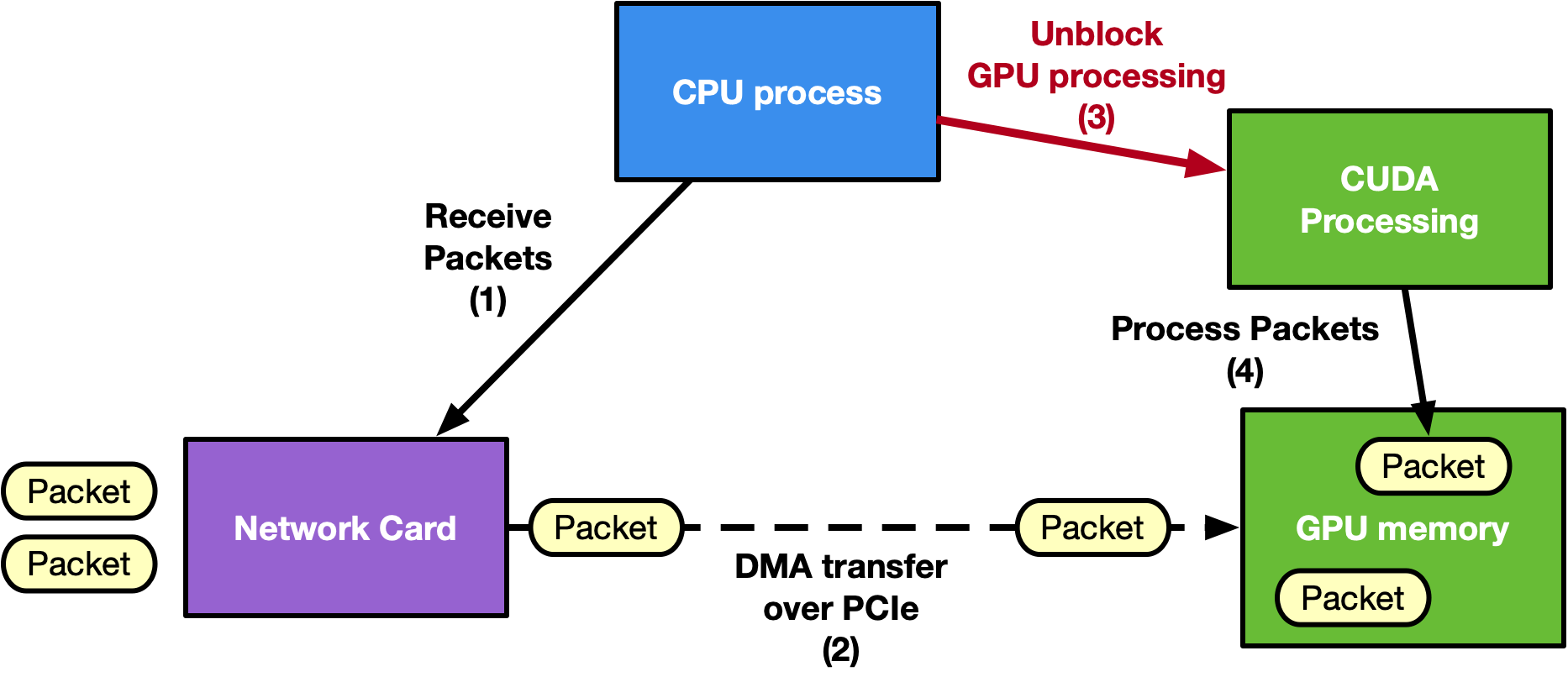
Traditional approaches often rely on a CPU-centric model, where the CPU coordinates with the NIC to receive packets in GPU memory using GPUDirect RDMA. Afterward, the CPU notifies a CUDA kernel on the GPU to process the packets. However, on low-power platforms, this CPU dependency can become a bottleneck, limiting GPU performance and increasing latency.
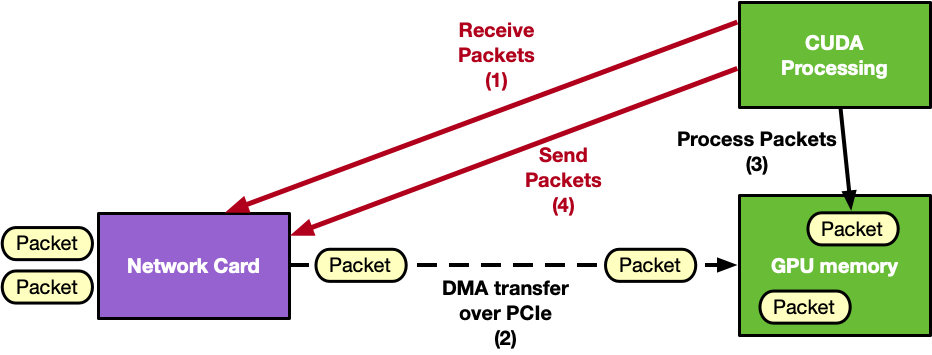
DOCA GPUNetIO addresses this challenge by offering a GPU-centric solution that removes the CPU from the critical path. By combining multiple NVIDIA technologies, it provides a highly efficient and scalable method for network packet processing.
Technologies integrated with DOCA GPUNetIO:
-
GPUDirect RDMA – Enables direct packet transfer between the NIC and GPU memory, eliminating unnecessary memory copies
-
GPUDirect Async Kernel-Initiated (GDAKI) – Allows CUDA kernels to control network operations without CPU intervention
-
GDAKI is also named IBGDA when used with the RDMA protocol
-
-
GDRCopy Library – Allows the CPU to access GPU memory directly
-
NVIDIA BlueField DMA Engine – Supports GPU-triggered memory copies
The following is an example diagram of a CPU-centric approach:
The following is an example diagram of a GPU-centric approach:
Key features of DOCA GPUNetIO include:
-
GPUDirect Async Kernel-Initiated (GDAKI)
-
GDAKI network communications – a GPU CUDA kernel can control network communications to send or receive data
-
GPU can control Ethernet communications (Ethernet/IP/UDP/TCP/ICMP)
-
GPU can control RDMA communications (InfiniBand or RoCE are supported)
-
CPU intervention is unnecessary in the application critical path
-
-
-
-
Enables direct data transfers to and from GPU memory without CPU staging copies.
-
-
DMA Engine Control
-
CUDA kernels can initiate memory copies using BlueField's DMA engine
-
-
Semaphores for Low-Latency Communication
-
Supports efficient message passing between CUDA kernels or between CUDA kernels and CPU threads
-
-
Smart Memory Allocation
-
Allocates aligned GPU memory buffers, optimizing memory access
-
GDRCopy library to allocate a GPU memory buffer accessible from the CPU
-
-
Accurate Send Scheduling
-
Provides precise control over Ethernet packet transmission based on user-defined timestamps.
-
NVIDIA applications that use DOCA GPUNetIO include:
-
Aerial 5G SDK – For ultra-low latency 5G network operations
-
NIXL – NVIDIA Inference Xfer Library (NIXL) is targeted for accelerating point to point communications in AI inference frameworks (e.g., NVIDIA Dynamo)
-
NVQLink – New GPU RoCE transceiver Holoscan sensor bridge operator
-
UCX – new GDAKI module via GPUNetIO functions
-
NCCL – GIN transport enabled via GPUNetIO GPU communications
-
NVSHMEM – GPUNetIO transport for GPU communications replacing the IBGDA transport
-
DeepEP/Hybrid/EP
For more information about DOCA GPUNetIO, refer to the following NVIDIA blog posts:
-
Realizing the Power of Real-time Network Processing with NVIDIA DOCA GPUNetIO
-
How DOCA GPUNetIO Unifies GPU-Initiated Networking Across the NVIDIA Software Stack
Changes From Previous Releases
Changes in 3.6.0
-
GPUNetIO changes/fixes:
-
New capability probes:
-
doca_gpu_nic_cap_is_gpu_mem_umem_supported() -
doca_gpu_nic_cap_is_host_mem_umem_supported() -
doca_gpu_nic_cap_is_nic_handler_gpu_sm_db_supported()
-
-
BlueFlame
ring_bf()on sm_90+ now fences the TMA copy withfence.proxy.asyncand commits and waits on it. -
BlueFlame
submit_bf_warp()now also rings the regular doorbell and honors its sync scope. -
doca_gpu_destroy()now returnsDOCA_ERROR_INVALID_VALUE("mtable map is not empty") when allocations were never freed -
doca_gpu_mem_alloc()/free()are now thread-safe on a shareddoca_gpu: a mutex protects the allocation table -
New
doca_gpu_dev_verbs_signal_warp(): one FetchAdd per lane, submitted once -
put_signal_warpandp_signal_warp(andget_warpwith MCST) now return the warp's last WQE asout_ticketin every lane -
Verbs and Ethernet lock/unlock (CTA/GPU modes) are rewritten in inline PTX to work around a CUDA 13.4 compiler issue
-
doca_gpu_dev_{verbs,eth}_atomic_add()now useatomicAdd()/atomicAdd_block()by default instead ofcuda::atomic_ref(24d768f1e69).-
DOCA_GPUNETIO_{VERBS,ETH}_USE_CCC_ATOMIC_ADD=1restores the 3.5 behaviour. -
With the default, 8-bit and 16-bit types now fail a
static_assert.
-
-
mark_wqes_ready()on an RQ in GPU sharing mode uses the lighter NVIDIA-NIC acquire fence, CTA scope by default -
Improved CQE attribute filling in
doca_gpu_dev_eth_rxq_recv_warpanddoca_gpu_dev_eth_rxq_recv_block
-
-
GPUNetIO Ethernet device headers
-
Rx fix:
-
recv_warpandrecv_blocknow exit per warp or block with__any_sync/__syncthreads_or, replacing a block-wide shared flag. -
An error CQE no longer makes one thread break out alone while the others wait at a barrier, which could hang.
-
recv_blocknow handles 2-D and 3-D blocks.
-
-
Per-packet attributes (bytes, timestamp) no longer have holes. The new
DOCA_GPUNETIO_ETH_RX_ATTR_ENFORCE_CORRECTNESS(default 1) fills them for[0, out_pkt_num)after the polling loop. -
DOCA_GPUNETIO_ETH_ENABLE_DEBUGis renamedDOCA_GPUNETIO_ETH_ENABLE_PRINT_DEBUGwith no alias, so the old define silently stops working. -
New
doca_gpu_dev_eth_warp_sum()and an opt-inDOCA_GPUNETIO_ETH_RX_USE_WARP_SUM(default 0).
-
-
GPUNetIO Verbs samples improvements:
-
New
-z/--data-directin 7 verbs samples (not get_bw or twosided_bw) (2a95fe6d593).-
It needs CUDA ≥ 12.8 and the right libmlx5 headers.
-
With
-z 1, the bandwidth servers receive into GPU memory. -
Verbs samples now need libmlx5 to build.
-
-
Breaking:
-
Peers exchange their config (-i, -t, -x) and abort on a mismatch, so 3.5 and 3.6 peers can't be mixed.
-
Options are validated at startup (2e0147b1172).
-
-n 3(BlueFlame) is rejected everywhere except write_lat -
The
--nic-handlerlong option now works; it was "nic handler" with a space.
-
-
-
GPUNetIO Ethernet samples improvements:
-
gpunetio_simple_send:-
Sends valid Eth/IPv4/UDP packets, with new
--src-ip/--dst-ip. -
-tis optional (default 512) and checked more strictly;-smust be 42–9216. -
Send errors now fail the sample, and teardown happens in the right order.
-
-
gpunetio_simple_receive: block-wide exit and error handling, DOCA Flow pipes destroyed before the RXQ, and leaks fixed. -
gpunetio_send_wait_time:-
All 8 bursts are queued up front. In 3.5 it waited for each burst before posting the next, so with a short
-tlater bursts went out late. -
Native wait-on-time support is now checked before the TXQ is created, with an mlxconfig hint (ConnectX-7+).
-
New failure: a NIC-vs-host clock offset above 25 ms now stops the sample with
DOCA_ERROR_BAD_STATE.
-
-
Size DOCA Flow counters per port (PORT resource mode) instead of the deprecated global call
-
-
Data direct enabled in DOCA Mmap: data direct can be combined with GPUNetIO Ethernet applications
-
GPUNetIO Ethernet Application improved:
-
New UDP options:
-
--udp-rx-scope thread|warp|block -
--udp-rx-max-pkts,--udp-rx-timeout -
--udp-rx-pkt-num,--udp-rx-pkt-size -
--udp-packet-filtering,--udp-stage-latency,--udp-cqe-attr-check -
--udp-pkt-host-mem,--udp-rq-host-mem
-
-
Behaviour change:
-
Each UDP receive call now takes at most 512 packets with a 500 µs timeout; 3.5 had no limit and a 1 ms timeout.
-
DNS classification only runs with
--udp-packet-filtering. -
The
[UDP]line reports bandwidth per 5 s interval and addsTOTAL_PPS, so 3.5 output parsers break.
-
-
UDP kernel fixes: block-uniform exit, block-wide error handling, 64-bit stats atomics, and
__threadfence_system()before the semaphore is set READY.
-
General Performance and Best Practices
Adhere to the following guidelines to maximize performance and streamline development with DOCA GPUNetIO.
Build Configuration
-
Use release builds: Always compile applications and samples by setting
buildtype = 'release'in themeson.buildfile. This ensures maximum throughput and minimal latency compared to the default debug mode.
Hardware and System Setup
-
Driver Selection for
dmabuf: Install thenvidia-opendrivers to utilizedmabuf. If the environment relies on the closed-source NVIDIA drivers (cuda-drivers), the system does not supportdmabuf; usenvidia-peermeminstead. -
Optimize PCIe topology: For peak throughput, ensure the GPU and NIC share a PIX or PXB topology (connected via a single PCIe bridge). Avoid NODE or SYS topologies, as routing data across NUMA nodes or SMP interconnects reduces efficiency.
-
Expand BAR1 size: If an application fails to map memory buffers to the NIC, verify the GPU's BAR1 size using
nvidia-smi -q. Enable Resizable BAR in the system BIOS to allocate sufficient space. -
Systems Without GPUDirect RDMA: For hardware that does not support GPUDirect RDMA (such as DGX Spark), use the
DOCA_GPU_MEM_TYPE_CPU_GPUmemory type and enable CPU proxy mode for transmissions.
Programming Guidelines
-
CUDA context initialization: Ensure an active CUDA context exists on the target device before calling DOCA GPUNetIO functions (such as
doca_gpu_create). Initialize this context effectively by callingcudaFree(0). -
Optimize execution scopes: When utilizing high-level Ethernet APIs, select the widest possible execution scope (Warp or Block) rather than Thread scope. This minimizes contention on atomic operations and significantly increases doorbell ringing efficiency.
-
Strict pointer management: Strictly separate memory access boundaries to prevent segmentation faults. Use
memptr_gpuexclusively within CUDA kernels, and usememptr_cpusolely for CPU-side management.
Permissions
-
Root requirements: Execute all Ethernet samples and applications with
sudoor root privileges, as they rely on DOCA Flow. -
Non-root alternatives: Verbs, RDMA, and DMA operations can run without root access. To enable this functionality, configure the NVIDIA driver with the option
NVreg_RegistryDwords="PeerMappingOverride=1;".
Navigation Hub
Choose the path that matches your current goal:
|
Goal |
Description |
Link |
|---|---|---|
|
Set up my system |
Install packages, configure NIC firmware (ConnectX/BlueField), and verify PCIe topology |
|
|
Learn the concepts |
Understand GDAKI, CPU vs. GPU control paths, and the GPUNetIO memory model |
|
|
Start coding |
Reference CPU and GPU functions for Ethernet, RDMA, Verbs, and DMA |
|
|
Run a demo |
Walk through build instructions and execute provided sample applications |
Last updated: