

Transceivers Firmware Installation
For manage switch you can upgrade the transciever FW using UFM or with NVOS (XDR systems only).
For unmanaged switch and servers you can upgrade using MFT.
Via UFM:
-
Navigate to managed elements page.
-
select the target switches and click on Upgrade Cable Transceivers option.

-
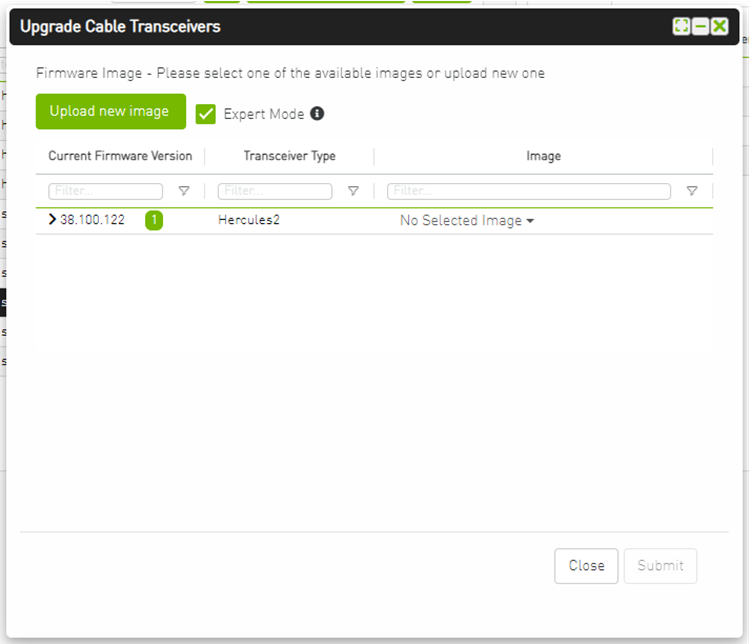
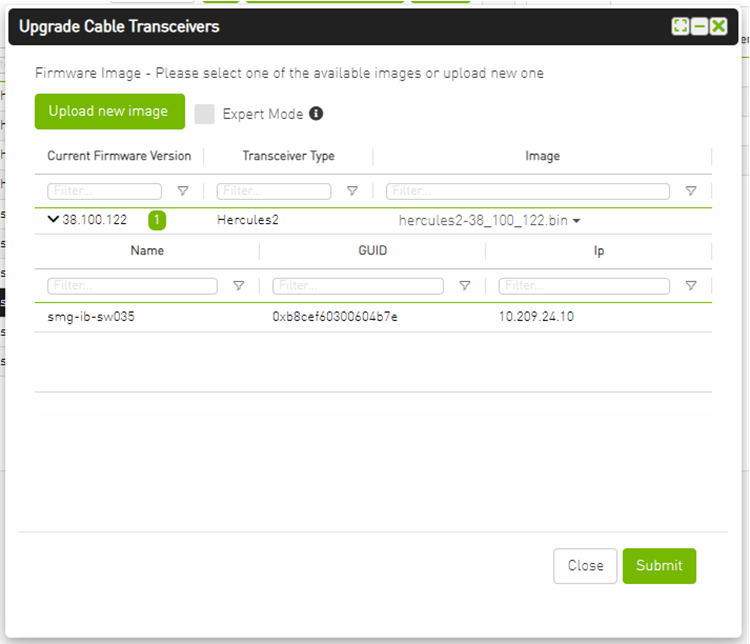
A model will be shown containing list of the active firmware versions for the cables of the selected switches, besides the version number, a badge will show the number of matched switches:
-
After the user clicks Submit, the GUI will start sending the selected binaries with the relevant switches sequentially, and a model with a progress bar will be shown (this model can be minimized):

-
After the whole action is completed successfully, you will be able to see the following message at the model bottom The upgrade cable transceivers completed successfully, do you want to activate it? by clicking the yes button it will run a new action on all the burned devices to activate the new uploaded binary image.
-
Another option to activate burned cables transceivers you can go to the Groups page and right click on the predefined Group named Devices Pending FW Transceivers Reset or you can right click on the upgraded device from managed element page and select Activate cable Transceivers action.

For further information, see UFM User Manual.
Via MFT:
-
Query the Transceiver firmware information.
flint -d lid-1 --linkx --downstream_device_ids 1 qWhen the cluster has many switches, multiple hosts may be engaged in the upgrade process. Each device (NIC, Switch) can update only the modules connected directly to it, not the far end. Updating the far-end transceiver requires the same operation to be done at the far-end switch(es).
-
Burn the cable using the Auto-update command.
flint -d <device> --linkx--linkx_auto_update--download_transfer-i<binary file> b -
Activate the new firmware:
flint -d lid-2 --linkx--linkx_auto_update–-activate b
More reading of flint for cables can be found in Cable Burn Command.
Via NVOS - on XDR systems only:
-
Show the Transceiver firmware information.
admin@croc-94-mgmt2:~$ nv show platform transceiver Transceiver Identifier Vendor name Vendor PN Vendor SN Vendor revision ----------- ----------------------------- ----------- ---------------- ------------- --------------- swA1 OSFP 8X Pluggable Transceiver NVIDIA MCP4Y10-N001-FTF MT2214VS03808 22 swA2 OSFP 8X Pluggable Transceiver NVIDIA MCP4Y10-N001-FTF MT2214VS03792 22 swA3 OSFP 8X Pluggable Transceiver NVIDIA MCP4Y10-N00A MT2139VS01287 33 swA4 OSFP 8X Pluggable Transceiver NVIDIA MCP4Y10-N00A MT2139VS01287 33 swA5 OSFP 8X Pluggable Transceiver NVIDIA MCP4Y10-N00A MT2237VS01231 33 swA6 OSFP 8X Pluggable Transceiver NVIDIA MCP4Y10-N00A MT2237VS01231 33 swA7 OSFP 8X Pluggable Transceiver NVIDIA MMS4X00-NV4 MT2220FT12808 11 swA8 OSFP 8X Pluggable Transceiver NVIDIA MMS4X00-NV4 MT2220FT14138 11 swA10 OSFP 8X Pluggable Transceiver NVIDIA NMA4OPT-XFJALML2 MT2416AC91448 11 swA11 OSFP 8X Pluggable Transceiver NVIDIA MCP4Y10-N00A MT2237VS01242 33 swA12 OSFP 8X Pluggable Transceiver NVIDIA MCP4Y10-N00A MT2237VS01242 33 swA13 OSFP 8X Pluggable Transceiver NVIDIA MCP4Y10-N00A MT2237VS01255 33 swA14 OSFP 8X Pluggable Transceiver NVIDIA MCP4Y10-N00A MT2237VS01255 33 swA15 OSFP 8X Pluggable Transceiver NVIDIA MCP4Y10-N00B MT2234VS02570 33 swB1 OSFP 8X Pluggable Transceiver NVIDIA MCP4Y10-N00A MT2237VS01543 33 swB2 OSFP 8X Pluggable Transceiver NVIDIA MCP4Y10-N00A MT2237VS01543 33 swB3 OSFP 8X Pluggable Transceiver NVIDIA MCP4Y10-N00A MT2237VS01272 33 swB4 OSFP 8X Pluggable Transceiver NVIDIA MCP4Y10-N00A MT2237VS01272 33 swB5 OSFP 8X Pluggable Transceiver NVIDIA MCP4Y10-N00A MT2150VS00492 33 swB6 OSFP 8X Pluggable Transceiver NVIDIA MCP4Y10-N00A MT2150VS00492 33 swB7 OSFP 8X Pluggable Transceiver NVIDIA MCP4Y10-N00A MT2237VS01502 33 swB8 OSFP 8X Pluggable Transceiver NVIDIA MCP4Y10-N00A MT2237VS01502 33 swB9 OSFP 8X Pluggable Transceiver NVIDIA MCP4Y10-N00A MT2237VS01219 33 swB10 OSFP 8X Pluggable Transceiver NVIDIA MCP4Y10-N00A MT2237VS01219 33 swB11 OSFP 8X Pluggable Transceiver NVIDIA MCP4Y10-N00A MT2237VS01532 33 swB12 OSFP 8X Pluggable Transceiver NVIDIA MCP4Y10-N00A MT2237VS01532 33 swB13 OSFP 8X Pluggable Transceiver NVIDIA MCP4Y10-N00A MT2237VS01517 33 swB14 OSFP 8X Pluggable Transceiver NVIDIA MCP4Y10-N00A MT2237VS01517 33 swB15 OSFP 8X Pluggable Transceiver NVIDIA MCP4Y10-N00B MT2234VS02570 33 -
Note that we can have both optical & copper type transceivers - these can be identified by Vendor PN and running show explicitly.
For example: swA7 is optical and swA10 is copper. each transceiver type has different firmware image.
admin@croc-94-mgmt2:~$ nv show platform transceiver swA7 | grep "cable-type"
cable-type             : Optical module
admin@croc-94-mgmt2:~$ nv show platform transceiver swA10 | grep "cable-type"
cable-type             : Copper cable
3. In order to see the current firmware version for the transceiver - add firmware param as the following:
admin@croc-94-mgmt2:~$ nv show platform transceiver swA10 firmware
                      operational
--------------------  -----------
actual-firmware       39.230.20
fw-upgrade-status     N/A
fw-upgrade-error-msg  N/A
4. The next step will be to fetch the right firmware image (and verify):
admin@croc-94-mgmt2:~$ nv action fetch platform firmware transceiver scp://root:12345@10.237.38.141/auto/sw_system_project/NVOS_INFRA/verification_files/transceiver_fw/Xodin/fw_39_230_00024_dev_signed.bin
Action executing ...
Fetching file ...
Action executing ...
File fetched successfully
Action succeeded
admin@croc-94-mgmt2:~$ nv show platform firmware transceiver files
Available Firmware Files              File Path
------------------------------------  ----------------------------------------------------------------
fw_39_230_00024_dev_signed.bin        /host/fw-images/transceiver/fw_39_230_00024_dev_signed.bin
5. Install the fetched firmware image:
admin@croc-94-mgmt2:~$ nv action install platform transceiver swA10 firmware files fw_39_230_00024_dev_signed.bin
Action executing ... 1%
Installing firmware: fw_39_230_00024_dev_signed.bin
Action executing ... 14%
Installed FW: 39.230.24
Action succeeded
6. Verify the image was installed successfully
admin@croc-94-mgmt2:~$ nv show platform transceiver swA10 firmware
                      operational
--------------------  -----------
actual-firmware       39.230.24
fw-upgrade-status     OK
fw-upgrade-error-msg  N/A
Last updated: