

In addition to the REST API used for Cyber AI management, Cyber AI software provides several command-line tools (CLI) for managing the Cyber AI system.
The CLI tools are installed on the Cyber AI host and can communicate with the Cyber AI containers.
ufm-cai-sanity
This tool is helpful for testing that cyberai is running and the suitable containers were loaded:
Tests
-
Checks ufm-cyberai service is running
-
Checks Cyber AI images are loaded
"cyberai_worker" "cyberai_web" "cyberai_plm" "mellanox/ufm-telemetry"
-
Check containers are running
cyberai-web" "cyberai-plm" "ufm-telemetry"
-
Checks that REST services are running
Usage
ufm-cai-sanity
ufm-cai-jobs
This script manages Cyber AI analytics jobs. Commands:
|
Command |
Usage |
|---|---|
|
|
Dump status of a job if provided, otherwise dump status for all jobs (in json format) |
|
|
List all job names |
|
|
Runs given job |
|
|
Enables given job (Requires restart to take effect) |
|
|
Disables given job (Requires restart to take effect) |
|
|
Resets all previous status (run times) |
Usage
ufm-cai-jobs [-h] | [-c (dump|list|run|enable|disable|reset-stats) [-j <job-name>]]
ufm-cai-ufm-params
This script configures and shows the UFM connection info.
Usage
ufm-cai-ufm-params (update|show) <option>
Update
Updates UFM configuration.
|
Option |
Description |
|---|---|
|
|
UFM server IP |
|
|
UFM REST API connection port |
|
|
UFM username |
|
|
UFM password |
|
|
UFM site name |
|
|
UFM Rest API connection protocol |
Show
Shows current UFM configuration (except password).
ufm-cai-status
This script checks the Cyber AI status, prints it or sends an email. The script runs once a day, using the Linux cron-job.
Usage
usage: ufm-cai-status [-h] [-m] [-p {none,plain,simple,html,json}]
optional arguments:
  -h, --help            show this help message and exit
  -m, --mail            Send an email with the status report
  -p {none,plain,simple,html,json}, --print-report {none,plain,simple,html,json}
                        Specify how to print the status report to console
Configuration
The configuration file is located in: /opt/ufm/cyber-ai/conf/status_report_config.yaml
It should be configured properly in order for Cyber AI to run:
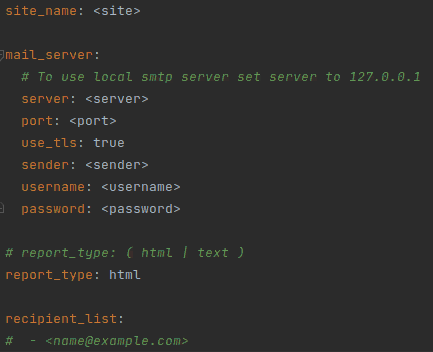
Cron Job
# crontab -l
30 7 * * * /usr/local/bin/ufm-cyberai_status -m
ufm-cai-sysdump
This script collects data and logs from Cyber AI and saves it into a zipped file to be used for debugging and troubleshooting.
Usage
ufm-cai-sysdump <options>
Options
|
Option |
Description |
|---|---|
|
|
explain what is being done |
|
|
collect network counters files |
|
|
collect cable counters files |
|
|
collect archived counter files when associated with [-n] or [-c] |
|
|
collect aggregated files |
|
|
collect database file(s) |
|
|
collect topology files |
|
|
collect model files |
|
|
collect log files |
|
|
collect configuration files |
|
|
collect all above |
Output
Output file is in tgz format:
cyberai-sysdump-<date and time>.tgz
ufm-cai-weekly-alerts-report
This script generates a csv file for each type of alerts in Cyber-AI according to the given interval and saves it to the specified output directory.
Usage
ufm-cai-weekly-alerts-report [-h] [-i IP] [-t TIME] [-o OUT_DIR]
Options
|
Option |
Long option |
Description |
|---|---|---|
|
-i |
--ip |
Cyber-AI IP address |
|
-t |
--time |
Interval to get the data for. (1|2|3...)(h|d|w|m) |
|
-o |
--out-dir |
output directory to save the data to |
Last updated: