

Windows Server 2012 and above supports Teaming as part of the operating system.
Please refer to Microsoft guide “NIC Teaming in Windows Server 2012” at the following link: https://technet.microsoft.com/en-us/windows-server-docs/networking/technologies/nic-teaming/nic-teaming?f=255&MSPPError=-2147217396#bkmk_over
Configuring a Port to Work with VLAN in Windows Server 2012 and Above
In this procedure you DO NOT create a VLAN, rather use an existing VLAN ID.
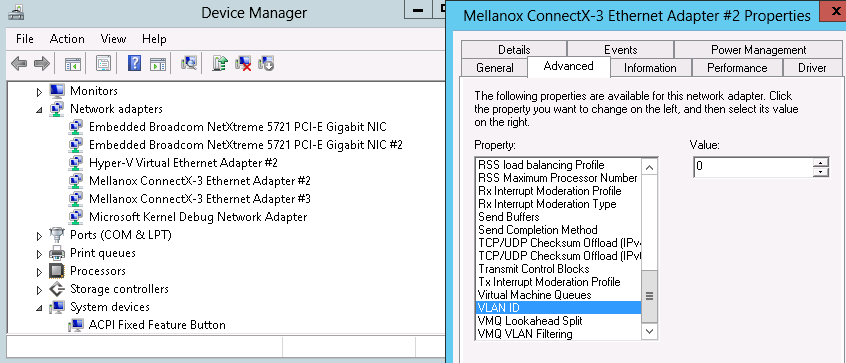
To configure a port to work with VLAN using the Device Manager.
-
Open the Device Manager.
-
Go to the Network adapters.
-
Right click Properties on Mellanox ConnectX®-3 Ethernet Adapter card.
-
Go to Advanced tab.
-
Choose the VLAN ID in the Property window.
-
Set its value in the Value window.
Last updated: