

This document describes the implementation and provides usage guidelines of the DOCA Accelerated UPF Reference Application, using NVIDIA® BlueField®-3 DPU.
Terms and Abbreviations
|
Term |
Description |
|---|---|
|
DN |
Data Network |
|
DPI |
Deep Packet Inspection |
|
DPU |
Data Processing Unit |
|
FAR |
Forwarding Action Rule |
|
gNB |
Next Generation NodeB |
|
GTP-U |
GPRS Tunneling Protocol User Plane |
|
N3 |
Interface connecting the Radio Access Network (gNB) to the User Plane Function (UPF) in 5G networks. Responsible for transporting user data using GTP-U protocol. |
|
N6 |
Interface connection the User Plane Function (UPF) to external data networks (e.g. internet, enterprise network, cloud services), serving as the gateway between 5G network and external networks. |
|
OVS |
Open vSwitch |
|
PDR |
Packet Detection Rule |
|
QER |
QoS Enforcement Rule |
|
QoS |
Quality of Service |
|
RAN |
Radio Access Network |
|
RAP |
Reference Application |
|
SMF |
Session Management Function |
|
UE |
User Equipment |
|
UPF |
User Plane Function |
|
URR |
Usage Reporting Rule |
|
WAN |
Wide Area Network |
Introduction
The Accelerated UPF RAP leverages the DPU's hardware capability to handle data traffic between the RAN (gNB) and the WAN (DN).
The Accelerated UPF RAP utilizes the DOCA Flow API for programming of the DPU's hardware with UPF's domain network pipelines, allowing acceleration through HW handling of the packets, instead of directing the packets to SW handling on the server CPU.
The operational flow is defined as follows:
-
N6 Traffic Handling:
-
Reception: All N6 traffic is received on Port A.
-
Processing: The UPF applies appropriate processing to the N6 traffic, including routing, policy enforcement, quota management, or any other relevant actions based on the traffic characteristics and network configuration.
-
Forwarding: After processing, the UPF forwards the N6 traffic to Port B.
-
-
N3 Traffic Handling:
-
Reception: All N3 traffic is received on Port B.
-
Processing: The UPF processes the N3 traffic, applying actions such as QoS enforcement, user-plane policy application, or routing as per the core network's requirements.
-
Forwarding: After processing, the UPF forwards the N3 traffic to Port A.
-
This flow ensures efficient and streamlined traffic processing and forwarding for both N6 and N3 interfaces, enabling robust user-plane functionality with clear traffic flow paths.
%20Mode.png?cb=8e12e1f5816f126d67c1bee772268297)
The Accelerated UPF RAP is designed to efficiently handle and manage traffic while incorporating key features for performance, observability, and resource optimization. The detailed operation and capabilities are as follows:
-
Rate Meters: Configurable rate meters to monitor traffic throughput on N3 and N6 interfaces.
-
Quota Meters: Per-subscriber quota management is enabled, tracking data usage against assigned limits. Notifications or actions (e.g., throttling or redirecting traffic) can be triggered when quotas are exceeded.
-
Flow Aging: A flow aging mechanism efficiently tracks active flows and removes inactive ones based on configurable timeouts, ensuring resource efficiency and preventing stale flow accumulation.
-
DPI Infrastructure: Allows configuring the number of packets from a flow to be processed by software before the flow is accelerated to hardware.
-
Connection Tracking Infrastructure: Maintains a shared software context for N3 and N6 flows of the same connection.
This is achieved in a performance-oriented manner by utilizing symmetric RSS, which ensures that both flows are processed on the same core.
This approach enables lock-free database access, enhancing efficiency and reducing latency. -
Debuggability and Telemetry: Real-time debug counters provide visibility into flow-level and packet-level operations.
The Accelerated UPF RAP does not enforce a specific traffic type (N3/N6) on either port. Instead, it is designed to handle both traffic types on any port interchangeably.
These advanced features ensures the UPF is capable of meeting modern network demands with high efficiency, robust observability, and optimal resource management for N3 and N6 flows.
System Design
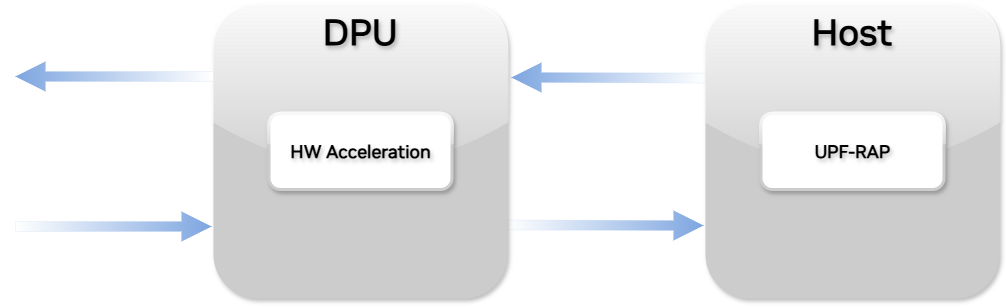
The Accelerated UPF RAP runs on the host and manages acceleration conditions on the DPU.
Application Architecture
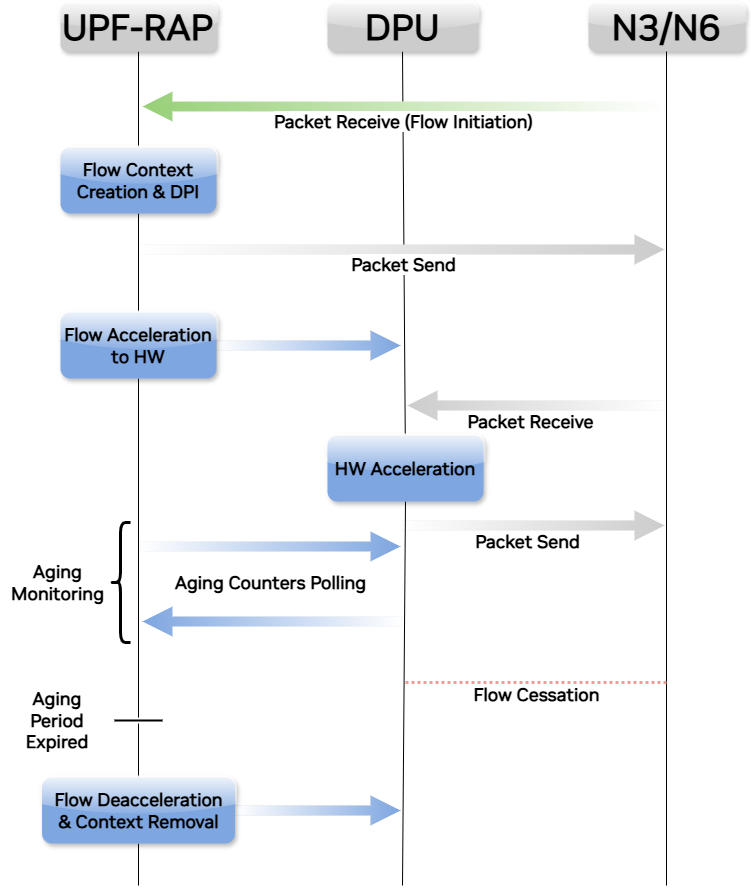
This Accelerated UPF RAP architecture leverages DOCA Flow to efficiently manage N3 and N6 traffic by accelerating flow processing to the DPU.
The architecture is designed to optimize performance, reduce CPU utilization, and maintain dynamic flow management with inactive flow removal.
Key Features
-
DOCA Flow Framework:
-
Acts as the foundational API for the Accelerated UPF RAP, enabling direct interaction with the DPU.
-
Facilitates high-performance packet processing, flow steering, and HW acceleration operations.
-
-
Traffic Management Logic:
-
N3 Traffic:
-
Received from the RAN and processed for interaction with the core network.
-
Managed via DOCA Flow to accelerate user-plane traffic to the DPU for low-latency forwarding (QoS, decapsulation).
-
-
N6 Traffic:
-
Received from DN and processed for delivery to the RAN or other destinations.
-
Accelerated to the DPU for efficient handling (QoS, encapsulation).
-
-
The Accelerated UPF RAP leverages symmetric RSS to run multithreaded, enabling the following capabilities:
-
Processing N3 and N6 Traffic on the Same Core: Symmetric RSS ensures that both N3 and N6 traffic of the same flow are directed to the same CPU core.
This is achieved by hashing packet headers in a way that packets belonging to the same flow are consistently mapped to the same core.
This reduces the overhead of context switching and improves cache efficiency, leading to better performance. -
Single Software Context for a Flow: With symmetric RSS, a single software context is maintained for each flow. This means that both N3 and N6 traffic of the same flow are handled within the same thread or process.
This unified context simplifies flow management and ensures that all operations related to a flow are executed sequentially, avoiding race conditions and reducing synchronization overhead. -
Lock-Free Database Access: To further enhance performance, the Accelerated UPF RAP implements lock-free data structures for managing flow state information.
This approach minimizes contention and latency, ensuring that database operations are performed efficiently.
-
-
-
Flow Management Logic:
-
Flow Accelerating:
-
New flows are identified by the Accelerated UPF RAP and accelerated the DPU via DOCA Flow APIs.
-
The DPU handles packet forwarding, flow-specific actions (e.g., QoS), and telemetry collection.
-
-
Flow Aging and Removal:
-
Inactive flows are monitored using timeouts and telemetry feedback.
-
Flows that exceed their inactivity threshold are automatically removed from the DPU, freeing resources.
-
As part of the DPI infrastructure, a software aging mechanism is implemented to manage flows that have not been accelerated.
This mechanism continuously polls software contexts of such flows using a sorted (by timestamp) linked list, ensuring that outdated or inactive flows are efficiently identified and removed.
-
-
SMF
The SMF is a crucial component of the 5G core network architecture. It is responsible for managing user sessions, including establishing, modifying, and terminating data sessions between UE and the DN.
The Accelerated UPF RAP uses static SMF policies provided by a JSON file, bypassing the need to integrate with a real SMF through N4 interface. Production-based UPF shall implement and accommodate the N4 interface in order to dynamically update the rules, following network updates.
An example configuration can be found in the application's directory.
The Accelerated UPF RAP supports the following fields:
-
PDR
|
Field Path |
Comments |
|
createPdr.pdrId |
PDR ID |
|
createPdr.pdi.sourceInterface.type |
Determines packet direction (Source Interface), supported values: 0 (Access/DL), 2 (SGi-LAN/N6-LAN). |
|
createPdr.pdi.localFT |
Defines the packet header matching the PDR |
|
createPdr.pdi.localFT.teid_start, createPdr.pdi.LocalFT.teid_end |
Defines GTPU TEID range to match |
|
createPdr.pdi.localFT.ip.v4 |
Defines the outer IPV4 source/destination address to match, depending on “sourceInterface” value (2 or 0 respectively) |
|
createPdr.pdi.qfi |
Defines the match of QFI field in GTPU header |
|
createPdr.pdi.userEquipment.ip.v4 |
Defines the outer IPV4 source/destination address to match, depending on “sourceInterface” value (0 or 2 respectively) |
|
createPdr.pdi.sdf.description |
Defines the criteria for packet matching |
|
createPdr.farId, createPdr.urrIds, createPdr.qerIds |
The FAR and lists of the URRs and a list of the QERs. |
-
FAR
|
Field Path |
Comments |
|
createFar.farId |
FAR ID |
|
createFar.fp.outerHeader.ip.v4, CreateFar.fp.outerHeader.teid |
Defines the outer header that needs to be added to the packet (Outer Header Creation). |
-
URR
|
Field Path |
Comments |
|
createUrr.urrId |
URR ID |
|
createUrr.volumeQuota.totalVolume |
Defines the total quota in bytes |
-
QER
|
Field Path |
Comments |
|
createQer.qurId |
QER ID |
|
createQer.maxBitRate.ulMBR, createQer.maxBitRate.dlMBR |
Defines the UL/DL Maximum Bit Rate allowed in 1kbps units. |
|
createQer.qfi |
Identifies the QFI field in GTPU header |
SMF Policy Example
The following example illustrates a typical SMF policy JSON format. This example includes various policy elements such as FAR, URR and QER.
The below JSON example is provided under the following license:
Copyright (c) 2025 NVIDIA CORPORATION AND AFFILIATES.  All rights reserved.

Redistribution and use in source and binary forms, with or without modification, are permitted
provided that the following conditions are met:
    * Redistributions of source code must retain the above copyright notice, this list of
      conditions and the following disclaimer.
    * Redistributions in binary form must reproduce the above copyright notice, this list of
      conditions and the following disclaimer in the documentation and/or other materials
      provided with the distribution.
    * Neither the name of the NVIDIA CORPORATION nor the names of its contributors may be used
      to endorse or promote products derived from this software without specific prior written
      permission.

THIS SOFTWARE IS PROVIDED BY THE COPYRIGHT HOLDERS AND CONTRIBUTORS "AS IS" AND ANY EXPRESS OR
IMPLIED WARRANTIES, INCLUDING, BUT NOT LIMITED TO, THE IMPLIED WARRANTIES OF MERCHANTABILITY AND
FITNESS FOR A PARTICULAR PURPOSE ARE DISCLAIMED. IN NO EVENT SHALL NVIDIA CORPORATION BE LIABLE
FOR ANY DIRECT, INDIRECT, INCIDENTAL, SPECIAL, EXEMPLARY, OR CONSEQUENTIAL DAMAGES (INCLUDING,
BUT NOT LIMITED TO, PROCUREMENT OF SUBSTITUTE GOODS OR SERVICES; LOSS OF USE, DATA, OR PROFITS;
OR BUSINESS INTERRUPTION) HOWEVER CAUSED AND ON ANY THEORY OF LIABILITY, WHETHER IN CONTRACT,
STRICT LIABILITY, OR TOR (INCLUDING NEGLIGENCE OR OTHERWISE) ARISING IN ANY WAY OUT OF THE USE
OF THIS SOFTWARE, EVEN IF ADVISED OF THE POSSIBILITY OF SUCH DAMAGE.
{
	"createPdr": [
		{
			"pdrId": 1,
			"pdi": {
				"sourceInterface": {
					"type": "0"
				},
				"localFT": {
					"teid_start": 1073741824,
					"teid_end": 1073807359,
					"ip": {
						"v4": "192.168.1.1"
					}
				},
				"userEquipment": {
					"ip": {
						"v4": "172.0.0.0/16"
					}
				},
				"sdf": [
					{
						"description": "permit out ip from any to assigned"
					}
				]
			},
			"farId": 1,
			"urrIds": [
				1
			],
			"qerIds": [
				1
			]
		},
		{
			"pdrId": 2,
			"pdi": {
				"sourceInterface": {
					"type": "2"
				},
				"userEquipment": {
					"ip": {
						"v4": "172.0.0.0/16"
					}
				},
				"sdf": [
					{
						"description": "permit out ip from any to assigned"
					}
				]
			},
			"farId": 2,
			"urrIds": [
				2
			],
			"qerIds": [
				2
			]
		},
		{
			"pdrId": 3,
			"pdi": {
				"sourceInterface": {
					"type": "0"
				},
				"localFT": {
					"teid_start": 1073741824,
					"teid_end": 1073807359,
					"ip": {
						"v4": "192.168.1.1"
					}
				},
				"qfi": 1,
				"userEquipment": {
					"ip": {
						"v4": "172.0.0.0/16"
					}
				},
				"sdf": [
					{
						"description": "permit out ip from any to assigned"
					}
				]
			},
			"farId": 1,
			"urrIds": [
				1
			],
			"qerIds": [
				1
			]
		}
	],

	"createFar": [
		{
			"farId": 1
		},
		{
			"farId": 2,
			"fp": {
				"outerHeader": {
					"ip": {
						"v4": "192.168.1.1"
					},
					"teid" : 1
				}
			}
		}
	],

	"createUrr": [
		{
			"urrId": 1,
			"volumeQuota": {
				"totalVolume": 4000000000
			}
		},
		{
			"urrId": 2,
			"volumeQuota": {
				"totalVolume": 200000
			}
		}
	],
	"createQer": [
		{
			"qerId": 1,
			"maxBitRate": {
				"ulMBR": "2000000000",
				"dlMBR": "2000000000"
			},
			"qfi":"20"
		},
		{
			"qerId": 2,
			"maxBitRate": {
				"ulMBR": "2000000000",
				"dlMBR": "2000000000"
			},
			"qfi":"20"
		}
	]
}
Flow Processing
In the Accelerated UPF RAP, the journey of a data flow from the moment it receives its first packet to the point it gets accelerated involves several key steps. Here’s a detailed description of this process:
-
Initial Packet Reception: When the Accelerated UPF RAP receives the first packet of a flow, it triggers the initial processing phase. This involves identifying the flow and applying initial packet processing rules.
The Accelerated UPF RAP uses the PDR to recognize the flow and determine the necessary actions, such as forwarding, buffering, or dropping the packet. -
Hardware Acceleration: With the flow identified and classified the UPF accelerates intensive processing tasks to specialized hardware. This hardware acceleration significantly reduces the CPU load and enhances the overall performance of the UPF.
Tasks like GTP-U encapsulation/decapsulation, flow tagging, and packet forwarding are handled by the NIC, providing deterministic performance and scalability. -
Flow Removal: If a flow remains inactive for the duration of its timer, DOCA triggers an aging event. The Accelerated UPF RAP then processes this event, removing the flow from its tables and freeing up the associated resources.
Integrated Packet Handling Setup
In modern network environments, efficiently managing packet processing is crucial for maintaining high performance and reliability. By combining the capabilities of different applications, we can optimize packet handling and ensure seamless network operations.
This setup leverages the strengths of both the Accelerated UPF RAP and a specialized application running on the DPU, distributing tasks between the host and the DPU. The benefits of this integrated approach include improved processing efficiency, reduced latency, and enhanced scalability.
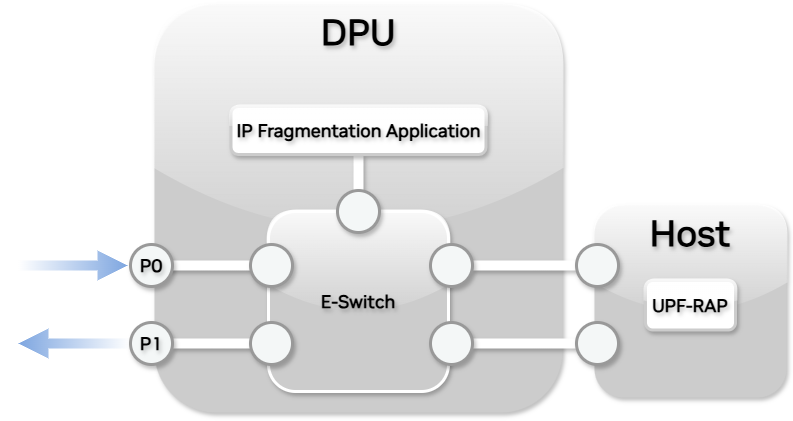
To achieve this, the proposed solution involves a combined setup where the Accelerated UPF RAP operates on the host, and a specialized application runs on the DPU. This integrated approach ensures that each packet is processed through the specialized application on the DPU both before and after it reaches the Accelerated UPF RAP.
Example: Handling Fragmented Packets
The following steps outline the configuration:
-
Accelerated UPF RAP on Host: The Accelerated UPF RAP is deployed on the host machine, responsible for core network functions and packet processing.
-
IP Fragmentation Application on DPU: An IP fragmentation application is deployed on the DPU to handle the fragmentation and reassembly of packets. This application ensures that packets are correctly fragmented before being sent to the UPF and reassembled after processing by the UPF.
-
Packet Flow through OVS Rules:
-
Ingress Path: Incoming packets are directed to the IP fragmentation application on the DPU via OVS rules configured in the e-switch. The fragmentation application processes these packets, ensuring they are in the correct format for the Accelerated UPF RAP.
-
UPF Processing: The fragmented packets are then forwarded to the Accelerated UPF RAP on the host for processing.
-
Egress Path: After processing by the UPF, packets are sent back to the IP fragmentation application on the DPU through OVS rules. The Accelerated UPF RAP reassembles the packets before they are transmitted to their final destination.
-
-
OVS Configuration: The OVS rules in the e-switch are configured to ensure seamless packet flow between the host and the DPU. These rules direct packets to the appropriate application based on their state (fragmented or reassembled).
Test Environment and Setup
The Accelerated UPF RAP was tested in the following environment and setup.
|
Item |
Description |
|---|---|
|
Test Description |
NVIDIA BlueField-3 DPU 2x 200GbE Throughput at zero packet loss - DPU mode |
|
Server |
Intel(R) Xeon(R) Platinum 8362 CPU @ 2.80GHz |
|
DPU |
Nvidia BlueField-3 P-Series DPU 200GbE/NDR200 VPI dual-port QSFP112; PCIe Gen5.0 x16 FHHL with x16 PCIe extension option; Crypto Enabled; SB Enabled 32GB on-board DDR; integrated BMC. |
|
Operating System |
Ubuntu 22.04.5 LTS |
|
DPU firmware
|
32.43.1014 |
|
DPDK version |
22.11 |
|
DOCA version |
2.10 |
|
Test Configuration |
1 NIC/DPU, 2 ports.
Port 0 receives RAN traffic of the form: Port 1 receives WAN traffic of the form: |
|
DPDK Settings |
Compile DPDK using: meson ; ninja -C |
|
Command Line |
doca_upf_accel -a <PORT_0>,dv_flow_en=2 -a <PORT_1>,dv_flow_en=2 -l 0-9 -- -f <SMF_POLICY_JSON> |
DOCA Libraries
This application leverages the following DOCA libraries:
For additional information about the used DOCA libraries, please refer to the respective programming guides.
Dependencies
-
NVIDIA BlueField-3 DPU
-
Ubuntu 18.04/20.04/22.04 hosts (x86)
-
Open MPI version 4.1.5rc2 or greater (included in DOCA's installation)
Compiling the Application
Please refer to the NVIDIA DOCA Installation Guide for Linux for details on how to install BlueField-related software.
The installation of DOCA's reference applications contains the sources of the applications, alongside the matching compilation instructions. This allows for compiling the applications "as-is" and provides the ability to modify the sources, then compile a new version of the application.
For more information about the applications as well as development and compilation tips, refer to the DOCA Applications page.
The sources of the application can be found under the application's directory: /opt/mellanox/doca/applications/upf_accel/.
The application relies on the json-c open source, requiring the following to be installed:
-
Ubuntu/Debian:
Bash$ sudo apt install libjson-c-dev -
CentOS/RHEL:
Bash$ sudo yum install json-c-devel
Compiling All Applications
All DOCA applications are defined under a single meson project. So, by default, the compilation includes all of them.
To build all the applications together, run:
cd /opt/mellanox/doca/applications/
meson /tmp/build
ninja -C /tmp/build
doca_upf_accel is created under /tmp/build/applications/upf_accel/.
Compiling Only the Current Application
-
To directly build only the Accelerated UPF RAP:
cd /opt/mellanox/doca/applications/
meson /tmp/build -Denable_all_applications=false -Denable_upf_accel=true
ninja -C /tmp/build
doca_upf_accelis created under/tmp/build/applications/upf_accel/.
-
Alternatively, one can set the desired flags in the
meson_options.txtfile instead of providing them in the compilation command line:-
Edit the following flags in
/opt/mellanox/doca/applications/meson_options.txt:-
Set
enable_all_applicationstofalse -
Set
enable_upf_acceltotrue
-
-
The same compilation commands should be used, as were shown in the previous section:
cd /opt/mellanox/doca/applications/
meson /tmp/build
ninja -C /tmp/build
doca_upf_accelis created under/tmp/build/applications/upf_accel/.
-
Troubleshooting
Please refer to the NVIDIA DOCA Troubleshooting Guide for any issue you may encounter with the compilation of the DOCA applications.
Running the Application
Prerequisites
-
The Accelerated UPF RAP is based on DOCA Flow. Therefore, the user is required to allocate huge pages.
$ echo '1024' | sudo tee -a /sys/kernel/mm/hugepages/hugepages-2048kB/nr_hugepages
$ sudo mkdir /mnt/huge
$ sudo mount -t hugetlbfs -o pagesize=2M nodev /mnt/huge
-
FLEX profile number should be manually set to 3 on the system to enable GTP matching:
$ sudo mlxconfig -d <pcie_address> s FLEX_PARSER_PROFILE_ENABLE=3
Application Execution
The Accelerated UPF RAP is provided in source form, hence a compilation is required before the application can be executed.
-
Application usage instructions:
Usage: doca_upf_accel [DPDK Flags] -- [DOCA Flags] [Program Flags]

DOCA Flags:
  -h, --help                        Print a help synopsis
  -v, --version                     Print program version information
  -l, --log-level                   Set the (numeric) log level for the program <10=DISABLE, 20=CRITICAL, 30=ERROR, 40=WARNING, 50=INFO, 60=DEBUG, 70=TRACE>
  --sdk-log-level                   Set the SDK (numeric) log level for the program <10=DISABLE, 20=CRITICAL, 30=ERROR, 40=WARNING, 50=INFO, 60=DEBUG, 70=TRACE>
  -j, --json <path>                 Parse all command flags from an input json file

Program Flags:
  -f, --smf-config-file-path        SMF JSON definitions file path
  -a, --aging-time-sec              Aging period in seconds
  -o, --dpi-packet-threshold        Number of packets processed in software before accelerating to hardware, enabling DPI on initial packets
For additional information, please refer to the Command Line Flags section below.
The above usage printout can be printed to the command line using the
-h(or--help) options:/tmp/build/upf_accel/doca_upf_accel -- -h
-
CLI example for running the application:
/tmp/build/upf_accel/doca_upf_accel -a 03:00.0,dv_flow_en=2 -a 03:00.1,dv_flow_en=2 -l 0-10 -- -f <SMF_POLICY_JSON>
The DOCA Comm Channel device PCI addresses (
03:00.0,03:00.1)should match the addresses of the desired PCI device.
-
The application also supports a JSON-based deployment mode, in which all command-line arguments are provided through a JSON file:
/tmp/build/upf_accel/doca_upf_accel --json [json_file]For example:
/tmp/build/upf_accel/doca_upf_accel --json upf_accel_params.json
Before execution, please ensure that the used JSON file contains the correct configuration parameters, and especially the desired PCI addresses needed for the deployment.
Command Line Flags
|
Flag Type |
Short Flag |
Long Flag/JSON Key |
Description |
JSON Content |
|---|---|---|---|---|
|
General flags |
|
|
Prints a help synopsis |
N/A |
|
|
|
Prints program version information |
N/A |
|
|
|
|
Set the log level for the application:
|
|
|
|
N/A |
|
Sets the log level for the program:
|
|
|
|
|
|
Parse all command flags from an input json file |
N/A |
|
|
Program flags |
|
|
Path to the SMF policy JSON file, see SMF Policy Example This is a mandatory flag.
|
|
|
|
|
Aging period in seconds, Optional; default is 15.
|
|
|
|
|
|
Specifies the number of packets processed in software before accelerating to hardware, enabling DPI on initial packets. Optional; default is 2. |
|
Refer to DOCA Arg Parser for more information regarding the supported flags and execution modes.
Troubleshooting
Please refer to the NVIDIA DOCA Troubleshooting Guide for any issue you may encounter with the installation or execution of the DOCA applications.
Application Code Flow
-
Parse application arguments.
-
Initialize arg parser resources, register DOCA general and DPDK-specific parameters.
doca_argp_init(); doca_argp_set_dpdk_program(dpdk_init); -
Register Accelerated UPF RAP parameters.
upf_accel_register_params(); -
Parse the arguments.
doca_argp_start();-
Parse DPDK flags and invoke handler for calling the
rte_eal_init()function. -
Parse app parameters.
-
-
Application uses 2 ports. This function configures the amount of ports based on the DPDK arguments given in the app run command.
upf_accel_dpdk_config_num_ports(); -
Application uses a dedicated queue per-core and amount of data path cores is user-configurable with DPDK arguments. Initialize dpdk ports and queues with the DOCA helper function.
dpdk_queues_and_ports_init();-
Initialize DPDK ports.
-
Create mbuf pool using
rte_pktmbuf_pool_create. -
Driver initialization – use
rte_eth_dev_configure -
Rx/Tx queue initialization – use
rte_eth_rx_queue_setupandrte_eth_tx_queue_setupto initialize the queues. -
Start the port using
rte_eth_dev_start.
-
-
Verifies that the dynamic field metadata is registered.
rte_flow_dynf_metadata_avail();
-
-
Parse SMF policy file, using the UPF JSON parser.
upf_accel_smf_parse(); -
Accelerated UPF RAP initialization.
init_upf_accel();-
DOCA Flow callbacks initialization.
init_doca_flow_cb(); -
Accelerated UPF RAP flow processing static data initialization.
upf_accel_fp_data_init(); -
DOCA Flow ports initialization.
init_doca_flow_ports(); -
Quota counters initialization.
upf_accel_init_quota_counters(); -
Rate meters initialization.
upf_accel_shared_meters_init(); -
Accelerated UPF RAP pipleine creation (RX & TX).
upf_accel_pipeline_create(); -
Static PDR rules insertion.
upf_accel_smf_rules_add(); -
Start Accelerated UPF RAP flow processing workers.
rte_eal_mp_remote_launch();
-
-
Run Accelerated UPF RAP.
run_upf_accel();-
Accelerated UPF RAP flow processing:
rte_eal_mp_remote_launch(upf_accel_fp_loop());-
Receive packets from each port.
rte_eth_rx_burst(); -
Parse received packets and populate the match structure.
upf_accel_fp_pkts_match(); -
PDR lookup.
upf_accel_fp_conns_lookup(); -
Accelerate flow.
upf_accel_fp_flows_accel(); -
Forward the packets, (after decapsulation, if necessary).
upf_accel_decap(); rte_eth_tx_burst(); -
Monitor and remove inactive flows.
upf_accel_hw_aging_poll(); upf_accel_sw_aging_ll_scan(); -
Iterate over quota counters and handle exceedances.
handle_exceeds_quotas();
-
-
-
Cleanup Accelerated UPF RAP resources.
deinit_upf_accel();-
Destroy DOCA Flow ports.
stop_doca_flow_ports(); -
Free UPF flow processing data.
upf_accel_fp_data_cleanup(); -
Destroy DOCA Flow.
doca_flow_destroy();
-
-
SMF cleanup.
upf_accel_smf_cleanup() -
Queues and ports cleanup.
dpdk_queues_and_ports_fini() -
DPDK cleanup.
dpdk_fini() -
Arg parser destroy.
doca_argp_destroy()
References
-
/opt/mellanox/doca/applications/upf_accel/ -
/opt/mellanox/doca/applications/upf_accel/upf_accel_params.json
Last updated: