

This document provides a DPA L2 reflector implementation on top of the NVIDIA® BlueField®-3 DPU.
Introduction
The BlueField-3 DPU supports high-speed Data Path Accelerator (DPA). Data path accelerator allows for accelerated packet processing and manipulation.
DOCA layer-2 reflector uses the DPA engine to intercept network traffic and swap the source and destination MAC addresses of each packet.
System Design
The application accepts traffic from a specific port given as an argument and leverages DPA capabilities for accelerated processing.
The following figure provides a high-level view of the components of the application:
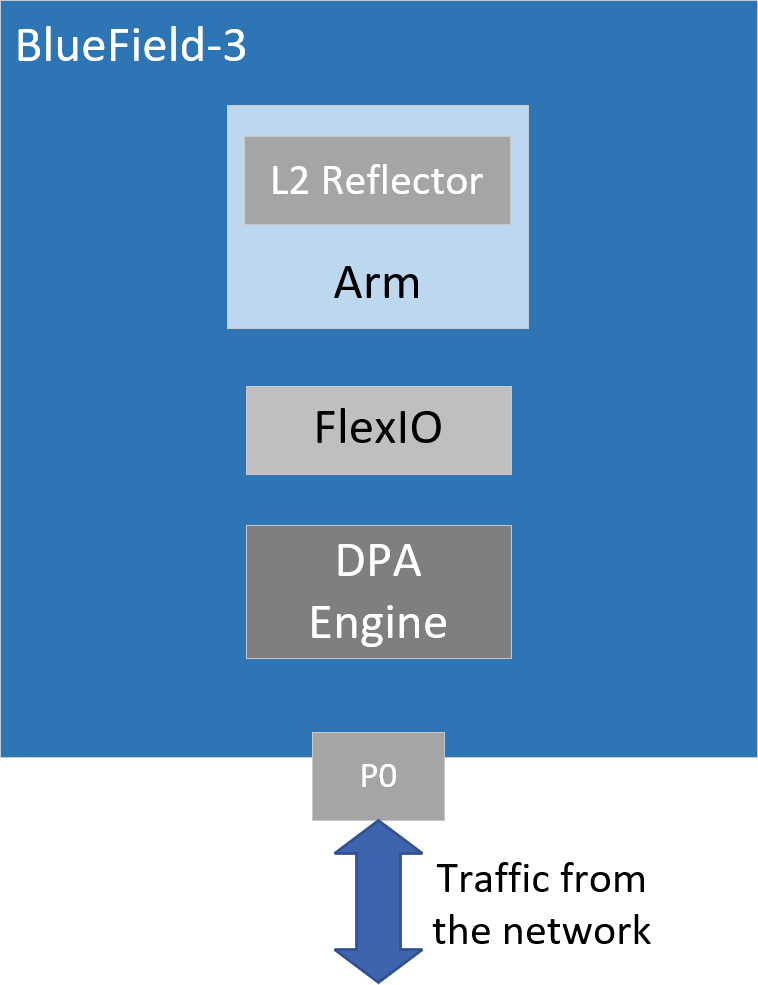
Application Architecture
DOCA L2 reflector runs on top of FlexIO SDK to configure the DPA engine.
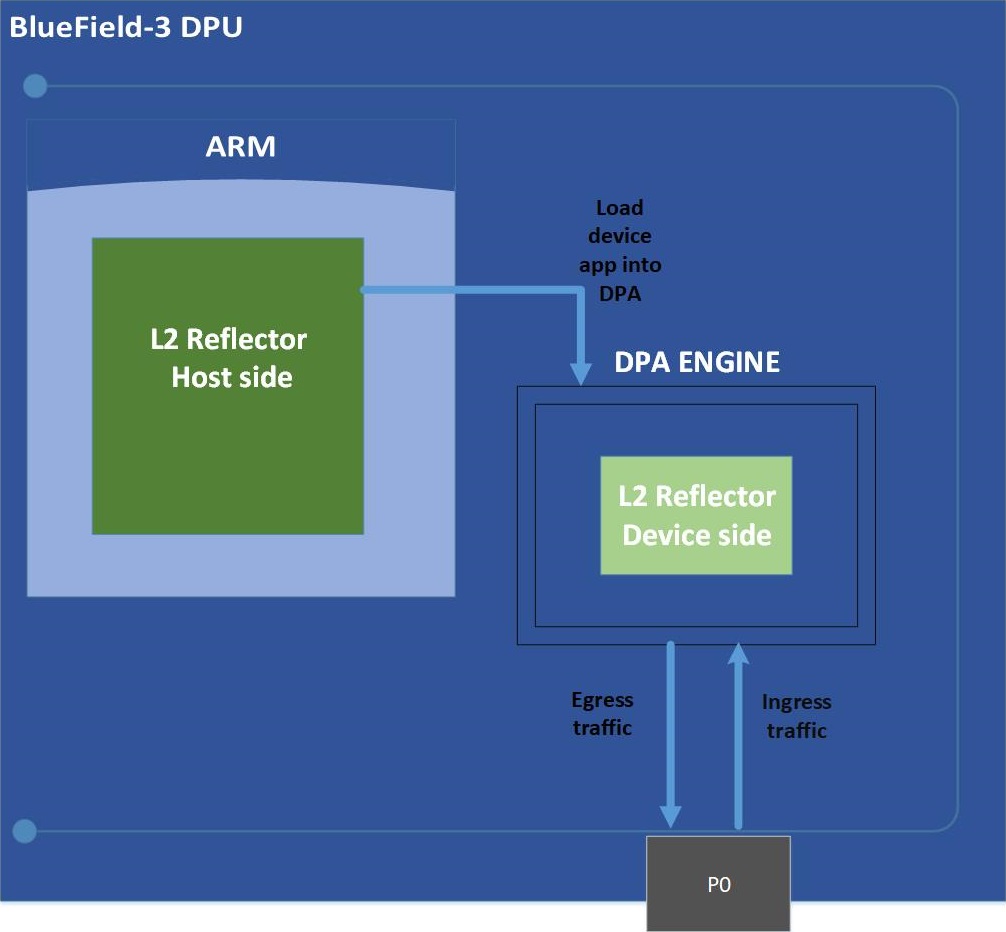
The FlexIO application consist of two parts:
-
Host side – responsible for allocating resources and loading them to the DPA
-
Device side – core processing logic of the application which swaps the MACs on the DPA
For more information, refer to "Programming FlexIO SDK".
DOCA Libraries and Drivers
This application leverages the following DOCA driver:
Refer to its programming guide for more information.
Dependencies
NVIDIA® BlueField®-3 DPU and above is required.
Running the Application
Installation
Please refer to the NVIDIA DOCA Installation Guide for Linux for details on how to install BlueField-related software.
Application Execution
The L2 reflector application is provided in both source and binary forms. The binary is located under /opt/mellanox/doca/applications/l2_reflector/bin/l2_reflector.
-
Application usage instructions:
Usage: l2_reflector [DOCA Flags] [Program Flags]

DOCA Flags:
  -h, --help                        Print a help synopsis
  -v, --version                     Print program version information
  -l, --log-level                   Set the (numeric) log level for the program <10=DISABLE, 20=CRITICAL, 30=ERROR, 40=WARNING, 50=INFO, 60=DEBUG, 70=TRACE>
  --sdk-log-level                   Set the SDK (numeric) log level for the program <10=DISABLE, 20=CRITICAL, 30=ERROR, 40=WARNING, 50=INFO, 60=DEBUG, 70=TRACE>
  -j, --json <path>                 Parse all command flags from an input json file

Program Flags:
  -d, --device <device name>        Device name
This usage printout can be printed to the command line using the
-h(or--help) options:/opt/mellanox/doca/applications/l2_reflector/bin/l2_reflector -h
For additional information, refer to section "NVIDIA DOCA DPA L2 Reflector Application Guide | id (2.5.2 LTS)NVIDIADOCADPAL2ReflectorApplicationGuide CommandLineFlags".
-
CLI example for running the application on BlueField or host:
/opt/mellanox/doca/applications/l2_reflector/bin/l2_reflector -d mlx5_0
The used device name (
-dflag) must match the identifier of the desired IB device.
-
The application also supports a JSON-based deployment mode, in which all command-line arguments are provided through a JSON file:
l2_reflector --json [json_file]For example:
cd /opt/mellanox/doca/applications/l2_reflector/bin
./l2_reflector --json ./l2_reflector_params.json
Before execution, ensure that the used JSON file contains the correct configuration parameters, and especially the desired PCIe addresses required for the deployment.
Command Line Flags
|
Flag Type |
Short Flag |
Long Flag/JSON Key |
Description |
JSON Content |
|---|---|---|---|---|
|
General flags |
|
|
Prints a help synopsis |
N/A |
|
|
|
Prints program version information |
N/A |
|
|
|
|
Set the log level for the application:
|
|
|
|
N/A |
|
Sets the log level for the program:
|
|
|
|
|
|
Parse all command flags from an input JSON file |
N/A |
|
|
Program flags |
|
|
Device name |
|
Refer to DOCA Arg Parser for more information regarding the supported flags and execution modes.
Troubleshooting
DPA L2 reflector works with packets with a specific source MAC address. To check the supported MAC address, refer to /opt/mellanox/doca/applications/l2_reflector/src/host/l2_reflector_core.h.
Please refer to the NVIDIA DOCA Troubleshooting Guide for any issue encountered with the installation or execution of the DOCA applications.
Recompiling the Application
In addition to providing the application in binary form, the installation also includes all of the application sources and compilation instructions so as to allow modifying the sources and recompiling the application. For more information about the applications, as well as development and compilation tips, refer to the DOCA Applications page.
The sources of the application can be found under the /opt/mellanox/doca/applications/l2_reflector/src directory.
Recompiling All Applications
The applications are all defined under a single meson project, so the default compilation recompiles all the DOCA applications.
To build all the applications together, run:
cd /opt/mellanox/doca/applications/
meson /tmp/build
ninja -C /tmp/build
l2_reflector is created under /tmp/build/l2_reflector/src/host.
Recompiling DPA L2 Reflector Application Only
To directly build only the L2 reflector application:
cd /opt/mellanox/doca/applications/
meson /tmp/build -Denable_all_applications=false -Denable_l2_reflector=true
ninja -C /tmp/build
l2_reflector is created under /tmp/build/l2_reflector/src/host.
Alternatively, one can set the desired flags in the meson_options.txt file instead of providing them in the compilation command line:
-
Edit the following flags in
/opt/mellanox/doca/applications/meson_options.txt:-
Set
enable_all_applicationstofalse -
Set
enable_l2_reflectortotrue
-
-
Run the following compilation commands:
cd /opt/mellanox/doca/applications/
meson /tmp/build
ninja -C /tmp/build
l2_reflectoris created under/tmp/build/l2_reflector/src/host.
Troubleshooting
Refer to the NVIDIA DOCA Troubleshooting Guide for any issue you may encounter with the compilation of the DOCA applications.
Application Code Flow
This section lists the application's configuration flow which includes different FlexIO functions and wrappers.
-
Parse application argument.
-
Initialize arg parser resources and register DOCA general parameters.
doca_argp_init();
-
Register the application's parameters.
register_l2_reflector_params();
-
Parse the arguments.
doca_argp_start();
-
-
Setup the InfiniBand device.
l2_reflector_setup_ibv_device();
-
Setup the DPA device.
l2_reflector_setup_device();
-
Allocate the device's resources.
l2_reflector_allocate_device_resources();
-
Run initialization function on the device.
flexio_process_call();
-
Create the steering rule.
l2_reflector_create_steering_rule();
-
Start the event handler on the device.
flexio_event_handler_run();
-
Main loop.
while (!force_quit)
	sleep(10);
-
Cleanup the resources.
l2_reflector_destroy();
References
-
/opt/mellanox/doca/applications/l2_reflector/src -
/opt/mellanox/doca/applications/l2_reflector/bin/l2_reflector_params.json
Last updated: