

Introduction
The doca_storage_comch_to_rdma_zero_copy application serves as a bridge between the initiator and a single storage target. It's only role in the data path is to forward the io requests and io responses between the initiator and storage target.
System Design
The doca_storage_comch_to_rdma_zero_copy application performs the following functions:
-
Relay of io requests from the initiator to the storage target
-
Relay of io responses from the storage target to the initiator
To achieve this it expects to be able to connect to a storage target using TCP connections and will then listen for an incoming connection from a single initiator using doca_comch_server.
Application architecture
The doca_storage_comch_to_rdma_zero_copy application is split into to two functional areas:
-
Control time and shared resources
-
Per thread data path resources
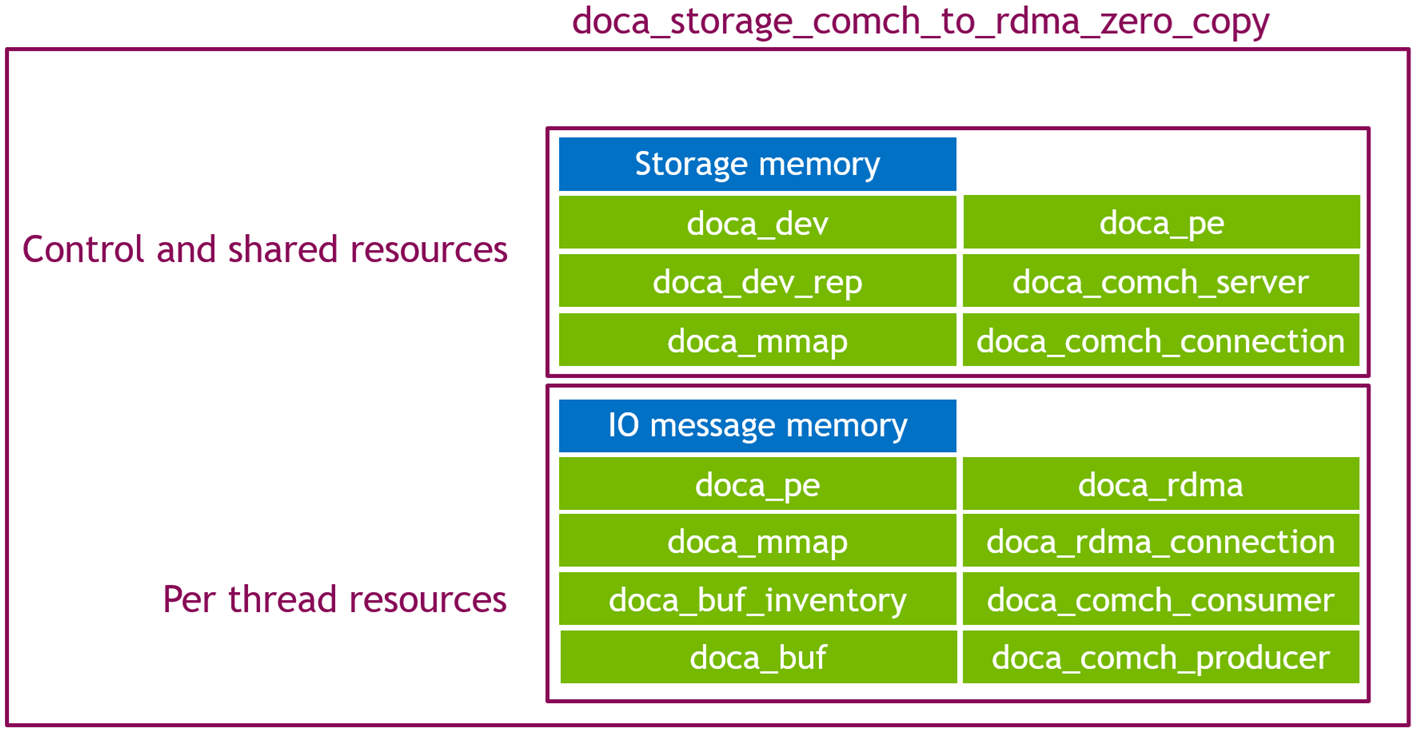
The flow of the application similarity executes in two main phases:
-
Control phase
-
Data path phase
Control Phase
The state starts by connecting to the storage target, then waiting for a client connection. Once all connections are established the application waits for the appropriate control commands:
-
Query storage
-
Init storage
-
Start storage
Processing each control command follows a similar pattern of:
-
Relay the command to the storage target
-
Wait for the storage target to respond
-
Do the required post processing and consistency checks on the storage responses
-
Respond to the client
The start storage control command will kick off the data path phase. Data threads will begin executing while the main thread proceeds to wait for the final control messages to complete the application lifecycle:
-
Stop storage
-
Shutdown
Data Path Phase
This phase happens per thread and involves each thread performing the requested IO operations requested by the client. Read and write requests are simply forwarded to the storage target, no actual processing is carried out by the data threads.
Read data flow
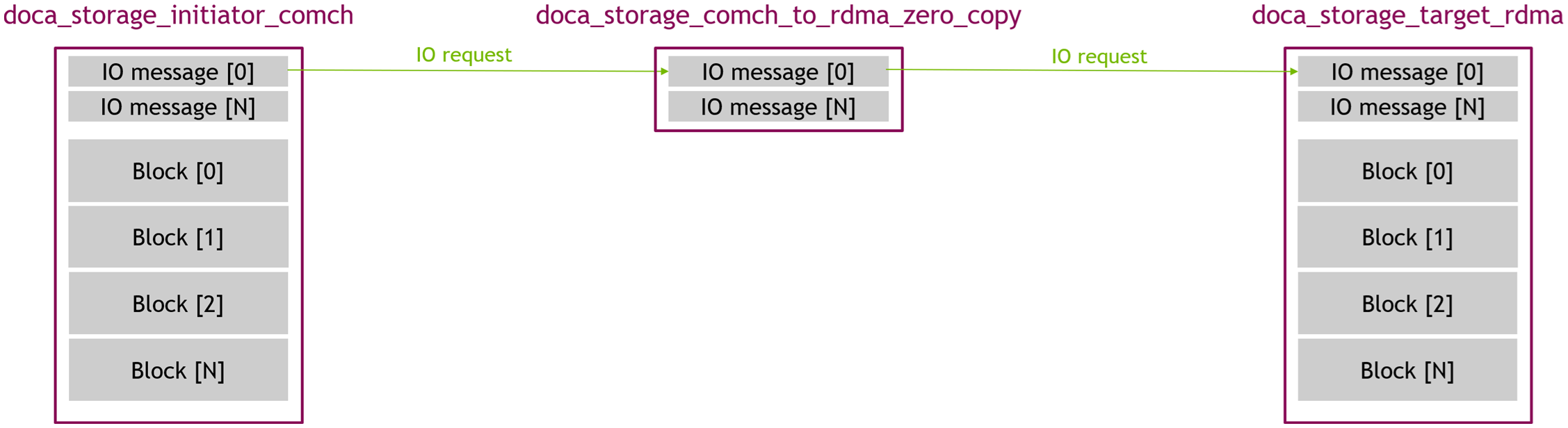
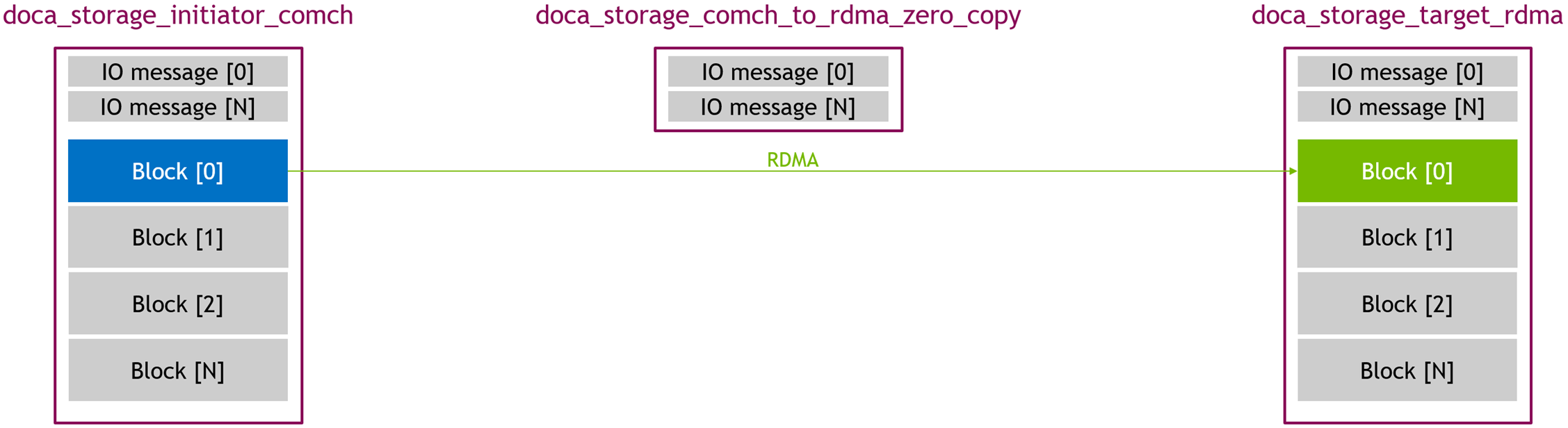
The regular read flow consists of the stages detailed in the following subsections.
1. Initiator Request
-
The initiator sends an I/O request to the zero copy application.
-
The zero copy application forwards the request verbatim to the storage target
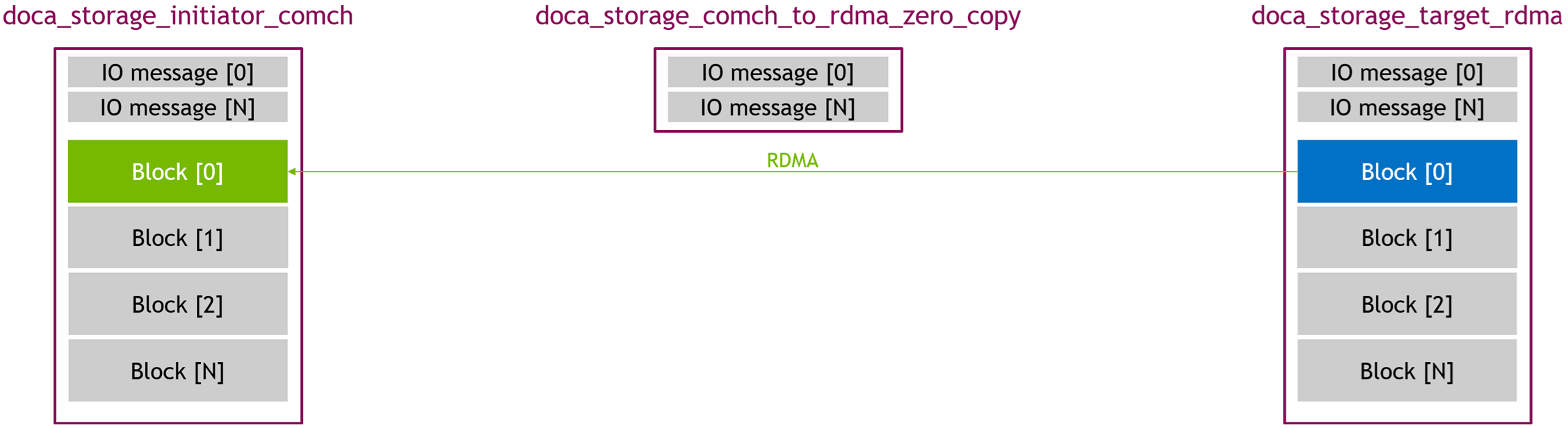
2. RDMA transfer
-
The storage target performs a RDMA write operation
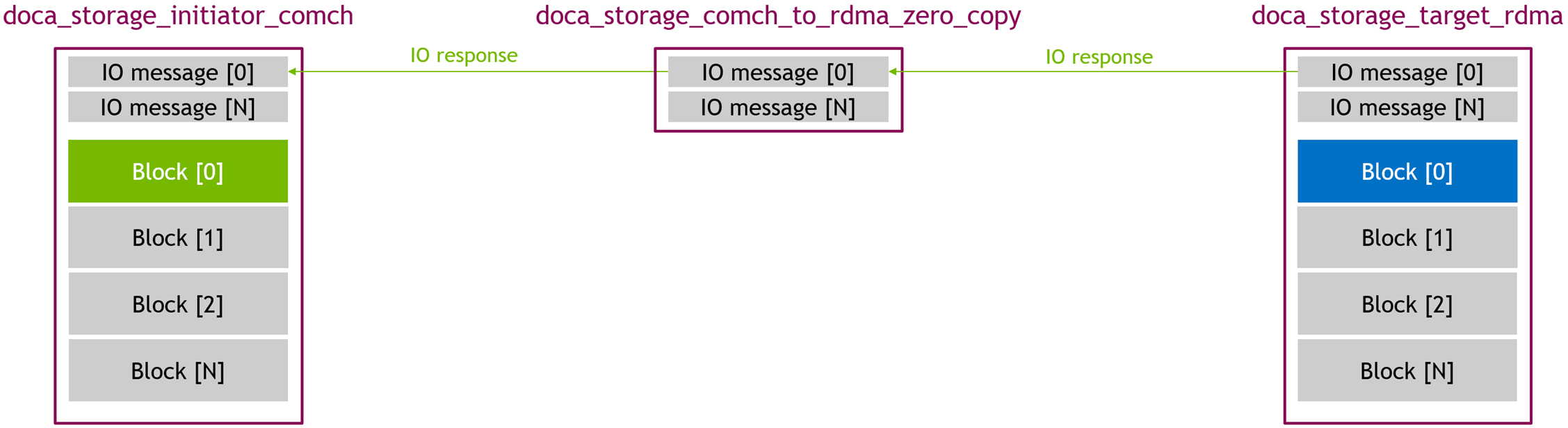
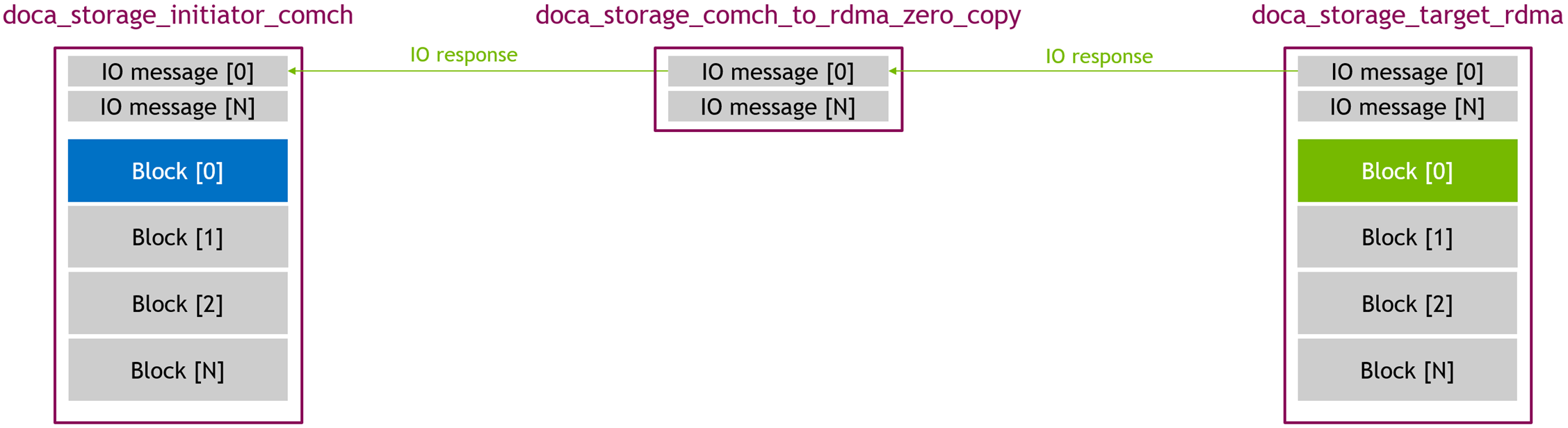
3. Target Response
-
The zero copy application receives a response from the storage target
-
The zero copy application forwards the request verbatim to the initiator
Write data flow
1. Initiator Request
-
The initiator sends an I/O request to the zero copy application.
-
The zero copy application forwards the request verbatim to the storage target
2. RDMA transfer
-
The storage target performs a RDMA read operation
3. Target Response
-
The zero copy application receives a response from the storage target
-
The zero copy application forwards the request verbatim to the initiator
DOCA Libraries
This application leverages the following DOCA libraries:
Compiling the Application
This application is compiled as part of the set of storage applications. For compilation instructions, refer to the DOCA Storage Applications page.
Running the Application
Application Execution
This application can only run within the NVIDIA® BlueField® DPU.
DOCA Storage Comch to RDMA Zero Copy is provided in source form. Therefore, compilation is required before the application can be executed.
-
Application usage instructions:
Usage: doca_storage_comch_to_rdma_zero_copy [DOCA Flags] [Program Flags]

DOCA Flags:
  -h, --help                        Print a help synopsis
  -v, --version                     Print program version information
  -l, --log-level                   Set the (numeric) log level for the program <10=DISABLE, 20=CRITICAL, 30=ERROR, 40=WARNING, 50=INFO, 60=DEBUG, 70=TRACE>
  --sdk-log-level                   Set the SDK (numeric) log level for the program <10=DISABLE, 20=CRITICAL, 30=ERROR, 40=WARNING, 50=INFO, 60=DEBUG, 70=TRACE>
  -j, --json <path>                 Parse all command flags from an input json file

Program Flags:
  -d, --device                      Device identifier
  -r, --representor                 Device host side representor identifier
  --cpu                             CPU core to which the process affinity can be set
  --storage-server                  Storage server addresses in <ip_addr>:<port> format
  --command-channel-name            Name of the channel used by the doca_comch_client. Default: "doca_storage_comch"
  --control-timeout                 Time (in seconds) to wait while performing control operations. Default: 5
This usage printout can be printed to the command line using the
-h(or--help) options:./doca_storage_comch_to_rdma_zero_copy -hFor additional information, refer to section "DOCA Storage ComCh to RDMA Zero copy Application Guide | id (3.0.0)DOCAStorageComChtoRDMAZerocopyApplicationGuide Command lineFlags".
-
CLI example for running the application on the BlueField:
./doca_storage_comch_to_rdma_zero_copy -d 03:00.0 -r 3b:00.0 --storage-server 172.17.0.1:12345 --cpu 0Both the DOCA Comch device PCIe address (
03:00.0) and the DOCA Comch device representor PCIe address (3b:00.0) should match the addresses of the desired PCIe devices.Storage target IP
address:porttuples should be updated to refer to the running storage target applications. -
The application also supports a JSON-based deployment mode in which all command-line arguments are provided through a JSON file:
./doca_storage_comch_to_rdma_zero_copy --json [json_file]For example:
./doca_storage_comch_to_rdma_zero_copy --json doca_storage_comch_to_rdma_zero_copy_params.jsonBefore execution, ensure that the JSON file contains valid configuration parameters, particularly the correct PCIe device addresses required for deployment.
Command-line Flags
|
Flag Type |
Short Flag |
Long Flag/JSON Key |
Description |
JSON Content |
|---|---|---|---|---|
|
General flags |
|
|
Print a help synopsis |
N/A |
|
|
|
Print program version information |
N/A |
|
|
|
|
Set the log level for the application:
|
|
|
|
N/A |
|
Set the log level for the program:
|
|
|
|
|
|
Parse all command flags from an input JSON file |
N/A |
|
|
Program flags |
|
|
DOCA device identifier. One of:
This flag is a mandatory. |
|
|
|
|
DOCA Comch device representor PCIe address This flag is a mandatory. |
|
|
|
N/A |
|
Index of CPU to use. One data path thread is spawned per CPU. Index starts at 0. The user can specify this argument multiple times to create more threads.
This flag is a mandatory. |
|
|
|
N/A |
|
IP address and port to use to establish the control TCP connection to the target. This flag is a mandatory. |
|
|
|
N/A |
|
Allows customizing the server name used for this application instance if multiple comch servers exist on the same device. |
|
|
|
N/A |
|
Time, in seconds, to wait while performing control operations |
|
Troubleshooting
Refer to the NVIDIA BlueField Platform Software Troubleshooting Guide for any issue encountered with the installation or execution of the DOCA applications.
Application Code Flow
Control Phase
-
Parse CLI arguments, apply default values, and create the application instance.
zero_copy_app app{parse_cli_args(argc, argv)}; -
C
app.connect_to_storage();Connect to the storage target over TCP.
-
C
app.wait_for_comch_client_connection();Create a
doca_comch_serverinstance and wait for adoca_comch_clientto connect. -
C
app.wait_for_and_process_query_storage();Wait for the initiator to send a query storage control message, then:
-
Send a query storage message to the storage target
-
Wait for a response from the storage target
-
Send a query storage response back to the initiator
-
-
C
app.wait_for_and_process_init_storage();Wait for the initiator to send an init storage control message, then:
-
Verify that the requested core count does not exceed the available cores
-
Import initiator mmap, then re-export it for use with RDMA:
-
C
void const *reexport_blob;
size_t reexport_blob_size;

doca_mmap_export_rdma(m_remote_io_mmap, m_dev, &reexport_blob, &reexport_blob_size);
-
-
Modify and send init storage message to the storage target. Payload doca_mmap details now refers to the re-exported doca_mmap
-
Wait for a response from the storage target
-
Create data path resources:
-
Worker threads
-
IO message memory regions
-
doca_peobjects -
doca_comch_consumerobjects -
doca_comch_producerobjects -
doca_rdmaconnection objects
-
-
Send an init storage response
-
-
C
app.wait_for_and_process_start_storage();Wait for the initiator to send a start storage control message, then:
-
Send a start storage message to the storage target
-
Wait for a response from storage target
-
Create task objects
-
Submit listening tasks (
doca_comch_consumerand RDMA receive tasks) -
Signal worker threads to begin processing
-
Send a start storage response
-
-
C
app.wait_for_and_process_stop_storage();Wait for the initiator to send a stop storage control message (test complete), then:
-
Send a stop storage message to the storage target
-
Wait for a response from the storage target
-
Signal worker threads to stop
-
Gather and post-process execution statistics
-
Destroy
doca_comch_consumerobjects -
Destroy
doca_comch_producerobjects -
Send a stop storage response
-
-
C
app.wait_for_and_process_shutdown();Wait for the initiator to send a shutdown control message, then:
-
Send a shutdown message to the storage target
-
Wait for a response from the storage target
-
Destroy all remaining data path objects
-
Send a shutdown storage response
-
-
C
app.display_stats();Display collected statistics and destroy all control path objects.
Data Path Phase
-
C
while (m_hot_data.run_flag == false) {
    std::this_thread::yield();
    if (m_hot_data.error_flag)
        return;
}
The main data thread enters a spin-wait loop, yielding execution until all threads and resources are initialized. If an error is detected (
error_flagis set), the thread exits early. -
C
while (m_hot_data.run_flag) {
    doca_pe_progress(m_hot_data.pe)
        ? ++(m_hot_data.pe_hit_count)
        : ++(m_hot_data.pe_miss_count);
}
Once started, the thread enters a tight loop, continuously polling the progress engine (
doca_pe_progress). Each iteration updates the hit/miss counters based on whether any task completions were triggered. This loop drives the data path by processing task completions as fast as possible. -
C
while (m_hot_data.error_flag == false && m_hot_data.in_flight_transaction_count != 0) {
    doca_pe_progress(m_hot_data.pe)
        ? ++(m_hot_data.pe_hit_count)
        : ++(m_hot_data.pe_miss_count);
}
This final loop ensures that all in-flight transactions complete before exiting. It continues polling the progress engine as long as there are active transactions and no error has occurred.
doca_comch_consumer_task_post_recv_cb
This is the comch consumer callback function is invoked for each IO operation. This is handled by the zero copy application by simply forwarding it verbatim to the storage target:
doca_rdma_task_receive_cb
After each storage target completes its respective data transfer, it sends a response. This is handled by the zero copy application by setting the response status code then forwarding it to the initiator
References
-
/opt/mellanox/doca/applications/storage/
Last updated: