

Introduction
The doca_storage_initiator_comch application is a client to the storage service and performs a benchmark of the performance in the process.
System Design
The doca_storage_initiator_comch application performs the following key functions:
-
Initiates a series of IO requests to exercise the storage service
-
Measures performance
-
Millions of IO operations per second
-
Effective IO data bandwidth
-
IO operation latency
-
Min
-
Max
-
Mean
-
-
To accomplish these tasks, the application establishes a connection to the service running on the NVIDIA® BlueField® platform using doca_comch_client.
Application architecture
The doca_storage_initiator_comch application is divided into two main functional areas:
-
Control-time and shared resources
-
Per-thread data path resources
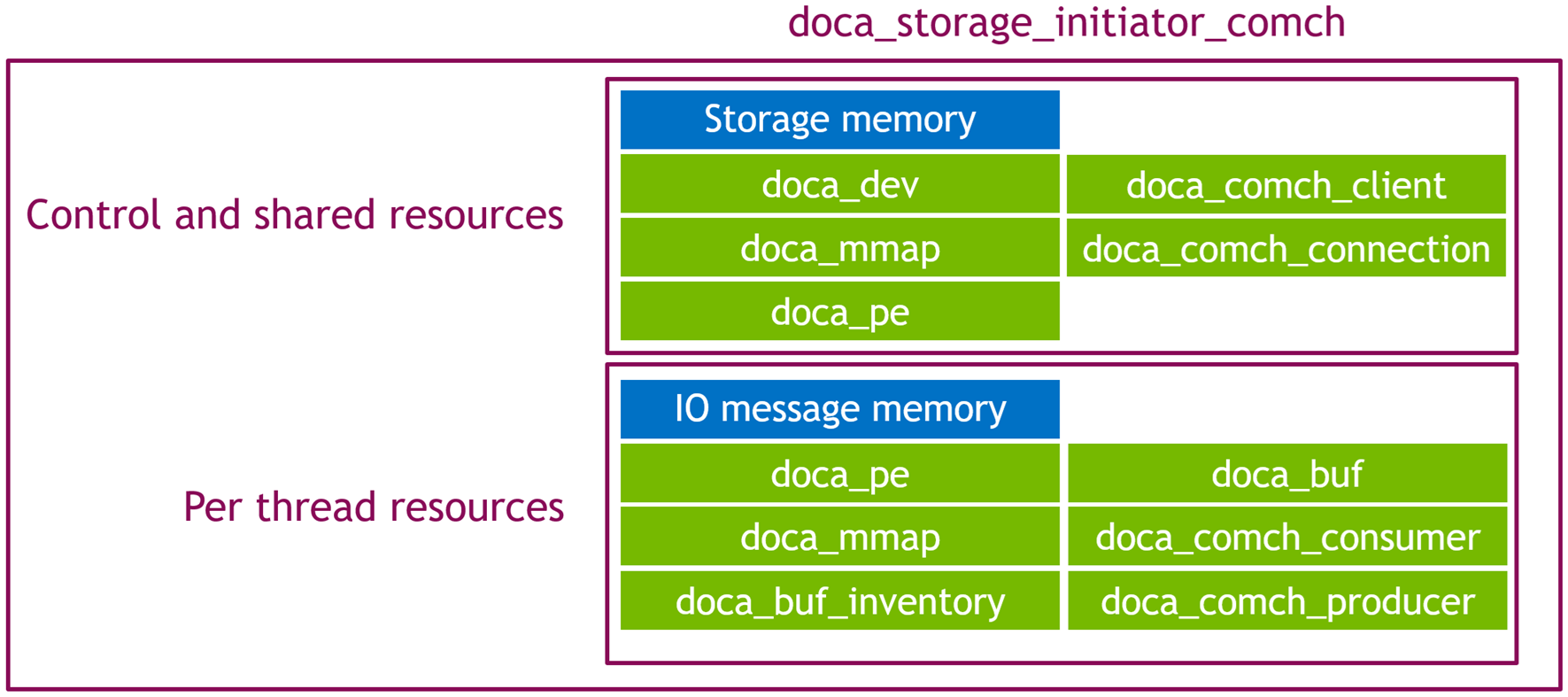
The application execution follows two primary phases:
-
Control phase
-
Data path phase
Control Phase
This phase begins with establishing connections to the storage service. Once connected it starts issuing the comtrol commands to prepare the use-case and begin data transfers:
-
Query storage
-
Init storage
-
Start storage
Issuing the start storage command initiates the data path phase. While the data threads begin execution, the main thread waits for the test execution to complete before finallt closing down the session by issuing the final control commands:
-
Stop storage
-
Shutdown
Data Path Phase
There are three data path routines that can be executed depending on mode:
-
Throughput test (read or write)
-
Read only data validity test
-
Write then read data validitiy test
Throughput test
In this mode tasks are submitted for the first them then a tight loop polling the progress engine is executed until the target operation count has been reached. As each task is submitted its assigned a memory location in the storage window to use; this location is then advanced ready for the next task to use, or if the end of storage is reached reset back to the start. In this way the memory is processed sequentially in a round robin fashion.
Read only data validity test
In this mode a copy of the expected storage memory is held by the initiator. tasks are submitted in th same was as with a throughput test but with the change being that once each segment of storage has been read the test is completed. As each task completes it compares the memory read from storage matches the data held in the relevant section of expected data file.
Write then read data validity test
This mode works start by writing a pattern accross the entire storage memory until each part of the storage memory has been "set". Following this the steps to perfom a read only data validity test are carried out but instead of using the content of a file loaded from disk to compare the read data to, the memory pattern that was generated to be written to the storage is compared against.
DOCA Libraries
This application leverages the following DOCA libraries:
Compiling the Application
This application is compiled as part of the set of storage applications. For compilation instructions, refer to the DOCA Storage Applications page.
Running the Application
Application Execution
This application can only run from the host.
DOCA Storage Initiator Comch is provided in source form. Therefore, compilation is required before the application can be executed.
-
Application usage instructions:
Usage: doca_storage_initiator_comch [DOCA Flags] [Program Flags]

DOCA Flags:
  -h, --help                        Print a help synopsis
  -v, --version                     Print program version information
  -l, --log-level                   Set the (numeric) log level for the program <10=DISABLE, 20=CRITICAL, 30=ERROR, 40=WARNING, 50=INFO, 60=DEBUG, 70=TRACE>
  --sdk-log-level                   Set the SDK (numeric) log level for the program <10=DISABLE, 20=CRITICAL, 30=ERROR, 40=WARNING, 50=INFO, 60=DEBUG, 70=TRACE>
  -j, --json <path>                 Parse all command flags from an input json file

Program Flags:
  -d, --device                      Device identifier
  --cpu                             CPU core to which the process affinity can be set
  --storage-plain-content           File containing the plain data that is represented by the storage
  --execution-strategy              Define what to run. One of: read_throughput_test | write_throughput_test | read_write_data_validity_test | read_only_data_validity_test
  --run-limit-operation-count       Run N operations (per thread) then stop. Default: 1000000
  --task-count                      Number of concurrent tasks (per thread) to use. Default: 64
  --command-channel-name            Name of the channel used by the doca_comch_client. Default: "doca_storage_comch"
  --control-timeout                 Time (in seconds) to wait while performing control operations. Default: 5
  --batch-size                      Batch size: Default: 4
This usage printout can be printed to the command line using the
-h(or--help) options:./doca_storage_initiator_comch -hFor additional information, refer to section "DOCA Storage Initiator ComCh Application Guide | id (3.0.0)DOCAStorageInitiatorComChApplicationGuide Command lineFlags".
-
CLI example for running the application on the BlueField:
./doca_storage_initiator_comch -d 3b:00.0 --execution-strategy read_throughput_test --run-limit-operation-count 1000000 --cpu 0Both the DOCA Comch device PCIe address (
3b:00.0) should match the addresses of the desired PCIe devices. -
The application also supports a JSON-based deployment mode in which all command-line arguments are provided through a JSON file:
./doca_storage_initiator_comch --json [json_file]For example:
./doca_storage_initiator_comch --json doca_storage_initiator_comch_params.jsonBefore execution, ensure that the JSON file contains valid configuration parameters, particularly the correct PCIe device addresses required for deployment.
Command-line Flags
|
Flag Type |
Short Flag |
Long Flag/JSON Key |
Description |
JSON Content |
|---|---|---|---|---|
|
General flags |
|
|
Print a help synopsis |
N/A |
|
|
|
Print program version information |
N/A |
|
|
|
|
Set the log level for the application:
|
|
|
|
N/A |
|
Set the log level for the program:
|
|
|
|
|
|
Parse all command flags from an input JSON file |
N/A |
|
|
Program flags |
|
|
DOCA device identifier. One of:
This flag is a mandatory. |
|
|
N/A |
|
The data path routine to run. One of:
This flag is a mandatory. |
|
|
|
N/A |
|
Index of CPU to use. One data path thread is spawned per CPU. Index starts at 0. The user can specify this argument multiple times to create more threads.
This flag is a mandatory. |
|
|
|
N/A |
|
Expected plain content that is expected to be read from storage during a |
|
|
|
N/A |
|
Number of IO operations to perform when performing a throughput test |
|
|
|
N/A |
|
Number of parallel tasks per thread to use |
|
|
|
N/A |
|
Allows customizing the server name used for this application instance if multiple comch servers exist on the same device. |
|
|
|
N/A |
|
Time, in seconds, to wait while performing control operations |
|
|
|
N/A |
|
Set how many tasks should be submitted before triggering the hardware to start processing them. |
|
Troubleshooting
Refer to the NVIDIA BlueField Platform Software Troubleshooting Guide for any issue encountered with the installation or execution of the DOCA applications.
Application Code Flow
Control Phase
-
Parse CLI arguments, apply default values, and create the application instance.
initiator_comch_app app{parse_cli_args(argc, argv)}; -
C
app.connect_to_storage_service();Connect to the storage service via
doca_comch_client. -
Query the storage service so thats its capacity and block size can be known.
app.query_storage();
-
C
app.init_storage();Prepare the storage service:
-
Allocate memory resources.
-
Send init storage control message.
-
Create per thread resources including
comch_consumerandcomch_producer.
-
-
Create thread objects and allocate per thread tasks
app.prepare_threads();
-
Send start storage control message, wait for response then start data path threads
app.start_storage();
-
C
app.run();Run the data path:
-
Start threads.
-
Wait for threads to complete.
-
Collect and post-process statistics.
-
-
C
app.join_threads();Join work threads.
-
C
app.stop_storage();Send stop storage control message
-
C
if (run_success) {
		app.display_stats();
} else {
	exit_value = EXIT_FAILURE;
	fprintf(stderr, "+================================================+\n");
	fprintf(stderr, "| Test failed!!\n");
	fprintf(stderr, "+================================================+\n");
}
Display execution result, or a failure banner if something wen't wrong during the data path
-
C
app.shutdown();Send the shutdown control command to trigger storage service and storage targets to shutdown and release resources
Read/Write Throughput: data path
-
C
while (hot_data.run_flag == false) {
	std::this_thread::yield();
	if (hot_data.error_flag)
		return;
}
Wait for run flag to be set
-
C
auto const initial_task_count = std::min(hot_data.transactions_size, hot_data.remaining_tx_ops);
for (uint32_t ii = 0; ii != initial_task_count; ++ii)
	hot_data.start_transaction(hot_data.transactions[ii], std::chrono::steady_clock::now());
Submit initial tasks
-
C
while (hot_data.run_flag) {
	doca_pe_progress(hot_data.pe) ? ++(hot_data.pe_hit_count) : ++(hot_data.pe_miss_count);
}
Run until the test is complete
Read only data validity: data path
-
C
while (hot_data.run_flag == false) {
	std::this_thread::yield();
	if (hot_data.error_flag)
		return;
}
Wait for run flag to be set
-
C
read_and_validate_storage_memory(hot_data, hot_data.storage_plain_content)Invoke the read and verify routine
-
C
hot_data.remaining_tx_ops = hot_data.remaining_rx_ops = io_region_size / hot_data.io_block_size;Set the expected op count to be 1 op per block
-
Cauto const initial_task_count = std::min(hot_data.transactions_size, hot_data.remaining_tx_ops); for (uint32_t ii = 0; ii != initial_task_count; ++ii) { char *io_request; doca_buf_get_data(doca_comch_producer_task_send_get_buf(hot_data.transactions[ii].request), (void**)&io_request)); storage::io_message_view::set_type(storage::io_message_type::read, io_request); hot_data.start_transaction(hot_data.transactions[ii], std::chrono::steady_clock::now()); }Force all io_requests into read mode then start executing them
-
C
while (hot_data.remaining_rx_ops != 0) {
	doca_pe_progress(hot_data.pe) ? ++(hot_data.pe_hit_count) : ++(hot_data.pe_miss_count);
}
Run until the test is complete
-
C
for (size_t offset = 0; offset != io_region_size; ++offset) {
	if (hot_data.io_region_begin[offset] != expected_memory_content[offset]) {
		DOCA_LOG_ERR("Data mismatch @ position %zu: %02x != %02x", offset, hot_data.io_region_begin[offset], expected_memory_content[offset]);
		hot_data.error_flag = true;
		break;
	}
}
Validate memory content
-
Read write data validity: data path
-
C
while (hot_data.run_flag == false) {
	std::this_thread::yield();
	if (hot_data.error_flag)
		return;
}
Wait for run flag to be set
-
C
size_t const io_region_size = hot_data.io_region_end - hot_data.io_region_begin;
std::vector<uint8_t> write_data;
write_data.resize(io_region_size);
for (size_t ii = 0; ii != io_region_size; ++ii) {
	write_data[ii] = static_cast<uint8_t>(ii);
}
Prepare new memory content
-
C
write_storage_memory(hot_data, write_data.data());Invoke write memory routine
-
C
hot_data.remaining_tx_ops = hot_data.remaining_rx_ops = io_region_size / hot_data.io_block_size;Set the expected op count to be 1 op per block
-
C
hot_data.io_addr = hot_data.io_region_begin;
std::copy(expected_memory_content, expected_memory_content + io_region_size, hot_data.io_region_begin);
Place data to write to storage service into local memory
-
Force all io_requests into write mode then start executing them
auto const initial_task_count = std::min(hot_data.transactions_size, hot_data.remaining_tx_ops); for (uint32_t ii = 0; ii != initial_task_count; ++ii) { char *io_request; doca_buf_get_data(doca_comch_producer_task_send_get_buf(hot_data.transactions[ii].request), (void**)&io_request)); storage::io_message_view::set_type(storage::io_message_type::write, io_request); hot_data.start_transaction(hot_data.transactions[ii], std::chrono::steady_clock::now()); } -
C
while (hot_data.remaining_rx_ops != 0) {
	doca_pe_progress(hot_data.pe) ? ++(hot_data.pe_hit_count) : ++(hot_data.pe_miss_count);
}
Execute write operations
-
-
C
read_and_validate_storage_memory(hot_data, write_data.data())Invoke the read and verify routine
-
C
hot_data.remaining_tx_ops = hot_data.remaining_rx_ops = io_region_size / hot_data.io_block_size;Set the expected op count to be 1 op per block
Cauto const initial_task_count = std::min(hot_data.transactions_size, hot_data.remaining_tx_ops); for (uint32_t ii = 0; ii != initial_task_count; ++ii) { char *io_request; doca_buf_get_data(doca_comch_producer_task_send_get_buf(hot_data.transactions[ii].request), (void**)&io_request)); storage::io_message_view::set_type(storage::io_message_type::read, io_request); hot_data.start_transaction(hot_data.transactions[ii], std::chrono::steady_clock::now()); }Force all io_requests into read mode then start executing them
-
C
while (hot_data.remaining_rx_ops != 0) {
	doca_pe_progress(hot_data.pe) ? ++(hot_data.pe_hit_count) : ++(hot_data.pe_miss_count);
}
Run until the test is complete
-
C
for (size_t offset = 0; offset != io_region_size; ++offset) {
	if (hot_data.io_region_begin[offset] != expected_memory_content[offset]) {
		DOCA_LOG_ERR("Data mismatch @ position %zu: %02x != %02x", offset, hot_data.io_region_begin[offset], expected_memory_content[offset]);
		hot_data.error_flag = true;
		break;
	}
}
Validate memory content
-
References
-
/opt/mellanox/doca/applications/storage/
Last updated: