

Introduction
The doca_storage_gga_offload_sbc_generator provides a mechanism to convert an input file into a form which can be used by the storage target applications when executing the GGA offload use-case. It take a single input file, breaks it down into chunks, performs compression and generates parity data. The result is 3 storage binary content (.sbc) files.
System Design
The doca_storage_gga_offload_sbc_generator performs the following functions:
-
Load input data from disk
-
Perform data compression
-
Generate parity data
-
Write output binary content files to disk
Application architecture
The doca_storage_gga_offload_sbc_generator is not performance sensitive so uses a simple natural program flow. It is made up of the following components:
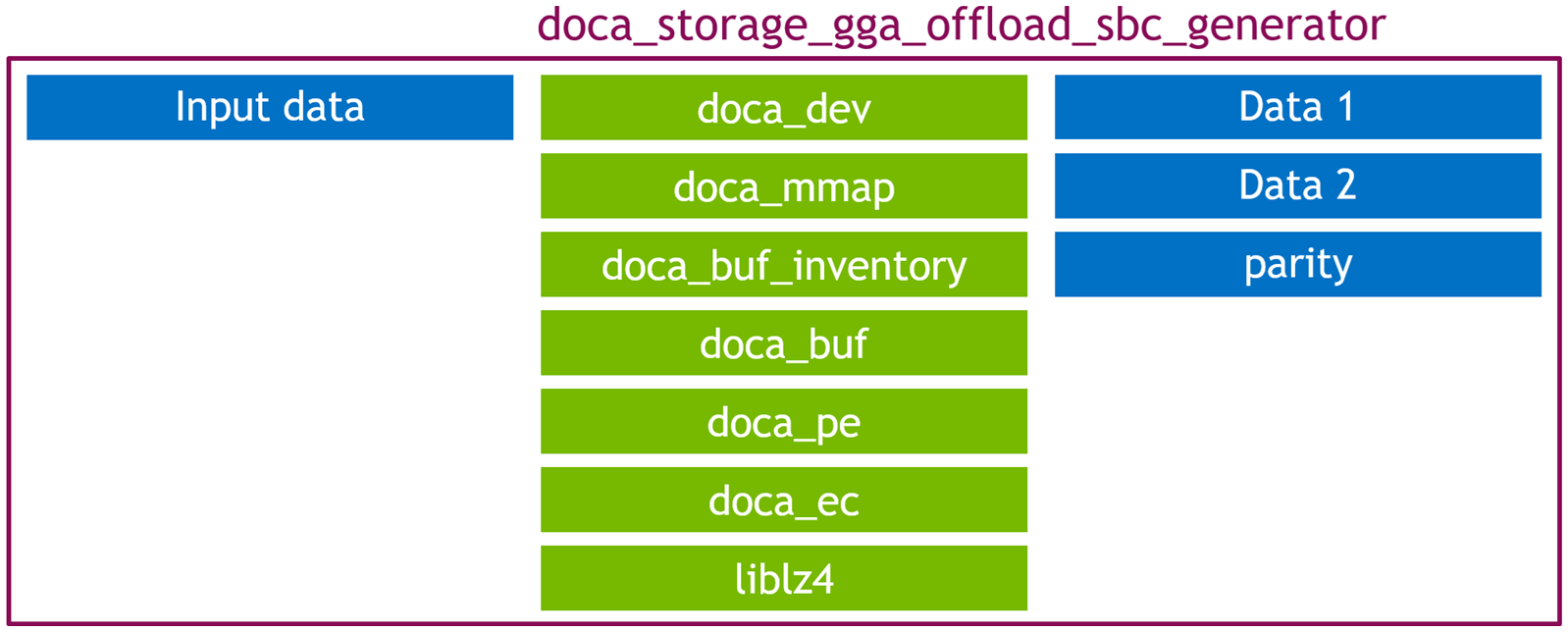
It performs the following steps:
-
Load source file from disk
-
Divide file content into chunks
-
Compresses each chunk using the lz4 library
-
If a chunk is not compressible enough (it cannot be made smaller than: it's original size - the size of a header and trailer) an error is reported and the program exits
-
-
Wraps each compressed chunk with a metadata header and trailer to form storage blocks
-
Metadata is used in the GGA Offload application to correctly form the decompression tasks
-
-
Generate EC parity for each storage block
-
Metadata is produced 2:1 i.e. For eevery 2 bytes of input data one byte of parity data is created. This is sufficient to allow for 50% of the data to be lost and then subsequently recovered by using the other half data and the parity data.
-
-
Splits the content between the data 1 , data 2 and parity partitions
-
Currently data 1 and data 2 are identical copies of each other and the parity block contains each block twice. This was done to simplify the code but is not something a real storage solution would want to do
-
-
Writes each partition with relevant high level metadata (storage block size, storage block count) to disk
DOCA Libraries
This application leverages the following DOCA libraries:
Compiling the Application
This application is compiled as part of the set of storage applications. For compilation instructions, refer to the DOCA Storage Applications page.
Running the Application
Application Execution
DOCA Storage GGA Offload SBC Generator is provided in source form. Therefore, compilation is required before the application can be executed.
-
Application usage instructions:
Usage: doca_storage_gga_offload_sbc_generator [DOCA Flags] [Program Flags]

DOCA Flags:
  -h, --help                        Print a help synopsis
  -v, --version                     Print program version information
  -l, --log-level                   Set the (numeric) log level for the program <10=DISABLE, 20=CRITICAL, 30=ERROR, 40=WARNING, 50=INFO, 60=DEBUG, 70=TRACE>
  --sdk-log-level                   Set the SDK (numeric) log level for the program <10=DISABLE, 20=CRITICAL, 30=ERROR, 40=WARNING, 50=INFO, 60=DEBUG, 70=TRACE>
  -j, --json <path>                 Parse all command flags from an input json file

Program Flags:
  -d, --device                      Device identifier
  --original-input-data             File containing the original data that is represented by the storage
  --block-size                      Size of each block. Default: 4096
  --matrix-type                     Type of matrix to use. One of: cauchy, vandermonde Default: vandermonde
  --data-1                          First half of the data in storage
  --data-2                          Second half of the data in storage
  --data-p                          Parity data (used to perform recovery flow)
This usage printout can be printed to the command line using the
-h(or--help) options:./doca_storage_gga_offload_sbc_generator -hFor additional information, refer to section "DOCA Storage GGA offload SBC generator Application Guide | id (3.0.0)DOCAStorageGGAoffloadSBCgeneratorApplicationGuide Command lineFlags".
-
CLI example for running the application on the BlueField:
./doca_storage_gga_offload_sbc_generator -d 03:00.0 --original-input-data original_data.txt --block-size 4096 --data-1 data_1.sbc --data-2 data_2.sbc --data-p data_p.sbcThe device PCIe address (
03:00.0) should match the addresses of the desired PCIe device. -
The application also supports a JSON-based deployment mode in which all command-line arguments are provided through a JSON file:
./doca_storage_gga_offload_sbc_generator --json [json_file]For example:
./doca_storage_gga_offload_sbc_generator --json doca_storage_gga_offload_sbc_generator_params.jsonBefore execution, ensure that the JSON file contains valid configuration parameters, particularly the correct PCIe device addresses required for deployment.
Command-line Flags
|
Flag Type |
Short Flag |
Long Flag/JSON Key |
Description |
JSON Content |
|---|---|---|---|---|
|
General flags |
|
|
Print a help synopsis |
N/A |
|
|
|
Print program version information |
N/A |
|
|
|
|
Set the log level for the application:
|
|
|
|
N/A |
|
Set the log level for the program:
|
|
|
|
|
|
Parse all command flags from an input JSON file |
N/A |
|
|
Program flags |
|
|
DOCA device identifier. One of:
This flag is a mandatory. |
|
|
N/A |
|
File containing the original data that is represented by the storage This flag is a mandatory. |
|
|
|
N/A |
|
IP address and port to use to establish the control TCP connection to the target. This flag is a mandatory. |
|
|
|
N/A |
|
File in which to store the data 1 partition This flag is a mandatory. |
|
|
|
N/A |
|
File in which to store the data 2 partition This flag is a mandatory. |
|
|
|
N/A |
|
File in which to store the parity partition This flag is a mandatory. |
|
|
|
N/A |
|
Type of matrix to use. One of:
|
|
Troubleshooting
Refer to the NVIDIA BlueField Platform Software Troubleshooting Guide for any issue encountered with the installation or execution of the DOCA applications.
Application Code Flow
General application flow
The high level application flow is as follows:
auto const cfg = parse_cli_args(argc, argv);
gga_offload_sbc_gen_app app{cfg.device_id, cfg.ec_matrix_type, cfg.block_size};
Parse confiruation, apply defaults and create the application instance
auto input_data = storage::load_file_bytes(cfg.original_data_file_name);
Load input data from file
pad_input_to_multiple_of_block_size(input_data, cfg.block_size);
Round up data size to a multiple of the block size by adding padding (0) bytes
app.generate_binary_content(input_data);
Perform data transformation
storage::write_binary_content_to_file(
	cfg.data_1_file_name,
	storage::binary_content{
		cfg.block_size,
		results.block_count,
		std::move(results.data_1_content)
		}
	);
storage::write_binary_content_to_file(
	cfg.data_2_file_name,
	storage::binary_content{
		cfg.block_size,
		results.block_count,
		std::move(results.data_2_content)
		}
	);
storage::write_binary_content_to_file(
	cfg.data_p_file_name,
	storage::binary_content{
		cfg.block_size,
		results.block_count,
		std::move(results.data_p_content)
		}
	);
Write transformed data to disk
Transform process
The following steps are performed per input data chunk:
auto const compresed_size =
			m_lz4_ctx.compress(input_data.data() + (ii * m_block_size),
					   m_block_size,
					   m_compressed_bytes_buffer.data() + metadata_header_size,
					   m_compressed_bytes_buffer.size() - metadata_overhead_size);
Compress data chunk
storage::compressed_block_header const hdr{
	htobe32(m_block_size),
	htobe32(compresed_size),
};

std::copy(reinterpret_cast<char const *>(&hdr),
			  reinterpret_cast<char const *>(&hdr) + sizeof(hdr),
			  m_compressed_bytes_buffer.data());
Set header values
doca_buf_set_data(m_input_buf, m_compressed_bytes_buffer.data(), m_block_size);
doca_buf_reset_data_len(m_output_buf);

doca_task_submit(doca_ec_task_create_as_task(m_ec_task));
Generate parity data
References
-
/opt/mellanox/doca/applications/storage/
Last updated: