

Introduction
The NVIDIA DOCA™ DevEmu Virtio-net library provides low-level APIs for building emulated virtio network devices on NVIDIA® BlueField® DPUs. The library is part of the DOCA DevEmu Virtio subsystem and is designed for use with DOCA DevEmu PCI transaction layer packet (TLP) emulation.
The reference application, vnet_pci_dev, demonstrates how to build a virtio-net PCI device controller with this library. The application manages PCI and TLP emulation, virtio feature negotiation, virtqueue lifecycle, control virtqueue handling, hot plug, reset, and live-update coordination. The application does not receive callbacks for individual packets. After the offload engine is enabled, the DOCA DevEmu Virtio-net offload library and hardware data path handle the receive (RX) and transmit (TX) virtqueues.
Library Interaction
The DevEmu Virtio-net stack follows the same layered design as other DOCA DevEmu Virtio libraries:
-
DOCA DevEmu PCI – manages the TLP PCI transport: PCI type creation, representors, endpoints, TLP channel events, MSI-X, and hot-plug support.
-
DOCA DevEmu Virtio Common – manages common virtio offload concepts: offload engine lifecycle, virtqueue configurationuration, virtqueue start, stop, enable, and disable, I/O binding, virtqueue debug state, and reset-sensitive state transitions.
-
DOCA DevEmu Virtio-net – manages virtio-net-specific objects: network offload engine, RX and TX/control virtqueues, MAC/MTU configuration, representor lookup, control virtqueue request routing, and DevEmu Virtio-net counters.
The reference application adds a complete virtio PCI device model around the library. It implements configuration-space and MMIO TLP handling, tracks virtio common configuration, exposes network device configuration, and drives the library according to host driver status transitions.
Core Functionality
The DevEmu Virtio-net library provides these main capabilities:
-
Create a virtio-net PCI TLP type.
-
Create a per-endpoint virtio-net offload engine.
-
Configure network-specific parameters such as MAC address and MTU.
-
Create RX, TX, and control virtqueues.
-
Start, enable, disable, stop, and destroy virtqueues through the common virtio API.
-
Route control virtqueue commands to the application as
doca_devemu_vnet_ctrl_req. -
Expose DevEmu Virtio-net virtqueue counters and common virtio queue debug state.
-
Export/import offload engine state for live update and recovery flows.
Unlike DOCA DevEmu Virtio-blk, DOCA DevEmu Virtio-net does not expose per-packet request objects such as doca_devemu_vblk_req. The application configures the RX and TX virtqueues, and the offload engine handles packet movement. The application receives request events only for the control virtqueue.
User Responsibilities
A DevEmu Virtio-net controller application is responsible for:
-
Creating and configuring the PCI TLP type.
-
Creating PCI representors and TLP endpoint devices.
-
Emulating virtio PCI configuration and device-specific network configuration.
-
Advertising feature bits consistently with what the application and library can support.
-
Creating, configuring, starting, binding, enabling, disabling, stopping, and destroying the RX and TX virtqueues and the control virtqueue (CVQ).
-
Creating an I/O context only when control virtqueue commands need to be routed to the application.
-
Handling
doca_devemu_vnet_ctrl_reqevents and completing them with virtio-net ACK status. -
Handling device reset, hot plug, and teardown without blocking the TLP progress path.
-
Managing any backend network policy, representor setup, or system integration outside the DevEmu Virtio-net library.
Environment and Prerequisites
DOCA DevEmu PCI TLP emulation is supported only on the BlueField target and requires root privileges. Before running vnet_pci_dev, complete the DOCA DevEmu PCI TLP environment configuration.
-
Configure BlueField to work in DPU mode as described in BlueField Modes of Operation.
-
Enable TLP emulation by running the following on the DPU:
[dpu] mlxconfig -y -d /dev/mst/mt41692_pciconf0 set TLP_EMULATION_ENABLE=1 [dpu] mlxconfig -y -d /dev/mst/mt41692_pciconf0 set TLP_EMULATION_NUM_PF=32 -
Perform a BlueField system-level reset for the
mlxconfigsettings to take effect.
For hot plug, configure PCI switch emulation and the host boot parameters described in DOCA DevEmu PCI.
Use the following host boot parameters:
-
Intel CPU:
intel_iommu=on iommu=pt pci=realloc -
AMD CPU:
iommu=pt pci=realloc
On the DPU, run:
[dpu] mlxconfig -y -d /dev/mst/mt41692_pciconf0 set PCI_SWITCH_EMULATION_ENABLE=1
[dpu] mlxconfig -y -d /dev/mst/mt41692_pciconf0 set PCI_SWITCH_EMULATION_NUM_TLP_PORT=1
[dpu] mlxconfig -y -d /dev/mst/mt41692_pciconf0 set PCI_SWITCH_EMULATION_NUM_PORT=2
Set PCI_SWITCH_EMULATION_NUM_PORT to at least PCI_SWITCH_EMULATION_NUM_TLP_PORT + 1. The reference application uses one physical TLP downstream port, so the minimum value is 2. The number of emulated virtio-net endpoints does not change this physical-port requirement.
For 32 virtio-net devices, run:
mlxconfig -y -d /dev/mst/mt41692_pciconf0 s PF_BAR2_ENABLE=0 PER_PF_NUM_SF=1 PF_SF_BAR_SIZE=8 PF_TOTAL_SF=33
After changing these mlxconfig settings, perform a BlueField system-level reset.
The vnet_pci_dev reference application expects exactly one physical NVIDIA emulation switch TLP downstream port. During initialization, it queries the TLP channel and fails if the number of physical downstream ports is not 1.
The reference topology is:
USP
|-- DSP[0] -> EP[0] virtio-net
|-- DSP[1] -> EP[1] virtio-net
|-- ...
|-- DSP[N] -> EP[N] virtio-net
-
One upstream port (USP).
-
Ndownstream ports (DSPs). -
Nemulated virtio-net endpoints.
Architecture
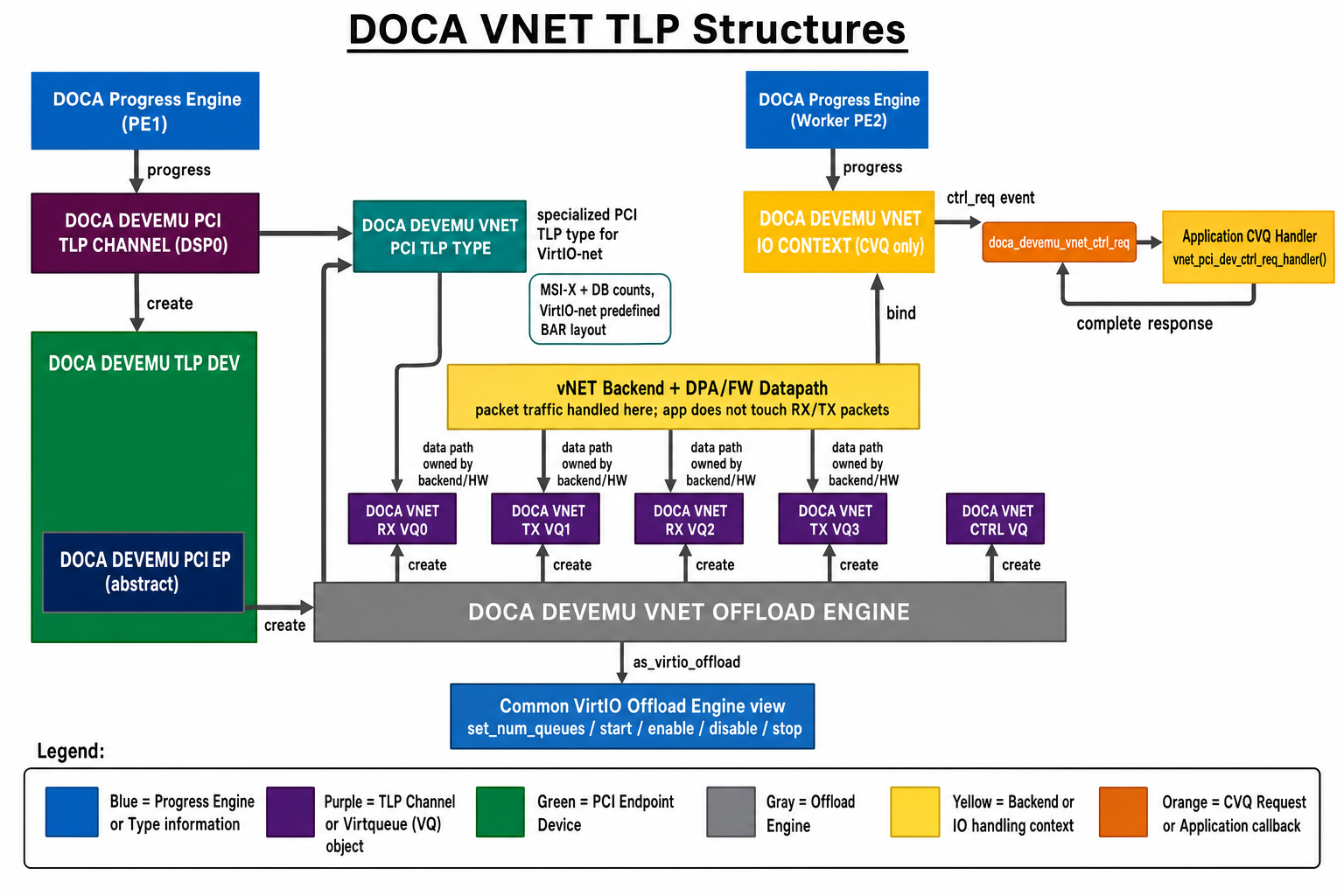
The following diagram shows the primary DOCA DevEmu Virtio-net objects and their relationships.
Virtio-net Type
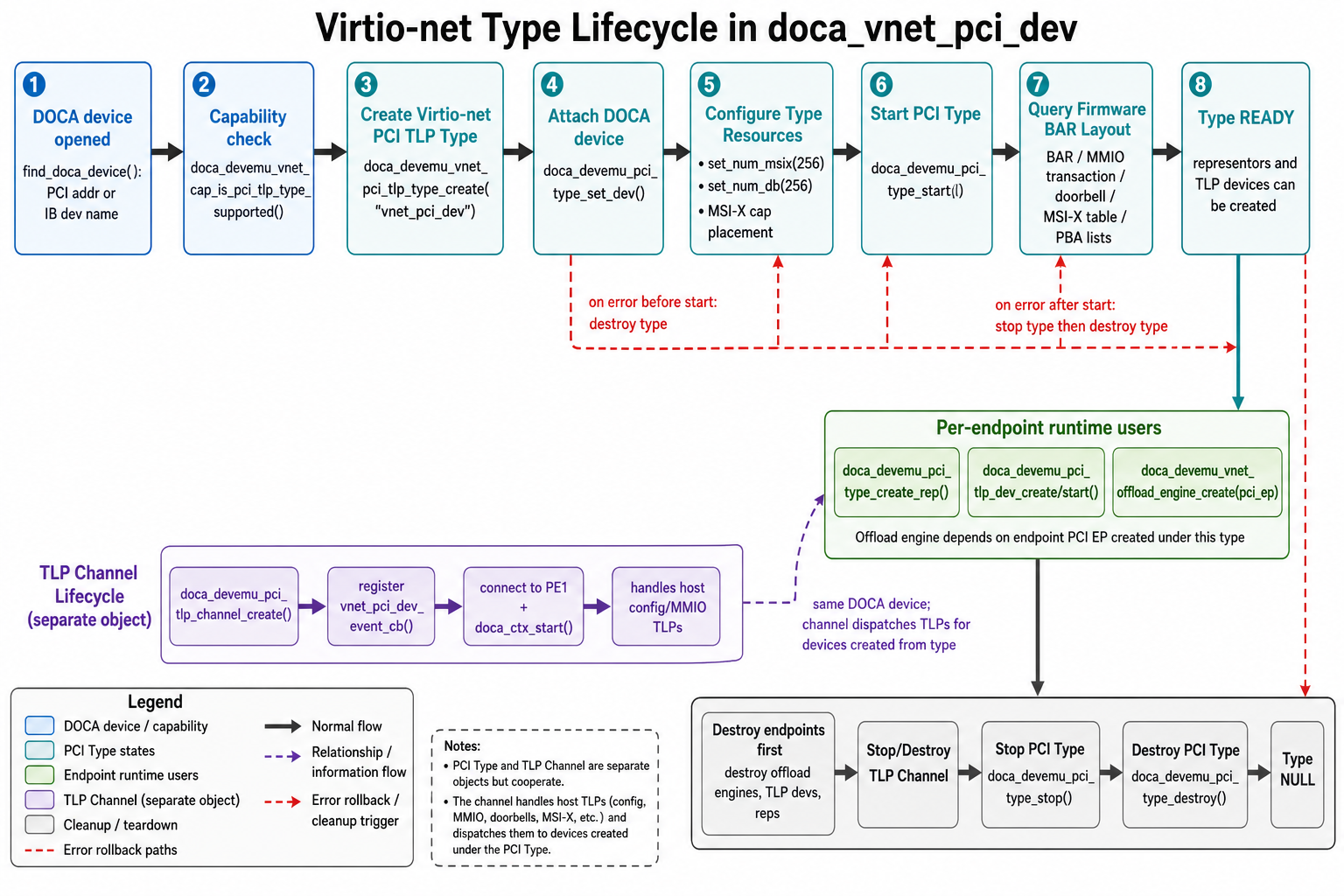
The following diagram shows how the virtio-net PCI TLP type is configured and started.
The virtio-net type is a PCI TLP type specialized for virtio-net emulation.
Important APIs:
-
doca_devemu_vnet_cap_is_pci_tlp_type_supported() -
doca_devemu_vnet_pci_tlp_type_create() -
doca_devemu_pci_type_set_dev() -
doca_devemu_pci_type_set_num_msix() -
doca_devemu_pci_type_set_num_db() -
doca_devemu_pci_tlp_type_set_pci_cap_conf() -
doca_devemu_pci_type_start()
The reference application creates the type in vnet_pci_device_init(), sets MSI-X and doorbell counts, configures MSI-X capability placement, starts the type, and then queries the predefined virtio-net BAR layout provided by firmware.
Virtio-net Offload Engine
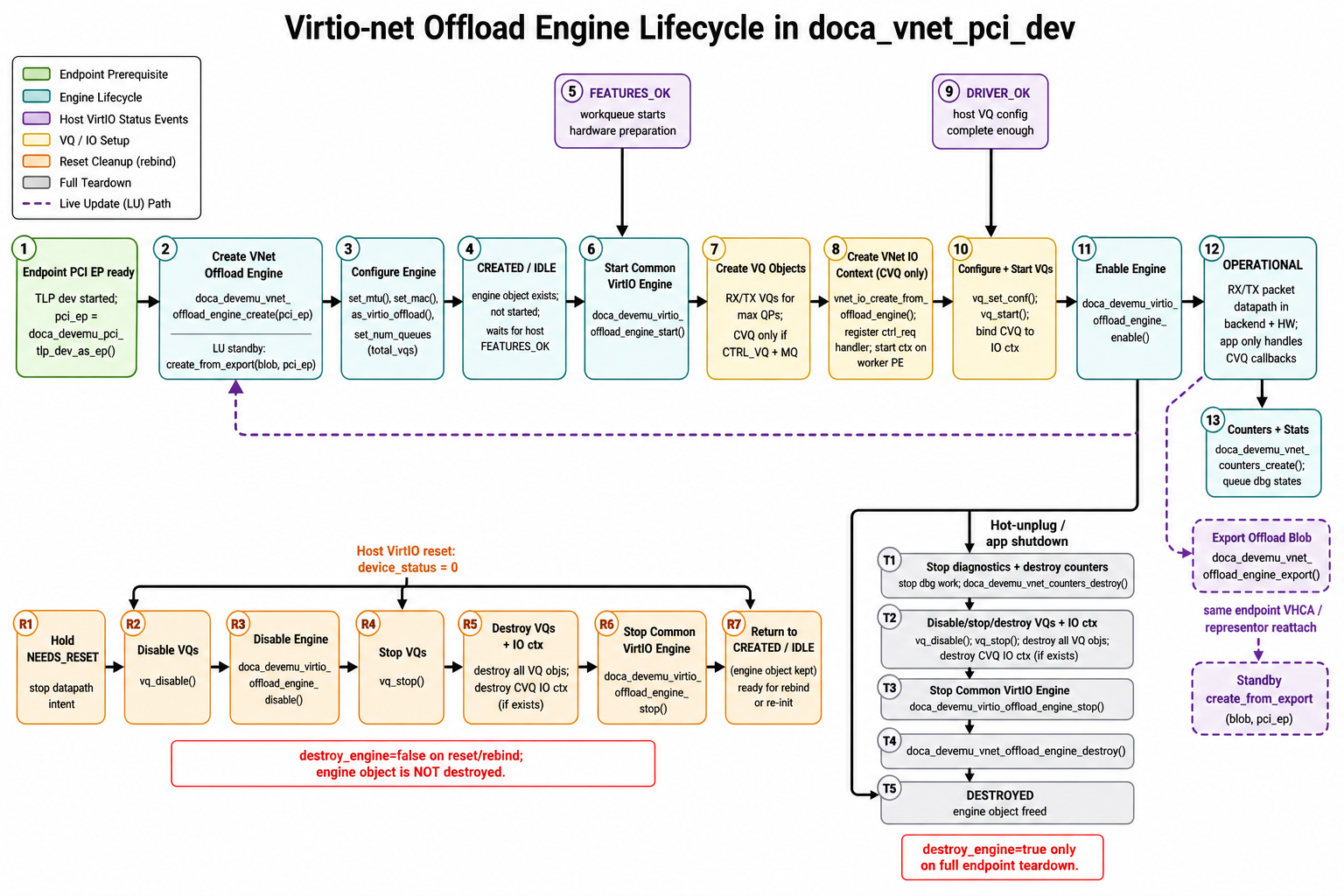
The following diagram shows the per-endpoint offload-engine lifecycle.
The offload engine is the per-endpoint DevEmu Virtio-net object that owns virtqueue state and network-specific configuration.
Important APIs:
-
doca_devemu_vnet_offload_engine_create() -
doca_devemu_vnet_offload_engine_create_from_export() -
doca_devemu_vnet_offload_engine_export() -
doca_devemu_vnet_offload_engine_destroy() -
doca_devemu_vnet_offload_engine_set_mtu() -
doca_devemu_vnet_offload_engine_set_mac() -
doca_devemu_virtio_offload_engine_set_feature_enabled() -
doca_devemu_vnet_offload_engine_get_rep() -
doca_devemu_vnet_offload_engine_as_virtio_offload()
After casting to common virtio offload:
-
doca_devemu_virtio_offload_engine_set_num_queues() -
doca_devemu_virtio_offload_engine_start() -
doca_devemu_virtio_offload_engine_enable() -
doca_devemu_virtio_offload_engine_disable() -
doca_devemu_virtio_offload_engine_stop()
The reference application creates the offload engine when a PCI endpoint is created, sets MTU and MAC, configures total queue count, but deliberately delays doca_devemu_virtio_offload_engine_start() until the host reaches FEATURES_OK.
Virtqueues
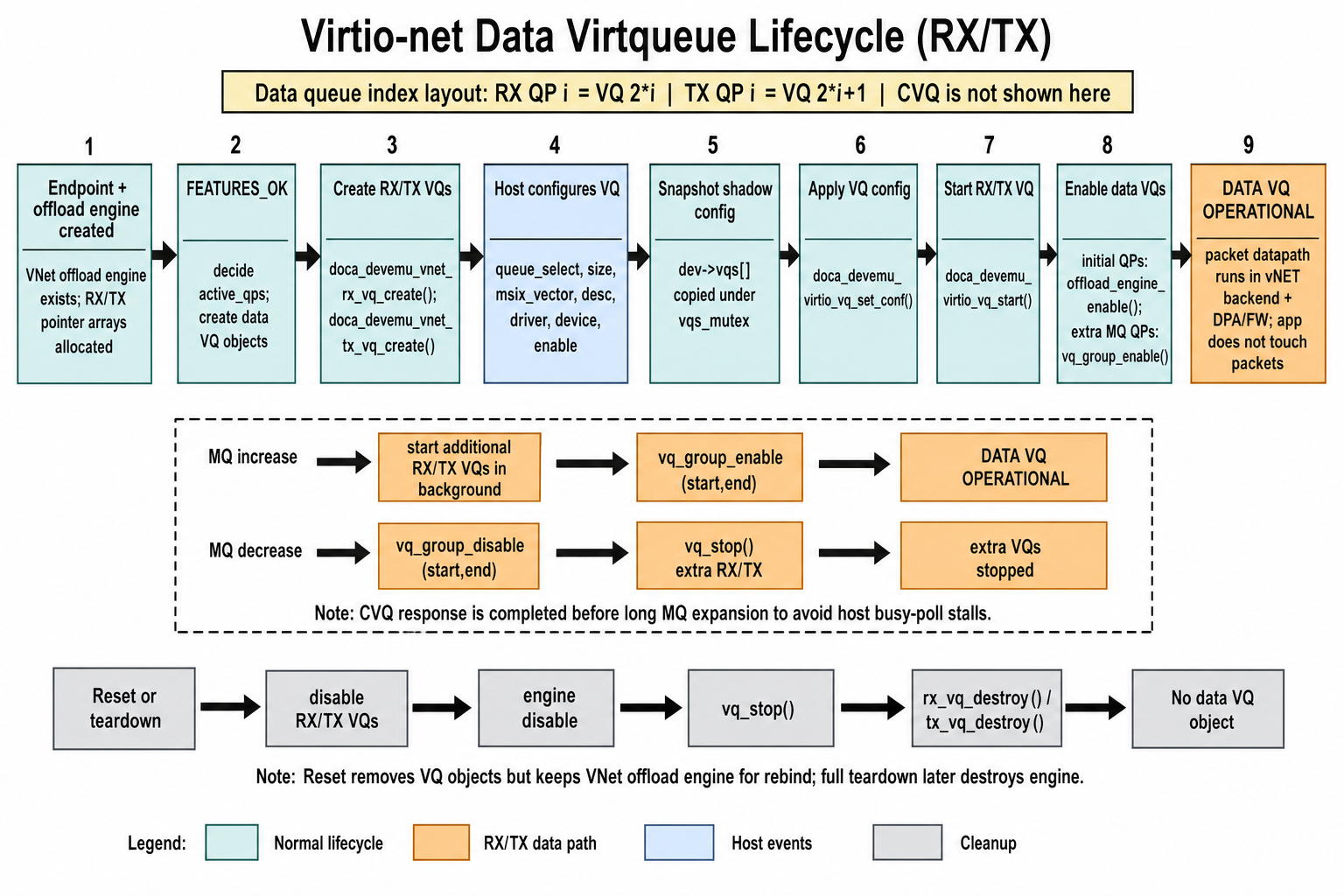
The following diagram shows the receive, transmit, and control virtqueues associated with an endpoint.
Virtio-net uses separate queue types:
-
RX virtqueue:
doca_devemu_vnet_rx_vq -
TX virtqueue:
doca_devemu_vnet_tx_vq -
Control virtqueue:
doca_devemu_vnet_ctrl_vq
Key APIs:
-
doca_devemu_vnet_rx_vq_create() -
doca_devemu_vnet_tx_vq_create() -
doca_devemu_vnet_ctrl_vq_create() -
doca_devemu_vnet_rx_vq_as_vq() -
doca_devemu_vnet_tx_vq_as_vq() -
doca_devemu_vnet_ctrl_vq_as_vq() -
doca_devemu_vnet_rx_vq_destroy() -
doca_devemu_vnet_tx_vq_destroy() -
doca_devemu_vnet_ctrl_vq_destroy()
The reference application uses queue index layout:
-
RX queue for queue pair
i:2 * i -
TX queue for queue pair
i:2 * i + 1 -
Control queue:
max_queue_pairs * 2 -
Total queues:
max_queue_pairs * 2 + 1
The control queue is created only when both VIRTIO_NET_F_CTRL_VQ and VIRTIO_NET_F_MQ are negotiated.
Virtio-net I/O Context
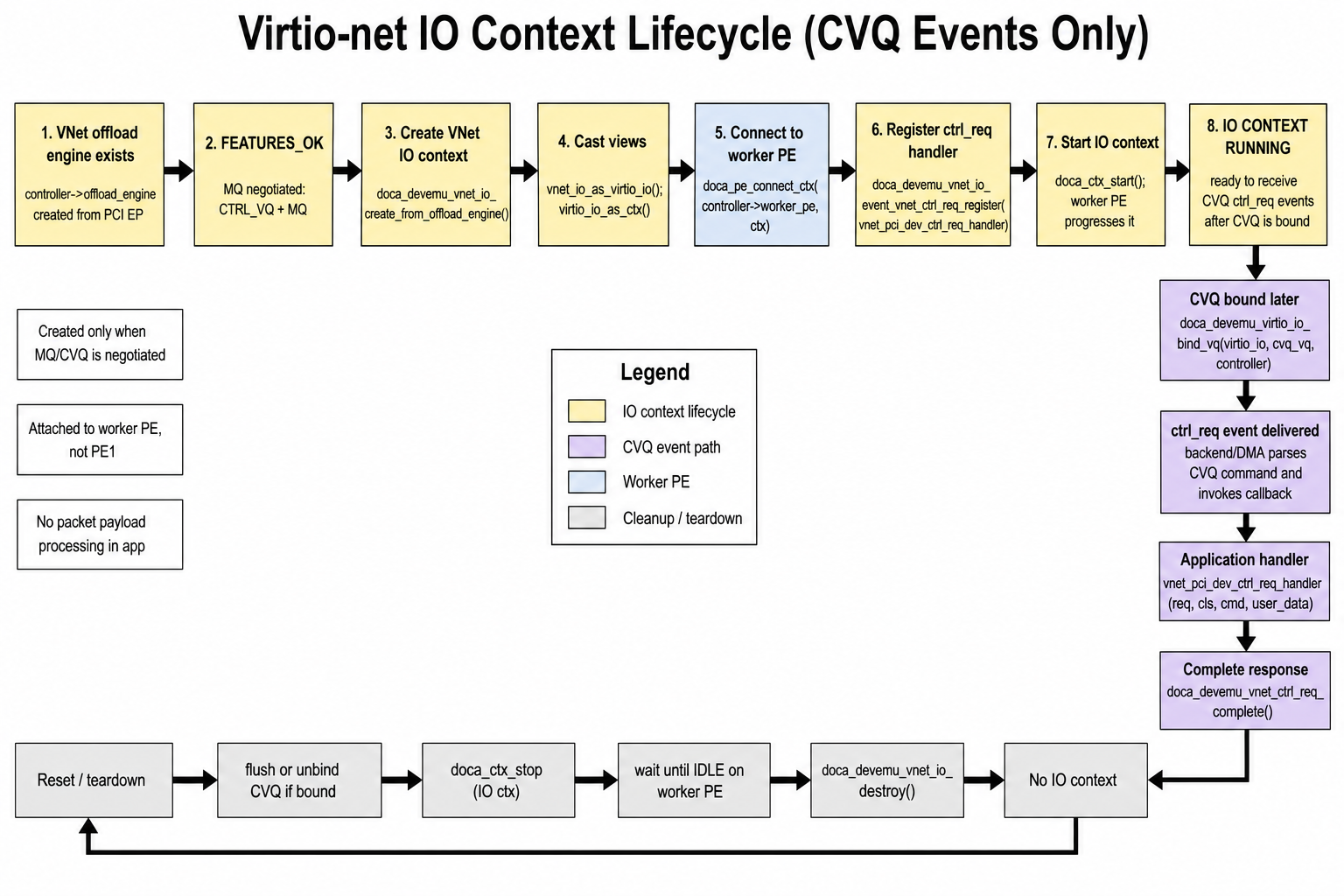
The following diagram shows how the I/O context routes control-virtqueue requests to the application.
The DevEmu Virtio-net I/O context routes control virtqueue requests to the application. It is not a packet data path callback context.
Key APIs:
-
doca_devemu_vnet_io_create_from_offload_engine() -
doca_devemu_vnet_io_destroy() -
doca_devemu_vnet_io_as_ctx() -
doca_devemu_vnet_io_as_virtio_io() -
doca_devemu_vnet_io_event_vnet_ctrl_req_register()
The reference application creates the I/O context only when MQ/CVQ is active. It connects the I/O context to a worker progress engine (PE), registers vnet_pci_dev_ctrl_req_handler(), starts the context, and later binds the CVQ with doca_devemu_virtio_io_bind_vq().
Control Request
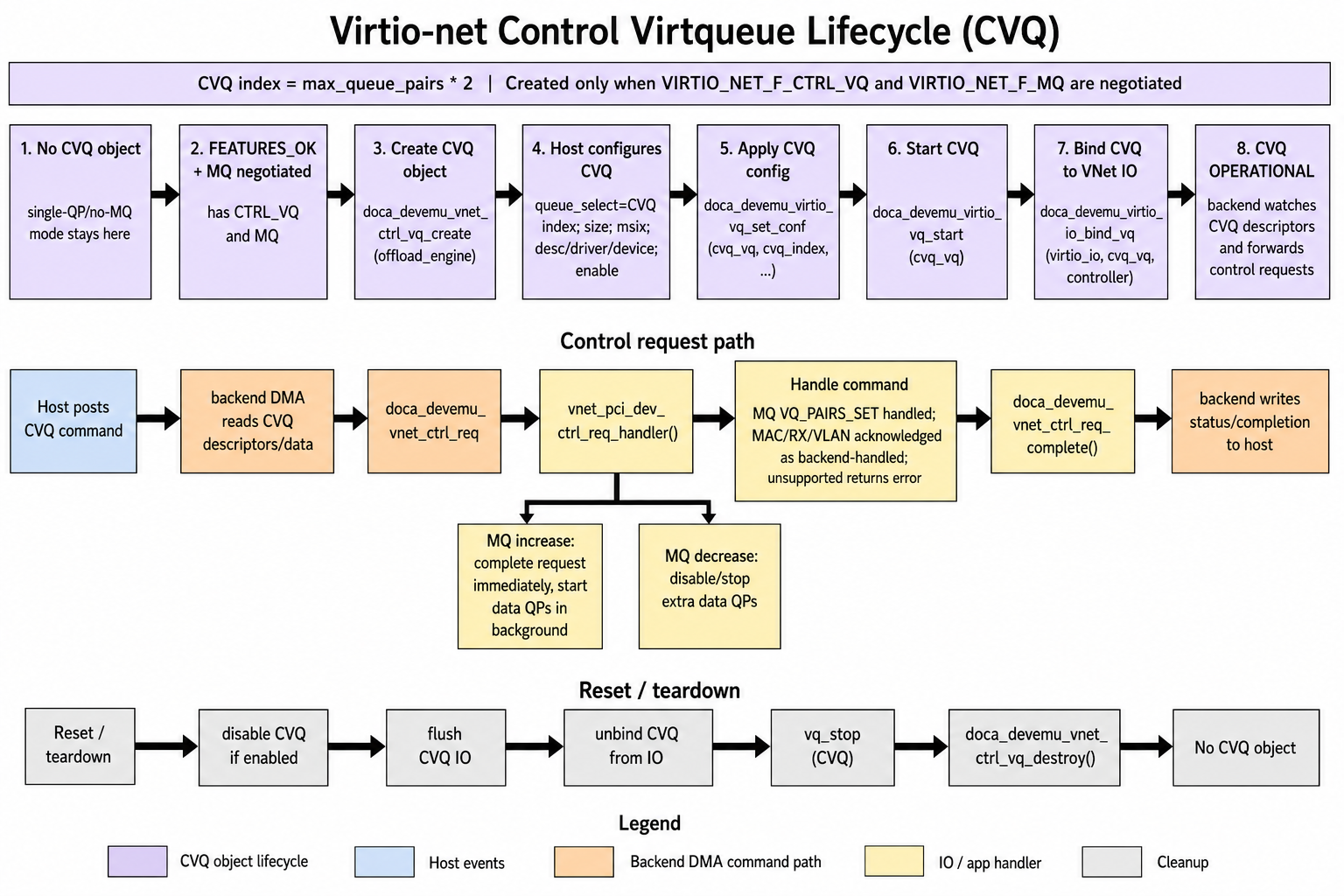
The following diagram shows how the application receives, processes, and completes a control request.
A control request represents one virtio-net CVQ command.
Handler signature:
void handler(struct doca_devemu_vnet_ctrl_req *req, uint8_t cls, uint8_t cmd, void *req_user_data);
Key APIs:
-
doca_devemu_vnet_ctrl_req_get_vnet_io() -
doca_devemu_vnet_ctrl_req_get_vq_user_data() -
doca_devemu_vnet_ctrl_req_get_data() -
doca_devemu_vnet_ctrl_req_get_data_len() -
doca_devemu_vnet_ctrl_req_get_result() -
doca_devemu_vnet_ctrl_req_get_result_len() -
doca_devemu_vnet_ctrl_req_complete()
The reference application handles VIRTIO_NET_CTRL_MQ/VIRTIO_NET_CTRL_MQ_VQ_PAIRS_SET. MAC, RX, and VLAN control classes are acknowledged as backend-handled in the sample.
Feature Bits
The reference application advertises these default network features:
-
VIRTIO_NET_F_CSUM -
VIRTIO_NET_F_MTU -
VIRTIO_NET_F_MAC -
VIRTIO_NET_F_STATUS -
VIRTIO_NET_F_HOST_TSO4 -
VIRTIO_NET_F_HOST_TSO6 -
VIRTIO_NET_F_SPEED_DUPLEX
It always adds:
-
VIRTIO_F_VERSION_1 -
VIRTIO_F_ACCESS_PLATFORM -
VIRTIO_NET_F_CTRL_VQ -
VIRTIO_NET_F_MQ -
VIRTIO_F_ADMIN_VQ
Optional offload features can be enabled with a CLI argument. See Optional Features for configuration details:
-
VIRTIO_NET_F_GUEST_CSUM -
VIRTIO_NET_F_GUEST_TSO4 -
VIRTIO_NET_F_GUEST_TSO6 -
VIRTIO_NET_F_GUEST_ECN -
VIRTIO_NET_F_GUEST_UFO -
VIRTIO_NET_F_HOST_ECN -
VIRTIO_NET_F_HOST_UFO -
VIRTIO_NET_F_MRG_RXBUF
Even though the application advertises control queue and multiqueue support, it still checks what the driver negotiated. If both CTRL_VQ and MQ are not negotiated, the application skips CVQ creation and I/O context initialization and runs with one active queue pair.
Device Configuration Layout
The following simplified structure shows the device-configuration fields described in this section:
struct vnet_virtio_net_config {
    uint8_t mac[ETH_ALEN];
    uint16_t status;
    uint16_t max_virtqueue_pairs;
    uint16_t mtu;
    uint32_t speed;
    /* Additional device-configuration fields. */
};
The application initializes this from CLI or configuration values:
-
MAC address
-
Link status
-
Maximum queue pairs
-
MTU
-
Speed
The common virtio configuration and queue shadow state are maintained by the application, not by the virtio-net library. Host writes to queue addresses, queue size, queue MSI-X vector, queue enable, device status, and feature selectors are decoded from TLP MMIO and configuration-space accesses and reflected into the application’s shadow structures.
Global Configuration
The current DevEmu Virtio-net public API has a smaller global configuration surface than DevEmu Virtio-blk.
Key APIs:
-
doca_devemu_vnet_add_dev() -
doca_devemu_vnet_rm_dev() -
doca_devemu_vnet_set_vnet_ctrl_req_user_data_size() -
doca_devemu_vnet_get_vnet_ctrl_req_user_data_size() -
doca_devemu_vnet_init() -
doca_devemu_vnet_teardown()
Unlike DevEmu Virtio-blk, the DevEmu Virtio-net headers do not expose global seg_max, queue-size, or data path-on-DPA configuration APIs.
The reference application performs:
-
Add DOCA device to DevEmu Virtio-net.
-
Initialize the DevEmu Virtio-net subsystem.
-
Parse and store MAC/MTU/queue-pair settings.
-
Create per-endpoint offload engines later.
Discovery and PCI Setup
A typical DevEmu Virtio-net TLP setup flow is:
-
Open a DOCA device by PCI address or IB device name.
-
Query
doca_devemu_vnet_cap_is_pci_tlp_type_supported(). -
Create the DevEmu Virtio-net PCI TLP type with
doca_devemu_vnet_pci_tlp_type_create(). -
Attach the DOCA device to the PCI type.
-
Configure MSI-X and doorbell counts.
-
Configure PCI capabilities such as MSI-X.
-
Start the PCI type.
-
Create a TLP channel with
doca_devemu_pci_tlp_channel_create(). -
Register the TLP request handler.
-
Connect the TLP channel context to the main progress engine.
-
Start the TLP channel context.
-
Create endpoint representors and TLP devices.
The reference application uses a main progress engine for TLP handling and one worker progress engine per controller for slower DOCA operations.
Initialization Flow
Application Startup
At process startup, the application:
-
Allocates
tlp_context. -
Opens the DOCA device.
-
Creates the main progress engine.
-
Initializes the DevEmu Virtio-net PCI framework and workqueue.
-
Creates and starts the virtio-net PCI TLP type.
-
Creates and starts the TLP channel.
-
Connects the TLP channel to the main PE.
-
Initializes software topology.
-
Calls DevEmu Virtio-net global init.
-
Creates the software virtio-net device model.
-
In static mode, creates all endpoint representors and TLP devices.
-
Creates one DevEmu Virtio-net controller per endpoint.
-
Creates one worker PE per controller.
-
Enters the progress loop.
Per-Endpoint Controller Creation
For each endpoint, the application:
-
Creates or reattaches a PCI representor.
-
Creates a TLP device.
-
Starts the TLP device.
-
Creates a virtio-net offload engine from the PCI endpoint.
-
Sets MTU.
-
Sets MAC address.
-
Sets total number of queues on the common virtio offload engine.
-
Allocates RX and TX VQ pointer arrays.
-
Queries the associated representor for logging/debug.
The offload engine is created before host driver probing, but not started until FEATURES_OK.
FEATURES_OK
When the host writes FEATURES_OK, the application queues asynchronous work:
-
Determine whether
CTRL_VQandMQwere both negotiated. -
Set
num_active_qpsto1. -
Set
max_queue_pairsto the configured maximum if MQ is active, otherwise1. -
Apply optional features if negotiated.
-
Start the offload engine.
-
Create RX and TX VQs for all configured queue pairs.
-
Create CVQ only if MQ/CVQ was negotiated.
-
Create and start the I/O context only if CVQ is needed.
This work is queued to avoid blocking TLP completions on slow DOCA or firmware operations.
DRIVER_OK
When the host writes DRIVER_OK, the application:
-
Verifies the first queue pair is fully configured.
-
Applies queue configurationuration with
doca_devemu_virtio_vq_set_conf(). -
Starts active RX and TX VQs with
doca_devemu_virtio_vq_start(). -
Starts the CVQ if configured.
-
Binds the CVQ to the I/O context.
-
Enables the offload engine with
doca_devemu_virtio_offload_engine_enable(). -
Creates DevEmu Virtio-net counters for debug/statistics.
At this point the device is operational.
Execution Phase
Control Path
The control path includes:
-
TLP request handling.
-
PCI configuration-space and MMIO emulation.
-
Virtio feature negotiation.
-
Device status transitions.
-
Queue configuration writes.
-
Queue lifecycle.
-
CVQ command handling.
-
Configuration-change MSI-X notification.
-
Reset and hot plug.
The application keeps TLP handling latency-sensitive. Time-consuming work runs on a workqueue and worker PEs. Slow endpoint creation or large multiqueue startup can otherwise cause PCIe completion timeouts or host stalls.
Data Path
For DevEmu Virtio-net, the application does not receive every packet. RX and TX virtqueues are configured and then owned by the DevEmu Virtio-net offload engine. Once queues are started and the engine is enabled, packet movement is handled by the DevEmu Virtio-net offload path.
The application still owns:
-
Virtqueue creation.
-
Virtqueue configurationuration from host-provided ring addresses.
-
Virtqueue start, stop, enable, and disable.
-
Multiqueue control.
-
Debug counters and virtqueue stats.
-
Representor and integration logic.
The application handles CVQ commands through doca_devemu_vnet_ctrl_req, not packet payloads.
Control Virtqueue Path
The CVQ path is:
-
Host submits a virtio-net control command.
-
DevEmu Virtio-net library receives the CVQ command.
-
The registered I/O handler is invoked with
req,cls, andcmd. -
The application reads command-specific data using
doca_devemu_vnet_ctrl_req_get_data(). -
The application optionally writes command-specific result data using
doca_devemu_vnet_ctrl_req_get_result(). -
The application completes with
doca_devemu_vnet_ctrl_req_complete(req, ack, len).
For VIRTIO_NET_CTRL_MQ_VQ_PAIRS_SET, the application reads the requested queue-pair count and validates it.
If the request decreases active queue pairs, extra queues are disabled/stopped synchronously.
If the request increases active queue pairs, the application completes the CVQ request immediately with VIRTIO_NET_OK and starts additional queues asynchronously. This avoids blocking the host in virtnet_send_command() while many queues are started.
Reset Flow
When the host writes device_status = 0, the application treats it as a virtio device reset.
The reset path:
-
Queues controller cleanup asynchronously.
-
Keeps the offload engine object alive for normal driver rebind.
-
Disables VQs if the engine is enabled.
-
Disables the engine.
-
Stops VQs.
-
Flushes and unbinds CVQ if needed.
-
Stops and destroys the I/O context.
-
Destroys VQs.
-
Stops the engine.
-
Leaves the engine object available unless this is full teardown.
For hot-unplug, the application intentionally does not destroy the engine on the reset edge alone. It waits for the later PCIe power-off or delayed-destroy path so that a reset during driver probe is not misclassified as final removal.
Teardown Flow
Full teardown performs stricter cleanup than reset:
-
Shut down the PCI configuration workqueue.
-
Stop stats and counter collection.
-
Destroy DevEmu Virtio-net counters.
-
Destroy queue debug state lists.
-
Destroy configuration MSI-X object if present.
-
Disable VQs.
-
Disable the offload engine.
-
Stop VQs.
-
Flush and unbind CVQ.
-
Stop and destroy I/O context.
-
Destroy RX, TX, and CVQ objects.
-
Stop the offload engine.
-
Destroy the DevEmu Virtio-net offload engine.
-
Stop and destroy TLP devices.
-
Destroy or close representors.
-
Stop and destroy the PCI type.
-
Tear down the DevEmu Virtio-net subsystem.
-
Remove the DOCA device from DevEmu Virtio-net.
-
Destroy progress engines and close the DOCA device.
Hot Plug
In hot-plug mode, endpoints are created and destroyed dynamically. The application accepts runtime commands such as plug and unplug. Hot-plug work is performed on the worker path rather than directly on the TLP progress path.
For plug:
-
Create representor.
-
Create and start TLP device.
-
Create DevEmu Virtio-net controller/offload engine.
-
Update slot state.
-
Notify the host.
For unplug:
-
Mark unplug pending.
-
Signal hot-plug state to the host.
-
Keep the device alive while the host resets/removes the driver.
-
Destroy the endpoint only after the host reaches the expected power-off/removal sequence.
Counters and Debug State
The DevEmu Virtio-net library exposes counters through doca_devemu_vnet_counters.
The reference application creates counters after the engine is enabled and periodically collects:
-
RX virtqueue counters.
-
TX virtqueue counters.
-
Common virtio queue debug state.
The application also maintains per-controller debug-state collection. Queue debug state is stored in a doca_devemu_virtio_queue_dbg_state list. Each populated entry includes the queue ID, enabled state, queue size, in-flight request count, hardware available and used indexes, and driver available and used indexes.
The application stops collection before teardown to avoid destroying resources still in use by asynchronous population.
The following common VirtIO counters are maintained per virtqueue:
|
Counter |
Description |
|
heads_fetched |
Number of descriptor-chain heads fetched from the available ring |
|
heads_completed |
Number of descriptor-chain heads completed towards the driver |
|
doorbells_handled |
Number of doorbell events handled for the virtqueue |
|
msix_raised |
Number of MSI-X interrupts raised for the virtqueue |
The first four are common virtio counters, shared with other virtio device types. Read them with doca_devemu_virtio_queue_counters_get_<counter>() after casting the list element with doca_devemu_vnet_counters_vq_as_virtio_queue_counters().
Reading the Counters
Perform the following steps:
-
doca_devemu_vnet_counters_create(): Create a counters object on an enabled offload engine. Only one instance is allowed per offload engine, and the object keeps the offload engine enabled for as long as it exists (doca_devemu_virtio_offload_engine_disable()returnsDOCA_ERROR_IN_USE). -
doca_devemu_vnet_counters_reset(): Optionally establish a zero baseline. All subsequent values are accumulated since this call. -
doca_devemu_vnet_counters_populate_sync(): Sample all currently enabled VQs. The call is synchronous — it returns with the values already in place, so there is no equivalent ofis_populated()to poll. -
Read the values with the getters, addressing each queue by its
vq_index.doca_devemu_vnet_counters_vq_as_virtio_queue_counters()to obtain the common Virtio sample for a queue, then read it withdoca_devemu_virtio_queue_counters_get_heads_fetched(),..._get_heads_completed(),..._get_doorbells_handled(), and..._get_msix_raised(). -
doca_devemu_vnet_counters_destroy(): Destroy the counters object. Steps 2 to 4 may be repeated any number of times before it is destroyed, and the object must be destroyed before the offload engine can be disabled.
Live Update
The DevEmu Virtio-net offload engine supports export and import:
-
doca_devemu_vnet_offload_engine_export() -
doca_devemu_vnet_offload_engine_create_from_export()
The reference virtio-net PCI application uses these APIs in --lu-mode active/--lu-mode standby. During handover, the active process exports the offload engine state and the standby process imports it, then starts the restored engine and replays the required virtio queue state. The imported engine preserves runtime state such as MTU, MAC address, queue count, and queue configurationuration.
The standby path skips normal TLP channel setup initially and restores channel/offload state through the live-update sequence.
Optional Features
Some virtio features must be enabled explicitly on the offload engine through the optional-features API. These features typically affect the data path and do not require control-path handling.
Configure an optional feature in two stages:
-
Verify that the device supports the requested feature.
-
Enable or disable the feature before starting the offload engine.
Call doca_devemu_vnet_cap_is_offload_engine_feature_supported() with the virtio feature-bit index to determine whether the device supports the feature.
Advertise a feature to the host only if the device supports it and the application implements the negotiated behavior.
Call doca_devemu_virtio_offload_engine_get_feature_enabled() to determine whether the feature is enabled for a specific offload engine.
Before starting the offload engine, call doca_devemu_virtio_offload_engine_set_feature_enabled() to enable or disable the feature.
Reference Application Architecture
A user reading vnet_pci_dev should view it as three cooperating subsystems:
-
PCI/TLP emulator – decodes host configuration-space and MMIO TLPs and returns completions quickly.
-
virtio-net controller – tracks features, device status, queue configuration, reset, hot plug, and CVQ commands.
-
DevEmu Virtio-net offload integration – creates offload engines and queues, enables packet data path, exposes representor and counters.
The main TLP progress path must remain responsive. Virtqueue startup, hot plug, reset cleanup, statistics collection, and multiqueue scaling are moved off the main PE to avoid host-visible PCIe timeouts.
Last updated: