

Introduction
The NVIDIA DOCA™ Memos Target library is a C API for services that run on a CMX data node. A CMX data node is a storage-side node that holds SSDs and provides shared KV-cache capacity. The library translates incoming Key/Value (KV) STORE, EXIST, RETRIEVE, and DELETE commands into block-level read and write operations.
The library does not access storage media directly. The application that uses the library supplies the SSD management logic that performs the read and write operations on the backing storage media.
DOCA Memos Target works as a pair with DOCA Memos Initiator. For an overview of the DOCA Memos libraries and how they work together, see DOCA Memos.
The DOCA Memos Target APIs are an initial definition and are subject to change as the architecture evolves. Backward compatibility is not guaranteed. For the quality level of each DOCA library, see DOCA Libraries.
Prerequisites
This library follows the architecture of a DOCA Core Context. Before you continue, read the following DOCA Core sections:
Changes From Previous Releases
This is the first release of the DOCA Memos Target library.
Known Issues
-
A subsystem with no attached namespace does not report KV command set support to initiators until the first namespace is attached. Until then,
CAP.CSS.IOCSSis cleared, and Identify I/O Command Set does not list KV. Workaround: Attach at least one KV namespace to the subsystem before initiators connect. -
A namespace detached on the target during KV I/O can stay in "detaching" until it comes back, and the I/O in flight to it stops responding until then. Workaround: Stop all I/O to a namespace before detaching or destroying it on the target.
-
If the target reuses a removed namespace's NSID while the initiator is writing, KV stores land on a different namespace. Workaround: Stop all I/O to a namespace before detaching it on the target.
Limitations
-
Adding a backend to an attached namespace, or removing one from it, is not validated in this release. The change redistributes keys, so keys stored earlier might no longer be retrievable. Add all backends before attaching the namespace. Detaching a namespace effectively drops its existing data.
-
Disconnect all initiators from a subsystem on a port before removing that port from the subsystem.
doca_memos_target_subsys_rm_port()does not drop existing connections; they stay up and continue to perform I/O after the port is removed. -
The size of a namespace is the total capacity of its backends. The size parameter of
doca_memos_target_subsys_ns_create()has no effect, and a namespace cannot be resized once it is started. A size larger than the total capacity of the backends causesdoca_memos_target_subsys_attach_ns()to fail.
Environment
DOCA Memos Target applications run on the Arm cores of NVIDIA® BlueField® and require a DOCA device that supports the library. To select the device, use DOCA Core device discovery. The library validates each device that you register with doca_memos_target_add_dev() against doca_memos_target_cap_is_supported().
The library supports NVMe-oF over RDMA and the IPv4 and IPv6 address families. For details, see Device Support.
Architecture
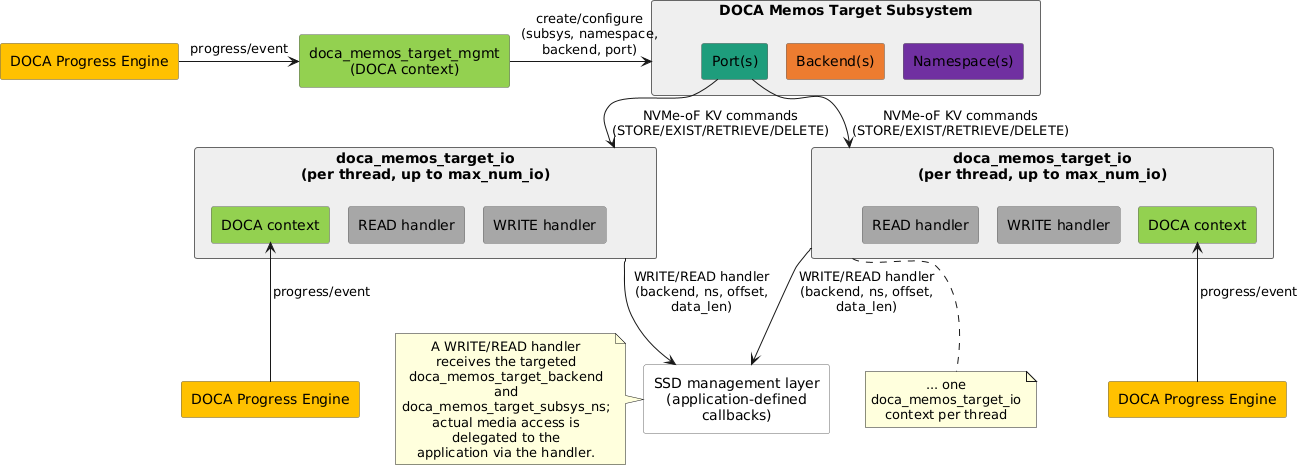
The management context (doca_memos_target_mgmt) and the I/O contexts (doca_memos_target_io) are DOCA Core Contexts. Each one connects to a DOCA progress engine, which you progress by calling doca_pe_progress().
-
The management context handles the target's management work, such as the lifecycles of its subsystems, ports, namespaces, and backends.
-
The I/O contexts receive Key/Value commands from DOCA Memos initiators and deliver the resulting READ and WRITE requests to the application. A DOCA Core Context is not thread-safe, so each thread that handles I/O needs its own I/O context.
Each NVMe-oF entity that the target exposes also has a corresponding object: a subsystem (doca_memos_target_subsys), its namespaces (doca_memos_target_subsys_ns), and the ports through which the subsystem is reachable (doca_memos_target_port). Each namespace stores its data in one or more backends (doca_memos_target_backend), which are storage regions that the application manages. You configure and drive these objects through the management context. They do not have progress engines of their own.
Many target operations are asynchronous and report their completion through a registered handler. The handler runs only if the function that starts the operation returns DOCA_SUCCESS. If the function returns an error, the operation failed immediately, and the handler does not run.
Objects
The following table describes the DOCA Memos Target objects:
|
Object |
Description |
Scope |
|---|---|---|
|
|
This DOCA Core Context progresses all management-path work: port, subsystem, namespace, and backend operations and their completion handlers. |
One per target process |
|
|
A subsystem is a storage-side, exported logical endpoint that is identified like an NVMe-oF subsystem. You attach namespaces and add ports to it. |
Multiple per target process |
|
|
A namespace is a logical Key/Value namespace that is backed by one or more backends. You attach it to a subsystem to expose it on the fabric. A subsystem can have up to its configured maximum number of namespaces. |
Multiple per subsystem |
|
|
A backend is a contiguous, block-addressed storage region. A namespace can aggregate more than one backend, and a backend belongs to at most one namespace at a time. |
Multiple per target process |
|
|
A port is a network listen endpoint that is defined by its transport type, address family, address, and service ID. You can add a port to multiple subsystems, and a subsystem can be reachable through multiple ports. |
Multiple per target process |
|
|
This DOCA Core Context receives NVMe Key/Value commands ( |
One per I/O thread |
|
|
A request is an abstract I/O request that an I/O context produces from a decoded incoming command. The I/O context hands the request to the application's registered READ or WRITE handler, and the application completes it with |
One per in-flight request |
The following figure shows the library components and how they interact:
Threading and Concurrency
The following rules apply to threads and handlers:
-
The management path includes the port, subsystem, namespace, and backend lifecycle calls and the completion handlers that those operations invoke. The library does not synchronize the management path. Do not run two management-path calls at once. Do not overlap any of them with
doca_pe_progress()on the management progress engine. One way to follow these rules is to issue every management call from the thread that progresses that engine. -
Handlers must not call
doca_pe_progress(). A completion handler that runs inside adoca_pe_progress()call can make more management calls because it runs on the same thread and does not overlap that call. -
I/O contexts are not on the management path. Each I/O context handles I/O independently, and you can progress its progress engine in parallel with the management path.
-
Some management operations depend on the I/O contexts. For example, subsystem start and stop, and namespace attach and detach, might involve I/O contexts. These operations cannot complete unless you keep progressing all I/O contexts.
Initialization Flow
The following sections describe the target initialization and the subsystem and namespace initialization.
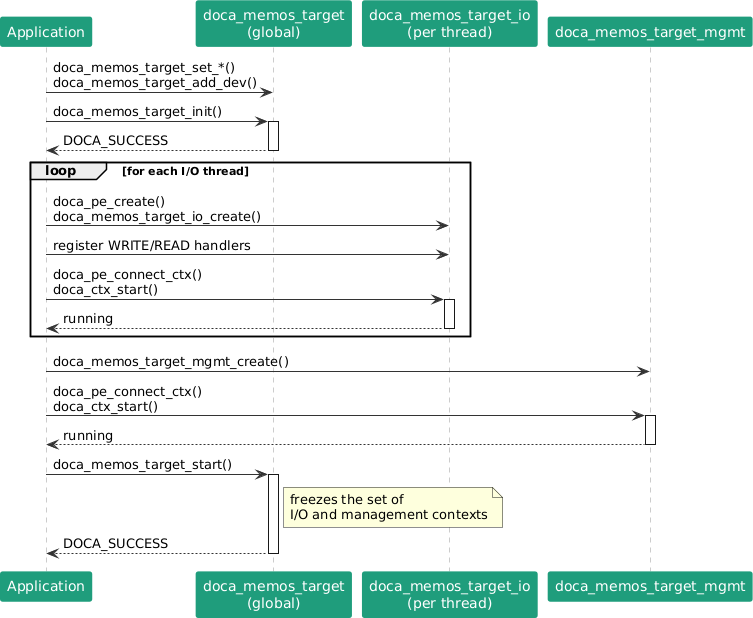
Target Initialization
-
Register devices with
doca_memos_target_add_dev(), and apply any optional configuration withdoca_memos_target_set_*(). For all configuration options, see Target Configuration. -
Call
doca_memos_target_init(). -
For each thread that handles I/O, set up an I/O context:
-
Create a progress engine with
doca_pe_create(). -
Create an I/O context with
doca_memos_target_io_create(). -
Register its READ and WRITE request handlers.
-
Connect the I/O context to the progress engine with
doca_pe_connect_ctx(). -
Start the I/O context with
doca_ctx_start().
-
-
Set up the management context:
-
Create the management context with
doca_memos_target_mgmt_create(). -
Connect it with
doca_pe_connect_ctx()to the progress engine that handles the target's management work. -
Start it with
doca_ctx_start().
-
-
Call
doca_memos_target_start(). This call ends the configuration phase and freezes the set of I/O contexts and the management context.
The following figure shows the target initialization sequence:
Subsystem and Namespace Initialization
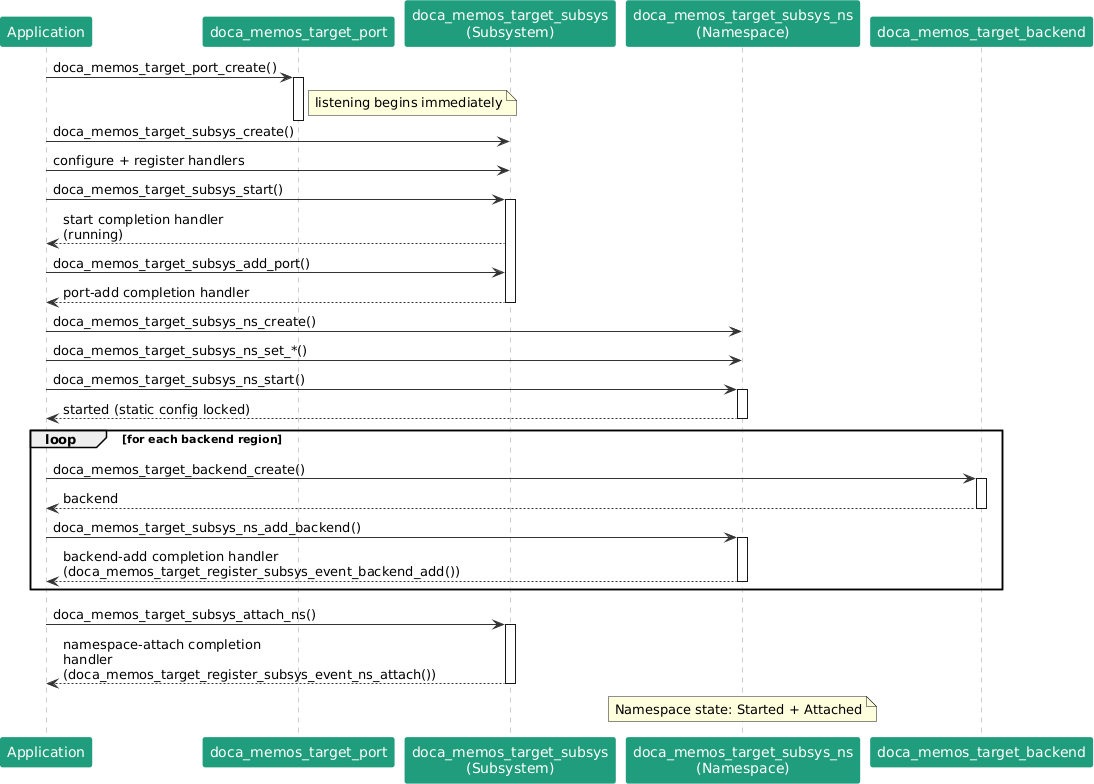
A subsystem accepts namespaces and ports only after it is running. To create and start a subsystem, do the following:
-
Create the subsystem with
doca_memos_target_subsys_create(). -
Set the NVMe Qualified Name (NQN) with
doca_memos_target_subsys_set_nqn(), and set any optional subsystem properties. For the options, see Subsystems. -
Register the start and stop completion handlers. Both handlers are required.
-
Register the namespace attach and detach, backend add and remove, and port add and remove completion handlers. Without them, the application cannot tell when these asynchronous operations complete or whether they succeed.
-
Call
doca_memos_target_subsys_start(). The operation is asynchronous: the subsystem enters the Starting state, and the registered start handler reports whether the subsystem reached the Running state or returned to Idle.
To make the subsystem reachable through a port, do the following:
-
Create a listener port with
doca_memos_target_port_create(). The port starts listening as soon as you create it, and you can add the same port to any number of subsystems. -
After the subsystem is running, add the port to it with
doca_memos_target_subsys_add_port(). The operation is asynchronous, and the registered port-add handler runs when it completes.
To add a namespace and its backends after the subsystem is running, do the following:
-
Create a namespace object with
doca_memos_target_subsys_ns_create(), and configure it withdoca_memos_target_subsys_ns_set_*(). -
Start the namespace object with
doca_memos_target_subsys_ns_start(). Starting the namespace locks its static configuration, and you can then add backends to it. -
Create a backend with
doca_memos_target_backend_create(). Pass it an attributes object that you allocate withdoca_memos_target_backend_create_attr_create()and configure withdoca_memos_target_backend_create_attr_set_*(): block size, number of blocks, write granularity, optimal write size, and optional user data. -
Add the backend to the namespace with
doca_memos_target_subsys_ns_add_backend(). The operation is asynchronous, and the registered backend-add handler runs when it completes. -
Repeat steps 3 and 4 for each additional backend.
-
Attach the namespace to the subsystem with
doca_memos_target_subsys_attach_ns(). The operation is asynchronous, and the registered namespace-attach handler runs when it completes.
The following figure shows the subsystem and namespace initialization sequence:
Teardown Flow
Keep progressing every I/O context until it has stopped at the end of target teardown. Otherwise, the namespace, port, and subsystem teardown steps might not complete.
Namespace and Backend Teardown
Reverse the namespace and backend initialization steps:
-
Detach the namespace from the subsystem with
doca_memos_target_subsys_detach_ns(). The operation is asynchronous, and the registered namespace-detach handler runs when it completes. -
Remove each backend from the namespace with
doca_memos_target_subsys_ns_rm_backend(). Each removal is asynchronous, and the registered backend-remove handler runs when it completes. -
Optional: If you no longer need the backends, destroy them with
doca_memos_target_backend_destroy(). -
Stop the namespace object with
doca_memos_target_subsys_ns_stop(). You can then reconfigure or destroy it. -
Optional: If you no longer need the namespace object, destroy it with
doca_memos_target_subsys_ns_destroy(). Target teardown requires every namespace object to be destroyed.
Port Removal
-
Remove the port from the subsystem with
doca_memos_target_subsys_rm_port(). The operation is asynchronous, and the registered port-remove handler runs when it completes. -
Optional: After you remove the port from every subsystem, destroy it with
doca_memos_target_port_destroy(). Destroying the port stops the listener.
Target Teardown
After you destroy every namespace and remove every port from its subsystems, tear down the target:
-
If you have not already destroyed the backends, destroy them with
doca_memos_target_backend_destroy(). -
Stop each subsystem with
doca_memos_target_subsys_stop(). Each stop is asynchronous, and the registered stop handler runs when the subsystem reaches Idle. -
Destroy each subsystem with
doca_memos_target_subsys_destroy(). -
If you have not already destroyed the ports, destroy them with
doca_memos_target_port_destroy(). -
Call
doca_memos_target_stop(). This call does not stop the I/O contexts or the management context. -
Stop and destroy the management context and every I/O context. A context that is stopped but not destroyed blocks teardown.
-
Call
doca_memos_target_teardown().
To restart the target instead of continuing the teardown after step 5, change the I/O contexts or the management context if needed, and then call doca_memos_target_start() again.
Configuration Phase
In the configuration phase, the application registers devices, initializes the target, and creates and starts the management context and one I/O context for each thread that handles I/O. Do all configuration in this phase from a single thread. The phase ends when you call doca_memos_target_start(). For the required order, see Target Initialization.
Target Configuration
Apply all target configuration before you call doca_memos_target_init(). Configuration calls that you make after initialization return DOCA_ERROR_BAD_STATE.
You must apply the following configuration:
|
Configuration |
API |
|---|---|
|
Register every DOCA device whose network interfaces the target listens on. |
|
If you do not register at least one device, doca_memos_target_init() fails.
The following configuration is optional:
|
Configuration |
API |
Default |
Notes |
|---|---|---|---|
|
Per-request user-data buffer size |
|
0 bytes |
With the default size of 0, no buffer is allocated. |
|
Target-wide maximum namespace value length |
|
8 MiB |
The value must be at least |
|
Custom request-buffer allocator |
|
Internal default allocator |
The |
The target allocates request data buffers from the registered allocator, mostly during initialization rather than for each request, and frees them during teardown. With the internal default allocator, the application might need to DMA-map the request buffers for its backend devices on the data path. For optimal performance, register a custom allocator, for example, one that returns memory that the application has already DMA-mapped for its devices.
Management Context
The management context has no configuration of its own. To get its DOCA context, call doca_memos_target_mgmt_as_ctx(). For the setup steps, see Target Initialization.
I/O Contexts
To get the DOCA context of an I/O context, call doca_memos_target_io_as_ctx(). For the setup steps, see Target Initialization. At most doca_memos_target_get_max_num_io() I/O contexts can exist.
You must register the following handlers before you call doca_ctx_start() on the I/O context:
|
Configuration |
API |
|---|---|
|
READ request handler |
|
|
WRITE request handler |
|
Device Support
You can query device capabilities without creating a target instance. Use the following functions:
|
Capability |
API |
|---|---|
|
DOCA Memos Target support |
|
|
NVMe-oF transport type support |
|
|
NVMe-oF address family support |
|
The capability functions report whether each recognized value is supported. For a value outside the NVMe-oF specification, doca_memos_target_cap_is_trtype_supported() and doca_memos_target_cap_is_adrfam_supported() return DOCA_ERROR_INVALID_VALUE instead.
The following table lists the NVMe-oF transport types that the library recognizes and whether the library supports each one:
|
NVMe-oF Transport Type |
Supported |
|---|---|
|
RDMA |
Yes |
|
TCP |
Recognized, not supported |
|
Fibre Channel (FC) |
Recognized, not supported |
|
Intra-host |
Recognized, not supported |
The following table lists the NVMe-oF address families that the library recognizes and whether the library supports each one:
|
NVMe-oF Address Family |
Supported |
|---|---|
|
IPv4 |
Yes |
|
IPv6 |
Yes |
|
InfiniBand (IB) |
Recognized, not supported |
|
FC |
Recognized, not supported |
|
Intra-host |
Recognized, not supported |
If you set a port attribute to a recognized but unsupported value with doca_memos_target_port_create_attr_set_trtype() or doca_memos_target_port_create_attr_set_adrfam(), the call returns DOCA_ERROR_NOT_SUPPORTED.
Execution Phase
After the target starts, the application creates and configures the subsystems, namespaces, backends, and ports that serve traffic. The library delivers I/O requests and the completions of management operations to the application as events. The application processes these events in the handlers that it registers. For the rules that handlers must follow, see Threading and Concurrency.
Subsystems
Configure a subsystem while it is Idle. Configuration calls that you make while the subsystem is in any other state return DOCA_ERROR_BAD_STATE.
You must apply the following configuration before you call doca_memos_target_subsys_start():
|
Configuration |
API |
|---|---|
|
NQN |
|
|
Start completion handler |
|
|
Stop completion handler |
|
The following configuration is optional:
|
Configuration |
API |
Default |
Notes |
|---|---|---|---|
|
Maximum namespace count |
|
Implementation-defined |
The value is bounded by |
|
Namespace ID (NSID) range |
|
Implementation-defined |
To get the current range, call |
|
Namespace attach and detach completion handlers |
|
Not registered |
Register these handlers. Without them, the application cannot tell when an asynchronous attach or detach operation completes or whether it succeeds. |
|
Backend add and remove completion handlers |
|
Not registered |
Register these handlers. Without them, the application cannot tell when an asynchronous add or remove operation completes or whether it succeeds. |
|
Port add and remove completion handlers |
|
Not registered |
Register these handlers. Without them, the application cannot tell when an asynchronous add or remove operation completes or whether it succeeds. |
Namespaces
Configure a namespace while it is Stopped. Configuration calls that you make while it is Started return DOCA_ERROR_BAD_STATE. The exception is the namespace size: if no attach or detach operation is pending, you can also change it with doca_memos_target_subsys_ns_set_size() while the namespace is Started.
You must set the following configuration before you call doca_memos_target_subsys_ns_start():
|
Configuration |
API |
Notes |
|---|---|---|
|
Namespace ID (NSID) |
|
The NSID must be nonzero, unique within the subsystem, and inside the subsystem's configured NSID range. |
The following configuration is optional:
|
Configuration |
API |
Default |
|---|---|---|
|
Namespace globally unique identifier (NGUID) |
|
Zero-filled |
|
Maximum value length |
|
Target-wide maximum (8 MiB by default) |
|
Namespace size (NSZE) |
|
0 |
|
User data |
|
0 |
|
Tenant ID |
|
0 |
The maximum value length must be at least doca_memos_target_cap_get_min_ns_value_len(), a multiple of doca_memos_target_cap_get_ns_value_len_align(), and no larger than the target-wide maximum that you set with doca_memos_target_set_max_ns_value_len().
In this release, the target stores the tenant ID but does not verify it, so the tenant ID does not restrict which initiators can perform I/O on the namespace.
Backends
To create a backend, allocate an attributes object with doca_memos_target_backend_create_attr_create(), configure it, and pass it to doca_memos_target_backend_create(). The library copies the attributes into the new backend. You cannot change them afterward. You can reuse the attributes object for more backends, or destroy it with doca_memos_target_backend_create_attr_destroy() as soon as you create the backend.
You must set the following attributes:
|
Attribute |
API |
Description |
|---|---|---|
|
Logical block size |
|
The size is in bytes. It must be a power of two and no larger than |
|
Number of logical blocks |
|
The number must be nonzero. |
|
Write granularity |
|
The write granularity is the smallest write, in bytes, that the device performs without a read-modify-write cycle. It must be a power of two, a multiple of the block size, and no larger than |
|
Optimal write size |
|
The optimal write size is the write size, in bytes, at which the device reaches its maximum performance. It must be a nonzero multiple of the block size and no larger than |
The following attribute is optional:
|
Attribute |
API |
Default |
|---|---|---|
|
User data |
|
0 |
Ports
To create a port, allocate an attributes object with doca_memos_target_port_create_attr_create(), configure it, and pass it to doca_memos_target_port_create(). The library copies the attributes into the new port. You can reuse the attributes object for more ports, or destroy it with doca_memos_target_port_create_attr_destroy() as soon as you create the port.
For the supported transport types and address families, see Device Support. You must set the following attributes:
|
Attribute |
API |
|---|---|
|
Transport type |
|
|
Address family |
|
|
Transport address |
|
|
Transport service ID |
|
I/O Events
To serve a Key/Value command, an I/O context issues one or more READ and WRITE requests, and it can issue several of them in parallel. Each request reaches the application as a doca_memos_target_req through an I/O event, and the application completes it by calling doca_memos_target_req_complete().
Requests
Each READ or WRITE I/O event carries the following properties:
|
Property |
Description |
|---|---|
|
Request |
The event carries the request itself ( |
|
Request user data |
The event carries the per-request user-data buffer. To set its size, call |
|
Backend |
The event carries the backend that the request targets. To get the user data that you set when you created the backend, call |
|
Namespace |
The event carries the namespace that the request targets. To get its NSID or user data, call |
|
Subsystem |
To get the subsystem that the request targets, call |
|
I/O context |
To get the I/O context that delivered the request, call |
|
Offset |
The event carries the byte offset within the backend at which the request starts. |
|
Data length |
The event carries the total length, in bytes, of the data to read or write. |
|
Data buffers |
For a READ request, these are the output buffers that you fill with the data to return. For a WRITE request, they hold the data to write. To get the buffers, call |
The following limitations apply to requests:
-
Call
doca_memos_target_req_complete()and the request getters (doca_memos_target_req_get_*()) from the same thread that invoked the handler. -
The request, its user-data buffer, and its data buffers are valid only from handler invocation until completion.
-
Ownership of the request moves to the application when the handler is invoked, and back to the I/O context on completion.
READ Request Event
The following sections describe the configuration, trigger condition, output, and handling of the READ request event.
Event Configuration
|
Description |
API to Set the Configuration |
|---|---|
|
Register the handler |
|
Event Trigger Condition
The I/O context needs data read from a backend to serve a Key/Value command.
Event Output
The event carries a request with output buffers to fill. To get the buffers, call doca_memos_target_req_get_iovec() and doca_memos_target_req_get_iovcnt().
Event Handling
Fill the buffers that the output iovec describes with the data to return, and then call doca_memos_target_req_complete() with a status.
WRITE Request Event
The following sections describe the configuration, trigger condition, output, and handling of the WRITE request event.
Event Configuration
|
Description |
API to Set the Configuration |
|---|---|
|
Register the handler |
|
Event Trigger Condition
The I/O context needs data written to a backend to serve a Key/Value command.
Event Output
The event carries a request with the data to write. To get the buffers that hold the data, call doca_memos_target_req_get_iovec() and doca_memos_target_req_get_iovcnt().
Event Handling
Write the data in the buffers that the input iovec describes to the backend at the request's offset, and then call doca_memos_target_req_complete() with a status.
Management Events
The library delivers the following events on the management path. These events follow the rules in Threading and Concurrency.
Subsystem Events
The following sections describe the configuration, trigger condition, and output of the subsystem start and stop events.
Event Configuration
|
Description |
API to Set the Configuration |
|---|---|
|
Register the subsystem start handler |
|
|
Register the subsystem stop handler |
|
Event Trigger Condition
A doca_memos_target_subsys_start() or doca_memos_target_subsys_stop() operation completes, successfully or not.
Event Output
The handler receives the following arguments:
-
subsysis the subsystem whose operation completed. -
reg_user_datais the user data that you supplied at registration. -
op_user_datais the user data that you supplied to the start or stop call. Use it to correlate the completion with the call. -
statusisDOCA_SUCCESS, or an error code if the operation failed.
Port Events
The following sections describe the configuration, trigger condition, and output of the port add and remove events.
Event Configuration
|
Description |
API to Set the Configuration |
|---|---|
|
Register the port add handler |
|
|
Register the port remove handler |
|
Event Trigger Condition
A doca_memos_target_subsys_add_port() or doca_memos_target_subsys_rm_port() operation completes, successfully or not.
Event Output
The handler receives the following arguments:
-
subsysis the subsystem that the port was added to or removed from. -
reg_user_datais the user data that you supplied at registration. -
op_user_datais the user data that you supplied to the add or remove call. Use it to correlate the completion with the call. -
statusisDOCA_SUCCESS, or an error code if the operation failed.
Namespace Events
The following sections describe the configuration, trigger condition, and output of the namespace attach and detach events.
Event Configuration
|
Description |
API to Set the Configuration |
|---|---|
|
Register the namespace attach handlers |
|
|
Register the namespace detach handlers |
|
Event Trigger Condition
A doca_memos_target_subsys_attach_ns() or doca_memos_target_subsys_detach_ns() operation completes, successfully or not.
Event Output
The library calls the registered success handler or error handler with the following arguments:
-
subsysis the subsystem instance. -
nsis the namespace that the operation completed for. -
reg_user_datais the user data that you supplied at registration.
Backend Events
The following sections describe the configuration, trigger condition, and output of the backend add and remove events.
Event Configuration
|
Description |
API to Set the Configuration |
|---|---|
|
Register the backend add handlers |
|
|
Register the backend remove handlers |
|
Event Trigger Condition
A doca_memos_target_subsys_ns_add_backend() or doca_memos_target_subsys_ns_rm_backend() operation completes, successfully or not.
Event Output
The library calls the registered success handler or error handler with the following arguments:
-
nsis the namespace that the backend was added to or removed from. -
backendis the backend that you passed to the add or remove call. -
reg_user_datais the user data that you supplied at registration.
State Machine
The following sections describe the states of the management context, I/O contexts, subsystems, namespaces, backends, and ports.
Management Context States
The management context (doca_memos_target_mgmt) follows the DOCA Core Context state machine.
|
State |
Allowed Operations |
How to Reach |
|---|---|---|
|
Idle |
Connect the context to a progress engine with |
Create the context with |
|
Starting |
Call |
Call |
|
Running |
Issue port, subsystem, namespace, and backend calls on the management path after the target starts, call |
A Starting context moves to Running after the underlying start completes. |
|
Stopping |
Call |
Call |
doca_memos_target_mgmt_destroy() requires the context to be Idle.
I/O Context States
Each I/O context (doca_memos_target_io) follows the DOCA Core Context state machine.
|
State |
Allowed Operations |
How to Reach |
|---|---|---|
|
Idle |
Register the READ and WRITE handlers, call |
Create the context with |
|
Starting |
Call |
Call |
|
Running |
Call |
A Starting context moves to Running after the underlying start completes. |
|
Stopping |
Call |
Call |
doca_memos_target_io_destroy() requires the context to be Idle.
Subsystem States
A subsystem (doca_memos_target_subsys) is not a DOCA Core Context. You drive its lifecycle with doca_memos_target_subsys_start() and doca_memos_target_subsys_stop(), and the library reports state changes through the start and stop completion handlers. For details, see Subsystem Events.
|
State |
Description |
Allowed Operations |
|---|---|---|
|
Idle |
Inactive |
Configure the subsystem, register event handlers, or call |
|
Starting |
|
None. Wait for the registered start handler. |
|
Running |
Serving DOCA Memos initiators |
Attach or detach namespaces, add or remove ports, or call |
|
Stopping |
|
None. Wait for the registered stop handler. |
doca_memos_target_subsys_destroy() requires the subsystem to be Idle.
Namespace States
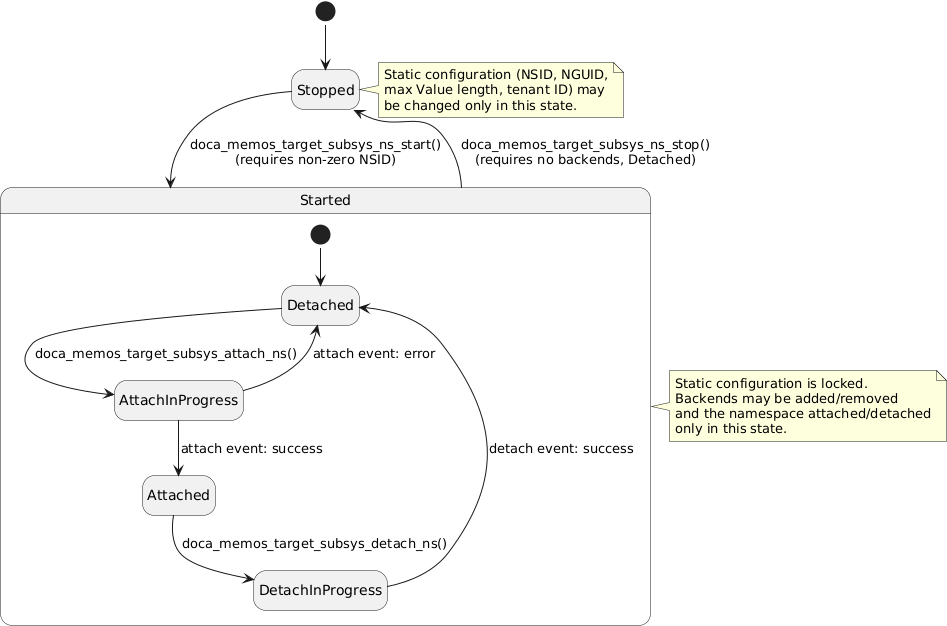
A namespace has a configuration state, which controls whether its static configuration is locked, and an attachment state, which controls whether the subsystem's NVMe-oF controllers can see the namespace. The following figure shows how the two states combine:
Configuration Lock
|
State |
Description |
Allowed Operations |
|---|---|---|
|
Stopped |
You can change the static configuration: NSID, NGUID, maximum value length, tenant ID, and user data. |
Call the configuration setters or |
|
Started |
The static configuration is locked. |
Add or remove backends, attach or detach the namespace, call |
doca_memos_target_subsys_ns_start() requires a nonzero NSID. doca_memos_target_subsys_ns_stop() requires the namespace to be detached and to have no backends added.
Attachment
The attachment state applies only after the namespace is Started.
|
State |
Description |
|---|---|
|
Detached |
The subsystem's NVMe-oF controllers cannot see the namespace. |
|
Attach in Progress |
|
|
Attached |
The subsystem's NVMe-oF controllers can see the namespace. |
|
Detach in Progress |
|
doca_memos_target_subsys_ns_destroy() requires the namespace to be both Stopped and Detached.
Backend and Port States
Backends (doca_memos_target_backend) and ports (doca_memos_target_port) have no intermediate states. A backend exists from doca_memos_target_backend_create() until doca_memos_target_backend_destroy(), and is either added to a namespace or not. To check, call doca_memos_target_backend_is_added(). A port listens from doca_memos_target_port_create() until doca_memos_target_port_destroy(), and is either added to a subsystem or not. You cannot destroy either object while it is still added.
DOCA Memos Target Samples
All DOCA samples described in this section are governed under the BSD-3 software license agreement.
DOCA Memos Simple Target
This sample shows how to use the DOCA Memos Target API to create and start a subsystem that exposes one file-backed namespace over one NVMe-oF RDMA port. The sample serves READ and WRITE requests against its backing file.
For the end-to-end example that connects this sample to the DOCA Memos Initiator Application and the DOCA Memos fio Plugin, see DOCA Memos Reference Application.
The sample logic includes the following steps:
-
Registering the buffer allocator and every device that supports the DOCA Memos Target library, and then initializing the target.
-
Opening and starting the target-level I/O context and the management context.
-
Starting the target, which freezes the set of I/O contexts and the management context.
-
Creating the target-level listener port.
-
Creating the subsystem, registering all of its completion handlers, and starting the subsystem.
-
Adding the listener port to the subsystem.
-
Adding a file-backed namespace: creating the namespace, adding a backend for the backing file with its write granularity and optimal write size set, and attaching the namespace to the subsystem.
-
Serving READ and WRITE requests against the backing file until interrupted, and then tearing everything down in reverse order.
For the source code, see the following files:
-
/opt/mellanox/doca/samples/doca_memos_target/memos_simple_target/memos_simple_target_main.c -
/opt/mellanox/doca/samples/doca_memos_target/memos_simple_target/memos_simple_target_sample.c -
/opt/mellanox/doca/samples/doca_memos_target/memos_simple_target/meson.build -
/opt/mellanox/doca/samples/doca_memos_target/README.md
Build the Sample
To install BlueField-related software, see DOCA Installation Guide for Linux. If you have issues installing, compiling, or running DOCA samples, see DOCA Troubleshooting.
Build the sample:
cd /opt/mellanox/doca/samples/doca_memos_target/memos_simple_target
meson /tmp/build
ninja -C /tmp/build
The build creates the doca_memos_simple_target binary in /tmp/build/.
Run the Sample
The sample requires the following command-line arguments:
|
Argument |
Description |
|---|---|
|
|
Transport address (IP) to listen on |
|
|
Transport service ID (port number) |
|
|
Backing file used as the namespace block device |
Start the sample:
/tmp/build/doca_memos_simple_target -a <target-ip> -p <target-port> -f <backing-file>
Replace <target-ip>, <target-port>, and <backing-file> with the values for the -a, -p, and -f arguments described in the preceding table.
The sample exposes a single subsystem with the NVMe Qualified Name (NQN) nqn.2026-06.com.nvidia:memos0 and runs until you stop it. To stop the sample, press Control+C.
For more information about the arguments, run the sample with the -h option:
/tmp/build/doca_memos_simple_target -h
Last updated: