

This document provides an IPsec security gateway implementation on top of NVIDIA® BlueField® DPU.
If your target application utilizes 100Gb/s or higher bandwidth, where a substantial part of the bandwidth is allocated for IPsec traffic, please refer to the NVIDIA BlueField-2 DPUs Product Release Notes to learn about a potential bandwidth limitation. To access the relevant product release notes, please contact your NVIDIA sales representative.
Introduction
DOCA IPsec Security Gateway is supported at alpha level.
DOCA IPsec Security Gateway leverages the DPU's hardware capability for secure network communication. The application demonstrates how to insert rules related to IPsec encryption and decryption based on the DOCA Flow and DOCA IPsec libraries.
The application demonstrates how to insert rules to create an IPsec tunnel.
An example for configuring the Internet Key Exchange (IKE) can be found under section "NVIDIA DOCA IPsec Security Gateway Application Guide | id (2.5.1 LTS)NVIDIADOCAIPsecSecurityGatewayApplicationGuide KeyingDaemonIntegration(StrongSwan)" but is not considered part of the application.
The application can be configured to receive IPsec rules in one of the following ways:
-
Static configuration – (default) receives a fixed list of rules for IPsec encryption and decryption
When creating the security association (SA) object, the application gets the key, salt, and other SA attributes from the JSON input file.
-
Dynamic configuration – receives IPsec encryption and decryption rules during runtime through a Unix domain socket (UDS) which is enabled when providing a socket path to the application
You may find an example of integrating a rules generator with the application under strongSwan project (DOCA plugin).
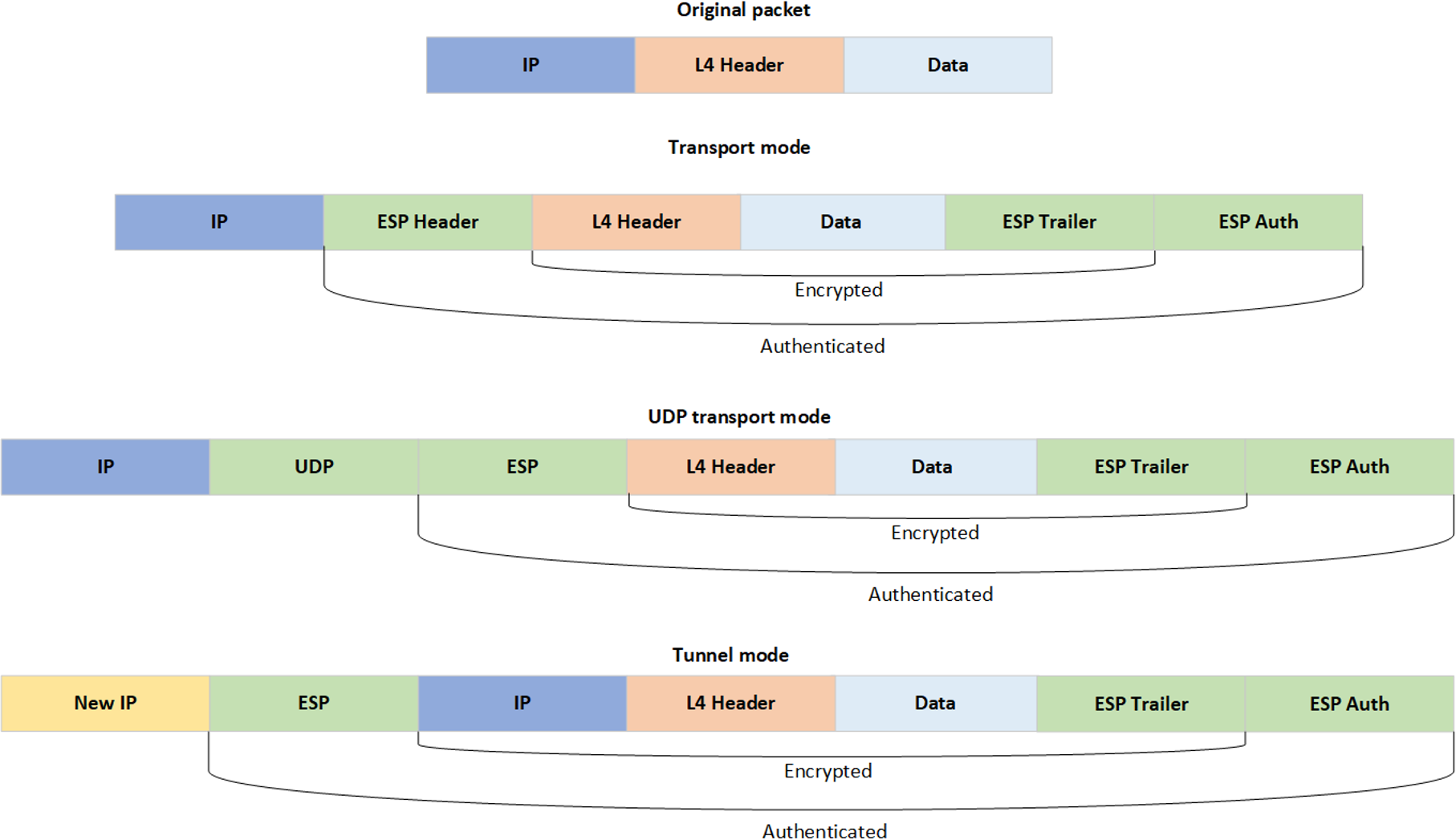
The application supports the following IPsec modes: Tunnel, transport, UDP transport.
System Design
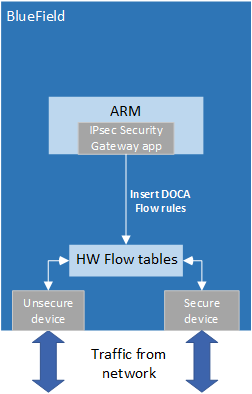
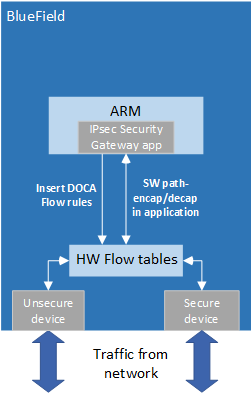
DOCA IPsec Security Gateway is designed to run with 2 ports, secured and unsecured:
-
Secured port – BlueField receives IPsec encrypted packets and, after decryption, they are sent through the unsecured port
-
Unsecured port – BlueField receives regular (plain text) packets and, after encryption, they are sent through the secured port
Example packet path for hardware (HW) offloading:
Example packet path for partial software processing (handling encap/decap in software):
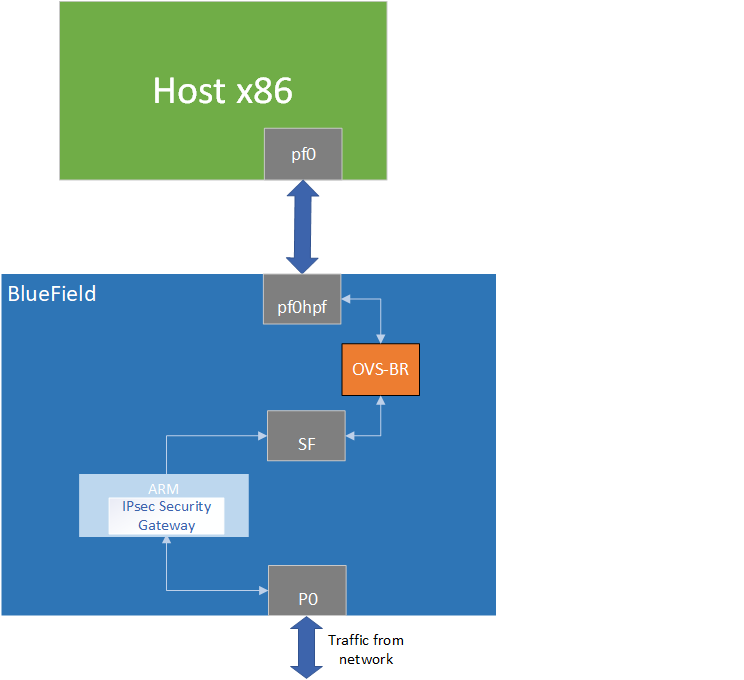
Using the application with SF:
Application Architecture
Static Configuration
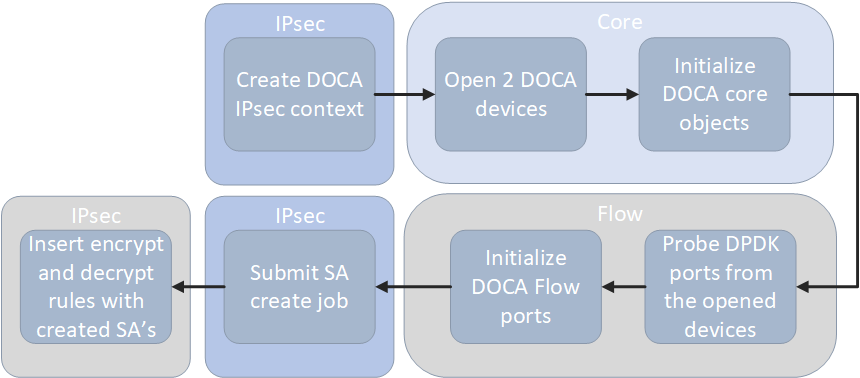
-
Create IPsec library context.
-
Open two DOCA devices, one for the secured port and another for the unsecured port.
-
Initialize the DOCA work queue.
-
With the open DOCA devices, the application probes DPDK ports and initializes DOCA Flow and DOCA Flow ports accordingly.
-
On the created ports, build DOCA Flow pipes.
-
In a loop according to the JSON rules:
-
Create DOCA IPsec SA for the new rule.
-
Insert encrypt or decrypt rule to DOCA Flow pipes.
-
Dynamic Configuration
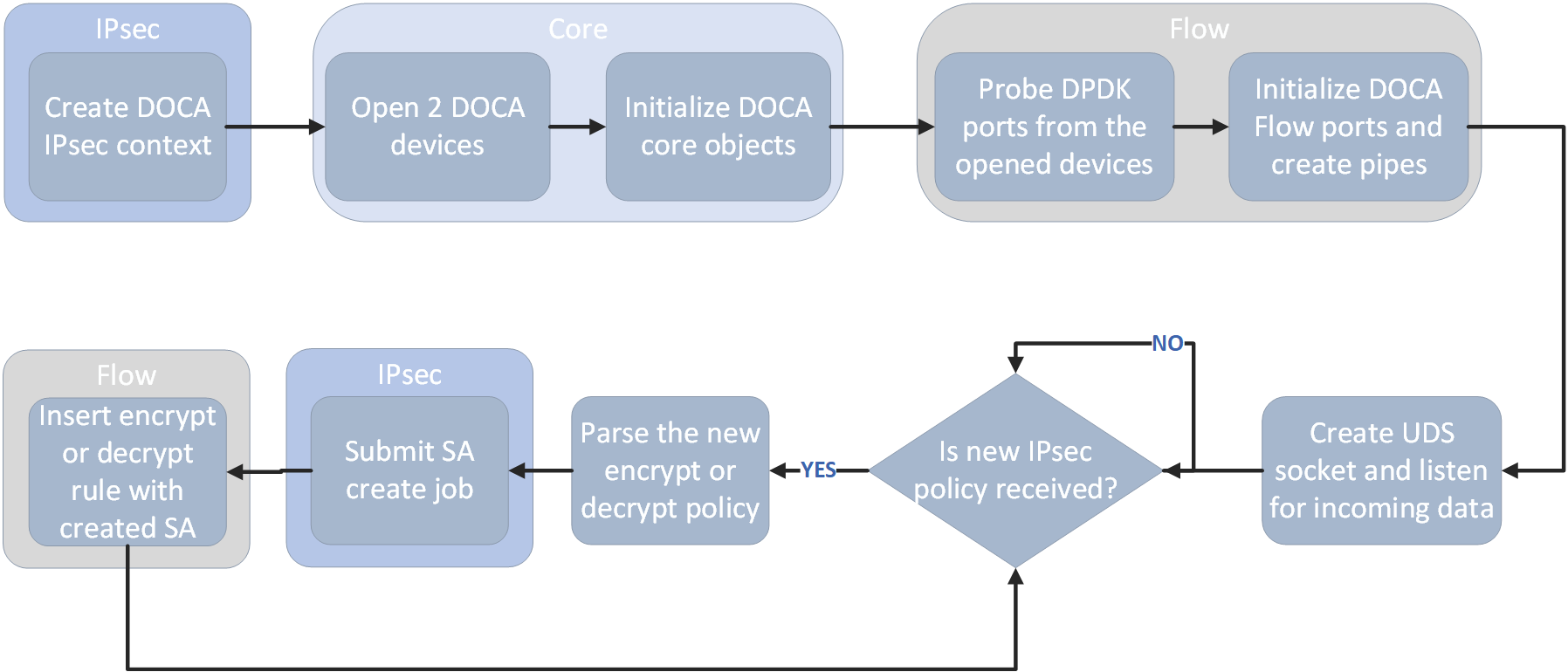
-
Create IPsec library context.
-
Open two DOCA devices, one for the secured port and another for the unsecured port.
-
Initialize the DOCA work queue.
-
With the open DOCA devices, the application probes DPDK ports and initializes DOCA Flow and DOCA Flow ports accordingly.
-
On the created ports, build DOCA Flow pipes.
-
Create UDS socket and listen for incoming data.
-
While waiting for new IPsec policies to be received in a loop, if a new IPsec policy is received:
-
Parse the policy whether it is an encryption or decryption rule.
-
Create DOCA IPsec SA for the new rule.
-
Insert encrypt or decrypt rule to DOCA Flow pipes.
-
DOCA Flow Modes
The application can run in two modes, vnf and switch. For more information about the modes, please refer to "Pipe Mode" in the DOCA Flow.
VNF Mode
Encryption
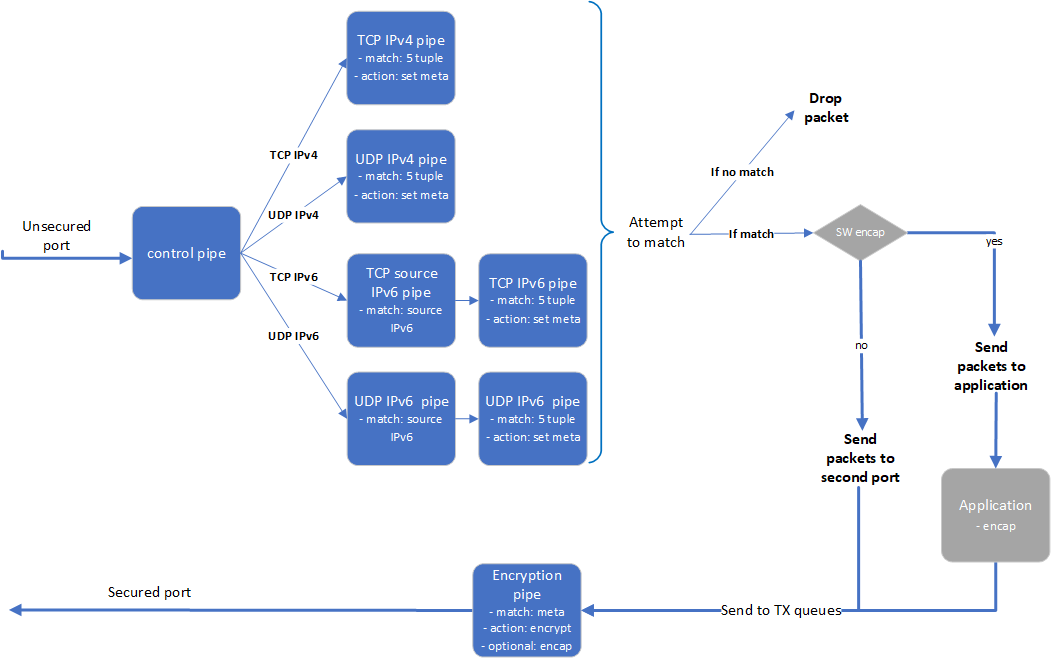
-
The application builds 8 pipes for encryption. Control pipe as root with four entries that match L3 and L4 types and forward the traffic to the relevant pipes.
-
IPv6 pipes – match the source IP address and forward the traffic to a pipe that matches 5-tuple excluding the source IP.
-
In the 5-tuple match pipes set action of "set meta data", the metadata would be the rule's index in the JSON file.
-
The matched packet is forwarded to the second port.
-
-
In the secured egress domain, there is an encryption pipe that has a shared IPsec encrypt action. According to the metadata match, the packet is encrypted with the encap destination IP and SPI as defined in the user's rules.
Decryption
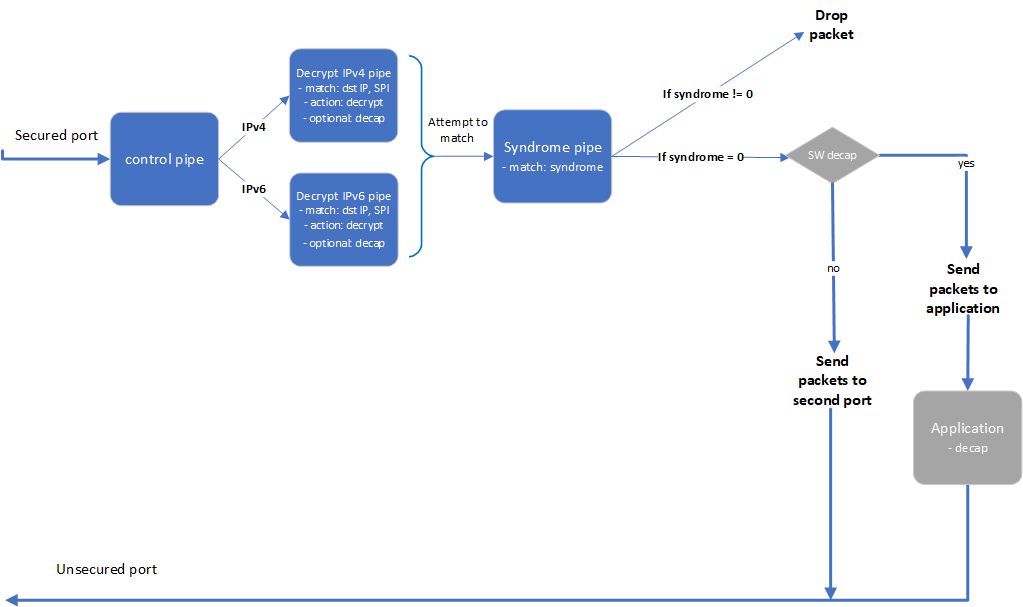
-
The application builds 4 pipes for decryption. Control pipe as root with two entries that match L3 type and forward the traffic to the relevant decrypt pipe.
-
The decrypt pipe matches the destination IP and SPI according to the rule files and has a shared IPsec action for decryption.
-
After decryption, the matched packets are forwarded to the syndrome pipe and, if the syndrome is non-zero, the packets are dropped. Otherwise, the packets are forwarded to the second port.
Switch Mode
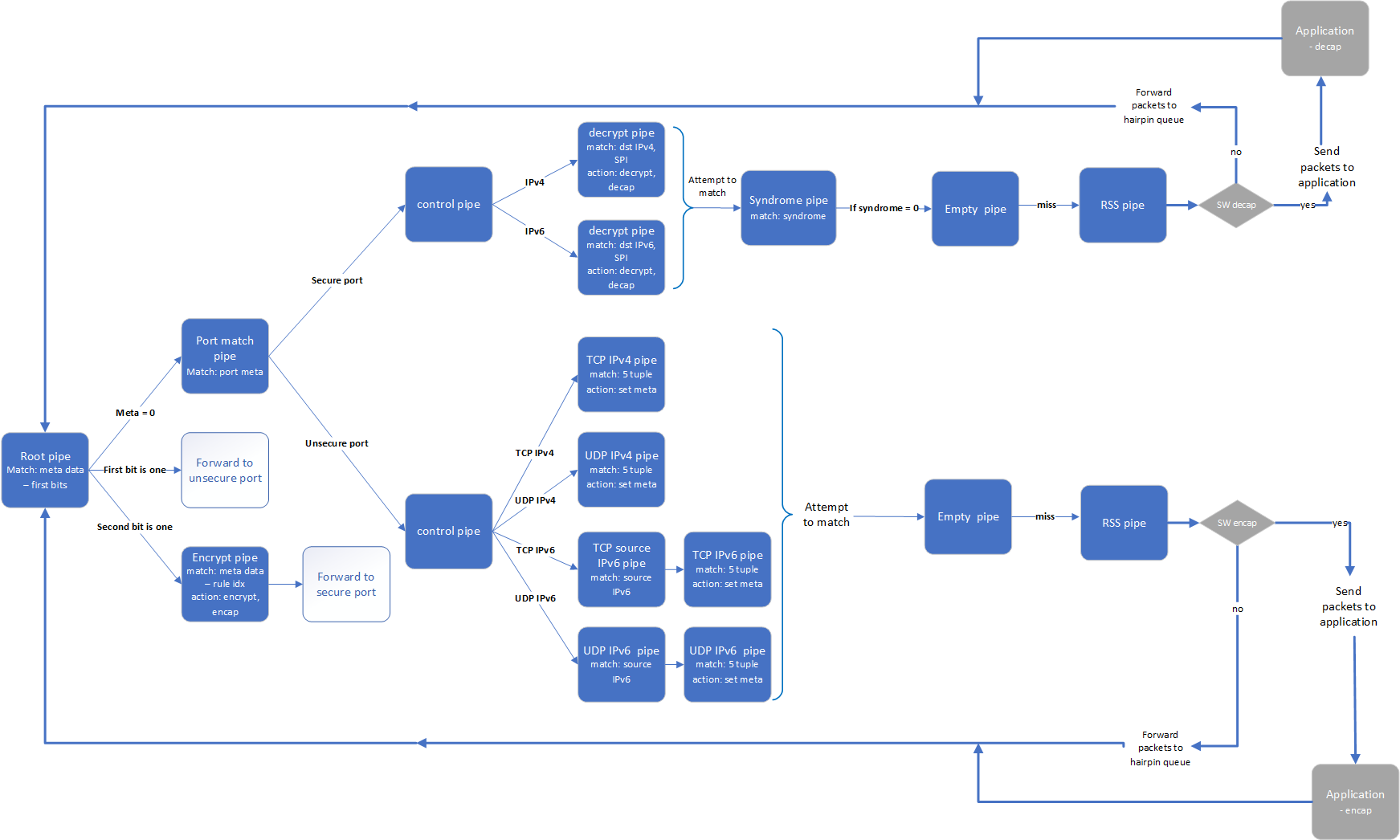
In switch mode, a root pipe matches the first 2 most significant bits (MSBs) to decide what the next pipe is:
-
Metadata is 0 – packet arrives and continues to pipe that matches on the port's meta. Based on the port, the packet passes through almost the same path as VNF mode and the metadata is set in the 2 MSBs. Afterwards, the packet moves to pipes that send the packets to the root pipe.
-
First bit is 1 – packet finishes the decrypt path and must be sent to the unsecure port.
-
Second bit is 1 – packet almost finishes the encrypt path and must be sent to the encrypt pipe on the secure egress domain and to the secure port from there.
DOCA Libraries
This application leverages the following DOCA libraries:
Refer to their respective programming guide for more information.
Running the Application
Installation
Refer to the NVIDIA DOCA Installation Guide for Linux for details on how to install BlueField-related software.
Prerequisites
-
The IPsec security gateway application is based on DOCA Flow. Therefore, the user is required to allocate huge pages.
echo '2048' | sudo tee -a /sys/kernel/mm/hugepages/hugepages-2048kB/nr_hugepages
On some operating systems (RockyLinux, OpenEuler, CentOS 8.2) the default huge page size on the DPU (and Arm hosts) is larger than 2MB, and is often 512MB instead. In such cases, the guiding principal is to allocate 4GB of RAM, and instead of allocating 2048 pages, one should allocate the matching amount (8 pages):
sudo echo 8 > /proc/sys/vm/nr_hugepages
-
VNF mode – the IPsec security gateway application requires disabling some of the hardware tables:
/opt/mellanox/iproute2/sbin/devlink dev eswitch set pci/0000:03:00.0 mode legacy
/opt/mellanox/iproute2/sbin/devlink dev eswitch set pci/0000:03:00.1 mode legacy

echo none > /sys/class/net/p0/compat/devlink/encap
echo none > /sys/class/net/p1/compat/devlink/encap

/opt/mellanox/iproute2/sbin/devlink dev eswitch set pci/0000:03:00.0 mode switchdev
/opt/mellanox/iproute2/sbin/devlink dev eswitch set pci/0000:03:00.1 mode switchdev
To restore the old configuration:
/opt/mellanox/iproute2/sbin/devlink dev eswitch set pci/0000:03:00.0 mode legacy
/opt/mellanox/iproute2/sbin/devlink dev eswitch set pci/0000:03:00.1 mode legacy

echo basic > /sys/class/net/p0/compat/devlink/encap
echo basic > /sys/class/net/p1/compat/devlink/encap

/opt/mellanox/iproute2/sbin/devlink dev eswitch set pci/0000:03:00.0 mode switchdev
/opt/mellanox/iproute2/sbin/devlink dev eswitch set pci/0000:03:00.1 mode switchdev
-
Switch mode – the IPsec security gateway application requires configuring the ports to run in switch mode:
sudo mlxconfig -d /dev/mst/mt41686(mt41692)_pciconf0 s LAG_RESOURCE_ALLOCATION=1
# power cycle the host to apply this setting

/opt/mellanox/iproute2/sbin/devlink dev eswitch set pci/0000:03:00.0 mode legacy
/opt/mellanox/iproute2/sbin/devlink dev eswitch set pci/0000:03:00.1 mode legacy

sudo devlink dev param set pci/0000:03:00.0 name esw_pet_insert value false cmode runtime
sudo devlink dev param set pci/0000:03:00.1 name esw_pet_insert value false cmode runtime

/opt/mellanox/iproute2/sbin/devlink dev eswitch set pci/0000:03:00.0 mode switchdev
/opt/mellanox/iproute2/sbin/devlink dev eswitch set pci/0000:03:00.1 mode switchdev

sudo devlink dev param set pci/0000:03:00.0 name esw_multiport value true cmode runtime
sudo devlink dev param set pci/0000:03:00.1 name esw_multiport value true cmode runtime
Make sure to perform graceful shutdown prior to power cycling the host.
To restore the old configuration:
sudo devlink dev param set pci/0000:03:00.0 name esw_multiport value false cmode runtime
sudo devlink dev param set pci/0000:03:00.1 name esw_multiport value false cmode runtime
Application Execution
The IPsec Security Gateway application is provided in both source and binary forms. The binary is located under /opt/mellanox/doca/applications/ipsec_security_gw/bin/doca_ipsec_security_gw.
-
Application usage instructions:
Usage: doca_ipsec_security_gw [DOCA Flags] [Program Flags]

DOCA Flags:
  -h, --help                        Print a help synopsis
  -v, --version                     Print program version information
  -l, --log-level                   Set the (numeric) log level for the program <10=DISABLE, 20=CRITICAL, 30=ERROR, 40=WARNING, 50=INFO, 60=DEBUG, 70=TRACE>
  --sdk-log-level                   Set the SDK (numeric) log level for the program <10=DISABLE, 20=CRITICAL, 30=ERROR, 40=WARNING, 50=INFO, 60=DEBUG, 70=TRACE>
  -j, --json <path>                 Parse all command flags from an input json file

Program Flags:
  -s, --secured                     secured port pci-address
  -u, --unsecured                   unsecured port pci-address
  -c, --config                      Path to the JSON file with application configuration
  -m, --mode                        ipsec mode - {tunnel/transport/udp_transport}
  -i, --ipc                         IPC socket file path
  -sn, --secured-name               secured port interface name
  -un, --unsecured-name             unsecured port interface name
This usage printout can be printed to the command line using the
-h(or--help) options:/opt/mellanox/doca/applications/ipsec_security_gw/bin/doca_ipsec_security_gw -h
For additional information, refer to section "Command Line Flags".
-
CLI example for running the application on the BlueField or host:
-
Static Configuration:
cd /opt/mellanox/doca/applications/ipsec_security_gw/bin
./doca_ipsec_security_gw -s 03:00.0 -u 03:00.1 -c ./ipsec_security_gw_config.json -m transport
Both the PCIe address identifiers (
-sand-uflags) should match the addresses of the desired PCIe devices.
-
Dynamic Configuration:
cd /opt/mellanox/doca/applications/ipsec_security_gw/bin
./doca_ipsec_security_gw -s 03:00.0 -u 03:00.1 -c ./ipsec_security_gw_config.json -m transport -i /tmp/rules_socket
Both the PCIe address identifiers (
-sand-uflags) should match the addresses of the desired PCIe devices.
-
-
The application also supports a JSON-based deployment mode, in which all command-line arguments are provided through a JSON file:
doca_ipsec_security_gw --json [json_file]For example
cd /opt/mellanox/doca/applications/ipsec_security_gw/bin
./doca_ipsec_security_gw --json ./ipsec_security_gw_params.json
Before execution, ensure that the used JSON file contains the correct configuration parameters, and especially the PCIe addresses necessary for the deployment.
Command Line Flags
|
Flag Type |
Short Flag |
Long Flag/JSON Key |
Description |
JSON Content |
|---|---|---|---|---|
|
General flags |
|
|
Prints a help synopsis |
N/A |
|
|
|
Prints program version information |
N/A |
|
|
|
|
Set the log level for the application:
|
|
|
|
N/A |
|
Sets the log level for the program:
|
|
|
|
|
|
Parse all command flags from an input json file |
N/A |
|
|
Program flags |
|
|
Path to JSON file with configurations |
|
|
|
|
PCIe address for the unsecured port |
|
|
|
|
|
PCIe address for the secured port |
|
|
|
|
|
IPsec mode. Possible values: |
|
|
|
|
|
Interface name of the unsecured port |
|
|
|
|
|
Interface name of the secured port |
|
|
|
|
|
IPC socket file path for receiving IPsec rules during runtime |
|
Refer to DOCA Arg Parser for more information regarding the supported flags and execution modes.
Static Configuration IPsec Rules
IPsec rules and other configuration can be added with a JSON config file which is passed using the --config parameter.
|
Section |
Field |
Type |
Description |
Example |
|---|---|---|---|---|
|
|
|
bool |
True for running DOCA Flow in switch mode.
|
|
|
|
string |
Decap and encap offloading: |
|
|
|
|
bool |
Increments sequence number of ESP in software if set to Available only if
|
|
|
|
|
bool |
Enables anti-replay mechanism in software if set to Window size is 64. Not ESN. Supports non-zero
|
|
|
|
|
uint |
Initial sequence number for ESP header. Used also when |
|
|
|
|
|
int |
Source and destination IP version. 4 / 6.
|
|
|
|
string |
Source IP to match |
|
|
|
|
string |
Destination IP to match |
|
|
|
|
string |
L4 protocol: TCP or UDP |
|
|
|
|
int |
Source port to match |
|
|
|
|
int |
Destination port to match |
|
|
|
|
int |
Encap IP version: 4 or 6. Optional; default is 4. |
|
|
|
|
string |
Encap destination IP. Mandatory for tunnel mode only. |
|
|
|
|
int |
SPI integer to set in the ESP header |
|
|
|
|
string |
Key for creating the SA (in hex format) |
|
|
|
|
int |
Key size: 128 or 256. Optional; default is 256. |
|
|
|
|
int |
Salt value for creating the SA.
|
|
|
|
|
int |
ICV length value: 8, 12, or 16.
|
|
|
|
|
|
int |
Destination IP version: 4 or 6. Optional; default is 4. |
|
|
|
string |
Destination IP to match |
|
|
|
|
int |
Inner IP version. Mandatory for tunnel mode only. Optional; default is 4. |
|
|
|
|
int |
SPI to match in the ESP header |
|
|
|
|
string |
Key for creating the SA (in hex format) |
|
|
|
|
int |
Key size: 128 or 256. Optional; default is 256. |
|
|
|
|
int |
Salt value for creating the SA.
|
|
|
|
|
int |
ICV length value: 8, 12, or 16.
|
|
Dynamic Configuration IPsec Rules
The application listens on the UDS socket for receiving a predefined structure for the IPsec policy defined in the policy.h file.
The client program or keying daemon should connect to the socket with the same socket file path provided to the application by the --ipc/-i flags, and send the policy structure as packed to the application through the same socket.
In the dynamic configuration, the application uses the config section from the JSON config file and ignores the encrypt_rules and decrypt_rules sections.
The IPsec policy structure:
struct ipsec_security_gw_ipsec_policy {
    /* Protocols attributes */
    uint16_t src_port;                   /* Policy inner source port */
    uint16_t dst_port;                   /* Policy inner destination port */
    uint8_t l3_protocol;                 /* Policy L3 proto {POLICY_L3_TYPE_IPV4, POLICY_L3_TYPE_IPV6} */
    uint8_t l4_protocol;                 /* Policy L4 proto {POLICY_L4_TYPE_UDP, POLICY_L4_TYPE_TCP} */
    uint8_t outer_l3_protocol;           /* Policy outer L3 type {POLICY_L3_TYPE_IPV4, POLICY_L3_TYPE_IPV6} */

    /* Policy attributes */
    uint8_t policy_direction;            /* Policy direction {POLICY_DIR_IN, POLICY_DIR_OUT} */
    uint8_t policy_mode;                 /* Policy IPSEC mode {POLICY_MODE_TRANSPORT, POLICY_MODE_TUNNEL} */

    /* Security Association attributes */
    uint8_t esn;                             /* Is ESN enabled? */
    uint8_t icv_length;                      /* ICV length in bytes {8, 12, 16} */
    uint8_t key_type;                        /* AES key type {POLICY_KEY_TYPE_128, POLICY_KEY_TYPE_256} */
    uint32_t spi;                            /* Security Parameter Index */
    uint32_t salt;                           /* Cryptographic salt */
    uint8_t enc_key_data[MAX_KEY_LEN];       /* Encryption key (binary) */

    /* Policy inner and outer addresses */
    char src_ip_addr[MAX_IP_ADDR_LEN + 1];       /* Policy inner IP source address in string format */
    char dst_ip_addr[MAX_IP_ADDR_LEN + 1];       /* Policy inner IP destination address in string format */
    char outer_src_ip[MAX_IP_ADDR_LEN + 1];      /* Policy outer IP source address in string format */
    char outer_dst_ip[MAX_IP_ADDR_LEN + 1];      /* Policy outer IP destination address in string format */
};
The policy type, whether it is encrypted or decrypted, is classified according to the policy_direction attribute:
-
POLICY_DIR_IN– decryption policy -
POLICY_DIR_OUT– encryption policy
Troubleshooting
Refer to the NVIDIA DOCA Troubleshooting Guide for any issue encountered with the installation or execution of the DOCA applications.
Recompiling the Application
In addition to providing the application in binary form, the installation also includes all of the application sources and compilation instructions so as to allow modifying the sources and recompiling the application. For more information about the applications, as well as development and compilation tips, refer to the DOCA Applications page.
The sources of the application can be found under the /opt/mellanox/doca/applications/ipsec_security_gw/src directory.
Recompiling All Applications
The applications are all defined under a single meson project, so the default compilation recompiles all the DOCA applications.
To build all the applications together, run:
cd /opt/mellanox/doca/applications/
meson /tmp/build
ninja -C /tmp/build
doca_ipsec_security_gw is created under /tmp/build/ipsec_security_gw/src/.
Recompiling IPsec Security Gateway Application Only
To directly build only the IPsec Security Gateway application:
cd /opt/mellanox/doca/applications/
meson /tmp/build -Denable_all_applications=false -Denable_ipsec_security_gw=true
ninja -C /tmp/build
doca_ipsec_security_gw is created under /tmp/build/ipsec_security_gw/src/.
Alternatively, users can set the desired flags in the meson_options.txt file instead of providing them in the compilation command line:
-
Edit the following flags in
/opt/mellanox/doca/applications/meson_options.txt:-
Set
enable_all_applicationstofalse -
Set
enable_ipsec_security_gwtotrue
-
-
Run the following compilation commands:
cd /opt/mellanox/doca/applications/
meson /tmp/build
ninja -C /tmp/build
doca_ipsec_security_gwis created under/tmp/build/ipsec_security_gw/src/.
Troubleshooting
Refer to the NVIDIA DOCA Troubleshooting Guide for any issue encountered with the compilation of the application.
Application Code Flow
-
Parse application argument.
-
Initialize arg parser resources and register DOCA general parameters.
doca_argp_init();
-
Register the application's parameters.
register_ipsec_security_gw_params();
-
Parse the arguments.
doca_argp_start();-
Parse app parameters.
-
-
-
DPDK initialization.
rte_eal_init();Call
rte_eal_init()to initialize EAL resources with the provided EAL flags for not probing the ports. -
Parse config file.
ipsec_security_gw_parse_config();
-
Initialize devices and ports.
ipsec_security_gw_init_devices();-
Open DOCA devices with input PCIe addresses / interface names.
-
Probe DPDK port from each opened device.
-
-
Initialize and start DPDK ports.
dpdk_queues_and_ports_init();-
Initialize DPDK ports, including mempool allocation.
-
Initialize hairpin queues if needed.
-
Binds hairpin queues of each port to its peer port.
-
-
Initialize objects for DOCA IPsec library.
ipsec_security_gw_ipsec_ctx_create();-
Create IPsec library context.
-
Create DOCA Progress Engine.
-
-
Initialize DOCA Flow.
ipsec_security_gw_init_doca_flow();-
Initialize DOCA Flow library.
-
Find the indices of the DPDK-probed ports and start DOCA Flow ports with them.
-
-
Insert rules.
-
Insert encryption rules.
ipsec_security_gw_insert_encrypt_rules();
-
Insert decryption rules.
ipsec_security_gw_insert_decrypt_rules();
-
-
Wait for traffic.
ipsec_security_gw_wait_for_traffic();-
wait in a loop until the user terminates the program.
-
-
IPsec security gateway cleanup:
-
DOCA Flow cleanup; destroy initialized ports.
doca_flow_cleanup();
-
SA destruction.
ipsec_security_gw_destroy_sas();
-
IPsec objects destruction.
ipsec_security_gw_ipsec_ctx_destroy();
-
Destroy DPDK ports and queues.
dpdk_queues_and_ports_fini();
-
DPDK finish.
dpdk_fini();Calls
rte_eal_destroy()to destroy initialized EAL resources. -
Arg parser destroy.
doca_argp_destroy()
-
Keying Daemon Integration (StrongSwan)
strongSwan is a keying daemon that uses the Internet Key Exchange Version 2 (IKEv2) protocol to establish SAs between two peers. strongSwan includes a DOCA plugin that is part of the strongSwan package in BFB. The plugin is loaded only if the DOCA IPsec Security Gateway is triggered. The plugin connects to UDS socket and sends IPsec policies to the application after the key exchange completes.
For more information about the key daemon, refer to strongSwan documentation.
End-to-end Architecture
The following diagram presents an architecture where two BlueField DPUs are connected to each other with DOCA IPsec Security Gateway running on each.
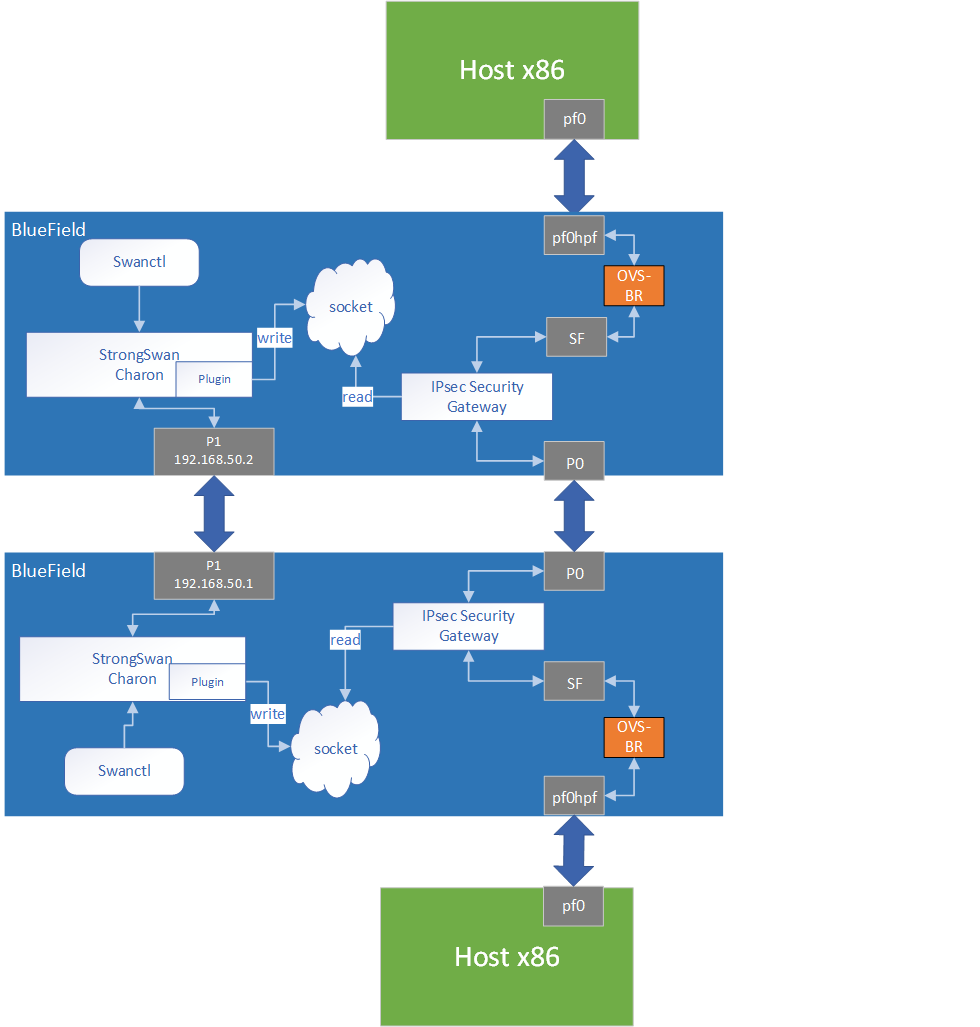
swanctl is a command line tool used for strongSwan IPsec configuration:
-
Run DOCA IPsec Security Gateway on both sides in a dynamic configuration.
-
Start strongSwan service.
-
Configure strongSwan IPsec using the
swanctl.confconfiguration file on both sides. -
Start key exchange between the two peers. At the end of the flow, the result arrives to the DOCA plugin, populates the policy-defined structure, and sends it to the socket.
-
DOCA IPsec Security Gateway on both sides reads new policies from the socket, performs the parsing, creates a DOCA SA object, and adds flow decrypt/encrypt entry.
This architecture uses P1 uplink on both BlueField DPUs to run the strongSwan key daemon. To configure the uplink:
-
Configure an IP addresses for the PFs of both DPUs:
-
On BF1:
ip addr add 192.168.50.1/24 dev p1
-
On BF2:
ip addr add 192.168.50.2/24 dev p1
It is possible to configure multiple IP addresses to uplinks to run key exchanges with different policy attributes.
-
-
Verify the connection between two BlueField DPUs.
BF1> ping 192.168.50.2
Make sure that the uplink is not in OVS bridges.
-
Configure the
swanctl.conffiles for each machine. The file should be located under/etc/swanctl/conf.d/.
Addingswanctl.conffile examples:-
Transport mode
-
swanctl.confexample for BF1:connections { BF1-BF2 { local_addrs = 192.168.50.1 remote_addrs = 192.168.50.2 rekey_time = 0 local { auth = psk id = host1 } remote { auth = psk id = host2 } children { bf { local_ts = 192.168.50.1/32 [udp/60] remote_ts = 192.168.50.2/32 [udp/90] esp_proposals = aes128gcm128-x25519-esn mode = transport policies_fwd_out = yes life_time = 0 } } version = 2 mobike = no reauth_time = 0 proposals = aes128-sha256-x25519 } } secrets { ike-BF { id-host1 = host1 id-host2 = host2 secret = 0sv+NkxY9LLZvwj4qCC2o/gGrWDF2d21jL } }
-
swanctl.confexample for BF2:connections { BF2-BF1 { local_addrs = 192.168.50.2 remote_addrs = 192.168.50.1 rekey_time = 0 local { auth = psk id = host2 } remote { auth = psk id = host1 } children { bf { local_ts = 192.168.50.2/32 [udp/90] remote_ts = 192.168.50.1/32 [udp/60] esp_proposals = aes128gcm128-x25519-esn mode = transport life_time = 0 } } version = 2 mobike = no reauth_time = 0 proposals = aes128-sha256-x25519 } } secrets { ike-BF { id-host1 = host1 id-host2 = host2 secret = 0sv+NkxY9LLZvwj4qCC2o/gGrWDF2d21jL } }
-
-
Tunnel mode
connections {
   BF1-BF2 {
      local_addrs  = 192.168.50.2
      remote_addrs = 192.168.50.1
	  rekey_time = 0

      local {
        auth = psk
        id = host2
      }
      remote {
        auth = psk
      	id = host1
      }

      children {
         bf {
            local_ts = 2001:db8:85a3::8a2e:370:7334/128 [udp/3030]
            remote_ts = 2001:db8:85a3::8a2e:370:7335/128 [udp/55]
            esp_proposals = aes128gcm128-x25519-esn
			life_time = 0
         }
      }
      version = 2
      mobike = no
      proposals = aes128-sha256-x25519
   }
}

secrets {
   ike-BF {
      id-host1 = host1
      id-host2 = host2
      secret = 0sv+NkxY9LLZvwj4qCC2o/gGrWDF2d21jL
   }
}
local_tsandremote_tsmust have a netmask of /32 for IPv4 addresses and /128 for IPv6 addresses.
SA rekey is not supported in DOCA plugin.
connection.rekey_timemust be set to 0 andconnection.child.life_timemust be set to 0.
-
DOCA IPsec only supports ESP headers, AES-GCM encryption algorithm, and key sizes 128 or 256. Therefore, when setting ESP proposals in the swanctl.conf, please adhere to the values provided in the following table:
|
ESP Proposal |
Algorithm Type Including ICV Length |
Key Size |
|---|---|---|
|
aes128gcm8 |
ENCR_AES_GCM_ICV8 |
128 |
|
aes128gcm64 |
ENCR_AES_GCM_ICV8 |
128 |
|
aes128gcm12 |
ENCR_AES_GCM_ICV12 |
128 |
|
aes128gcm96 |
ENCR_AES_GCM_ICV12 |
128 |
|
aes128gcm16 |
ENCR_AES_GCM_ICV16 |
128 |
|
aes128gcm128 |
ENCR_AES_GCM_ICV16 |
128 |
|
aes128gcm |
ENCR_AES_GCM_ICV16 |
128 |
|
aes256gcm8 |
ENCR_AES_GCM_ICV8 |
256 |
|
aes256gcm64 |
ENCR_AES_GCM_ICV8 |
256 |
|
aes256gcm12 |
ENCR_AES_GCM_ICV12 |
256 |
|
aes256gcm96 |
ENCR_AES_GCM_ICV12 |
256 |
|
aes256gcm16 |
ENCR_AES_GCM_ICV16 |
256 |
|
aes256gcm128 |
ENCR_AES_GCM_ICV16 |
256 |
|
aes256gcm |
ENCR_AES_GCM_ICV16 |
256 |
Running the Solution
Run the following commands on both BlueField peers.
-
Run DOCA IPsec Security Gateway in dynamic configuration, assuming the socket location is
/tmp/rules_socket.doca_ipsec_security_gw -s 03:00.0 -un <sf_net_dev> -c ./ipsec_security_gw_config.json -m transport -i /tmp/rules_socket
DOCA IPsec Security Gateway application should be run first.
-
Edit the
/etc/strongswan.d/charon/doca.conffile and add the UDS socket path. If thesocket_pathis not set, the plugin uses the default path/tmp/strongswan_doca_socket.doca { # Whether to load the plugin load = yes # Path to DOCA socket socket_path = /tmp/rules_socket }
You must provide the application with this path as well.
-
Restart the strongSwan server:
systemctl restart strongswan-starter.service
If the application has been run with log level debug, you can see that the connection has been done successfully and the application is waiting for new IPsec policies.
-
Verify that the
swanctl.conffile exists in/etc/swanctl/conf.d/. directory.It is recommended to remove any unused conf files under
/etc/swanctl/conf.d/.
-
Load IPsec configuration:
swanctl --load-all
-
Start IKE protocol on either the initiator or the target side:
swanctl -i --child <child_name>
In the example above, the child's name is
bf.
Building strongSwan
To perform some changes in the DOCA plugin in strongSwan zone:
-
Verify that the dependencies listed here are installed in your environment.
libgmp-devis missing from that list so make sure to install that as well. -
Git clone https://github.com/Mellanox/strongswan.git.
-
Git checkout BF-5.9.6 branch.
-
Add your changes in the plugin located under
src/libcharon/plugins/doca. -
Run
autogen.shwithin the strongSwan repo. -
Run the following:
./configure --enable-openssl --disable-random --prefix=/usr/local --sysconfdir=/etc --enable-systemd --enable-doca
make
make install
systemctl daemon-reload
systemctl restart strongswan-starter.service
References
-
/opt/mellanox/doca/applications/ipsec_security_gw/src -
/opt/mellanox/doca/applications/ipsec_security_gw/bin/ipsec_security_gw_params.json
Last updated: