

In the following menu, you can set the following options:
This menu includes attributes that are applicable only to Legacy mode, except for PKEY which is valid for both the UEFI and the Legacy mode.
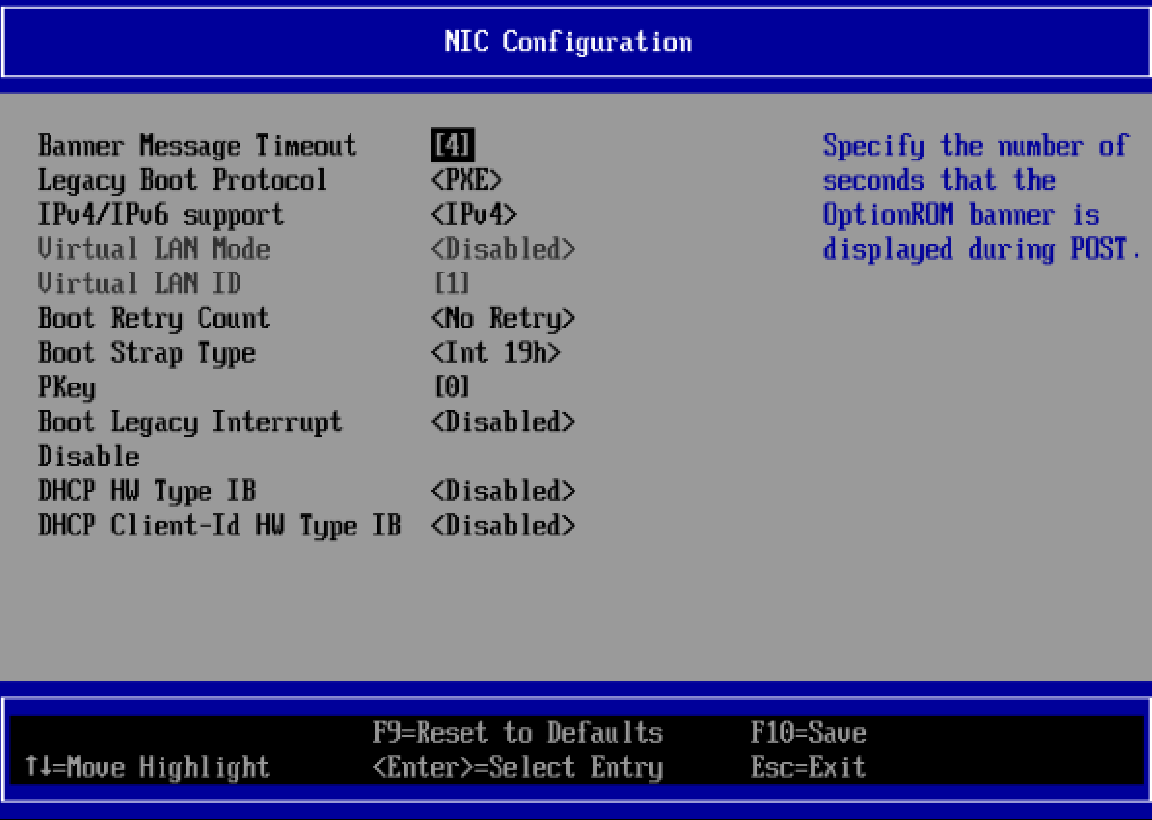
DHCP Client-Id HW Type IB
This setting will appear in the boot menu only for selected adapters that support the feature, and only in VPI adapter cards.
|
Description: |
When enabled, DHCP packets are sent with Client-Id option (61) that includes "HW type(0x20)" + "GUID" instead of "NVIDIA Prefix" + "GUID". |
|---|---|
|
Configurable: |
Yes |
|
Available Options |
1 - Enabled
|
DHCP HW Type IB
This setting will appear in the boot menu only for selected adapters that support the feature, and only in VPI adapter cards.
|
Description: |
When enabled, DHCP discovery packets are sent with HW-addr= GUID instead of a MAC address. |
|---|---|
|
Configurable: |
Yes |
|
Available Options |
1 - Enabled
|
Boot Legacy Interrupt Disabled
|
Location |
System setup/Port main configurations/NIC Configuration |
|---|---|
|
Description: |
Disable/Enable legacy Interrupt support. Note:
|
|
Configurable: |
Yes - built-in option |
|
Available Options |
1 - Enabled
|
Banner Message Timeout
|
Location: |
Main Configuration Form /NIC Configuration |
|---|---|
|
Description: |
Defines the Banner's timeout |
|
Configurable: |
Yes – via input – If virtualization mode is SR-IOV |
|
Persistency: |
Persistent through AC cycle |
|
Reboot required: |
Yes – reboot is needed in order for this change to apply |
|
Available options: |
0-14 sec |
Legacy Boot Protocol
|
Location: |
Main Configuration Form /NIC Configuration |
|---|---|
|
Description: |
Use a non-UEFI network boot protocol.
|
|
Configurable: |
Yes – built-in options |
|
Persistency: |
Persistent through AC cycle |
|
Available options: |
1 - None – no PXE boot, no iSCSI boot 2 - PXE – PXE first and if failed, try iSCSI 3 - iSCSI – iSCSI first and if failed, try PXE 4 - PXE without fail-over - PXE boot without fail-over to iSCSI boot 5 - iSCSI without fail-over - iSCSI boot without fail-over to PXE boot |
IPv4/IPv6 Support
|
Location: |
System setup/Port Main Configurations/NIC Configuration |
|---|---|
|
Description: |
Select which IP protocol version will be used when booting. If both are configured, FlexBoot will try to boot with the 2nd protocol only if failed to boot with the 1st one. |
|
Configurable: |
Yes – built-in options |
|
Persistency: |
Persistent through AC cycle |
|
Available options: |
1 - IPv4
|
Virtual LAN Mode
|
Location: |
Main Configuration Form /NIC Configuration |
|---|---|
|
Description: |
Enable/Disable VLAN tagging on the selected boot protocol. |
|
Configurable: |
Yes – built-in options: Ethernet mode only. |
|
Persistency: |
Persistent through AC cycle |
|
Available options: |
1 - Enabled
|
Virtual LAN ID
|
Location: |
Main Configuration Form /NIC Configuration |
|---|---|
|
Description: |
Uses the VLAN tag with the selected boot protocol. |
|
Configurable: |
Yes – via input – If virtual LAN mode is enabled |
|
Value restrictions: |
The minimum integer value is 1 and Maximum integer value is 4094. |
PKey
PKey setting will appear in the boot menu only for selected adapters that support the feature and only in VPI adapter cards.
|
Location: |
Main Configuration Form /NIC Configuration |
|---|---|
|
Description: |
PKey ID to be used by PXE boot. If 0 is selected, the default PKey will be used. |
|
Configurable: |
Yes – via input – If PKey is supported: InfiniBand mode only. |
|
Value restrictions: |
The minimum integer value is 0 and Maximum integer value is 65535. |
Boot Retry Count
|
Location: |
Main Configuration Form /NIC Configuration |
|---|---|
|
Description: |
The number of retries to attempt in case of a boot failure. |
|
Configurable: |
Yes – built-in options |
|
Persistency: |
Persistent through AC cycle |
|
Available options: |
0 - No retries
|
Wake on LAN
|
Location: |
Main Configuration Form /NIC Configuration |
|---|---|
|
Description: |
Status of Wake on LAN feature. When set, it enables the server to be powered using an in-band magic packet.
|
|
Configurable: |
Yes – built-in options |
|
Persistency: |
Persistent through AC cycle |
|
Available options: |
1 - Enabled
|
Last updated: