This documentation explains configuration and deployment of DOCA Firefly service as DPUService in DPF.
Main Firefly concepts are explained in the official DOCA Firefly documentation.
While the official documentation provides a more comprehensive overview, DPUService users should consult it for detailed explanation of PTP configuration and monitoring options.
The DOCA Firefly usecase in DPF is mainly to provide PTP time synchronization for the host system clocks.
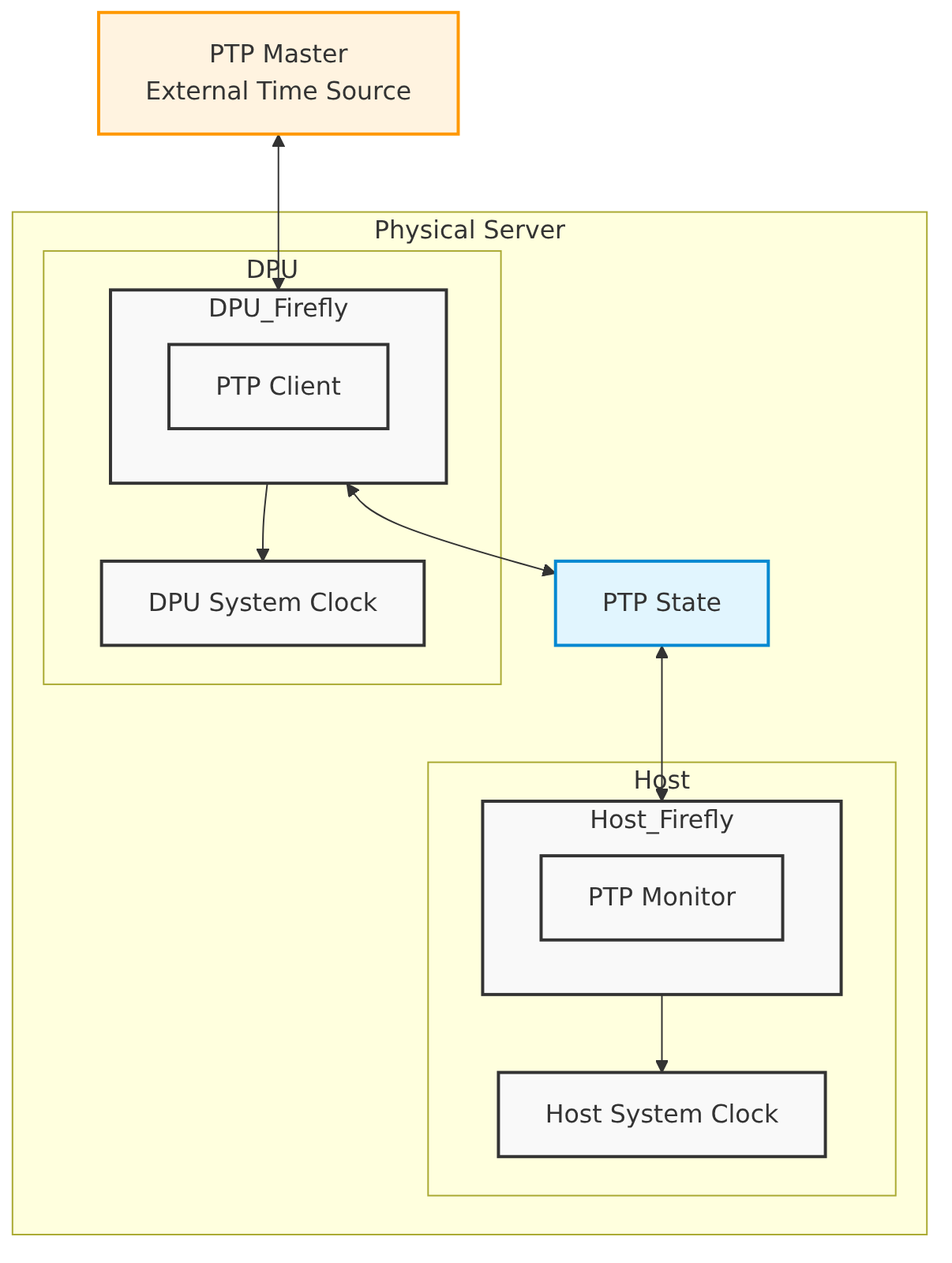
We split the service into two components: one running on the DPU, which is running the PTP software stack, and the other on the host.
A high-level overview of the Firefly DPF service architecture is shown below.
Service Components
Firefly consists of two main components:
1. DPU Component:
* Runs on the DPU
* Acts as the PTP client
* Handles PTP time synchronization
* Sets DPU system clock
apiVersion: provisioning.dpu.nvidia.com/v1alpha1
kind: DPUFlavor
metadata:
  annotations:
    provisioning.dpu.nvidia.com/num-of-trusted-sfs: "5"
  name: dpf-provisioning-firefly
  namespace: dpf-operator-system
spec:
  bfcfgParameters:
    - UPDATE_ATF_UEFI=yes
    - UPDATE_DPU_OS=yes
    - WITH_NIC_FW_UPDATE=yes
  configFiles:
    - operation: override
      path: /etc/mellanox/mlnx-bf.conf
      permissions: "0644"
      raw: |
        ALLOW_SHARED_RQ="no"
        IPSEC_FULL_OFFLOAD="no"
        ENABLE_ESWITCH_MULTIPORT="yes"
    - operation: override
      path: /etc/mellanox/mlnx-ovs.conf
      permissions: "0644"
      raw: |
        CREATE_OVS_BRIDGES="no"
        OVS_DOCA="yes"
    - operation: override
      path: /etc/mellanox/mlnx-sf.conf
      permissions: "0644"
      raw: ""
  grub:
    kernelParameters:
      - console=hvc0
      - console=ttyAMA0
      - earlycon=pl011,0x13010000
      - net.ifnames=0
      - biosdevname=0
      - iommu.passthrough=1
      - cgroup_no_v1=net_prio,net_cls
      - hugepagesz=2048kB
      - hugepages=250
  nvconfig:
    - device: '*'
      parameters:
        - PF_BAR2_ENABLE=0
        - PER_PF_NUM_SF=1
        - PF_TOTAL_SF=20
        - PF_SF_BAR_SIZE=10
        - NUM_PF_MSIX_VALID=0
        - PF_NUM_PF_MSIX_VALID=1
        - PF_NUM_PF_MSIX=228
        - INTERNAL_CPU_MODEL=1
        - INTERNAL_CPU_OFFLOAD_ENGINE=0
        - SRIOV_EN=1
        - NUM_OF_VFS=46
        - LAG_RESOURCE_ALLOCATION=1
        - REAL_TIME_CLOCK_ENABLE=1
        - LINK_TYPE_P1=ETH
        - LINK_TYPE_P2=ETH
  ovs:
    rawConfigScript: |
      _ovs-vsctl() {
        ovs-vsctl --timeout 15 "$@"
      }

      # Remove default OVS configuration on the DPU and ensure no leftovers on the OVS kernel side
      _ovs-vsctl --if-exists del-br ovsbr1
      _ovs-vsctl --if-exists del-br ovsbr2
      ovs-appctl --timeout 15 dpctl/del-dp system@ovs-system || true

      _ovs-vsctl set Open_vSwitch . other_config:doca-init=true
      _ovs-vsctl set Open_vSwitch . other_config:dpdk-max-memzones=50000
      _ovs-vsctl set Open_vSwitch . other_config:hw-offload=true
      _ovs-vsctl set Open_vSwitch . other_config:pmd-quiet-idle=true
      _ovs-vsctl set Open_vSwitch . other_config:max-idle=20000
      _ovs-vsctl set Open_vSwitch . other_config:max-revalidator=5000
      _ovs-vsctl set Open_vSwitch . other_config:doca-congestion-threshold=60
      _ovs-vsctl set Open_vSwitch . other_config:flow-limit=500000
      _ovs-vsctl set Open_vSwitch . other_config:hw-offload-ct-unidir-udp-enabled=true
      _ovs-vsctl remove Open_vSwitch . other_config default-datapath-type || true

      if systemctl list-unit-files openvswitch-switch.service &>/dev/null; then
        systemctl restart openvswitch-switch
      elif systemctl list-unit-files openvswitch.service &>/dev/null; then
        systemctl restart openvswitch
      fi
      _ovs-vsctl --may-exist add-br br-sfc
      _ovs-vsctl set bridge br-sfc datapath_type=netdev
      _ovs-vsctl set bridge br-sfc fail_mode=secure
      _ovs-vsctl --may-exist add-port br-sfc p0
      _ovs-vsctl set Interface p0 type=dpdk
      _ovs-vsctl set Port p0 external_ids:dpf-type=physical

      # Activate DOCA for OVNK
      _ovs-vsctl set Open_vSwitch . external-ids:ovn-bridge-datapath-type=netdev
      # setup ovnkube managed bridge, br-dpu (this corresponds to br-ex on ovnk docs)
      _ovs-vsctl --may-exist add-br br-dpu
      _ovs-vsctl br-set-external-id br-dpu bridge-id br-dpu
      _ovs-vsctl br-set-external-id br-dpu bridge-uplink pbrdputobrovn
      _ovs-vsctl set bridge br-dpu datapath_type=netdev
      _ovs-vsctl --may-exist add-port br-dpu pf0hpf
      _ovs-vsctl set Interface pf0hpf mtu_request=9216
      _ovs-vsctl set Interface pf0hpf type=dpdk

      # Create OVS bridge (br-ovn) in between the SC managed bridge and OVNK
      _ovs-vsctl --may-exist add-br br-ovn
      _ovs-vsctl set bridge br-ovn datapath_type=netdev
      _ovs-vsctl --may-exist add-port br-ovn pbrovntobrdpu
      _ovs-vsctl --may-exist add-port br-dpu pbrdputobrovn

      # Patch br-ovn and br-dpu together
      _ovs-vsctl set Interface pbrovntobrdpu type=patch options:peer=pbrdputobrovn
      _ovs-vsctl set Interface pbrdputobrovn type=patch options:peer=pbrovntobrdpu

      # Disabling DPU NTP. Requires functional PTP setup.
      systemctl disable ntpsec --now
The DPUFlavor above does not set ubuntu_PASSWORD in bfcfgParameters. If omitted, DPF defaults to ubuntu:ubuntu credentials on the DPU. For production deployments, it is recommended to set a hashed password (see BFCfg Parameters).
General note: In the official documentation, all options should be specified in the ptp.conf file.
In DPF the same options should be set via the DPUServiceConfiguration.
Preconfiguration
Our referenced example DPUServiceConfigration includes G.8275.1 PTP Profile configuration. You can set all necessary configurations to your needs.
Network Configuration
The Firefly service requires a trusted Scalable Function (SF) to enable secure PTP communication. This interface is added to the SFC bridge using a DPUServiceNAD (Network Attachment Definition). The DPUService controller takes care of injecting the correct resource to the Pod using that DPUServiceNAD.
DPUDeployment
The complete DPUDeployment configuration is in DPUDeployment.
Toleration Configuration
The Firefly service includes a special configuration (toleration) that ensures it always runs on the host system. This is important because:
The service needs to run on the host to properly synchronize the system time.
Without proper time synchronization, other system components might not work correctly.
The toleration prevents the service from being blocked from running on the host.
This configuration is automatically handled in the DPUServiceTemplate and does not require any user configuration.
Check the Status
You can check the status of the Firefly service using the following command: