

The DOCA Weave service is a technology preview and is not recommended for production use.
Overview
The DOCA Weave DPUService targets east-west network isolation on NVIDIA BlueField 4 DPUs used with ConnectX-9 east-west NICs. On the Vera-Rubin platform, the Advanced Secure Trusted Resource Architecture (ASTRA) implements a zero-trust system boundary: the host cannot talk to the DPU directly, while the DPU still drives the E/W ConnectX-9 path. DOCA Weave layers an isolation architecture on that model: isolation is enforced on the DPU, autonomously and independently of the host. Using Open vSwitch (OVS) on the BlueField to manage ConnectX-9 E-Switches, Weave injects hardware-accelerated VXLAN encapsulation and decapsulation from the DPU toward the E/W NICs, so host traffic is transparently tunneled while tenant separation stays in the DPU dataplane.
Weave also supplies overlay DHCP on the per-NIC DHCP bridges, rounding out tenant connectivity. A straightforward overlay-to-underlay address mapping avoids a dedicated routing layer on the overlay - underlay routing (including features such as route summarization) carries scalability to very large node counts. Each BlueField 4 hosts a gRPC control plane above flow programming (NetworkIsolation in this release), keeping forwarding on hardware for near line-rate encapsulation with minimal added latency.
This document describes how the Weave service behaves on the DPU - components, vpcctl, virtual networks, and worked examples.
Key Features
-
East-west isolation: Per-tenant overlay traffic separated on the DPU using VXLAN and OVS forwarding.
-
Multi-NIC underlay: support for multiple east-west NICs.
-
Per-DPU virtual network management: control virtual networks and attachments to those networks per DPU.
Underlay configuration
DOCA Weave uses several OVS bridges per east-west NIC. Names come from weaveFlowController.underlayConfigMapData.interfaces[] in DPUServiceConfiguration
Bridges you must provide
The flow controller expects these bridges to already exist on each DPU (names come from underlayInterface in underlayConfigMapData.interfaces[]). How to create and wire them is covered in the deployment guide.
|
Bridge (example) |
Config field |
Role |
|---|---|---|
|
|
|
Underlay fabric egress, carries the |
Bridges created by Weave
DOCA Weave creates per-NIC bridges according to the list you provide in underlayConfigMapData (dhcpBridgeName, dropBridgeName).
|
Bridge (example) |
Config field |
Role |
|---|---|---|
|
|
|
Overlay DHCP ( |
|
|
|
Drop path programmed by |
Architecture
DOCA Weave runs on each DPU. It leverages OVS-DOCA for dataplane forwarding (bridges and switching where tenant traffic is switched and tunneled).
It is composed of three parts:
-
weave-flow-controller: exposes the NetworkIsolation gRPC API on a local Unix socket, reconciles OVS after events such as a restart, and programs tenant/VXLAN bridges and flows. -
weave-dhcp-agent: provides overlay DHCP on the per-NIC DHCP bridges. -
vpcctl: CLI for the NetworkIsolation API, mainly for evaluation, development, and testing (usage and examples).
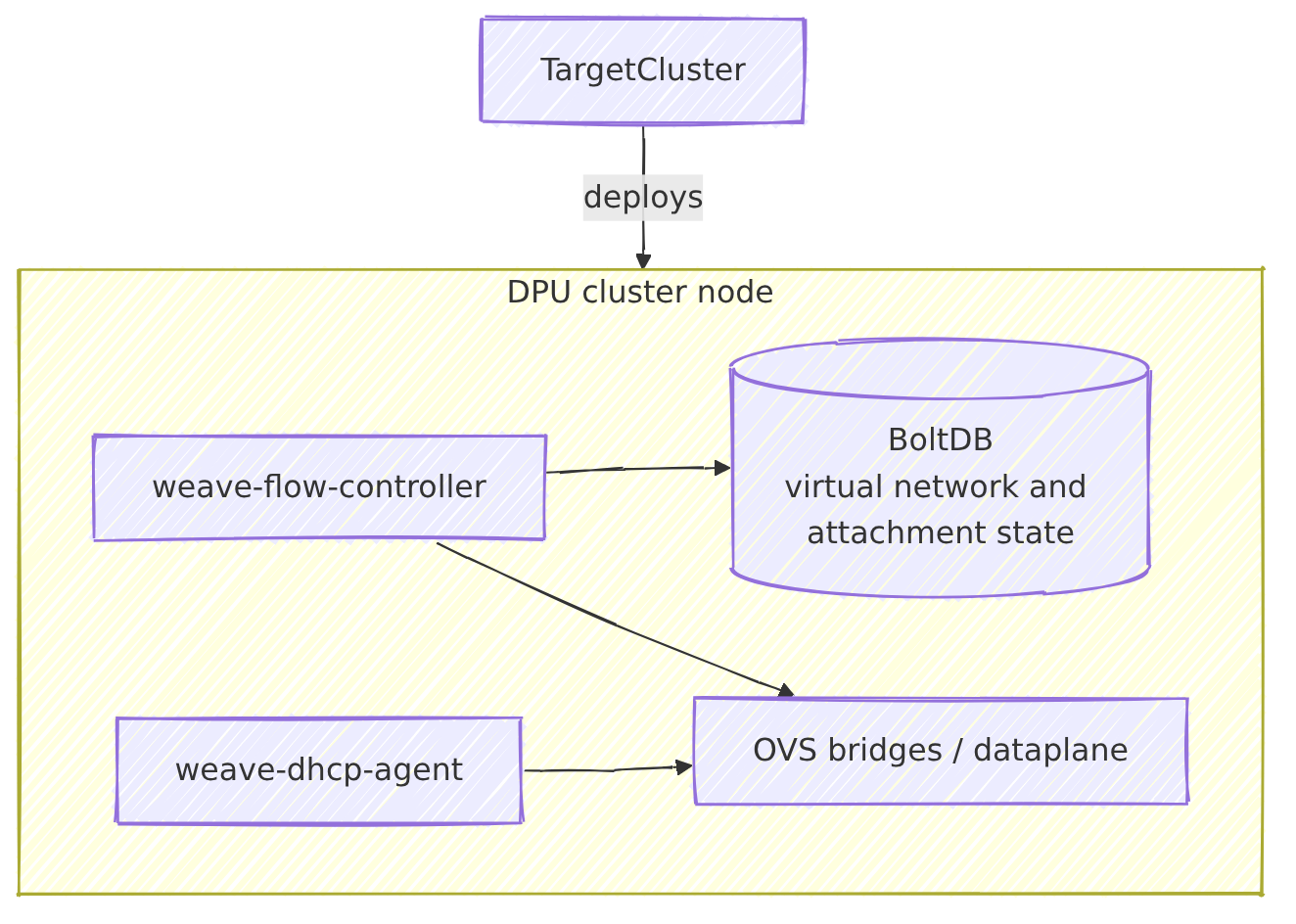
weave-flow-controller
Persists virtual network and attachment state, coordinates with weave-dhcp-agent over gRPC, and programs OVS for isolation and VXLAN.
weave-flow-controller environment variables
Set these on the weave-flow-controller DPUService / DPUServiceConfiguration.
|
Environment variable |
Default when unset |
Role |
|---|---|---|
|
|
|
Unix socket for the NetworkIsolation gRPC server. |
|
|
|
Unix socket for the |
|
|
|
BoltDB path for virtual network state. |
|
|
|
Underlay YAML consumed by the flow controller. |
|
|
|
Interval between reconcile attempts for failed items. |
|
|
|
When true, mirror selected kernel IPv4 routes into OVS so underlay traffic follows source-based routing. |
When ENABLE_SRC_BASED_ROUTE is true, the flow controller mirrors selected kernel IPv4 routes into OVS. It copies main-table routes that have a destination prefix and a non-zero IPv4 gateway. For policy routing, use ip rule entries in from <source> lookup <table> form and define the routes in that table so they can sync to OVS route rules. Routes with no destination, on-link routes without a gateway, and rules in other forms are not mirrored.
weave-dhcp-agent
Serves overlay DHCP on bridges such as br-dhcp-n0 and br-dhcp-n1, aligned with dhcpBridgeName and overlayDHCPInterface in the flow-controller configuration. When dhcpNetworks.createNADs is true, the chart creates Multus NetworkAttachmentDefinitions.
weave-dhcp-agent environment variables
Set these on the weave-dhcp-agent DPUService / DPUServiceConfiguration.
|
Environment variable |
Default when unset |
Role |
|---|---|---|
|
|
|
Unix socket for the DHCPAgentConfig gRPC server. Use the same path as |
|
|
|
JSON file where the DHCP agent stores last applied state. |
|
|
(empty list) |
Comma-separated interface names the DHCP agent manages (same semantics as |
NetworkIsolation API - VirtualNetworks and VirtualNetworkAttachments
The weave-flow-controller exposes the NetworkIsolation gRPC API on each DPU. It provides create, delete, get, and list methods for:
-
VirtualNetwork- isolation boundary for east-west overlay traffic, defined by an IPv4 subnet and a VXLAN VNI. -
VirtualNetworkAttachment- binds an attachment to aVirtualNetworkon a specific east-west NIC.
Status
Both object types expose lifecycle state under status.state.
|
Field |
Description |
|---|---|
|
|
Current lifecycle phase (see table below) |
|
|
Machine-readable token for the phase (for example |
|
|
Human-readable detail; on |
|
Phase |
Meaning |
|---|---|
|
|
Uninitialized or unknown |
|
|
Object was registered but was not fully handled (transient during create) |
|
|
Handling completed, virtual network or attachment is usable |
|
|
Delete was requested, removal is in progress ( |
|
|
Last operation failed; |
After create-vnet or create-attachment, the response usually shows PHASE_READY or PHASE_ERROR once the synchronous apply completes. Poll with get-vnet / get-attachment if another client holds the flow-controller lock (gRPC Aborted with pending) or after an OVS restart. Do not use overlay connectivity until PHASE_READY.
On PHASE_ERROR, inspect status.state.message and weave-flow-controller logs on that DPU. The flow controller retries failed objects on a background interval (default every two minutes). Typical causes include missing or misconfigured underlay bridges, invalid nicId / pfId, parent virtual network not in PHASE_READY when creating an attachment, or OVS programming failures after restart.
VirtualNetworkAttachment objects use the same status.state phases. When PHASE_READY, an attachment may also include status.hostIpv4.
Example when apply succeeds (PHASE_READY):
{
  "virtualNetwork": {
    "spec": {
      "id": "vnet1",
      "subnetIpv4": "10.0.0.0/12",
      "vni": 100
    },
    "status": {
      "state": {
        "phase": "PHASE_READY"
      }
    }
  }
}
Example when apply fails (object is still returned, gRPC call succeeds, PHASE_ERROR):
{
  "virtualNetwork": {
    "spec": {
      "id": "vnet1",
      "subnetIpv4": "10.0.0.0/12",
      "vni": 100
    },
    "status": {
      "state": {
        "phase": "PHASE_ERROR",
        "reason": "Internal",
        "message": "failed to apply virtual network: ..."
      }
    }
  }
}
Some failures are reported only as gRPC errors (no persisted object), for example AlreadyExists on duplicate id, NotFound on get/delete of a missing object, or FailedPrecondition when deleting a virtual network that still has attachments or creating an attachment while the parent virtual network is not PHASE_READY.
VirtualNetwork
A VirtualNetwork is the isolation boundary for east-west overlay traffic. It is defined by an IPv4 subnet and a VXLAN VNI. One VirtualNetwork on a DPU can be used by multiple attachments on that DPU, including across NICs. Overlay connectivity between two PF attachments on the same node is not yet supported (see Limitations).
|
Field |
Description |
|---|---|
|
|
Unique identifier for this virtual network on the DPU |
|
|
Overlay subnet (CIDR), prefix length must match |
|
|
VXLAN VNI (20-bit usable value, bits 20-23 of the 24-bit on-wire VNI are reserved, range 1-1048575) |
|
|
Lifecycle state, see Status |
A VirtualNetwork is the tenant boundary, defined by the (subnet, VNI) pair. Every DPU that participates in that tenant must use the same subnet and VNI. PFs only share an overlay when their virtual networks match on both values, mismatched subnets or VNIs across DPUs break isolation and connectivity.
Example when status.state.phase is PHASE_READY:
{
  "virtualNetwork": {
    "spec": {
      "id": "vnet1",
      "subnetIpv4": "10.0.0.0/12",
      "vni": 100
    },
    "status": {
      "state": {
        "phase": "PHASE_READY"
      }
    }
  }
}
For PHASE_ERROR and other phases, see Status.
VirtualNetworkAttachment
A virtual network attachment binds one host PF to a VirtualNetwork on a specific east-west NIC path. Create one attachment per PF that should join the overlay. nicId selects the NIC, attachmentPf.pfId is the specific host PF to attach.
|
Field |
Description |
|---|---|
|
|
Unique attachment identifier on the DPU |
|
|
Target |
|
|
NIC identifier this virtual network is bound to, MAC address of one of the NIC's host-facing PFs |
|
|
Host PF to attach, MAC address of that PF |
|
|
|
|
|
Overlay address assigned to the host PF when applicable |
|
|
Lifecycle state, see Status |
nicId and pfId are not always the same. nicId is the NIC this virtual network is bound to: the MAC of any host-facing PF on that NIC. attachmentPf.pfId is the specific host PF to attach. When a rail has only one PF, both are often set to that PF's MAC.
Example object shape when PHASE_READY (status.hostIpv4 is illustrative, phases in Status):
{
  "virtualNetworkAttachment": {
    "spec": {
      "attachmentPf": {
        "pfId": "94:6d:ae:4f:41:50"
      },
      "attachmentType": "ATTACHMENT_TYPE_PF",
      "id": "attach1",
      "nicId": "94:6d:ae:4f:41:50",
      "vnetId": "vnet1"
    },
    "status": {
      "hostIpv4": "10.1.0.1",
      "state": {
        "phase": "PHASE_READY"
      }
    }
  }
}
vpcctl
vpcctl is a CLI for the NetworkIsolation gRPC API exposed by weave-flow-controller. Integrations should call that API with a gRPC client directly, the DOCA Weave image also ships vpcctl so you can interact with the flow controller co-located on the same DPU.
Run /vpcctl on each DPU via kubectl exec into the weave-flow-controller pod on that node. Virtual network state is per DPU. Subcommands that return objects (create-vnet, get-vnet, list-vnet, create-attachment, get-attachment, list-attachment) print JSON to stdout.
Default gRPC socket: /var/run/dpf/weave/grpc/flow-controller.sock. Run /vpcctl --help. If you change the socket, set GRPC_SOCKET_PATH on weave-flow-controller and VPCCTL_SOCKET_PATH on vpcctl to the same path.
Subcommands: create-vnet, get-vnet, list-vnet, delete-vnet, create-attachment, get-attachment, list-attachment, delete-attachment.
Create a VirtualNetwork
|
Flag |
Description |
|---|---|
|
|
Virtual network ID (optional on create, server assigns if omitted) |
|
|
Subnet CIDR |
|
|
VNI |
/vpcctl create-vnet --id <id> --subnet-v4 <subnet_ipv4> --vni <vni>
Example: /vpcctl create-vnet --id vnet1 --subnet-v4 10.0.0.0/12 --vni 100. Confirm status.state.phase is PHASE_READY before use (see Status).
Create a VirtualNetworkAttachment
|
Flag |
Description |
|---|---|
|
|
Attachment ID (optional on create, server may assign) |
|
|
Target virtual network |
|
|
NIC identifier this virtual network is bound to, MAC address of one of the NIC's host-facing PFs |
|
|
|
|
|
MAC of the specific host PF to attach ( |
|
|
Representor netdev of the host attachment. When set, |
# with nic-id and pf
/vpcctl create-attachment --id <id> --vnet-id <vnet_id> --type pf --nic-id <nic_mac> --pf <pf>
# with rep
/vpcctl create-attachment --id <id> --vnet-id <vnet_id> --type pf --rep <rep>
Examples:
# with nic-id and pf
/vpcctl create-attachment --id attach1 --vnet-id vnet1 --type pf --nic-id 94:6d:ae:4f:41:50 --pf 94:6d:ae:4f:41:50
# with rep
/vpcctl create-attachment --id attach1 --vnet-id vnet1 --type pf --rep A1c1pf0
Refer to VirtualNetworkAttachment for response fields.
Get, list, and delete
-
get-vnet---id(virtual network ID), prints oneVirtualNetwork. -
get-attachment---id(attachment ID), prints oneVirtualNetworkAttachment. -
list-vnet/list-attachment- Optional filters (--vni,--vnet-id,--nic-id) pervpcctl --help. -
delete-vnet/delete-attachment---idof the object to remove.
/vpcctl get-vnet --id <vnet-id>
/vpcctl get-attachment --id <id>
/vpcctl list-vnet
/vpcctl list-attachment
/vpcctl delete-attachment --id <id>
/vpcctl delete-vnet --id <id>
Removing VirtualNetwork objects
VirtualNetwork and VirtualNetworkAttachment objects live on each DPU. To drop overlay state only, run the following in the weave-flow-controller pod on every DPU where those objects exist (attachments first):
-
/vpcctl delete-attachment --id <id> -
/vpcctl delete-vnet --id <id>
Example: one shared VirtualNetwork, one attachment per host PF
Overview
This walkthrough builds one east-west overlay tenant across two DPU nodes. All four host PFs (two rails × two nodes) join the same VirtualNetwork on the same VXLAN segment. After configuration, you validate with PHASE_READY, overlay addresses on the PFs, and overlay ping tests. Expect cross-node connectivity on the same rail or across rails.
Setup
-
Two Kubernetes worker nodes, each with a DPU running DOCA Weave (
weave-flow-controllerandweave-dhcp-agent). -
Two east-west NIC rails per node (
n0,n1), each with a host PF you attach to the overlay (--type pf). -
Replace
<weave-flow-controller-dpu-worker-1>and<weave-flow-controller-dpu-worker-2>with the flow-controller pod names on those nodes (for examplekubectl get pods -n dpf-operator-system -o wide). -
Run
vpcctlin the pod on the DPU you are configuring. Virtual network state is per DPU: create the sameVirtualNetworkon every participating DPU, then create only that node’s attachments from that node’s pod.
Overlay
One tenant on every participating DPU. Use the same id, subnet, and VNI on each DPU.
|
Item |
Value |
|---|---|
|
Virtual network |
|
|
Subnet ( |
|
|
VNI |
|
Objects created (IDs are stable across the lab, MACs are examples—use your PF MACs):
|
DPU (pod) |
|
|
|---|---|---|
|
worker-1 |
|
|
|
worker-2 |
|
|
Configure
# Overlay parameters
subnetV4=10.0.0.0/12
VNI=100

# --- Worker 1 (first DPU) ---

# Create the shared virtual network on worker-1's DPU
kubectl exec -it -n dpf-operator-system <weave-flow-controller-dpu-worker-1> -- /vpcctl create-vnet --id shared-vnet --subnet-v4 "$subnetV4" --vni $VNI

# MACs for worker-1 host PFs on rail n0 and n1 (replace with your addresses)
MAC_NODE1_N0=00:11:22:33:44:55
MAC_NODE1_N1=11:22:33:44:55:66

# Attach worker-1 PF on rail n0 to shared-vnet
kubectl exec -it -n dpf-operator-system <weave-flow-controller-dpu-worker-1> -- /vpcctl create-attachment --id node1-n0 --vnet-id shared-vnet --type pf --nic-id $MAC_NODE1_N0 --pf $MAC_NODE1_N0

# Attach worker-1 PF on rail n1 to shared-vnet
kubectl exec -it -n dpf-operator-system <weave-flow-controller-dpu-worker-1> -- /vpcctl create-attachment --id node1-n1 --vnet-id shared-vnet --type pf --nic-id $MAC_NODE1_N1 --pf $MAC_NODE1_N1

# --- Worker 2 (second DPU) ---

# Create the same virtual network on worker-2's DPU (same id, subnet, and VNI as worker-1)
kubectl exec -it -n dpf-operator-system <weave-flow-controller-dpu-worker-2> -- /vpcctl create-vnet --id shared-vnet --subnet-v4 "$subnetV4" --vni $VNI

MAC_NODE2_N0=aa:bb:cc:dd:ee:ff
MAC_NODE2_N1=aa:bb:cc:dd:ee:00

# Attach worker-2 PF on rail n0 to shared-vnet
kubectl exec -it -n dpf-operator-system <weave-flow-controller-dpu-worker-2> -- /vpcctl create-attachment --id node2-n0 --vnet-id shared-vnet --type pf --nic-id $MAC_NODE2_N0 --pf $MAC_NODE2_N0

# Attach worker-2 PF on rail n1 to shared-vnet
kubectl exec -it -n dpf-operator-system <weave-flow-controller-dpu-worker-2> -- /vpcctl create-attachment --id node2-n1 --vnet-id shared-vnet --type pf --nic-id $MAC_NODE2_N1 --pf $MAC_NODE2_N1
Validate
Confirm PHASE_READY with get-vnet / get-attachment or list-vnet / list-attachment on each DPU. See Status for phases and errors. Run dhclient on each host PF. Ping across nodes should work on the same rail (for example node1-n0 to node2-n0) and across rails (for example node1-n0 to node2-n1).
Response examples
VirtualNetwork after create-vnet for shared-vnet:
{
  "virtualNetwork": {
    "spec": {
      "id": "shared-vnet",
      "subnetIpv4": "10.0.0.0/12",
      "vni": 100
    },
    "status": {
      "state": {
        "phase": "PHASE_READY"
      }
    }
  }
}
VirtualNetworkAttachment after each create-attachment (hostIpv4 values are illustrative):
{
  "virtualNetworkAttachment": {
    "spec": {
      "attachmentPf": {
        "pfId": "00:11:22:33:44:55"
      },
      "attachmentType": "ATTACHMENT_TYPE_PF",
      "id": "node1-n0",
      "nicId": "00:11:22:33:44:55",
      "vnetId": "shared-vnet"
    },
    "status": {
      "hostIpv4": "10.0.0.1",
      "state": {
        "phase": "PHASE_READY"
      }
    }
  }
}
{
  "virtualNetworkAttachment": {
    "spec": {
      "attachmentPf": {
        "pfId": "11:22:33:44:55:66"
      },
      "attachmentType": "ATTACHMENT_TYPE_PF",
      "id": "node1-n1",
      "nicId": "11:22:33:44:55:66",
      "vnetId": "shared-vnet"
    },
    "status": {
      "hostIpv4": "10.32.0.1",
      "state": {
        "phase": "PHASE_READY"
      }
    }
  }
}
{
  "virtualNetworkAttachment": {
    "spec": {
      "attachmentPf": {
        "pfId": "aa:bb:cc:dd:ee:ff"
      },
      "attachmentType": "ATTACHMENT_TYPE_PF",
      "id": "node2-n0",
      "nicId": "aa:bb:cc:dd:ee:ff",
      "vnetId": "shared-vnet"
    },
    "status": {
      "hostIpv4": "10.0.0.41",
      "state": {
        "phase": "PHASE_READY"
      }
    }
  }
}
{
  "virtualNetworkAttachment": {
    "spec": {
      "attachmentPf": {
        "pfId": "aa:bb:cc:dd:ee:00"
      },
      "attachmentType": "ATTACHMENT_TYPE_PF",
      "id": "node2-n1",
      "nicId": "aa:bb:cc:dd:ee:00",
      "vnetId": "shared-vnet"
    },
    "status": {
      "hostIpv4": "10.32.0.41",
      "state": {
        "phase": "PHASE_READY"
      }
    }
  }
}
Teardown
Remove overlay objects on each DPU where you created them. Delete attachments before virtual networks.
# --- Worker 1 ---

# Remove attachments first
kubectl exec -it -n dpf-operator-system <weave-flow-controller-dpu-worker-1> -- /vpcctl delete-attachment --id node1-n0
kubectl exec -it -n dpf-operator-system <weave-flow-controller-dpu-worker-1> -- /vpcctl delete-attachment --id node1-n1

# Remove virtual network after all its attachments are gone on this DPU
kubectl exec -it -n dpf-operator-system <weave-flow-controller-dpu-worker-1> -- /vpcctl delete-vnet --id shared-vnet

# --- Worker 2 ---

kubectl exec -it -n dpf-operator-system <weave-flow-controller-dpu-worker-2> -- /vpcctl delete-attachment --id node2-n0
kubectl exec -it -n dpf-operator-system <weave-flow-controller-dpu-worker-2> -- /vpcctl delete-attachment --id node2-n1
kubectl exec -it -n dpf-operator-system <weave-flow-controller-dpu-worker-2> -- /vpcctl delete-vnet --id shared-vnet
On each worker pod, list-attachment and list-vnet should no longer list these objects.
Example: two VirtualNetworks (VNI 100 and 101) - VNI-based isolation
Overview
This walkthrough builds two overlay tenants on the same subnet but different VNIs. Rail n0 uses VNI 100, rail n1 uses VNI 101. PFs on the same VNI should reach each other across nodes, PFs on different VNIs should not (isolation by VNI). You validate with PHASE_READY, overlay addresses, same-VNI ping success, and cross-VNI ping failure.
Setup
-
Same lab assumptions as the shared VirtualNetwork example: two DPU workers, two east-west rails per node, Weave deployed, and flow-controller pod names substituted for
<weave-flow-controller-dpu-worker-1>/<weave-flow-controller-dpu-worker-2>. -
Create both
VirtualNetworkobjects on every participating DPU. -
Create attachments only from each node’s flow-controller pod, binding the PF on
n0tovnet-vni100and the PF onn1tovnet-vni101. -
Adjust example MACs to your hardware.
Overlay
Same subnet for both tenants, VNI separates rails. Replicate each virtual network on every participating DPU.
|
Virtual network |
Subnet |
VNI |
Rail / PF |
|---|---|---|---|
|
|
|
|
|
|
|
|
|
|
|
DPU (pod) |
|
|
|---|---|---|
|
worker-1 |
|
|
|
worker-2 |
|
|
Configure
subnetV4=10.0.0.0/12
VNI_A=100   # tenant for rail n0
VNI_B=101   # tenant for rail n1

# --- Worker 1 ---

# Virtual network for VNI 100 (rail n0 tenant) on worker-1's DPU
kubectl exec -it -n dpf-operator-system <weave-flow-controller-dpu-worker-1> -- /vpcctl create-vnet --id vnet-vni100 --subnet-v4 "$subnetV4" --vni $VNI_A

# Virtual network for VNI 101 (rail n1 tenant) on worker-1's DPU
kubectl exec -it -n dpf-operator-system <weave-flow-controller-dpu-worker-1> -- /vpcctl create-vnet --id vnet-vni101 --subnet-v4 "$subnetV4" --vni $VNI_B

MAC_NODE1_N0=00:11:22:33:44:55
MAC_NODE1_N1=11:22:33:44:55:66

# Bind worker-1 n0 PF to the VNI 100 overlay
kubectl exec -it -n dpf-operator-system <weave-flow-controller-dpu-worker-1> -- /vpcctl create-attachment --id v100-node1-n0 --vnet-id vnet-vni100 --type pf --nic-id $MAC_NODE1_N0 --pf $MAC_NODE1_N0

# Bind worker-1 n1 PF to the VNI 101 overlay
kubectl exec -it -n dpf-operator-system <weave-flow-controller-dpu-worker-1> -- /vpcctl create-attachment --id v101-node1-n1 --vnet-id vnet-vni101 --type pf --nic-id $MAC_NODE1_N1 --pf $MAC_NODE1_N1

# --- Worker 2 ---

# Replicate both virtual networks on worker-2's DPU (same ids, subnet, and VNIs)
kubectl exec -it -n dpf-operator-system <weave-flow-controller-dpu-worker-2> -- /vpcctl create-vnet --id vnet-vni100 --subnet-v4 "$subnetV4" --vni $VNI_A
kubectl exec -it -n dpf-operator-system <weave-flow-controller-dpu-worker-2> -- /vpcctl create-vnet --id vnet-vni101 --subnet-v4 "$subnetV4" --vni $VNI_B

MAC_NODE2_N0=aa:bb:cc:dd:ee:ff
MAC_NODE2_N1=bb:cc:dd:ee:ff:00

# Bind worker-2 n0 PF to VNI 100 (should ping v100-node1-n0, not v101-* attachments)
kubectl exec -it -n dpf-operator-system <weave-flow-controller-dpu-worker-2> -- /vpcctl create-attachment --id v100-node2-n0 --vnet-id vnet-vni100 --type pf --nic-id $MAC_NODE2_N0 --pf $MAC_NODE2_N0

# Bind worker-2 n1 PF to VNI 101
kubectl exec -it -n dpf-operator-system <weave-flow-controller-dpu-worker-2> -- /vpcctl create-attachment --id v101-node2-n1 --vnet-id vnet-vni101 --type pf --nic-id $MAC_NODE2_N1 --pf $MAC_NODE2_N1
Validate
Confirm PHASE_READY with get-vnet / get-attachment or list-vnet / list-attachment on each DPU. See Status for phases and errors. Run dhclient on each host PF. PFs on the same VNI (for example v100-node1-n0 and v100-node2-n0) should ping each other, PFs on different VNIs (n0 vs n1) should fail.
Response examples
VirtualNetwork after each create-vnet:
{
  "virtualNetwork": {
    "spec": {
      "id": "vnet-vni100",
      "subnetIpv4": "10.0.0.0/12",
      "vni": 100
    },
    "status": {
      "state": {
        "phase": "PHASE_READY"
      }
    }
  }
}
{
  "virtualNetwork": {
    "spec": {
      "id": "vnet-vni101",
      "subnetIpv4": "10.0.0.0/12",
      "vni": 101
    },
    "status": {
      "state": {
        "phase": "PHASE_READY"
      }
    }
  }
}
VirtualNetworkAttachment after each create-attachment (hostIpv4 values are illustrative):
{
  "virtualNetworkAttachment": {
    "spec": {
      "attachmentPf": {
        "pfId": "00:11:22:33:44:55"
      },
      "attachmentType": "ATTACHMENT_TYPE_PF",
      "id": "v100-node1-n0",
      "nicId": "00:11:22:33:44:55",
      "vnetId": "vnet-vni100"
    },
    "status": {
      "hostIpv4": "10.0.0.1",
      "state": {
        "phase": "PHASE_READY"
      }
    }
  }
}
{
  "virtualNetworkAttachment": {
    "spec": {
      "attachmentPf": {
        "pfId": "aa:bb:cc:dd:ee:ff"
      },
      "attachmentType": "ATTACHMENT_TYPE_PF",
      "id": "v100-node2-n0",
      "nicId": "aa:bb:cc:dd:ee:ff",
      "vnetId": "vnet-vni100"
    },
    "status": {
      "hostIpv4": "10.0.0.41",
      "state": {
        "phase": "PHASE_READY"
      }
    }
  }
}
{
  "virtualNetworkAttachment": {
    "spec": {
      "attachmentPf": {
        "pfId": "11:22:33:44:55:66"
      },
      "attachmentType": "ATTACHMENT_TYPE_PF",
      "id": "v101-node1-n1",
      "nicId": "11:22:33:44:55:66",
      "vnetId": "vnet-vni101"
    },
    "status": {
      "hostIpv4": "10.32.0.1",
      "state": {
        "phase": "PHASE_READY"
      }
    }
  }
}
{
  "virtualNetworkAttachment": {
    "spec": {
      "attachmentPf": {
        "pfId": "bb:cc:dd:ee:ff:00"
      },
      "attachmentType": "ATTACHMENT_TYPE_PF",
      "id": "v101-node2-n1",
      "nicId": "bb:cc:dd:ee:ff:00",
      "vnetId": "vnet-vni101"
    },
    "status": {
      "hostIpv4": "10.32.0.41",
      "state": {
        "phase": "PHASE_READY"
      }
    }
  }
}
Teardown
Remove overlay objects on each DPU where you created them. Delete attachments before virtual networks.
# --- Worker 1 ---

kubectl exec -it -n dpf-operator-system <weave-flow-controller-dpu-worker-1> -- /vpcctl delete-attachment --id v100-node1-n0
kubectl exec -it -n dpf-operator-system <weave-flow-controller-dpu-worker-1> -- /vpcctl delete-attachment --id v101-node1-n1
kubectl exec -it -n dpf-operator-system <weave-flow-controller-dpu-worker-1> -- /vpcctl delete-vnet --id vnet-vni100
kubectl exec -it -n dpf-operator-system <weave-flow-controller-dpu-worker-1> -- /vpcctl delete-vnet --id vnet-vni101

# --- Worker 2 ---

kubectl exec -it -n dpf-operator-system <weave-flow-controller-dpu-worker-2> -- /vpcctl delete-attachment --id v100-node2-n0
kubectl exec -it -n dpf-operator-system <weave-flow-controller-dpu-worker-2> -- /vpcctl delete-attachment --id v101-node2-n1
kubectl exec -it -n dpf-operator-system <weave-flow-controller-dpu-worker-2> -- /vpcctl delete-vnet --id vnet-vni100
kubectl exec -it -n dpf-operator-system <weave-flow-controller-dpu-worker-2> -- /vpcctl delete-vnet --id vnet-vni101
On each worker pod, list-attachment and list-vnet should no longer list these objects.
Monitoring and Troubleshooting
-
DPUServices not ready - inspect the deployment and chain hierarchy:
kubectl describe dpudeployment <name> -n dpf-operator-system
kubectl -n dpf-operator-system exec deploy/dpf-operator-controller-manager -- /dpfctl describe dpudeployments
where
<name>matches yourDPUDeploymentmetadata.name. Confirm chart version and image pull secrets match your DPF release. -
Fabric / bridges -
serviceChains,DPUServiceInterface,peerBridge, andunderlayConfigMapDatamust stay consistent per NIC (includingweave.dpu.nvidia.com/interfacewhere used). -
vpcctl- Run it in theweave-flow-controllerpod on the DPU (node) you are configuring or debugging. Virtual network and attachment state is stored only on that DPU,get-vnet/list-vnetshow that DPU only. For multi-DPU overlays, create the same virtual networks and attachments on each participating DPU (see shared-overlay example). -
DHCP - If host PFs do not receive overlay addresses (for example
dhclientfails), check overlay DHCP on each DPU:-
weave-dhcp-agentpod isReadyon that DPU. -
Per NIC, DHCP agent configuration
dhcpNetworks.networks[]matches flow controller configurationunderlayConfigMapData:bridge=dhcpBridgeName,interfaceName=overlayDHCPInterface(same NIC index on both sides). -
If
resourceNameis set (for examplenvidia.com/bf_sf), the DPU node must advertise that extended resource so the agent can attach to the DHCP bridge.
-
Limitations
Technology preview (not for production).
-
Address family - Only IPv4 is supported for overlay and underlay traffic in this release.
-
Attachments - Only
attachment_typepfis supported forVirtualNetworkAttachment,vfis not supported. -
Same-node PFs - Overlay connectivity between two PF attachments on the same node is not yet supported, even when they share the same
VirtualNetworkand VNI. -
VNI - Bits 20-23 of the 24-bit VNI are reserved (see VirtualNetwork).
-
Identifiers -
nicId/--nic-idandattachmentPf.pfId/--pfsupport MAC addresses only.
Last updated: