

Persona Use Cases
The NVLink Health Dashboard tracks the operational integrity of NVLink interfaces across the cluster, including physical signal quality, link-down events, and XID error patterns.
|
Persona |
Primary Use Case |
|---|---|
|
Infrastructure / DC Ops |
Identifies physical layer issues like failing cables or optics by monitoring Physical Symbol Errors and Link Down events. |
|
System Administrators / SREs |
Correlates XID 149.4 and 149.37 events to isolate Fabric Manager issues or peer-to-peer connection resets. |
|
AI/ML Engineers |
Investigates training performance degradation or job hangs by checking XID 145 counts and Bandwidth Loss Ratios. |
Dashboard Overview
The NVLink Health Dashboard tracks the operational integrity of NVLink interfaces across the entire cluster. By default, it displays telemetry and log events for the last 24 hours, covering east-west traffic within a node (GPU-to-GPU) and across the switch fabric (NVSwitch).
Note: This dashboard combines raw metric counters (like Symbol Errors) with supervised log analysis (XID tracking) to provide a complete picture of link stability.
Health Issues (Summary Tiles)
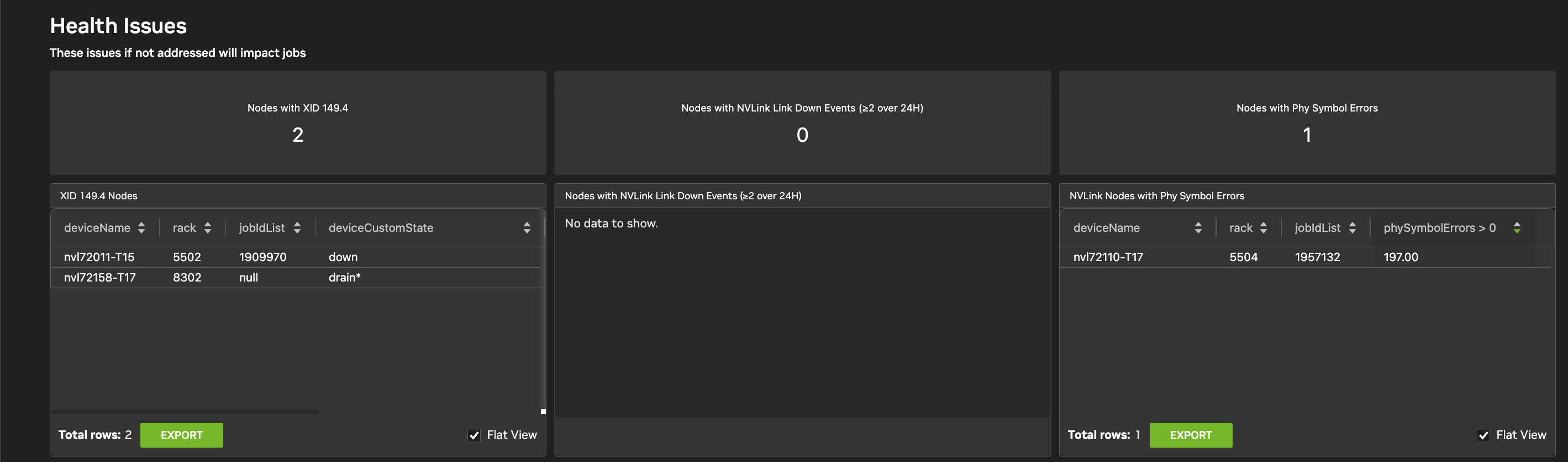
These tiles at the top of the page show the status of the most critical fabric indicators.
-
Nodes with XID 149.4: Counts nodes experiencing signal-integrity-related link resets.
-
Nodes with Link Down Events: Tracks nodes where links have transitioned to a down state two or more times within a 1-hour window over the last 24 hours.
-
Nodes with Phy Symbol Errors: Identifies how many nodes are reporting physical layer errors before any packet loss recovery (PLR) occurs.
NVLink Recovery Telemetry
This section covers data transmission health.
-
Physical Layer Symbol Errors: Displays errors detected at the physical layer. High counts indicate aging hardware or poor cable seating.
-
Metric:
phy_symbol_errors
-
-
NVLink Nodes/Switches with Phy Symbol Errors: Tables showing which
deviceName,rack, andjobIdare affected. -
Bandwidth Loss Ratio: Monitors the impact of retransmissions on effective throughput. High loss ratios directly correlate to slower training iterations (Step Time).
Link Down and Connection Events
These widgets monitor the 'liveness' of the NVLink fabric.
-
XID 149.37 (Peer Connection): Indicates the link has lost connection to its peer. This is often seen during node reboots or Fabric Manager transitions.
-
XID 149.4 (Signal Integrity): Indicates a link reset due to signal quality issues. Requires hardware inspection if persistent.
-
Unintentional Link Downs: A table for switches experiencing frequent, unplanned link transitions (two or more in 1 hour over the last 24 hours).
XID 145 Events
XID 145 is a key indicator of NVLink instability, packet loss, or source timeouts on a GPU-to-GPU link.
-
Impact: These errors frequently manifest as NCCL or CUDA timeouts, causing AI jobs to hang or abort.
-
Tracking: The dashboard provides a "Flat View" of nodes throwing XID 145, including the
deviceCustomState(for example,drain,futr) to show if the node has already been sidelined by the scheduler.
Last updated: