

The Professor-X Dashboard provides multi-tier visibility into network fabric and compute node health for AI factory clusters.
Persona Use Cases
|
Persona |
Primary Use Case |
|---|---|
|
Network Engineers |
Monitor bandwidth distribution and congestion across Leaf, Spine, and Super Spine tiers to identify fabric bottlenecks. |
|
Cluster Administrators |
Track real-time availability of switches and compute nodes, ensuring infrastructure readiness for job scheduling. |
|
Performance Engineers |
Analyze RoCE-specific metrics like CNP handling and Adaptive Retransmissions to tune collective communication performance. |
|
HPC/Slurm Admins |
Correlate network health with Slurm node states (Drained/Down) to troubleshoot job-level failures. |
Dashboard Overview
The Professor-X Dashboard provides a centralized view of the cluster's network fabric. It aggregates telemetry from NIC, DCGM, Node, NVLink, and NVSwitch sources. By default, widgets display data for the last 24 hours, providing historical context for traffic patterns and error rates alongside a real-time view of fabric health.
Performance and Fabric Bandwidth
These widgets, located at the top of the dashboard, visualize north-south and east-west traffic flow across the fabric hierarchy.
-
Max BW Per Level: Compares peak throughput (
ifOutOctetRate) across leaf, spine, and super spine tiers. -
SU Activity: Tracks which Scalable Units (SUs) are active by showing the maximum bandwidth from a NIC to a leaf switch.
Link Status and Physical Errors
These widgets monitor the operational integrity of physical connections and identify failing hardware.
-
Link Status (Multi-Tier): Tracks
operStateDownsfor leaf-to-NIC, leaf-to-spine, and spine-to-super spine connections. -
Layer 2 Symbol Errors: A heatmap visualizing
layer2SymbolErrors. Increasing counts are a leading indicator of failing optical transceivers or cables. -
FSM Link Down Events: Tracks Fabric Manager-specific link-down events, critical for NVLink-connected systems.
RoCE Performance and Congestion
These widgets focus on the health of Priority Flow Control (PFC) and RoCE transport.
-
Adaptive Retransmissions: Monitors
hwRoceAdpRetransand timeouts (hwRoceAdpRetransTo). Spikes indicate packet loss in the fabric. -
CNP Handled: Tracks Congestion Notification Packets (
hwRpCnpHandled) processed by the NICs. -
TX ECN Marked: Visualizes explicit congestion notification markers (
ifTcTxEcnMarkedTc) across all tiers to identify where the fabric is under pressure. -
TX/RX Pauses: Displays pause frame counts. Frequent pauses at the leaf-to-NIC level indicate a slow-receiver issue on the compute node.
SLURM
These widgets correlate scheduling states with underlying hardware health to explain why nodes may be unavailable for jobs.
-
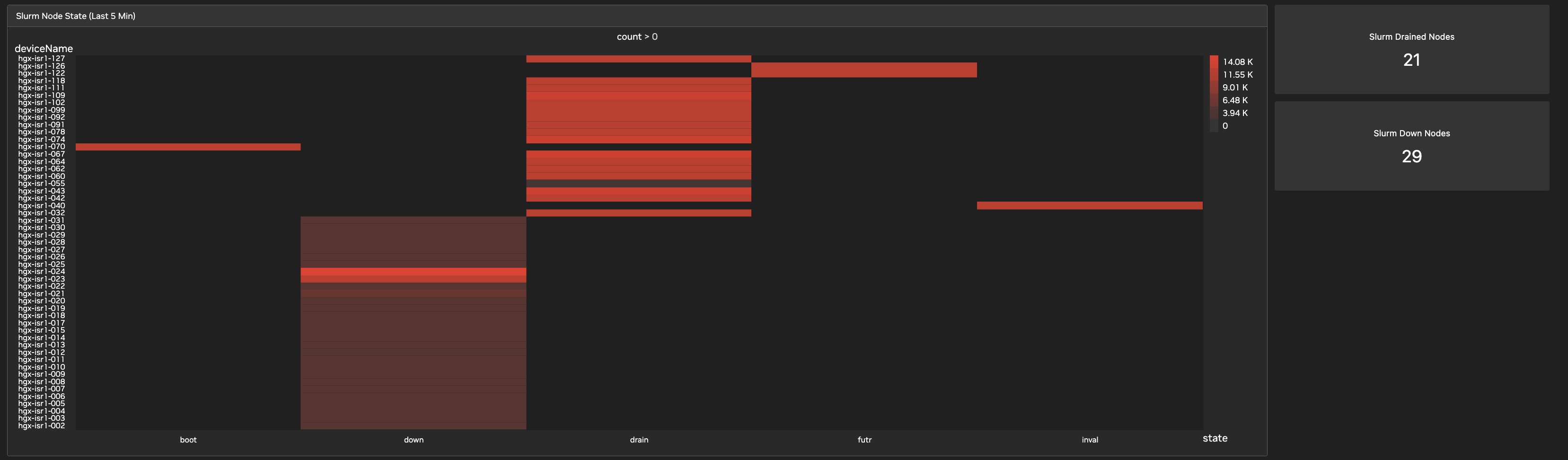
Slurm Node State: A real-time count of nodes in various states (Allocated, Idle, Drained, Down).
-
Drained/Down Nodes: Summary tiles flagging nodes removed from the scheduling pool.
-
Job Table: Provides metadata for cluster Slurm jobs, allowing you to correlate network anomalies with specific workloads.
Global Inventory and Telemetry Health
These widgets provide a status check on the management layer.
-
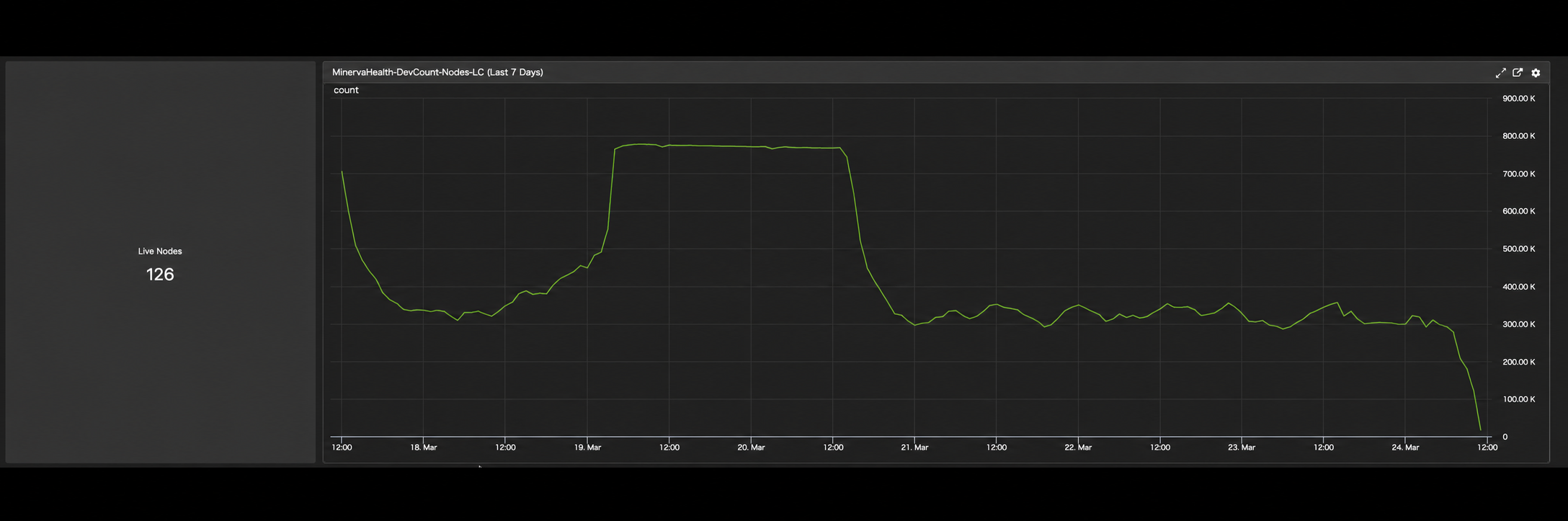
Live Switches and Nodes: Real-time counts of active management agents (for example, 57 switches, 126 nodes).
-
Minerva Health DevCount: A 7-day trend showing the stability of telemetry ingestion. This metric shows the number of data points received from nodes over the period, not a count of nodes over time. A significant drop indicates management network issues or agent crashes.
Last updated: