

RoCE (RDMA over Converged Ethernet) enables high-bandwidth, low-latency GPU-to-GPU communication in AI Factory clusters. Because RoCE is lossless by design, it relies on Priority Flow Control (PFC) to signal congestion: when a leaf switch becomes congested, it sends pause frames upstream. Those pause frames can cascade into retransmit storms that stall NCCL collective operations and cause job timeouts.
The Topology view is the primary tool for tracing a job timeout back to the specific switch or link responsible.
-
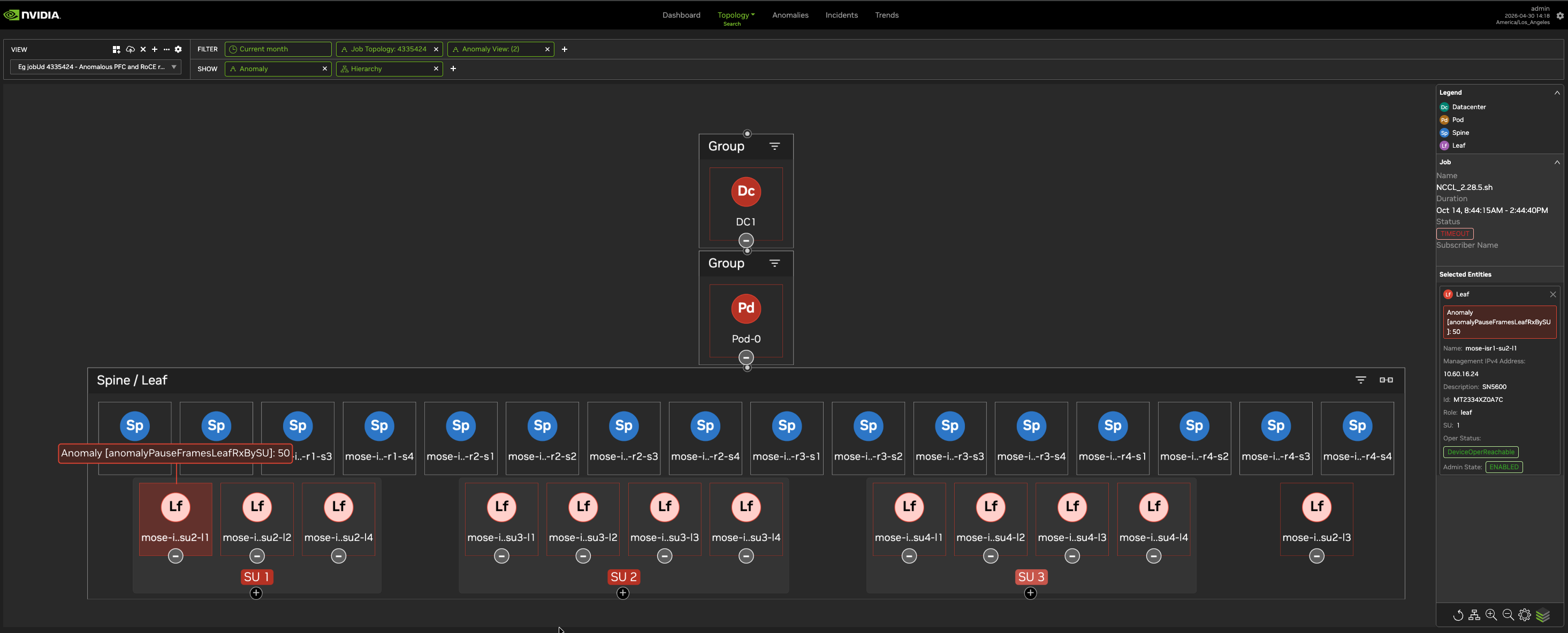
Open the Topology tab and enter the job ID as a filter (for example,
4335424).The view isolates the spine, leaf, and compute nodes that participated in this job. Unrelated cluster topology is hidden.
-
Scan the filtered topology for anomaly indicators. Amber or red highlights on a node indicate that NVIDIA Minerva detected an anomaly at that location during the job's run window.
-
Identify the anomaly type on each highlighted node. In a RoCE retransmit scenario, look for:
-
Anomalous PFC (pause frames): the switch is generating pause frames that throttle upstream traffic.
-
RoCE retransmits: the adapter or link is experiencing packet loss that triggers RDMA retransmission.
-
-
Trace the impact. If a single leaf switch (for example,
mose-i..su2-l1) shows both pause frame and RoCE retransmit anomalies, it is likely the root cause. A congested leaf throttles all compute nodes directly connected to it, causing NCCL all-reduce operations across the job to stall until the job times out.
Last updated: