

Disassembly Procedure AC Powered Switch
To disassemble the system from the rack:
-
Unplug and remove all Optic Fibers, Copper Cables, management cables
-
Unplug all power cords.
-
Unscrew the Switch from the brackets and rails.
-
Slide the system from the rack.
Support the weight of the system when you remove the screws so that the system does not fall.
RMA for Liquid Cooled Systems
Scope
The following instructions apply to the SN6600-LD and SN6810-LD switch systems being returned for Return Merchandise Authorization (RMA) after operation with a Cooling Distribution Unit (CDU). The SN6600-LD is a 100% liquid-cooled switch utilizing UQD08 inlet/outlet connections and PG-25 coolant.
Pre-Shipment and General Handling Instructions
System Disassembly
-
Power Down and Disconnect: Shut down the switch according to standard system shutdown procedures and carefully remove it from the rack.
-
Weight and Safety Caution: Support the system weight during rack removal.
Heavy Equipment Hazard
-
SN6600-LD Weight: 33 kg
-
SN6810-LD Weight: 32.5 kg
Due to the weight of these systems, always use two people or suitable mechanical lifting equipment to move or install them.
Packaging Safety and Care
-
Rubber Protective Caps: It is strongly recommended to retain and reuse the original UQD rubber caps provided with the switch during RMA preparation.
-
Mechanical Protection: Repackage the switch with care. Ensure no external pressure or load is applied to the UQDs or Busbar, as this can cause permanent physical damage.
Shipping Methods Overview
Do NOT ship the switch fully filled with both UQD08 connections independently capped/sealed. A fully filled, sealed cooling loop is highly sensitive to temperature variations during transport and storage; thermal expansion of the coolant increases internal pressure and can deform or damage cooling components.
Choose one of the following methods:
Method A — Partially Drained Shipment
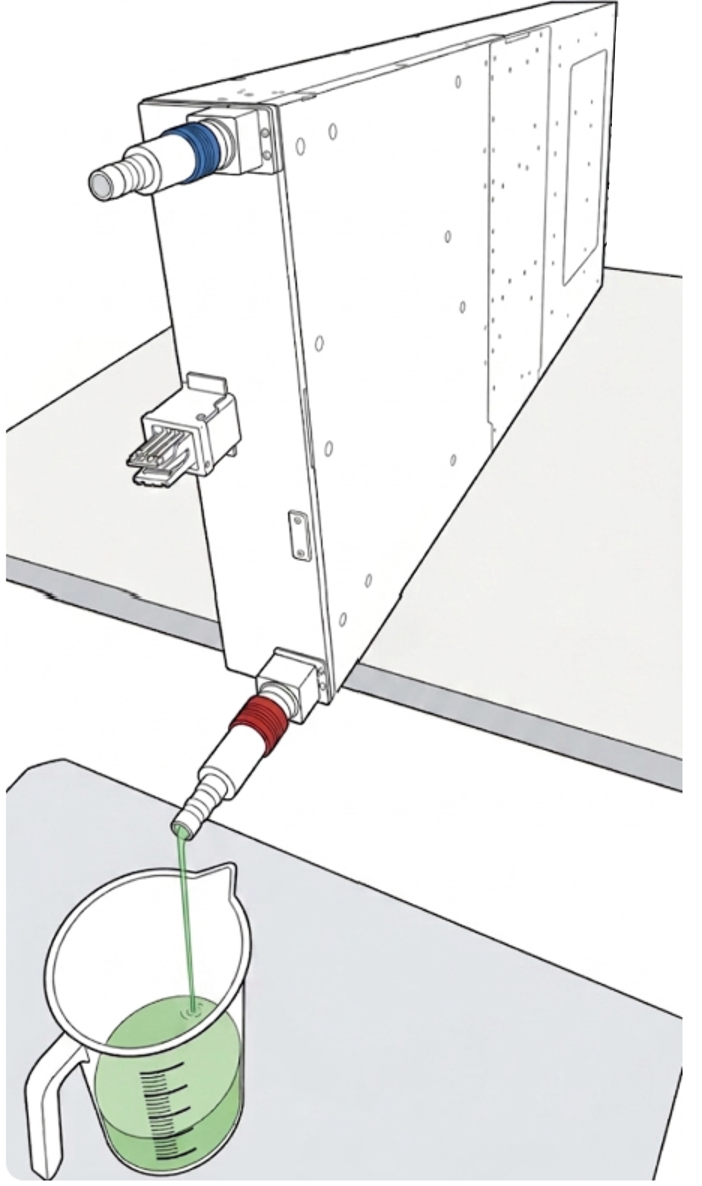
If a suitable wet-shipment expansion hose cannot be installed, partially drain the SN6600-LD cooling loop. One UQD should be used for draining while the second UQD is opened as a vent. The loop can be drained by gravity or pumping.
CAUTION: Chemical Fluid Handling and Disposal
The coolant (PG-25) is a chemical corrosive fluid. when handled it requires wearing safety goggles and gloves.
The Coolant must be collected carefully during the draining procedure.
Do NOT dispose of coolant in regular waste or municipal sewage systems. Dispose of the fluid in strict compliance with domestic standards, local environmental laws, and WEEE Directive 2002/96/EC.
Reference Adapter Part Numbers:
-
Danfoss 155-2335-000 (Blue)
-
Danfoss 155-2336-000 (Red)
Procedure
-
Disconnect the switch from the CDU.
-
Connect a drain hose using a reference adapter to one UQD08 port.
-
Connect an open-ended hose with UQD08 to allow air vent.
-
For SN6600-LD systems only: Position the switch vertically to facilitate gravity draining.
-
Allow a minimum of 156 ml to drain from the SN6600-LD (representing 50% of the total cooling loop capacity). Alternatively, an approved pump can be used.
-
Disconnect drainage equipment.
-
Reinstall the protective UQD rubber caps/covers before packaging to prevent port contamination and transit damage.
-
Inspect the unit thoroughly for external leaks before sealing the shipping box.
Shipping Conditions
-
Temperature Range: +5°C and +60°C (41°F to 140°F).
-
Transit Time: Must arrive at the NVIDIA RMA facility within 45 days maximum.
Due to its weight (~95 kg), tilting and positioning the SN6800-LD system vertically is not applicable.
Method B — Wet Shipment with Expansion Hose (Recommended)
This method is recommended when an approved expansion hose is available. The hose provides the necessary additional volume for coolant expansion during transport and storage. NVIDIA will provide the expansion hose part number and specifications for customer purchase once available.
Procedure
-
Disconnect the switch from the CDU.
-
Connect the approved service/transport expansion hose between the UQD08 inlet and UQD08 outlet.
-
Verify that both UQD connections are fully engaged and locked.
-
Inspect the complete cooling loop and expansion hose for any visible leakage.
-
Ensure the hose is mechanically secured so it cannot pull on or strain the UQD connectors during transit.
-
Protect the UQD assemblies and hose from mechanical impact during packaging.
|

|
Shipping Conditions
-
Temperature Range: 5°C to 60°C.
-
Transit Time: Must arrive at the NVIDIA RMA facility within 45 days maximum.
Pre-Shipment Checklist and Packaging Record
Final Pre-Shipment Inspection
Before closing the RMA packaging, verify and check off the following:
-
[ ] No visible external coolant leakage.
-
[ ] UQD08 and Busbar interfaces mechanically protected against external pressure/impact.
-
[ ] Protective UQD rubber covers installed (Method A only).
-
[ ] Expansion hose installed and secured (Method B only).
-
[ ] Cooling preparation method recorded in RMA case documentation.
-
[ ] Approximate drained coolant volume recorded (Method A only).
The RMA package should be marked as containing a liquid-cooled system, and the RMA record should indicate which cooling preparation method was used:
|
Cooling Condition: |
|
[ ] Wet – Expansion Hose Installed |
|
[ ] Partially Drained – ___ ml Removed |
|
SN6600-LD 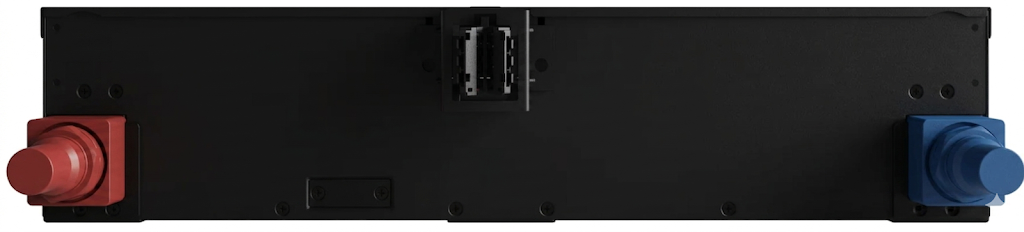
|
SN6810-LD 
|
SN6800-LD 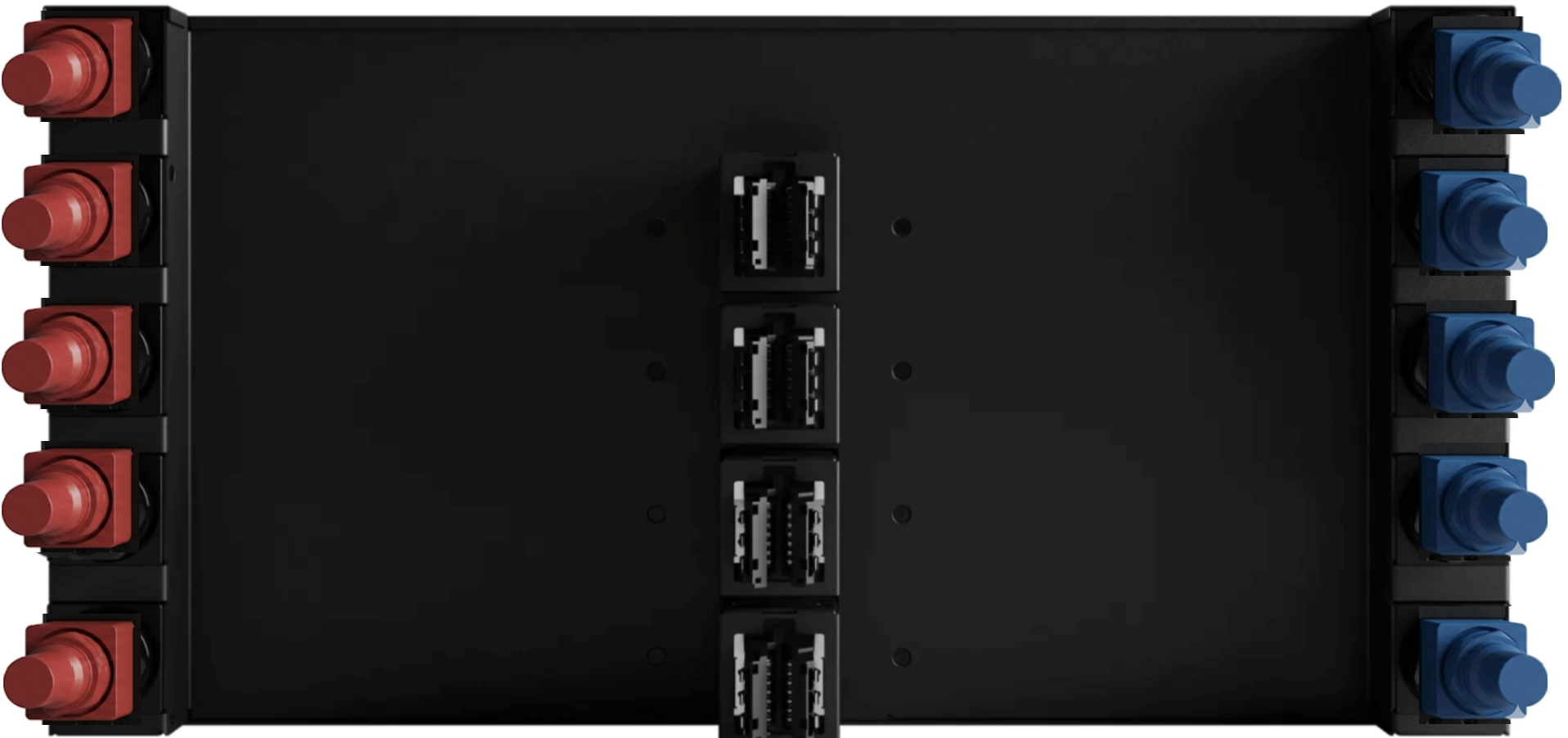
|
System Disposal
According to the WEEE Directive 2002/96/EC, all waste electrical and electronic equipment (EEE) should be collected separately and not disposed of with regular household waste. Dispose of this product and all of its parts in a responsible and environmentally friendly way.
Lithium Battery
If the product's real-time clock includes a lithium coin battery (CR2032), be noted that it contains perchlorate. When replacing the battery, use only a replacement battery that is recommended by the equipment manufacturer.
The battery can explode if not properly used, replaced, or disposed of. Dispose of the battery according to your local regulations. Do not attempt to recharge the battery, disassemble, puncture, or otherwise damage it.
Last updated: