

The AI Cluster Health Dashboard provides visibility into AI factory cluster health for the following personas.
|
Persona |
Primary Use Case |
|---|---|
|
Infrastructure / DC Ops |
Monitor physical health indicators like NIC link downs, power consumption, and thermal health to prevent hardware-induced job failures. |
|
System Administrators / SREs |
Use Zero Day Log Anomalies to identify kernel-level issues (for example, CPU soft lockups) and Lustre filesystem instability before they escalate. |
|
AI/ML Engineers |
Correlate training job performance drops with GPU Critical Errors (XIDs) and NVLink/NVSwitch fabric issues. |
|
Tenant Admins |
Track global health status across the entire cluster over a 24-hour period to ensure SLA compliance. |
Dashboard Overview
The AI Cluster Health Dashboard aggregates telemetry to give a holistic view of AI infrastructure operational integrity. By default, it aggregates data over the last day, but you can adjust the timeframe using the time filter at the top of the page. It combines supervised log monitoring with unsupervised machine learning.
This page describes the dashboard sections found on most deployments. Dashboards are typically customized for the specific cluster they are observing and may include variations, additional sections, or omit sections not applicable to your environment.
Health Issues (Summary Tiles)
Located at the top of the dashboard, these tiles provide real-time counts of critical hardware and system states.
-
GPU Critical Errors: Displays the count of high-severity GPU events (for example, XID errors).
-
NIC Link Flaps/Downs: Monitors interruptions in the connectivity state of network interfaces. These are broken down into specific counters to isolate where systemic issues are occurring.
-
Switch/Host Critical Issues: Counts of high-priority system and fabric alerts detected using Collective Learning.
-
Switch PHY Uncorrectable Errors: Indicates specific interfaces on switches where the bit error rate (
rawBer) exceeds what Forward Error Correction (FEC) can correct, incrementing the effective errors counters on a switch.

Log Errors
Supervised learning (Collective Learning) categorizes high-impact events based on logs.
-
Switch, GPU and Server Critical Issues: A grid view that maps specific error categories against hostnames using the Collective Learning library. The library includes the following categorized events:
-
Out of Memory Processes Killed
-
Network Link Disconnections or Instability
-
GPU Memory Errors
-
Firmware/OS Driver Mismatches
-
Thermal Throttling
-
PCI Advanced Error Reporting
-
Storage Client Evictions
-
-
Utility: High-density hot spots in the heatmap help identify whether an issue is isolated to a single node or is systemic across one or more racks.

-
GPU Critical Errors: A table enumerating GPU events (for example, XID errors). This includes a broader range of GPU errors than the subset of high-severity errors in the summary tile.
-
XID tracking: Monitors codes like XID 149.4 (NVLink peer reset) and XID 145 (fatal NVLink error).
-
Remediation: Provides instructions such as "Reset the GPU" or "Restart Fabric Manager (FM)", including links to the GPU Debug Guidelines.
-
-
NVSwitch Errors: A table enumerating GPU-adjacent events from the NVLink switch (for example, SXID errors).
-
NIC Link Flaps/Downs: A heatmap visualizing the frequency of network link interruptions by interface over time, segmented by connectivity type (leaf to NIC, leaf to spine, E-W, N-S, and others).
-
Metric Errors
-
Interface Error Rate: A heatmap visualizing errors on receive interfaces as a ratio of errors per packets transmitted, by interface over time.
-
NIC Phy Symbol Errors: A heatmap visualizing the frequency of physical (PHY) layer symbol errors by interface over time.
-
Switch/NIC Symbol Errors: A heatmap visualizing the frequency of layer 2 symbol errors by interface over time.
-
Switch PHY Uncorrectable Errors: A heatmap visualizing specific interfaces incrementing the effective errors counters on a switch, by device and interface.
Zero Day Log Anomalies
This section uses unsupervised machine learning to detect rare or never-before-seen logs.
-
Identifies log entries that have not been seen recently, surfacing novel issues that may require attention.
-
Every anomaly includes a detailed, AI-generated remediation guide.
XID Rate Anomalies
-
XID Rate: Detects sudden spikes in the frequency of specific XIDs on a per-host basis.
Metric Performance Anomalies
Identifies anomalous behavior across key indicators when there is a spike in activity.
-
Adaptive Retransmits (RoCE): Tracks network congestion and packet loss using ML-based confidence scores to separate noise from actual network degradation.
-
Interface Error Rate: Shows spikes when the ratio of errors per packets received deviates from an ML-established baseline, per interface.
-
NIC Link Down: Isolates specific interfaces when they have an abnormal spike in network link losses.
-
NVLink PLR Transmit Retry Codes: Indicates spikes in
PlrXmitRetryCodesfrom the Physical Layer Retransmit mechanism (after FEC), per interface. -
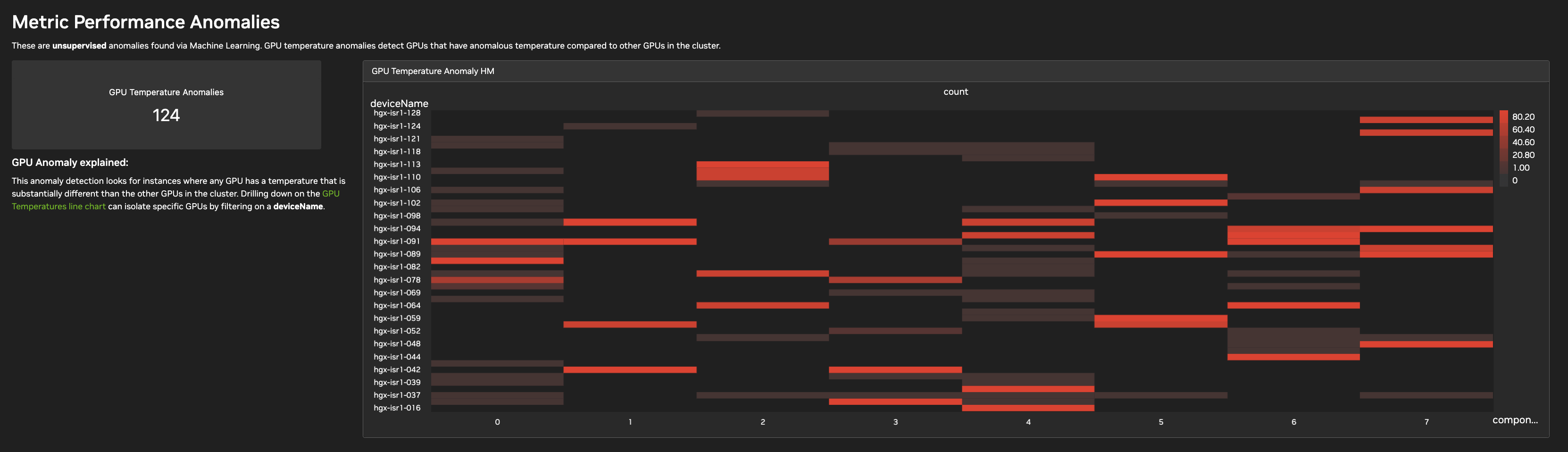
GPU Temperature Anomalies: Indicates when a single GPU on any given host has a significant temperature deviation compared to other GPUs in the cluster performing the same workload. Presented as a summary tile and a heatmap by device over GPU component ID.
Key Metrics
This section monitors environmental and power thresholds that affect hardware longevity.
-
GPU Temperature High: Flags any GPU exceeding 75°C.
-
GPU Power > 500 Watts: Identifies nodes drawing excessive power, which may indicate inefficient workload distribution or cooling issues.
-
GPU Clock Throttle: Visualizes when the GPU clock frequency is constrained due to temperature or other issues.
-
Adaptive Retransmits (RoCE) and Timeouts: Tracks network congestion and packet loss raw counters over time, per interface.
Last updated: