

The settings page provides several options to customize the UI. To open global settings, click ⚙️Settings in the upper-right corner of the UI.

Change Time, Date, and Date Format
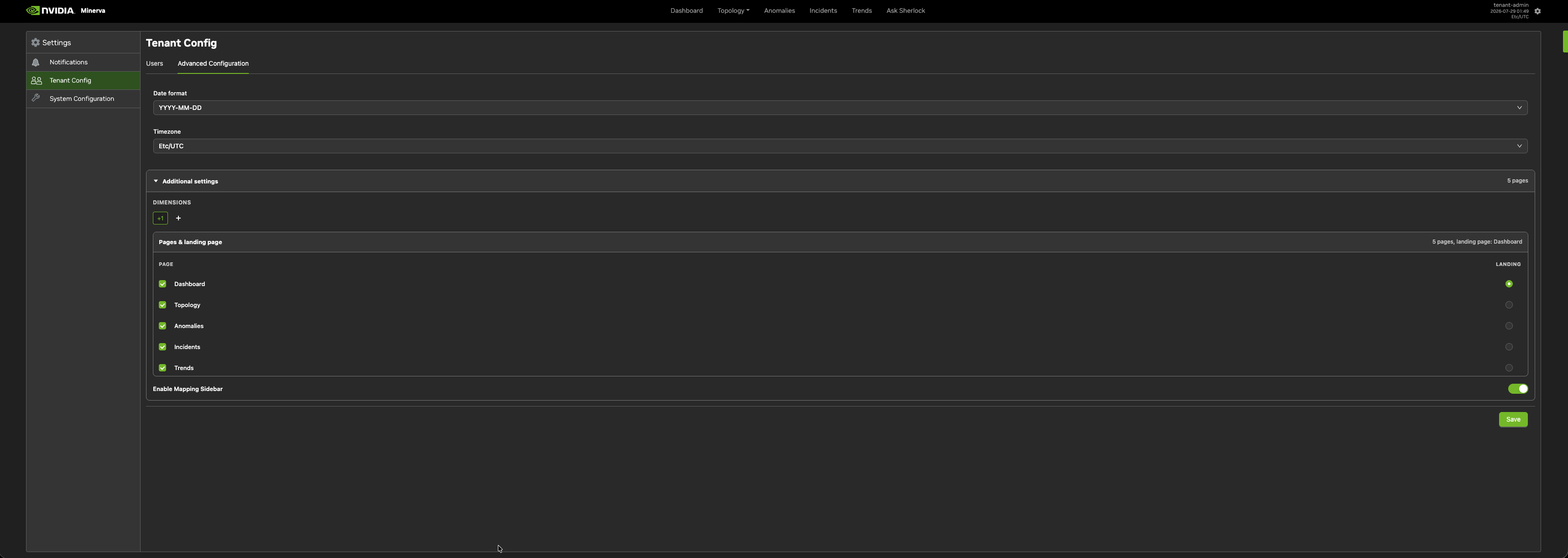
By default, the portal uses UTC time with a 15-minute idle timeout. To change these as a tenant admin:
-
Navigate to Settings > Tenant Config > Advanced Configuration > Time Zone to change the time zone.
-
Click Date Format to configure the tenant date format (YYYY-MM-DD, DD-MM-YYYY, MM-DD-YYYY).
Default Views
For each top-level tab, you can set the default view that loads when you open that tab.
-
Open the System Configuration tab.
-
Click the Edit Mode (pencil) icon, next to
DEFAULT VIEWS. -
Click the tab you want to modify: Dashboard, Anomaly, Topology, Incidents, or Trends.
-
Select the Default View to load.
-
Click OK to save.
Last updated: