

Anomaly feedback lets you label anomalies as operationally relevant or not. NVIDIA Minerva uses your labels to automatically categorize future anomalies that match the same criteria, reducing noise and improving alert quality over time. The customized feedback is unique to your network.
How to Submit Feedback
-
Go to the Anomalies tab and find the anomaly you want to label.
-
Click the Feedback icon (speech bubble) on the anomaly row.
-
Categorize the relevancy from one of three categories:
-
Operationally Relevant & Urgent: requires immediate action (for example, a hardware failure)
-
Operationally Relevant: needs investigation but isn't critical
-
Not Relevant / False Positive: expected or benign behavior
-
-
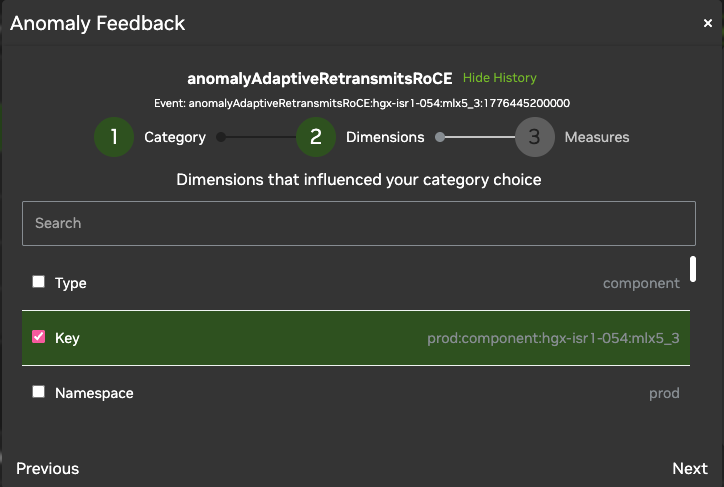
Select influencing dimensions. Choose the metadata tags that define when this anomaly matters. For example, if you only care about this error on spine switches, select
role: spine. Future recommendations only trigger if a new anomaly matches all selected dimensions.
-
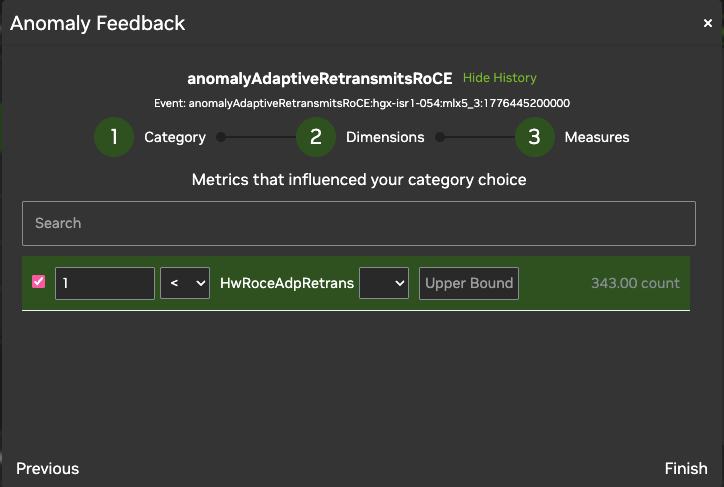
Define metric bounds. Set lower and upper bounds for the metric value that should trigger this recommendation. For example, if pause frames RX is only urgent above 300 Kb/s, set the lower bound to
300.
-
Select Finish. NVIDIA Minerva will apply a
recommendedCategoryto future anomalies matching your criteria.
Use Feedback to Build Automated Workflows
After you provide feedback, you can use the recommendedCategory dimension to filter and route:
-
Filtered views: Create a custom view in the Anomalies Page that only shows anomalies where
recommendedCategory = Operationally Relevant -
Smart notifications: Configure Slack or ServiceNow notifications to trigger only when an anomaly has been pre-validated by your previous feedback.
Best Practices
-
Be specific with dimensions: Only select the dimensions that truly define the issue's scope. Selecting too many dimensions makes the profile too narrow to match future events reliably.
-
Ranked feedback: If multiple pieces of feedback match a new anomaly, NVIDIA Minerva applies the highest-ranked feedback. You can adjust the rank of your feedback entries by submitting anomaly feedback in the UI.
-
Feedback is object-specific: For example, feedback provided for a
sysloganomaly does not apply to atemperatureanomaly. Tune each base type independently.
Last updated: